Microsoft released KB5095185 on June 9, 2026, as a Safe OS Dynamic Update for Windows 11 version 26H1, refreshing the recovery and setup environment while again warning that long-lived Windows Secure Boot certificates begin expiring this month. The update itself is small in presentation but large in context. Microsoft is trying to make a certificate rollover feel like ordinary patch hygiene, even though it reaches into the trust chain that decides what can run before Windows is fully awake. That is the right engineering instinct, but it also exposes how much of the PC ecosystem still depends on assumptions made in the Windows 8 era.
KB5095185 belongs to a class of Windows updates that rarely attracts much public attention. Safe OS Dynamic Updates service the Windows recovery environment, setup files, and preinstallation components rather than the desktop features users see after signing in. In practical terms, they help Windows install, repair, reset, and recover itself more reliably.
That makes the Secure Boot note attached to this release more interesting than the update package alone. Microsoft is not saying that KB5095185 is the grand certificate fix for every machine. It is using the update channel, and the steady drumbeat of monthly servicing, to keep pushing a broader message: the Secure Boot certificates that have anchored most Windows devices since 2011 are aging out.
The company’s wording is deliberately calming. Devices that have not yet received the newer certificates “will continue to start and operate normally,” and standard Windows updates will continue to install. That sentence is doing a lot of work, because the nightmare version of this story has always been mass boot failure when a certificate date rolls over.
Microsoft is instead drawing a narrower, more technical line. The danger is not that every unrefreshed PC turns into a brick on June 24 or June 27. The danger is that machines left on old Secure Boot trust material become increasingly unable to participate in future boot-level security work.
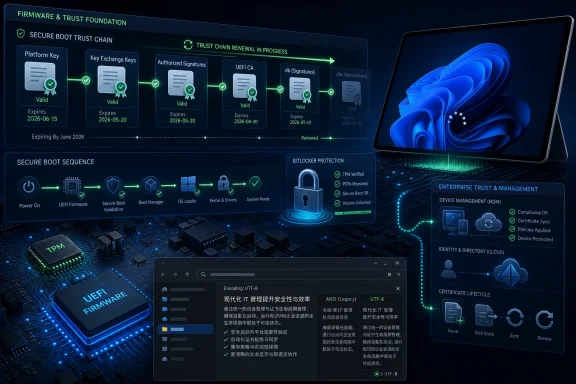
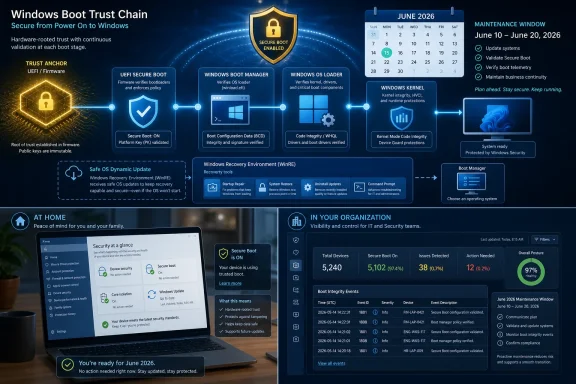
That chain depends on certificates stored in firmware databases. Microsoft’s 2011-era certificates became part of the default trust fabric for Windows PCs and many third-party boot scenarios. They were not an afterthought; they were a foundation.
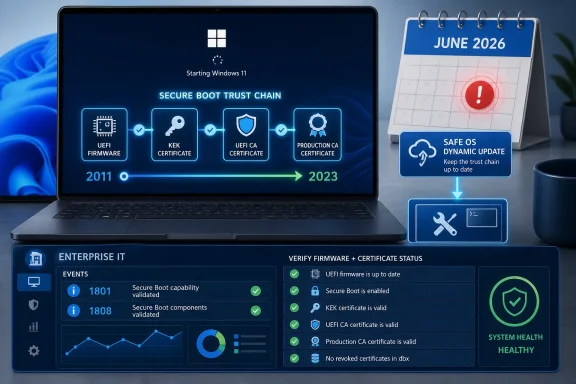
Fifteen years later, the foundation needs replacing. Microsoft’s guidance identifies the old Microsoft Corporation KEK CA 2011, Microsoft Corporation UEFI CA 2011, and Microsoft Windows Production PCA 2011 certificates as expiring in stages beginning in June 2026 and running into October. The replacement family is based on 2023 certificates, including updated KEK, Windows UEFI CA, and option ROM-related certificates.
That transition sounds bureaucratic until you remember where these certificates live. They are not just files in a Windows directory. They are part of the firmware-level policy that decides whether early boot code is trusted. Updating them requires Windows, firmware, OEM assumptions, event logs, restarts, and sometimes management policy to line up correctly.
That is the right product choice. If Microsoft had treated this as a manual firmware maintenance campaign for every Windows user, the effort would have failed immediately. Most users do not know which Secure Boot certificates their PC trusts, and they should not need to.
The reassurance matters: a PC without the newer certificates is expected to keep starting, operating, and receiving standard Windows updates. That undercuts the panic narrative that June 2026 is a universal boot cliff. But it should not be mistaken for a declaration that nothing matters.
A machine that continues to boot can still be in a degraded security posture. Microsoft’s own guidance is careful to distinguish normal Windows servicing from future Secure Boot protections for early boot components. The desktop may look fine while the pre-OS trust machinery is no longer where Microsoft wants it to be.
Corporate devices are more likely to have update controls, diagnostic data restrictions, custom images, older firmware, virtual machines, BitLocker policies, third-party security tools, and hardware models that were purchased in waves years apart. A certificate update that is uneventful on a new Surface laptop may be less predictable on a neglected branch-office desktop or a long-lived industrial workstation.
Microsoft’s playbook asks administrators to verify Secure Boot status, identify device models and firmware versions, test representative samples, and monitor event IDs such as 1801 and 1808. Event 1801 indicates that remediation has not been applied; event 1808 indicates that the required new certificates are present. That is not glamorous work, but it is exactly the sort of telemetry-driven plumbing that separates a controlled rollout from a help-desk incident.
The uncomfortable part is that Microsoft cannot fully abstract away firmware quality. Secure Boot certificate updates require the device firmware to participate correctly. If firmware is stale, buggy, or abandoned by the OEM, Windows can be ready and still run into a platform problem.
That is why Microsoft keeps emphasizing firmware updates, representative pilot groups, and OEM support. Older devices may need BIOS or UEFI updates before the Secure Boot certificate update can complete reliably. In some cases, devices that are no longer supported by their manufacturer may become exceptions that IT has to document, isolate, or replace.
This is also where BitLocker enters the anxiety loop. Changes in firmware state and boot trust can trigger recovery prompts if a device interprets the change as a boot environment alteration. Microsoft’s guidance treats unexpected or repeated BitLocker recovery prompts as a risk scenario to test for, not as a surprise to discover after broad deployment.
The lesson is familiar but easy to ignore: modern Windows security is not just a Windows problem. It is a supply-chain arrangement among Microsoft, silicon vendors, firmware vendors, OEMs, enterprise management tools, and administrators. Secure Boot is only as smooth as that arrangement is disciplined.
Dynamic Updates matter most when Windows is being installed, upgraded, repaired, or reset. Those are precisely the moments when boot trust, recovery reliability, and compatibility with newer platform security requirements become visible. Microsoft’s certificate campaign is therefore not merely about preserving today’s boot path; it is about keeping future Windows servicing paths viable.
That becomes more important as Windows leans harder on hardware-backed security. TPM 2.0, virtualization-based security, measured boot, BitLocker, kernel protections, and Secure Boot all form a layered model. If one layer becomes stale, the machine may keep working, but the security story becomes less coherent.
Microsoft has spent years arguing that Windows 11’s hardware requirements were about moving the ecosystem forward. The Secure Boot certificate rollover is a test of that argument in reverse. It asks whether the ecosystem can move forward without leaving too many functioning but under-maintained PCs behind.
This is where the messaging gets awkward. Microsoft can say, correctly, that standard Windows updates continue on eligible devices. It can also say, correctly, that unsupported versions should not be expected to receive the same security modernization. To users, those distinctions often collapse into one sentence: my PC still works, so why is Microsoft telling me it is less safe?
The answer is that security deadlines rarely look dramatic from the desktop. A vulnerable machine can browse the web, run Office, print, join meetings, and install ordinary patches until the day a specific exploit path matters. Secure Boot certificate expiration is not a fireworks show; it is a narrowing of future trust.
That makes it harder to communicate than a broken Start menu or a failed cumulative update. There may be no obvious symptom. The failure mode is strategic rather than cosmetic.
That is why the phrase “Microsoft UEFI CA” has always carried more weight than its name suggests. It has functioned as a practical interoperability bridge across the PC ecosystem. Rotating that trust anchor requires coordination well beyond the Windows desktop.
Games and anti-cheat systems add another dimension. Some anti-cheat vendors have leaned into Secure Boot and TPM requirements as part of their effort to make kernel-level tampering and cheat loaders harder to hide. If boot trust becomes inconsistent across a user base, support issues can appear in places that do not obviously look like Windows servicing problems.
The same is true for recovery media and deployment tools. An IT shop that maintains old bootable utilities may discover that “it worked for years” is not a security maintenance plan. The certificate rollover is a reminder that pre-OS tooling has a lifecycle too.
But “your PC will continue to start” is not the same as “there is nothing to do.” For many users, the correct action really is simply to stay current with Windows Update and check Windows Security if prompted. For administrators, the correct action is to prove that the fleet is updated, not assume it.
There is also an uncomfortable timing issue. Certificate expiration is not a surprise; these dates were built into the system years ago. Yet many organizations are encountering the operational complexity only as the deadline approaches. That is not unique to Microsoft, but it is a familiar pattern in IT: infrastructure debt becomes visible only when a date turns theoretical risk into scheduled work.
The best reading of KB5095185 is therefore not that it is a crisis patch. It is a marker in a longer campaign. Microsoft is using ordinary servicing channels to shepherd Windows PCs through a trust-anchor migration that should have been boring, but cannot be ignored.
 A Routine Dynamic Update Carries an Unroutine Warning
KB5095185 belongs to a class of Windows updates that rarely attracts much public attention. Safe OS Dynamic Updates service the Windows recovery environment, setup files, and preinstallation components rather than the desktop features users see after signing in. In practical terms, they help Windows install, repair, reset, and recover itself more reliably.That makes the Secure Boot note attached to this release more interesting than the update package alone. Microsoft is not saying that KB5095185 is the grand certificate fix for every machine. It is using the update channel, and the steady drumbeat of monthly servicing, to keep pushing a broader message: the Secure Boot certificates that have anchored most Windows devices since 2011 are aging out.
The company’s wording is deliberately calming. Devices that have not yet received the newer certificates “will continue to start and operate normally,” and standard Windows updates will continue to install. That sentence is doing a lot of work, because the nightmare version of this story has always been mass boot failure when a certificate date rolls over.
Microsoft is instead drawing a narrower, more technical line. The danger is not that every unrefreshed PC turns into a brick on June 24 or June 27. The danger is that machines left on old Secure Boot trust material become increasingly unable to participate in future boot-level security work.
Secure Boot’s 2011 Roots Are Finally Showing
Secure Boot arrived in the PC mainstream with Windows 8 and the UEFI transition. Its purpose was straightforward: establish a chain of trust before the operating system loads, so bootkits, unsigned bootloaders, and tampered early-start components have a harder time gaining control before Windows security features are active.That chain depends on certificates stored in firmware databases. Microsoft’s 2011-era certificates became part of the default trust fabric for Windows PCs and many third-party boot scenarios. They were not an afterthought; they were a foundation.
Fifteen years later, the foundation needs replacing. Microsoft’s guidance identifies the old Microsoft Corporation KEK CA 2011, Microsoft Corporation UEFI CA 2011, and Microsoft Windows Production PCA 2011 certificates as expiring in stages beginning in June 2026 and running into October. The replacement family is based on 2023 certificates, including updated KEK, Windows UEFI CA, and option ROM-related certificates.
That transition sounds bureaucratic until you remember where these certificates live. They are not just files in a Windows directory. They are part of the firmware-level policy that decides whether early boot code is trusted. Updating them requires Windows, firmware, OEM assumptions, event logs, restarts, and sometimes management policy to line up correctly.
Microsoft Wants Consumers to Do Almost Nothing
For home users and many unmanaged business PCs, Microsoft’s strategy is automation. The company says it has been updating certificates on consumer and non-managed business devices for months. It is also surfacing Secure Boot certificate status inside the Windows Security app, which is exactly where a normal user would expect to see a device-health warning rather than a PowerShell incantation.That is the right product choice. If Microsoft had treated this as a manual firmware maintenance campaign for every Windows user, the effort would have failed immediately. Most users do not know which Secure Boot certificates their PC trusts, and they should not need to.
The reassurance matters: a PC without the newer certificates is expected to keep starting, operating, and receiving standard Windows updates. That undercuts the panic narrative that June 2026 is a universal boot cliff. But it should not be mistaken for a declaration that nothing matters.
A machine that continues to boot can still be in a degraded security posture. Microsoft’s own guidance is careful to distinguish normal Windows servicing from future Secure Boot protections for early boot components. The desktop may look fine while the pre-OS trust machinery is no longer where Microsoft wants it to be.
Enterprise IT Gets the Harder Version of the Story
The consumer story is “let Windows Update handle it.” The enterprise story is “inventory, test, stage, monitor, and remediate.” That difference is not just Microsoft covering itself. It reflects the actual risk profile of managed fleets.Corporate devices are more likely to have update controls, diagnostic data restrictions, custom images, older firmware, virtual machines, BitLocker policies, third-party security tools, and hardware models that were purchased in waves years apart. A certificate update that is uneventful on a new Surface laptop may be less predictable on a neglected branch-office desktop or a long-lived industrial workstation.
Microsoft’s playbook asks administrators to verify Secure Boot status, identify device models and firmware versions, test representative samples, and monitor event IDs such as 1801 and 1808. Event 1801 indicates that remediation has not been applied; event 1808 indicates that the required new certificates are present. That is not glamorous work, but it is exactly the sort of telemetry-driven plumbing that separates a controlled rollout from a help-desk incident.
The uncomfortable part is that Microsoft cannot fully abstract away firmware quality. Secure Boot certificate updates require the device firmware to participate correctly. If firmware is stale, buggy, or abandoned by the OEM, Windows can be ready and still run into a platform problem.
The Firmware Layer Is Where Patch Tuesday Meets Reality
Windows administrators are used to thinking in terms of operating system versions, cumulative updates, and management rings. Secure Boot certificate rotation forces them to think one layer lower. The relevant question is not only whether a device has installed the latest Windows update, but whether its firmware can accept and persist the new trust material correctly.That is why Microsoft keeps emphasizing firmware updates, representative pilot groups, and OEM support. Older devices may need BIOS or UEFI updates before the Secure Boot certificate update can complete reliably. In some cases, devices that are no longer supported by their manufacturer may become exceptions that IT has to document, isolate, or replace.
This is also where BitLocker enters the anxiety loop. Changes in firmware state and boot trust can trigger recovery prompts if a device interprets the change as a boot environment alteration. Microsoft’s guidance treats unexpected or repeated BitLocker recovery prompts as a risk scenario to test for, not as a surprise to discover after broad deployment.
The lesson is familiar but easy to ignore: modern Windows security is not just a Windows problem. It is a supply-chain arrangement among Microsoft, silicon vendors, firmware vendors, OEMs, enterprise management tools, and administrators. Secure Boot is only as smooth as that arrangement is disciplined.
The 26H1 Detail Signals Where Windows Is Going
The version number in KB5095185 is also notable. Windows 11 version 26H1 points to the next turn of Microsoft’s servicing calendar, and Safe OS Dynamic Updates for that branch suggest the company is already laying groundwork around installation and recovery scenarios.Dynamic Updates matter most when Windows is being installed, upgraded, repaired, or reset. Those are precisely the moments when boot trust, recovery reliability, and compatibility with newer platform security requirements become visible. Microsoft’s certificate campaign is therefore not merely about preserving today’s boot path; it is about keeping future Windows servicing paths viable.
That becomes more important as Windows leans harder on hardware-backed security. TPM 2.0, virtualization-based security, measured boot, BitLocker, kernel protections, and Secure Boot all form a layered model. If one layer becomes stale, the machine may keep working, but the security story becomes less coherent.
Microsoft has spent years arguing that Windows 11’s hardware requirements were about moving the ecosystem forward. The Secure Boot certificate rollover is a test of that argument in reverse. It asks whether the ecosystem can move forward without leaving too many functioning but under-maintained PCs behind.
The Unsupported Windows Problem Never Really Went Away
The certificate rollover also lands in the long shadow of Windows 10’s lifecycle. Microsoft’s guidance has repeatedly tied certificate availability to supported Windows versions and, where applicable, extended security arrangements. That means unsupported systems are not simply missing feature upgrades; they risk missing the plumbing needed to stay current with boot-level trust.This is where the messaging gets awkward. Microsoft can say, correctly, that standard Windows updates continue on eligible devices. It can also say, correctly, that unsupported versions should not be expected to receive the same security modernization. To users, those distinctions often collapse into one sentence: my PC still works, so why is Microsoft telling me it is less safe?
The answer is that security deadlines rarely look dramatic from the desktop. A vulnerable machine can browse the web, run Office, print, join meetings, and install ordinary patches until the day a specific exploit path matters. Secure Boot certificate expiration is not a fireworks show; it is a narrowing of future trust.
That makes it harder to communicate than a broken Start menu or a failed cumulative update. There may be no obvious symptom. The failure mode is strategic rather than cosmetic.
Linux, Anti-Cheat, and the Wider UEFI Ecosystem Are Part of the Blast Radius
Windows owns the narrative here because Microsoft’s certificates are central to Windows PCs, but Secure Boot is not a Windows-only concern. Many Linux distributions, boot utilities, recovery tools, and specialized software paths have historically depended on Microsoft’s UEFI trust chain to boot on consumer hardware without asking users to manage their own keys.That is why the phrase “Microsoft UEFI CA” has always carried more weight than its name suggests. It has functioned as a practical interoperability bridge across the PC ecosystem. Rotating that trust anchor requires coordination well beyond the Windows desktop.
Games and anti-cheat systems add another dimension. Some anti-cheat vendors have leaned into Secure Boot and TPM requirements as part of their effort to make kernel-level tampering and cheat loaders harder to hide. If boot trust becomes inconsistent across a user base, support issues can appear in places that do not obviously look like Windows servicing problems.
The same is true for recovery media and deployment tools. An IT shop that maintains old bootable utilities may discover that “it worked for years” is not a security maintenance plan. The certificate rollover is a reminder that pre-OS tooling has a lifecycle too.
Microsoft’s Reassurance Is Credible, but Not Complete
Microsoft deserves credit for trying to avoid panic. The company has been rolling out updated certificates ahead of the deadline, documenting enterprise deployment options, and adding user-facing status checks. Compared with the historic messiness of firmware-adjacent changes, this is a relatively transparent campaign.But “your PC will continue to start” is not the same as “there is nothing to do.” For many users, the correct action really is simply to stay current with Windows Update and check Windows Security if prompted. For administrators, the correct action is to prove that the fleet is updated, not assume it.
There is also an uncomfortable timing issue. Certificate expiration is not a surprise; these dates were built into the system years ago. Yet many organizations are encountering the operational complexity only as the deadline approaches. That is not unique to Microsoft, but it is a familiar pattern in IT: infrastructure debt becomes visible only when a date turns theoretical risk into scheduled work.
The best reading of KB5095185 is therefore not that it is a crisis patch. It is a marker in a longer campaign. Microsoft is using ordinary servicing channels to shepherd Windows PCs through a trust-anchor migration that should have been boring, but cannot be ignored.
The Practical Reading for WindowsForum Readers
For enthusiasts, sysadmins, and support pros, the message is narrower and more useful than the alarmist versions circulating online. This is not a universal “PCs will not boot in June” story. It is a “verify your Secure Boot trust state before future boot-level security work depends on it” story.- Windows 11 version 26H1 received KB5095185 on June 9, 2026, as a Safe OS Dynamic Update aimed at setup and recovery components rather than ordinary desktop features.
- Microsoft’s Secure Boot warning concerns certificates originally issued in 2011 that begin expiring in June 2026, with additional related expirations later in 2026.
- Devices without the newer certificates are expected to keep starting and receiving standard Windows updates, but they may miss future protections for early boot components.
- Home users should keep Windows Update enabled and check the Secure Boot certificate status in the Windows Security app when available.
- Administrators should inventory firmware models, monitor Secure Boot update events, pilot across representative hardware, and avoid treating Microsoft’s automated rollout as a substitute for fleet validation.
- Older or unsupported hardware is the risk pocket, especially where firmware updates are unavailable or where BitLocker and Secure Boot policy changes have not been tested together.
References
- Primary source: Microsoft Support
Published: Tue, 09 Jun 2026 17:04:25 Z
- Official source: learn.microsoft.com
Update Secure Boot Certificates for Windows Devices - Windows Client | Microsoft Learn
Update your Windows devices to maintain Secure Boot protection with 2023 certificates before they expire in June 2026.learn.microsoft.com - Official source: microsoft.com
Prepare your servers for Secure Boot certificate updates | Microsoft Windows Server Blog
The original Secure Boot certificates introduced in 2011 are approaching the end of their planned lifecycle, with expirations beginning in late June 2026.www.microsoft.com - Related coverage: windowscentral.com
Microsoft warns Secure Boot certificates will expire in 2026 | Windows Central
After 15 years, the original Secure Boot certificates that keep your PC secure during boot are expiring. Here's what you need to know.www.windowscentral.com - Related coverage: notebookcheck.net
Microsoft sets 2026 deadline for Secure Boot certificate expiration - Notebookcheck News
Microsoft has issued new guidance warning that 2011 Secure Boot certificates begin expiring in June 2026. Windows updates are rolling out 2023 replacement certificates, with some PCs requiring OEM firmware updates. www.notebookcheck.net
- Related coverage: tomshardware.com
Microsoft is refreshing Secure Boot certificates to plug security holes before they happen — if you bought a PC last year, you should be set | Tom's Hardware
Be sure to keep Windows 11 systems updated to get refreshed security certificates.www.tomshardware.com

- Official source: techcommunity.microsoft.com
Act now: Secure Boot certificates expire in June 2026 - Windows IT Pro Blog
Get tips to prepare for the rollout of updated certificates across your organization. techcommunity.microsoft.com
- Related coverage: windowslatest.com
Microsoft answers what you must do as Windows 11 Secure Boot deadline hits in days
Key takeaways from Microsoft's second Secure Boot AMA. Learn how the June 24 KEK expiration impacts Windows 11 PCs and what IT admins must do. www.windowslatest.com
- Related coverage: securitytoday.de
Secure Boot Certificates Expire in June 2026: What IT Teams Must Prepare for The
Secure Boot Certificates: Microsoft retires 2011 CAs starting June 2026. What IT teams need to implement now for Windows fleets, UEFI, and Linux dual-boot setups.www.securitytoday.de
- Related coverage: pcgamer.com
Secure Boot certificates used by anti-cheat software are set to expire in June but new ones are already in the mail | PC Gamer
You shouldn't have to worry about expired certificates if you keep your PC up-to-date.www.pcgamer.com - Related coverage: techradar.com
Still using Windows 10? Microsoft is automatically replacing Secure Boot certificates on older PCs ahead of expiration, so you might want to update ASAP | TechRadar
Secure Boot certificate upgrades is bad news for Windows 10www.techradar.com - Related coverage: tomsguide.com
Windows 10 users warned to upgrade now or risk a ‘degraded security state’ as Microsoft ends Secure Boot support | Tom's Guide
Support for Windows 10 officially ended in October 2025, and Microsoft says devices that don’t upgrade could enter a degraded security state — leaving them vulnerable to threats. Here’s what it means for your PC and how to protect it.www.tomsguide.com - Related coverage: cisco.com
- Official source: cdn-dynmedia-1.microsoft.com