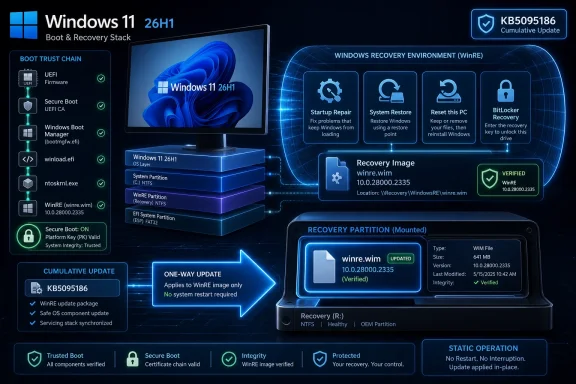
Microsoft published KB5095615 on June 23, 2026, as a Safe OS Dynamic Update for Windows 11 versions 24H2 and 25H2, delivering improvements to the Windows Recovery Environment and replacing the earlier KB5094149 package. That sounds like plumbing, because it is. But it is also the kind of plumbing Microsoft increasingly depends on when Windows has to repair itself, update boot-critical components, and survive the messy transition now underway around Secure Boot certificates. The update is not a marquee Patch Tuesday payload; it is a reminder that the most consequential Windows servicing work often happens before the operating system is fully awake.
KB5095615 is deliberately narrow. Microsoft says the update improves the Windows Recovery Environment, the stripped-down recovery partition used when Windows needs to troubleshoot startup failures, apply certain repairs, reset a device, or recover from an unbootable state. It applies to Windows 11 version 24H2 and version 25H2, the two releases now sharing much of the same servicing foundation.
The update is available through Windows Update and should download and install automatically on eligible systems. Microsoft also offers a standalone package through the Microsoft Update Catalog, which matters for administrators maintaining offline images, deployment media, or controlled recovery environments.
The official details are spare but important. There are no prerequisites, no restart is required after applying it, and once the update is applied to a Windows image, it cannot be removed. Microsoft says the expected WinRE version after installation is 10.0.26100.8737.
That last number is the tell. Safe OS Dynamic Updates do not exist to make the desktop prettier or File Explorer faster. They exist to keep the recovery and setup side of Windows current enough to understand the system it may one day have to repair.
A Safe OS Dynamic Update targets the environment Windows uses during setup and recovery rather than the normal interactive desktop. That makes it less visible than a cumulative update, but not less important. If the recovery environment is stale, it may lack fixes, drivers, compatibility improvements, or servicing logic needed when things go wrong.
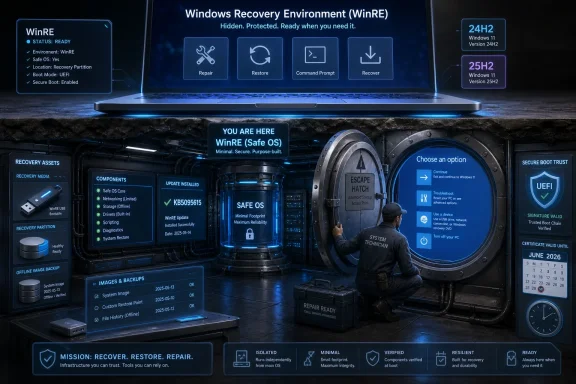
WinRE is the operating system’s escape hatch. It is the thing users see as “Advanced startup,” “Startup Repair,” “Reset this PC,” or BitLocker recovery workflows. In enterprise estates, it is also part of a broader repair chain involving deployment tooling, recovery partitions, and device management policies.
The catch is that WinRE has historically been treated as background infrastructure until it fails. Then it becomes painfully central. If a device cannot boot, if an update leaves a machine in a recovery loop, or if a repair workflow cannot understand the installed Windows image, the quality and freshness of WinRE suddenly matter more than any Start menu feature.
KB5095615 therefore belongs to the unglamorous but critical class of updates that keep Windows’ emergency systems aligned with Windows itself. For administrators, that alignment is not theoretical. It affects whether machines can be recovered cleanly at scale when a servicing problem, disk issue, boot problem, or encryption prompt turns into a help-desk incident.
That model reduces the drama of feature updates, at least in theory. If 24H2 and 25H2 share the same servicing baseline, Microsoft can ship many fixes once and have them apply across both releases. For users, that can make a version upgrade feel less like an old-school in-place migration and more like unlocking features already staged in the system.
For IT departments, the shared servicing model cuts both ways. It can reduce application compatibility churn and simplify patch validation because the underlying platform delta is smaller. But it also compresses the time between “this is just a servicing update” and “this estate is effectively ready for the next Windows release.”
KB5095615 sits squarely in that reality. A recovery environment update that targets both 24H2 and 25H2 suggests Microsoft wants the repair substrate to remain consistent across both versions. That is useful. It also means organizations cannot treat recovery partitions as static artifacts tied to the day a device was imaged.
The operational lesson is simple: Windows release management is no longer only about the visible OS build. The hidden components around setup, recovery, and boot are part of the release train too, and they need the same inventory and compliance discipline as the installed operating system.
That distinction matters. This is not a Y2K-style midnight failure scenario in which every unpatched PC suddenly becomes a brick. The risk is subtler: devices that miss the certificate transition can drift into a degraded security posture where future boot-layer trust updates, revocations, or newly signed components become more complicated.
Secure Boot is one of the few security mechanisms that runs before Windows itself has a chance to defend anything. It verifies bootloaders and related components before the operating system loads. When attackers target the boot chain, they are trying to get below the level where endpoint agents, identity controls, and operating system hardening can see them.
That is why the certificate transition has made administrators uneasy. It depends not only on Microsoft’s Windows updates but also, in some cases, firmware support from OEMs. It touches UEFI databases, boot trust, third-party bootloaders, recovery media, and security products that rely on measured or verified startup states.
KB5095615 is not, on its face, the Secure Boot certificate update. Microsoft describes it as a WinRE improvement. But recovery, boot trust, and safe operating system servicing live in the same neighborhood. When the industry is rotating long-lived boot trust material for the first time at this scale, keeping recovery images current is not optional hygiene. It is risk reduction.
That does not mean KB5095615 is suspect. It means recovery updates occupy a different operational category from desktop app fixes. If something goes wrong in a recovery image, rollback may mean replacing or rebuilding that image rather than uninstalling a package.
This is especially relevant for organizations that maintain custom recovery partitions or offline servicing pipelines. A large enterprise may not rely solely on whatever Windows Update does to a live machine. It may inject updates into Windows Imaging Format files, update boot media, prepare Autopilot deployment images, or maintain break-glass USB media for field technicians.
Those workflows need to include Safe OS updates deliberately. If they do not, the installed operating system and the recovery environment can diverge. That divergence is easy to miss during normal operations and ugly to discover during an outage.
The best administrators already treat recovery media like production infrastructure. They version it, test it, document it, and retire it. KB5095615 is another reason that approach should be standard rather than exceptional.
That invisibility is a feature. Users should not need to understand WinRE package versions or Safe OS servicing channels to have a recoverable PC. Microsoft’s consumer strategy depends on background maintenance precisely because most users do not manage recovery environments manually.
Still, there are practical implications. If Windows Security or Windows Update reports that a device needs attention around Secure Boot or recovery, users should not dismiss it as another optional notification. Likewise, users who keep Windows Update disabled for long stretches are not merely delaying cosmetic fixes; they are delaying maintenance to the boot and recovery stack.
The growing complexity of Windows servicing makes the old “I only install updates when something breaks” mindset more dangerous. Some updates are designed to prevent the kind of breakage that only becomes visible months later, when a recovery option fails or a security transition reaches a deadline.
For enthusiasts who build their own PCs, dual-boot systems, or frequently swap firmware settings, the advice is even stronger. Keep firmware updated, keep Windows updated, and understand whether Secure Boot is enabled and healthy before experimenting with bootloaders or recovery media.
That is the classic Windows servicing trap. Compliance dashboards show the fleet as patched because the running operating systems are patched. But the recovery image that will be used during a reset, repair, or bare-metal deployment may still carry older components.
The mismatch is not always catastrophic, but it is operationally sloppy. A recovery environment should not be an archaeological layer from the day a laptop model was first certified. It should be maintained as part of the device lifecycle.
Microsoft’s own instructions point administrators toward manual installation into Windows RE when needed. That is not casual documentation filler. It is an acknowledgment that the automatic path is not the whole story in managed environments.
This is where sysadmins should resist the temptation to treat KB5095615 as “just another dynamic update.” The package should trigger a review of whether WinRE is being inventoried, whether recovery partitions are large enough and healthy, whether offline images are updated, and whether validation includes actually booting into recovery instead of merely checking a package list.
Microsoft has improved the tooling, but the underlying problem remains: recovery is both essential and hidden. It lives in partitions users are told not to touch and administrators often inherit from OEM imaging decisions. It must be secure enough to participate in trusted repair workflows but flexible enough to receive updates over the life of the device.
That tension becomes sharper as Windows leans more heavily on hardware-rooted security. BitLocker, Secure Boot, TPM-backed identity, virtualization-based security, and recovery workflows all intersect around boot and pre-boot states. A broken recovery environment is no longer merely inconvenient; it can block access to encrypted systems or complicate incident response.
KB5095615 does not solve the recovery partition problem by itself. No single Safe OS update could. But it reinforces the direction of travel: Windows is becoming more dependent on an up-to-date layer below the user-facing operating system.
The irony is that Microsoft’s most important reliability work may be least visible to the people who benefit from it. A successful WinRE update is noticed only in the negative space where a future repair does not fail.
This has become a familiar pattern in Windows servicing. Microsoft often provides enough information to support deployment but not enough to fully explain the engineering rationale. Administrators get package identity, applicability, replacement information, and maybe a file list; they rarely get the story of what failure modes were fixed.
There are defensible reasons for that restraint. Recovery and boot components can involve security-sensitive details, and Microsoft may not want to advertise exactly what was hardened or changed. But sparse notes push customers into inference, and inference is where rumors grow.
The better reading is not to overstate what KB5095615 does. It is not a public emergency fix. It is not described as resolving a known widespread failure. It is a scheduled recovery environment update arriving during a period when boot and recovery trust are especially important.
That is enough to take it seriously without dramatizing it. The risk is not that every user must manually chase this package today. The risk is that organizations with mature patch processes may still have immature recovery servicing processes.
The right question is not whether KB5095615 deserves emergency change-control treatment. It usually should not. The right question is whether your Windows estate can answer basic recovery questions without a scavenger hunt.
Can you identify the WinRE version deployed across your fleet? Do you know which devices have disabled or broken recovery environments? Are your offline images updated on a schedule? Are firmware and Secure Boot certificate states visible in inventory? Can your technicians recover a BitLocker-protected Windows 11 25H2 device using current media?
Those are not theoretical governance exercises. They are the difference between a one-device repair and a fleet-wide scramble when a servicing issue, boot certificate transition, or firmware dependency exposes a hidden gap.
KB5095615 is therefore best understood as a small update with a large administrative shadow. It is a reminder that modern Windows reliability is not only built in the monthly cumulative update. It is built in the layers that cumulative updates assume will be there when the system needs help.
 Microsoft Ships a Recovery Update at the Moment Recovery Matters Most
KB5095615 is deliberately narrow. Microsoft says the update improves the Windows Recovery Environment, the stripped-down recovery partition used when Windows needs to troubleshoot startup failures, apply certain repairs, reset a device, or recover from an unbootable state. It applies to Windows 11 version 24H2 and version 25H2, the two releases now sharing much of the same servicing foundation.The update is available through Windows Update and should download and install automatically on eligible systems. Microsoft also offers a standalone package through the Microsoft Update Catalog, which matters for administrators maintaining offline images, deployment media, or controlled recovery environments.
The official details are spare but important. There are no prerequisites, no restart is required after applying it, and once the update is applied to a Windows image, it cannot be removed. Microsoft says the expected WinRE version after installation is 10.0.26100.8737.
That last number is the tell. Safe OS Dynamic Updates do not exist to make the desktop prettier or File Explorer faster. They exist to keep the recovery and setup side of Windows current enough to understand the system it may one day have to repair.
The Safe OS Layer Is Where Windows Services Its Own Escape Hatch
Windows users tend to think of updates as something that happens inside Windows. That is only partly true. Modern Windows servicing reaches across the live operating system, setup files, boot components, recovery images, and compatibility data that come into play during upgrades or repair operations.A Safe OS Dynamic Update targets the environment Windows uses during setup and recovery rather than the normal interactive desktop. That makes it less visible than a cumulative update, but not less important. If the recovery environment is stale, it may lack fixes, drivers, compatibility improvements, or servicing logic needed when things go wrong.
WinRE is the operating system’s escape hatch. It is the thing users see as “Advanced startup,” “Startup Repair,” “Reset this PC,” or BitLocker recovery workflows. In enterprise estates, it is also part of a broader repair chain involving deployment tooling, recovery partitions, and device management policies.
The catch is that WinRE has historically been treated as background infrastructure until it fails. Then it becomes painfully central. If a device cannot boot, if an update leaves a machine in a recovery loop, or if a repair workflow cannot understand the installed Windows image, the quality and freshness of WinRE suddenly matter more than any Start menu feature.
KB5095615 therefore belongs to the unglamorous but critical class of updates that keep Windows’ emergency systems aligned with Windows itself. For administrators, that alignment is not theoretical. It affects whether machines can be recovered cleanly at scale when a servicing problem, disk issue, boot problem, or encryption prompt turns into a help-desk incident.
24H2 and 25H2 Are Two Releases Riding One Servicing Track
The presence of both Windows 11 24H2 and 25H2 in the same KB is not accidental. Microsoft has been moving Windows 11 toward a model in which adjacent releases can share a servicing branch, with the newer feature release arriving more like an enablement switch than a wholesale replacement.That model reduces the drama of feature updates, at least in theory. If 24H2 and 25H2 share the same servicing baseline, Microsoft can ship many fixes once and have them apply across both releases. For users, that can make a version upgrade feel less like an old-school in-place migration and more like unlocking features already staged in the system.
For IT departments, the shared servicing model cuts both ways. It can reduce application compatibility churn and simplify patch validation because the underlying platform delta is smaller. But it also compresses the time between “this is just a servicing update” and “this estate is effectively ready for the next Windows release.”
KB5095615 sits squarely in that reality. A recovery environment update that targets both 24H2 and 25H2 suggests Microsoft wants the repair substrate to remain consistent across both versions. That is useful. It also means organizations cannot treat recovery partitions as static artifacts tied to the day a device was imaged.
The operational lesson is simple: Windows release management is no longer only about the visible OS build. The hidden components around setup, recovery, and boot are part of the release train too, and they need the same inventory and compliance discipline as the installed operating system.
The Secure Boot Clock Makes This More Than Housekeeping
The timing of KB5095615 is hard to ignore. Microsoft has been warning that Secure Boot certificates issued in 2011 begin expiring in June 2026, with additional certificate deadlines following later in the year. The company has repeatedly said ordinary Windows updates will continue to install and that devices without newer certificates should continue to start and operate normally, but it has also warned administrators to validate status and follow its Secure Boot guidance.That distinction matters. This is not a Y2K-style midnight failure scenario in which every unpatched PC suddenly becomes a brick. The risk is subtler: devices that miss the certificate transition can drift into a degraded security posture where future boot-layer trust updates, revocations, or newly signed components become more complicated.
Secure Boot is one of the few security mechanisms that runs before Windows itself has a chance to defend anything. It verifies bootloaders and related components before the operating system loads. When attackers target the boot chain, they are trying to get below the level where endpoint agents, identity controls, and operating system hardening can see them.
That is why the certificate transition has made administrators uneasy. It depends not only on Microsoft’s Windows updates but also, in some cases, firmware support from OEMs. It touches UEFI databases, boot trust, third-party bootloaders, recovery media, and security products that rely on measured or verified startup states.
KB5095615 is not, on its face, the Secure Boot certificate update. Microsoft describes it as a WinRE improvement. But recovery, boot trust, and safe operating system servicing live in the same neighborhood. When the industry is rotating long-lived boot trust material for the first time at this scale, keeping recovery images current is not optional hygiene. It is risk reduction.
The Uninstall Story Is the Enterprise Warning Label
Microsoft’s note that the update cannot be removed once applied to a Windows image will barely register for home users. For enterprise administrators, it is a flashing yellow light. Anything that becomes part of a deployed image without an uninstall path needs testing before broad distribution into gold images, task sequences, offline media, or factory provisioning flows.That does not mean KB5095615 is suspect. It means recovery updates occupy a different operational category from desktop app fixes. If something goes wrong in a recovery image, rollback may mean replacing or rebuilding that image rather than uninstalling a package.
This is especially relevant for organizations that maintain custom recovery partitions or offline servicing pipelines. A large enterprise may not rely solely on whatever Windows Update does to a live machine. It may inject updates into Windows Imaging Format files, update boot media, prepare Autopilot deployment images, or maintain break-glass USB media for field technicians.
Those workflows need to include Safe OS updates deliberately. If they do not, the installed operating system and the recovery environment can diverge. That divergence is easy to miss during normal operations and ugly to discover during an outage.
The best administrators already treat recovery media like production infrastructure. They version it, test it, document it, and retire it. KB5095615 is another reason that approach should be standard rather than exceptional.
Home Users Will Never See It, Which Is Mostly the Point
For most Windows 11 users, KB5095615 should be invisible. It arrives through Windows Update, does not require a restart, and has no user-facing feature list. If the update succeeds, nothing obvious happens.That invisibility is a feature. Users should not need to understand WinRE package versions or Safe OS servicing channels to have a recoverable PC. Microsoft’s consumer strategy depends on background maintenance precisely because most users do not manage recovery environments manually.
Still, there are practical implications. If Windows Security or Windows Update reports that a device needs attention around Secure Boot or recovery, users should not dismiss it as another optional notification. Likewise, users who keep Windows Update disabled for long stretches are not merely delaying cosmetic fixes; they are delaying maintenance to the boot and recovery stack.
The growing complexity of Windows servicing makes the old “I only install updates when something breaks” mindset more dangerous. Some updates are designed to prevent the kind of breakage that only becomes visible months later, when a recovery option fails or a security transition reaches a deadline.
For enthusiasts who build their own PCs, dual-boot systems, or frequently swap firmware settings, the advice is even stronger. Keep firmware updated, keep Windows updated, and understand whether Secure Boot is enabled and healthy before experimenting with bootloaders or recovery media.
Offline Images Are the Place Where Good Intentions Go Stale
The organizations most likely to care about KB5095615 are also the organizations most likely to miss it in one corner of their environment. Live devices may receive the update automatically, while offline images, recovery media, lab builds, and rarely used deployment shares remain frozen at an earlier state.That is the classic Windows servicing trap. Compliance dashboards show the fleet as patched because the running operating systems are patched. But the recovery image that will be used during a reset, repair, or bare-metal deployment may still carry older components.
The mismatch is not always catastrophic, but it is operationally sloppy. A recovery environment should not be an archaeological layer from the day a laptop model was first certified. It should be maintained as part of the device lifecycle.
Microsoft’s own instructions point administrators toward manual installation into Windows RE when needed. That is not casual documentation filler. It is an acknowledgment that the automatic path is not the whole story in managed environments.
This is where sysadmins should resist the temptation to treat KB5095615 as “just another dynamic update.” The package should trigger a review of whether WinRE is being inventoried, whether recovery partitions are large enough and healthy, whether offline images are updated, and whether validation includes actually booting into recovery instead of merely checking a package list.
The Recovery Partition Is Still Windows’ Most Neglected Dependency
Windows has a long history of recovery partition awkwardness. Users discover it when BitLocker asks for a key, when “Reset this PC” fails, when an update cannot service WinRE because the partition is too small, or when a disk layout created years ago no longer fits modern servicing expectations.Microsoft has improved the tooling, but the underlying problem remains: recovery is both essential and hidden. It lives in partitions users are told not to touch and administrators often inherit from OEM imaging decisions. It must be secure enough to participate in trusted repair workflows but flexible enough to receive updates over the life of the device.
That tension becomes sharper as Windows leans more heavily on hardware-rooted security. BitLocker, Secure Boot, TPM-backed identity, virtualization-based security, and recovery workflows all intersect around boot and pre-boot states. A broken recovery environment is no longer merely inconvenient; it can block access to encrypted systems or complicate incident response.
KB5095615 does not solve the recovery partition problem by itself. No single Safe OS update could. But it reinforces the direction of travel: Windows is becoming more dependent on an up-to-date layer below the user-facing operating system.
The irony is that Microsoft’s most important reliability work may be least visible to the people who benefit from it. A successful WinRE update is noticed only in the negative space where a future repair does not fail.
Microsoft’s Minimal Release Notes Ask IT to Read Between the Lines
Microsoft’s support article for KB5095615 is terse. It says the update improves WinRE, identifies the target Windows versions, lists how to obtain it, notes that no restart is required, and gives the expected WinRE version. That is useful, but it is not explanatory.This has become a familiar pattern in Windows servicing. Microsoft often provides enough information to support deployment but not enough to fully explain the engineering rationale. Administrators get package identity, applicability, replacement information, and maybe a file list; they rarely get the story of what failure modes were fixed.
There are defensible reasons for that restraint. Recovery and boot components can involve security-sensitive details, and Microsoft may not want to advertise exactly what was hardened or changed. But sparse notes push customers into inference, and inference is where rumors grow.
The better reading is not to overstate what KB5095615 does. It is not a public emergency fix. It is not described as resolving a known widespread failure. It is a scheduled recovery environment update arriving during a period when boot and recovery trust are especially important.
That is enough to take it seriously without dramatizing it. The risk is not that every user must manually chase this package today. The risk is that organizations with mature patch processes may still have immature recovery servicing processes.
The 25H2 Era Rewards Boring Discipline
Windows 11 25H2 has not changed the basic rules of enterprise endpoint management, but it has made the boring rules matter more. Shared servicing branches, enablement-style releases, automatic update paths, and boot trust transitions all reward organizations that maintain accurate inventories and punish those that rely on assumptions.The right question is not whether KB5095615 deserves emergency change-control treatment. It usually should not. The right question is whether your Windows estate can answer basic recovery questions without a scavenger hunt.
Can you identify the WinRE version deployed across your fleet? Do you know which devices have disabled or broken recovery environments? Are your offline images updated on a schedule? Are firmware and Secure Boot certificate states visible in inventory? Can your technicians recover a BitLocker-protected Windows 11 25H2 device using current media?
Those are not theoretical governance exercises. They are the difference between a one-device repair and a fleet-wide scramble when a servicing issue, boot certificate transition, or firmware dependency exposes a hidden gap.
KB5095615 is therefore best understood as a small update with a large administrative shadow. It is a reminder that modern Windows reliability is not only built in the monthly cumulative update. It is built in the layers that cumulative updates assume will be there when the system needs help.
The Small KB That Points to the Bigger Windows Maintenance Job
This update should not cause panic, but it should cause a maintenance check. Microsoft has made the package easy to receive for ordinary systems, while giving administrators a standalone route for offline and recovery-image servicing. The concrete action is to make sure the automatic path is actually reaching the environments that matter.- KB5095615 updates the Windows Recovery Environment for Windows 11 versions 24H2 and 25H2 and replaces KB5094149.
- Microsoft says the update installs automatically through Windows Update, with a standalone package available through the Microsoft Update Catalog.
- The expected WinRE version after installation is 10.0.26100.8737.
- The update has no prerequisites, does not require a restart, and cannot be removed once applied to a Windows image.
- Administrators should check offline images, custom recovery partitions, deployment media, and Secure Boot readiness rather than assuming live-device patch compliance covers everything.
- The update lands during the wider 2026 Secure Boot certificate transition, making recovery and boot-chain hygiene more important than usual.
References
- Primary source: Microsoft Support
Published: Tue, 23 Jun 2026 17:02:30 Z
- Official source: learn.microsoft.com
Update Secure Boot Certificates for Windows Devices - Windows Client | Microsoft Learn
Update your Windows devices to maintain Secure Boot protection with 2023 certificates before they expire in June 2026.learn.microsoft.com - Related coverage: allthings.how
Windows Secure Boot certificates expire in June 2026: what to check now
The 2011 certificates are aging out, but your PC will still boot — here's how to confirm the 2023 update landed.allthings.how - Related coverage: techspot.com
Windows Secure Boot certificates set to expire in June – here's what it means for your PC | TechSpot
In an Ask Microsoft Anything livestream on YouTube, Microsoft Principal Security Engineer Arden White, Principal Software Architect Scott Shell, and Group Engineering Manager Richard Powell answered a...www.techspot.com - Related coverage: notebookcheck.net
Windows Secure Boot certificates start expiring June 24 - Notebookcheck News
Windows Secure Boot certificates from 2011 expire June 24. Devices without the update will lose boot-level security protections, with no fix for some older PCs. www.notebookcheck.net
- Related coverage: spirhed.com
Secure Boot certificates expire in June 2026 | Spirhed
Microsoft’s Windows UEFI CA 2011 and Microsoft Corporation KEK CA 2011 expire in June 2026. Every Windows device with Secure Boot enabled needs the 2023 replacement certificates installed in firmware before that, or it will eventually stop receiving boot-level security updates. The...spirhed.com

- Related coverage: securitytoday.de
Secure Boot Certificates Expire in June 2026: What IT Teams Must Prepare for The
Secure Boot Certificates: Microsoft retires 2011 CAs starting June 2026. What IT teams need to implement now for Windows fleets, UEFI, and Linux dual-boot setups.www.securitytoday.de
- Related coverage: tomshardware.com
Microsoft to force updates to Windows 11 25H2 for PCs with older Windows 11 OS versions — 'intelligent' update system uses machine learning to determine when a device is ready | Tom's Hardware
Microsoft forces 25H2 rollout ahead of 24H2 end-of-supportwww.tomshardware.com - Related coverage: windowslatest.com
Microsoft answers what you must do as Windows 11 Secure Boot deadline hits in days
Key takeaways from Microsoft's second Secure Boot AMA. Learn how the June 24 KEK expiration impacts Windows 11 PCs and what IT admins must do. www.windowslatest.com
- Related coverage: memstechtips.com
Windows Secure Boot Certificates Expire In June 2026 - What To Do
Windows Secure Boot certificates from 2011 expire June 2026. Check your status and install the new Windows UEFI CA 2023 certificate in under 5 minutes.memstechtips.com - Related coverage: techjournal.org
Windows Secure Boot Expires June 2026: What to Do
Windows Secure Boot certificates from 2011 expire in June 2026. Here's what happens to your PC, how to check if you're protected, and how to fix it.techjournal.org - Related coverage: windowscentral.com
Microsoft warns Secure Boot certificates will expire in 2026 | Windows Central
After 15 years, the original Secure Boot certificates that keep your PC secure during boot are expiring. Here's what you need to know.www.windowscentral.com - Related coverage: pcgamer.com
Secure Boot certificates used by anti-cheat software are set to expire in June but new ones are already in the mail | PC Gamer
You shouldn't have to worry about expired certificates if you keep your PC up-to-date.www.pcgamer.com - Related coverage: techradar.com
Still using Windows 10? Microsoft is automatically replacing Secure Boot certificates on older PCs ahead of expiration, so you might want to update ASAP | TechRadar
Secure Boot certificate upgrades is bad news for Windows 10www.techradar.com - Official source: techcommunity.microsoft.com
- Related coverage: cisco.com