

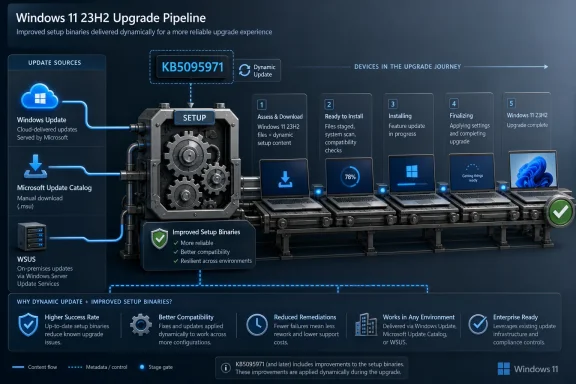
Microsoft released KB5095971 on June 9, 2026, as a Setup Dynamic Update for Windows 11 version 23H2, delivering refreshed setup binaries and setup-used files for feature-update operations through Windows Update, Microsoft Update Catalog, and WSUS. It is not the kind of patch that gives users a new button, a changed taskbar, or an obvious build-number bragging right. It is plumbing — and in Windows servicing, plumbing is often where the real risk lives. The update matters because it lands at the moment when Windows 11 23H2 is no longer the shiny release, but still sits in enough deployment rings, images, recovery paths, and upgrade workflows to make setup reliability a business issue rather than a trivia item.
KB5095971 is a narrow update with a broad job: improve the files Windows Setup uses when a device moves through a feature update. Microsoft’s public description is characteristically sparse, saying only that it improves Windows setup binaries or files setup uses for feature updates in Windows 11 version 23H2. That single sentence is doing a lot of work.
Setup Dynamic Updates exist because a Windows feature update is not just a payload. It is a staged operation involving compatibility checks, migration, drivers, recovery components, servicing stack behavior, language and optional component handling, and rollback logic. If that machinery is stale, the upgrade may fail before the operating system being installed ever has a chance to prove itself.
That is why these updates rarely make noise in consumer-facing Windows Update coverage, but deserve attention from administrators. A cumulative update patches the operating system you are running. A Setup Dynamic Update patches part of the mechanism that decides whether you can successfully get to the next one.
KB5095971 replaces KB5077374, the previous Setup Dynamic Update for Windows 11 23H2. That replacement relationship tells us this is not an emergency rebrand or an isolated one-off. Microsoft is continuing to service the 23H2 setup path as part of a rolling chain, keeping the upgrade machinery current even as newer Windows 11 releases occupy the marketing spotlight.
Dynamic Update is invoked early in a Windows feature update. When enabled, Windows Setup can contact Microsoft’s update endpoints, retrieve newer setup-related packages, and apply them before or during the upgrade process. The purpose is simple: do not ask a device to perform a complicated operating system transition using setup components that were frozen months earlier.
This is especially relevant for media-based upgrades. Administrators often download an ISO, build a task sequence, or maintain a reference image that begins aging the moment it is created. Dynamic Update is one of Microsoft’s answers to that entropy. It lets Setup refresh parts of the upgrade experience without forcing every organization to constantly rebuild media for every minor servicing adjustment.
The catch is that Dynamic Update is only helpful if administrators understand whether their deployment path allows it. Internet-connected machines using Windows Update may receive this kind of content automatically. Managed environments using WSUS or offline media need more deliberate handling. KB5095971 being available through Windows Update, the Microsoft Update Catalog, and WSUS is therefore not a footnote; it is Microsoft making sure the same setup fix can enter consumer, managed, and image-based channels.
That makes servicing the 23H2 setup path more important than it might look from a consumer desktop. An organization may not be standardizing on 23H2 for the future, but it may still use 23H2 as the installed base from which a later upgrade begins. If that starting point has brittle setup components, the next migration becomes harder.
The Windows servicing model also means the installed OS and the upgrade engine are not the same problem. You can have a device that is fully patched from a quality-update standpoint but still attempt a feature update using setup files that benefit from a newer Dynamic Update. KB5095971 lives in that gap.
This is the kind of gap that produces maddening help-desk cases. The machine appears healthy, monthly patching looks compliant, storage is adequate, and policy appears correct — yet the feature update fails, rolls back, or stalls. Not every such failure is solved by a Setup Dynamic Update, of course. But stale setup components are one of the variables administrators can actually control.
The absence of prerequisites is equally important. There is no elaborate dependency chain in the support note, no instruction to install another package first, and no warning that only a subset of devices qualify. For administrators, that lowers the friction of importing or allowing the update through existing servicing channels.
Still, “no restart” should not be misread as “no operational impact.” The value of the update appears when Setup runs. A device may quietly receive KB5095971 today and only benefit from it weeks later when a feature update, in-place repair, or media-based upgrade path calls the refreshed files.
That delayed effect is precisely why these updates are easy to miss. Users notice a reboot. Admins notice a failed deployment. Setup Dynamic Updates live between those two moments, reducing the chance that the failure happens in the first place.
For WSUS shops, that matters. Many organizations still treat feature updates with extreme caution while allowing routine quality updates through more predictable rings. Setup Dynamic Updates complicate that division because they are not feature updates themselves, but they influence feature-update success.
The classification as “Updates” rather than a flashy security release may also cause the package to be overlooked in tightly filtered environments. Admins who only chase cumulative updates and security baselines may never notice that the setup path has a separate servicing stream. That is a mistake, particularly for fleets preparing staged Windows 11 migrations.
There is a practical governance point here: deployment teams should know whether Dynamic Update content is being approved, imported, blocked, or superseded in their environment. Not because KB5095971 is dramatic, but because the absence of this class of update can make future drama more likely.
Offline and semi-offline deployment workflows are not rare edge cases. They show up in regulated industries, manufacturing floors, defense-adjacent environments, high-latency branches, classrooms, labs, and any organization that still treats OS deployment as a controlled engineering process rather than a cloud-fed event. For those environments, Dynamic Update is less “dynamic” and more “something you need to inject manually if you want its benefits.”
This is where Microsoft’s deployment documentation has become more explicit over the years. Dynamic Update packages can be applied to existing Windows images before deployment, and the sequence can include setup updates, Safe OS updates, servicing stack components, cumulative updates, and driver-related content depending on the scenario. The point is to keep the install media from becoming a museum piece.
KB5095971 does not automatically modernize your ISO sitting on a file share. If your organization boots old media, disables Dynamic Update, and never refreshes the image, the existence of a June 2026 setup update on Microsoft’s servers will not save you. The package has to enter the deployment path somehow.
A device that cannot complete a feature update may remain on an older release longer than planned. A fleet with unreliable upgrades may require additional exception windows. A rollback-prone deployment can train users and local IT staff to fear updates, creating the very inertia that security teams spend years trying to reduce.
This is the hidden security value of setup reliability. Security policy says “move to the supported release.” Setup either makes that practical or turns it into a multi-week incident queue. When Microsoft services the setup engine, it is servicing part of the security supply chain for Windows.
There is also a recovery angle. The Setup ecosystem intersects with the safe operating system and recovery environment in broader Dynamic Update workflows, even though KB5095971 itself is specifically a Setup Dynamic Update. Admins who maintain images should think in terms of the whole upgrade and recovery chain, not a single monthly patch name.
That sparseness is frustrating but not surprising. Setup Dynamic Updates often modify the components that help setup handle broad classes of upgrade conditions. Microsoft may not want to publish a granular map of internal setup behavior, and in some cases the changes may be cumulative hardening rather than a single customer-visible bug fix.
For IT pros, the lack of detail creates a familiar dilemma. You cannot easily map KB5095971 to a specific failure in your environment unless Microsoft or telemetry later connects those dots. But you also cannot ignore it simply because the support page is boring.
The better operational posture is to treat Setup Dynamic Updates as part of image hygiene. You do not need a public confession of a bug to justify keeping setup components current. You need a controlled process, test rings, and a clear understanding of where the package enters your upgrade workflow.
Supersedence is one of those areas where Windows servicing can become deceptively messy. A package may be replaced, but an old image, task sequence, or offline share may still contain the earlier file set. If deployment documentation simply says “apply the latest Setup Dynamic Update” but the share has not been touched since February, the process and the reality have diverged.
This is why organizations should version their deployment media and document which Dynamic Update packages were injected. “Windows 11 23H2 ISO” is not a sufficient description. A useful label includes the servicing month, the cumulative update level, and any Dynamic Update packages used to refresh setup and recovery components.
That discipline may sound pedantic until a deployment fails across a pilot group and nobody can say which setup files were actually used. Windows servicing rewards boring documentation. KB5095971 is the latest reminder.
That does not mean it is irrelevant to home PCs. A consumer machine that eventually takes a feature update can benefit from refreshed setup components in the same broad way a managed PC can. The difference is visibility. Home users generally do not curate setup packages, approve WSUS classifications, or maintain offline media.
The practical advice for enthusiasts is modest: do not panic when you see a Setup Dynamic Update in update history or catalog listings. It is part of the Windows upgrade pipeline. If you are building installation media for repairs or in-place upgrades, however, it is worth remembering that the ISO you downloaded months ago may not include the latest setup improvements.
That point matters for the WindowsForum crowd in particular. Many power users reach for an in-place repair install when monthly servicing goes sideways. Using stale media can still work, but the whole premise of Dynamic Update is that setup reliability improves when setup is allowed to refresh itself.
Those questions matter more than the KB number itself. KB5095971 is today’s package, but the underlying issue recurs every time Microsoft publishes a new Dynamic Update. If the process is sound, the new package is routine. If the process is improvised, the package becomes another thing nobody owns.
There is also a policy tension. Some administrators disable Dynamic Update to preserve predictability, avoid drivers arriving during setup, or ensure that monthly cumulative updates are deployed only after validation. Microsoft provides options for that kind of control, including modes that permit Dynamic Update while excluding drivers or the latest cumulative update. The important thing is not that every organization choose the same setting; it is that the setting be intentional.
A feature update is not a single file transfer. It is a negotiation between the current OS, the target OS, drivers, policies, storage, recovery components, optional features, and user data migration. KB5095971 updates the negotiator.
 Microsoft Ships Another Quiet Patch for the Moment Before Windows Changes Itself
KB5095971 is a narrow update with a broad job: improve the files Windows Setup uses when a device moves through a feature update. Microsoft’s public description is characteristically sparse, saying only that it improves Windows setup binaries or files setup uses for feature updates in Windows 11 version 23H2. That single sentence is doing a lot of work.Setup Dynamic Updates exist because a Windows feature update is not just a payload. It is a staged operation involving compatibility checks, migration, drivers, recovery components, servicing stack behavior, language and optional component handling, and rollback logic. If that machinery is stale, the upgrade may fail before the operating system being installed ever has a chance to prove itself.
That is why these updates rarely make noise in consumer-facing Windows Update coverage, but deserve attention from administrators. A cumulative update patches the operating system you are running. A Setup Dynamic Update patches part of the mechanism that decides whether you can successfully get to the next one.
KB5095971 replaces KB5077374, the previous Setup Dynamic Update for Windows 11 23H2. That replacement relationship tells us this is not an emergency rebrand or an isolated one-off. Microsoft is continuing to service the 23H2 setup path as part of a rolling chain, keeping the upgrade machinery current even as newer Windows 11 releases occupy the marketing spotlight.
The Boring Name Is the Point
Microsoft’s update taxonomy has always had a habit of hiding operationally important changes behind dry labels. “Setup Dynamic Update” sounds like something only a deployment engineer could love, and perhaps that is accurate. But that name also tells you almost exactly where the update sits: not in the user session, not in File Explorer, not in the Start menu, but in Setup.Dynamic Update is invoked early in a Windows feature update. When enabled, Windows Setup can contact Microsoft’s update endpoints, retrieve newer setup-related packages, and apply them before or during the upgrade process. The purpose is simple: do not ask a device to perform a complicated operating system transition using setup components that were frozen months earlier.
This is especially relevant for media-based upgrades. Administrators often download an ISO, build a task sequence, or maintain a reference image that begins aging the moment it is created. Dynamic Update is one of Microsoft’s answers to that entropy. It lets Setup refresh parts of the upgrade experience without forcing every organization to constantly rebuild media for every minor servicing adjustment.
The catch is that Dynamic Update is only helpful if administrators understand whether their deployment path allows it. Internet-connected machines using Windows Update may receive this kind of content automatically. Managed environments using WSUS or offline media need more deliberate handling. KB5095971 being available through Windows Update, the Microsoft Update Catalog, and WSUS is therefore not a footnote; it is Microsoft making sure the same setup fix can enter consumer, managed, and image-based channels.
Windows 11 23H2 Is Old Enough to Need Care, Not Old Enough to Ignore
Windows 11 version 23H2 now sits in an awkward middle age. It is no longer the newest feature release, and many enthusiasts have already moved on. But enterprise Windows fleets do not move with enthusiast speed, and neither do lab images, break-glass recovery media, VDI templates, kiosk baselines, or carefully validated deployment task sequences.That makes servicing the 23H2 setup path more important than it might look from a consumer desktop. An organization may not be standardizing on 23H2 for the future, but it may still use 23H2 as the installed base from which a later upgrade begins. If that starting point has brittle setup components, the next migration becomes harder.
The Windows servicing model also means the installed OS and the upgrade engine are not the same problem. You can have a device that is fully patched from a quality-update standpoint but still attempt a feature update using setup files that benefit from a newer Dynamic Update. KB5095971 lives in that gap.
This is the kind of gap that produces maddening help-desk cases. The machine appears healthy, monthly patching looks compliant, storage is adequate, and policy appears correct — yet the feature update fails, rolls back, or stalls. Not every such failure is solved by a Setup Dynamic Update, of course. But stale setup components are one of the variables administrators can actually control.
The Update Is Small in Scope but Strategic in Placement
Microsoft says no restart is required after applying KB5095971. That is expected for this class of update and also part of its appeal. Setup Dynamic Updates are not meant to interrupt the user’s current session; they are meant to improve the next major transition.The absence of prerequisites is equally important. There is no elaborate dependency chain in the support note, no instruction to install another package first, and no warning that only a subset of devices qualify. For administrators, that lowers the friction of importing or allowing the update through existing servicing channels.
Still, “no restart” should not be misread as “no operational impact.” The value of the update appears when Setup runs. A device may quietly receive KB5095971 today and only benefit from it weeks later when a feature update, in-place repair, or media-based upgrade path calls the refreshed files.
That delayed effect is precisely why these updates are easy to miss. Users notice a reboot. Admins notice a failed deployment. Setup Dynamic Updates live between those two moments, reducing the chance that the failure happens in the first place.
WSUS Support Is the Enterprise Tell
The support article’s WSUS language is unusually meaningful for such a short entry. Microsoft says the update will automatically sync with Windows Server Update Services if administrators configure the product as Windows 11 and the classification as Updates. That places KB5095971 in the normal enterprise approval universe rather than leaving it as a catalog-only oddity.For WSUS shops, that matters. Many organizations still treat feature updates with extreme caution while allowing routine quality updates through more predictable rings. Setup Dynamic Updates complicate that division because they are not feature updates themselves, but they influence feature-update success.
The classification as “Updates” rather than a flashy security release may also cause the package to be overlooked in tightly filtered environments. Admins who only chase cumulative updates and security baselines may never notice that the setup path has a separate servicing stream. That is a mistake, particularly for fleets preparing staged Windows 11 migrations.
There is a practical governance point here: deployment teams should know whether Dynamic Update content is being approved, imported, blocked, or superseded in their environment. Not because KB5095971 is dramatic, but because the absence of this class of update can make future drama more likely.
The Microsoft Update Catalog Remains the Escape Hatch for Controlled Shops
KB5095971 is also available as a standalone package from the Microsoft Update Catalog. That matters most for organizations that do not let every device reach Microsoft during Setup, or that build updated installation media before deployment. The Catalog remains the place where admins can retrieve the package, stage it, and apply it according to their own process.Offline and semi-offline deployment workflows are not rare edge cases. They show up in regulated industries, manufacturing floors, defense-adjacent environments, high-latency branches, classrooms, labs, and any organization that still treats OS deployment as a controlled engineering process rather than a cloud-fed event. For those environments, Dynamic Update is less “dynamic” and more “something you need to inject manually if you want its benefits.”
This is where Microsoft’s deployment documentation has become more explicit over the years. Dynamic Update packages can be applied to existing Windows images before deployment, and the sequence can include setup updates, Safe OS updates, servicing stack components, cumulative updates, and driver-related content depending on the scenario. The point is to keep the install media from becoming a museum piece.
KB5095971 does not automatically modernize your ISO sitting on a file share. If your organization boots old media, disables Dynamic Update, and never refreshes the image, the existence of a June 2026 setup update on Microsoft’s servers will not save you. The package has to enter the deployment path somehow.
Setup Reliability Is a Security Story Wearing a Deployment Badge
It is tempting to view Setup Dynamic Updates as mere convenience patches. That undersells them. In the real world, upgrade failures often become security delays.A device that cannot complete a feature update may remain on an older release longer than planned. A fleet with unreliable upgrades may require additional exception windows. A rollback-prone deployment can train users and local IT staff to fear updates, creating the very inertia that security teams spend years trying to reduce.
This is the hidden security value of setup reliability. Security policy says “move to the supported release.” Setup either makes that practical or turns it into a multi-week incident queue. When Microsoft services the setup engine, it is servicing part of the security supply chain for Windows.
There is also a recovery angle. The Setup ecosystem intersects with the safe operating system and recovery environment in broader Dynamic Update workflows, even though KB5095971 itself is specifically a Setup Dynamic Update. Admins who maintain images should think in terms of the whole upgrade and recovery chain, not a single monthly patch name.
The Public Notes Are Thin Because Microsoft Wants This to Be Infrastructure
The support article for KB5095971 is minimalist. There is no long changelog, no list of fixed error codes, no explanation of what binaries changed, and no narrative about affected scenarios. Microsoft offers the standard summary, availability channels, restart behavior, replacement information, and file information download.That sparseness is frustrating but not surprising. Setup Dynamic Updates often modify the components that help setup handle broad classes of upgrade conditions. Microsoft may not want to publish a granular map of internal setup behavior, and in some cases the changes may be cumulative hardening rather than a single customer-visible bug fix.
For IT pros, the lack of detail creates a familiar dilemma. You cannot easily map KB5095971 to a specific failure in your environment unless Microsoft or telemetry later connects those dots. But you also cannot ignore it simply because the support page is boring.
The better operational posture is to treat Setup Dynamic Updates as part of image hygiene. You do not need a public confession of a bug to justify keeping setup components current. You need a controlled process, test rings, and a clear understanding of where the package enters your upgrade workflow.
The Replacement of KB5077374 Signals a Moving Baseline
The fact that KB5095971 replaces KB5077374 is more useful than it first appears. It confirms that Microsoft sees the setup-update baseline for Windows 11 23H2 as something that continues to move. Admins who previously imported or approved KB5077374 now have a newer package to account for.Supersedence is one of those areas where Windows servicing can become deceptively messy. A package may be replaced, but an old image, task sequence, or offline share may still contain the earlier file set. If deployment documentation simply says “apply the latest Setup Dynamic Update” but the share has not been touched since February, the process and the reality have diverged.
This is why organizations should version their deployment media and document which Dynamic Update packages were injected. “Windows 11 23H2 ISO” is not a sufficient description. A useful label includes the servicing month, the cumulative update level, and any Dynamic Update packages used to refresh setup and recovery components.
That discipline may sound pedantic until a deployment fails across a pilot group and nobody can say which setup files were actually used. Windows servicing rewards boring documentation. KB5095971 is the latest reminder.
Home Users Probably Will Not Notice, and That Is Fine
For ordinary Windows 11 users, KB5095971 is unlikely to be memorable. It may arrive automatically through Windows Update. It does not require a reboot. It does not advertise a new experience. It will not make the desktop feel faster.That does not mean it is irrelevant to home PCs. A consumer machine that eventually takes a feature update can benefit from refreshed setup components in the same broad way a managed PC can. The difference is visibility. Home users generally do not curate setup packages, approve WSUS classifications, or maintain offline media.
The practical advice for enthusiasts is modest: do not panic when you see a Setup Dynamic Update in update history or catalog listings. It is part of the Windows upgrade pipeline. If you are building installation media for repairs or in-place upgrades, however, it is worth remembering that the ISO you downloaded months ago may not include the latest setup improvements.
That point matters for the WindowsForum crowd in particular. Many power users reach for an in-place repair install when monthly servicing goes sideways. Using stale media can still work, but the whole premise of Dynamic Update is that setup reliability improves when setup is allowed to refresh itself.
Admins Should Audit the Path, Not Just the Patch
The right response to KB5095971 is not a breathless emergency rollout. It is a deployment-path audit. Where do your 23H2 devices get feature-update setup content? Is Dynamic Update enabled? Are devices allowed to reach Microsoft’s update endpoints during Setup? Are WSUS products and classifications configured to receive this package? Are offline images refreshed on a schedule?Those questions matter more than the KB number itself. KB5095971 is today’s package, but the underlying issue recurs every time Microsoft publishes a new Dynamic Update. If the process is sound, the new package is routine. If the process is improvised, the package becomes another thing nobody owns.
There is also a policy tension. Some administrators disable Dynamic Update to preserve predictability, avoid drivers arriving during setup, or ensure that monthly cumulative updates are deployed only after validation. Microsoft provides options for that kind of control, including modes that permit Dynamic Update while excluding drivers or the latest cumulative update. The important thing is not that every organization choose the same setting; it is that the setting be intentional.
A feature update is not a single file transfer. It is a negotiation between the current OS, the target OS, drivers, policies, storage, recovery components, optional features, and user data migration. KB5095971 updates the negotiator.
The One-Paragraph Briefing Your Patch Meeting Actually Needs
KB5095971 is best understood as a low-drama maintenance release for the Windows 11 23H2 upgrade engine, not as a conventional desktop patch. It deserves a place in patch review because it affects feature-update reliability, image currency, and WSUS-managed deployment paths.- Microsoft released KB5095971 on June 9, 2026, for Windows 11 version 23H2 as a Setup Dynamic Update.
- The package improves Windows setup binaries or files used by Setup during feature updates.
- The update is available through Windows Update, the Microsoft Update Catalog, and WSUS when Windows 11 and the Updates classification are configured.
- Microsoft lists no prerequisites and says no restart is required after applying the update.
- KB5095971 replaces the previously released KB5077374, making it the newer setup-update baseline for Windows 11 23H2.
- Organizations using offline media, task sequences, or restricted internet access should verify that this class of Dynamic Update is actually entering their deployment workflow.
References
- Primary source: Microsoft Support
Published: Tue, 09 Jun 2026 17:04:14 Z
- Official source: learn.microsoft.com
Update Windows installation media with Dynamic Update | Microsoft Learn
Learn how to acquire and apply Dynamic Update packages to existing Windows images prior to deploymentlearn.microsoft.com - Official source: microsoft.com
Windows 11 Specs and System Requirements | Microsoft Windows
View Windows 11 specs, system requirements, and features from Microsoft. Learn about the device specifications, versions, and languages available for Windows 11.www.microsoft.com - Official source: catalog.update.microsoft.com
- Related coverage: windowsreport.com
Microsoft rolls out new Dynamic Updates (KB5065378 & KB5064097) for Windows 11 24H2 and Server 2026
Microsoft has rolled out new Dynamic Updates (KB5065378 & KB5064097) for Windows 11 24H2 and Windows Server 2025. windowsreport.com
- Related coverage: windowsforum.com
KB5077374 Setup Dynamic Update for Windows 11 23H2: Admin Guide to Image Hygiene | Windows Forum
Microsoft published a Setup Dynamic Update for Windows 11, version 23H2 (KB5077374) on February 10, 2026; the short public summary confirms the package...windowsforum.com

- Related coverage: windowscentral.com
Windows 11 is gaining a simplified naming scheme for updates going forward | Windows Central
Going forward, updates that appear in Windows Update will utilize a simplified naming scheme designed to make it clearer to end users what is actually being downloaded.www.windowscentral.com - Related coverage: techradar.com
Microsoft may have just saved admins a whole of work (and stress) when it comes to installing vital upgrades | TechRadar
Admins can now update Windows PCs much more easilywww.techradar.com - Related coverage: help.sfasu.edu
</rdf:Alt> </dc:title> <dc:description> <rdf:Alt> <rdf:li xml:lang="x-default"/> </rdf:Alt> </dc:description> <dc:creator> <rdf:Seq> <rdf:li>Brandon
</rdf:Alt> </dc:description> <dc:creator> <rdf:Seq> <rdf:li>Brandon Stringfieldhelp.sfasu.edu
- Official source: techcommunity.microsoft.com
