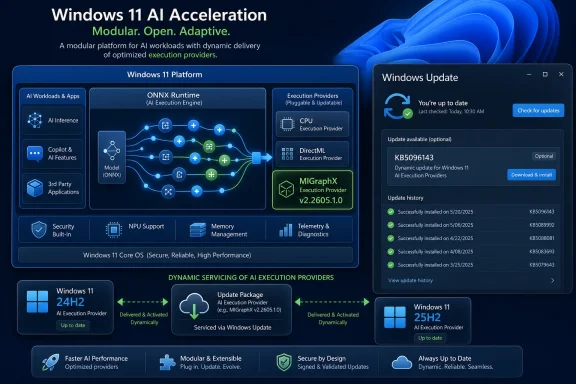
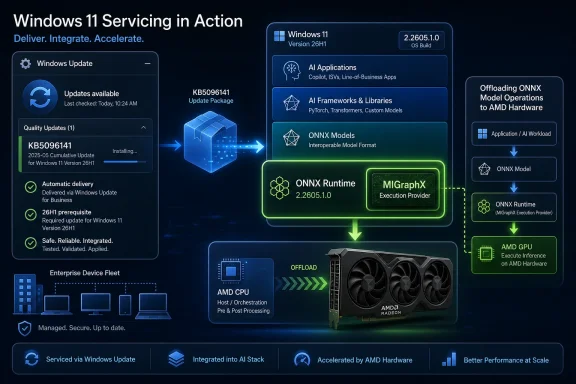
Microsoft has published KB5096141, an automatic Windows Update package that updates the AMD MIGraphX Execution Provider to version 2.2605.1.0 for Windows 11 version 26H1 devices with the latest cumulative update installed. The dry support note looks minor, but the delivery mechanism is the real story. Microsoft is turning AI acceleration into a serviced Windows component, not an app-by-app dependency or a driver-only concern. For AMD users, developers, and administrators, that means the local AI stack is becoming part of the monthly Windows maintenance surface.
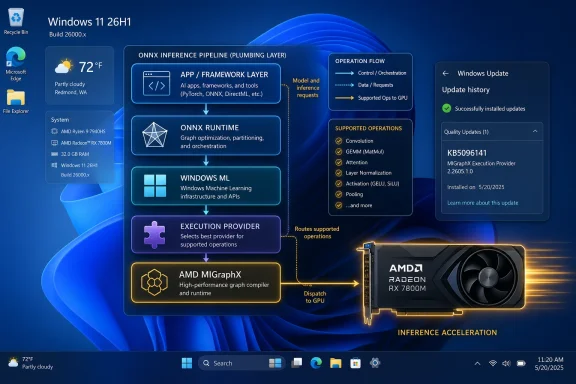
KB5096141 is not a conventional Windows feature update, and it is not a Radeon driver release wearing a Microsoft badge. It targets a specific execution provider: AMD’s MIGraphX layer for ONNX Runtime and Windows machine-learning workloads. In plain terms, it helps supported ONNX models run on AMD GPU hardware instead of falling back entirely to the CPU or a more generic execution path.
That distinction matters because Windows is no longer treating local AI acceleration as a novelty bolted onto a few showcase features. Execution providers are becoming plumbing. They sit between models and hardware, decide what can run where, and make the difference between an AI feature that feels instant and one that quietly burns CPU cycles in the background.
The support article says the update includes improvements to the MIGraphX Execution Provider AI component for Windows 11 version 26H1. It also says the package is downloaded and installed automatically through Windows Update, provided the device already has the latest cumulative update for 26H1. There is no manual installer story here, no developer download page as the primary route, and no “go find the right DLL” dance.
That is Microsoft’s broader Windows AI strategy in miniature. The company wants Windows to own the AI runtime layer the same way it owns graphics composition, audio routing, and security servicing. Hardware vendors still supply the acceleration technology, but Windows Update becomes the distribution channel that keeps the abstraction layer current.
AI workloads complicate that model. A local model does not merely need a display driver; it needs a runtime, graph optimizer, operator support, memory behavior, and a policy for falling back when the hardware cannot run a given operation. ONNX Runtime’s execution provider model exists precisely because “GPU acceleration” is not one thing. It is a negotiation between model structure and hardware capability.
MIGraphX is AMD’s graph inference engine, and the Windows execution provider built around it lets ONNX Runtime and Windows ML offload supported operations to AMD GPUs. Unsupported operations can still run elsewhere, which is both the strength and the administrative headache of the model. A workload may appear to “support AMD acceleration” while only part of its graph is actually running through MIGraphX.
That is why KB5096141 is more interesting than its short description suggests. Microsoft is not merely updating a binary. It is reinforcing a boundary where Windows, ONNX Runtime, AMD’s inference stack, and app developers all meet. When that boundary changes, performance can improve, compatibility can expand, and troubleshooting can become more subtle.
For administrators, this means AI acceleration is becoming something to inventory. The relevant question is no longer just “Which GPU driver is installed?” It is also “Which execution provider version is present, which Windows ML package is being used, and which cumulative update baseline is required?”
That makes KB5096141 feel like an early signal from the next Windows maintenance era. Microsoft is servicing AI components against a platform release that will not necessarily describe the average enthusiast desktop today. Yet the execution provider architecture spans Windows 11 24H2 and later in Microsoft’s broader documentation, and the same servicing logic is clearly meant to scale across Intel, AMD, Qualcomm, and NVIDIA paths.
The support note’s prerequisite is blunt: the device must have the latest cumulative update for Windows 11 version 26H1 installed. That dependency tells us Microsoft does not want execution provider updates floating independently of the OS baseline. The AI component may be modular, but it still expects the host platform to be current.
This is familiar to anyone who has managed Windows at scale. Microsoft modularizes a component, then ties its supportability to a serviced platform floor. The benefit is consistency. The cost is that organizations trying to freeze parts of the stack may find fewer clean seams than they expected.
The practical upshot is that AI components are likely to follow the same gravity as other Windows-serviced infrastructure. If you want the newest acceleration layer, you stay current. If you defer cumulative updates, you may also defer the AI runtime improvements that depend on them.
Microsoft’s execution provider list is deliberately plural. Windows ML can work with CPU and DirectML paths, and dynamically available providers cover silicon-specific stacks from multiple vendors. AMD’s MIGraphX sits alongside NVIDIA TensorRT-RTX, Intel OpenVINO, Qualcomm QNN, and AMD’s own Vitis AI in the broader Windows AI picture.
That crowded field is not an accident. Microsoft wants developers to target Windows ML and ONNX Runtime instead of hand-coding hardware paths for every vendor. The execution provider becomes the vendor-specific optimization layer beneath a more stable app-facing interface.
For AMD, MIGraphX gives Windows a way to use GPU hardware more directly for supported ONNX inference workloads. That is especially relevant as AI features creep into creative tools, productivity apps, photo editors, developer utilities, and system experiences. A GPU that once existed mainly for rendering frames is now expected to help classify, generate, summarize, upscale, detect, and transform.
Still, there is a reason Microsoft’s documentation keeps using careful language like “supported operations.” Execution providers are not universal translators. They accelerate what they know how to accelerate, on hardware and driver combinations that meet requirements, under runtime rules that can change with each release.
But automatic installation also makes the component part of the trust chain administrators must watch. A GPU driver update is visible and often controlled by policy. A Windows cumulative update is visible and heavily tracked. A small AI execution provider package can sit somewhere between those categories, close enough to application behavior to matter but low-level enough to be missed in casual review.
The check path Microsoft gives is Settings, Windows Update, Update history. After installation, the update should appear in the device’s update history as the Windows ML Runtime AMD MIGraphX Execution Provider entry associated with KB5096141. That is simple enough for an individual PC, but less satisfying for organizations that need fleet reporting and change control.
The bigger question is how enterprises will classify these packages. Are they driver-adjacent? App runtime updates? Windows components? AI feature enablement? Security-neutral performance fixes? Microsoft’s support note presents KB5096141 as an improvement release, not a security bulletin. But in operational terms, anything that changes how local models execute can affect reliability, power behavior, and application output.
This is where Windows Update’s convenience becomes a governance issue. The same mechanism that keeps consumers current can make it harder for IT teams to draw a bright line around the AI stack.
KB5096141 is part of making that theory workable. Execution providers need to be updated as vendors improve operator coverage, fix bugs, tune graph partitioning, and adapt to driver changes. If every app had to bundle its own AMD inference stack, Windows AI would quickly become the same fragmented mess that PC multimedia once was.
A Windows-serviced provider catalog offers a better answer. Developers can rely on a shared runtime component, and Microsoft can update the acceleration layer without waiting for every app developer to ship a new package. That matters for small developers especially, because few have the resources to validate every GPU vendor’s machine-learning stack independently.
The tradeoff is that app behavior can change outside the app’s own update cycle. A model that previously fell back to CPU for a particular operation might begin using the AMD GPU after an execution provider update. That could improve latency, but it could also expose precision differences, memory pressure, or a latent bug in an app that assumed a slower path.
This is not a reason to avoid the model. It is a reason to test like the runtime is alive, because it is. Windows AI development is moving toward a world where the OS, the provider, the driver, and the model all evolve on overlapping schedules.
That minimalism is both normal and frustrating. Normal, because Windows Update component packages often get short KB entries. Frustrating, because AI execution behavior is exactly the kind of area where developers and administrators benefit from specificity. If the update changes model compatibility or fixes a crash in a particular graph pattern, that information would help the people most likely to notice.
The absence of detail also reflects how new this servicing category still feels. Microsoft has decades of muscle memory around documenting security updates, cumulative updates, and driver packages. AI execution providers sit in a less familiar space. They are runtime components, vendor integrations, performance enablers, and compatibility surfaces all at once.
For enthusiasts, the lack of a changelog invites speculation. For IT pros, it invites caution. For developers, it means the only reliable answer may be to test the workloads that matter and compare behavior before and after the package lands.
Microsoft can get away with sparse notes while the affected audience is small. As more Windows features and third-party apps depend on local inference, that will become harder. AI runtime updates need documentation that respects the fact that they can change real application behavior, not just satisfy an internal servicing checklist.
That is a strategic reversal from the early era of PC AI demos, where each application brought its own runtime baggage. Those bundles were predictable for the app vendor but wasteful for the platform. Multiple apps could ship multiple versions of the same inference libraries, each with its own bugs and update cadence.
Microsoft’s approach is more platform-centric. Put ONNX Runtime and Windows ML in the middle, expose execution providers for hardware acceleration, and service the pieces centrally. That reduces duplication and gives Windows a stronger role in deciding how AI workloads consume local compute.
For users, this should eventually mean smaller apps, better battery life, and more consistent acceleration across hardware. For Microsoft, it means Windows becomes the broker for on-device AI at exactly the moment when cloud inference costs and privacy concerns are pushing more workloads back to the client.
The risk is that local AI becomes another opaque subsystem. Users may notice fans spinning, battery estimates falling, or an app behaving differently, without any obvious way to see which model ran where. Windows has tools for CPU, GPU, disk, and network visibility. It does not yet have an equally mature user-facing story for AI workload observability.
That matters because Windows Update has historically been both a stabilizer and a source of anxiety for GPU-related components. Users remember driver replacements they did not ask for. Administrators remember vendor packages arriving through channels that were hard to align with internal validation. Gamers remember the difference between a tuned vendor release and a generic update path.
Execution providers are not the same as full GPU drivers, but they touch the same nervous system: hardware acceleration. If Microsoft wants these updates to be trusted, it needs to make their boundaries clear. Users should understand that KB5096141 updates the machine-learning execution layer, not the entire AMD graphics stack.
This distinction could become more important as Windows AI components multiply. A future update history page may show several provider packages across CPU, GPU, and NPU vendors. Without clear naming and documentation, that list will become another graveyard of cryptic servicing entries.
KB5096141 at least uses a descriptive label: Windows ML Runtime AMD MIGraphX Execution Provider. That is not exactly consumer poetry, but it is better than a nameless component update. The more AI moves into Windows servicing, the more these names will matter.
The long-term pattern is more consequential. AI acceleration components are joining the list of Windows elements that can change underneath business applications. That means IT teams will eventually need testing rings for AI runtime updates, just as they already use rings for cumulative updates, browser changes, Office builds, and graphics drivers.
The challenge is that AI failures are not always clean crashes. They can appear as slower inference, higher power draw, different model outputs, missing acceleration, or a feature silently falling back to CPU. Those symptoms are harder to capture in conventional patch validation.
Organizations using local AI for sensitive workflows will also care about determinism. If a model’s output changes after an execution provider update, even for legitimate optimization reasons, someone may need to explain why. This is especially true in regulated environments where local inference is attractive precisely because data does not leave the device.
That does not make Windows-serviced execution providers a bad idea. It makes them an operational reality. The lesson for IT is to start treating the AI runtime as part of the managed endpoint, not as developer trivia.
That invisibility is the point of a platform runtime. A photo app should not need to explain whether it is using MIGraphX, DirectML, or CPU fallback. A writing assistant should not require the user to pick a backend. A system feature should simply use the best available local compute without turning settings into a hardware seminar.
The hard part is that invisible improvements are easy to undersell. A small update history entry does not convey the platform work behind local AI acceleration. It also does not help users understand why keeping Windows current might matter for features that are not obviously part of the operating system.
Microsoft’s Copilot+ push has sometimes made AI on Windows feel like a branding exercise tied to specific hardware badges. Execution provider updates are less glamorous but more foundational. They are how the promise becomes maintainable after launch day.
For AMD users, this is the kind of update that may matter most over time. Not a headline feature, not a dramatic UI change, but steady improvements in the layer that lets Windows and apps use the hardware already inside the machine.
 Microsoft Moves the AI Runtime Into the Patch Stream
KB5096141 is not a conventional Windows feature update, and it is not a Radeon driver release wearing a Microsoft badge. It targets a specific execution provider: AMD’s MIGraphX layer for ONNX Runtime and Windows machine-learning workloads. In plain terms, it helps supported ONNX models run on AMD GPU hardware instead of falling back entirely to the CPU or a more generic execution path.That distinction matters because Windows is no longer treating local AI acceleration as a novelty bolted onto a few showcase features. Execution providers are becoming plumbing. They sit between models and hardware, decide what can run where, and make the difference between an AI feature that feels instant and one that quietly burns CPU cycles in the background.
The support article says the update includes improvements to the MIGraphX Execution Provider AI component for Windows 11 version 26H1. It also says the package is downloaded and installed automatically through Windows Update, provided the device already has the latest cumulative update for 26H1. There is no manual installer story here, no developer download page as the primary route, and no “go find the right DLL” dance.
That is Microsoft’s broader Windows AI strategy in miniature. The company wants Windows to own the AI runtime layer the same way it owns graphics composition, audio routing, and security servicing. Hardware vendors still supply the acceleration technology, but Windows Update becomes the distribution channel that keeps the abstraction layer current.
The Execution Provider Is the New Driver Boundary
For years, PC users understood acceleration through the language of drivers. If a game stuttered, you updated the GPU driver. If video encoding broke, you checked the driver branch. If a CAD app crashed, the ISV and GPU vendor argued over whose certification matrix had gone stale.AI workloads complicate that model. A local model does not merely need a display driver; it needs a runtime, graph optimizer, operator support, memory behavior, and a policy for falling back when the hardware cannot run a given operation. ONNX Runtime’s execution provider model exists precisely because “GPU acceleration” is not one thing. It is a negotiation between model structure and hardware capability.
MIGraphX is AMD’s graph inference engine, and the Windows execution provider built around it lets ONNX Runtime and Windows ML offload supported operations to AMD GPUs. Unsupported operations can still run elsewhere, which is both the strength and the administrative headache of the model. A workload may appear to “support AMD acceleration” while only part of its graph is actually running through MIGraphX.
That is why KB5096141 is more interesting than its short description suggests. Microsoft is not merely updating a binary. It is reinforcing a boundary where Windows, ONNX Runtime, AMD’s inference stack, and app developers all meet. When that boundary changes, performance can improve, compatibility can expand, and troubleshooting can become more subtle.
For administrators, this means AI acceleration is becoming something to inventory. The relevant question is no longer just “Which GPU driver is installed?” It is also “Which execution provider version is present, which Windows ML package is being used, and which cumulative update baseline is required?”
Windows 11 26H1 Makes the Update Look Smaller Than It Is
The 26H1 label is easy to glide past, but it gives the update a sharper edge. Windows 11 version 26H1 is not simply another broad feature update washing over every existing PC at once. It is part of Microsoft’s increasingly hardware-aware Windows cadence, where platform releases can exist to support new silicon and specific device classes before the rest of the ecosystem catches up.That makes KB5096141 feel like an early signal from the next Windows maintenance era. Microsoft is servicing AI components against a platform release that will not necessarily describe the average enthusiast desktop today. Yet the execution provider architecture spans Windows 11 24H2 and later in Microsoft’s broader documentation, and the same servicing logic is clearly meant to scale across Intel, AMD, Qualcomm, and NVIDIA paths.
The support note’s prerequisite is blunt: the device must have the latest cumulative update for Windows 11 version 26H1 installed. That dependency tells us Microsoft does not want execution provider updates floating independently of the OS baseline. The AI component may be modular, but it still expects the host platform to be current.
This is familiar to anyone who has managed Windows at scale. Microsoft modularizes a component, then ties its supportability to a serviced platform floor. The benefit is consistency. The cost is that organizations trying to freeze parts of the stack may find fewer clean seams than they expected.
The practical upshot is that AI components are likely to follow the same gravity as other Windows-serviced infrastructure. If you want the newest acceleration layer, you stay current. If you defer cumulative updates, you may also defer the AI runtime improvements that depend on them.
AMD Gets a Seat in Windows AI, But Not the Whole Table
The AMD angle is important, but it should not be overstated. KB5096141 updates the MIGraphX Execution Provider, which is tied to AMD GPU acceleration for ONNX model inference. It does not magically turn every Ryzen or Radeon system into a Copilot+ showcase, and it does not replace other AMD AI paths such as Vitis AI or Ryzen AI NPU tooling.Microsoft’s execution provider list is deliberately plural. Windows ML can work with CPU and DirectML paths, and dynamically available providers cover silicon-specific stacks from multiple vendors. AMD’s MIGraphX sits alongside NVIDIA TensorRT-RTX, Intel OpenVINO, Qualcomm QNN, and AMD’s own Vitis AI in the broader Windows AI picture.
That crowded field is not an accident. Microsoft wants developers to target Windows ML and ONNX Runtime instead of hand-coding hardware paths for every vendor. The execution provider becomes the vendor-specific optimization layer beneath a more stable app-facing interface.
For AMD, MIGraphX gives Windows a way to use GPU hardware more directly for supported ONNX inference workloads. That is especially relevant as AI features creep into creative tools, productivity apps, photo editors, developer utilities, and system experiences. A GPU that once existed mainly for rendering frames is now expected to help classify, generate, summarize, upscale, detect, and transform.
Still, there is a reason Microsoft’s documentation keeps using careful language like “supported operations.” Execution providers are not universal translators. They accelerate what they know how to accelerate, on hardware and driver combinations that meet requirements, under runtime rules that can change with each release.
Automatic Installation Solves One Problem and Creates Another
Automatic delivery through Windows Update is the sane consumer choice. Most users will never know what MIGraphX is, and they should not need to. If Windows and apps can make better use of AMD hardware after a background update, that is exactly the kind of invisible maintenance a modern operating system is supposed to provide.But automatic installation also makes the component part of the trust chain administrators must watch. A GPU driver update is visible and often controlled by policy. A Windows cumulative update is visible and heavily tracked. A small AI execution provider package can sit somewhere between those categories, close enough to application behavior to matter but low-level enough to be missed in casual review.
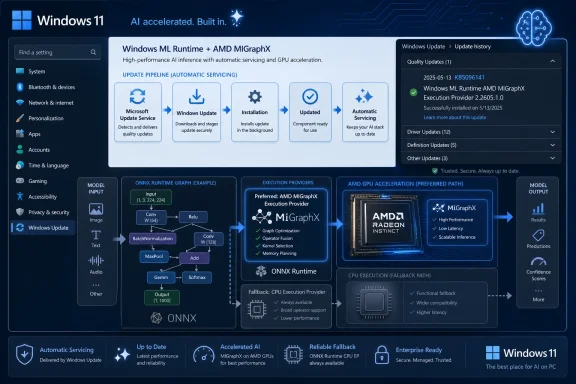
The check path Microsoft gives is Settings, Windows Update, Update history. After installation, the update should appear in the device’s update history as the Windows ML Runtime AMD MIGraphX Execution Provider entry associated with KB5096141. That is simple enough for an individual PC, but less satisfying for organizations that need fleet reporting and change control.
The bigger question is how enterprises will classify these packages. Are they driver-adjacent? App runtime updates? Windows components? AI feature enablement? Security-neutral performance fixes? Microsoft’s support note presents KB5096141 as an improvement release, not a security bulletin. But in operational terms, anything that changes how local models execute can affect reliability, power behavior, and application output.
This is where Windows Update’s convenience becomes a governance issue. The same mechanism that keeps consumers current can make it harder for IT teams to draw a bright line around the AI stack.
Developers Get a Cleaner Target, With More Moving Parts Beneath It
For developers, the promise of Windows ML and ONNX Runtime is attractive. Build around a common model format, select or register execution providers, and let the platform choose the best available hardware path. In theory, that means less vendor-specific code and better reach across the Windows PC ecosystem.KB5096141 is part of making that theory workable. Execution providers need to be updated as vendors improve operator coverage, fix bugs, tune graph partitioning, and adapt to driver changes. If every app had to bundle its own AMD inference stack, Windows AI would quickly become the same fragmented mess that PC multimedia once was.
A Windows-serviced provider catalog offers a better answer. Developers can rely on a shared runtime component, and Microsoft can update the acceleration layer without waiting for every app developer to ship a new package. That matters for small developers especially, because few have the resources to validate every GPU vendor’s machine-learning stack independently.
The tradeoff is that app behavior can change outside the app’s own update cycle. A model that previously fell back to CPU for a particular operation might begin using the AMD GPU after an execution provider update. That could improve latency, but it could also expose precision differences, memory pressure, or a latent bug in an app that assumed a slower path.
This is not a reason to avoid the model. It is a reason to test like the runtime is alive, because it is. Windows AI development is moving toward a world where the OS, the provider, the driver, and the model all evolve on overlapping schedules.
The Support Note Says Little Because the Strategy Says Plenty
Microsoft’s support article for KB5096141 is terse, almost aggressively so. It explains what MIGraphX is, identifies the target Windows version, states the cumulative update requirement, and tells users where to confirm installation. There are no detailed release notes, no operator-level changelog, no known issues table, and no performance claims.That minimalism is both normal and frustrating. Normal, because Windows Update component packages often get short KB entries. Frustrating, because AI execution behavior is exactly the kind of area where developers and administrators benefit from specificity. If the update changes model compatibility or fixes a crash in a particular graph pattern, that information would help the people most likely to notice.
The absence of detail also reflects how new this servicing category still feels. Microsoft has decades of muscle memory around documenting security updates, cumulative updates, and driver packages. AI execution providers sit in a less familiar space. They are runtime components, vendor integrations, performance enablers, and compatibility surfaces all at once.
For enthusiasts, the lack of a changelog invites speculation. For IT pros, it invites caution. For developers, it means the only reliable answer may be to test the workloads that matter and compare behavior before and after the package lands.
Microsoft can get away with sparse notes while the affected audience is small. As more Windows features and third-party apps depend on local inference, that will become harder. AI runtime updates need documentation that respects the fact that they can change real application behavior, not just satisfy an internal servicing checklist.
Local AI Is Becoming Less Optional Than It Looks
One reason KB5096141 deserves attention is that it hints at a future where local AI capability is not something users explicitly install. It arrives as part of the operating system. It updates through the same pipeline as other Windows components. It is available to apps that know how to ask for it.That is a strategic reversal from the early era of PC AI demos, where each application brought its own runtime baggage. Those bundles were predictable for the app vendor but wasteful for the platform. Multiple apps could ship multiple versions of the same inference libraries, each with its own bugs and update cadence.
Microsoft’s approach is more platform-centric. Put ONNX Runtime and Windows ML in the middle, expose execution providers for hardware acceleration, and service the pieces centrally. That reduces duplication and gives Windows a stronger role in deciding how AI workloads consume local compute.
For users, this should eventually mean smaller apps, better battery life, and more consistent acceleration across hardware. For Microsoft, it means Windows becomes the broker for on-device AI at exactly the moment when cloud inference costs and privacy concerns are pushing more workloads back to the client.
The risk is that local AI becomes another opaque subsystem. Users may notice fans spinning, battery estimates falling, or an app behaving differently, without any obvious way to see which model ran where. Windows has tools for CPU, GPU, disk, and network visibility. It does not yet have an equally mature user-facing story for AI workload observability.
The AMD Update Is Also a Windows Update Story
It is tempting to read KB5096141 as an AMD note, but Microsoft is the main actor in the delivery story. The package is published through Microsoft Support, installed through Windows Update, and scoped to a Windows platform version. AMD supplies the underlying technology; Microsoft controls the mainstream Windows distribution channel.That matters because Windows Update has historically been both a stabilizer and a source of anxiety for GPU-related components. Users remember driver replacements they did not ask for. Administrators remember vendor packages arriving through channels that were hard to align with internal validation. Gamers remember the difference between a tuned vendor release and a generic update path.
Execution providers are not the same as full GPU drivers, but they touch the same nervous system: hardware acceleration. If Microsoft wants these updates to be trusted, it needs to make their boundaries clear. Users should understand that KB5096141 updates the machine-learning execution layer, not the entire AMD graphics stack.
This distinction could become more important as Windows AI components multiply. A future update history page may show several provider packages across CPU, GPU, and NPU vendors. Without clear naming and documentation, that list will become another graveyard of cryptic servicing entries.
KB5096141 at least uses a descriptive label: Windows ML Runtime AMD MIGraphX Execution Provider. That is not exactly consumer poetry, but it is better than a nameless component update. The more AI moves into Windows servicing, the more these names will matter.
Enterprise IT Will Treat AI Acceleration Like a Change-Control Problem
For managed environments, the immediate impact of KB5096141 is probably limited. It applies to Windows 11 version 26H1 devices with the current cumulative update, and only matters where AMD GPU acceleration for Windows ML workloads is relevant. Many fleets will not see it yet, or will see it only on new hardware cohorts.The long-term pattern is more consequential. AI acceleration components are joining the list of Windows elements that can change underneath business applications. That means IT teams will eventually need testing rings for AI runtime updates, just as they already use rings for cumulative updates, browser changes, Office builds, and graphics drivers.
The challenge is that AI failures are not always clean crashes. They can appear as slower inference, higher power draw, different model outputs, missing acceleration, or a feature silently falling back to CPU. Those symptoms are harder to capture in conventional patch validation.
Organizations using local AI for sensitive workflows will also care about determinism. If a model’s output changes after an execution provider update, even for legitimate optimization reasons, someone may need to explain why. This is especially true in regulated environments where local inference is attractive precisely because data does not leave the device.
That does not make Windows-serviced execution providers a bad idea. It makes them an operational reality. The lesson for IT is to start treating the AI runtime as part of the managed endpoint, not as developer trivia.
The Consumer Benefit Is Real, Even If the Branding Is Invisible
Most Windows users do not care which execution provider accelerates which operator. They care whether features are fast, private, responsive, and battery-friendly. If KB5096141 improves the AMD path for supported workloads, the best outcome is that users never notice the package itself.That invisibility is the point of a platform runtime. A photo app should not need to explain whether it is using MIGraphX, DirectML, or CPU fallback. A writing assistant should not require the user to pick a backend. A system feature should simply use the best available local compute without turning settings into a hardware seminar.
The hard part is that invisible improvements are easy to undersell. A small update history entry does not convey the platform work behind local AI acceleration. It also does not help users understand why keeping Windows current might matter for features that are not obviously part of the operating system.
Microsoft’s Copilot+ push has sometimes made AI on Windows feel like a branding exercise tied to specific hardware badges. Execution provider updates are less glamorous but more foundational. They are how the promise becomes maintainable after launch day.
For AMD users, this is the kind of update that may matter most over time. Not a headline feature, not a dramatic UI change, but steady improvements in the layer that lets Windows and apps use the hardware already inside the machine.
The Small KB That Shows Where Windows Is Headed
KB5096141 is narrow, but it points to several concrete realities Windows users and administrators should internalize as Microsoft keeps moving AI into the operating system.- KB5096141 updates the AMD MIGraphX Execution Provider to version 2.2605.1.0 for Windows 11 version 26H1 systems that already have the latest cumulative update installed.
- The update is delivered automatically through Windows Update, which makes the AMD inference provider part of the normal Windows servicing stream rather than a separate app bundle.
- The component helps ONNX Runtime and Windows machine-learning workloads offload supported model operations to AMD GPUs, while unsupported work may still use other execution paths.
- The update can be confirmed in Windows Update history, where it should appear as the Windows ML Runtime AMD MIGraphX Execution Provider package associated with KB5096141.
- Developers and IT teams should treat execution provider versions as part of the AI application environment, because runtime changes can affect acceleration, fallback behavior, and workload validation.
- The sparse support note leaves performance and compatibility details unstated, so meaningful assurance still depends on testing real models and real applications on affected hardware.
References
- Primary source: Microsoft Support
Published: Tue, 26 May 2026 21:03:06 Z
- Official source: learn.microsoft.com
Windows ML execution providers
Learn which ONNX Runtime execution providers are available in Windows ML for accelerating local AI models across Windows PCs, and see their release history.learn.microsoft.com - Related coverage: onnxruntime.ai
AMD - MIGraphX
Instructions to execute ONNX Runtime with the AMD MIGraphX execution provideronnxruntime.ai
- Related coverage: windowsforum.com
KB5083465 Updates AMD MIGraphX on Windows 11 26H1 via Windows Update
Microsoft has quietly added another AI servicing package to Windows 11’s growing stack of component updates, and this one is aimed squarely at AMD-powered systems running Windows 11 version 26H1. The new package, KB5083465, updates the AMD MIGraphX Execution Provider to version 2.2603.1.0 and is... windowsforum.com
- Related coverage: shalvamist.github.io
AMD - MIGraphX
Instructions to execute ONNX Runtime with the AMD MIGraphX execution providershalvamist.github.io
- Related coverage: windowscentral.com
Windows 11 version 26H1: Everything you need to know about Microsoft's special OS release now shipping on new hardware | Windows Central
Microsoft has confirmed that Windows 11 version 26H1 is now shipping exclusively on new PCs that ship with Qualcomm's new Snapdragon X2 SoC. Here's what you need to know.www.windowscentral.com