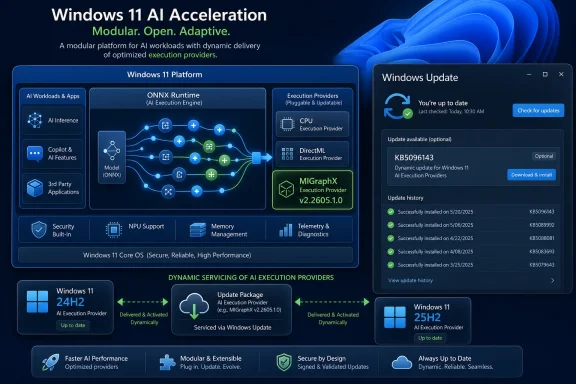
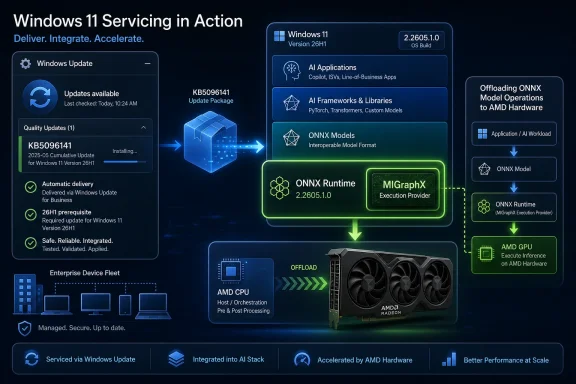
Microsoft has published KB5096141, an automatic Windows Update package that updates the AMD MIGraphX Execution Provider to version 2.2605.1.0 for Windows 11 version 26H1 devices with the latest cumulative update installed. The dry support note looks minor, but the delivery mechanism is the real story. Microsoft is turning AI acceleration into a serviced Windows component, not an app-by-app dependency or a driver-only concern. For AMD users, developers, and administrators, that means the local AI stack is becoming part of the monthly Windows maintenance surface.

Windows 11 infographic showing automated servicing and AMD MiGraphX AI GPU acceleration.Microsoft Moves the AI Runtime Into the Patch Stream​

KB5096141 is not a conventional Windows feature update, and it is not a Radeon driver release wearing a Microsoft badge. It targets a specific execution provider: AMD’s MIGraphX layer for ONNX Runtime and Windows machine-learning workloads. In plain terms, it helps supported ONNX models run on AMD GPU hardware instead of falling back entirely to the CPU or a more generic execution path.
That distinction matters because Windows is no longer treating local AI acceleration as a novelty bolted onto a few showcase features. Execution providers are becoming plumbing. They sit between models and hardware, decide what can run where, and make the difference between an AI feature that feels instant and one that quietly burns CPU cycles in the background.
The support article says the update includes improvements to the MIGraphX Execution Provider AI component for Windows 11 version 26H1. It also says the package is downloaded and installed automatically through Windows Update, provided the device already has the latest cumulative update for 26H1. There is no manual installer story here, no developer download page as the primary route, and no “go find the right DLL” dance.
That is Microsoft’s broader Windows AI strategy in miniature. The company wants Windows to own the AI runtime layer the same way it owns graphics composition, audio routing, and security servicing. Hardware vendors still supply the acceleration technology, but Windows Update becomes the distribution channel that keeps the abstraction layer current.

The Execution Provider Is the New Driver Boundary​

For years, PC users understood acceleration through the language of drivers. If a game stuttered, you updated the GPU driver. If video encoding broke, you checked the driver branch. If a CAD app crashed, the ISV and GPU vendor argued over whose certification matrix had gone stale.
AI workloads complicate that model. A local model does not merely need a display driver; it needs a runtime, graph optimizer, operator support, memory behavior, and a policy for falling back when the hardware cannot run a given operation. ONNX Runtime’s execution provider model exists precisely because “GPU acceleration” is not one thing. It is a negotiation between model structure and hardware capability.
MIGraphX is AMD’s graph inference engine, and the Windows execution provider built around it lets ONNX Runtime and Windows ML offload supported operations to AMD GPUs. Unsupported operations can still run elsewhere, which is both the strength and the administrative headache of the model. A workload may appear to “support AMD acceleration” while only part of its graph is actually running through MIGraphX.
That is why KB5096141 is more interesting than its short description suggests. Microsoft is not merely updating a binary. It is reinforcing a boundary where Windows, ONNX Runtime, AMD’s inference stack, and app developers all meet. When that boundary changes, performance can improve, compatibility can expand, and troubleshooting can become more subtle.
For administrators, this means AI acceleration is becoming something to inventory. The relevant question is no longer just “Which GPU driver is installed?” It is also “Which execution provider version is present, which Windows ML package is being used, and which cumulative update baseline is required?”

Windows 11 26H1 Makes the Update Look Smaller Than It Is​

The 26H1 label is easy to glide past, but it gives the update a sharper edge. Windows 11 version 26H1 is not simply another broad feature update washing over every existing PC at once. It is part of Microsoft’s increasingly hardware-aware Windows cadence, where platform releases can exist to support new silicon and specific device classes before the rest of the ecosystem catches up.
That makes KB5096141 feel like an early signal from the next Windows maintenance era. Microsoft is servicing AI components against a platform release that will not necessarily describe the average enthusiast desktop today. Yet the execution provider architecture spans Windows 11 24H2 and later in Microsoft’s broader documentation, and the same servicing logic is clearly meant to scale across Intel, AMD, Qualcomm, and NVIDIA paths.
The support note’s prerequisite is blunt: the device must have the latest cumulative update for Windows 11 version 26H1 installed. That dependency tells us Microsoft does not want execution provider updates floating independently of the OS baseline. The AI component may be modular, but it still expects the host platform to be current.
This is familiar to anyone who has managed Windows at scale. Microsoft modularizes a component, then ties its supportability to a serviced platform floor. The benefit is consistency. The cost is that organizations trying to freeze parts of the stack may find fewer clean seams than they expected.
The practical upshot is that AI components are likely to follow the same gravity as other Windows-serviced infrastructure. If you want the newest acceleration layer, you stay current. If you defer cumulative updates, you may also defer the AI runtime improvements that depend on them.

AMD Gets a Seat in Windows AI, But Not the Whole Table​

The AMD angle is important, but it should not be overstated. KB5096141 updates the MIGraphX Execution Provider, which is tied to AMD GPU acceleration for ONNX model inference. It does not magically turn every Ryzen or Radeon system into a Copilot+ showcase, and it does not replace other AMD AI paths such as Vitis AI or Ryzen AI NPU tooling.
Microsoft’s execution provider list is deliberately plural. Windows ML can work with CPU and DirectML paths, and dynamically available providers cover silicon-specific stacks from multiple vendors. AMD’s MIGraphX sits alongside NVIDIA TensorRT-RTX, Intel OpenVINO, Qualcomm QNN, and AMD’s own Vitis AI in the broader Windows AI picture.
That crowded field is not an accident. Microsoft wants developers to target Windows ML and ONNX Runtime instead of hand-coding hardware paths for every vendor. The execution provider becomes the vendor-specific optimization layer beneath a more stable app-facing interface.
For AMD, MIGraphX gives Windows a way to use GPU hardware more directly for supported ONNX inference workloads. That is especially relevant as AI features creep into creative tools, productivity apps, photo editors, developer utilities, and system experiences. A GPU that once existed mainly for rendering frames is now expected to help classify, generate, summarize, upscale, detect, and transform.
Still, there is a reason Microsoft’s documentation keeps using careful language like “supported operations.” Execution providers are not universal translators. They accelerate what they know how to accelerate, on hardware and driver combinations that meet requirements, under runtime rules that can change with each release.

Automatic Installation Solves One Problem and Creates Another​

Automatic delivery through Windows Update is the sane consumer choice. Most users will never know what MIGraphX is, and they should not need to. If Windows and apps can make better use of AMD hardware after a background update, that is exactly the kind of invisible maintenance a modern operating system is supposed to provide.
But automatic installation also makes the component part of the trust chain administrators must watch. A GPU driver update is visible and often controlled by policy. A Windows cumulative update is visible and heavily tracked. A small AI execution provider package can sit somewhere between those categories, close enough to application behavior to matter but low-level enough to be missed in casual review.
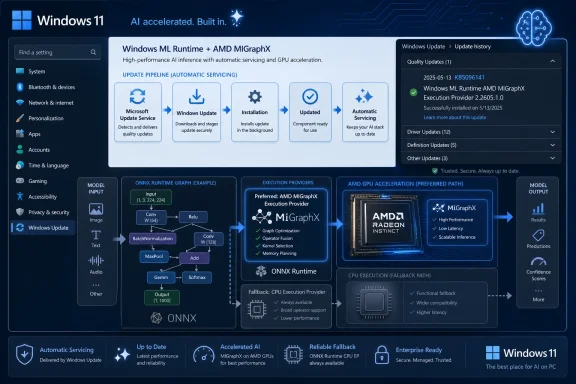
The check path Microsoft gives is Settings, Windows Update, Update history. After installation, the update should appear in the device’s update history as the Windows ML Runtime AMD MIGraphX Execution Provider entry associated with KB5096141. That is simple enough for an individual PC, but less satisfying for organizations that need fleet reporting and change control.
The bigger question is how enterprises will classify these packages. Are they driver-adjacent? App runtime updates? Windows components? AI feature enablement? Security-neutral performance fixes? Microsoft’s support note presents KB5096141 as an improvement release, not a security bulletin. But in operational terms, anything that changes how local models execute can affect reliability, power behavior, and application output.
This is where Windows Update’s convenience becomes a governance issue. The same mechanism that keeps consumers current can make it harder for IT teams to draw a bright line around the AI stack.

Developers Get a Cleaner Target, With More Moving Parts Beneath It​

For developers, the promise of Windows ML and ONNX Runtime is attractive. Build around a common model format, select or register execution providers, and let the platform choose the best available hardware path. In theory, that means less vendor-specific code and better reach across the Windows PC ecosystem.
KB5096141 is part of making that theory workable. Execution providers need to be updated as vendors improve operator coverage, fix bugs, tune graph partitioning, and adapt to driver changes. If every app had to bundle its own AMD inference stack, Windows AI would quickly become the same fragmented mess that PC multimedia once was.
A Windows-serviced provider catalog offers a better answer. Developers can rely on a shared runtime component, and Microsoft can update the acceleration layer without waiting for every app developer to ship a new package. That matters for small developers especially, because few have the resources to validate every GPU vendor’s machine-learning stack independently.
The tradeoff is that app behavior can change outside the app’s own update cycle. A model that previously fell back to CPU for a particular operation might begin using the AMD GPU after an execution provider update. That could improve latency, but it could also expose precision differences, memory pressure, or a latent bug in an app that assumed a slower path.
This is not a reason to avoid the model. It is a reason to test like the runtime is alive, because it is. Windows AI development is moving toward a world where the OS, the provider, the driver, and the model all evolve on overlapping schedules.

The Support Note Says Little Because the Strategy Says Plenty​

Microsoft’s support article for KB5096141 is terse, almost aggressively so. It explains what MIGraphX is, identifies the target Windows version, states the cumulative update requirement, and tells users where to confirm installation. There are no detailed release notes, no operator-level changelog, no known issues table, and no performance claims.
That minimalism is both normal and frustrating. Normal, because Windows Update component packages often get short KB entries. Frustrating, because AI execution behavior is exactly the kind of area where developers and administrators benefit from specificity. If the update changes model compatibility or fixes a crash in a particular graph pattern, that information would help the people most likely to notice.
The absence of detail also reflects how new this servicing category still feels. Microsoft has decades of muscle memory around documenting security updates, cumulative updates, and driver packages. AI execution providers sit in a less familiar space. They are runtime components, vendor integrations, performance enablers, and compatibility surfaces all at once.
For enthusiasts, the lack of a changelog invites speculation. For IT pros, it invites caution. For developers, it means the only reliable answer may be to test the workloads that matter and compare behavior before and after the package lands.
Microsoft can get away with sparse notes while the affected audience is small. As more Windows features and third-party apps depend on local inference, that will become harder. AI runtime updates need documentation that respects the fact that they can change real application behavior, not just satisfy an internal servicing checklist.

Local AI Is Becoming Less Optional Than It Looks​

One reason KB5096141 deserves attention is that it hints at a future where local AI capability is not something users explicitly install. It arrives as part of the operating system. It updates through the same pipeline as other Windows components. It is available to apps that know how to ask for it.
That is a strategic reversal from the early era of PC AI demos, where each application brought its own runtime baggage. Those bundles were predictable for the app vendor but wasteful for the platform. Multiple apps could ship multiple versions of the same inference libraries, each with its own bugs and update cadence.
Microsoft’s approach is more platform-centric. Put ONNX Runtime and Windows ML in the middle, expose execution providers for hardware acceleration, and service the pieces centrally. That reduces duplication and gives Windows a stronger role in deciding how AI workloads consume local compute.
For users, this should eventually mean smaller apps, better battery life, and more consistent acceleration across hardware. For Microsoft, it means Windows becomes the broker for on-device AI at exactly the moment when cloud inference costs and privacy concerns are pushing more workloads back to the client.
The risk is that local AI becomes another opaque subsystem. Users may notice fans spinning, battery estimates falling, or an app behaving differently, without any obvious way to see which model ran where. Windows has tools for CPU, GPU, disk, and network visibility. It does not yet have an equally mature user-facing story for AI workload observability.

The AMD Update Is Also a Windows Update Story​

It is tempting to read KB5096141 as an AMD note, but Microsoft is the main actor in the delivery story. The package is published through Microsoft Support, installed through Windows Update, and scoped to a Windows platform version. AMD supplies the underlying technology; Microsoft controls the mainstream Windows distribution channel.
That matters because Windows Update has historically been both a stabilizer and a source of anxiety for GPU-related components. Users remember driver replacements they did not ask for. Administrators remember vendor packages arriving through channels that were hard to align with internal validation. Gamers remember the difference between a tuned vendor release and a generic update path.
Execution providers are not the same as full GPU drivers, but they touch the same nervous system: hardware acceleration. If Microsoft wants these updates to be trusted, it needs to make their boundaries clear. Users should understand that KB5096141 updates the machine-learning execution layer, not the entire AMD graphics stack.
This distinction could become more important as Windows AI components multiply. A future update history page may show several provider packages across CPU, GPU, and NPU vendors. Without clear naming and documentation, that list will become another graveyard of cryptic servicing entries.
KB5096141 at least uses a descriptive label: Windows ML Runtime AMD MIGraphX Execution Provider. That is not exactly consumer poetry, but it is better than a nameless component update. The more AI moves into Windows servicing, the more these names will matter.

Enterprise IT Will Treat AI Acceleration Like a Change-Control Problem​

For managed environments, the immediate impact of KB5096141 is probably limited. It applies to Windows 11 version 26H1 devices with the current cumulative update, and only matters where AMD GPU acceleration for Windows ML workloads is relevant. Many fleets will not see it yet, or will see it only on new hardware cohorts.
The long-term pattern is more consequential. AI acceleration components are joining the list of Windows elements that can change underneath business applications. That means IT teams will eventually need testing rings for AI runtime updates, just as they already use rings for cumulative updates, browser changes, Office builds, and graphics drivers.
The challenge is that AI failures are not always clean crashes. They can appear as slower inference, higher power draw, different model outputs, missing acceleration, or a feature silently falling back to CPU. Those symptoms are harder to capture in conventional patch validation.
Organizations using local AI for sensitive workflows will also care about determinism. If a model’s output changes after an execution provider update, even for legitimate optimization reasons, someone may need to explain why. This is especially true in regulated environments where local inference is attractive precisely because data does not leave the device.
That does not make Windows-serviced execution providers a bad idea. It makes them an operational reality. The lesson for IT is to start treating the AI runtime as part of the managed endpoint, not as developer trivia.

The Consumer Benefit Is Real, Even If the Branding Is Invisible​

Most Windows users do not care which execution provider accelerates which operator. They care whether features are fast, private, responsive, and battery-friendly. If KB5096141 improves the AMD path for supported workloads, the best outcome is that users never notice the package itself.
That invisibility is the point of a platform runtime. A photo app should not need to explain whether it is using MIGraphX, DirectML, or CPU fallback. A writing assistant should not require the user to pick a backend. A system feature should simply use the best available local compute without turning settings into a hardware seminar.
The hard part is that invisible improvements are easy to undersell. A small update history entry does not convey the platform work behind local AI acceleration. It also does not help users understand why keeping Windows current might matter for features that are not obviously part of the operating system.
Microsoft’s Copilot+ push has sometimes made AI on Windows feel like a branding exercise tied to specific hardware badges. Execution provider updates are less glamorous but more foundational. They are how the promise becomes maintainable after launch day.
For AMD users, this is the kind of update that may matter most over time. Not a headline feature, not a dramatic UI change, but steady improvements in the layer that lets Windows and apps use the hardware already inside the machine.
The Small KB That Shows Where Windows Is Headed​

KB5096141 is narrow, but it points to several concrete realities Windows users and administrators should internalize as Microsoft keeps moving AI into the operating system.
  • KB5096141 updates the AMD MIGraphX Execution Provider to version 2.2605.1.0 for Windows 11 version 26H1 systems that already have the latest cumulative update installed.
  • The update is delivered automatically through Windows Update, which makes the AMD inference provider part of the normal Windows servicing stream rather than a separate app bundle.
  • The component helps ONNX Runtime and Windows machine-learning workloads offload supported model operations to AMD GPUs, while unsupported work may still use other execution paths.
  • The update can be confirmed in Windows Update history, where it should appear as the Windows ML Runtime AMD MIGraphX Execution Provider package associated with KB5096141.
  • Developers and IT teams should treat execution provider versions as part of the AI application environment, because runtime changes can affect acceleration, fallback behavior, and workload validation.
  • The sparse support note leaves performance and compatibility details unstated, so meaningful assurance still depends on testing real models and real applications on affected hardware.
The larger story is that Windows AI is becoming infrastructure, and infrastructure gets patched. KB5096141 may look like a small AMD component update for a narrow Windows 11 release, but it is another brick in Microsoft’s attempt to make local inference a serviced, hardware-aware layer of the OS. The next phase of Windows competition will not be decided only by who has the flashiest AI demo; it will be decided by who can keep the runtime current, compatible, observable, and boring enough that users trust it without needing to know its name.

References​

  1. Primary source: Microsoft Support
    Published: Tue, 26 May 2026 21:03:06 Z
  2. Official source: learn.microsoft.com
  3. Related coverage: onnxruntime.ai
  4. Related coverage: windowsforum.com
  5. Related coverage: shalvamist.github.io
  6. Related coverage: windowscentral.com
 

Microsoft has published KB5096138, an automatic Windows Update package for Windows 11 version 26H1 that updates the Intel OpenVINO Execution Provider to version 2.2605.1.0, provided the device already has the latest cumulative update installed before the AI component is offered.
That sentence is dry because the update itself is dry. But the bigger story is not a single Intel runtime bump; it is Microsoft quietly turning Windows Update into the delivery mechanism for the AI acceleration layer that applications will increasingly depend on. KB5096138 is another small brick in a much larger wall: Windows is being rebuilt so local AI performance can be serviced like graphics drivers, language models, and security components rather than bundled once a year inside a monolithic OS release.

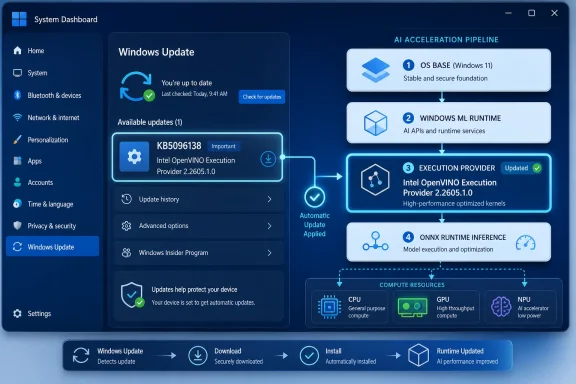
Windows System Dashboard shows Windows Update progress and an AI acceleration pipeline from OS to runtime.Microsoft Is Servicing AI Like a System Component Because That Is What It Has Become​

For decades, Windows administrators understood the rough categories of updates. There were cumulative updates for the operating system, drivers for hardware, Store updates for apps, and occasional framework updates for things like .NET or Visual C++ redistributables. KB5096138 sits in a newer category that does not fit neatly into any of those older mental boxes.
The Intel OpenVINO Execution Provider is not an app feature. It is not a user-facing Copilot button. It is an execution layer used by ONNX Runtime and Windows machine-learning workloads to route inference jobs onto Intel CPUs, GPUs, and NPUs. In plainer language, it helps Windows and Windows apps run supported AI models locally on Intel hardware without every developer having to hand-code separate acceleration paths for every chip generation.
That makes this update more important than its short support article suggests. Microsoft is not merely pushing a patch for an optional developer library. It is maintaining part of the substrate that determines whether AI features on Intel-powered PCs are fast, power-efficient, and predictable.
The package targets Windows 11 version 26H1, and Microsoft says it downloads and installs automatically through Windows Update. Users can confirm its presence in Settings under Windows Update and Update history, where it should appear as the Windows ML Runtime Intel OpenVINO Execution Provider update for KB5096138.
The prerequisite matters. Microsoft says the latest cumulative update for Windows 11 version 26H1 must already be installed. That is the tell: this AI component is being serviced in lockstep with the OS baseline, not thrown over the wall as a free-floating vendor utility.

The Execution Provider Is the New Driver, Even If Windows Does Not Call It That​

The phrase execution provider sounds like something invented to keep normal people away from a settings page. But the idea is straightforward. ONNX Runtime can run machine-learning models, and execution providers tell it how to use specific hardware back ends efficiently.
A model might be portable, but hardware is not. Intel’s CPUs, integrated GPUs, Arc graphics, and NPUs all have different capabilities, memory behavior, driver dependencies, and optimization paths. The execution provider is the translation and scheduling layer that lets a developer target a standard model format while still getting acceleration from the hardware underneath.
That is why KB5096138 should be read less like a conventional feature update and more like a runtime or driver servicing event. A graphics driver update may not change the Windows desktop, but it can alter game performance, media acceleration, power draw, and application compatibility. An AI execution-provider update can do the same for local inference workloads.
The difference is visibility. When a GPU driver misbehaves, users often know where to look. When an execution provider causes an AI feature to fall back to CPU execution, perform worse than expected, or fail compatibility checks, the trail is murkier. It may appear as a slow app, an unavailable feature, or a mysterious dependency mismatch.
Microsoft’s answer is to move this class of component into a Windows-managed update path. That reduces the burden on app developers and avoids asking consumers to install separate AI acceleration bundles. It also places Microsoft in the middle of a delicate triangle involving silicon vendors, app developers, and administrators who now have to treat AI runtimes as part of the managed endpoint.

Windows ML Turns Vendor Optimization Into a Platform Contract​

Windows ML is Microsoft’s attempt to make local AI on Windows less chaotic. The pitch is simple: developers bring ONNX models, Windows ML supplies the runtime plumbing, and silicon vendors provide certified execution providers that can be discovered, downloaded, and updated through Windows-managed mechanisms.
That matters because the Windows hardware ecosystem is fragmented by design. A Windows 11 fleet might include Intel Core Ultra systems with NPUs, older Intel systems with capable GPUs but no NPU, AMD Ryzen AI machines, Qualcomm Snapdragon X devices, workstations with discrete GPUs, and virtual desktops with no useful local acceleration at all. Without a platform abstraction, every serious AI app becomes a matrix of vendor SDKs, driver versions, model formats, and fallback behavior.
The OpenVINO Execution Provider is Intel’s entry in that abstraction layer. It brings Intel’s OpenVINO optimization stack into the Windows ML world so apps can use Intel hardware acceleration through standard Windows and ONNX Runtime pathways. For developers, the selling point is less code and fewer deployment headaches. For users, the promise is that AI features run faster and closer to the device instead of being shipped to a cloud endpoint by default.
But the trade-off is that more intelligence moves into components most users never see. An app’s AI feature may depend on an OS runtime, a vendor execution provider, a model package, a driver, firmware, and a minimum Windows build. KB5096138 is one of those pieces, and its automatic delivery is Microsoft’s way of keeping the stack from calcifying.
The practical result is a Windows platform that updates AI capability in layers. The OS gets cumulative updates. AI models get their own packages. Execution providers get their own KBs. Drivers still matter. Store-delivered apps evolve on a separate cadence. That is powerful, but it also makes Windows servicing harder to explain and harder to audit.

The 26H1 Target Makes This More Than a Routine Intel Patch​

KB5096138 is specifically described as an update for Windows 11 version 26H1. That detail gives the package a narrower audience than a generic Windows 11 update and makes it more interesting for enthusiasts watching Microsoft’s release strategy.
Windows 11 26H1 is not just another broad feature update in the traditional sense. The 26H1 branch has been associated with newer hardware enablement and the continuing evolution of Microsoft’s AI PC strategy, while mainstream Windows 11 servicing remains heavily shaped by the 24H2 and 25H2 baseline for much of the installed base. In that context, a 26H1-only AI component update is a signal about where Microsoft is putting the earliest platform work.
That does not mean every Windows user should expect to see KB5096138. Most users should not go hunting for it if they are not on Windows 11 version 26H1. The support text is explicit about the target version and the cumulative-update prerequisite. If the machine is not eligible, Windows Update should not offer it.
For WindowsForum readers, the more useful interpretation is architectural. Microsoft is validating and servicing AI acceleration components per Windows release line, not treating all Windows 11 builds as interchangeable. That is sensible from an engineering perspective, because the AI stack depends on kernel, driver, runtime, and security boundaries that may differ across releases. It is also another reason the Windows version number now matters more than Microsoft’s marketing sometimes suggests.
The version number of the component, 2.2605.1.0, also follows the cadence pattern visible across recent AI component releases. Microsoft has been publishing a stream of Windows AI component updates, including execution providers and model-related packages, with versions that appear tied to calendarized development waves. KB5096138 continues that rhythm for Intel’s OpenVINO provider.

Automatic Installation Is Convenient Until You Have to Explain It​

Microsoft says KB5096138 will be downloaded and installed automatically from Windows Update. For consumers, that is the right default. Nobody should need to know what OpenVINO is before their video editor, photo app, security tool, or future local assistant can use Intel acceleration properly.
For enterprise IT, automatic installation is both a blessing and a governance problem. If AI acceleration is part of the application platform, delaying it may create compatibility and support issues. If it is updated automatically, administrators need visibility into what changed, which devices received it, and whether any regulated workloads are affected.
The support article’s brevity is therefore a little unsatisfying. “Improvements” to the OpenVINO Execution Provider AI component may be accurate, but it does not tell administrators whether the package includes performance tuning, expanded hardware support, reliability fixes, security hardening, compatibility changes, or all of the above. That is not unusual for component updates, but AI runtimes deserve better release notes as they become operationally significant.
In a managed environment, the question is not simply whether KB5096138 installs. The question is whether the fleet has a reproducible AI runtime state. Two laptops with the same app and the same model may behave differently if one has a newer execution provider, a different Intel driver, or a cumulative update that changes the Windows ML layer.
That does not mean administrators should block these updates by reflex. It means they should start treating AI components as part of endpoint configuration management. Update history is the user-visible breadcrumb, but inventory tooling, compliance baselines, and troubleshooting scripts will need to catch up.

Intel Gets a First-Class Lane in Microsoft’s Local AI Roadmap​

Intel has a lot riding on this. The company’s AI PC pitch depends not only on putting NPUs into Core Ultra processors but also on making those accelerators useful to ordinary Windows software. Hardware without a dependable software path becomes a benchmark curiosity.
OpenVINO gives Intel a mature toolkit for optimizing and deploying models across its hardware portfolio. Windows ML gives Intel a distribution and integration point inside the Windows ecosystem. The OpenVINO Execution Provider is where those strategies meet.
That is why these KB updates matter even if they do not announce glamorous features. If Microsoft and Intel can keep the execution provider current through Windows Update, developers gain confidence that supported systems will have the right plumbing. That lowers the adoption barrier for apps that want to run local inference without bundling vendor-specific runtimes.
It also lets Intel compete at the platform layer rather than only on raw TOPS figures. The AI PC market has been drowning in performance claims, but developers care about the path from model to shipped feature. If the Windows ML stack makes Intel acceleration easy to use, update, and validate, Intel gains leverage that is not captured by a spec-sheet comparison.
The risk for Intel is that this layer becomes invisible when it works and infamous when it fails. Users will not praise the execution provider when a feature runs smoothly. They will blame Windows, Intel, or the app when it does not. That makes reliability and transparent servicing essential.

The Real Customer Is the Developer Who Does Not Want to Become a Silicon Expert​

The most important audience for KB5096138 may never read the KB article. It is the developer building a Windows app with an ONNX model who wants local inference to work across real hardware.
Before this new stack, the developer’s choices were awkward. They could run on CPU and accept mediocre performance. They could integrate vendor SDKs directly and inherit a support matrix. They could rely on DirectML for broad GPU acceleration where appropriate. Or they could push inference to the cloud and pay the latency, privacy, and operating-cost price.
Windows ML and execution-provider distribution are meant to make the local path less painful. A developer can ask Windows what providers are available, acquire supported providers, and run through ONNX Runtime with hardware-specific acceleration handled below the app layer. That is the right direction if Microsoft wants Windows to be a serious client AI platform rather than a collection of demos.
KB5096138, then, is a maintenance event for developer trust. Every time Microsoft updates the provider without breaking apps, the abstraction becomes more credible. Every time a provider update improves compatibility with a new Intel device or fixes a performance edge case, the developer has one fewer reason to ship a cloud-only feature.
The catch is that abstractions leak. Model operators may not be supported equally across providers. Quantization choices can affect accuracy and performance. NPUs may be ideal for some workloads and poor fits for others. A developer still needs telemetry, fallback paths, and a clear understanding of where the model actually runs.
Microsoft can hide the installation complexity. It cannot repeal the physics of heterogeneous computing.

Users Will Experience This as Faster Apps, Missing Toggles, or Nothing at All​

Most Windows 11 users will never knowingly interact with the Intel OpenVINO Execution Provider. That is by design. The component exists so AI workloads can find the best available Intel acceleration path without forcing the user into configuration screens.
When it works, the user experience is boring in the best possible way. A background blur is smoother. A photo feature processes locally. A transcription or indexing task consumes less power. A security product can classify suspicious content on-device. The user sees an application feature, not the runtime stack underneath it.
When it does not work, the symptoms may be vague. An app may fall back to CPU execution. A feature may be disabled because the required provider is unavailable. Performance may differ between two machines that look similar on paper. Battery life may suffer if a workload runs on the wrong processor block.
That is why the Update history check is useful but limited. Seeing KB5096138 confirms that the component was installed. It does not prove that a given application is using it, that the latest Intel driver is present, or that a particular model maps efficiently to the NPU or GPU. It is one piece of a chain.
For enthusiasts, this creates a new troubleshooting frontier. Device Manager, Windows Update history, app logs, ONNX Runtime provider lists, Intel driver versions, and Windows build numbers all become relevant. The AI PC era is not going to reduce the number of things power users can argue about.

Security and Privacy Are Part of the Same Story​

Local AI is often sold as a privacy win, and sometimes it is. If a model runs on-device, data may not need to leave the machine. That can reduce cloud exposure, latency, and recurring service costs.
But local execution also expands the amount of sensitive processing happening on endpoints. Models, runtimes, execution providers, and driver interfaces become part of the trusted computing base for AI-enabled workflows. If enterprises begin using local AI for document analysis, endpoint security, customer data processing, or developer tooling, the quality of these components matters.
That makes Windows Update delivery a defensible choice. A stale AI runtime is not merely inefficient; it may become a compatibility or security liability. Centralized servicing gives Microsoft and its silicon partners a way to respond when the stack needs repair.
Still, administrators will want clearer boundaries. Is a given provider update security-related? Does it change model behavior? Does it alter supported hardware? Does it affect deterministic output for a regulated workflow? Microsoft’s AI component release notes are improving as a public ledger, but the industry has not yet settled on the level of disclosure expected for client-side AI runtime updates.
That debate is coming. The more Windows uses local AI for system features and third-party apps, the less acceptable it will be to describe changes only as “improvements.”

The Windows Update Page Is Becoming an AI Bill of Materials​

KB5096138 is one entry in a growing list of AI component updates. Microsoft has already been tracking multiple classes of Windows AI components, including execution providers and model packages. This is the shape of Windows servicing in the AI PC era.
The old model treated the OS as the main platform and applications as the innovation layer. The new model inserts a managed AI substrate between them. That substrate includes models, runtimes, provider libraries, optimization tools, and hardware-specific plugins. Some of it may ship with Windows. Some of it may be acquired dynamically. Much of it will update independently.
This creates a kind of informal AI bill of materials on the client. A machine’s AI capability is no longer described only by “Windows 11” and “Intel Core Ultra.” It is described by the Windows build, cumulative update level, Windows ML runtime, execution-provider versions, model package versions, driver versions, firmware, and application code.
That sounds excessive until something breaks. Then it becomes exactly the information support teams need. If one cohort of devices produces different inference results or worse performance, the component chain will be the first place to look.
Microsoft’s challenge is presentation. Windows Update history was built for humans checking whether an update installed, not for explaining the layered dependencies of an AI runtime stack. If these components keep multiplying, Microsoft will need better tooling for both consumers and administrators.
A future Settings page that simply says “AI components are up to date” will not be enough for professionals. They will need exportable versions, policy controls, health checks, and clear mappings between components and supported hardware.

The Small KB Is the Point​

It is tempting to dismiss KB5096138 because it does not introduce a visible Windows feature. There is no new Start menu behavior, no Copilot redesign, no File Explorer overhaul. The only visible change for most users is a line in update history.
But invisible platform work is how ecosystems shift. DirectX updates did not matter because users enjoyed installing runtime packages; they mattered because they gave developers a predictable way to target graphics hardware. The same logic applies here. Microsoft wants Windows ML and its execution providers to become the boring, dependable layer beneath local AI apps.
That ambition depends on frequent, uneventful servicing. Version 2.2605.1.0 follows earlier OpenVINO provider updates and will almost certainly be followed by more. The cadence is the message. AI acceleration is not a one-time feature drop; it is a maintained platform capability.
For Windows enthusiasts, this is also a reminder that “AI in Windows” is not synonymous with chatbots. Some of the most consequential AI work in Windows is infrastructure: how models are packaged, how inference is accelerated, how hardware vendors plug in, and how updates are distributed. KB5096138 is firmly in that category.
It may be mundane, but it is not trivial.

KB5096138 Draws the New Maintenance Map for Intel AI PCs​

KB5096138 is narrow, but it gives Windows 11 administrators and enthusiasts a useful snapshot of where Microsoft’s AI servicing model is heading. The practical lessons are concrete rather than dramatic.
  • KB5096138 updates the Intel OpenVINO Execution Provider to version 2.2605.1.0 for Windows 11 version 26H1 devices.
  • The update is delivered automatically through Windows Update and requires the latest cumulative update for Windows 11 version 26H1.
  • The component helps ONNX Runtime and Windows ML workloads use Intel CPUs, GPUs, and NPUs for hardware-accelerated inference.
  • Users can verify installation through Settings, Windows Update, and Update history, but that does not by itself prove a specific app is using Intel acceleration.
  • Administrators should treat execution-provider versions as part of endpoint inventory because AI app behavior may depend on these hidden runtime components.
  • The update is best understood as platform maintenance for local AI, not as a consumer-facing Windows feature release.
The larger lesson is that Windows AI capability is becoming modular, serviced, and hardware-specific. That is probably the only workable path for an ecosystem as broad as Windows, but it will require better visibility than today’s sparse KB pages provide.
Microsoft, Intel, AMD, Qualcomm, and the rest of the Windows silicon ecosystem are trying to make local AI feel automatic. KB5096138 shows what “automatic” really means: a steady stream of runtime, model, driver, and provider updates arriving beneath the surface so applications can assume the platform is ready. If Microsoft gets this right, users will not think about the Intel OpenVINO Execution Provider at all; if it gets it wrong, the next generation of Windows troubleshooting will begin with a deceptively simple question: which AI component version is actually installed?

References​

  1. Primary source: Microsoft Support
    Published: Tue, 26 May 2026 21:03:01 Z
  2. Related coverage: intel.com
  3. Official source: learn.microsoft.com
  4. Related coverage: windowsforum.com
  5. Related coverage: downloadmirror.intel.com
  6. Related coverage: onnxruntime.ai
 

Microsoft has published KB5096140, an automatic Windows Update package for Windows 11 version 24H2 and 25H2 that updates the Intel OpenVINO Execution Provider to version 2.2605.1.0 for Windows ML and ONNX Runtime workloads. The update is small in presentation but strategically large in meaning: Microsoft is now servicing AI acceleration on Windows as an operating-system component, not merely as an SDK dependency or vendor driver. For users, that means better odds that AI features use the right Intel silicon without waiting for every app developer to ship new binaries. For administrators, it means yet another Windows Update-delivered component that deserves inventory, testing, and change-control attention.

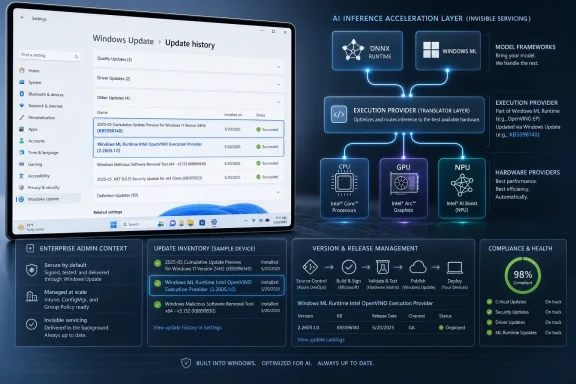
Windows Update history and AI inference pipeline graphic showing ONNX, Windows ML, and OpenVINO execution on CPU/GPU/NPU.Microsoft Turns AI Acceleration Into a Serviced Windows Layer​

KB5096140 is not a conventional feature update, security patch, or driver package in the old Windows sense. It updates the Intel OpenVINO Execution Provider, the bridge that lets ONNX Runtime and Windows ML send supported machine-learning inference workloads to Intel CPUs, GPUs, and NPUs. In plain English, it helps Windows and apps make better use of Intel hardware when running local AI models.
That distinction matters because the modern Windows AI stack is being assembled in layers. At the top are applications and shell features. Beneath them sit model formats and runtimes, including ONNX Runtime and Windows ML. Under that are execution providers, which translate model operations into something a particular class of hardware can run efficiently.
Historically, Windows users tended to think of hardware acceleration as a graphics-driver story. If a game or video app needed more GPU performance, the answer was usually a vendor driver, a runtime redistributable, or an app update. With Windows ML execution providers, Microsoft is trying to make AI acceleration look more like a platform capability: discoverable, dynamically acquired, and updated through the same plumbing that already delivers monthly OS servicing.
KB5096140 therefore sits at the intersection of three agendas. Intel wants OpenVINO to be the optimization layer for its client AI hardware. Microsoft wants Windows ML to become a reliable abstraction for developers building local AI features. PC makers want AI PCs to behave like finished products rather than developer kits that need a scavenger hunt of runtimes, drivers, and SDK components before acceleration works.

The Version Number Tells a Quiet Story About Pace​

The update moves the Intel OpenVINO Execution Provider to version 2.2605.1.0. Microsoft’s KB text is terse, saying only that the release includes improvements to the OpenVINO Execution Provider AI component for Windows 11 24H2 and 25H2. That lack of drama is itself notable: AI infrastructure updates are arriving as ordinary maintenance.
Microsoft says the update replaces KB5089170, which makes KB5096140 part of a continuing cadence rather than a one-off correction. Earlier Microsoft documentation and support pages have shown OpenVINO execution provider updates arriving through Windows Update as Microsoft refines the Windows ML stack. The pattern is becoming familiar: a support article, a version bump, automatic delivery, and an entry in Windows Update history.
That is a very Windows way to make a new platform real. Developers can write against APIs, hardware vendors can advertise silicon blocks, and Microsoft can announce platform ambitions, but the practical test is whether the component keeps getting serviced after the launch event. KB5096140 is evidence that Microsoft is treating these execution providers as living pieces of the OS-adjacent runtime.
The version also hints at the difference between what users see and what developers need to care about. An everyday Windows user may only notice that a device says it installed “Windows ML Runtime Intel OpenVINO Execution Provider.” A developer or IT pro sees a component that may affect model compatibility, operator support, performance characteristics, and troubleshooting baselines across a fleet.

Windows 11 24H2 Was the Real Starting Line​

The KB applies to Windows 11 version 24H2 and Windows 11 version 25H2, with the prerequisite that the latest cumulative update for the target version be installed. That is not just bureaucratic wording. It reflects how Microsoft has drawn the platform boundary for modern Windows ML execution providers.
Windows 11 24H2 marked a substantial reset for the client AI stack. It is the release family where Copilot+ PC features, newer Windows ML behavior, and hardware-specific acceleration components began to converge in earnest. Version 25H2 continues that architecture rather than replacing it with a wholly different foundation.
This has practical consequences. A Windows 11 23H2 machine may still run plenty of AI-enabled applications, and developers can bundle their own runtimes, but the newer dynamic Windows ML execution-provider model is tied to the 24H2-and-later servicing line. Microsoft is effectively saying that the modern AI PC platform starts there.
For enterprise IT, that creates another reason the 24H2/25H2 migration matters. This is no longer only about support dates, security baselines, or UI changes. It is about whether Windows can consume a growing catalog of hardware-specific AI acceleration components through a managed OS servicing channel.

The OpenVINO Provider Is the Translator, Not the Model​

It is easy to overread a KB like this and imagine Microsoft is installing new AI features onto every Intel PC. That is not what this update does. The OpenVINO Execution Provider is infrastructure: it helps supported apps and Windows ML workloads run ONNX models more efficiently on compatible Intel hardware.
The model itself still comes from an app, Windows feature, or service. The execution provider decides how supported portions of that model are executed. If the model includes operations the provider can accelerate, the workload may be routed to Intel silicon more efficiently than it would be through a generic CPU path.
That means the impact of KB5096140 will be uneven by design. A user who never runs Windows ML-backed local inference may see no visible change. A developer testing model execution on Intel Core Ultra hardware may care a great deal. A fleet administrator may care less about the immediate user-visible change and more about the fact that the machine’s AI runtime environment changed underneath applications.
This is the new normal for platform AI. The most important update on a given day may not be a chatbot UI, a new Copilot button, or a flashy creative feature. It may be a low-level execution component that determines whether local inference is fast, power-efficient, compatible, or silently falling back to a less optimal path.

Intel Needs Windows ML as Much as Windows Needs Intel​

Intel’s OpenVINO has long been positioned as a way to optimize AI inference across Intel CPUs, integrated GPUs, discrete GPUs, and newer NPUs. On paper, that breadth is a strength. In practice, it creates a distribution problem: developers need a way to reach the installed base without building fragile hardware-detection and packaging logic into every app.
Windows ML helps solve that problem by giving developers a Microsoft-supported way to discover, acquire, and register execution providers. The app does not need to ship a separate Intel runtime for every possible device path if it can rely on the Windows platform to provide a compatible provider. That is the promise, at least.
For Microsoft, Intel’s participation matters because x86 Windows PCs remain the bulk of the Windows ecosystem. Qualcomm may have grabbed headlines with Arm-based Copilot+ PCs, and AMD and NVIDIA have their own acceleration paths, but Intel machines are still everywhere: corporate laptops, consumer ultrabooks, mini PCs, workstations, and education fleets.
The OpenVINO provider is therefore not a niche component. It is a key piece of Microsoft’s attempt to make “AI PC” mean something across ordinary Windows hardware, not just the latest premium machine. If Windows ML can select a useful Intel path on a broad range of PCs, developers have a stronger reason to target the platform abstraction instead of writing only for the newest NPU showcase.

Automatic Delivery Is Convenient Until It Becomes a Change-Control Problem​

Microsoft says KB5096140 will be downloaded and installed automatically from Windows Update. For consumers, that is probably the right answer. The average user should not have to know what an execution provider is, much less manually retrieve one from a vendor site.
For managed environments, automatic delivery is more complicated. AI execution providers sit close enough to application behavior that a change can affect performance, compatibility, or supportability. They are not drivers in the classic Device Manager sense, but they can behave like runtime dependencies for apps that use Windows ML or ONNX Runtime integration.
That raises familiar Windows servicing questions in a new category. Should these components be allowed immediately on pilot rings? Should they be deferred along with optional nonsecurity preview content? Should AI runtime versions be captured in endpoint inventory? If a line-of-business app suddenly shows different inference performance, will the help desk know to check the Windows ML execution provider version?
The answer cannot be “block everything.” Blocking runtime updates indefinitely may leave users with older operator support, weaker hardware utilization, or bugs that have already been fixed upstream. But treating AI execution providers as invisible background noise is equally risky. The better model is to recognize them as a new class of platform dependency.

Windows Update Is Becoming the AI Runtime Supply Chain​

The most interesting thing about KB5096140 is not the KB itself. It is the delivery model. Microsoft’s Windows ML documentation describes execution providers as components that can be dynamically acquired and then updated through Windows Update, with applications benefiting from compatible updates without manually updating their own packages.
That is a major architectural bet. Instead of every developer bundling a vendor-specific acceleration layer, Windows becomes the supply chain for machine-learning execution. The benefit is obvious: smaller apps, fewer duplicated binaries, and a platform-level mechanism for keeping acceleration components current.
The tradeoff is also obvious. When the OS becomes the supply chain, OS servicing policy becomes AI application policy. A developer may test against a provider version in April and find that users have a different provider version in May. An enterprise may certify an app on one image and later discover that Windows Update has changed the runtime beneath it.
Microsoft is trying to square that circle with compatibility promises and version-checking APIs. Developers can inspect the installed execution provider package, and organizations that need strict control can still choose a bring-your-own execution provider model. But the gravitational pull is toward evergreen platform components, because that is how Microsoft can scale AI acceleration across hundreds of millions of PCs.

The User-Visible Clue Is Buried in Update History​

Microsoft’s support article tells users to check Settings, Windows Update, and Update history to confirm installation. After the update lands, the expected entry is “Windows ML Runtime Intel OpenVINO Execution Provider (KB5096140).” That line may be the only visible sign anything happened.
This is useful, but only barely. Update history is not a diagnostic strategy for a developer, and it is not fleet inventory for an administrator. It can confirm that the package arrived, but it does not explain whether a particular application is using the provider, whether inference is landing on CPU, GPU, or NPU, or whether a fallback path is hiding a compatibility issue.
For IT pros, PowerShell and management tooling will matter more. Microsoft’s Windows ML documentation describes checking execution provider packages via app package enumeration, and developers can inspect execution provider package identity through Windows ML APIs. That is the difference between knowing an update is listed and knowing what runtime state the machine is actually in.
Still, the Update history entry matters culturally. It names the component. It makes the AI runtime visible as part of Windows servicing. And it gives support teams a breadcrumb when a user says, “Something changed after Windows Update,” but the monthly cumulative update does not obviously explain the symptom.

The AI PC Era Is Being Built in Boring Packages​

The PC industry has spent the last two years selling the AI PC as if it were a singular product category. In reality, it is an ecosystem negotiation. Silicon vendors need their accelerators used. Microsoft needs developers to target Windows APIs. Developers need predictable deployment. Users need features that work without understanding any of it.
KB5096140 is boring in exactly the way infrastructure must be boring. It does not promise a new Copilot animation, a breakthrough benchmark, or a visible settings page. It updates a component whose job is to make other things run better when the right hardware and software line up.
That boringness should not be mistaken for insignificance. Windows became the dominant PC platform partly because developers could assume a baseline and because Microsoft continually expanded that baseline through runtime, driver, and API servicing. AI acceleration is now being folded into that same platform logic.
The open question is whether Microsoft can make the stack reliable enough that developers trust it. If every AI app still has to carry its own inference runtime and vendor plugins, Windows ML becomes another optional abstraction. If Windows Update reliably delivers tested execution providers across Intel, AMD, NVIDIA, and Qualcomm hardware, Windows becomes a much more attractive target for local AI features.

Developers Get Convenience With a New Testing Matrix​

For developers, the appeal of Windows ML execution providers is straightforward. Instead of shipping separate hardware acceleration paths, an app can ask Windows for certified execution providers and register what is available. That reduces packaging complexity and gives apps access to hardware improvements after release.
But abstraction does not eliminate testing. It moves testing to the boundary between the app, the model, the OS runtime, and the provider. Developers still need to know whether their ONNX models use operators supported by a given execution provider, whether performance changes across versions, and whether fallback behavior is acceptable.
This is especially important for applications that market local AI features as core functionality rather than nice-to-have acceleration. If the feature is a background blur, fallback to CPU may be tolerable. If the feature is real-time transcription, image generation assistance, or an enterprise workflow that depends on predictable latency, provider behavior becomes product behavior.
The smartest developers will treat provider versions as part of their support matrix. They will log what execution provider is selected, expose useful diagnostics, and avoid assuming that “Intel PC” means one acceleration path. Intel’s client ecosystem spans many generations, and the requirements for CPU, GPU, and NPU acceleration are not identical.

Administrators Should Inventory the Runtime, Not Just the Driver​

The Windows admin instinct is to look at drivers first, and that instinct is still useful. Intel graphics and NPU drivers remain part of the acceleration story. But KB5096140 shows that drivers are no longer the whole story.
An endpoint may have the right Intel driver and still depend on a Windows ML execution provider package to make a particular app’s acceleration path work. Conversely, the execution provider may be installed, but hardware or driver requirements may prevent a workload from landing where the user expects. Troubleshooting will require looking at both layers.
In enterprise environments, this argues for adding AI runtime components to configuration baselines. Inventory should not stop at Windows version, cumulative update level, BIOS, and display driver. For machines expected to run local AI workloads, the installed Windows ML execution providers and their versions are becoming relevant facts.
This is not only about performance. It is also about reproducibility. If a compliance-sensitive organization validates an AI-assisted workflow, it needs to know when the underlying inference runtime changes. KB5096140 may be a compatibility update rather than a security update, but it can still change the technical conditions under which a model runs.

Microsoft’s Sparse Release Notes Leave Too Much to Interpretation​

The weakness of KB5096140 is not the update itself. It is the thinness of the public explanation. “Includes improvements” is the kind of phrase that says everything and nothing, especially for a component that can affect application performance and compatibility.
Microsoft is not alone here. Hardware and runtime vendors often summarize low-level AI updates in language that is too generic for administrators and too shallow for developers. But as Windows ML becomes a serviced platform, that old habit will become harder to defend.
A useful release note would distinguish between performance improvements, operator coverage, reliability fixes, hardware enablement, and known issues. It would tell developers whether they should retest specific model classes. It would give administrators a better sense of urgency and risk. It would make clear whether the update merely aligns packaging versions or materially changes runtime behavior.
To be fair, Microsoft may be trying to avoid overpromising across a huge range of Intel hardware. The same provider can behave differently depending on CPU generation, GPU driver, NPU availability, and model shape. But vague notes force the community to infer significance from version numbers and replacement chains, which is not ideal for a platform Microsoft wants enterprises to trust.

The 25H2 Angle Is Less About New Features Than Continuity​

The inclusion of Windows 11 25H2 is important, but not because KB5096140 appears to unlock something uniquely tied to 25H2. The more important point is continuity. Microsoft is carrying the Windows ML execution-provider model forward into the next Windows 11 release line.
That matters for organizations planning migrations. If 24H2 is the first broad platform base for this AI servicing model, 25H2 is the test of whether Microsoft can maintain it across annual Windows releases without fragmenting the runtime story. Developers do not want to write one acceleration strategy for 24H2 and another for 25H2 if they can avoid it.
The prerequisite language reinforces that cumulative updates remain part of the dependency chain. A machine must be current enough on its Windows 11 release before this execution provider update applies. That gives Microsoft a way to avoid servicing AI components against stale OS baselines, but it also means lagging fleets may miss runtime improvements.
For home users, this will mostly be invisible. For IT departments, it folds AI readiness into the broader discipline of keeping Windows 11 builds current. The AI stack is not floating above Windows servicing; it is becoming one of the reasons Windows servicing matters.

The Practical Reading of KB5096140 Is Narrow but Important​

KB5096140 should not be treated as a magic performance button. It will not turn an old laptop into a Copilot+ PC, and it will not guarantee that every AI workload runs on an Intel NPU. Hardware capability, driver support, model structure, and application behavior still decide what happens at runtime.
But the update is still important because it advances the managed-runtime model for AI on Windows. It is another sign that Microsoft intends to keep vendor execution providers current through Windows Update, rather than leaving every app vendor and end user to assemble the stack manually.
For Windows enthusiasts, the interesting experiment will be benchmarking and observing real applications across versions. Does a given ONNX workload choose a different backend after the update? Does latency improve? Does power consumption change on mobile Intel systems? Does an app that previously fell back to CPU now use GPU or NPU paths?
For administrators, the experiment is more procedural. Can the organization detect the update, stage it, validate important apps, and correlate support tickets with runtime changes? If not, the AI PC story may become another case where the consumer servicing model arrives before enterprise tooling fully catches up.

The KB5096140 Checklist for People Who Actually Maintain PCs​

The sensible response to this update is neither panic nor indifference. Treat KB5096140 as a small component update with platform implications: low drama for most users, worth tracking for anyone relying on Windows ML acceleration.
  • KB5096140 updates the Intel OpenVINO Execution Provider to version 2.2605.1.0 on supported Windows 11 24H2 and 25H2 systems.
  • The update is delivered automatically through Windows Update and appears in Update history as a Windows ML Runtime Intel OpenVINO Execution Provider entry.
  • The package requires the latest cumulative update for the installed Windows 11 release before it applies.
  • The update replaces KB5089170, which places it in an ongoing servicing chain rather than a standalone event.
  • Developers and IT teams should treat execution provider versions as part of the AI application support matrix, especially where local inference performance or compatibility matters.
  • Users should not expect a visible new feature, because the update improves the runtime layer that applications and Windows ML workloads may use behind the scenes.
KB5096140 is the kind of update Windows will need many more of if local AI is going to become ordinary rather than ornamental. The future of AI on the PC will not be decided only by headline features or TOPS figures on a spec sheet; it will be decided by whether Microsoft, Intel, and the rest of the ecosystem can keep the invisible acceleration layer current, compatible, and boring enough that users never have to learn its name.

References​

  1. Primary source: Microsoft Support
    Published: Tue, 26 May 2026 21:03:04 Z
  2. Official source: learn.microsoft.com
  3. Related coverage: intel.com
  4. Related coverage: windowsforum.com
  5. Related coverage: community.intel.com
 

Microsoft has published KB5096141, an automatic Windows Update package for Windows 11 version 26H1 that updates the AMD MIGraphX Execution Provider to version 2.2605.1.0, improving the Windows ML component that offloads supported ONNX Runtime inference workloads to AMD GPUs. That is the factual news, but the larger story is Microsoft’s quiet conversion of AI enablement into a serviced Windows platform layer. This is not a flashy Copilot feature drop; it is plumbing. And in modern Windows, plumbing is increasingly where the strategy lives.

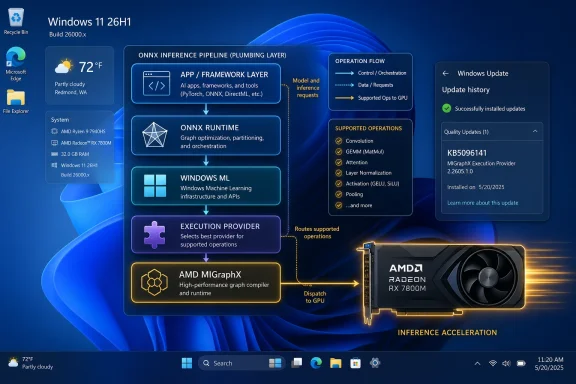
Windows 11 desktop showing an ONNX GPU inference pipeline diagram with an AMD Radeon RX 7800M.Microsoft Is Turning Local AI Into Serviced Infrastructure​

KB5096141 looks, at first glance, like one more small support article in the vast churn of Windows servicing. It has a KB number, a component name, a version string, a prerequisite, and the familiar instruction to check Windows Update history. There is no consumer-facing feature name attached, no demo video, and no promise that your PC will suddenly become smarter after a reboot.
That low drama is precisely what makes it interesting. The update targets the AMD MIGraphX Execution Provider, one of the execution-provider components used by Windows ML and ONNX Runtime to route machine-learning workloads to suitable hardware. In plain English, it helps Windows decide how to run supported AI models efficiently on AMD GPU hardware rather than treating the CPU as the default workhorse.
For years, Windows hardware acceleration was mostly discussed in terms of graphics, media encode, gaming, and UI composition. The AI era changes the emphasis. Now Microsoft is maintaining an abstraction layer between applications, model runtimes, silicon vendors, and Windows Update itself.
That means the future of Windows AI is not simply “Copilot gets better.” It is that inference runtimes, model components, execution providers, and hardware-specific optimizations become serviced pieces of the operating system. KB5096141 is a small tile in that mosaic, but it shows the direction clearly.

The Execution Provider Is Where the Hardware Argument Gets Real​

The term execution provider sounds like something only runtime engineers should care about, but it is one of the more important concepts in local AI on Windows. ONNX Runtime uses execution providers to map portions of a model’s computation graph onto available hardware backends. If a supported operation can run faster or more efficiently on a GPU, NPU, or specialized accelerator, the provider is the bridge that makes that possible.
AMD’s MIGraphX sits in that bridge layer. It is a graph inference engine designed to accelerate machine-learning model inference on AMD hardware, applying hardware-specific optimizations to supported ONNX model operations. In the Windows ML context, the MIGraphX Execution Provider is the Microsoft-serviced component that lets Windows ML participate in that acceleration path.
The practical impact depends on the workload. A model must use operations supported by the provider, the device must have compatible AMD hardware and drivers, and the software stack must choose the provider at runtime. This is not a magic speed button for every AI application.
But it does matter because Windows needs a vendor-neutral way to expose vendor-specific acceleration. Microsoft cannot build the local AI future around only one chip vendor’s API, and developers do not want to rewrite their applications every time a new GPU, NPU, or runtime component arrives. Execution providers are the compromise: common model plumbing above, silicon-specific acceleration below.

KB5096141 Is Small Because the Platform Is Doing the Heavy Lifting​

The support note for KB5096141 says the update includes improvements to the MIGraphX Execution Provider AI component for Windows 11 version 26H1. It also says the update downloads and installs automatically from Windows Update, and that devices need the latest cumulative update for Windows 11 version 26H1 installed first. After installation, users should see “Windows ML Runtime AMD MIGraphX Execution Provider (KB5096141)” in update history.
That is sparse language, but Microsoft’s sparsity here is part of the servicing model. These AI component updates are not being framed like optional enthusiast driver packages. They are being pushed as Windows-managed components, with Windows Update acting as the delivery mechanism and update history serving as the user-visible audit trail.
The update also replaces a previously released package, KB5089171. That replacement relationship matters more than it may appear. It tells administrators and power users that Microsoft is treating the execution provider as a component with a versioned servicing chain, not a one-off downloadable add-on.
For Windows enthusiasts, that raises the familiar question: where does the operating system end and the vendor runtime begin? With KB5096141, Microsoft’s answer seems to be that the boundary is less important than consistency. If local AI features are to work reliably across fleets of mixed hardware, Microsoft needs a way to keep the runtime stack current without asking each user to understand ONNX graphs or AMD inference engines.

Windows 11 Version 26H1 Is the First Clue About Audience​

The update applies to Windows 11 version 26H1, all editions. That version reference is important because it places KB5096141 in the next wave of Windows servicing rather than the mainstream Windows 11 24H2 world most users are still living in. In other words, this is a forward-looking component update for a platform generation where local AI is expected to be more deeply integrated.
The average Windows user may never knowingly interact with MIGraphX. They may never launch an ONNX model directly, inspect execution-provider selection, or care whether a transformer block was evaluated on a CPU, GPU, or NPU. But they will care if a background photo tool responds faster, if an on-device search feature stops hammering battery life, or if an AI-assisted accessibility feature works offline with acceptable latency.
That is why these component updates matter. Microsoft’s local AI story depends on a stack that can be patched underneath applications. If the company had to wait for every app vendor to ship its own hardware-specific inference backend, Windows AI would fragment quickly.
For IT departments, the 26H1 targeting also hints at the shape of future testing. AI components will increasingly be part of OS readiness, not just application readiness. A Windows deployment plan that ignores execution providers may miss performance, compatibility, and support variables that matter once local inference becomes a normal part of productivity software.

Automatic Delivery Is Convenient Until It Becomes a Change-Control Problem​

Microsoft says KB5096141 is downloaded and installed automatically from Windows Update. For consumers, that is the right default. Most users do not know what a MIGraphX Execution Provider is, and they should not have to manually curate a runtime component for hardware-accelerated inference.
For managed environments, automatic delivery is more complicated. AI components sit in an awkward space between drivers, runtimes, application dependencies, and OS features. They may not be security updates, but they can affect performance, workload behavior, and the stability of AI-enabled applications.
That is not an argument against automatic servicing. It is an argument for treating AI components as real infrastructure. Admins should know how to verify installation, how update rings handle these packages, and whether a given application relies on Windows ML rather than bundling its own runtime stack.
The Windows Update history entry is therefore not just a consumer troubleshooting breadcrumb. It is a small but useful inventory clue. If an app behaves differently across two ostensibly identical AMD-powered Windows 11 systems, the presence or absence of “Windows ML Runtime AMD MIGraphX Execution Provider (KB5096141)” may become part of the diagnostic path.

The AMD Angle Is About More Than One GPU Vendor​

AMD has been working to make its hardware more credible for AI inference across client and workstation scenarios, and MIGraphX is one of the pieces in that strategy. For Microsoft, supporting AMD’s execution provider through Windows Update helps keep Windows ML from looking like a platform biased toward a single accelerator ecosystem. That matters politically, technically, and commercially.
The AI PC market is already crowded with overlapping claims from CPU vendors, GPU vendors, NPU vendors, OEMs, and software companies. Every vendor wants to be the one whose hardware makes on-device AI practical. Microsoft, meanwhile, needs Windows to be the place where those competing hardware claims can be normalized into a developer-facing platform.
This is why execution providers are strategic. They let Microsoft support multiple acceleration paths without forcing every Windows application developer to become a silicon specialist. Developers can target Windows ML and ONNX Runtime abstractions, while the platform negotiates where supported parts of the model should run.
That abstraction will never be perfect. Some workloads will perform better on one vendor’s hardware, some providers will support different operator sets, and some models will need tuning to take full advantage of the available backend. But the direction is clear: Microsoft wants Windows to broker AI acceleration the way it has long brokered printing, graphics, input, and driver servicing.

The Missing Details Are Also Part of the Story​

KB5096141 does not provide a detailed changelog. It does not list individual bug fixes, performance gains, operator coverage changes, regression fixes, or known issues. It simply says the update includes improvements to the MIGraphX Execution Provider AI component.
That may be normal for this class of support article, but it is not ideal for administrators or developers trying to understand risk. If a database engine, graphics driver, or hypervisor component receives an update, technically minded users expect at least some sense of what changed. AI execution providers deserve the same discipline because they can influence workload routing and performance in ways that are difficult to observe casually.
The lack of detail also reflects a broader tension in Windows AI servicing. Microsoft is trying to make AI components invisible enough for consumers and manageable enough for enterprises. Those goals often pull in opposite directions. Invisible updates reduce friction; explicit changelogs build trust.
For now, the best reading is cautious: KB5096141 is an incremental platform component update, not a feature launch. It should improve the AMD execution-provider layer for supported Windows 11 26H1 devices, but Microsoft has not publicly described the specific technical deltas in the support note.

Windows ML Is Becoming the Compatibility Layer for the AI PC​

The phrase “AI PC” has been overused to the point of exhaustion, but the underlying technical challenge is real. A PC may have a CPU with vector extensions, an integrated GPU, a discrete GPU, an NPU, or some combination of all four. A modern AI application should not need a bespoke code path for every possible hardware permutation.
Windows ML is Microsoft’s answer to that mess. By providing platform APIs and runtime integration, Microsoft can give developers a way to run models locally while leaving room for hardware-specific acceleration underneath. ONNX Runtime supplies the model execution foundation; execution providers connect that foundation to available hardware.
KB5096141 fits into this model as a vendor-specific update delivered through a platform channel. It is not the whole Windows ML story, but it is a useful example of how Microsoft expects the ecosystem to work. AMD improves or updates the provider layer, Microsoft packages and services it, Windows Update distributes it, and applications benefit if they are using the supported stack correctly.
The strategic wager is that local AI becomes ordinary. Not exotic. Not a demo. Not a manually installed SDK experiment. Ordinary enough that the runtime components update in the background like any other part of Windows.

Developers Should Read This as a Platform Signal​

For developers, the obvious lesson is that Windows ML and ONNX Runtime are becoming safer bets for applications that need local inference without hard-coding around a single hardware vendor. The existence of a serviced AMD MIGraphX provider tells developers that Microsoft is investing in the middle layer where models meet devices.
That does not mean developers can ignore testing. Execution-provider behavior can vary, and fallback paths still matter. A model that runs correctly on one backend may expose performance cliffs or unsupported operators on another. The right approach is to design for acceleration, measure actual behavior, and make graceful fallback part of the application architecture.
But the servicing model helps. If an execution provider can be improved through Windows Update, developers are not solely responsible for shipping every hardware backend improvement inside their app package. That can reduce duplication, shrink maintenance burden, and make AI-enabled applications more consistent across Windows devices.
The caution is that Microsoft’s platform abstraction will only be as useful as its documentation, diagnostics, and transparency. Developers need to know which providers are present, which model operations are supported, when a workload has fallen back, and why performance changed after an update. Without that visibility, the abstraction becomes a black box.

Admins Need to Add AI Components to the Patch Vocabulary​

Enterprise IT has spent decades building muscle memory around Patch Tuesday, driver qualification, firmware updates, Microsoft Store apps, and feature-update deferrals. AI component servicing now adds another category to the list. It is not quite a driver, not quite a cumulative update, and not quite an application dependency.
KB5096141’s prerequisite is the latest cumulative update for Windows 11 version 26H1. That dependency reinforces the idea that AI components are layered on top of the OS servicing baseline. If the base OS is not current enough, the AI component update is not the first thing to chase.
In practical terms, administrators should expect more of these packages. Execution providers for different vendors, model components for built-in Windows features, and runtime updates for on-device AI will likely appear with their own KB numbers and version histories. Some will matter only to Copilot+ PCs. Others may matter to a broader range of Windows 11 systems as developers adopt Windows ML more widely.
The management challenge is not that any one of these updates is alarming. It is that the category is new enough to be easy to miss. The Windows fleet of 2026 will not be judged only by OS build number and driver version. It may also be judged by which AI components are installed, current, and compatible with the workloads users actually run.

Enthusiasts Get a New Layer to Inspect​

For WindowsForum readers, KB5096141 is also a reminder that the interesting parts of Windows are increasingly hidden below the visible shell. The Settings app may look familiar, the Start menu may change slowly, and the user-facing AI branding may come and go. Underneath, Microsoft is assembling a runtime substrate for local AI workloads.
The update history check is the simplest way to verify presence. On an eligible system, go to Settings, then Windows Update, then Update history. After installation, the relevant entry should appear as “Windows ML Runtime AMD MIGraphX Execution Provider (KB5096141).”
That will not tell you whether a particular app is using the provider. It will not benchmark your model, expose operator coverage, or confirm that an AMD GPU handled a specific inference workload. But it confirms that the serviced component is present, which is the first step in any real troubleshooting path.
Power users should also resist over-reading the update. Installing KB5096141 does not mean every AI workload will accelerate on AMD hardware, nor does it mean unsupported GenAI scenarios suddenly become supported by the provider. It means the Windows ML runtime component for AMD MIGraphX has been updated to a newer version on the applicable Windows release.

The AI Stack Is Being Patched Into Normalcy​

The most concrete lesson from KB5096141 is that Microsoft wants local AI to become part of ordinary Windows maintenance. That is good for users if it produces faster, more reliable, and more power-efficient on-device experiences. It is good for developers if the platform absorbs some of the complexity of hardware acceleration. It is good for silicon vendors if their optimizations can reach customers through a trusted OS channel.
The tradeoff is opacity. The more Microsoft turns AI infrastructure into background-serviced Windows plumbing, the more users and admins need better ways to see what changed. A KB number and a version string are useful, but they are not the same as a meaningful changelog.
That tension will define the next phase of Windows AI. Microsoft wants the AI PC to feel seamless, but seamless systems are often hard to audit. The company will need to prove that automatic AI component servicing can be both low-friction and accountable.

KB5096141 Shows How Quiet the AI PC Transition May Be​

This update is not a headline feature, but it gives us a useful snapshot of where Windows is going.
  • KB5096141 updates the AMD MIGraphX Execution Provider for Windows 11 version 26H1 to version 2.2605.1.0.
  • The component is used with ONNX Runtime and Windows ML to offload supported inference operations to AMD GPU hardware.
  • The update installs automatically through Windows Update on eligible systems that already have the latest cumulative update for Windows 11 version 26H1.
  • Users can verify installation in Windows Update history by looking for “Windows ML Runtime AMD MIGraphX Execution Provider (KB5096141).”
  • The package replaces the earlier KB5089171 update, indicating an ongoing servicing chain for this AI runtime component.
  • The absence of a detailed changelog means administrators and developers should treat the update as important platform plumbing rather than a fully explained feature release.
The most important Windows AI changes may not arrive with a new button on the taskbar. They may arrive as versioned runtime components, installed automatically, quietly improving the odds that a model runs on the right hardware at the right time. KB5096141 is one of those quiet changes, and it points toward a Windows future where AI acceleration is not an add-on but another serviced layer of the operating system.

References​

  1. Primary source: Microsoft Support
    Published: Tue, 26 May 2026 21:03:06 Z
  2. Official source: learn.microsoft.com
 

Microsoft has published KB5096578, a May 2026 Windows Update package that updates the Image Processing AI component to version 1.2604.515.0 on Intel-powered Copilot+ PCs running Windows 11 version 26H1, after the latest cumulative update is already installed. That is the plain administrative fact. The more interesting story is that Windows is now being serviced in layers: the operating system, the silicon-tuned AI runtime, and the feature experiences that sit on top of both. KB5096578 is small in description, but large in implication, because it shows Microsoft treating local AI models as moving parts of Windows rather than as occasional app features.

Futuristic ad showing Windows 11 image understanding on a laptop with AI layers and update history panels.Microsoft’s AI Stack Is Becoming a Servicing Channel of Its Own​

For years, a Windows update was easy to understand even when it was hard to love. A cumulative update patched the OS, a driver update touched hardware, and an app update changed the visible experience. Copilot+ PCs blur that neat division, and KB5096578 is a tidy example of the new order.
This update does not advertise a flashy new button, a redesigned app, or a marquee Copilot trick. Instead, it updates the Image Processing AI component, the machinery responsible for on-device image understanding and processing across Windows features and apps. Microsoft describes the component as handling tasks such as scaling, segmentation, foreground and background extraction, and visual analysis.
That matters because these are not peripheral tasks anymore. They are the plumbing beneath background blur, object isolation, image editing, accessibility aids, and future AI-assisted experiences that need to understand a picture without first sending it to a cloud service. In other words, Microsoft is not merely updating Windows; it is updating the substrate on which Windows’ local AI promises depend.
KB5096578 also fits a pattern Microsoft has been building over the past year. Copilot+ PCs are not a single hardware platform in the old Wintel sense. They are a class of machines built around dedicated neural processing hardware from several vendors, each with its own runtime behavior, driver stack, and performance envelope. That makes AI component updates less like optional feature packs and more like silicon-specific maintenance.

The Version Number Is Boring, and That Is the Point​

Version 1.2604.515.0 is not a number that will mean much to ordinary users. It will not sell a laptop, inspire a keynote slide, or become the name of a Windows feature. But in enterprise IT, version numbers like this are the paper trail of operational reality.
Microsoft says the update applies to Intel-powered Copilot+ PCs running Windows 11 version 26H1 and requires the latest cumulative update for that OS version. It will be downloaded and installed automatically through Windows Update. Once installed, it should appear in Windows Update history as “2026-05 Image Processing version 1.2604.515.0 for Intel-powered systems (KB5096578).”
That phrasing is worth slowing down over. The update is not just “for Windows 11.” It is not just “for Copilot+ PCs.” It is for a specific processor family, on a specific Windows version, with a specific prerequisite state. The old assumption that a Windows feature exists uniformly across all Windows devices is becoming less reliable.
This is the unavoidable consequence of pushing AI inference onto the client. When the cloud runs the model, the endpoint matters less. When the PC runs the model locally, the endpoint becomes everything: NPU capability, driver maturity, memory bandwidth, Windows build, app integration, and policy posture all begin to affect what users experience.

Copilot+ PCs Are No Longer Just Marketing Hardware​

When Microsoft introduced the Copilot+ PC category, the pitch was simple enough for consumers: faster AI features, local processing, better battery life, and privacy benefits because more data could stay on the device. For enthusiasts and administrators, the fine print was always more interesting. A Copilot+ PC is not just a faster Windows laptop; it is a Windows laptop with an AI hardware requirement and a growing list of features that depend on that hardware.
KB5096578 reinforces that Copilot+ is now a servicing boundary. If a device is not an Intel-powered Copilot+ PC on Windows 11 version 26H1, this particular package is not for it. That sounds obvious, but it is a meaningful shift from the universal Windows update model many administrators still mentally carry around.
The update also highlights the practical fragmentation inside the Copilot+ label. Qualcomm, AMD, and Intel systems may all sit under the same branding umbrella, but Microsoft must still service AI components in ways that account for platform differences. That does not necessarily mean features will diverge permanently, but it does mean the road to feature parity is paved with platform-specific packages.
For users, this fragmentation may remain invisible when everything works. For IT teams, it is another dimension of inventory management. Knowing that a fleet is “Windows 11” is no longer enough. Knowing that it is “Windows 11 on Copilot+ hardware” is not enough either. The processor family and AI component version now matter.

Local AI Privacy Depends on Local AI Maintenance​

Microsoft’s support text leans on a familiar selling point: running image processing on dedicated AI hardware can keep image data on the device while delivering fast, low-latency performance. That is the right architectural direction, especially for features involving screenshots, photos, camera feeds, or documents with sensitive visual content. But privacy does not come from architecture alone.
A local model still needs to be patched, tuned, replaced, and governed. Runtime components need updates. Model behavior may need adjustment. Performance regressions may need correction. Compatibility with apps and Windows features may need repair. KB5096578 does not provide a dramatic changelog, but the existence of the update is a reminder that local AI is not a one-and-done installation.
This is where Microsoft’s messaging has to mature. “On-device” is not synonymous with “static.” If Windows is going to rely on local AI components for everyday user experiences, then those components must be serviced with the same seriousness as graphics drivers, security baselines, and accessibility frameworks.
There is also a trust angle. Users are being asked to believe that AI-assisted image features can operate privately and predictably on their own PCs. Administrators are being asked to allow these capabilities in managed environments. Both groups will need clearer visibility into what changed, why it changed, and whether the update affects behavior, performance, privacy, or policy controls.

The Changelog Gap Is Becoming Harder to Ignore​

The most frustrating part of KB5096578 is not what Microsoft says. It is what Microsoft does not say. The company states that the update includes improvements to the Image Processing AI component, but it does not describe those improvements in operational detail.
That sparse language may be acceptable for a consumer support article, but it is thin gruel for enterprise administrators. If an update changes segmentation accuracy, foreground extraction behavior, scaling quality, model performance, or app compatibility, those details can matter. They can affect help desk calls, accessibility validation, image-editing workflows, training materials, and application testing.
Microsoft is not alone here. AI model and runtime updates across the industry are often described with a foggy blend of “quality improvements,” “reliability updates,” and “performance enhancements.” The problem is that AI behavior is not always deterministic in the way administrators expect from traditional software components. A subtle model change can alter outputs without breaking anything in the old crash-and-error sense.
The more Windows relies on AI components, the less sustainable vague release notes become. Microsoft does not need to publish model internals or proprietary tuning data, but it should give IT pros enough information to understand risk. A useful changelog would distinguish between performance improvements, compatibility fixes, model quality changes, security hardening, and known behavioral changes.

Windows Update Is Doing the Delivery, but Governance Still Belongs to IT​

KB5096578 arrives automatically from Windows Update once prerequisites are met. That is the consumer-friendly answer, and for unmanaged PCs it is probably the right one. Most users should not have to know which AI component helps Windows separate a foreground subject from a background.
In managed environments, automatic delivery is only the beginning of the conversation. Administrators need to know whether these AI component updates flow through existing update rings, whether they are visible in reporting tools, whether they can be deferred or audited consistently, and how they interact with Windows Autopatch, Intune, WSUS, or other fleet-management systems. The support article’s simplicity does not eliminate those operational questions.
This is especially important because AI component updates occupy an awkward category. They are not quite drivers, not quite app updates, and not quite traditional OS patches. They are closer to feature infrastructure: invisible when healthy, suddenly important when a visible AI feature behaves differently.
The best IT posture is to treat these packages as part of the Windows servicing baseline. That means tracking them, validating them on representative hardware, and documenting whether business-critical workflows depend on the Windows features they support. If your organization is already buying Copilot+ PCs, AI component versioning belongs in the same conversation as firmware, graphics drivers, and monthly cumulative updates.

Intel’s Role Is Strategic, Not Incidental​

The Intel-specific nature of KB5096578 is not a footnote. Intel arrived later to the Copilot+ PC branding story than Qualcomm’s first wave, but its presence is strategically crucial for Microsoft’s broader Windows ecosystem. Corporate PC fleets are still deeply tied to x86 compatibility, Intel platform management features, and procurement habits built over decades.
That makes Intel-powered Copilot+ PCs a bridge between Microsoft’s AI ambitions and the installed reality of business computing. Qualcomm systems helped Microsoft prove the battery-life and NPU story. Intel systems help Microsoft make that story feel less like a platform jump and more like the next refresh cycle.
Image Processing is a logical place for that bridge to show up. Visual AI tasks are immediately useful, relatively easy to demonstrate, and broad enough to support multiple Windows and app experiences. They also benefit from low latency, which makes on-device acceleration more compelling than a round trip to the cloud.
The challenge is that Intel’s value proposition depends on consistency. If a user buys an Intel Copilot+ PC expecting the same Windows AI behavior advertised for the category, Microsoft and Intel need the servicing machinery to keep pace. KB5096578 is one cog in that machinery.

Windows 11 Version 26H1 Signals a Faster Platform Cadence​

The reference to Windows 11 version 26H1 is another clue that the Windows platform cadence is changing around AI hardware. Microsoft’s traditional annual Windows feature-update rhythm has already been complicated by enablement packages, Moment-style feature drops, Store-delivered app changes, and server-side feature rollouts. AI components add another layer.
A device can now be on the right Windows generation but still miss a particular AI component update because it lacks the prerequisite cumulative update or the right hardware profile. Conversely, a device may receive an AI component update that changes underlying capability without a user noticing any obvious OS-level upgrade.
This creates a documentation burden. Microsoft must explain not only what version of Windows is supported, but what version of each AI component is current for each supported hardware class. That is a lot for normal users, but it is exactly the kind of matrix IT departments need to manage.
The future Windows version number may become less important than the combination of OS build, component version, and hardware capability. That is not necessarily bad. Modular servicing can make Windows more adaptable. But modular systems demand better observability, or they become a maze.

The User Experience Will Change Before Users Know Why​

Most users will never search for KB5096578. They may never open update history, and they certainly will not memorize Image Processing version 1.2604.515.0. If they notice anything, it will be through a feature that feels faster, more accurate, less glitchy, or occasionally different in a way they cannot quite explain.
That is the strange new bargain of AI-enabled operating systems. The visible experience may depend on invisible model and runtime updates that ship outside the old mental model of feature releases. A background-removal tool might get better at hair. A visual accessibility feature might interpret edges more reliably. An app might start using a Windows component rather than bundling its own approach.
The upside is obvious. Microsoft can improve local AI capabilities over time without waiting for a monolithic Windows release. The downside is accountability. When behavior changes, users and administrators need a way to trace that change back to a component update rather than guessing whether an app, driver, cloud service, or OS patch is responsible.
Update history is a start, but it is not a complete answer. It tells you that KB5096578 is present. It does not tell you whether a particular image workflow changed because of it.

The Real Competition Is the Platform That Makes AI Feel Routine​

The PC industry has spent the last two years trying to make the NPU feel essential. That has been a harder sell than the marketing suggested. Users understand faster CPUs and better screens. They understand battery life. They do not necessarily understand why a neural processing unit should influence their next laptop purchase.
Updates like KB5096578 are where the argument becomes more practical. If Windows features and third-party apps increasingly depend on a maintained set of local AI components, the NPU becomes less of an abstract chip block and more of a serviced platform capability. The value is not merely that the PC has AI hardware. The value is that Windows knows how to use it, update it, and expose it consistently.
That is why these support articles, sparse as they are, deserve attention. They are the maintenance logs of a platform transition. The future of Windows AI will not be determined only by splashy Copilot demos. It will be determined by whether these quiet components become reliable enough for users to stop thinking about them.
Apple, Google, and the broader Linux ecosystem are all pursuing their own versions of local AI integration. Microsoft’s advantage is the breadth of the Windows hardware ecosystem. Its disadvantage is the breadth of the Windows hardware ecosystem. Every silicon-specific AI update is both a sign of reach and a reminder of complexity.

The Fine Print Now Carries the Product Strategy​

For WindowsForum readers, the immediate facts are straightforward, but the strategic lesson is bigger than this one KB. KB5096578 is the kind of update that will be easy to ignore until a feature depends on it, a compliance team asks about it, or a fleet report shows inconsistent AI component versions across similar machines.
  • KB5096578 updates the Image Processing AI component to version 1.2604.515.0 for Intel-powered Copilot+ PCs.
  • The update applies to Windows 11 version 26H1 and requires the latest cumulative update for that version before installation.
  • Microsoft says the package is delivered automatically through Windows Update rather than as a manually installed feature upgrade.
  • The update replaces KB5089871, making it part of an ongoing component servicing chain rather than a standalone one-off release.
  • Administrators can confirm installation in Settings under Windows Update history, where it should appear as the May 2026 Image Processing update for Intel-powered systems.
  • The practical importance is not the visible UI change but the continued maintenance of local image understanding, segmentation, scaling, and visual-analysis capabilities used by Windows features and apps.
KB5096578 is a modest update with an immodest message: Windows AI is becoming infrastructure. Microsoft’s challenge now is to make that infrastructure trustworthy, observable, and boring in the best possible sense. If Copilot+ PCs are going to become normal business PCs rather than showcase hardware, these component updates must become as well-understood as cumulative updates and drivers; the next phase of Windows will be judged not by whether AI appears in the Start menu, but by whether the local intelligence underneath it can be serviced without surprises.

References​

  1. Primary source: Microsoft Support
    Published: Tue, 26 May 2026 21:02:23 Z
  2. Official source: learn.microsoft.com
  3. Related coverage: windowsforum.com
  4. Official source: news.microsoft.com
  5. Related coverage: intel.com
  6. Related coverage: na.ingrammicro.com
 

Microsoft has published KB5096141, an automatic Windows Update package that updates the AMD MIGraphX Execution Provider to version 2.2605.1.0 for Windows 11 version 26H1 devices with the latest cumulative update installed, listing it in Update history as a Windows ML Runtime AMD component. The support note is brief, but the signal is larger than the changelog. Microsoft is treating local AI acceleration as something Windows services directly, not as a loose pile of app runtimes and vendor downloads. For AMD users and IT teams, that makes the machine-learning stack part of the operating system’s maintenance surface.

Futuristic data center scene with a glowing cloud icon, arrows, and a PCIe chip on a neon city.Microsoft Turns AI Acceleration Into Patchable Plumbing​

KB5096141 is not a Radeon driver release, and it is not a feature update dressed in AI branding. It updates a Windows ML execution provider: the layer that lets ONNX Runtime and Windows machine-learning workloads hand supported model operations to AMD GPU hardware through AMD’s MIGraphX inference engine.
That sounds obscure because, for most users, it is. Execution providers are not apps, taskbar buttons, or settings pages. They are the plumbing between a model and the silicon asked to run it. But Windows has spent decades proving that boring plumbing becomes strategically important the moment enough software depends on it.
The important phrase in Microsoft’s note is “downloaded and installed automatically from Windows Update.” That means this component is now on the same operational rails as other Windows-serviced parts of the platform. The update replaces a previous MIGraphX package, KB5089171, moving the component from the prior 2.2604-era release to 2.2605.1.0.
This is the kind of update that looks tiny in a help article and large in a systems diagram. Microsoft, AMD, and app developers are converging on a model where local inference is not merely a library bundled inside each application. It is increasingly a capability the OS discovers, updates, brokers, and exposes.

The Execution Provider Is Where AI Meets the Driver Stack​

ONNX Runtime is designed around the idea that a model should not need to know every detail of the hardware underneath it. An app loads an ONNX model, ONNX Runtime builds an execution plan, and an execution provider handles the actual work on a CPU, GPU, NPU, or other accelerator when it can.
MIGraphX is AMD’s graph inference engine for accelerating supported model operations on AMD GPUs. In this Windows ML context, the MIGraphX Execution Provider gives Windows applications a vendor-specific AMD acceleration path without every developer having to reinvent the same hardware dispatch logic.
That does not mean every ONNX model suddenly flies on every AMD GPU. Execution providers have requirements, supported operation sets, driver expectations, and fallback behavior. If a provider cannot handle part of a graph, runtime policy may split work across providers or fall back to a more general path.
That is why servicing matters. Local AI performance is not a single switch labeled “GPU acceleration.” It is a stack: model format, runtime, execution provider, compiler, driver, firmware, and hardware capabilities. A weak link in that chain can turn a flashy AI feature into a hot laptop fan and a CPU-bound workload.
Microsoft’s decision to distribute provider updates through Windows Update is an attempt to tame that complexity. Instead of requiring each app to ship a frozen acceleration backend, Windows can keep the shared component fresher. That is good for developers, but it also moves responsibility closer to the platform owner.

Windows 11 26H1 Is the Narrow Stage for a Bigger Play​

KB5096141 applies to Windows 11 version 26H1, all editions, and requires the latest cumulative update for that release. That matters because 26H1 is not being framed as a broad feature upgrade for every existing Windows 11 PC. Microsoft has described it as scoped for new devices coming to market in early 2026 rather than as the mainstream annual feature update path for existing machines.
That makes KB5096141 easy to misread. If you are on Windows 11 24H2 or 25H2 and do not see it, that does not necessarily indicate a broken update channel. It is tied to a specific Windows release branch and device generation strategy.
But the component model is not narrow. Microsoft’s Windows ML documentation already positions execution providers as dynamically available pieces that can be downloaded and updated depending on device and driver compatibility. CPU and DirectML remain broad foundations, while vendor-specific providers such as AMD MIGraphX target more specialized acceleration paths.
The 26H1 boundary therefore looks less like a limitation of ambition and more like controlled deployment. Microsoft is not trying to flip every Windows PC into the same AI hardware configuration overnight. It is building a serviced runtime layer that can follow the hardware where it makes sense.
For OEM systems, especially those marketed around AI performance, that approach is attractive. A new laptop can ship with a known Windows build, a compatible AMD stack, and an update channel for the provider that apps will rely on. For IT departments, it also means yet another component whose behavior can change through the normal servicing pipeline.

The Update History Entry Is the Admin’s First Clue​

Microsoft says administrators and users can confirm installation through Settings, Windows Update, and Update history. After installation, the update should appear as “Windows ML Runtime AMD MIGraphX Execution Provider (KB5096141).”
That small breadcrumb matters because AI runtime components are otherwise easy to lose track of. A user may notice only that an app is faster, slower, or different after an update. An administrator needs a way to connect that behavior to a servicing event.
The update history entry gives support desks a starting point. If a local inference workload changes behavior on a fleet of AMD-equipped 26H1 machines, KB5096141 becomes part of the timeline. It is not proof of causality, but it is evidence that the acceleration layer changed.
That distinction is important in enterprise troubleshooting. Windows Update is already crowded with cumulative updates, driver packages, Defender platform updates, Store app updates, Edge updates, and firmware deliveries. AI runtime packages add another layer to the matrix.
The smart operational move is not panic. It is inventory. Organizations experimenting with Windows ML or ONNX Runtime workloads should know which devices have which providers, which driver versions, and which apps are using vendor-specific acceleration. Without that baseline, every AI performance regression becomes guesswork.

AMD Gets a Cleaner Windows Story, But Not a Magic Wand​

AMD has long had a more complicated Windows AI story than Nvidia’s CUDA-centered ecosystem. ROCm has improved, DirectML provides a broad Windows abstraction, and Ryzen AI adds NPU-specific capabilities, but developers have often had to navigate a messy distinction between what works on Linux, what works on Windows, what works on Radeon, and what works on specific integrated or discrete GPU generations.
MIGraphX inside Windows ML helps simplify that story. It gives AMD a first-class execution provider in the Microsoft-backed runtime path, with Windows Update carrying at least some of the servicing load. That is not the same as saying AMD has solved every developer pain point, but it is a more coherent distribution model than expecting each application to carry its own complete acceleration stack.
It also reflects a broader split in local AI hardware. NPUs are increasingly marketed for efficient background inference, camera effects, recall-like indexing, and lightweight model execution. GPUs still matter for larger parallel workloads and model classes that benefit from graphics-class compute. A Windows device may have both, and the runtime needs to choose intelligently.
For AMD systems, MIGraphX targets GPU acceleration, while other providers may target AMD’s NPU path or broader DirectML compatibility. The result is a layered set of options rather than a single “AMD AI” button. That is more accurate technically, but harder to explain to users.
The practical effect of KB5096141 is therefore modest but meaningful. It does not promise a new consumer feature. It refreshes the component that may make some local ONNX workloads faster, more compatible, or more stable on supported AMD GPU hardware.

Developers Are Being Nudged Toward the OS Runtime​

For Windows developers, the strategic message is hard to miss: Microsoft wants AI apps to target Windows ML and ONNX Runtime rather than shipping a bespoke inference universe every time. That makes sense. If every app bundles its own runtime, provider, compiler, and hardware compatibility assumptions, the platform becomes fragile and redundant.
A serviced provider model lets developers ask the OS what acceleration paths exist and choose accordingly. That reduces installer bloat and allows Microsoft and silicon vendors to improve performance after an app ships. It also creates a more Windows-native route for AI features that are not tied to a cloud API.
But there is a tradeoff. Developers give up some control when the operating system updates a component underneath them. An app tested against one provider version may encounter different behavior after Windows Update installs another. In theory, runtime compatibility contracts reduce that risk; in practice, anyone who has maintained GPU-accelerated software knows that driver-adjacent layers can be temperamental.
This is where Microsoft’s documentation and versioning discipline will matter. If execution providers become routine Windows components, developers need predictable release notes, compatibility matrices, rollback guidance, and clear failure modes. A support page that says “includes improvements” is enough for consumers, but not enough for serious production planning.
The deeper challenge is observability. Apps and administrators need to know whether a model ran on MIGraphX, DirectML, CPU, or another provider; whether the graph was partially accelerated; and whether fallback occurred silently. Without that visibility, the promise of hardware acceleration becomes difficult to validate.

The Enterprise Risk Is Change Without Visibility​

The most conservative reading of KB5096141 is that it is a routine component update. The more realistic enterprise reading is that it represents a new class of moving part.
AI runtime updates are not security patches in the usual sense, but they can affect application behavior. They may change performance characteristics, numerical behavior, memory use, device selection, compatibility with certain models, or error paths. That matters in environments using local inference for document processing, imaging, accessibility, data classification, or line-of-business workflows.
The risk is not that KB5096141 is dangerous. There is no public indication of that. The risk is that organizations treat AI acceleration as invisible infrastructure until an app depends on it. By then, the patch cadence, testing process, and telemetry may already be behind the curve.
This is especially relevant because Windows Update can install the package automatically on eligible systems. Automatic delivery is a benefit for security, consistency, and consumer simplicity. It is also a governance question when the component affects workloads that may be performance-sensitive or validation-sensitive.
For managed environments, the response should be boring and disciplined. Track the package. Test representative workloads. Watch for changes in inference latency and provider selection. Document which device classes are eligible. Treat the AI runtime like any other dependency that can influence production behavior.

“Includes Improvements” Is Doing a Lot of Work​

Microsoft’s support text says the update includes improvements to the MIGraphX Execution Provider AI component for Windows 11 version 26H1. It does not enumerate performance gains, bug fixes, supported model changes, security hardening, driver compatibility updates, or known issues.
That kind of sparse changelog is common for small support articles, but AI infrastructure deserves better. The audience for this component is not just ordinary users. It includes developers shipping ONNX models, OEMs validating device images, administrators managing Windows Update behavior, and enthusiasts trying to understand why a workload now chooses one provider over another.
A vague “improvements” line also makes it harder to separate vendor positioning from observed impact. If a model runs faster after the update, was that because MIGraphX improved graph optimization, because the app changed, because a driver changed, or because Windows selected a different provider? If it runs slower, the same uncertainty applies.
The opacity is not unique to Microsoft or AMD. Much of the AI acceleration world is still moving faster than its documentation culture. Silicon vendors want to ship performance gains quickly. OS vendors want to abstract complexity. Developers want stable targets. Users want everything to work without learning what an execution provider is.
KB5096141 sits right in the middle of that tension. It is a small update, but it belongs to a stack that needs adult supervision as it becomes more central to everyday computing.

DirectML Still Matters Because Vendor Paths Cannot Cover Everything​

It would be a mistake to read the MIGraphX update as a replacement for DirectML. DirectML remains the broad Windows graphics-backed acceleration path, useful precisely because it abstracts across a wide range of GPUs. Vendor-specific providers can offer deeper hardware-specific optimization, but they usually come with narrower compatibility expectations.
That split is likely to define Windows AI for the next few years. The OS needs a general path that works across hardware, and it needs specialized paths that make premium silicon worth buying. DirectML supplies the former; providers such as MIGraphX point toward the latter.
For users, the distinction will mostly be invisible. They will install an app and expect it to run. Under the surface, the app or runtime may decide whether the best path is CPU, DirectML, MIGraphX, an NPU provider, or some combination.
For developers, the distinction is strategic. A broad compatibility path reduces support burden, while a vendor-tuned provider can unlock better performance for certain devices. The winning apps will likely be the ones that can adapt gracefully, not the ones that assume one accelerator path always exists.
This is why Microsoft’s provider catalog approach is significant. It turns acceleration into something that can be discovered and updated rather than hard-coded. KB5096141 is one instance of that model in motion.

The Real Product Is the Servicing Model​

The update’s version number, 2.2605.1.0, is less interesting than its delivery mechanism. Windows Update is the product story here. Microsoft is building a world in which AI capability is not simply installed at purchase and frozen until the next major OS release.
That has benefits. Hardware vendors can improve support after devices ship. Microsoft can keep runtime components aligned with Windows ML. Developers can rely on a common platform layer. Users can get fixes without hunting through vendor portals.
It also has costs. The more Windows Update carries AI components, the more update governance must expand to include them. Enthusiasts will want to know what changed. Enterprises will want rings, deferrals, reporting, and rollback options. Developers will want compatibility guarantees.
The old Windows servicing debate was about security fixes versus feature churn. The new one adds AI behavior to the mix. A cumulative update might secure the OS, a driver update might fix a display issue, and an execution provider update might alter how an app runs an image model locally. They all arrive through adjacent channels, and users experience them simply as “Windows changed.”
Microsoft’s challenge is to make that change trustworthy. That requires not only stable code, but clearer language. If AI runtime components are now part of Windows maintenance, their release notes should eventually look less like stubs and more like engineering records.

The KB5096141 Lesson for AMD Windows PCs​

KB5096141 should not be oversold. It is not a dramatic new Windows feature, and it does not guarantee that every AMD GPU owner will see a visible performance jump. It is scoped to Windows 11 version 26H1, requires the latest cumulative update, and updates a specific Windows ML component.
But it also should not be dismissed. The update shows how Microsoft intends to keep vendor AI acceleration current on supported Windows devices. The GPU, the runtime, and Windows Update are being tied together more tightly than they were in the traditional desktop software model.
For AMD, that is a chance to make Windows AI feel less experimental. For Microsoft, it is another step toward making local inference a platform capability. For administrators, it is a reminder that AI is becoming part of endpoint management whether or not the organization has formally adopted an “AI PC” strategy.
The least useful response is to treat this as just another inscrutable KB number. The more useful response is to recognize the pattern: AI components are entering the normal Windows lifecycle, and they will need the same scrutiny as drivers, runtimes, and other shared dependencies.

The Patch Note That Points Past Itself​

KB5096141 leaves Windows users with a few concrete facts and a larger architectural hint.
  • Microsoft is distributing AMD’s MIGraphX Execution Provider update automatically through Windows Update for eligible Windows 11 version 26H1 devices.
  • The package updates the AMD provider to version 2.2605.1.0 and replaces the earlier KB5089171 release.
  • The component is part of the Windows ML Runtime path used with ONNX Runtime to accelerate supported model operations on AMD GPU hardware.
  • Users can verify installation in Windows Update history, where it should appear as the Windows ML Runtime AMD MIGraphX Execution Provider update.
  • Administrators testing local AI workloads should track this package alongside cumulative updates, drivers, and app versions because it can affect the inference stack even when no user-facing feature appears to change.
The next phase of Windows AI will not be defined only by Copilot branding, NPU TOPS figures, or splashy demos at hardware launches. It will be defined by small servicing decisions like this one: which components update automatically, how clearly those changes are documented, and whether developers and administrators can trust the platform beneath their models. KB5096141 is a narrow AMD provider update today, but it points toward a Windows future where local AI acceleration is no longer an optional add-on; it is maintained infrastructure.

References​

  1. Primary source: Microsoft Support
    Published: Tue, 26 May 2026 21:03:06 Z
  2. Official source: learn.microsoft.com
  3. Related coverage: onnxruntime.ai
  4. Related coverage: amd.github.io
  5. Related coverage: windowsforum.com
 

Last edited:
Microsoft has published KB5096138, an automatic Windows Update package released May 26, 2026, that updates the Intel OpenVINO Execution Provider to version 2.2605.1.0 for Windows 11 version 26H1 devices with the latest cumulative update installed. The update is small on paper, but it points to a much larger shift in how Microsoft wants Windows to handle local AI. The operating system is no longer just receiving features and security fixes; it is becoming the distribution channel for vendor-tuned machine-learning plumbing. For Intel PCs, that means the layer between ONNX models and CPUs, GPUs, and NPUs is now being treated like a living Windows component.

Futuristic server chip connected to a glowing AI network, with digital icons on a blue tech circuit board.Microsoft Is Turning AI Acceleration Into Windows Servicing​

KB5096138 is not the kind of update that will make a normal user stop scrolling through Windows Update history. There is no Start menu redesign, no Copilot interface flourish, no new Settings panel begging for attention. After installation, Microsoft says users should see “Windows ML Runtime Intel OpenVINO Execution Provider” listed in update history.
That plainness is the point. Microsoft is building a world in which AI acceleration is serviced below the visible application layer, quietly updated through the same machinery that already handles cumulative updates, driver packages, Defender intelligence, and Store-delivered system components. The Intel OpenVINO Execution Provider is one of the components that makes that strategy possible.
An execution provider is the adapter that lets ONNX Runtime and Windows ML run parts of a machine-learning model on the best available hardware. In Intel’s case, OpenVINO can target Intel CPUs, GPUs, and NPUs, giving applications a way to benefit from silicon-specific optimizations without every developer having to ship and maintain their own Intel runtime stack.
That matters because local AI is quickly becoming a dependency rather than a novelty. Features such as image enhancement, background effects, OCR, summarization, semantic search, and small language-model inference all need predictable performance. If Windows cannot keep the acceleration layer fresh, developers either bundle their own runtimes or avoid the platform abstraction entirely.

KB5096138 Is Small Because the Architecture Is the News​

Microsoft’s support article for KB5096138 is concise almost to the point of opacity. It says the update improves the OpenVINO Execution Provider AI component for Windows 11 version 26H1, requires the latest cumulative update for that release, and arrives automatically through Windows Update. There is no public changelog listing model compatibility fixes, operator coverage changes, performance deltas, or known issues.
That absence should not be mistaken for irrelevance. The story is not that Microsoft shipped one Intel AI component update. The story is that Microsoft is normalizing a cadence where execution providers can move independently of the OS feature-release calendar.
Windows has been here before. Graphics drivers, media codecs, firmware, printer drivers, language packs, and security intelligence all began as components users thought of as part of the machine, then became individually serviced pieces of the Windows experience. AI execution providers are now joining that club.
The version number also tells a story. KB5096138 moves Intel OpenVINO to 2.2605.1.0, aligning with Microsoft’s May 2026 AI component update cycle for Windows 11 26H1. Microsoft’s AI update history now tracks several vendor-specific execution providers, including Intel OpenVINO, NVIDIA TensorRT-RTX, Qualcomm QNN, AMD MIGraphX, and AMD Vitis AI. That list makes the direction unmistakable: Windows ML is becoming a broker for heterogeneous AI hardware.

Windows ML Is Microsoft’s Answer to the Vendor Runtime Problem​

For years, Windows developers building hardware-accelerated machine-learning features faced an awkward choice. They could use a general acceleration layer and accept uneven performance, or they could integrate vendor-specific SDKs and inherit a matrix of package size, device compatibility, driver requirements, and support burden.
Windows ML’s newer direction is designed to collapse that mess. Microsoft’s current Windows ML documentation describes it as the Windows-supported and maintained copy of ONNX Runtime, with the ability to dynamically acquire execution providers for hardware acceleration. In simpler terms: applications can call the familiar ONNX Runtime APIs while Windows helps find and maintain the hardware-specific back ends.
That is a meaningful platform move. Instead of every app bundling separate Intel, AMD, NVIDIA, and Qualcomm components, Windows can provide a shared runtime and pull down the appropriate execution provider when the device supports it. This reduces app size, centralizes servicing, and gives Microsoft a certification checkpoint before hardware-specific AI acceleration lands on user machines.
The tradeoff is that the OS becomes more involved in application performance than developers may be used to. If an execution provider is updated through Windows Update, an app’s inference behavior could change without the app itself being updated. Microsoft explicitly warns developers to expect the list of available execution provider devices to change when Windows ML components or drivers update. That is technically reasonable, but operationally important.
For consumers, this is mostly invisible. For software vendors and IT administrators, it is a new dependency chain. AI performance now depends on the app, the model, ONNX Runtime, Windows ML, the execution provider, the hardware driver, and the Windows servicing state.

Intel Gets a Cleaner Path Into the Windows AI Stack​

Intel’s OpenVINO has long been one of the company’s most important software assets in AI inference. The toolkit is designed to optimize and deploy models across Intel hardware, and the OpenVINO Execution Provider brings that capability into ONNX Runtime workflows. With KB5096138, Microsoft is not inventing Intel AI acceleration; it is making the Windows delivery path more official and more automatic.
That is good news for Intel in a market where AI PC branding has often been clearer than AI PC utility. Intel has shipped NPUs in recent Core Ultra platforms, but a hardware block is only valuable if applications can reach it reliably. Windows Update delivery gives Intel’s acceleration layer a broader path to deployed systems than developer-by-developer packaging.
It also gives Microsoft leverage. By putting vendor execution providers behind Windows ML and Windows Update, Microsoft can encourage a common model for app developers while still supporting different silicon strategies. Intel can optimize through OpenVINO, Qualcomm through QNN, NVIDIA through TensorRT-RTX, and AMD through its own providers, but Windows remains the coordination layer.
That is the platform politics beneath this dry KB article. Microsoft wants the Windows AI ecosystem to be broad enough to satisfy hardware partners, but unified enough that developers do not flee into separate vendor stacks. Execution providers are the compromise: vendor-specific below, Windows-mediated above.

26H1 Makes This Update Feel More Interesting Than It Looks​

KB5096138 applies to Windows 11 version 26H1, a release that has already created confusion because it does not behave like a conventional annual Windows update for the general installed base. Microsoft’s servicing documentation and public reporting have treated 26H1 as a targeted platform release, not a broad in-place upgrade for every existing Windows 11 PC.
That makes this OpenVINO update unusually specific. It is not a blanket Intel update for every Windows 11 machine with an Intel processor. It is for devices on Windows 11 26H1, and Microsoft says the latest cumulative update for that release is a prerequisite.
The practical consequence is simple: many users reading about KB5096138 will not see it. If a device is on Windows 11 24H2 or 25H2, it follows a different update track. If it lacks the required Windows ML and hardware support, the update may never be offered. If it is enterprise-managed, policy may also affect whether the component arrives automatically.
This is where Microsoft’s AI servicing model will need better communication. Windows users are accustomed to KB numbers being either security patches, cumulative updates, or driver updates. AI component updates sit somewhere between driver, runtime, and platform feature. That ambiguity will generate support questions, especially when two machines with similar-looking Intel branding show different update histories.

The Update History Entry Is the New Smoke Alarm​

Microsoft’s instructions for verifying KB5096138 are refreshingly mundane: open Settings, go to Windows Update, check Update history, and look for the Windows ML Runtime Intel OpenVINO Execution Provider entry. That is the right place for the check, but it is not enough for serious troubleshooting.
If an AI feature performs poorly, fails to select the NPU, or suddenly changes behavior after Patch Tuesday, the update history entry is only the beginning. Administrators will also need to know the Windows build, driver versions, device capabilities, application runtime mode, and whether the app is using Windows-managed execution providers or bundling its own. The more invisible Microsoft makes AI plumbing, the more important observability becomes.
Task Manager has already started exposing more AI-relevant hardware information on some Windows builds, including NPU visibility where supported. That helps, but it is still a consumer-facing view. Enterprise IT will eventually want something closer to inventory-grade reporting: which execution providers are installed, which versions are active, which devices they expose, and which policies control acquisition.
KB5096138 does not solve that. It merely underscores the need. Servicing AI components through Windows Update is convenient, but convenience without clear diagnostics becomes a support burden.

Developers Win App Size and Lose Some Control​

The developer pitch for Windows ML execution providers is straightforward. If Windows can supply and update the provider, the application does not have to carry heavy vendor binaries. That can reduce installer size, simplify distribution, and let apps pick up performance and compatibility improvements without a full app release.
For many apps, that is the correct trade. A photo editor, note-taking tool, video app, or document scanner probably does not want to become an expert in every silicon vendor’s AI runtime lifecycle. Letting Windows manage certified providers is appealing, especially if the app already uses ONNX models.
But the same abstraction that simplifies deployment can complicate reproducibility. A developer testing against one OpenVINO provider version may find users running another. A model that performs well on one driver and provider combination may fall back to CPU elsewhere. A managed enterprise device may block dynamic acquisition entirely, forcing the app to handle degraded acceleration gracefully.
The best Windows AI applications will therefore treat acceleration as opportunistic, not guaranteed. They will ask Windows what providers and devices are available, choose policies such as maximum performance or maximum efficiency where appropriate, and remain resilient when the answer changes. That is less glamorous than demoing an NPU benchmark, but it is the difference between a platform feature and a support nightmare.

Enterprises Will Care Less About the NPU Than the Change Window​

For enterprise IT, the most important part of KB5096138 is not Intel or OpenVINO. It is the phrase “downloaded and installed automatically from Windows Update.” Automatic servicing is a blessing on unmanaged consumer PCs and a governance question everywhere else.
Organizations do not merely ask whether an update improves performance. They ask when it arrives, how it is approved, how it is rolled back, how it interacts with line-of-business applications, and whether it changes a validated configuration. AI execution providers are new enough that many organizations have not yet put them into their formal change-management vocabulary.
That will change quickly. If local AI becomes part of productivity suites, endpoint security tools, collaboration apps, accessibility features, and developer environments, the acceleration layer becomes business infrastructure. A bad provider update could mean performance regressions, failed inference, higher battery drain, or inconsistent behavior across a fleet.
Microsoft’s challenge is to give IT pros knobs without destroying the simplicity of the model. Windows Update for Business, Intune, policy controls, release rings, and reporting will all need to account for AI components as first-class serviced entities. Otherwise, admins will treat them like surprise drivers: useful when they work, unwelcome when they appear without context.

Copilot+ PCs Are Becoming the Test Bed for a Broader Windows Runtime​

Microsoft frames execution provider AI components as especially relevant to Copilot+ PCs, and that makes sense. Copilot+ branding depends on local AI capabilities, particularly NPUs with sufficient throughput for sustained on-device workloads. Without reliable runtime plumbing, the brand collapses into a sticker.
But the execution provider model is not limited to one marketing category. Windows ML documentation describes acceleration across NPUs, GPUs, and CPUs, and the provider list spans multiple vendors and compute types. That means the same architecture could matter for gaming laptops with discrete GPUs, workstations with professional cards, thin-and-light systems with NPUs, and ordinary desktops using optimized CPU paths.
This is the more durable strategy. Copilot+ PCs may be the launch vehicle, but Windows needs a general-purpose local AI substrate. Developers do not want to write one app for Qualcomm NPUs, another for Intel NPUs, another for NVIDIA GPUs, and a fallback for everyone else. They want a runtime that can discover hardware, select an execution path, and keep moving as devices improve.
KB5096138 is a tiny sign that Microsoft is building exactly that. The update does not make every Intel PC an AI workstation. It does, however, keep one piece of Intel’s Windows AI path current inside Microsoft’s servicing system.

The Vendor-Neutral Dream Still Depends on Vendor-Specific Reality​

There is a tension at the heart of Windows AI. Microsoft wants developers to see a unified Windows ML platform. Hardware vendors want their own acceleration stacks to shine. Users just want features that work quickly without destroying battery life.
Execution providers are where those interests meet. They let Microsoft present a common ONNX Runtime-facing surface while allowing Intel, AMD, NVIDIA, and Qualcomm to optimize for their own silicon. The abstraction is real, but it is not magic. Different providers support different operators, expose different performance characteristics, and depend on different drivers.
That means Windows ML can reduce fragmentation, not abolish it. Developers still need to test on real hardware. Models still need optimization. IT still needs validation. Users still need realistic expectations about what their particular CPU, GPU, or NPU can do.
The risk is that “AI PC” becomes another label that hides too many details. A machine may technically support an NPU but lack the right provider, driver, OS version, or application path to use it. Microsoft’s componentized update history helps expose part of that stack, but the industry still needs clearer language for capability, not just branding.

The Quiet KB That Shows Where Windows Is Going​

KB5096138 will not be remembered as a landmark update, and Microsoft probably does not intend it to be. Its importance lies in the pattern it belongs to: monthly-ish AI component servicing, vendor execution providers distributed through Windows Update, and Windows ML positioned as the shared runtime for local inference.
For Windows enthusiasts, the update is a glimpse of how the OS is being reorganized around AI hardware. For developers, it is another reason to pay attention to Windows ML rather than treating ONNX Runtime deployment as purely an app-local decision. For admins, it is a warning that AI components are becoming part of fleet hygiene.
The next few years of Windows AI will not be decided only by flashy Copilot features. They will be decided by whether this plumbing works reliably enough that developers trust it, vendors support it, and users never have to think about it. KB5096138 is boring in exactly the way successful platform work often is.

The Intel Runtime Update Leaves Five Practical Signals​

The immediate user-facing impact of KB5096138 is modest, but the operational signal is larger. This is the kind of update Windows professionals should track not because it changes the desktop today, but because it shows which parts of the AI stack Microsoft now considers serviceable infrastructure.
  • KB5096138 updates the Intel OpenVINO Execution Provider to version 2.2605.1.0 on eligible Windows 11 version 26H1 systems.
  • The update is delivered automatically through Windows Update after the latest cumulative update for Windows 11 26H1 is installed.
  • The component helps ONNX Runtime and Windows ML accelerate compatible models on Intel CPUs, GPUs, and NPUs.
  • Users can confirm installation in Windows Update history by looking for the Windows ML Runtime Intel OpenVINO Execution Provider entry.
  • Developers should design Windows ML applications to handle changing execution provider availability rather than assuming one provider version will remain fixed.
  • Enterprise administrators should treat AI execution providers as part of the managed Windows servicing surface, not as incidental consumer features.
The bigger lesson is that Windows AI is becoming less like an app feature and more like a serviced platform layer. KB5096138 is only one Intel-flavored update in that transition, but it captures the direction clearly: Microsoft wants local AI performance to improve through the operating system itself, quietly, continuously, and with enough abstraction that the next generation of Windows applications can assume acceleration without carrying the whole hardware ecosystem on their backs.

References​

  1. Primary source: Microsoft Support
    Published: Tue, 26 May 2026 21:03:01 Z
  2. Related coverage: windowsforum.com
  3. Related coverage: onnxruntime.ai
  4. Related coverage: intel.com
  5. Related coverage: builders.intel.com
 

Last edited:
Microsoft has published KB5096143, an automatic Windows Update package for Windows 11 version 24H2 and 25H2 that updates AMD’s MIGraphX Execution Provider to version 2.2605.1.0 for ONNX Runtime and Windows machine-learning workloads on supported AMD GPU hardware. The update is small in outward appearance but unusually revealing in strategy: Windows is turning AI acceleration into a serviced platform component rather than something every app vendor must bundle, tune, and chase alone. For users, it will look like another entry in Update history. For developers and IT teams, it is a sign that the Windows AI stack is becoming more modular, more hardware-specific, and more dependent on the health of Windows Update itself.

Windows 11 AI acceleration infographic showing modular execution providers and a Windows Update screen.Microsoft Is Quietly Turning AI Acceleration Into a Windows Component​

KB5096143 is not a conventional feature update, security patch, or driver release. It updates a component that most users will never launch directly: AMD’s MIGraphX Execution Provider, a bridge that lets ONNX Runtime route suitable machine-learning model operations to AMD GPUs. In plain English, it helps Windows and applications run certain AI inference tasks on AMD graphics hardware instead of leaving everything to the CPU.
That distinction matters because Microsoft’s Windows AI architecture increasingly depends on execution providers as the translation layer between models and silicon. ONNX Runtime provides the common runtime; execution providers decide how work is mapped to CPU, GPU, NPU, or vendor-specific acceleration libraries. MIGraphX is AMD’s route into that model for GPU inference.
The result is a quiet but important shift in responsibility. Instead of every application developer shipping a separate AMD acceleration stack, Windows can dynamically obtain and update compatible providers through the operating system’s own servicing channels. That is cleaner for developers and potentially better for users, but it also places more trust in Microsoft’s update machinery.
KB5096143 is therefore best understood not as “an AMD update” in the old driver-package sense, but as a Windows platform update for the AI layer. Microsoft is servicing the connective tissue between applications, ONNX models, and AMD hardware.

The New Windows AI Stack Is Built Around Swappable Silicon Paths​

ONNX Runtime has become one of the more important invisible technologies in modern Windows AI work. It gives developers a way to run trained models without binding every application to one vendor’s toolkit. The execution provider model is what makes that abstraction useful: a model can run on the CPU, DirectML, an AMD GPU through MIGraphX, a Qualcomm accelerator through QNN, or other hardware paths depending on availability and support.
That sounds simple, but it is a hard problem in practice. Machine-learning models are graphs of operations, and not every operation maps neatly to every device. An execution provider must determine what it can accelerate, what must fall back elsewhere, and how to avoid wasting more time moving data around than it saves by using specialized hardware.
MIGraphX is AMD’s graph inference engine, designed to optimize deep-learning model execution on AMD GPU hardware. In the Windows ML context, the MIGraphX Execution Provider is the packaging of that capability for ONNX Runtime-based workloads. It is not a consumer-facing app, and it is not a general guarantee that every AI feature on a Radeon-powered PC will suddenly run faster.
The more accurate reading is that Microsoft and AMD are maintaining a path for supported ONNX inference workloads to use AMD GPUs more effectively. That is narrow, but it is also foundational. Platform AI tends to arrive first as infrastructure, then as developer APIs, and only later as user-visible features.

KB5096143 Draws a Bright Line Around Windows 11 24H2 and 25H2​

Microsoft’s support note makes the eligibility boundary explicit: this update applies to Windows 11 version 24H2 and Windows 11 version 25H2, and the device must have the latest cumulative update installed. That requirement is not incidental. It tells administrators that this provider update depends on the newer Windows ML stack present in the current Windows 11 servicing baseline.
For Windows 11 users still on older releases, KB5096143 is not a backported convenience patch. The provider architecture Microsoft is using here belongs to the 24H2-and-later era, where Windows ML and ONNX Runtime integration are more central to the OS. That also means AI component compatibility is becoming another reason Microsoft will push users and enterprises toward newer Windows 11 builds.
The update installs automatically from Windows Update, which reduces friction for consumer devices but complicates change control for managed environments. Enterprises tend to prefer predictable servicing rings, documented dependencies, and regression windows. A hardware-specific AI component that arrives through Windows Update may be welcome, but it still needs to be understood as part of the machine’s runtime surface.
The check is straightforward: Microsoft says users can verify the update under Settings, Windows Update, Update history. After installation, the relevant Windows ML Runtime AMD MIGraphX Execution Provider update should appear there. That discoverability matters, because most affected users will not know the component exists until a developer, support engineer, or troubleshooting workflow asks them to confirm it.

The Version Number Says This Is Servicing, Not Spectacle​

Version 2.2605.1.0 does not come with a dramatic consumer-facing changelog. Microsoft describes the release as including improvements to the MIGraphX Execution Provider AI component for Windows 11 24H2 and 25H2. That phrasing is sparse, but it is consistent with how platform components are often serviced: compatibility, reliability, enablement, and performance work may not translate into a neat list of visible features.
This is likely to frustrate enthusiasts who want benchmarks and before-and-after numbers. It may also frustrate admins who prefer to know exactly what changed before approving deployment. But AI execution providers sit in a messy layer where a change can improve one model shape, fix a fallback path, adjust compatibility with a driver version, or prepare the platform for future SDK behavior.
The absence of a big announcement does not mean the update is unimportant. If Windows applications increasingly call into shared machine-learning infrastructure, then the quality of that infrastructure matters. A broken or outdated provider could mean failed acceleration, CPU fallback, unexpected performance differences, or app-specific behavior that is difficult to diagnose.
The versioning also shows how Microsoft is moving AI plumbing onto an update cadence separate from full OS releases. That is necessary if Windows is to support a fast-moving AI ecosystem. GPU drivers, model runtimes, vendor SDKs, and application frameworks do not evolve on the same annual schedule as Windows feature updates.

AMD Gets a More Native Seat at the Windows AI Table​

For years, Windows GPU acceleration was often discussed through gaming, media, and graphics APIs. AI acceleration changes the competitive frame. Nvidia has CUDA and a large developer ecosystem; Qualcomm has made NPUs central to the Copilot+ PC pitch; Intel has been promoting its own NPU and GPU acceleration paths; AMD needs its Windows AI story to be more than raw silicon specifications.
MIGraphX is one part of that answer. By providing an ONNX Runtime execution provider through Windows ML, AMD gains a more standardized way for applications to discover and use its hardware. That is important because many Windows developers do not want to write separate acceleration logic for every vendor stack.
The update also matters for AMD’s broader position in AI PCs. Ryzen AI branding has emphasized NPUs, but many systems also include capable integrated or discrete AMD graphics. A GPU execution provider gives Windows another route to accelerate inference workloads, especially where model support, driver compatibility, or performance characteristics make the GPU a better fit than the CPU.
There is still a gap between platform availability and developer adoption. An execution provider can exist on the system and still be unused by most applications. Developers must build against Windows ML or ONNX Runtime in ways that allow provider discovery, testing, and fallback. The infrastructure is necessary, but it is not sufficient.

Automatic Installation Solves One Problem and Creates Another​

Automatic delivery through Windows Update is the right answer for the average user. If an application depends on Windows ML and can benefit from AMD GPU acceleration, the user should not have to hunt down a separate runtime, match package versions, and manually wire an execution provider into place. The system should acquire compatible components and keep them current.
That is the consumer-friendly version of the story. The enterprise version is less tidy. Any automatically serviced runtime component can become part of an organization’s application compatibility matrix, especially if internal tools or third-party business software begin to rely on local AI inference.
The likely risk is not that KB5096143 will visibly break large numbers of PCs. The bigger issue is operational opacity. If an AI-enabled application behaves differently after a provider update, the root cause may be buried under Windows Update history, driver versions, ONNX model behavior, and hardware compatibility. That is a new troubleshooting stack for many Windows administrators.
Microsoft can reduce that pain with better release notes, clearer provider inventory tools, and policy controls that make these components visible in management platforms. Windows Update has become the distribution mechanism for many things that are not “Windows” in the traditional sense. AI execution providers are the latest example.

The Update History Entry Becomes a Diagnostic Clue​

Microsoft’s instruction to check Update history may seem mundane, but it is the practical hinge of the whole release. If an app vendor says it requires the AMD MIGraphX provider version 2.2605.1.0 or later, users need a way to verify whether the component is present. Update history is not elegant, but it is at least familiar.
For support teams, that entry can become a useful first check. Is the device on Windows 11 24H2 or 25H2? Does it have the latest cumulative update? Is KB5096143 installed? Is the AMD driver stack compatible with the provider requirements? Those questions are more concrete than telling users to “update your AI runtime,” a phrase that would mean almost nothing to most Windows customers.
The harder part is that Update history does not tell the full story. A provider may be installed but not selected. A model may contain operations unsupported by the provider. A driver mismatch may prevent acceleration. An application may pin a different ONNX Runtime behavior. The presence of KB5096143 is a starting point, not proof of acceleration.
That distinction will become more important as Windows AI features proliferate. Users will increasingly ask why a model runs on one PC and crawls on another. The answer may involve hardware blocks, execution providers, model formats, OS builds, drivers, and app choices. KB5096143 is a reminder that Windows AI troubleshooting will not be as simple as checking whether a GPU exists.

This Is the Unflashy Side of the AI PC Push​

The AI PC market has been marketed through demos: image generation, background effects, summarization, Recall-style memory features, and local assistants. But the durable work is happening lower in the stack. Someone has to make models run reliably across a chaotic hardware ecosystem, and that work looks more like KB5096143 than a keynote demo.
Microsoft’s challenge is that Windows is not a console. It runs on countless combinations of CPUs, GPUs, NPUs, drivers, firmware versions, and OEM images. The only way to make local AI broadly useful is to abstract the hardware without flattening the performance advantages of each vendor. Execution providers are Microsoft’s compromise: common APIs above, vendor-specific acceleration below.
That model is sensible, but it requires constant maintenance. AI frameworks move quickly. Model architectures change. Hardware vendors revise their compilers and runtimes. Windows itself changes. A static AI runtime baked into one OS release would age badly.
KB5096143 therefore points to a future in which AI capability on Windows is not merely a function of the OS version printed in Settings. It will depend on a live constellation of runtime packages, provider updates, driver revisions, and application frameworks. That is powerful, but it also means Windows AI is becoming more like a serviced cloud client even when the inference runs locally.

Developers Should See a Platform Promise, Not a Free Lunch​

For developers, the appeal of Windows ML and ONNX Runtime is obvious. Build against a common runtime, allow the system to discover acceleration providers, and reduce the burden of shipping every vendor’s stack yourself. That is the promise Microsoft is making with dynamic provider delivery.
But application developers still have to test. They need to understand which models work well on which providers, how fallback behaves, and whether the user experience remains acceptable when acceleration is unavailable. A model that performs well through one provider may not perform identically through another.
The MIGraphX update also reinforces the importance of ONNX as a practical deployment format. ONNX is not glamorous compared with model announcements, but it remains central to cross-framework inference. If Windows developers want local AI features that are not tied to one hardware vendor, ONNX Runtime is one of the most plausible paths.
There is a strategic upside here for Microsoft. If developers trust Windows to provide current execution providers, they are more likely to target Windows ML instead of bundling their own private runtime universe. That would make Windows a stronger AI application platform. The risk is that trust takes years to build and only a few opaque regressions to damage.

Administrators Need to Treat AI Components Like Runtime Dependencies​

The enterprise impact of KB5096143 is not immediate drama; it is category creep. AI execution providers are not drivers in the familiar sense, but they are also not ordinary applications. They sit in the runtime path of software that may soon become business-critical.
That means administrators should begin tracking them alongside GPU drivers, Windows builds, and application dependencies. If a legal review tool, helpdesk assistant, CAD plugin, or internal automation client uses local inference, the execution provider stack becomes part of the support boundary. It is no longer just a developer concern.
The update’s prerequisite — the latest cumulative update for Windows 11 24H2 or 25H2 — also matters for patch policy. Organizations that defer cumulative updates may indirectly defer AI provider updates. Conversely, organizations that approve cumulative updates broadly may receive AI component changes faster than their application teams expect.
This is where Microsoft’s documentation style will need to mature. “Includes improvements” is adequate for consumers and inadequate for regulated environments. If Windows AI becomes a serious enterprise platform, administrators will need clearer servicing notes, known issues, rollback guidance, and compatibility disclosures.

The Security Story Is About Surface Area as Much as Speed​

Machine-learning runtimes are code, and code that parses models, compiles graphs, and talks to GPU stacks deserves security attention. KB5096143 is not presented as a security update, but the broader category should not be ignored. As local AI becomes more common, model execution paths will become more attractive targets for malicious input, supply-chain attacks, and privilege-boundary mistakes.
Execution providers are especially sensitive because they combine complex model parsing with hardware-specific optimization. That does not make them inherently unsafe, but it does mean they belong in threat modeling. Enterprises already worry about where models come from and what data they process; they should also care about the runtime components that execute them.
Automatic updates can help here by closing bugs and improving compatibility without requiring users to manually maintain obscure packages. But automatic servicing also raises trust questions. Organizations need confidence that provider packages are authenticated, controlled, observable, and recoverable.
The right posture is neither panic nor complacency. KB5096143 is a normal platform update, but the category it represents is becoming more important. AI runtime hygiene will become part of endpoint hygiene.

The Consumer Benefit Will Be Indirect Until Apps Catch Up​

Most Windows users will not notice KB5096143 after it installs. There is no new Start menu icon, no AMD-branded control panel, and no obvious “AI acceleration is on” banner. The value appears only when software uses the relevant Windows ML and ONNX Runtime paths on compatible AMD hardware.
That may sound underwhelming, but it is how platform work usually begins. DirectX updates mattered before every game used the newest feature level. Media Foundation components mattered before users knew which codec path their streaming app selected. AI execution providers are part of the same pattern.
The timing also reflects the awkward middle stage of the AI PC era. Hardware vendors are shipping capable chips, Microsoft is building platform APIs, and developers are deciding which local AI features are worth the complexity. The installed base has to be prepared before the software ecosystem can assume the capability is there.
For AMD users, the practical advice is simple: keep Windows 11 24H2 or 25H2 current, maintain supported AMD drivers, and do not expect a universal performance boost. KB5096143 enables or improves a specific acceleration path. Whether that path matters depends on the applications and models you run.

Microsoft’s Multi-Vendor AI Strategy Depends on These Boring Updates​

The most interesting part of KB5096143 is that it is not alone in concept. Microsoft is building a Windows ML world where execution providers from multiple hardware vendors can be delivered and updated separately. That is the only plausible strategy for an operating system that must support AMD, Intel, Nvidia, Qualcomm, and a long tail of OEM configurations.
The alternative would be fragmentation. Each app bundles its own runtime, each vendor ships its own installer, and users are left with duplicated components that may or may not be compatible. Windows has lived through versions of that story before, and it rarely ends well.
A common Windows-managed provider catalog is the better architectural answer. It lets Microsoft mediate between app developers and hardware vendors while preserving specialized acceleration. It also gives Microsoft a stronger hand in defining what “AI-ready” means on Windows.
But the approach will only work if the servicing experience is reliable. Windows Update already carries the burden of OS patches, drivers, firmware in some cases, Microsoft Store dependencies, and feature enablement. Adding AI execution providers to that pipeline is logical, but it raises the stakes. The invisible parts of Windows are becoming more consequential.

The Small KB That Shows Where Windows AI Is Headed​

KB5096143 is easy to underestimate because it does not sell a new feature. Its significance is that it shows how Microsoft wants AI capability to arrive on PCs: incrementally, automatically, and through modular runtime components tied to the hardware underneath. That is less exciting than a Copilot demo, but far more important to whether local AI becomes dependable.
The immediate facts are concrete:
  • Microsoft has released KB5096143 to update the AMD MIGraphX Execution Provider to version 2.2605.1.0.
  • The update applies to Windows 11 version 24H2 and Windows 11 version 25H2 devices that have the latest cumulative update installed.
  • The component is used with ONNX Runtime and Windows machine-learning workloads to offload supported model operations to AMD GPUs.
  • The update is delivered automatically through Windows Update rather than as a separate manual download.
  • Users can verify installation in Settings under Windows Update and Update history.
  • The practical impact depends on compatible hardware, drivers, applications, and ONNX models that actually use the MIGraphX provider.
The larger takeaway is that Windows AI will be won or lost in this kind of plumbing. Microsoft, AMD, and the rest of the PC ecosystem can market AI hardware all they like, but users will judge the platform by whether applications run quickly, reliably, and without configuration archaeology. KB5096143 is one small servicing package in that effort, and it points toward a Windows future where the most important AI updates may be the ones users never knew they installed.

References​

  1. Primary source: Microsoft Support
    Published: Tue, 26 May 2026 21:03:08 Z
  2. Official source: learn.microsoft.com
  3. Related coverage: onnxruntime.ai
  4. Related coverage: shalvamist.github.io
 

Microsoft has published KB5096141, an automatic Windows Update package for Windows 11 version 26H1 that updates the AMD MIGraphX Execution Provider to version 2.2605.1.0 for supported systems with the latest cumulative update installed. The short support note looks minor, but it points to a much larger shift in how Windows will service local AI acceleration. Microsoft is no longer treating machine-learning plumbing as something that arrives only with app updates, driver packages, or annual Windows releases. It is carving AI runtime components into the same serviced operating-system fabric that already carries security fixes, compatibility updates, and driver-adjacent reliability work.

Infographic shows Windows 11 servicing, ONNX Runtime/MIGraphX, and offloading ONNX inference to AMD GPU.Microsoft Is Turning AI Acceleration Into Windows Infrastructure​

KB5096141 is not a flashy Copilot feature, a new Settings page, or a benchmark-friendly demo. It is a component update for the AMD MIGraphX Execution Provider, the layer that lets ONNX Runtime and Windows machine-learning workloads offload supported model operations to AMD GPUs. In plain terms, it helps Windows route eligible local inference work away from the CPU and onto AMD graphics hardware where that work can run faster or more efficiently.
That makes this update easy to overlook and hard to dismiss. The consumer-facing Windows story still tends to frame AI around Copilot, Recall, image generation, semantic search, and other visible features. But the operating-system story is increasingly about execution providers: vendor-specific acceleration back ends that decide whether local AI workloads run well, run slowly, or fall back to a more generic path.
MIGraphX is AMD’s graph inference engine, designed to optimize and execute machine-learning models on AMD hardware. Microsoft’s support article describes the Windows component as an AMD execution provider used with ONNX Runtime and Windows machine-learning, which is the important architectural point. The application may ask for inference, ONNX Runtime may present a common model interface, but the execution provider is where hardware specificity enters the room.
That hardware specificity is now being serviced through Windows Update. For administrators and developers, that is the real news. Microsoft is building a world where the AI stack inside Windows changes underneath applications in a controlled, OS-managed way, rather than depending entirely on each app vendor to bundle its own inference engine and hardware acceleration libraries.

The KB Number Is Small, but the Servicing Model Is the Story​

The immediate mechanics are simple. KB5096141 applies to all editions of Windows 11 version 26H1, requires the latest cumulative update for that release, and is downloaded and installed automatically from Windows Update. Users can confirm installation in Settings by checking Windows Update history, where it should appear as “Windows ML Runtime AMD MIGraphX Execution Provider (KB5096141).”
That sounds like ordinary Windows maintenance, and that is precisely why it matters. Microsoft is normalizing AI component servicing as part of the Windows lifecycle. Instead of waiting for a feature update, a GPU driver refresh, or an application-specific installer, supported devices can receive updated machine-learning components directly through the OS update channel.
This is the same broad playbook Microsoft has used elsewhere: separate fast-moving components from the monolithic Windows image, then service them independently. Edge, WebView2, Defender intelligence, Store frameworks, inbox apps, and compatibility databases all trained Windows users and IT departments to expect important system behavior to change outside the old once-or-twice-a-year feature cadence. AI acceleration is now joining that category.
There is a practical reason for that. Local AI is not stable infrastructure yet. Model formats change, frameworks evolve, silicon vendors tune their back ends, and Microsoft’s own Windows ML APIs are still settling into a developer platform. If Microsoft waited for annual Windows releases to ship every provider update, Windows would lag the AI hardware market by design.
The tradeoff is that administrators get one more moving part to track. A GPU driver version, a Windows build number, a Windows App SDK package, an ONNX Runtime behavior, and a Windows-serviced execution provider can all influence whether a local AI workload behaves as expected. KB5096141 is not just a patch; it is a reminder that “Windows AI” is a stack, not a feature.

AMD Gets a Seat in the Local Inference Race​

Microsoft’s AI hardware messaging has spent much of the Copilot+ PC era focused on NPUs, especially Qualcomm’s early lead with Snapdragon X systems. But Windows cannot be an AI platform if it treats acceleration as synonymous with one class of neural processor. The installed base is full of GPUs, and AMD’s presence in laptops, desktops, handhelds, and workstations makes GPU-backed inference strategically important.
MIGraphX gives AMD a clearer role in that Windows story. It is not the same thing as AMD’s Vitis AI path for Ryzen AI NPUs, and it is not a generic DirectML fallback. It is an AMD-specific execution provider intended to expose hardware-aware optimizations for ONNX models running on AMD GPU hardware.
That distinction matters because local AI performance is often decided below the level where most users look. A model may be “ONNX compatible,” but that does not mean every operator in the graph is accelerated by every provider. The execution provider determines which parts of a graph can run on the target device, which optimizations are applied, and when unsupported operations fall back elsewhere.
For Windows users, the visible effect may be subtle: an app feels more responsive, a battery drains less aggressively, a filter applies faster, or a background indexing job finishes sooner. For developers, the effect is less subtle. The difference between a mature provider and a fragile one can decide whether it is realistic to ship a local AI feature across a range of PCs.
AMD also benefits from having Microsoft distribute and service the provider through Windows Update. That does not remove the importance of AMD’s own driver stack, but it gives Windows a more consistent way to deliver the runtime component that applications target. In an ecosystem where Nvidia, Intel, Qualcomm, and AMD all want preferred positions in local inference, the update channel itself becomes part of the competitive terrain.

Windows 11 26H1 Looks More Like an AI Platform Release Than a Normal Feature Update​

KB5096141 applies specifically to Windows 11 version 26H1, which is already an unusual release in the Windows timeline. Microsoft’s documentation positions 26H1 as a supported Windows 11 version with its own servicing path, not merely a small enablement package layered over earlier releases. It also appears in Microsoft’s release materials as a platform tied closely to new AI-era hardware and component servicing.
That context makes the MIGraphX update more interesting than a standalone AMD fix. Microsoft is not merely updating a library. It is demonstrating how Windows 11 26H1 systems will receive AI component improvements after the base OS is installed.
The prerequisite is also telling: the device must have the latest cumulative update for Windows 11 26H1 installed. In other words, Microsoft is anchoring the AI provider update to the health of the underlying OS servicing state. That is familiar from other Windows packages, but it underscores that these components are not floating app add-ons. They are part of the Windows-managed runtime environment.
For enterprise IT, that creates a recognizable pattern. First keep the monthly cumulative update baseline current, then let dependent component updates arrive. The benefit is coherence; Microsoft can assume a certain platform level. The risk is coupling; if an organization delays cumulative updates, it may also delay AI runtime improvements that developers or users expect to be present.
That tension will become more visible as AI features move from novelty to dependency. Today, many local AI workloads are optional enhancements. Tomorrow, they may be embedded in productivity suites, creative tools, endpoint security products, accessibility features, and line-of-business applications. Once that happens, a missing execution provider update starts to look less like trivia and more like a support ticket waiting to happen.

The Execution Provider Is Where the Marketing Meets the Silicon​

The phrase hardware accelerated inference has become marketing wallpaper, but execution providers are where it becomes concrete. ONNX Runtime can provide a common way to run models, but the provider is the piece that knows how to translate parts of that model into efficient work for a specific back end. For AMD GPUs, that is where MIGraphX enters.
The support article says the provider offloads supported ONNX model operations to AMD GPUs. The word “supported” is doing a lot of work. AI acceleration is not a magic switch that moves every model, every layer, and every operation onto the fastest available hardware. It is a negotiation between the model graph, the runtime, the provider, the driver, and the device.
That negotiation is why component updates matter. A new provider can expand support for operations, improve graph optimizations, fix failures, reduce memory pressure, or improve scheduling behavior. Microsoft’s note does not enumerate specific fixes in KB5096141, describing the release only as improvements to the MIGraphX Execution Provider AI component. That vagueness is not ideal, but it is not unusual for this class of platform update.
The lack of detailed release notes leaves developers and administrators with a familiar Windows problem: the update is probably useful, possibly necessary, and insufficiently descriptive. In consumer Windows, that may be tolerable. In managed environments, it complicates change control, especially when local AI workloads touch regulated data, endpoint performance, or application compatibility.
Still, the direction is rational. The lower layers of the AI stack need to evolve quickly, and Microsoft needs a way to update them without asking every app developer to become a hardware enablement specialist. The execution provider model is Microsoft’s attempt to make local AI acceleration both vendor-specific and platform-managed.

Automatic Delivery Solves One Problem and Creates Another​

The best argument for automatic installation is simple: most users will never know what a MIGraphX execution provider is, and they should not have to. If their hardware supports it and Windows can safely update it, the operating system should keep the local inference stack current. That is the consumer-friendly version of the story.
The enterprise version is more complicated. Automatic delivery through Windows Update means the component can arrive as part of normal servicing behavior, but AI runtime changes can affect application performance and compatibility. A model that previously fell back to CPU might now run on GPU. A workload that previously used one provider path might choose another. A performance improvement in one scenario can expose a latent bug in another.
That does not mean Microsoft is wrong to use Windows Update. It means IT departments need to decide whether AI component updates belong in the same validation ring strategy as cumulative updates and drivers. For many organizations, the answer should be yes. If a business is testing monthly Windows updates on pilot devices, it should include local AI workloads in those pilots before assuming production machines will behave identically.
There is also a visibility problem. Traditional patch management tools are good at answering whether a cumulative update is installed. They are not always as good at presenting AI runtime component state in a way that application owners understand. The Settings update history entry is useful for a single PC, but fleets need inventory, reporting, and correlation with hardware and driver versions.
Microsoft’s documentation ecosystem is moving in that direction, with release information pages for AI components and execution provider tables for Windows ML. But the story is not yet as mature as Windows security update reporting. KB5096141 is a reminder that Microsoft must make AI component servicing observable, not just automatic.

Developers Get a Cleaner Target, but Not a Free Abstraction​

For Windows developers, the appeal of Windows ML and ONNX Runtime is obvious. Build against a common model format and runtime path, then let Windows and its execution providers handle the hardware-specific work where possible. That is a far better proposition than shipping separate acceleration stacks for every GPU, NPU, and CPU combination.
But clean abstractions are not free abstractions. Developers still need to understand which execution providers exist, which devices they support, which driver versions they require, and which scenarios are not supported. Microsoft’s provider documentation for MIGraphX identifies the provider name developers use and notes hardware and driver requirements. It also indicates that MIGraphX is not currently supported for GenAI scenarios, a limitation that matters given how loosely the industry now uses the AI label.
That last point is important. Not every local AI workload is a chatbot. Image analysis, classification, segmentation, enhancement, search, ranking, and other inference tasks may benefit from GPU acceleration without being “generative AI” in the consumer sense. MIGraphX’s value is likely to be clearest in those conventional ONNX inference paths where supported graph operations map well to AMD GPU execution.
Developers should also avoid assuming that Windows Update makes testing unnecessary. Provider updates can change performance characteristics, memory behavior, and operator coverage. Applications that select providers dynamically should be built with telemetry, fallback paths, and clear diagnostics. If an app’s AI feature quietly drops from GPU acceleration to CPU fallback, the user may only notice a hot laptop and a spinning fan.
The better long-term outcome is a Windows ecosystem where apps ask for acceleration capabilities rather than hard-coding assumptions about silicon. KB5096141 nudges Windows toward that model. It does not finish the job.

The Copilot+ Era Is Becoming Less Qualcomm-Centric​

The first wave of Copilot+ PC attention created an understandable impression that Windows AI was mostly an Arm-and-NPU story. Qualcomm had the launch moment, Microsoft had the marketing campaign, and the headline features leaned heavily on dedicated neural processing. But the Windows installed base is too broad for that to remain the whole story.
AMD’s MIGraphX provider update shows a more pluralistic architecture taking shape. Qualcomm has QNN for Snapdragon NPUs. Intel has OpenVINO for CPU, GPU, and NPU paths. Nvidia has its own RTX-oriented execution provider story. AMD has both GPU and Ryzen AI-related provider work. Windows ML becomes the broker among these competing acceleration paths.
That is healthy for the platform, but it also makes Windows more complex. The PC’s old promise was that Windows software would run across a messy hardware landscape. The AI-era promise is harder: Windows software should run well across a messy hardware landscape, while selecting the right local accelerator, respecting driver constraints, preserving battery life, and maintaining privacy.
Execution providers are Microsoft’s answer to that complexity. They let vendors optimize for their silicon while Microsoft provides discovery, installation, registration, and servicing mechanisms. It is a pragmatic compromise between a single lowest-common-denominator runtime and a chaos of vendor SDKs bundled with every application.
For AMD users, the significance is straightforward. Their GPUs are not merely display devices or gaming hardware in this model. They are part of the local AI compute fabric that Windows can target and service. That may not matter to every user today, but it will matter more as AI features become ordinary parts of Windows applications.

The Support Note Says “Improvements,” and That Is Not Enough​

Microsoft’s KB article is concise to the point of opacity. It explains what the MIGraphX execution provider is, says the update includes improvements, lists the Windows 11 26H1 prerequisite, and tells users where to find it in update history. It does not say which models benefit, which bugs were fixed, whether performance changed, whether any regressions are known, or whether administrators should expect different behavior from previous releases.
That level of detail may be acceptable for a consumer support page, but AI component updates need better release communication as they become operationally relevant. If Microsoft wants Windows ML to be trusted by developers and enterprises, release notes should eventually look more like platform engineering notes and less like placeholder prose. “Improvements” is not a change-management category.
The ambiguity also makes it harder to separate Windows Update behavior from AMD driver behavior. If an application’s local inference performance changes after KB5096141, an administrator may need to inspect Windows update history, GPU driver versions, application logs, and provider registration state. Without clearer notes, root-cause analysis becomes guesswork.
To be fair, Microsoft is not alone here. The entire AI runtime ecosystem is moving quickly, and vendor release notes often lag behind the practical consequences of updates. But Windows is held to a different standard because it is the integration point. When Microsoft uses Windows Update to ship these components automatically, it inherits responsibility for explaining them.
The path forward is obvious. Microsoft should maintain a human-readable AI component history that lists provider versions, availability dates, supported hardware, meaningful fixes, and known limitations. The company has the pieces of that documentation already. It now needs the discipline to make those pieces useful to the people who support real machines.

Admins Should Treat KB5096141 Like a Driver-Adjacent Runtime Update​

KB5096141 is not a graphics driver, but administrators should think about it in driver-adjacent terms. It sits near the boundary between operating system, runtime, application, and hardware. That is exactly the kind of component that can produce subtle differences across device models.
The immediate action is simple for individual users: install current Windows 11 26H1 cumulative updates and confirm the MIGraphX entry in Windows Update history. For managed fleets, the better action is to identify which devices have AMD GPU hardware that could use this provider, then include those devices in update validation rings. AI runtime changes should not be discovered first by a user running a production workload.
Developers and IT teams should also be careful with assumptions about availability. A Windows 11 version number alone does not prove that a particular execution provider is installed, registered, compatible with the GPU driver, or selected by an application. Local AI readiness is a state assembled from several components.
That reality may frustrate anyone hoping for a single “AI PC” checkbox. But it is also how Windows has always absorbed hardware diversity. The difference now is that the diversity affects model execution paths and user-facing AI features, not just display adapters, storage controllers, and audio devices.

The Most Important Line Is the One About Windows Update​

The practical lesson from KB5096141 is not that AMD released another AI runtime component. It is that Microsoft has made that component part of automatic Windows servicing for a specific Windows 11 release. That tells us where the platform is going.
  • KB5096141 updates the AMD MIGraphX Execution Provider to version 2.2605.1.0 for Windows 11 version 26H1 systems that meet the cumulative update prerequisite.
  • The provider is used with ONNX Runtime and Windows machine-learning workloads to offload supported ONNX model operations to AMD GPUs.
  • The update installs automatically through Windows Update and appears in update history as a Windows ML Runtime AMD MIGraphX Execution Provider entry.
  • The release reinforces Microsoft’s move toward independently serviced AI components rather than waiting for annual Windows feature updates.
  • Administrators should validate AI runtime updates alongside cumulative updates, GPU drivers, and applications that depend on local inference.
  • Developers should continue to build fallback paths and diagnostics because execution provider availability does not guarantee every model operation will be accelerated.
The larger point is that Windows AI is becoming infrastructure before it becomes invisible. KB5096141 is a small, vendor-specific update, but it belongs to a much bigger servicing model in which Microsoft, AMD, and other silicon vendors continuously tune the local inference layer underneath ordinary applications. If Microsoft can make that layer reliable, observable, and well documented, Windows gains a credible path toward hardware-aware AI at PC scale; if it cannot, the next generation of “AI PCs” will inherit all the old driver-era complexity with a shinier name.

References​

  1. Primary source: Microsoft Support
    Published: Tue, 26 May 2026 21:03:06 Z
 

Back
Top