

Microsoft has published KB5096142, an automatic Windows Update package for Windows 11 version 24H2 and 25H2 that updates the Nvidia TensorRT-RTX Execution Provider to version 2.2605.1.0 for Windows ML and ONNX Runtime acceleration on RTX GPUs. The update is small in presentation but large in implication: Microsoft is turning AI acceleration into a serviced Windows component rather than a developer-by-developer dependency problem. For users, this will not look like a new app or a flashy Copilot feature. For Windows as a platform, it is another brick in the increasingly important runtime layer between AI software and local hardware.
KB5096142 is not the kind of update that will generate a Start menu icon, a new settings page, or a promotional splash screen. It is an execution provider update, which means it improves the Windows component that lets machine-learning workloads target a specific class of hardware—in this case, Nvidia RTX GPUs—through Windows ML and ONNX Runtime.
That sounds dry because it is infrastructure. But infrastructure is where platform control lives. Microsoft’s bet is that local AI on Windows cannot depend on every app bundling its own GPU stack, its own optimized inference libraries, and its own update cadence.
The update applies to Windows 11 version 24H2 and Windows 11 version 25H2, provided the system already has the latest cumulative update installed. It replaces the prior Nvidia TensorRT-RTX Execution Provider update, KB5089168, which carried version 2.2604.1.0. The new package moves that component to version 2.2605.1.0 and appears in Windows Update history as “Windows ML Runtime Nvidia TensorRT-RTX Execution Provider Update.”
There is no dramatic changelog. Microsoft describes the release only as containing improvements to the execution provider component. That brevity is frustrating for administrators who prefer explicit fixes, but it is also consistent with how Microsoft has begun treating AI runtime servicing: as a compatibility and performance stream that evolves separately from the operating system’s visible shell.
The Nvidia TensorRT-RTX Execution Provider is built for one slice of that universe: ONNX model inference on Nvidia RTX GPUs in client PCs. It uses Nvidia’s TensorRT for RTX runtime to generate and run optimized inference engines locally on the GPU. In plain English, it helps Windows applications use RTX hardware for AI workloads without every developer having to become an Nvidia deployment specialist.
That distinction matters because the Windows PC market is fragmented by design. One user may have a Qualcomm NPU, another an Intel NPU, another an AMD GPU, another an Nvidia RTX card, and many will have some combination of CPU, GPU, and neural accelerator. If Windows is going to be a credible local AI platform, it needs a common abstraction layer that hides enough of that complexity to make developers willing to target it.
Microsoft’s answer is not to eliminate hardware-specific optimization. It is to package that optimization in components Windows can discover, service, and make available to apps. KB5096142 is therefore not just an Nvidia update wearing a Microsoft KB number. It is a sign of how Windows is absorbing AI acceleration into the operating system’s maintenance model.
That makes KB5096142 part of a broader platform reset. Microsoft is not merely backporting every AI acceleration feature to the installed base. It is using 24H2 and later as the foundation for a more actively serviced AI runtime ecosystem.
For enthusiasts, this means the Windows version number matters more than it did during the long, flat middle years of Windows 10. For developers, it means targeting the newer Windows ML stack can bring automatic access to improved execution providers. For administrators, it means AI capability is increasingly coupled to cumulative update state, driver state, and Windows Update policy.
The prerequisite language is also revealing. Microsoft says users must have the latest cumulative update for Windows 11 version 24H2 or 25H2 installed. In other words, the execution provider is not a freestanding island. It rides on top of a current Windows servicing baseline, which gives Microsoft a narrower matrix to validate and reduces the chance of new AI components landing on stale system files.
That is sensible engineering, but it also reinforces the servicing treadmill. If a fleet delays cumulative updates aggressively, it may also delay the AI runtime improvements that application vendors assume are present. The cost of staying behind is no longer limited to security exposure or missing shell fixes; it may include worse local AI performance and compatibility.
The TensorRT-RTX Execution Provider is one attempt to tame that for client scenarios. Instead of asking each app to ship and maintain an entire optimized inference path, Windows can expose an execution provider that apps can use through the platform. The promise is not that every workload magically becomes fast. The promise is that the path to hardware acceleration becomes less bespoke.
That is good for Nvidia because it keeps RTX GPUs relevant in the local AI story even as Microsoft promotes NPUs in Copilot+ PCs. NPUs are efficient and increasingly important, but the installed base of RTX laptops and desktops is enormous, and GPUs remain attractive for heavier models and creative workloads. A serviced TensorRT-RTX provider lets Nvidia’s acceleration story participate in the Windows ML layer instead of living only in separate developer ecosystems.
It is also good for Microsoft because it avoids making Windows AI synonymous with one hardware class. Copilot+ branding pushed NPUs into the spotlight, but real Windows machines are hybrid compute boxes. A practical AI platform has to dispatch work across what the user actually owns, not what a launch event wished they owned.
Still, there is a strategic tension here. The more Microsoft abstracts vendor hardware behind Windows ML, the more it can tell developers to target Windows rather than Nvidia, Qualcomm, Intel, or AMD directly. The more Nvidia integrates into that abstraction, the more RTX hardware becomes useful to ordinary Windows apps without special setup. Both companies benefit, but neither is giving up leverage.
For managed environments, automatic servicing is more complicated. Execution providers are not security patches in the traditional sense, but they can affect application behavior. They may change performance, supported operators, model compatibility, fallback behavior, or GPU utilization patterns. If an enterprise has validated an AI-enabled workflow on a particular runtime version, an automatic component update is still a change.
This is the familiar Windows tension in a new costume. Microsoft wants a platform where improvements flow continuously and developers can assume a reasonably modern base. Administrators want predictability, staged rollout, and a clear understanding of what changed before it reaches production machines.
The lack of detailed release notes makes that harder. “Improvements” may be true, but it is not operationally rich. A sysadmin reading KB5096142 knows the version number, applicability, prerequisite, replacement relationship, and update-history label. They do not know which model operators were improved, which crashes were fixed, whether engine caching changed, or whether any known regressions exist.
That is acceptable for home PCs. It is less satisfying for organizations beginning to deploy local AI features in regulated, high-performance, or support-sensitive environments. If Microsoft wants Windows ML to be treated as serious platform infrastructure, its AI component updates will eventually need the same sort of change transparency expected from graphics drivers, .NET servicing, or browser enterprise release notes.
It updates a Windows ML runtime component that uses Nvidia’s TensorRT for RTX technology for model inference. That is a narrower and more specific function. If a game is crashing, a monitor is flickering, or the Nvidia Control Panel is misbehaving, this KB is unlikely to be the first suspect.
The distinction matters because the Windows Update history entry may alarm users who are conditioned to be cautious about GPU changes. “Nvidia TensorRT-RTX Execution Provider” sounds technical enough to be dangerous and obscure enough to be suspicious. In reality, it is part of the machinery that AI-capable Windows apps may call when they want to run ONNX models efficiently on local RTX hardware.
That does not mean it is risk-free. Runtime components can have bugs, and GPU-accelerated inference can expose driver interactions or application assumptions. But troubleshooting should start from what the component actually does. It is a machine-learning inference provider, not the core graphics driver stack.
For WindowsForum readers, the practical test is simple: if you see KB5096142 in update history and nothing is broken, there is probably nothing to do. If an AI application behaves differently after the update, especially one using Windows ML or ONNX Runtime acceleration, then the execution provider becomes relevant. If your issue is purely display, gaming, or general Nvidia driver behavior, look elsewhere first.
The problem is that local AI is not one feature. It is a stack. Models need formats, runtimes, execution providers, hardware drivers, memory planning, power management, security boundaries, and update channels. A keynote can hide that complexity; a shipping platform cannot.
KB5096142 belongs to the unglamorous part of the story. It updates one provider for one hardware family on two Windows versions. But multiplied across Qualcomm QNN, Intel OpenVINO, AMD components, Nvidia TensorRT-RTX, and Microsoft’s own runtime work, this is how local AI becomes less experimental and more ordinary.
That ordinariness is the point. Users should not need to know whether an app’s background removal model uses DirectML, TensorRT-RTX, an NPU provider, or CPU fallback. Developers should not have to ship a separate acceleration universe for every hardware vendor. Administrators should be able to inventory and manage the components that make all of this happen.
The danger is that Microsoft repeats old Windows mistakes: opaque updates, inconsistent naming, scattered documentation, and unclear boundaries between OS, Store, driver, and optional component. AI runtime servicing can succeed only if it becomes boring in the right way. Boring means predictable, inspectable, and recoverable—not invisible until something fails.
For Microsoft, ONNX is strategically useful because it prevents Windows AI from depending entirely on one vendor’s native SDK. A developer can bring an ONNX model to Windows ML and let the platform choose an appropriate execution provider. On an Nvidia RTX machine, that may mean TensorRT-RTX. On another machine, it may mean a Qualcomm, Intel, AMD, DirectML, or CPU path.
That does not erase vendor differences. Some models run better on certain hardware. Some operators may be supported in one execution provider before another. Some workloads need GPU memory that a thin-and-light laptop simply does not have. Abstraction is not magic.
But abstraction is still valuable. Without it, Windows AI becomes a maze of per-vendor code paths and installer prerequisites. With it, Microsoft can encourage developers to write against a common platform while still allowing hardware vendors to compete underneath on performance and efficiency.
KB5096142 is a minor version bump in that architecture. Its significance is that the architecture now has a visible servicing rhythm. Microsoft is not treating execution providers as static files dropped once and forgotten. It is updating them, replacing prior KBs, and exposing their presence in update history.
That is both useful and limited. It gives power users a way to confirm the component landed. It gives support desks a string to ask for when troubleshooting. It gives administrators a KB number to track.
What it does not give is a friendly explanation inside Windows of why the component exists. A user with an RTX laptop may reasonably ask why a machine-learning runtime update appeared when they did not install an AI app. The answer is that Windows is preparing and maintaining shared acceleration infrastructure that applications may use later. But Windows Update history does not say that in human terms.
This is one of the stranger aspects of the AI PC transition. Microsoft is making deep platform changes while the visible user experience remains uneven. Some users see Copilot branding everywhere and resent it. Others receive AI runtime components silently and never learn what they do. Between those poles lies the actual platform work, which is more consequential than the marketing.
For WindowsForum’s audience, update history is also a diagnostic breadcrumb. If an app developer says their Windows ML feature requires the latest Nvidia TensorRT-RTX provider, KB5096142 is the name to check. If a device is stuck on an older provider such as KB5089168, the next question is whether the machine is current on cumulative updates and eligible for the automatic Windows Update package.
The inclusion also hints at how Microsoft wants Windows versions to feel for AI developers. The ideal is continuity: an app targets Windows ML, execution providers arrive and improve through Windows Update, and the user’s hardware determines the best available acceleration path. In that model, the app is less tightly coupled to a specific Windows feature release and more dependent on the presence of serviced runtime components.
The reality will be messier. Enterprises will lag on feature updates. Consumers will own unsupported hardware combinations. GPU drivers will vary. Some AI apps will bypass Windows ML entirely and ship their own stacks because they need maximum control or cross-platform consistency.
Even so, the direction is clear. Microsoft wants the Windows AI platform to be versioned, serviced, and discoverable. KB5096142 is part of that scaffolding. It is not an end-user feature update, but it is a platform signal.
A version number is not a changelog. “Improvements” is not a support matrix. “Replaces KB5089168” is useful but not sufficient. If an execution provider update changes performance or compatibility, the people responsible for fleets need more than a breadcrumb.
This is especially important because local AI workloads can be resource-intensive. They can affect battery life, thermals, GPU scheduling, memory pressure, and user perception of system responsiveness. A change that is beneficial for one model or app could expose a regression in another.
Microsoft does not need to publish every internal bug ID. But it should publish enough to let IT professionals understand the category of change: stability fixes, operator support, performance improvements, security hardening, compatibility updates, or known issues. That kind of transparency would make these updates feel like mature platform servicing rather than mysterious AI payloads.
The irony is that Microsoft has spent decades teaching administrators to respect KB numbers. A KB article is supposed to be the durable explanation behind a change. If AI execution provider KBs remain thin, they will inherit the authority of Windows Update without providing the operational detail that authority deserves.
 Microsoft Is Quietly Moving AI Plumbing Into Windows Update
KB5096142 is not the kind of update that will generate a Start menu icon, a new settings page, or a promotional splash screen. It is an execution provider update, which means it improves the Windows component that lets machine-learning workloads target a specific class of hardware—in this case, Nvidia RTX GPUs—through Windows ML and ONNX Runtime.That sounds dry because it is infrastructure. But infrastructure is where platform control lives. Microsoft’s bet is that local AI on Windows cannot depend on every app bundling its own GPU stack, its own optimized inference libraries, and its own update cadence.
The update applies to Windows 11 version 24H2 and Windows 11 version 25H2, provided the system already has the latest cumulative update installed. It replaces the prior Nvidia TensorRT-RTX Execution Provider update, KB5089168, which carried version 2.2604.1.0. The new package moves that component to version 2.2605.1.0 and appears in Windows Update history as “Windows ML Runtime Nvidia TensorRT-RTX Execution Provider Update.”
There is no dramatic changelog. Microsoft describes the release only as containing improvements to the execution provider component. That brevity is frustrating for administrators who prefer explicit fixes, but it is also consistent with how Microsoft has begun treating AI runtime servicing: as a compatibility and performance stream that evolves separately from the operating system’s visible shell.
The Execution Provider Is the Part Users Never See but Apps Depend On
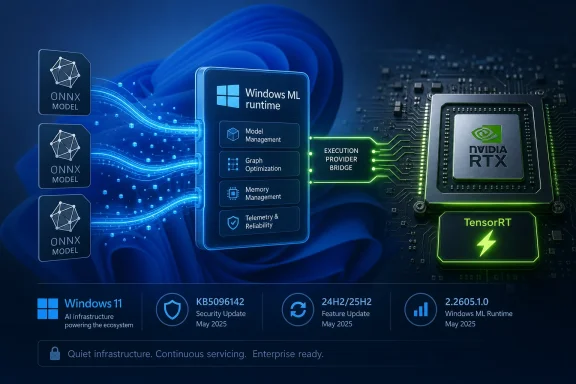
An execution provider is a hardware-specific bridge between an AI model and the processor best suited to run it. In the Windows ML world, the model is commonly expressed in ONNX, a portable format designed to let trained machine-learning models run across different frameworks and devices. ONNX Runtime then decides, with help from available execution providers, whether the work should run on a CPU, GPU, or NPU.The Nvidia TensorRT-RTX Execution Provider is built for one slice of that universe: ONNX model inference on Nvidia RTX GPUs in client PCs. It uses Nvidia’s TensorRT for RTX runtime to generate and run optimized inference engines locally on the GPU. In plain English, it helps Windows applications use RTX hardware for AI workloads without every developer having to become an Nvidia deployment specialist.
That distinction matters because the Windows PC market is fragmented by design. One user may have a Qualcomm NPU, another an Intel NPU, another an AMD GPU, another an Nvidia RTX card, and many will have some combination of CPU, GPU, and neural accelerator. If Windows is going to be a credible local AI platform, it needs a common abstraction layer that hides enough of that complexity to make developers willing to target it.
Microsoft’s answer is not to eliminate hardware-specific optimization. It is to package that optimization in components Windows can discover, service, and make available to apps. KB5096142 is therefore not just an Nvidia update wearing a Microsoft KB number. It is a sign of how Windows is absorbing AI acceleration into the operating system’s maintenance model.
Windows 11 24H2 Was the Real Starting Line
The update’s dependency on Windows 11 24H2 or 25H2 is not incidental. Windows 11 24H2 introduced the modern Windows ML direction Microsoft has been building around Copilot+ PCs and local inference. Vendor-optimized execution providers for GPUs and NPUs are tied to that newer Windows base rather than older Windows 10-era WinML expectations.That makes KB5096142 part of a broader platform reset. Microsoft is not merely backporting every AI acceleration feature to the installed base. It is using 24H2 and later as the foundation for a more actively serviced AI runtime ecosystem.
For enthusiasts, this means the Windows version number matters more than it did during the long, flat middle years of Windows 10. For developers, it means targeting the newer Windows ML stack can bring automatic access to improved execution providers. For administrators, it means AI capability is increasingly coupled to cumulative update state, driver state, and Windows Update policy.
The prerequisite language is also revealing. Microsoft says users must have the latest cumulative update for Windows 11 version 24H2 or 25H2 installed. In other words, the execution provider is not a freestanding island. It rides on top of a current Windows servicing baseline, which gives Microsoft a narrower matrix to validate and reduces the chance of new AI components landing on stale system files.
That is sensible engineering, but it also reinforces the servicing treadmill. If a fleet delays cumulative updates aggressively, it may also delay the AI runtime improvements that application vendors assume are present. The cost of staying behind is no longer limited to security exposure or missing shell fixes; it may include worse local AI performance and compatibility.
Nvidia Gets a Cleaner Path Into Windows AI Workloads
Nvidia already dominates the developer imagination around accelerated AI, but Windows client deployment is a different battlefield from data-center CUDA stacks. Consumer PCs are messy. Drivers vary, app packaging varies, users do not install toolkits correctly, and even technically literate people can get trapped in dependency mismatches between CUDA, cuDNN, TensorRT, ONNX Runtime, and Python packages.The TensorRT-RTX Execution Provider is one attempt to tame that for client scenarios. Instead of asking each app to ship and maintain an entire optimized inference path, Windows can expose an execution provider that apps can use through the platform. The promise is not that every workload magically becomes fast. The promise is that the path to hardware acceleration becomes less bespoke.
That is good for Nvidia because it keeps RTX GPUs relevant in the local AI story even as Microsoft promotes NPUs in Copilot+ PCs. NPUs are efficient and increasingly important, but the installed base of RTX laptops and desktops is enormous, and GPUs remain attractive for heavier models and creative workloads. A serviced TensorRT-RTX provider lets Nvidia’s acceleration story participate in the Windows ML layer instead of living only in separate developer ecosystems.
It is also good for Microsoft because it avoids making Windows AI synonymous with one hardware class. Copilot+ branding pushed NPUs into the spotlight, but real Windows machines are hybrid compute boxes. A practical AI platform has to dispatch work across what the user actually owns, not what a launch event wished they owned.
Still, there is a strategic tension here. The more Microsoft abstracts vendor hardware behind Windows ML, the more it can tell developers to target Windows rather than Nvidia, Qualcomm, Intel, or AMD directly. The more Nvidia integrates into that abstraction, the more RTX hardware becomes useful to ordinary Windows apps without special setup. Both companies benefit, but neither is giving up leverage.
Automatic Delivery Is Convenient Until It Becomes a Change-Control Problem
Microsoft says KB5096142 will be downloaded and installed automatically from Windows Update. For consumers, that is the right default. Nobody wants to manually track execution provider versions just to make a photo editor, local transcription app, or AI-assisted coding tool run better on a GPU.For managed environments, automatic servicing is more complicated. Execution providers are not security patches in the traditional sense, but they can affect application behavior. They may change performance, supported operators, model compatibility, fallback behavior, or GPU utilization patterns. If an enterprise has validated an AI-enabled workflow on a particular runtime version, an automatic component update is still a change.
This is the familiar Windows tension in a new costume. Microsoft wants a platform where improvements flow continuously and developers can assume a reasonably modern base. Administrators want predictability, staged rollout, and a clear understanding of what changed before it reaches production machines.
The lack of detailed release notes makes that harder. “Improvements” may be true, but it is not operationally rich. A sysadmin reading KB5096142 knows the version number, applicability, prerequisite, replacement relationship, and update-history label. They do not know which model operators were improved, which crashes were fixed, whether engine caching changed, or whether any known regressions exist.
That is acceptable for home PCs. It is less satisfying for organizations beginning to deploy local AI features in regulated, high-performance, or support-sensitive environments. If Microsoft wants Windows ML to be treated as serious platform infrastructure, its AI component updates will eventually need the same sort of change transparency expected from graphics drivers, .NET servicing, or browser enterprise release notes.
This Is Not a GPU Driver, and That Distinction Matters
One source of confusion is that anything involving Nvidia and Windows Update tends to get mentally filed under “driver.” KB5096142 is not a GeForce driver update. It does not replace the Nvidia display driver, does not update the Nvidia App, and does not directly change gaming features such as DLSS settings or display output behavior.It updates a Windows ML runtime component that uses Nvidia’s TensorRT for RTX technology for model inference. That is a narrower and more specific function. If a game is crashing, a monitor is flickering, or the Nvidia Control Panel is misbehaving, this KB is unlikely to be the first suspect.
The distinction matters because the Windows Update history entry may alarm users who are conditioned to be cautious about GPU changes. “Nvidia TensorRT-RTX Execution Provider” sounds technical enough to be dangerous and obscure enough to be suspicious. In reality, it is part of the machinery that AI-capable Windows apps may call when they want to run ONNX models efficiently on local RTX hardware.
That does not mean it is risk-free. Runtime components can have bugs, and GPU-accelerated inference can expose driver interactions or application assumptions. But troubleshooting should start from what the component actually does. It is a machine-learning inference provider, not the core graphics driver stack.
For WindowsForum readers, the practical test is simple: if you see KB5096142 in update history and nothing is broken, there is probably nothing to do. If an AI application behaves differently after the update, especially one using Windows ML or ONNX Runtime acceleration, then the execution provider becomes relevant. If your issue is purely display, gaming, or general Nvidia driver behavior, look elsewhere first.
Local AI Needs Boring Updates More Than Big Promises
The PC industry has spent the last two years selling local AI as a revolution. Copilot keys, NPUs, “AI PCs,” RTX acceleration, small language models, background effects, recall-style indexing, and on-device assistants all orbit the same premise: more intelligence should run locally, not only in the cloud.The problem is that local AI is not one feature. It is a stack. Models need formats, runtimes, execution providers, hardware drivers, memory planning, power management, security boundaries, and update channels. A keynote can hide that complexity; a shipping platform cannot.
KB5096142 belongs to the unglamorous part of the story. It updates one provider for one hardware family on two Windows versions. But multiplied across Qualcomm QNN, Intel OpenVINO, AMD components, Nvidia TensorRT-RTX, and Microsoft’s own runtime work, this is how local AI becomes less experimental and more ordinary.
That ordinariness is the point. Users should not need to know whether an app’s background removal model uses DirectML, TensorRT-RTX, an NPU provider, or CPU fallback. Developers should not have to ship a separate acceleration universe for every hardware vendor. Administrators should be able to inventory and manage the components that make all of this happen.
The danger is that Microsoft repeats old Windows mistakes: opaque updates, inconsistent naming, scattered documentation, and unclear boundaries between OS, Store, driver, and optional component. AI runtime servicing can succeed only if it becomes boring in the right way. Boring means predictable, inspectable, and recoverable—not invisible until something fails.
ONNX Is the Common Language Microsoft Wants Developers to Speak
The presence of ONNX Runtime at the center of this update is not accidental. ONNX gives developers a model format that can move between training frameworks and inference environments. ONNX Runtime then provides a way to execute those models across different hardware targets.For Microsoft, ONNX is strategically useful because it prevents Windows AI from depending entirely on one vendor’s native SDK. A developer can bring an ONNX model to Windows ML and let the platform choose an appropriate execution provider. On an Nvidia RTX machine, that may mean TensorRT-RTX. On another machine, it may mean a Qualcomm, Intel, AMD, DirectML, or CPU path.
That does not erase vendor differences. Some models run better on certain hardware. Some operators may be supported in one execution provider before another. Some workloads need GPU memory that a thin-and-light laptop simply does not have. Abstraction is not magic.
But abstraction is still valuable. Without it, Windows AI becomes a maze of per-vendor code paths and installer prerequisites. With it, Microsoft can encourage developers to write against a common platform while still allowing hardware vendors to compete underneath on performance and efficiency.
KB5096142 is a minor version bump in that architecture. Its significance is that the architecture now has a visible servicing rhythm. Microsoft is not treating execution providers as static files dropped once and forgotten. It is updating them, replacing prior KBs, and exposing their presence in update history.
The Update History Entry Is the Only Consumer-Facing Clue
Microsoft tells users to verify installation by going to Settings, Windows Update, and Update history. After installation, the relevant entry should read “Windows ML Runtime Nvidia TensorRT-RTX Execution Provider Update (KB5096142).”That is both useful and limited. It gives power users a way to confirm the component landed. It gives support desks a string to ask for when troubleshooting. It gives administrators a KB number to track.
What it does not give is a friendly explanation inside Windows of why the component exists. A user with an RTX laptop may reasonably ask why a machine-learning runtime update appeared when they did not install an AI app. The answer is that Windows is preparing and maintaining shared acceleration infrastructure that applications may use later. But Windows Update history does not say that in human terms.
This is one of the stranger aspects of the AI PC transition. Microsoft is making deep platform changes while the visible user experience remains uneven. Some users see Copilot branding everywhere and resent it. Others receive AI runtime components silently and never learn what they do. Between those poles lies the actual platform work, which is more consequential than the marketing.
For WindowsForum’s audience, update history is also a diagnostic breadcrumb. If an app developer says their Windows ML feature requires the latest Nvidia TensorRT-RTX provider, KB5096142 is the name to check. If a device is stuck on an older provider such as KB5089168, the next question is whether the machine is current on cumulative updates and eligible for the automatic Windows Update package.
Version 25H2’s Inclusion Shows the AI Stack Is Already Looking Ahead
KB5096142 applies to Windows 11 version 25H2 as well as 24H2. That matters because it shows Microsoft is carrying this AI runtime model forward rather than treating it as a one-release experiment. Windows 11 24H2 may have been the practical platform reset, but 25H2 is already in the servicing picture.The inclusion also hints at how Microsoft wants Windows versions to feel for AI developers. The ideal is continuity: an app targets Windows ML, execution providers arrive and improve through Windows Update, and the user’s hardware determines the best available acceleration path. In that model, the app is less tightly coupled to a specific Windows feature release and more dependent on the presence of serviced runtime components.
The reality will be messier. Enterprises will lag on feature updates. Consumers will own unsupported hardware combinations. GPU drivers will vary. Some AI apps will bypass Windows ML entirely and ship their own stacks because they need maximum control or cross-platform consistency.
Even so, the direction is clear. Microsoft wants the Windows AI platform to be versioned, serviced, and discoverable. KB5096142 is part of that scaffolding. It is not an end-user feature update, but it is a platform signal.
The Changelog Gap Is Now the Biggest Weakness
The strongest criticism of KB5096142 is not that it exists, or that it installs automatically, or that it targets a narrow Nvidia component. The criticism is that Microsoft is asking users and administrators to accept an AI runtime update with almost no technical disclosure.A version number is not a changelog. “Improvements” is not a support matrix. “Replaces KB5089168” is useful but not sufficient. If an execution provider update changes performance or compatibility, the people responsible for fleets need more than a breadcrumb.
This is especially important because local AI workloads can be resource-intensive. They can affect battery life, thermals, GPU scheduling, memory pressure, and user perception of system responsiveness. A change that is beneficial for one model or app could expose a regression in another.
Microsoft does not need to publish every internal bug ID. But it should publish enough to let IT professionals understand the category of change: stability fixes, operator support, performance improvements, security hardening, compatibility updates, or known issues. That kind of transparency would make these updates feel like mature platform servicing rather than mysterious AI payloads.
The irony is that Microsoft has spent decades teaching administrators to respect KB numbers. A KB article is supposed to be the durable explanation behind a change. If AI execution provider KBs remain thin, they will inherit the authority of Windows Update without providing the operational detail that authority deserves.
The Small Nvidia KB That Shows Where Windows Is Going
KB5096142 is easy to ignore, but it captures several concrete realities about the new Windows AI stack. The most important point is that AI acceleration is becoming a maintained platform layer, not merely a feature inside individual apps.- KB5096142 updates the Nvidia TensorRT-RTX Execution Provider to version 2.2605.1.0 for Windows 11 version 24H2 and 25H2 systems.
- The update is delivered automatically through Windows Update and requires the latest cumulative update for the applicable Windows version.
- The package replaces KB5089168, which carried the previous 2.2604.1.0 version of the same provider.
- The component is meant for ONNX model inference acceleration on Nvidia RTX GPUs through Windows ML and ONNX Runtime, not for general graphics-driver servicing.
- Users can confirm installation in Windows Update history under the Windows ML Runtime Nvidia TensorRT-RTX Execution Provider Update entry.
- The update’s sparse release notes leave administrators with too little detail about the exact fixes or performance changes included.
References
- Primary source: Microsoft Support
Published: Tue, 26 May 2026 21:02:36 Z
- Official source: learn.microsoft.com

Update execution providers in Windows ML
Learn how execution providers are updated in Windows ML.learn.microsoft.com - Related coverage: onnxruntime.ai
NVIDIA - TensorRT
Instructions to execute ONNX Runtime on NVIDIA GPUs with the TensorRT execution provideronnxruntime.ai
- Related coverage: docs.nvidia.com
Architecture Overview — NVIDIA TensorRT for RTX
docs.nvidia.com
- Related coverage: developer.nvidia.com

NVIDIA TensorRT for RTX Introduces an Optimized Inference AI Library on Windows 11 | NVIDIA Technical Blog
AI experiences are rapidly expanding on Windows in creativity, gaming, and productivity apps. There are various frameworks available to accelerate AI inference in these apps locally on a desktop…developer.nvidia.com

