

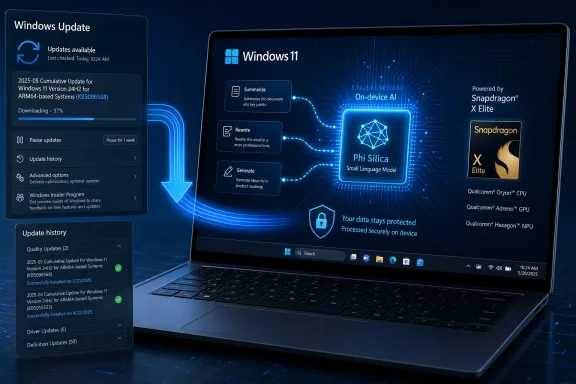
Microsoft has published KB5096568, a Phi Silica AI component update to version 1.2605.856.0 for Qualcomm-powered Copilot+ PCs running Windows 11 version 24H2 or 25H2, delivered automatically through Windows Update after the latest cumulative update is installed. The update is easy to miss because it is not a headline feature drop, a security bulletin, or a new Copilot app announcement. But it is one of the clearest signals yet that Microsoft now treats local AI models as serviced Windows components, not as optional demos layered on top of the operating system.
That distinction matters. Phi Silica is not just another bundled app; it is part of the machinery behind Microsoft’s attempt to make Windows an AI runtime. KB5096568 is therefore less about one model version number than about the new maintenance contract Copilot+ PC owners have implicitly entered: the operating system, the NPU, the AI APIs, and the language model are now moving parts of the same platform.
For most Windows users, “AI update” still sounds like a cloud-side change. Copilot gets a new interface, Microsoft 365 gains a new drafting trick, or a model hosted somewhere in Azure becomes faster without the PC itself changing much. KB5096568 points in the opposite direction. It updates a local model that lives on the device and is expected to serve Windows features and applications without making a round trip to the cloud.
Phi Silica is Microsoft’s small language model designed for Copilot+ PCs, tuned to run on the Neural Processing Unit rather than leaning on a CPU, GPU, or remote service. Its role is narrow compared with a giant frontier model, but that is the point. It is built for local text understanding, summarization, rewriting, and short-form generation where latency, power use, and privacy are more important than maximal reasoning depth.
The KB article says the update applies to Windows 11 version 24H2 and Windows 11 version 25H2 on Qualcomm-powered systems. It also says users must have the latest cumulative update installed before this component update arrives. In other words, the model update is downstream of ordinary Windows servicing, not a detached app-store novelty.
That is a quiet but important architectural choice. Microsoft is putting AI components into the same operational pipeline that enterprises already watch, delay, test, and audit. The local model becomes another part of Windows that can be versioned, deployed, and inspected through Update history.
That does not mean Phi Silica is conceptually limited to Qualcomm forever. Microsoft has also been servicing Phi Silica variants for AMD and Intel Copilot+ PCs as the broader x86 ecosystem catches up. But Qualcomm systems remain the original proving ground, partly because they were first through the Copilot+ PC gate and partly because Windows on Arm gives Microsoft a more controlled hardware-software showcase.
For users, the effect is mundane by design. The update downloads and installs automatically from Windows Update, and its presence can be checked in Settings under Windows Update history. That is not glamorous, but it is precisely the sort of boring plumbing required if Microsoft wants AI features to behave like platform capabilities rather than preview toys.
The version number, 1.2605.856.0, is also worth reading as a platform signal. Microsoft is not waiting for annual Windows releases to iterate on the local AI layer. The model component can be refreshed independently, while still being gated by Windows 11 24H2 or 25H2 and the latest cumulative update baseline.
That changes the success criteria. A local model on a Copilot+ PC does not need to replace a cloud model used for deep research or complex code generation. It needs to summarize selected text quickly, rewrite a paragraph without freezing the machine, classify or transform user content, and support app developers who want language features without building their own model distribution pipeline.
This is where the NPU becomes more than a marketing acronym. If the model can run efficiently on dedicated silicon, Windows can offer AI features without turning every request into a battery-draining event. That is especially important for Arm laptops, where the sales pitch has been all-day mobility plus enough AI capability to justify new hardware.
There is also a privacy argument, though it should be handled carefully. Local processing can keep prompts and source text on the device for supported scenarios, which is materially different from sending every request to a cloud service. But privacy depends on the calling app, the feature design, diagnostic settings, and organizational policy. “On-device” is a strong building block, not a magic absolution.
That makes sense if Phi Silica is part of the OS substrate. Windows features such as Click to Do, rewriting, summarization, and future AI-powered shell experiences need a predictable local model underneath them. Developers using Windows AI APIs also need to know whether a compatible model is present and current.
The tradeoff is that model servicing now inherits all the politics of Windows servicing. Home users may barely notice the install. Enthusiasts will inspect the KB number and version string. Enterprise administrators will ask how the package behaves with Windows Update for Business, Intune, Autopatch, WSUS, offline imaging, compliance reporting, and rollback expectations.
That last group has good reason to care. A model update is not the same thing as a calculator update. Even when the interface does not change, outputs can shift. Summaries may become more concise, rewrites may choose different wording, content filters may behave differently, and latency may improve or regress depending on the workload.
Microsoft’s support text describes KB5096568 broadly as including improvements to the Phi Silica AI component. It does not provide a granular changelog of model behavior. That may be normal for AI components, but it is uncomfortable for administrators trained to ask exactly what changed before approving a rollout.
That complexity is manageable, but it changes troubleshooting. If a local summarization feature fails, the cause may not be the app itself. The PC may lack the right Copilot+ hardware, the Windows build may be behind, the cumulative update prerequisite may be missing, the AI component may not have installed, or a policy may be blocking part of the deployment path.
The support article’s instruction to check Update history is therefore more than a casual note. It gives users and admins a concrete place to confirm whether the component landed. In a world where AI features are often announced with sweeping language and uneven availability, the boring visibility of Update history is valuable.
Still, Microsoft has work to do here. Windows Update history was built for KB packages, drivers, definitions, and feature updates, not for explaining the health of a local AI runtime. If AI components become central to Windows, administrators will need clearer inventory, policy, and diagnostics than a line item in Settings.
But the platform is not universal. Phi Silica is tied to Copilot+ PCs with suitable NPUs, and Microsoft’s own documentation has emphasized that unsupported devices should be expected to lack model availability. Developers cannot treat it as a baseline Windows feature in the same way they might treat WinUI, WebView2, or DirectX on broadly supported hardware.
That creates a familiar Windows problem in a new form: capability fragmentation. An app that uses Phi Silica well should detect support, degrade gracefully, and avoid making a Copilot+ PC a hidden requirement unless the app’s whole purpose depends on local AI. The best Windows AI apps will be explicit about what runs locally, what requires cloud fallback, and what happens on non-Copilot+ hardware.
There is also a trust dimension. If an enterprise app uses Phi Silica to summarize customer records, legal material, or internal chat logs, local execution may be a selling point. But organizations will still need to validate output quality, retention behavior, policy controls, and the consequences of model updates. A serviced model is convenient; it is not static.
KB5096568 lands directly in that tension. Automatic installation is excellent for keeping consumer devices current and for ensuring developers can target a reasonably fresh local model. It is less comforting for regulated environments where model behavior changes may require validation, documentation, or at least a pilot ring.
The risk is not that Phi Silica is uniquely dangerous. The risk is that AI components blur categories Windows administrators understand. Is this an OS component, a model artifact, an application dependency, a feature enabler, or a content-processing engine? The honest answer is: yes, depending on who is asking.
That ambiguity will force better tooling. Enterprises will need AI component inventory alongside OS build inventory. They will need policy surfaces that distinguish cloud AI from local AI. They will need documentation that explains not just whether a model exists, but which Windows features and third-party apps can invoke it.
That is how platform shifts often arrive. The first wave is underwhelming because the visible apps lag behind the plumbing. Then, once the APIs, models, drivers, and hardware are common enough, developers begin to assume the platform exists and build experiences that would have been too awkward before.
Microsoft’s challenge is that users have already been trained to expect AI announcements to overpromise. Copilot+ PCs launched into a market that was curious but skeptical, especially after the controversy around Recall and the uneven rollout of early AI features. Component updates like KB5096568 are not enough to win that argument by themselves.
But they are necessary. If Microsoft cannot service local models reliably, the Copilot+ PC concept collapses into branding. If it can, Windows gains a new layer of capability that may eventually become as normal as graphics acceleration or biometric sign-in.
The support page does not say much about the specific improvements in version 1.2605.856.0. That omission is frustrating but not surprising. AI model updates often involve a mixture of performance tuning, compatibility work, reliability improvements, and behavior adjustments that vendors are reluctant to describe in detail.
For WindowsForum readers, the practical interpretation is straightforward. If you own or manage Qualcomm-powered Copilot+ PCs on Windows 11 24H2 or 25H2, this is an update to watch rather than fear. Confirm the prerequisite cumulative update, verify the KB appears in Update history, and treat any change in local AI behavior as part of the Windows servicing lifecycle.
The broader interpretation is more interesting. Microsoft is building a world where the PC’s AI capability is not frozen at purchase. The NPU is the hardware anchor, but the model layer above it is expected to evolve.
That distinction matters. Phi Silica is not just another bundled app; it is part of the machinery behind Microsoft’s attempt to make Windows an AI runtime. KB5096568 is therefore less about one model version number than about the new maintenance contract Copilot+ PC owners have implicitly entered: the operating system, the NPU, the AI APIs, and the language model are now moving parts of the same platform.
 Microsoft Turns the Local Model Into a Windows Component
For most Windows users, “AI update” still sounds like a cloud-side change. Copilot gets a new interface, Microsoft 365 gains a new drafting trick, or a model hosted somewhere in Azure becomes faster without the PC itself changing much. KB5096568 points in the opposite direction. It updates a local model that lives on the device and is expected to serve Windows features and applications without making a round trip to the cloud.Phi Silica is Microsoft’s small language model designed for Copilot+ PCs, tuned to run on the Neural Processing Unit rather than leaning on a CPU, GPU, or remote service. Its role is narrow compared with a giant frontier model, but that is the point. It is built for local text understanding, summarization, rewriting, and short-form generation where latency, power use, and privacy are more important than maximal reasoning depth.
The KB article says the update applies to Windows 11 version 24H2 and Windows 11 version 25H2 on Qualcomm-powered systems. It also says users must have the latest cumulative update installed before this component update arrives. In other words, the model update is downstream of ordinary Windows servicing, not a detached app-store novelty.
That is a quiet but important architectural choice. Microsoft is putting AI components into the same operational pipeline that enterprises already watch, delay, test, and audit. The local model becomes another part of Windows that can be versioned, deployed, and inspected through Update history.
Qualcomm Copilot+ PCs Remain Microsoft’s First AI Beachhead
The Qualcomm targeting is not incidental. Copilot+ PCs began life most visibly on Snapdragon X-series hardware, and Microsoft’s early Windows-on-Arm AI push has depended on Qualcomm’s NPU story being good enough to make local AI feel ordinary rather than experimental. KB5096568 continues that pattern by naming Qualcomm-powered systems specifically.That does not mean Phi Silica is conceptually limited to Qualcomm forever. Microsoft has also been servicing Phi Silica variants for AMD and Intel Copilot+ PCs as the broader x86 ecosystem catches up. But Qualcomm systems remain the original proving ground, partly because they were first through the Copilot+ PC gate and partly because Windows on Arm gives Microsoft a more controlled hardware-software showcase.
For users, the effect is mundane by design. The update downloads and installs automatically from Windows Update, and its presence can be checked in Settings under Windows Update history. That is not glamorous, but it is precisely the sort of boring plumbing required if Microsoft wants AI features to behave like platform capabilities rather than preview toys.
The version number, 1.2605.856.0, is also worth reading as a platform signal. Microsoft is not waiting for annual Windows releases to iterate on the local AI layer. The model component can be refreshed independently, while still being gated by Windows 11 24H2 or 25H2 and the latest cumulative update baseline.
The Model Is Small Because the Job Is Different
The industry’s AI conversation is still dominated by scale: more parameters, bigger context windows, larger clusters, and cloud services that absorb the cost of inference far away from the user. Phi Silica represents a different bet. Microsoft is trying to make a small, NPU-optimized model good enough for common interface tasks that benefit from being instant, local, and power-efficient.That changes the success criteria. A local model on a Copilot+ PC does not need to replace a cloud model used for deep research or complex code generation. It needs to summarize selected text quickly, rewrite a paragraph without freezing the machine, classify or transform user content, and support app developers who want language features without building their own model distribution pipeline.
This is where the NPU becomes more than a marketing acronym. If the model can run efficiently on dedicated silicon, Windows can offer AI features without turning every request into a battery-draining event. That is especially important for Arm laptops, where the sales pitch has been all-day mobility plus enough AI capability to justify new hardware.
There is also a privacy argument, though it should be handled carefully. Local processing can keep prompts and source text on the device for supported scenarios, which is materially different from sending every request to a cloud service. But privacy depends on the calling app, the feature design, diagnostic settings, and organizational policy. “On-device” is a strong building block, not a magic absolution.
Windows Update Is Becoming the AI Distribution Channel
The most consequential part of KB5096568 may be its delivery mechanism. Microsoft could have distributed Phi Silica through a developer SDK, a Store package, an optional feature, or a Copilot-branded installer. Instead, this update arrives through Windows Update and appears in Update history.That makes sense if Phi Silica is part of the OS substrate. Windows features such as Click to Do, rewriting, summarization, and future AI-powered shell experiences need a predictable local model underneath them. Developers using Windows AI APIs also need to know whether a compatible model is present and current.
The tradeoff is that model servicing now inherits all the politics of Windows servicing. Home users may barely notice the install. Enthusiasts will inspect the KB number and version string. Enterprise administrators will ask how the package behaves with Windows Update for Business, Intune, Autopatch, WSUS, offline imaging, compliance reporting, and rollback expectations.
That last group has good reason to care. A model update is not the same thing as a calculator update. Even when the interface does not change, outputs can shift. Summaries may become more concise, rewrites may choose different wording, content filters may behave differently, and latency may improve or regress depending on the workload.
Microsoft’s support text describes KB5096568 broadly as including improvements to the Phi Silica AI component. It does not provide a granular changelog of model behavior. That may be normal for AI components, but it is uncomfortable for administrators trained to ask exactly what changed before approving a rollout.
The New Windows Stack Has More Layers to Break
For decades, Windows compatibility mostly meant the OS, drivers, frameworks, and applications. Copilot+ PCs add a new dependency chain: the feature, the Windows AI API, the model package, the NPU driver, the silicon vendor’s acceleration layer, and the OS build all need to line up. KB5096568 is a reminder that the modern Windows client is becoming a layered AI platform, not just a place where AI apps happen to run.That complexity is manageable, but it changes troubleshooting. If a local summarization feature fails, the cause may not be the app itself. The PC may lack the right Copilot+ hardware, the Windows build may be behind, the cumulative update prerequisite may be missing, the AI component may not have installed, or a policy may be blocking part of the deployment path.
The support article’s instruction to check Update history is therefore more than a casual note. It gives users and admins a concrete place to confirm whether the component landed. In a world where AI features are often announced with sweeping language and uneven availability, the boring visibility of Update history is valuable.
Still, Microsoft has work to do here. Windows Update history was built for KB packages, drivers, definitions, and feature updates, not for explaining the health of a local AI runtime. If AI components become central to Windows, administrators will need clearer inventory, policy, and diagnostics than a line item in Settings.
Developers Get a Platform, But Not a Blank Check
For developers, Phi Silica is attractive because it promises a local language model exposed through Windows AI APIs. That lowers the barrier to adding summarization, rewriting, prompt-response experiences, and text transformation to Windows apps. It also reduces the need to bundle large models or manage cloud API keys for every basic language feature.But the platform is not universal. Phi Silica is tied to Copilot+ PCs with suitable NPUs, and Microsoft’s own documentation has emphasized that unsupported devices should be expected to lack model availability. Developers cannot treat it as a baseline Windows feature in the same way they might treat WinUI, WebView2, or DirectX on broadly supported hardware.
That creates a familiar Windows problem in a new form: capability fragmentation. An app that uses Phi Silica well should detect support, degrade gracefully, and avoid making a Copilot+ PC a hidden requirement unless the app’s whole purpose depends on local AI. The best Windows AI apps will be explicit about what runs locally, what requires cloud fallback, and what happens on non-Copilot+ hardware.
There is also a trust dimension. If an enterprise app uses Phi Silica to summarize customer records, legal material, or internal chat logs, local execution may be a selling point. But organizations will still need to validate output quality, retention behavior, policy controls, and the consequences of model updates. A serviced model is convenient; it is not static.
The Enterprise Story Is About Control, Not Hype
Microsoft’s AI marketing often aims at end users: faster writing, smarter search, instant actions, and a PC that feels more helpful. Enterprise IT hears a different pitch. It wants to know what is installed, who can use it, what data it touches, how it is governed, and whether the feature can be delayed or disabled if something goes wrong.KB5096568 lands directly in that tension. Automatic installation is excellent for keeping consumer devices current and for ensuring developers can target a reasonably fresh local model. It is less comforting for regulated environments where model behavior changes may require validation, documentation, or at least a pilot ring.
The risk is not that Phi Silica is uniquely dangerous. The risk is that AI components blur categories Windows administrators understand. Is this an OS component, a model artifact, an application dependency, a feature enabler, or a content-processing engine? The honest answer is: yes, depending on who is asking.
That ambiguity will force better tooling. Enterprises will need AI component inventory alongside OS build inventory. They will need policy surfaces that distinguish cloud AI from local AI. They will need documentation that explains not just whether a model exists, but which Windows features and third-party apps can invoke it.
The Consumer Benefit Is Subtle Until It Is Everywhere
For a consumer with a Snapdragon Copilot+ PC, KB5096568 probably will not feel like a dramatic event. There may be no new button, no splash screen, and no obvious before-and-after moment. The update’s value is cumulative: local AI features get a fresher foundation, and apps that rely on the Windows AI layer get a more current runtime.That is how platform shifts often arrive. The first wave is underwhelming because the visible apps lag behind the plumbing. Then, once the APIs, models, drivers, and hardware are common enough, developers begin to assume the platform exists and build experiences that would have been too awkward before.
Microsoft’s challenge is that users have already been trained to expect AI announcements to overpromise. Copilot+ PCs launched into a market that was curious but skeptical, especially after the controversy around Recall and the uneven rollout of early AI features. Component updates like KB5096568 are not enough to win that argument by themselves.
But they are necessary. If Microsoft cannot service local models reliably, the Copilot+ PC concept collapses into branding. If it can, Windows gains a new layer of capability that may eventually become as normal as graphics acceleration or biometric sign-in.
The Version Number Tells a Bigger Story Than the KB Page
KB5096568 is a small support article with a large implication: Windows is moving from “AI features included” to AI components maintained. That is a more serious claim, and it comes with more serious obligations. A feature can be demoed; a component has to be serviced.The support page does not say much about the specific improvements in version 1.2605.856.0. That omission is frustrating but not surprising. AI model updates often involve a mixture of performance tuning, compatibility work, reliability improvements, and behavior adjustments that vendors are reluctant to describe in detail.
For WindowsForum readers, the practical interpretation is straightforward. If you own or manage Qualcomm-powered Copilot+ PCs on Windows 11 24H2 or 25H2, this is an update to watch rather than fear. Confirm the prerequisite cumulative update, verify the KB appears in Update history, and treat any change in local AI behavior as part of the Windows servicing lifecycle.
The broader interpretation is more interesting. Microsoft is building a world where the PC’s AI capability is not frozen at purchase. The NPU is the hardware anchor, but the model layer above it is expected to evolve.
The Phi Silica Refresh Makes Copilot+ PCs Feel Less Like a Launch Moment
The most concrete facts of KB5096568 are simple, but the operating model behind them is new enough that users and admins should internalize it.- KB5096568 updates the Phi Silica AI component to version 1.2605.856.0 on Qualcomm-powered Copilot+ PCs.
- The update applies to Windows 11 version 24H2 and Windows 11 version 25H2, assuming the latest cumulative update is already installed.
- The package is delivered automatically through Windows Update rather than as a separate manual download.
- Users can confirm installation through Settings, Windows Update, and Update history.
- The update reinforces Microsoft’s strategy of treating local AI models as serviced Windows platform components.
- Administrators should expect AI component versioning to become part of normal endpoint inventory and validation.
References
- Primary source: Microsoft Support
Published: Tue, 26 May 2026 21:02:19 Z
- Related coverage: qualcomm.com
Microsoft and Qualcomm Technologies collaborate on Windows 11, Copilot+ PCs and Windows AI Foundry | Qualcomm
Microsoft and Qualcomm Technologies collaborated to enhance AI solutions for Windows 11 and Copilot+ PCs, integrating advanced hardware and software for improved performance and efficiency.www.qualcomm.com
- Related coverage: windowsforum.com

Qualcomm Phi Silica Update Boosts On‑Device Copilot AI on Windows 11
Microsoft has quietly pushed a targeted component update for Phi Silica — the NPU‑tuned on‑device language model that powers many Windows Copilot experiences — delivering version 1.2511.1196.0 to Qualcomm‑powered Copilot+ systems via Windows Update (KB5072641). The package is a component‑level... windowsforum.com
- Related coverage: ctrlaltnod.com

KB5072642: Phi Silica AI Component Update for Intel-Powered Systems
KB5072642 introduces the Phi Silica AI component for Intel Copilot+ PCs running Windows 11 24H2/25H2. This local language model enhances AI capabilities with LLM-like features. www.ctrlaltnod.com
- Related coverage: windowslatest.com

Microsoft moves ahead with Windows 11 24H2, but Intel and AMD PCs must wait
Windows 11 24H2 is now generally and officially available for Snapdragon X Plus and X Elite-powered PCs, also known as Copilot+ PCs. In a new support document published on June 15, Microsoft quietly clarified that Windows 11 24H2 is available for Copilot+ PCs, and KB5039239 is the first big... www.windowslatest.com
- Official source: learn.microsoft.com

Copilot+ PC에 대한 AI 모델 설치 지침
IKU 및 unattend.xml사용하여 Windows 이미지 서비스 중에 AI 모델 사전 설치를 사용하도록 설정하는 OEM 및 IT 전문가를 위한 지침입니다.learn.microsoft.com

- Official source: blogs.windows.com

Phi Silica, small but mighty on-device SLM
Introduction This blog is the first installment in a new series of technical content designed to provide insights into the AI innovation on Windows. Today we will share how the Applied Sci blogs.windows.com
- Related coverage: na.ingrammicro.com
