

Microsoft’s KB5096573, published for Qualcomm-powered systems running Windows 11 version 26H1, delivers Phi Silica AI component version 1.2604.515.0 through Windows Update, automatically installing improvements for Microsoft’s on-device small language model after the latest cumulative update is already present. That sounds like routine servicing, but it is really a marker for where Windows is going. Microsoft is treating local AI models less like optional app features and more like platform components with their own release cadence, hardware targeting, and update history. For Copilot+ PCs, the operating system is no longer just updating drivers, security fixes, and inbox apps; it is updating the intelligence layer itself.
KB5096573 is not a blockbuster update in the traditional Windows sense. It does not arrive with a dramatic Start menu redesign, a new taskbar behavior, or a long list of administrator-facing policy switches. Its visible payload is narrow: a Phi Silica component update for Qualcomm-powered systems on Windows 11 version 26H1.
That narrowness is the point. Microsoft has spent decades teaching users and IT departments to think of Windows Update as the pipe for operating system maintenance. Now the company is using the same mechanism to maintain on-device AI capabilities that may be called by Windows features and third-party applications.
Phi Silica is not merely a demo model tucked away for enthusiasts. It is Microsoft’s NPU-optimized local small language model for Copilot+ PCs, exposed through Windows AI APIs and positioned as a way for apps to perform language tasks without shipping prompts to the cloud. Summarization, rewriting, short text generation, and text understanding are not new ideas, but making them a serviced Windows capability changes the economics and governance of using them.
The update also reinforces a less glamorous truth about AI PCs: the models matter as much as the silicon. Qualcomm’s NPU provides the hardware lane, but Microsoft decides what gets shipped into that lane, how it is versioned, and when it changes. KB5096573 is a small release note attached to a much larger platform bet.
For years, Windows administrators could treat most version differences as deployment timing problems. If a feature was not available today, it might arrive later through an enablement package, a cumulative update, or a staged rollout. Copilot+ PCs complicate that mental model because some features depend on local acceleration, model packages, and device-specific optimization.
Qualcomm-powered systems sit at the center of this update because Microsoft and Qualcomm have been the most tightly coupled partners in the first phase of Copilot+ PC development. Snapdragon X-class machines were the opening act for Microsoft’s modern AI PC push, and Phi Silica has been one of the clearest examples of Microsoft tailoring Windows AI features to a local NPU.
That does not mean Intel and AMD are irrelevant to Windows AI. It means the AI stack is becoming fragmented in the way graphics, power management, and firmware already are. The Windows brand remains unified, but the actual capabilities of a given Windows device increasingly depend on what silicon is inside and which AI components Microsoft has prepared for it.
For users, this will feel arbitrary unless Microsoft explains it well. For administrators, it means asset inventory now needs to include not just Windows version and CPU architecture, but NPU capability, AI component state, and whether a device’s update channel actually receives the model packages an application expects.
A cloud API can be updated behind the scenes, but developers generally expect the service provider to document capability changes, deprecations, safety behavior, and model transitions. Local AI inside Windows needs the same discipline. If Phi Silica is going to be a platform dependency, then version numbers such as 1.2604.515.0 are not trivia; they are part of the compatibility contract.
KB5096573 does not spell out a dramatic change in model behavior. Microsoft describes it as an update that includes improvements to the Phi Silica AI component. That vagueness is typical of many Windows component updates, but it becomes more consequential when the component generates or transforms language.
A file system update can be tested against known inputs and outputs. A language model is probabilistic, constrained by safety systems, and shaped by subtle changes in weights, prompts, runtime handling, and moderation. Even when an update is beneficial, it may change edge-case responses in ways that matter to applications built around repeatable local behavior.
This is where Microsoft’s platform ambition meets enterprise caution. Businesses may like the idea of offline summarization and local text handling, but they will want change control. If an internal app uses Phi Silica to summarize support tickets, rewrite customer responses, or classify documents, an AI component update is not just a patch; it is a behavioral change in a production dependency.
That is powerful. A note-taking app can summarize locally. A writing tool can rewrite a paragraph without sending it to a vendor cloud. A line-of-business app can extract intent from a short instruction on a locked-down corporate machine. The developer experience becomes closer to calling a platform API than building a miniature AI infrastructure stack.
But a platform API is only as good as its availability guarantees. If the app requires a Copilot+ PC, a supported NPU, a particular Windows App SDK path, and the right underlying AI component, developers must either build graceful fallback behavior or accept a small addressable market. KB5096573 is a reminder that “Windows 11” is no longer a sufficient compatibility statement.
The old Windows application model rewarded broad compatibility. The new AI model rewards opportunistic enhancement. The best apps will detect what is available, use Phi Silica when it is present, fall back to cloud models when appropriate, and remain useful when neither is available. The worst apps will simply fail or hide features behind opaque hardware messages.
Microsoft can help by making model readiness transparent. Users should not need to know the difference between a cumulative update, an AI component update, and a Windows App SDK prerequisite just to understand why a local summarization feature is missing. Developers should not need to write detective code to determine whether the promised platform is actually present.
That centralization has benefits. Microsoft can optimize for disk usage, power behavior, NPU scheduling, safety policy, and device compatibility. It can also patch model-related issues without waiting for every third-party developer to ship an app update. In theory, the result is cleaner than the current desktop AI mess, where every vendor wants to install a helper service, a background updater, and a private model cache.
The tradeoff is control. If Microsoft owns the local AI component pipeline, then Microsoft also controls the pace at which devices gain, lose, or change AI behavior. Windows Update becomes the gatekeeper not just for security posture, but for the machine’s cognitive surface area.
That is a heavy governance burden. Enterprises already wrestle with update rings, deferrals, driver validation, and application compatibility testing. AI components add another axis. A model update might not break an app in the conventional sense, but it could affect output quality, tone, safety refusals, latency, memory use, or battery life.
The natural response will be testing rings for AI features, just as organizations use testing rings for Windows patches. That sounds straightforward until one remembers that local AI value often comes from being embedded invisibly into workflows. Testing whether a model update changed “summarization quality” or “rewrite usefulness” is not as simple as checking whether a printer still works.
But this should not be mistaken for Qualcomm owning the Windows AI layer. Microsoft’s strategy is to abstract the model and API surface above the silicon. The company wants developers to think in terms of Windows AI APIs, not Hexagon NPU details, even if Qualcomm optimization is currently central to the experience.
That is exactly how Microsoft has historically preferred to manage hardware transitions. It supports partner differentiation where necessary, then pulls developers toward a Windows-level abstraction. DirectX did this for graphics. Windows Hello did it for biometrics. The Windows AI APIs are trying to do it for local inference.
For Qualcomm, the upside is immediate relevance. For Microsoft, the upside is leverage over the entire AI PC category. If developers build to Microsoft’s local AI APIs, then chip vendors compete to run those APIs well rather than forcing developers to choose between silicon-specific stacks.
The risk is that early fragmentation becomes habit. If Qualcomm systems receive certain model updates before AMD or Intel systems, or if Windows versions diverge by hardware class, developers may learn to treat Windows AI as a compatibility matrix rather than a universal platform. That would slow adoption precisely when Microsoft needs developers to make Copilot+ hardware feel necessary.
A local SLM changes where computation happens. It shifts some AI tasks from cloud subscriptions to device capabilities. It also changes user expectations: if a PC has an NPU and a built-in language model, people will begin to expect applications to feel more context-aware even when offline.
That expectation will pressure developers. Once a few Windows apps offer instant local rewriting, summarization, or command interpretation, those features may become table stakes. The first wave will look like convenience; the second wave will look like baseline UX.
There is also a security dimension. Local models reduce some data-exfiltration risks because prompts do not need to leave the device. But local AI does not magically eliminate risk. Sensitive data can still be mishandled by the calling app, stored insecurely, included in logs, or exposed through poorly designed workflows.
Administrators should therefore resist the temptation to classify local AI as automatically safe. The better framing is that local processing gives organizations more control over where data travels. It does not absolve them from auditing what apps do with that data before and after inference.
A single user can check update history manually. An enterprise fleet cannot. If local AI becomes part of application capability, IT teams will need inventory tools that can answer which devices have which AI components, which model versions, and which hardware-specific builds. Without that visibility, support teams will be stuck troubleshooting AI features with the same vague scripts once used for missing codecs or bad drivers.
This matters because AI failures are often ambiguous. If a local rewrite feature is slow, is the NPU unavailable? Is the component missing? Is the device on battery saver? Is the model version outdated? Is content moderation blocking the prompt? Is the app using the API correctly? The answer may not be obvious to the user or the help desk.
Microsoft has an opportunity here to avoid repeating the worst habits of Windows feature discovery. The company should expose AI component readiness in a way that is intelligible to users and scriptable for administrators. “This device supports Phi Silica version X and it is ready for apps” is the kind of statement Windows needs to make plainly.
Until then, KB articles such as this one will function as breadcrumbs. They tell us what changed, but not always enough about why it matters or how to operationalize it. For enthusiasts, that is annoying. For IT departments, it is a deployment risk.
Users will not care how many trillion operations per second their laptop can perform if the AI features are inconsistent, unavailable, or confusingly limited by model state. Developers will not target Windows AI APIs if the installed base is too fragmented or the documentation cannot keep pace with servicing. Administrators will not enable sensitive local AI workflows if they cannot test, govern, and explain updates.
Microsoft’s advantage is that it owns the OS, the API surface, the update mechanism, and the first-party Windows experiences that can demonstrate the value of local AI. Its disadvantage is that Windows users have long memories. They have seen features arrive half-finished, settings migrate unpredictably, and updates change behavior with limited explanation.
That history raises the bar for AI servicing. Microsoft cannot treat local models as mysterious black boxes that improve because the release note says so. It needs to provide enough transparency for professionals to trust the cadence, even if it does not disclose every internal model detail.
This is especially true because AI output is personal in a way many OS features are not. A bad animation annoys users. A bad summary misleads them. A rewrite that changes nuance can create business risk. A local assistant that misunderstands intent can undermine confidence in the whole class of features.
The future is not one giant Copilot button. It is a mesh of local models, cloud services, app APIs, hardware accelerators, and update channels. Some of it will be visible to users. Much of it will be invisible until something is missing, broken, slow, or unexpectedly better.
That makes the servicing model a central part of the product. Microsoft is not just selling an AI PC; it is promising that the AI PC will improve after purchase. KB5096573 is one of the small mechanisms by which that promise is supposed to become real.
The uncomfortable question is whether customers will experience those updates as improvement or churn. If local AI components evolve quietly and reliably, Windows will feel smarter without users needing to understand why. If they evolve opaquely, every AI feature will acquire the familiar Windows support haze: it works on one machine, not on another, and nobody is quite sure which update made the difference.
The practical lessons are already visible:
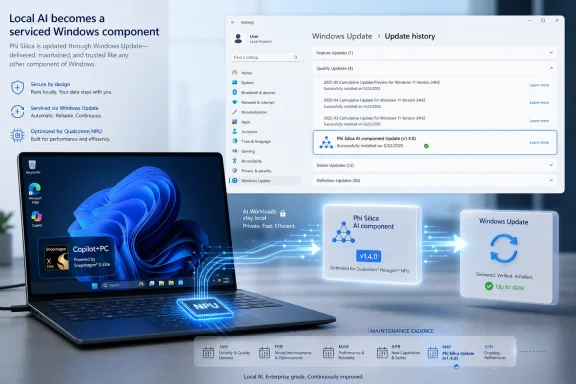 Microsoft Turns the Local Model Into a Serviced Windows Component
KB5096573 is not a blockbuster update in the traditional Windows sense. It does not arrive with a dramatic Start menu redesign, a new taskbar behavior, or a long list of administrator-facing policy switches. Its visible payload is narrow: a Phi Silica component update for Qualcomm-powered systems on Windows 11 version 26H1.That narrowness is the point. Microsoft has spent decades teaching users and IT departments to think of Windows Update as the pipe for operating system maintenance. Now the company is using the same mechanism to maintain on-device AI capabilities that may be called by Windows features and third-party applications.
Phi Silica is not merely a demo model tucked away for enthusiasts. It is Microsoft’s NPU-optimized local small language model for Copilot+ PCs, exposed through Windows AI APIs and positioned as a way for apps to perform language tasks without shipping prompts to the cloud. Summarization, rewriting, short text generation, and text understanding are not new ideas, but making them a serviced Windows capability changes the economics and governance of using them.
The update also reinforces a less glamorous truth about AI PCs: the models matter as much as the silicon. Qualcomm’s NPU provides the hardware lane, but Microsoft decides what gets shipped into that lane, how it is versioned, and when it changes. KB5096573 is a small release note attached to a much larger platform bet.
26H1 Is a Hardware Story Disguised as a Windows Version
The Windows 11 version 26H1 requirement is more than housekeeping. Microsoft has increasingly tied the newest AI experiences to particular combinations of Windows builds, NPUs, and silicon platforms. That turns the operating system version into a hardware eligibility boundary, not just a feature-update label.For years, Windows administrators could treat most version differences as deployment timing problems. If a feature was not available today, it might arrive later through an enablement package, a cumulative update, or a staged rollout. Copilot+ PCs complicate that mental model because some features depend on local acceleration, model packages, and device-specific optimization.
Qualcomm-powered systems sit at the center of this update because Microsoft and Qualcomm have been the most tightly coupled partners in the first phase of Copilot+ PC development. Snapdragon X-class machines were the opening act for Microsoft’s modern AI PC push, and Phi Silica has been one of the clearest examples of Microsoft tailoring Windows AI features to a local NPU.
That does not mean Intel and AMD are irrelevant to Windows AI. It means the AI stack is becoming fragmented in the way graphics, power management, and firmware already are. The Windows brand remains unified, but the actual capabilities of a given Windows device increasingly depend on what silicon is inside and which AI components Microsoft has prepared for it.
For users, this will feel arbitrary unless Microsoft explains it well. For administrators, it means asset inventory now needs to include not just Windows version and CPU architecture, but NPU capability, AI component state, and whether a device’s update channel actually receives the model packages an application expects.
The Privacy Pitch Depends on Boring Reliability
Microsoft’s public argument for Phi Silica is easy to understand: keep language processing local, reduce latency, and avoid sending sensitive content to a remote model when the job can be handled on-device. That is an attractive pitch for regulated industries, privacy-conscious users, and developers tired of paying for every inference call. It is also a pitch that only works if the local model behaves predictably.A cloud API can be updated behind the scenes, but developers generally expect the service provider to document capability changes, deprecations, safety behavior, and model transitions. Local AI inside Windows needs the same discipline. If Phi Silica is going to be a platform dependency, then version numbers such as 1.2604.515.0 are not trivia; they are part of the compatibility contract.
KB5096573 does not spell out a dramatic change in model behavior. Microsoft describes it as an update that includes improvements to the Phi Silica AI component. That vagueness is typical of many Windows component updates, but it becomes more consequential when the component generates or transforms language.
A file system update can be tested against known inputs and outputs. A language model is probabilistic, constrained by safety systems, and shaped by subtle changes in weights, prompts, runtime handling, and moderation. Even when an update is beneficial, it may change edge-case responses in ways that matter to applications built around repeatable local behavior.
This is where Microsoft’s platform ambition meets enterprise caution. Businesses may like the idea of offline summarization and local text handling, but they will want change control. If an internal app uses Phi Silica to summarize support tickets, rewrite customer responses, or classify documents, an AI component update is not just a patch; it is a behavioral change in a production dependency.
Developers Get a Platform, but Also a Moving Target
The most interesting audience for KB5096573 may not be end users. It may be developers who have been waiting for Windows AI APIs to become stable enough to target seriously. Phi Silica gives them a local language model without asking them to bundle a model, manage an inference runtime, or require a network call for every small AI feature.That is powerful. A note-taking app can summarize locally. A writing tool can rewrite a paragraph without sending it to a vendor cloud. A line-of-business app can extract intent from a short instruction on a locked-down corporate machine. The developer experience becomes closer to calling a platform API than building a miniature AI infrastructure stack.
But a platform API is only as good as its availability guarantees. If the app requires a Copilot+ PC, a supported NPU, a particular Windows App SDK path, and the right underlying AI component, developers must either build graceful fallback behavior or accept a small addressable market. KB5096573 is a reminder that “Windows 11” is no longer a sufficient compatibility statement.
The old Windows application model rewarded broad compatibility. The new AI model rewards opportunistic enhancement. The best apps will detect what is available, use Phi Silica when it is present, fall back to cloud models when appropriate, and remain useful when neither is available. The worst apps will simply fail or hide features behind opaque hardware messages.
Microsoft can help by making model readiness transparent. Users should not need to know the difference between a cumulative update, an AI component update, and a Windows App SDK prerequisite just to understand why a local summarization feature is missing. Developers should not need to write detective code to determine whether the promised platform is actually present.
Windows Update Is Becoming an AI Distribution System
There is a practical reason Microsoft is using Windows Update for Phi Silica. AI components are large, hardware-sensitive, and likely to change more often than traditional OS features. Distributing them through the same trusted update channel avoids the chaos of each app downloading its own model and runtime.That centralization has benefits. Microsoft can optimize for disk usage, power behavior, NPU scheduling, safety policy, and device compatibility. It can also patch model-related issues without waiting for every third-party developer to ship an app update. In theory, the result is cleaner than the current desktop AI mess, where every vendor wants to install a helper service, a background updater, and a private model cache.
The tradeoff is control. If Microsoft owns the local AI component pipeline, then Microsoft also controls the pace at which devices gain, lose, or change AI behavior. Windows Update becomes the gatekeeper not just for security posture, but for the machine’s cognitive surface area.
That is a heavy governance burden. Enterprises already wrestle with update rings, deferrals, driver validation, and application compatibility testing. AI components add another axis. A model update might not break an app in the conventional sense, but it could affect output quality, tone, safety refusals, latency, memory use, or battery life.
The natural response will be testing rings for AI features, just as organizations use testing rings for Windows patches. That sounds straightforward until one remembers that local AI value often comes from being embedded invisibly into workflows. Testing whether a model update changed “summarization quality” or “rewrite usefulness” is not as simple as checking whether a printer still works.
Qualcomm Gets the Early Advantage, but Microsoft Keeps the Leverage
KB5096573 is explicitly for Qualcomm-powered systems, which gives Snapdragon-based Copilot+ PCs another moment in the spotlight. Qualcomm has benefited from being first in Microsoft’s AI PC rollout, and the company’s NPUs gave Microsoft a concrete target for local AI experiences when the Copilot+ brand launched. Phi Silica’s Qualcomm-specific servicing keeps that advantage visible.But this should not be mistaken for Qualcomm owning the Windows AI layer. Microsoft’s strategy is to abstract the model and API surface above the silicon. The company wants developers to think in terms of Windows AI APIs, not Hexagon NPU details, even if Qualcomm optimization is currently central to the experience.
That is exactly how Microsoft has historically preferred to manage hardware transitions. It supports partner differentiation where necessary, then pulls developers toward a Windows-level abstraction. DirectX did this for graphics. Windows Hello did it for biometrics. The Windows AI APIs are trying to do it for local inference.
For Qualcomm, the upside is immediate relevance. For Microsoft, the upside is leverage over the entire AI PC category. If developers build to Microsoft’s local AI APIs, then chip vendors compete to run those APIs well rather than forcing developers to choose between silicon-specific stacks.
The risk is that early fragmentation becomes habit. If Qualcomm systems receive certain model updates before AMD or Intel systems, or if Windows versions diverge by hardware class, developers may learn to treat Windows AI as a compatibility matrix rather than a universal platform. That would slow adoption precisely when Microsoft needs developers to make Copilot+ hardware feel necessary.
The Small Language Model Is Not a Small Commitment
Calling Phi Silica a small language model can make the technology sound modest. In parameter count and resource requirements, it is obviously smaller than the frontier models powering major cloud AI services. In platform significance, however, it is anything but small.A local SLM changes where computation happens. It shifts some AI tasks from cloud subscriptions to device capabilities. It also changes user expectations: if a PC has an NPU and a built-in language model, people will begin to expect applications to feel more context-aware even when offline.
That expectation will pressure developers. Once a few Windows apps offer instant local rewriting, summarization, or command interpretation, those features may become table stakes. The first wave will look like convenience; the second wave will look like baseline UX.
There is also a security dimension. Local models reduce some data-exfiltration risks because prompts do not need to leave the device. But local AI does not magically eliminate risk. Sensitive data can still be mishandled by the calling app, stored insecurely, included in logs, or exposed through poorly designed workflows.
Administrators should therefore resist the temptation to classify local AI as automatically safe. The better framing is that local processing gives organizations more control over where data travels. It does not absolve them from auditing what apps do with that data before and after inference.
The Update History Entry Is the New Compatibility Clue
Microsoft’s instruction for checking KB5096573 is ordinary: go to Settings, open Windows Update, and check Update history. That is useful for consumers and help desks, but it also hints at a broader problem. AI component state needs to be discoverable, reportable, and manageable at scale.A single user can check update history manually. An enterprise fleet cannot. If local AI becomes part of application capability, IT teams will need inventory tools that can answer which devices have which AI components, which model versions, and which hardware-specific builds. Without that visibility, support teams will be stuck troubleshooting AI features with the same vague scripts once used for missing codecs or bad drivers.
This matters because AI failures are often ambiguous. If a local rewrite feature is slow, is the NPU unavailable? Is the component missing? Is the device on battery saver? Is the model version outdated? Is content moderation blocking the prompt? Is the app using the API correctly? The answer may not be obvious to the user or the help desk.
Microsoft has an opportunity here to avoid repeating the worst habits of Windows feature discovery. The company should expose AI component readiness in a way that is intelligible to users and scriptable for administrators. “This device supports Phi Silica version X and it is ready for apps” is the kind of statement Windows needs to make plainly.
Until then, KB articles such as this one will function as breadcrumbs. They tell us what changed, but not always enough about why it matters or how to operationalize it. For enthusiasts, that is annoying. For IT departments, it is a deployment risk.
The Bigger Battle Is Trust, Not TOPS
The Copilot+ PC marketing cycle has leaned heavily on NPU performance, especially the now-familiar TOPS figure. That was inevitable; hardware needs numbers, and buyers need a way to compare machines. But KB5096573 shows that the more important battle may be trust in the software layer.Users will not care how many trillion operations per second their laptop can perform if the AI features are inconsistent, unavailable, or confusingly limited by model state. Developers will not target Windows AI APIs if the installed base is too fragmented or the documentation cannot keep pace with servicing. Administrators will not enable sensitive local AI workflows if they cannot test, govern, and explain updates.
Microsoft’s advantage is that it owns the OS, the API surface, the update mechanism, and the first-party Windows experiences that can demonstrate the value of local AI. Its disadvantage is that Windows users have long memories. They have seen features arrive half-finished, settings migrate unpredictably, and updates change behavior with limited explanation.
That history raises the bar for AI servicing. Microsoft cannot treat local models as mysterious black boxes that improve because the release note says so. It needs to provide enough transparency for professionals to trust the cadence, even if it does not disclose every internal model detail.
This is especially true because AI output is personal in a way many OS features are not. A bad animation annoys users. A bad summary misleads them. A rewrite that changes nuance can create business risk. A local assistant that misunderstands intent can undermine confidence in the whole class of features.
The Fine Print Now Carries the Strategy
KB5096573’s fine print is doing a lot of work. It says the update is automatic through Windows Update. It says the latest cumulative update for Windows 11 version 26H1 is required. It says the component is tied to Qualcomm-powered systems. None of those points is surprising individually, but together they map the future of Windows AI.The future is not one giant Copilot button. It is a mesh of local models, cloud services, app APIs, hardware accelerators, and update channels. Some of it will be visible to users. Much of it will be invisible until something is missing, broken, slow, or unexpectedly better.
That makes the servicing model a central part of the product. Microsoft is not just selling an AI PC; it is promising that the AI PC will improve after purchase. KB5096573 is one of the small mechanisms by which that promise is supposed to become real.
The uncomfortable question is whether customers will experience those updates as improvement or churn. If local AI components evolve quietly and reliably, Windows will feel smarter without users needing to understand why. If they evolve opaquely, every AI feature will acquire the familiar Windows support haze: it works on one machine, not on another, and nobody is quite sure which update made the difference.
The Phi Silica Update Tells IT Where to Look Next
KB5096573 is not the kind of update that demands panic, but it does deserve attention from anyone managing or developing for Copilot+ PCs. Its importance is less about one version number than about the pattern it represents. Microsoft is beginning to service local AI like a first-class Windows substrate.The practical lessons are already visible:
- Organizations should track AI component versions on Copilot+ PCs with the same seriousness they apply to drivers, firmware, and cumulative updates.
- Developers should design Windows AI features to detect availability, degrade gracefully, and avoid assuming that every Windows 11 device has the same local model stack.
- Privacy claims around Phi Silica are strongest when paired with clear app-level data handling, because local inference alone does not guarantee safe workflows.
- Qualcomm-powered Copilot+ PCs remain a leading target for Microsoft’s local AI work, but that early advantage also highlights the risk of hardware-specific fragmentation.
- Windows Update is becoming the delivery channel for model behavior, not merely operating system maintenance, and enterprises will need testing practices that reflect that shift.
References
- Primary source: Microsoft Support
Published: Tue, 26 May 2026 21:02:46 Z
- Related coverage: qualcomm.com
Microsoft and Qualcomm Technologies collaborate on Windows 11, Copilot+ PCs and Windows AI Foundry | Qualcomm
Microsoft and Qualcomm Technologies collaborated to enhance AI solutions for Windows 11 and Copilot+ PCs, integrating advanced hardware and software for improved performance and efficiency.www.qualcomm.com
- Official source: learn.microsoft.com

What are Windows AI APIs?
The Windows AI APIs support a variety of AI-powered features through machine learning (ML) models that run locally on Copilot+ PCs.learn.microsoft.com - Related coverage: windowscentral.com
- Official source: developer.microsoft.com
- Related coverage: windowsforum.com

KB5096573 Phi Silica Update: Local AI Gets Versioned Delivery for Copilot+ PCs
Microsoft published KB5096573 on May 26, 2026, delivering Phi Silica AI component version 1.2604.515.0 through Windows Update for Qualcomm-powered Copilot+ PCs running Windows 11 version 26H1 with the latest cumulative update installed. The change is small on paper and strategic in practice... windowsforum.com

- Official source: microsoft.com
Shop Copilot+ PCs: Windows AI PCs and Laptop Devices | Microsoft Windows
Shop Copilot+ PCs, the fastest, most intelligent Windows PCs ever. Explore Windows AI tools and features built into the latest PCs, desktops, and laptop devices.www.microsoft.com
- Official source: cdn-dynmedia-1.microsoft.com
- Related coverage: na.ingrammicro.com
- Official source: news.microsoft.com
- Related coverage: axios.com

Microsoft launches Phi-3, a new open-source small language model
The company says Phi-3 can handle many of the same tasks as the large language models.www.axios.com
