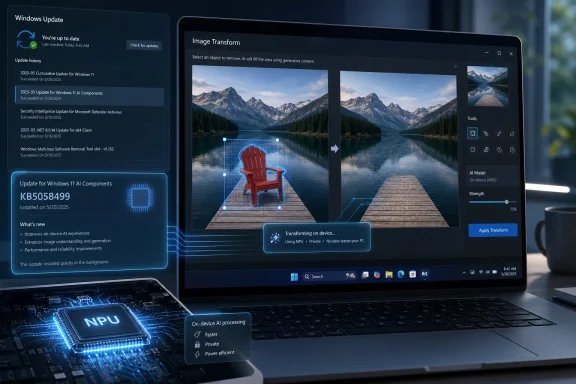
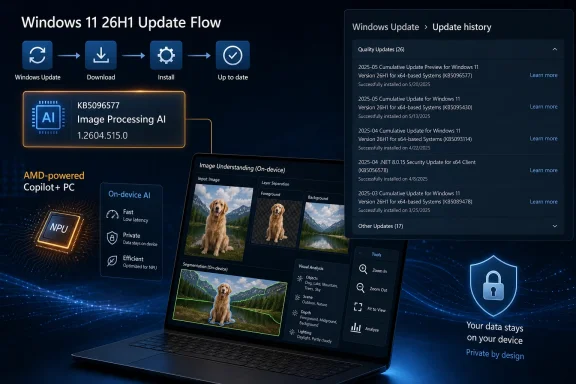
Microsoft has published KB5096577, an Image Processing AI component update that installs version 1.2604.515.0 on AMD-powered Copilot+ PCs running Windows 11 version 26H1 through Windows Update after the latest cumulative update is already present. It is a small-looking support entry with a large implication: Windows AI is no longer just an app feature or a cloud service, but a stack of updateable local components tied to silicon, OS servicing, and model delivery. For AMD Copilot+ PC owners, this is routine maintenance. For IT departments, it is another sign that the Windows update map is getting more granular, more hardware-specific, and more difficult to explain with the old “Patch Tuesday plus drivers” vocabulary.
KB5096577 is not a flashy feature drop. Microsoft’s description is brief, procedural, and almost aggressively plain: the update applies to Copilot+ PCs only, targets AMD-powered systems, updates the Image Processing AI component, and requires the latest cumulative update for Windows 11 version 26H1 before it will install.
That plainness is the point. Microsoft is treating image understanding and image manipulation not as a one-off capability embedded in Photos, Paint, Recall, Studio Effects, or accessibility tooling, but as a common component that can be serviced underneath those experiences. The model and runtime layer becomes part of Windows maintenance.
The Image Processing AI component is described as enabling on-device image understanding and processing across Windows features and apps. Microsoft names scaling, segmentation, foreground and background extraction, and visual analysis as examples. Those are not consumer-facing product names; they are the raw building blocks that let apps separate a person from a background, understand image regions, improve visual clarity, or prepare image data for assistive and generative features.
That makes KB5096577 more interesting than its terse support page suggests. It is part of a new Windows servicing pattern in which the AI substrate beneath the user interface receives its own updates, version numbers, and eligibility rules. The operating system is still Windows 11, but the pieces that make a Copilot+ PC feel like a Copilot+ PC are becoming separately maintained modules.
That vagueness will frustrate administrators who want to know whether an update changes model behavior, improves performance, fixes a reliability issue, or closes a security flaw. But it also reflects the nature of this category. When an AI image component changes, the most visible effect may not be a new button; it may be that a crop is cleaner, a background blur behaves more consistently, an accessibility description becomes more accurate, or an app using the same local pipeline stops failing on certain inputs.
The version number is therefore the practical anchor. If a device has KB5096577 installed, Settings should show the corresponding entry in Windows Update history, and the component should be at 1.2604.515.0. If it does not, the first troubleshooting question is not whether the user opened the right app, but whether the device is eligible, current on cumulative updates, and actually receiving this AI component channel.
That is a subtle but important shift for support desks. AI behavior on Windows is becoming dependent on component inventory in the same way graphics behavior depends on driver versions. A vague user complaint about an image feature may need to be triaged against OS build, device class, processor platform, NPU availability, app version, and now AI component version.
That pitch matters because many of the most sensitive AI scenarios involve personal data. Image analysis can touch faces, homes, documents, screenshots, presentations, and private photos. Processing that data locally is not merely a performance optimization; it is part of the trust bargain Microsoft is trying to make with users and enterprises.
KB5096577 sits squarely inside that bargain. The update is not for every AMD PC, nor even every Windows 11 PC with a recent Ryzen processor. It is for AMD-powered Copilot+ PCs, a narrower class of machines that meet Microsoft’s hardware requirements for local AI experiences. The support note’s “Copilot+ PCs only” caveat is not boilerplate; it defines the boundary of Microsoft’s new Windows AI platform.
That boundary is going to matter more over time. As AI features move from demos into daily workflows, users will expect their machines either to support them cleanly or not at all. Administrators will expect inventory tools to identify which machines qualify, which components are installed, and which experiences should be enabled. The Copilot+ label is becoming a servicing and support category, not just a marketing tier.
For users, the distinction may be invisible. A Copilot+ PC feature should work whether the machine is powered by AMD, Qualcomm, or Intel, provided the system meets Microsoft’s requirements. But underneath that promise, Microsoft has to ship components that can take advantage of each vendor’s hardware and runtime stack without breaking the common Windows experience.
This is the cost of moving AI out of the cloud and onto client devices. Cloud AI can hide hardware variation behind a service endpoint. Local AI has to live with the machine in front of it. The silicon vendor suddenly matters not only for battery life and benchmark scores, but for the cadence and reliability of AI feature delivery.
AMD’s role here is especially important because the company has been pushing Ryzen AI systems into commercial refresh conversations. Enterprises evaluating Windows 11 migrations are also evaluating the lifespan and usefulness of AI PCs. A clean, predictable component update path is part of that value proposition, even if it arrives in the least glamorous possible form: a KB article with a component version number.
The update is not simply checking whether the device has an AMD NPU. It also depends on the servicing state of the operating system. Microsoft is effectively sequencing AI component updates behind the main Windows cumulative update path, ensuring the underlying OS has the expected plumbing before the AI layer moves forward.
For consumer users, that mostly means Windows Update will handle the sequence automatically. If the cumulative update is installed, the AI component update should arrive without a separate download ritual. If the device is behind, the component may not appear until the operating system catches up.
For managed environments, the implication is sharper. Organizations that defer cumulative updates, use internal rings, or rely on update management tools may find that AI components do not behave like conventional feature switches. A device can be new enough, powerful enough, and branded correctly, yet still miss an AI component because the OS baseline is not where Microsoft expects it to be.
This is where the old mental model breaks down. In the past, an administrator might think of AI-enabled Windows experiences as app updates plus OS feature flags. KB5096577 suggests a more layered reality: OS cumulative update first, component update second, app experience third. If one layer lags, the final feature may degrade or disappear.
AI components are not ordinary codecs. They can influence how content is interpreted, transformed, summarized, segmented, or made accessible. Even when the work remains on-device, changes to those components can affect workflows in ways that are hard to predict from a one-line release note.
Consider an organization that uses Windows image processing capabilities in accessibility scenarios. A small model improvement could be welcome, but a behavioral change could affect user training, support scripts, or compliance documentation. Similarly, creative and communications teams using AI-assisted image editing may care whether foreground extraction becomes more aggressive or whether certain image types produce different results.
Microsoft does not need to publish model weights or exhaustive internal engineering notes. But the company will eventually need a clearer release language for local AI components. Security fixes, reliability improvements, performance tuning, model quality changes, hardware compatibility updates, and feature enablement are different categories. Lumping them all under “improvements” makes change management harder than it needs to be.
Local processing reduces exposure. A background extraction operation or visual analysis task does not inherently need to upload a photo to a remote server if the NPU and local model can do the job. That matters for personal privacy, regulated industries, and organizations that treat screenshots and images as potentially sensitive records.
But local processing also creates a maintenance tail. If the model lives on the PC, the model must be updated on the PC. If the runtime uses a vendor-specific acceleration path, that path must be serviced on the PC. If the feature depends on OS-level integration, the Windows servicing channel becomes the delivery mechanism.
This is the trade-off Windows users should understand. On-device AI is not magic that ships once and stays perfect. It is a local stack that will need updates for quality, compatibility, and possibly security. KB5096577 is the kind of update that makes the privacy story possible, but it also makes AI part of endpoint management.
The support path is simple enough. A user or technician can go to Settings, then Windows Update, then Update history, and look for the update after installation. That is a familiar location, and it gives the component some visibility without turning it into a standalone app.
The trouble begins when the expected entry is missing. The device may not be a Copilot+ PC. It may not be AMD-powered. It may not be running Windows 11 version 26H1. It may not have the latest cumulative update. It may be managed by policy. It may be pointed at an update source that does not surface the component the same way consumer Windows Update does.
Those are all reasonable explanations, but they are not explanations a normal user will intuit. The more Microsoft subdivides AI functionality into platform-specific components, the more important it becomes for Windows to expose eligibility and update status clearly. A greyed-out feature should not require archaeology through KB articles.
That pattern tells us Microsoft is building a servicing matrix for AI. The old Windows stack had the OS, drivers, inbox apps, Store apps, optional features, and firmware. The new stack adds AI models and AI runtimes as first-class update targets, sometimes tied to vendor hardware and sometimes tied to specific Windows release trains.
This is not inherently bad. In fact, it is probably necessary. AI capabilities improve quickly, and Microsoft cannot wait for annual OS upgrades to tune every local model or runtime. A componentized delivery model lets the company improve features without requiring a full Windows feature update.
But every new servicing lane adds complexity. For enthusiasts, that complexity is interesting. For administrators, it is another thing to inventory, test, and explain. For Microsoft, it is a challenge of communication: the company has to make AI components feel invisible when everything works and diagnosable when they do not.
The most practical advice is also the least exciting: keep the device current. If an AMD Copilot+ PC is running Windows 11 version 26H1 and has the latest cumulative update, the Image Processing AI component should be eligible to move to version 1.2604.515.0. If not, the cumulative update baseline is the first place to look.
Users should not expect a dramatic visual change the moment the update lands. Image processing improvements often show up as smoother edges, faster analysis, better segmentation, more reliable extraction, or fewer odd failures in apps that use the underlying component. The best evidence may be the absence of friction.
That makes this a classic infrastructure update. It matters because other things depend on it. The component is not the destination; it is the road.
 Microsoft Turns Image Processing Into a Serviced AI Layer
KB5096577 is not a flashy feature drop. Microsoft’s description is brief, procedural, and almost aggressively plain: the update applies to Copilot+ PCs only, targets AMD-powered systems, updates the Image Processing AI component, and requires the latest cumulative update for Windows 11 version 26H1 before it will install.That plainness is the point. Microsoft is treating image understanding and image manipulation not as a one-off capability embedded in Photos, Paint, Recall, Studio Effects, or accessibility tooling, but as a common component that can be serviced underneath those experiences. The model and runtime layer becomes part of Windows maintenance.
The Image Processing AI component is described as enabling on-device image understanding and processing across Windows features and apps. Microsoft names scaling, segmentation, foreground and background extraction, and visual analysis as examples. Those are not consumer-facing product names; they are the raw building blocks that let apps separate a person from a background, understand image regions, improve visual clarity, or prepare image data for assistive and generative features.
That makes KB5096577 more interesting than its terse support page suggests. It is part of a new Windows servicing pattern in which the AI substrate beneath the user interface receives its own updates, version numbers, and eligibility rules. The operating system is still Windows 11, but the pieces that make a Copilot+ PC feel like a Copilot+ PC are becoming separately maintained modules.
The Version Number Says More Than the Changelog
The update moves AMD systems to Image Processing AI component version 1.2604.515.0. Microsoft does not publish a detailed change log for the package beyond saying it includes improvements to the Image Processing AI component for Windows 11 version 26H1.That vagueness will frustrate administrators who want to know whether an update changes model behavior, improves performance, fixes a reliability issue, or closes a security flaw. But it also reflects the nature of this category. When an AI image component changes, the most visible effect may not be a new button; it may be that a crop is cleaner, a background blur behaves more consistently, an accessibility description becomes more accurate, or an app using the same local pipeline stops failing on certain inputs.
The version number is therefore the practical anchor. If a device has KB5096577 installed, Settings should show the corresponding entry in Windows Update history, and the component should be at 1.2604.515.0. If it does not, the first troubleshooting question is not whether the user opened the right app, but whether the device is eligible, current on cumulative updates, and actually receiving this AI component channel.
That is a subtle but important shift for support desks. AI behavior on Windows is becoming dependent on component inventory in the same way graphics behavior depends on driver versions. A vague user complaint about an image feature may need to be triaged against OS build, device class, processor platform, NPU availability, app version, and now AI component version.
Copilot+ PCs Are Becoming a Platform, Not a Sticker
Microsoft says the Image Processing AI component runs on dedicated AI hardware and keeps image data on the device. In the Copilot+ PC era, that dedicated hardware is the neural processing unit, or NPU, and it is the foundation for the “local AI” pitch Microsoft and its hardware partners have been making since the first Copilot+ systems arrived.That pitch matters because many of the most sensitive AI scenarios involve personal data. Image analysis can touch faces, homes, documents, screenshots, presentations, and private photos. Processing that data locally is not merely a performance optimization; it is part of the trust bargain Microsoft is trying to make with users and enterprises.
KB5096577 sits squarely inside that bargain. The update is not for every AMD PC, nor even every Windows 11 PC with a recent Ryzen processor. It is for AMD-powered Copilot+ PCs, a narrower class of machines that meet Microsoft’s hardware requirements for local AI experiences. The support note’s “Copilot+ PCs only” caveat is not boilerplate; it defines the boundary of Microsoft’s new Windows AI platform.
That boundary is going to matter more over time. As AI features move from demos into daily workflows, users will expect their machines either to support them cleanly or not at all. Administrators will expect inventory tools to identify which machines qualify, which components are installed, and which experiences should be enabled. The Copilot+ label is becoming a servicing and support category, not just a marketing tier.
AMD Gets Its Own Lane in the AI Servicing Highway
The AMD-specific nature of KB5096577 is also notable. Microsoft maintains separate AI component updates for different silicon platforms, reflecting the reality that on-device AI is not abstracted away as cleanly as ordinary application logic. Models, runtimes, acceleration paths, drivers, and firmware all meet at the edge of the NPU.For users, the distinction may be invisible. A Copilot+ PC feature should work whether the machine is powered by AMD, Qualcomm, or Intel, provided the system meets Microsoft’s requirements. But underneath that promise, Microsoft has to ship components that can take advantage of each vendor’s hardware and runtime stack without breaking the common Windows experience.
This is the cost of moving AI out of the cloud and onto client devices. Cloud AI can hide hardware variation behind a service endpoint. Local AI has to live with the machine in front of it. The silicon vendor suddenly matters not only for battery life and benchmark scores, but for the cadence and reliability of AI feature delivery.
AMD’s role here is especially important because the company has been pushing Ryzen AI systems into commercial refresh conversations. Enterprises evaluating Windows 11 migrations are also evaluating the lifespan and usefulness of AI PCs. A clean, predictable component update path is part of that value proposition, even if it arrives in the least glamorous possible form: a KB article with a component version number.
Windows 11 26H1 Becomes the First Gate
KB5096577 requires Windows 11 version 26H1 and the latest cumulative update for that version. That requirement is easy to skim past, but it is one of the most operationally important details in the article.The update is not simply checking whether the device has an AMD NPU. It also depends on the servicing state of the operating system. Microsoft is effectively sequencing AI component updates behind the main Windows cumulative update path, ensuring the underlying OS has the expected plumbing before the AI layer moves forward.
For consumer users, that mostly means Windows Update will handle the sequence automatically. If the cumulative update is installed, the AI component update should arrive without a separate download ritual. If the device is behind, the component may not appear until the operating system catches up.
For managed environments, the implication is sharper. Organizations that defer cumulative updates, use internal rings, or rely on update management tools may find that AI components do not behave like conventional feature switches. A device can be new enough, powerful enough, and branded correctly, yet still miss an AI component because the OS baseline is not where Microsoft expects it to be.
This is where the old mental model breaks down. In the past, an administrator might think of AI-enabled Windows experiences as app updates plus OS feature flags. KB5096577 suggests a more layered reality: OS cumulative update first, component update second, app experience third. If one layer lags, the final feature may degrade or disappear.
The Changelog Gap Is Becoming an Enterprise Problem
Microsoft’s sparse documentation is defensible for a low-level component update, but it is not ideal. “Improvements” may be enough for a home user who simply wants the latest bits. It is not enough for administrators who must assess risk, explain change, and document baselines.AI components are not ordinary codecs. They can influence how content is interpreted, transformed, summarized, segmented, or made accessible. Even when the work remains on-device, changes to those components can affect workflows in ways that are hard to predict from a one-line release note.
Consider an organization that uses Windows image processing capabilities in accessibility scenarios. A small model improvement could be welcome, but a behavioral change could affect user training, support scripts, or compliance documentation. Similarly, creative and communications teams using AI-assisted image editing may care whether foreground extraction becomes more aggressive or whether certain image types produce different results.
Microsoft does not need to publish model weights or exhaustive internal engineering notes. But the company will eventually need a clearer release language for local AI components. Security fixes, reliability improvements, performance tuning, model quality changes, hardware compatibility updates, and feature enablement are different categories. Lumping them all under “improvements” makes change management harder than it needs to be.
On-Device AI Is a Privacy Promise With a Maintenance Tail
The support note emphasizes that running on dedicated AI hardware keeps image data on the device. That is one of the strongest arguments for Copilot+ PCs, especially after years of user skepticism about cloud-connected AI features.Local processing reduces exposure. A background extraction operation or visual analysis task does not inherently need to upload a photo to a remote server if the NPU and local model can do the job. That matters for personal privacy, regulated industries, and organizations that treat screenshots and images as potentially sensitive records.
But local processing also creates a maintenance tail. If the model lives on the PC, the model must be updated on the PC. If the runtime uses a vendor-specific acceleration path, that path must be serviced on the PC. If the feature depends on OS-level integration, the Windows servicing channel becomes the delivery mechanism.
This is the trade-off Windows users should understand. On-device AI is not magic that ships once and stays perfect. It is a local stack that will need updates for quality, compatibility, and possibly security. KB5096577 is the kind of update that makes the privacy story possible, but it also makes AI part of endpoint management.
The User Experience Is Automatic, Until It Isn’t
Microsoft says KB5096577 will be downloaded and installed automatically from Windows Update. That is the right default. Most users should not be asked to understand component names like Image Processing AI or version strings like 1.2604.515.0.The support path is simple enough. A user or technician can go to Settings, then Windows Update, then Update history, and look for the update after installation. That is a familiar location, and it gives the component some visibility without turning it into a standalone app.
The trouble begins when the expected entry is missing. The device may not be a Copilot+ PC. It may not be AMD-powered. It may not be running Windows 11 version 26H1. It may not have the latest cumulative update. It may be managed by policy. It may be pointed at an update source that does not surface the component the same way consumer Windows Update does.
Those are all reasonable explanations, but they are not explanations a normal user will intuit. The more Microsoft subdivides AI functionality into platform-specific components, the more important it becomes for Windows to expose eligibility and update status clearly. A greyed-out feature should not require archaeology through KB articles.
The Forum Signal Is Bigger Than One KB Article
For WindowsForum readers, KB5096577 is part of a broader pattern that has been appearing across Microsoft’s AI component updates. Different packages target different AI components, different processor platforms, and different Windows versions, often with the same automatic delivery model and the same dependency on current cumulative updates.That pattern tells us Microsoft is building a servicing matrix for AI. The old Windows stack had the OS, drivers, inbox apps, Store apps, optional features, and firmware. The new stack adds AI models and AI runtimes as first-class update targets, sometimes tied to vendor hardware and sometimes tied to specific Windows release trains.
This is not inherently bad. In fact, it is probably necessary. AI capabilities improve quickly, and Microsoft cannot wait for annual OS upgrades to tune every local model or runtime. A componentized delivery model lets the company improve features without requiring a full Windows feature update.
But every new servicing lane adds complexity. For enthusiasts, that complexity is interesting. For administrators, it is another thing to inventory, test, and explain. For Microsoft, it is a challenge of communication: the company has to make AI components feel invisible when everything works and diagnosable when they do not.
The Practical Reading for AMD Copilot+ Owners
KB5096577 does not require users to manually download a package from Microsoft’s catalog, at least according to the support note. It arrives through Windows Update and should appear in update history after installation. That makes it a maintenance update, not a feature hunt.The most practical advice is also the least exciting: keep the device current. If an AMD Copilot+ PC is running Windows 11 version 26H1 and has the latest cumulative update, the Image Processing AI component should be eligible to move to version 1.2604.515.0. If not, the cumulative update baseline is the first place to look.
Users should not expect a dramatic visual change the moment the update lands. Image processing improvements often show up as smoother edges, faster analysis, better segmentation, more reliable extraction, or fewer odd failures in apps that use the underlying component. The best evidence may be the absence of friction.
That makes this a classic infrastructure update. It matters because other things depend on it. The component is not the destination; it is the road.
The Small AMD Package That Explains Microsoft’s AI Future
The immediate facts are narrow, but the servicing pattern is broad. KB5096577 is one of those updates that looks minor precisely because Microsoft wants the AI substrate of Windows to become routine.- KB5096577 applies only to AMD-powered Copilot+ PCs, not to all AMD Windows systems.
- The update installs Image Processing AI component version 1.2604.515.0 for Windows 11 version 26H1.
- The device must already have the latest cumulative update for Windows 11 version 26H1 before the component update is installed.
- The package is delivered automatically through Windows Update and can be verified in Windows Update history.
- The component supports local image understanding and processing tasks such as scaling, segmentation, foreground and background extraction, and visual analysis.
- The broader significance is that Microsoft is servicing local AI components as discrete parts of Windows, with hardware-specific delivery paths.
References
- Primary source: Microsoft Support
Published: Tue, 26 May 2026 21:02:47 Z
- Related coverage: windowsforum.com
KB5096570 Update: Phi Silica Local AI Component Gets Version 1.2604.515.0
Microsoft has published KB5096570, a May 2026 Phi Silica AI component update that installs version 1.2604.515.0 on AMD-powered Copilot+ PCs running Windows 11 version 26H1, provided the device already has the latest cumulative update installed. The update is small in presentation but large in... windowsforum.com
- Official source: learn.microsoft.com
Release information for AI components | Microsoft Learn
Release information for AI componentslearn.microsoft.com - Official source: news.microsoft.com
- Related coverage: na.ingrammicro.com