

Microsoft has published KB5096585, an automatic Windows Update package that advances the Image Transform AI component to version 1.2605.856.0 for Copilot+ PCs running Windows 11 version 24H2 or Windows 11 version 25H2. The update is not a general Windows feature release, and it is not meant for conventional Windows 11 machines without Copilot+ hardware. Its significance is quieter but more revealing: Microsoft is now treating local AI models as serviced Windows components, not as static app features. That changes how users, administrators, and software vendors should think about the operating system they are actually maintaining.
KB5096585 is easy to underestimate because Microsoft’s support note is almost aggressively spare. It says the package applies only to Copilot+ PCs, updates the Image Transform AI component, requires the latest cumulative update for Windows 11 24H2 or 25H2, and installs automatically through Windows Update. That is the kind of language administrators usually associate with routine plumbing.
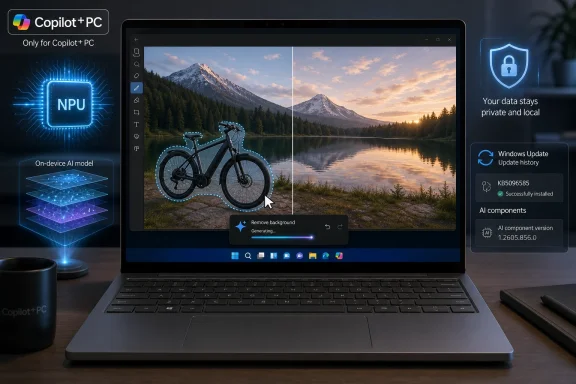
But the plumbing is the point. Image Transform is the component behind a particular class of local generative editing: removing selected foreground objects and generating background content to fill the space left behind. In consumer terms, this is the magic eraser behavior users now expect from phones and photo apps; in Windows terms, it is a locally serviced model-and-runtime component that can be shared across system experiences and applications.
That distinction matters because Microsoft is no longer merely shipping an AI feature inside Photos, Paint, or a Copilot-branded interface. It is shipping a reusable AI substrate that Windows features can call into. When that substrate changes, the behavior of multiple experiences can improve, regress, or subtly shift without any one visible app appearing to receive a major update.
For users, KB5096585 may show up as better object removal, cleaner background reconstruction, faster inference, or fewer strange visual artifacts. Microsoft does not spell out those improvements in granular terms, so nobody should pretend this is a documented leap in quality. Still, the version number tells the real story: the local model stack is moving, and it is moving through the same machinery that already governs the rest of Windows servicing.
That has been true in practice since Copilot+ PCs arrived, but updates like KB5096585 make the split more operationally visible. Windows 11 24H2 and 25H2 are no longer complete descriptions of a device’s capabilities. A fleet can be “on 25H2” and still behave very differently depending on whether it has the required NPU, whether it qualifies as a Copilot+ PC, and whether its AI components are current.
This is a subtle but important change for Windows veterans. For decades, the version of Windows and the installed application set told most of the story. Hardware mattered for performance and driver support, but not usually for whether a system-level image transformation pipeline existed on the machine at all.
Copilot+ breaks that assumption. Microsoft is building a Windows tier where the OS version, silicon class, neural runtime, and local model inventory all combine to determine user experience. KB5096585 is a small update, but it belongs to a larger servicing model in which “Windows 11” becomes less a single product state and more a matrix.
That matrix is manageable, but it is not ignorable. Help desks will increasingly need to ask not just which build a user is on, but whether a given AI component is present and current. Documentation, troubleshooting scripts, compliance inventories, and user training will all need to catch up.
Local inference reduces one obvious risk: the image does not need to leave the PC simply because the user wants to remove an object from the background. That is especially relevant for photos of family members, workplaces, whiteboards, documents, and other images that can contain more sensitive information than the user initially realizes. In enterprises, it also gives Microsoft a cleaner argument for AI-assisted workflows in environments that are skeptical of consumer cloud AI services.
But local does not automatically mean simple. A local AI feature still raises questions about governance, auditing, default availability, model behavior, and whether generated output can create records that need to be retained or reviewed. It also creates a new kind of dependency: the trustworthiness of the feature rests not only on cloud policy, but on the correctness and servicing discipline of models installed on endpoints.
That is why KB5096585 deserves more attention than its short support note invites. Microsoft is not just saying “we improved an image feature.” It is normalizing the idea that privacy-sensitive AI behavior can be updated silently and automatically at the component level. For consumers, that may be a net win. For regulated organizations, it is another reason to treat local AI components as part of the managed software estate.
The industry conversation around AI privacy has often been too binary: cloud bad, local good. Windows is now heading into the messier middle, where local models reduce data exposure but increase the need for endpoint-level governance. KB5096585 sits right in that middle.
That is good news for anyone who has had to troubleshoot “AI feature works on one laptop but not another” problems. A visible KB entry gives support teams a first checkpoint. If a Copilot+ PC on Windows 11 25H2 lacks the expected Image Transform behavior, the absence of KB5096585 in update history becomes a useful clue.
The less comforting part is that Microsoft’s public notes remain thin. “Includes improvements” is a phrase that covers everything from performance tuning to model quality changes to compatibility fixes. It does not tell administrators whether a regression was fixed, whether output changed in a way users will notice, or whether there are known issues.
That vagueness has long been a sore point in Windows servicing, but AI components make it more consequential. A cumulative update that fixes file copy behavior can be tested with conventional workflows. A model update that changes how an image is reconstructed after object removal is harder to assess, because “better” can be subjective, content-dependent, and difficult to compare at scale.
For now, Update history is a necessary but incomplete tool. It can tell you whether the component landed. It cannot tell you precisely how the model’s behavior changed.
For IT departments, automatic delivery is both helpful and slightly unnerving. The helpful part is obvious: Microsoft is trying to keep AI components aligned with the platform rather than leaving every OEM, app, or user to chase model updates independently. Fragmentation would be worse. A Copilot+ ecosystem where each app dragged along its own incompatible image model would be a support nightmare.
The unnerving part is that automatic model servicing creates another channel of behavioral change. Organizations already track monthly cumulative updates, driver updates, firmware, Store apps, Microsoft 365 Apps, Edge, Defender intelligence, and policy payloads. AI components now join that parade.
This does not mean administrators should panic or block everything with “AI” in the name. It does mean they should stop thinking of these components as decorative extras. If a Windows feature can generate or alter user content, and if that capability is updated outside the traditional annual feature release rhythm, it belongs in change-management conversations.
The practical question is not whether KB5096585 is dangerous. There is no public evidence that it is. The practical question is whether organizations have a process to notice, document, validate, and support changes to local AI capabilities as Microsoft ships them.
That is where the NPU becomes more than a marketing spec. Microsoft’s Copilot+ pitch depends on dedicated AI hardware delivering low-latency inference without sending data to the cloud. Image Transform is a good example of the kind of workload that benefits from that arrangement: it is interactive, visual, privacy-sensitive, and latency-sensitive enough that users notice when it feels slow.
But this also means the user experience is only as good as the chain beneath it. The model, runtime, driver layer, Windows build, and application integration all have to cooperate. When they do, AI editing feels like a natural part of Windows. When they do not, the user sees only that a button is missing, slow, inconsistent, or producing odd results.
This is one reason Microsoft’s componentized AI servicing model is rational. The company needs to update models and runtimes independently because the stack is too new and too hardware-sensitive to remain frozen until the next big Windows feature release. The bargain is that Windows Update becomes the delivery vehicle not just for security and reliability, but for the refinement of local intelligence.
That bargain will be tested as Copilot+ PCs diversify across Qualcomm, AMD, and Intel platforms. The more hardware-specific the optimization becomes, the more important clear eligibility and version reporting will be. KB5096585 appears broad across Windows 11 24H2 and 25H2 Copilot+ PCs, but the surrounding AI component ecosystem already shows that some updates can be scoped more narrowly.
This is not a demand for Microsoft to publish model weights, internal benchmark suites, or proprietary tuning notes. It is a demand for operationally meaningful disclosure. Did the update improve quality, speed, reliability, memory use, compatibility, safety filtering, crash behavior, or hardware utilization? Did it address known cases where object removal failed? Did it change output characteristics enough that creative workflows should be retested?
Those details matter because AI features are not deterministic utilities in the way a checkbox or file dialog is. A small model change can affect a wide range of real-world inputs. Two images that look similar to a person can produce very different artifacts depending on segmentation, fill strategy, and the training or tuning behind the model.
Microsoft is not alone in this opacity; the entire AI industry often hides behind generalized “quality improvements” language. But Windows is not a web app that can be quietly tweaked for everyone overnight with little local accountability. Windows is infrastructure, and infrastructure changelogs need to be legible to the people who maintain it.
If Microsoft wants enterprises to trust local AI components, it should give them release notes that sound less like placeholder text. KB5096585 may be routine, but routine updates are exactly where trust is built.
That democratization is not trivial. Millions of users now expect image cleanup to be as casual as cropping or rotating a photo. When the feature runs locally, it becomes available in more private and potentially offline contexts. It also reduces the need to bounce personal images through random web tools that may have unclear data policies.
The trade-off is that image manipulation becomes increasingly invisible. When generated background content is clean enough, casual viewers may not know a photo was altered. That is not a new problem, but OS-level convenience accelerates it. The easier these tools become, the more normal it becomes to edit reality at the margins.
Windows is not responsible for inventing that cultural shift, but it is helping mainstream it. KB5096585 is part of the maintenance layer behind that shift. Better object removal is useful; better object removal is also a reminder that provenance, disclosure, and media literacy are no longer specialist concerns.
For WindowsForum readers, the point is not to moralize about every edited vacation photo. It is to recognize that the operating system is absorbing capabilities that used to live in professional creative suites or cloud services. That changes user expectations, support boundaries, and the default power of a PC.
That is attractive if it works. A developer building a photo workflow, accessibility tool, content management app, or creative utility does not necessarily want to ship and update a full local image transformation stack. If Windows exposes reliable AI capabilities through supported APIs, the platform becomes more useful and the app ecosystem becomes less fragmented.
But developers will also need to account for uneven availability. A feature that depends on Image Transform may work on one Windows 11 PC and not another. It may require a Copilot+ class device, a specific OS version, a current component package, and compatible hardware. That is manageable, but only if applications detect capability cleanly and explain missing functionality honestly.
The worst outcome would be a new generation of Windows apps that simply fail silently or advertise AI features that only exist on a subset of machines. Microsoft can avoid that by making component discovery, version checks, and fallback behavior straightforward. Developers can do their part by treating local AI as a capability to query, not an assumption to bake in.
KB5096585’s immediate audience is users with eligible Copilot+ PCs. Its broader audience is anyone betting on Windows as an AI development platform.
AI components add a new frontier because they blur categories. They are not traditional security definitions, though they may have safety implications. They are not drivers, though they may be hardware-sensitive. They are not ordinary apps, though users experience them through apps. They are not annual feature updates, though they can change what Windows does.
That ambiguity is why KB5096585 is more important than its size or silence suggests. It shows Microsoft leaning into a componentized model where Windows AI capabilities evolve continuously. This is probably the only realistic path for keeping on-device AI competitive, but it also demands better management surfaces and clearer communication.
Enterprises will eventually want policy knobs that distinguish between enabling a feature, allowing its model updates, restricting it by data class, and auditing its use. Consumers will want confidence that “local” really means local, and that automatic updates are improving rather than destabilizing experiences. Developers will want stable APIs and predictable capability discovery.
The operating system is becoming a host for living models. That phrase sounds like marketing until an update like KB5096585 lands in Windows Update history with a KB number and a version string. Then it becomes administration.
Here is the practical read for Copilot+ PC owners and the people who support them:
 Microsoft Is Updating the AI Model, Not the App Around It
KB5096585 is easy to underestimate because Microsoft’s support note is almost aggressively spare. It says the package applies only to Copilot+ PCs, updates the Image Transform AI component, requires the latest cumulative update for Windows 11 24H2 or 25H2, and installs automatically through Windows Update. That is the kind of language administrators usually associate with routine plumbing.But the plumbing is the point. Image Transform is the component behind a particular class of local generative editing: removing selected foreground objects and generating background content to fill the space left behind. In consumer terms, this is the magic eraser behavior users now expect from phones and photo apps; in Windows terms, it is a locally serviced model-and-runtime component that can be shared across system experiences and applications.
That distinction matters because Microsoft is no longer merely shipping an AI feature inside Photos, Paint, or a Copilot-branded interface. It is shipping a reusable AI substrate that Windows features can call into. When that substrate changes, the behavior of multiple experiences can improve, regress, or subtly shift without any one visible app appearing to receive a major update.
For users, KB5096585 may show up as better object removal, cleaner background reconstruction, faster inference, or fewer strange visual artifacts. Microsoft does not spell out those improvements in granular terms, so nobody should pretend this is a documented leap in quality. Still, the version number tells the real story: the local model stack is moving, and it is moving through the same machinery that already governs the rest of Windows servicing.
Copilot+ PCs Are Becoming a Separate Windows Track
The most important phrase in the support article is not “Image Transform.” It is “Copilot+ PCs only.” Microsoft’s AI hardware class is now receiving component updates that ordinary Windows PCs will never see, even when those PCs run the same branded operating system version.That has been true in practice since Copilot+ PCs arrived, but updates like KB5096585 make the split more operationally visible. Windows 11 24H2 and 25H2 are no longer complete descriptions of a device’s capabilities. A fleet can be “on 25H2” and still behave very differently depending on whether it has the required NPU, whether it qualifies as a Copilot+ PC, and whether its AI components are current.
This is a subtle but important change for Windows veterans. For decades, the version of Windows and the installed application set told most of the story. Hardware mattered for performance and driver support, but not usually for whether a system-level image transformation pipeline existed on the machine at all.
Copilot+ breaks that assumption. Microsoft is building a Windows tier where the OS version, silicon class, neural runtime, and local model inventory all combine to determine user experience. KB5096585 is a small update, but it belongs to a larger servicing model in which “Windows 11” becomes less a single product state and more a matrix.
That matrix is manageable, but it is not ignorable. Help desks will increasingly need to ask not just which build a user is on, but whether a given AI component is present and current. Documentation, troubleshooting scripts, compliance inventories, and user training will all need to catch up.
The Privacy Pitch Is Real, but It Is Not the Whole Story
Microsoft’s framing around Image Transform leans heavily on local execution. The component runs on supported AI hardware, performs inference on the device, and is described as keeping image data local. For privacy-minded users, that is a meaningful difference from uploading personal photos to a cloud service for editing.Local inference reduces one obvious risk: the image does not need to leave the PC simply because the user wants to remove an object from the background. That is especially relevant for photos of family members, workplaces, whiteboards, documents, and other images that can contain more sensitive information than the user initially realizes. In enterprises, it also gives Microsoft a cleaner argument for AI-assisted workflows in environments that are skeptical of consumer cloud AI services.
But local does not automatically mean simple. A local AI feature still raises questions about governance, auditing, default availability, model behavior, and whether generated output can create records that need to be retained or reviewed. It also creates a new kind of dependency: the trustworthiness of the feature rests not only on cloud policy, but on the correctness and servicing discipline of models installed on endpoints.
That is why KB5096585 deserves more attention than its short support note invites. Microsoft is not just saying “we improved an image feature.” It is normalizing the idea that privacy-sensitive AI behavior can be updated silently and automatically at the component level. For consumers, that may be a net win. For regulated organizations, it is another reason to treat local AI components as part of the managed software estate.
The industry conversation around AI privacy has often been too binary: cloud bad, local good. Windows is now heading into the messier middle, where local models reduce data exposure but increase the need for endpoint-level governance. KB5096585 sits right in that middle.
The Update History Page Becomes an AI Inventory Tool
Microsoft says users can verify the installation by going to Settings, then Windows Update, then Update history. That sounds pedestrian, but it reflects a useful shift: these AI components are not hidden entirely behind app version numbers or Store updates. They have KB identities and version numbers.That is good news for anyone who has had to troubleshoot “AI feature works on one laptop but not another” problems. A visible KB entry gives support teams a first checkpoint. If a Copilot+ PC on Windows 11 25H2 lacks the expected Image Transform behavior, the absence of KB5096585 in update history becomes a useful clue.
The less comforting part is that Microsoft’s public notes remain thin. “Includes improvements” is a phrase that covers everything from performance tuning to model quality changes to compatibility fixes. It does not tell administrators whether a regression was fixed, whether output changed in a way users will notice, or whether there are known issues.
That vagueness has long been a sore point in Windows servicing, but AI components make it more consequential. A cumulative update that fixes file copy behavior can be tested with conventional workflows. A model update that changes how an image is reconstructed after object removal is harder to assess, because “better” can be subjective, content-dependent, and difficult to compare at scale.
For now, Update history is a necessary but incomplete tool. It can tell you whether the component landed. It cannot tell you precisely how the model’s behavior changed.
Automatic Delivery Is Convenient Until the Fleet Gets Complicated
KB5096585 downloads and installs automatically from Windows Update on eligible systems. For home users, that is the expected bargain. If a Copilot+ PC has the right Windows version and the latest cumulative update, the AI component should arrive without a trip through a separate installer.For IT departments, automatic delivery is both helpful and slightly unnerving. The helpful part is obvious: Microsoft is trying to keep AI components aligned with the platform rather than leaving every OEM, app, or user to chase model updates independently. Fragmentation would be worse. A Copilot+ ecosystem where each app dragged along its own incompatible image model would be a support nightmare.
The unnerving part is that automatic model servicing creates another channel of behavioral change. Organizations already track monthly cumulative updates, driver updates, firmware, Store apps, Microsoft 365 Apps, Edge, Defender intelligence, and policy payloads. AI components now join that parade.
This does not mean administrators should panic or block everything with “AI” in the name. It does mean they should stop thinking of these components as decorative extras. If a Windows feature can generate or alter user content, and if that capability is updated outside the traditional annual feature release rhythm, it belongs in change-management conversations.
The practical question is not whether KB5096585 is dangerous. There is no public evidence that it is. The practical question is whether organizations have a process to notice, document, validate, and support changes to local AI capabilities as Microsoft ships them.
The New Windows Dependency Chain Runs Through the NPU
The requirement for the latest cumulative update is another small line with a larger implication. AI components do not float above the operating system. They depend on Windows servicing state, hardware support, execution providers, and the broader Copilot+ stack.That is where the NPU becomes more than a marketing spec. Microsoft’s Copilot+ pitch depends on dedicated AI hardware delivering low-latency inference without sending data to the cloud. Image Transform is a good example of the kind of workload that benefits from that arrangement: it is interactive, visual, privacy-sensitive, and latency-sensitive enough that users notice when it feels slow.
But this also means the user experience is only as good as the chain beneath it. The model, runtime, driver layer, Windows build, and application integration all have to cooperate. When they do, AI editing feels like a natural part of Windows. When they do not, the user sees only that a button is missing, slow, inconsistent, or producing odd results.
This is one reason Microsoft’s componentized AI servicing model is rational. The company needs to update models and runtimes independently because the stack is too new and too hardware-sensitive to remain frozen until the next big Windows feature release. The bargain is that Windows Update becomes the delivery vehicle not just for security and reliability, but for the refinement of local intelligence.
That bargain will be tested as Copilot+ PCs diversify across Qualcomm, AMD, and Intel platforms. The more hardware-specific the optimization becomes, the more important clear eligibility and version reporting will be. KB5096585 appears broad across Windows 11 24H2 and 25H2 Copilot+ PCs, but the surrounding AI component ecosystem already shows that some updates can be scoped more narrowly.
Microsoft’s Sparse Changelog Leaves Too Much to Interpretation
The frustrating part of KB5096585 is not that it exists. It is that Microsoft tells users almost nothing about what changed. “Improvements” may be technically accurate, but it is journalistically and administratively unsatisfying.This is not a demand for Microsoft to publish model weights, internal benchmark suites, or proprietary tuning notes. It is a demand for operationally meaningful disclosure. Did the update improve quality, speed, reliability, memory use, compatibility, safety filtering, crash behavior, or hardware utilization? Did it address known cases where object removal failed? Did it change output characteristics enough that creative workflows should be retested?
Those details matter because AI features are not deterministic utilities in the way a checkbox or file dialog is. A small model change can affect a wide range of real-world inputs. Two images that look similar to a person can produce very different artifacts depending on segmentation, fill strategy, and the training or tuning behind the model.
Microsoft is not alone in this opacity; the entire AI industry often hides behind generalized “quality improvements” language. But Windows is not a web app that can be quietly tweaked for everyone overnight with little local accountability. Windows is infrastructure, and infrastructure changelogs need to be legible to the people who maintain it.
If Microsoft wants enterprises to trust local AI components, it should give them release notes that sound less like placeholder text. KB5096585 may be routine, but routine updates are exactly where trust is built.
Creative Convenience Now Lives Inside the Operating System
For ordinary users, the appeal of Image Transform is straightforward. You select an object, remove it, and let the system generate plausible background content. A task that once required some knowledge of Photoshop-style tools becomes a built-in Windows capability.That democratization is not trivial. Millions of users now expect image cleanup to be as casual as cropping or rotating a photo. When the feature runs locally, it becomes available in more private and potentially offline contexts. It also reduces the need to bounce personal images through random web tools that may have unclear data policies.
The trade-off is that image manipulation becomes increasingly invisible. When generated background content is clean enough, casual viewers may not know a photo was altered. That is not a new problem, but OS-level convenience accelerates it. The easier these tools become, the more normal it becomes to edit reality at the margins.
Windows is not responsible for inventing that cultural shift, but it is helping mainstream it. KB5096585 is part of the maintenance layer behind that shift. Better object removal is useful; better object removal is also a reminder that provenance, disclosure, and media literacy are no longer specialist concerns.
For WindowsForum readers, the point is not to moralize about every edited vacation photo. It is to recognize that the operating system is absorbing capabilities that used to live in professional creative suites or cloud services. That changes user expectations, support boundaries, and the default power of a PC.
Developers Should Read KB5096585 as a Platform Signal
The developer angle is easy to miss because KB5096585 is not an SDK announcement. Yet it is still a platform signal. Microsoft is building and servicing local AI components as shared infrastructure, and that points toward a Windows application model where developers can rely on OS-provided intelligence rather than bundling everything themselves.That is attractive if it works. A developer building a photo workflow, accessibility tool, content management app, or creative utility does not necessarily want to ship and update a full local image transformation stack. If Windows exposes reliable AI capabilities through supported APIs, the platform becomes more useful and the app ecosystem becomes less fragmented.
But developers will also need to account for uneven availability. A feature that depends on Image Transform may work on one Windows 11 PC and not another. It may require a Copilot+ class device, a specific OS version, a current component package, and compatible hardware. That is manageable, but only if applications detect capability cleanly and explain missing functionality honestly.
The worst outcome would be a new generation of Windows apps that simply fail silently or advertise AI features that only exist on a subset of machines. Microsoft can avoid that by making component discovery, version checks, and fallback behavior straightforward. Developers can do their part by treating local AI as a capability to query, not an assumption to bake in.
KB5096585’s immediate audience is users with eligible Copilot+ PCs. Its broader audience is anyone betting on Windows as an AI development platform.
The Windows Servicing Model Has Found Its Next Frontier
The history of Windows servicing is a long argument between stability and change. Security updates need to arrive quickly. Feature updates need to be controlled. Drivers need to be current but not reckless. Store apps update on their own cadence. Microsoft has spent years trying to make that machinery less painful, with mixed results.AI components add a new frontier because they blur categories. They are not traditional security definitions, though they may have safety implications. They are not drivers, though they may be hardware-sensitive. They are not ordinary apps, though users experience them through apps. They are not annual feature updates, though they can change what Windows does.
That ambiguity is why KB5096585 is more important than its size or silence suggests. It shows Microsoft leaning into a componentized model where Windows AI capabilities evolve continuously. This is probably the only realistic path for keeping on-device AI competitive, but it also demands better management surfaces and clearer communication.
Enterprises will eventually want policy knobs that distinguish between enabling a feature, allowing its model updates, restricting it by data class, and auditing its use. Consumers will want confidence that “local” really means local, and that automatic updates are improving rather than destabilizing experiences. Developers will want stable APIs and predictable capability discovery.
The operating system is becoming a host for living models. That phrase sounds like marketing until an update like KB5096585 lands in Windows Update history with a KB number and a version string. Then it becomes administration.
The KB5096585 Lesson Is Bigger Than Image Cleanup
KB5096585 is not a blockbuster release, and that is precisely why it is worth watching. The future of Windows AI will not arrive only through keynote demos and taskbar icons. It will arrive through quiet component updates that make local models a little faster, a little better, and a little more deeply woven into everyday workflows.Here is the practical read for Copilot+ PC owners and the people who support them:
- KB5096585 updates the Image Transform AI component to version 1.2605.856.0 on eligible Copilot+ PCs running Windows 11 version 24H2 or 25H2.
- The package is delivered automatically through Windows Update, but Microsoft says the latest cumulative update for the relevant Windows version must already be installed.
- The component supports local image transformation tasks such as removing foreground objects and generating replacement background content.
- The update should be verified in Windows Update history rather than assumed from the Windows version alone.
- The sparse changelog means organizations should validate AI-assisted image workflows themselves if they rely on consistent output.
- The update is another sign that Copilot+ PCs are developing their own serviced Windows layer beyond conventional OS build numbers.
References
- Primary source: Microsoft Support
Published: Tue, 26 May 2026 21:02:56 Z
- Related coverage: windowslatest.com

Windows 11 AI components are getting their own changelogs (release history), as Microsoft plans model updates
Windows Latest today found a new support document called "Release information for AI components." This lists all AI model updates. www.windowslatest.com
- Related coverage: windowsforum.com

KB5096574: Image Processing AI Update for Qualcomm Copilot+ PCs (24H2/25H2)
Microsoft has published KB5096574, an Image Processing AI component update version 1.2605.856.0 for Qualcomm-powered Copilot+ PCs running Windows 11 version 24H2 or 25H2, delivered automatically through Windows Update after the latest cumulative update is installed. The small support note is not... windowsforum.com
- Official source: learn.microsoft.com

- Official source: news.microsoft.com
- Related coverage: na.ingrammicro.com

