

Windows 11 cumulative updates KB5101650 and KB5094126 revoke 11 aging Microsoft-signed UEFI shim bootloaders that could be used to bypass Secure Boot and run untrusted code before the operating system starts. The vulnerable binaries date back as far as 2015, leaving a gap in Microsoft’s boot trust chain for more than a decade.
The revocations first shipped with the June 9, 2026 Patch Tuesday release, KB5094126, and are carried forward by the July 14 update, KB5101650. Because Windows servicing is cumulative, Windows 11 24H2 and 25H2 users can install KB5101650 rather than hunting down the earlier package.
As reported by Neowin and detailed in a CERT Coordination Center vulnerability note, ESET researchers found that old shim bootloaders signed under the Microsoft Corporation UEFI CA 2011 certificate were still accepted by many UEFI systems. The affected components are tracked under CVE-2026-8863 and CVE-2026-10797.
Secure Boot is intended to stop unauthorized software from executing during startup. Firmware checks boot applications against trusted signature databases, while known-bad components are placed in the UEFI Forbidden Signature Database, commonly called the DBX.
A shim is a small first-stage bootloader commonly used to bridge Microsoft’s Secure Boot trust model with Linux distributions and other third-party boot environments. Microsoft signs approved shims so that they can run on PCs whose firmware trusts Microsoft’s third-party UEFI certificate authority.
That interoperability creates a long-term security obligation. A Microsoft signature can keep an old binary trusted long after its original product has disappeared, unless the binary is explicitly revoked through a DBX update.
ESET identified 11 signed shims at version 0.9 or earlier that lacked checks found in modern releases. The affected binaries appeared in products including older Red Hat Enterprise Linux and CentOS media, Spyrus WTGCreator, baramundi Management Suite, WhiteCanyon WipeDrive, Finland’s Abitti examination environment, ROSA Linux and PC-Doctor Service Center.
The immediate problem is not that every Windows 11 installation contains one of those products. An attacker can supply a vulnerable signed binary independently, a technique described as Bring Your Own Vulnerable Bootloader. If the target firmware still trusts the signing certificate and has not received the relevant DBX entries, Secure Boot may accept the attacker-provided shim.
That makes the vulnerable file portable across systems. According to ESET, exposure is not limited to PCs with the original Linux distribution, diagnostic package or disk utility installed.
Shim gained SBAT support in version 15.3. Older versions also have incomplete or nonexistent handling of Machine Owner Key deny lists, which can be used to prevent specifically prohibited components from continuing through the boot chain.
Without those controls, a legacy shim may accept components that a modern shim would reject. CERT/CC says arbitrary code could consequently execute during the early boot phase, before Windows, endpoint protection and many monitoring tools initialize.
That position is particularly valuable to an attacker. Boot-level malware can tamper with the operating system as it loads, introduce unsigned kernel components and potentially establish persistence that survives ordinary remediation attempts. ESET specifically warns that exploitation can support the deployment of UEFI bootkits or other pre-OS malware.
This is not a conventional drive-by Windows vulnerability. CERT/CC says an attacker needs administrative privileges or another way to modify the boot process, such as control over bootable media or the EFI System Partition. The flaw therefore becomes most useful after an attacker has already gained meaningful access, but it can turn that access into deeper and harder-to-detect persistence.
Windows 11 Secured-core PCs are expected to ship with trust in Microsoft’s third-party UEFI certificate disabled by default, reducing exposure to this particular route. Configuration and vendor implementation still matter, however, so the Secured-core designation should not replace checking actual Secure Boot policy.
KB5094126 delivered the revocations to Windows 11 24H2 and 25H2 on June 9, moving those releases to OS builds 26100.8655 and 26200.8655. July’s KB5101650 supersedes that update and moves the same Windows versions to builds 26100.8875 and 26200.8875, respectively.
For ordinary Windows Update users, the practical action is straightforward: install the July 2026 cumulative update and keep Secure Boot enabled. Administrators using Windows Update for Business, WSUS or endpoint management policies should confirm that the update has reached devices rather than assuming approval equals successful DBX deployment.
Revocation updates require more caution than a normal Windows component replacement. Once firmware rejects an old bootloader, legacy recovery drives, Linux installation media, diagnostic tools and network-boot images containing that binary may stop booting. That is the security control working as intended, but it can still create an operational surprise.
IT teams should test business-critical boot environments before broad enforcement, particularly if they use older versions of baramundi Management Suite, WipeDrive, PC-Doctor or Linux deployment media. Updating the affected product or rebuilding its boot media with a current shim is preferable to disabling Secure Boot to keep an obsolete image running.
Organizations should also inventory machines that do not regularly receive Windows updates, including offline workstations, lab equipment and systems booted primarily into another operating system. The trust decision occurs in UEFI firmware, so a PC can remain exposed even when Windows is not its main workload.
KB5101650 includes additional targeting data intended to expand the number of devices eligible to receive those new certificates automatically. Microsoft says PCs that have not yet received the replacements will continue to boot and receive standard Windows updates, but administrators still need to track readiness for future boot-critical servicing.
The certificate transition and the shim revocations solve related but different problems. Replacing expiring certificates modernizes the broader Secure Boot trust infrastructure; adding hashes to the DBX blocks specific signed binaries that should no longer be accepted. Receiving one change should not be treated as proof that every part of the Secure Boot migration is complete.
Microsoft’s July release notes also warn administrators updating Windows installation images to include the matching
The larger lesson is that a valid signature is only a statement about who approved a binary at a particular point in time. It is not evidence that the binary remains safe indefinitely. ESET’s findings show how forgotten third-party components can preserve old weaknesses across otherwise fully patched systems when revocation does not keep pace.
KB5101650 closes the identified route for current Windows 11 24H2 and 25H2 systems, but ESET cautions that nobody can confidently say every obsolete Microsoft-signed shim has now been found. For administrators, July’s update is both a required patch and a reason to audit every recovery image, deployment tool and bootable utility that still depends on the Microsoft Corporation UEFI CA 2011 trust chain.
The revocations first shipped with the June 9, 2026 Patch Tuesday release, KB5094126, and are carried forward by the July 14 update, KB5101650. Because Windows servicing is cumulative, Windows 11 24H2 and 25H2 users can install KB5101650 rather than hunting down the earlier package.
As reported by Neowin and detailed in a CERT Coordination Center vulnerability note, ESET researchers found that old shim bootloaders signed under the Microsoft Corporation UEFI CA 2011 certificate were still accepted by many UEFI systems. The affected components are tracked under CVE-2026-8863 and CVE-2026-10797.
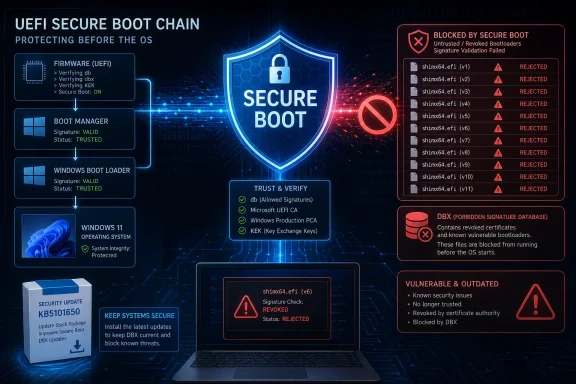 Secure Boot Trusted the Signature, Not the Age
Secure Boot is intended to stop unauthorized software from executing during startup. Firmware checks boot applications against trusted signature databases, while known-bad components are placed in the UEFI Forbidden Signature Database, commonly called the DBX.A shim is a small first-stage bootloader commonly used to bridge Microsoft’s Secure Boot trust model with Linux distributions and other third-party boot environments. Microsoft signs approved shims so that they can run on PCs whose firmware trusts Microsoft’s third-party UEFI certificate authority.
That interoperability creates a long-term security obligation. A Microsoft signature can keep an old binary trusted long after its original product has disappeared, unless the binary is explicitly revoked through a DBX update.
ESET identified 11 signed shims at version 0.9 or earlier that lacked checks found in modern releases. The affected binaries appeared in products including older Red Hat Enterprise Linux and CentOS media, Spyrus WTGCreator, baramundi Management Suite, WhiteCanyon WipeDrive, Finland’s Abitti examination environment, ROSA Linux and PC-Doctor Service Center.
The immediate problem is not that every Windows 11 installation contains one of those products. An attacker can supply a vulnerable signed binary independently, a technique described as Bring Your Own Vulnerable Bootloader. If the target firmware still trusts the signing certificate and has not received the relevant DBX entries, Secure Boot may accept the attacker-provided shim.
That makes the vulnerable file portable across systems. According to ESET, exposure is not limited to PCs with the original Linux distribution, diagnostic package or disk utility installed.
Old Shims Miss Modern Revocation Defenses
The affected shims predate or fail to enforce newer controls designed to make bootloader revocation more precise. Secure Boot Advanced Targeting, or SBAT, attaches generation information to boot components so that a vulnerable generation can be rejected without invalidating every release from the same vendor.Shim gained SBAT support in version 15.3. Older versions also have incomplete or nonexistent handling of Machine Owner Key deny lists, which can be used to prevent specifically prohibited components from continuing through the boot chain.
Without those controls, a legacy shim may accept components that a modern shim would reject. CERT/CC says arbitrary code could consequently execute during the early boot phase, before Windows, endpoint protection and many monitoring tools initialize.
That position is particularly valuable to an attacker. Boot-level malware can tamper with the operating system as it loads, introduce unsigned kernel components and potentially establish persistence that survives ordinary remediation attempts. ESET specifically warns that exploitation can support the deployment of UEFI bootkits or other pre-OS malware.
This is not a conventional drive-by Windows vulnerability. CERT/CC says an attacker needs administrative privileges or another way to modify the boot process, such as control over bootable media or the EFI System Partition. The flaw therefore becomes most useful after an attacker has already gained meaningful access, but it can turn that access into deeper and harder-to-detect persistence.
Windows 11 Secured-core PCs are expected to ship with trust in Microsoft’s third-party UEFI certificate disabled by default, reducing exposure to this particular route. Configuration and vendor implementation still matter, however, so the Secured-core designation should not replace checking actual Secure Boot policy.
Microsoft Finally Adds the Missing DBX Entries
Microsoft’s response is to add the signatures of the 11 vulnerable binaries to the DBX. Once the updated forbidden-signature database is applied, compliant firmware should refuse to execute those specific shims even though they carry an otherwise trusted Microsoft signature.KB5094126 delivered the revocations to Windows 11 24H2 and 25H2 on June 9, moving those releases to OS builds 26100.8655 and 26200.8655. July’s KB5101650 supersedes that update and moves the same Windows versions to builds 26100.8875 and 26200.8875, respectively.
For ordinary Windows Update users, the practical action is straightforward: install the July 2026 cumulative update and keep Secure Boot enabled. Administrators using Windows Update for Business, WSUS or endpoint management policies should confirm that the update has reached devices rather than assuming approval equals successful DBX deployment.
Revocation updates require more caution than a normal Windows component replacement. Once firmware rejects an old bootloader, legacy recovery drives, Linux installation media, diagnostic tools and network-boot images containing that binary may stop booting. That is the security control working as intended, but it can still create an operational surprise.
IT teams should test business-critical boot environments before broad enforcement, particularly if they use older versions of baramundi Management Suite, WipeDrive, PC-Doctor or Linux deployment media. Updating the affected product or rebuilding its boot media with a current shim is preferable to disabling Secure Boot to keep an obsolete image running.
Organizations should also inventory machines that do not regularly receive Windows updates, including offline workstations, lab equipment and systems booted primarily into another operating system. The trust decision occurs in UEFI firmware, so a PC can remain exposed even when Windows is not its main workload.
A Decade-Old Oversight Meets the 2026 Certificate Transition
The discovery lands while Microsoft is already replacing Secure Boot certificates introduced around the Windows 8 era. Microsoft says certificates used by most Windows devices began reaching expiration milestones in June 2026 and has been distributing replacements through Windows Update using staged, device-targeted deployment.KB5101650 includes additional targeting data intended to expand the number of devices eligible to receive those new certificates automatically. Microsoft says PCs that have not yet received the replacements will continue to boot and receive standard Windows updates, but administrators still need to track readiness for future boot-critical servicing.
The certificate transition and the shim revocations solve related but different problems. Replacing expiring certificates modernizes the broader Secure Boot trust infrastructure; adding hashes to the DBX blocks specific signed binaries that should no longer be accepted. Receiving one change should not be treated as proof that every part of the Secure Boot migration is complete.
Microsoft’s July release notes also warn administrators updating Windows installation images to include the matching
boot.stl file. An installation image with an incorrect or missing copy can fail Secure Boot validation and produce error 0xc0430001, making offline media maintenance part of the update process rather than an optional cleanup task.The larger lesson is that a valid signature is only a statement about who approved a binary at a particular point in time. It is not evidence that the binary remains safe indefinitely. ESET’s findings show how forgotten third-party components can preserve old weaknesses across otherwise fully patched systems when revocation does not keep pace.
KB5101650 closes the identified route for current Windows 11 24H2 and 25H2 systems, but ESET cautions that nobody can confidently say every obsolete Microsoft-signed shim has now been found. For administrators, July’s update is both a required patch and a reason to audit every recovery image, deployment tool and bootable utility that still depends on the Microsoft Corporation UEFI CA 2011 trust chain.
References
- Primary source: Neowin
Published: 2026-07-15T09:34:01+00:00
Windows 11 KB5101650, KB5094126 fixes major flaw that went unnoticed for over 10 years - Neowin
Windows 11 updates KB5101650 and KB5094126 fix a critical security flaw that remained undetected and unresolved for more than 10 years. www.neowin.net
- Official source: support.microsoft.com
July 14, 2026—KB5101650 (OS Builds 26200.8870 and 26100.8875) | Microsoft Support
July 14, 2026—KB5101650 (OS Builds 26200.8870 and 26100.8875)support.microsoft.com
