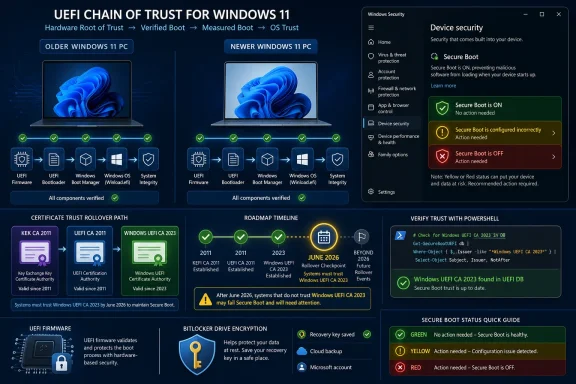
Microsoft on June 29, 2026 published KB5105943 to explain why some Windows 10, Windows 11, and Windows Server devices are being blocked from receiving updated Secure Boot certificates, and what happens if those machines reach certificate expiration without the new trust material installed. The short version is reassuring but not comforting: affected PCs should still boot, patch, browse, and run applications, but they will fall behind in one of the most sensitive parts of the Windows security model. This is not a blue-screen cliff; it is a slow loss of boot-chain credibility. And that makes it exactly the kind of Windows problem enterprises hate most: visible only after inventory work, vendor coordination, and a firmware dependency nobody budgeted time for.
Secure Boot was designed to keep untrusted code from running before the operating system loads, which is precisely the point in the boot sequence where malware has the most leverage and defenders have the least visibility. The feature depends on certificates stored in firmware trust databases, and those certificates are now aging out of their original design window. Microsoft’s new support article is less a warning about a single patch than a reminder that Windows security is partly anchored in firmware decisions made by OEMs years ago.
The new certificates are meant to replace the 2011-era Secure Boot authorities with newer 2023 trust material. Microsoft has been preparing this transition for months, and for most consumer and business PCs the process is supposed to happen through Windows Update. If the machine’s firmware can accept the updated Secure Boot database and the device is in a supported servicing state, the user may never notice the handoff.
KB5105943 exists because “most” is not “all.” Some devices cannot complete the certificate update automatically because the firmware needs an OEM update first. Others may be in a more terminal category: the hardware or firmware does not support the automated update path, or the manufacturer no longer supports the model well enough to provide the required firmware change.
That distinction matters. Microsoft can service Windows, but it cannot unilaterally rewrite every OEM firmware implementation in the field. Secure Boot was built as a chain of trust, and chains are only as strong as the link controlled by the least responsive vendor.
Windows quality updates and ordinary monthly security updates are expected to keep installing. Apps will still open. Networking will still work. Browsers will still browse. Users who think of security only in terms of visible breakage may conclude nothing happened.
But Secure Boot is not there to make daily computing feel different. It is there to prevent malicious or vulnerable boot components from being trusted before Windows gets a chance to defend itself. A machine that cannot receive future Secure Boot and Boot Manager protections is not immediately compromised, but it becomes less able to respond to new boot-level threats.
That is the practical meaning of Microsoft’s “gradual reduction in long-term security” language. The device keeps yesterday’s protections, but it may not receive tomorrow’s boot-chain defenses. In security terms, that is not a crash; it is erosion.
Those messages may look similar to an end user, but for IT they imply very different operational paths. A temporary pause suggests the device is still in the remediation pipeline. A hardware or firmware limitation suggests procurement history has caught up with the security baseline.
The first group belongs in a monitoring queue. Administrators should track OEM advisories, firmware releases, Windows Security status, event logs, and management-platform signals. The second group belongs in a risk register, because “contact your device manufacturer” may be a polite way of saying the device’s support lifecycle is now the limiting factor.
This is where home users and enterprises diverge. A home user can check the PC maker’s support page and hope for a firmware update. An enterprise has to answer harder questions: how many models are affected, which business units own them, whether they process regulated data, and whether replacement is cheaper than sustaining exceptions.
That dependency is not new, but it is newly visible. Firmware has long been the awkward basement of endpoint management: essential, risky to update, inconsistent across vendors, and frequently outside the neat compliance dashboards built around Windows Update. Certificate rollover brings that basement into the executive briefing.
The most competent IT teams will treat this as a firmware hygiene event, not merely a Windows patch event. They will confirm BIOS and UEFI update channels, test representative models, stage rollouts, verify recovery media, and document the failure modes before the help desk discovers them through tickets.
The least prepared environments will discover that “fully patched Windows” does not necessarily mean “fully protected boot chain.” That gap is exactly what attackers, auditors, and incident responders care about.
An older PC that cannot receive the new certificates is effectively being moved into a weaker long-term security class. It may still be appropriate for light-duty home use, lab work, kiosk scenarios, or offline roles. It may no longer be appropriate for sensitive enterprise workloads, privileged administration, remote access, or environments where boot integrity is part of the compliance story.
That reclassification will sting because many of these systems may otherwise feel healthy. They might have enough RAM, a decent SSD, and years of useful mechanical life left. The failure is not performance; it is platform trust.
This is the uncomfortable bargain of modern endpoint security. The useful life of a PC is no longer determined only by CPU speed or battery wear. It is increasingly determined by whether the firmware, TPM, boot chain, and OS servicing stack can keep meeting the current security baseline.
Still, Windows 10 gives the issue its sharpest edge. Many organizations remain in extended migration planning, and many home users are stretching older machines because they do not meet Windows 11’s hardware requirements. Secure Boot certificate rotation adds another pressure point to an already fraught end-of-life conversation.
Microsoft’s position is predictable: supported systems should receive the necessary updates through normal channels, while unsupported systems should not be expected to receive new platform protections forever. That is defensible from a security engineering standpoint. It is also frustrating for users whose machines are technically functional but fall outside the supported trust path.
The result is a familiar Windows lifecycle squeeze. Microsoft can say, accurately, that it is not intentionally breaking older PCs. Users can say, also accurately, that security expectations are being used to shorten the practical life of hardware that still works.
A server that continues to boot normally can lull teams into postponing the work. But servers are where boot-chain protection intersects with ransomware risk, credential theft, virtualization hosts, remote management, and regulatory obligations. A machine that cannot accept future boot revocations or Boot Manager protections may remain operational while quietly becoming a more attractive persistence target.
The operational burden is also heavier. Firmware updates on servers often require maintenance windows, vendor-specific tools, cluster planning, out-of-band management validation, and rollback preparation. Administrators cannot treat this as a casual driver update.
The better approach is to fold Secure Boot certificate status into existing lifecycle and vulnerability management processes. If a server model needs firmware, that requirement should be tracked like any other security dependency. If the vendor cannot provide it, the replacement conversation should start before an auditor or incident makes it urgent.
Leaving Secure Boot enabled preserves protection against threats already covered by the current trust database. Disabling it removes a major pre-OS guardrail altogether. In other words, a device stuck on older certificates is less future-ready; a device with Secure Boot turned off is less protected right now.
That difference should be central to help desk scripts and user-facing guidance. The correct response to a blocked certificate update is not panic and not firmware tinkering by guesswork. It is inventory, vendor confirmation, update testing, and a decision about whether the machine can remain in its current role.
This is especially important for BitLocker and device encryption scenarios. Secure Boot status can influence the trust measurements used during startup, and careless firmware changes can trigger recovery prompts or operational disruption. Administrators should plan certificate and firmware work with recovery keys, remote access constraints, and user communication in mind.
For enthusiasts, this is a reason to learn the OEM update stack. Dell, HP, Lenovo, ASUS, Microsoft Surface, and other vendors each have their own firmware delivery rhythms and support pages. The right answer may arrive through Windows Update, a vendor utility, a BIOS package, or an enterprise management tool.
For IT pros, the Windows Security app is only the visible layer. Fleet-scale verification needs telemetry. That means checking management inventory, event logs, registry indicators, firmware versions, and vendor advisories across hardware models. A single green check on a single laptop does not prove the fleet is ready.
The uncomfortable truth is that endpoint security is becoming less OS-centric. The operating system can report the problem, but the remediation may live in firmware supply chains, OEM lifecycle policies, and procurement records.
What makes it feel abnormal is scale. Windows runs on a chaotic universe of hardware models, firmware implementations, deployment images, recovery media, embedded devices, servers, and user habits. Rotating a certificate in that ecosystem is not like updating a browser root store. It touches the machinery that decides whether an operating system loader is allowed to run.
The 2011 certificates also became embedded in workflows far beyond simple Windows startup. Recovery environments, imaging tools, third-party boot components, security products, anti-cheat systems, and specialized enterprise tooling can all intersect with Secure Boot trust. Even when Microsoft’s own update path works, adjacent dependencies may need testing.
That is why the article should not be read as a narrow support note. It is a public admission that platform security maintenance has entered a messy phase. The cryptography is doing what cryptography is supposed to do: expire before it becomes indefinite authority. The ecosystem is doing what ecosystems do: revealing all the places where “standard” was implemented differently.
Spare laptops in storage, lab systems, point-of-sale terminals, factory PCs, classroom carts, medical-adjacent workstations, signage controllers, and branch-office servers can all fall outside routine maintenance. These are exactly the machines that turn into emergency projects when someone needs them quickly. A device that has not been online during the staged rollout may not have received the firmware or certificate sequence expected by newer recovery media or boot components.
Enterprises should therefore think in terms of dormant inventory as well as active inventory. A clean dashboard of currently managed endpoints is useful, but it may not include the machines that will be pulled from a cabinet during a hardware shortage or incident response event.
The risk is not that those devices all fail on the same morning. The risk is that they slowly diverge from the supported boot baseline and then reappear in production when nobody remembers why they were not updated.
That dual message is difficult to communicate because modern users have been trained to interpret security notices as either catastrophic or ignorable. This one is neither. It is a maintenance deadline with uneven blast radius.
The company’s most important practical advice is to keep Windows updated, check the Windows Security app, and follow OEM guidance when firmware is required. For many users, that will be enough. For organizations, it is merely the start of a project plan.
The deeper message is that Secure Boot has become a shared responsibility between Microsoft, the OEM, and the device owner. If any one of those parties drops the handoff, the machine may keep running but stop advancing.
That means the meaningful deadline differs by environment. For a low-risk home PC, the practical urgency may be moderate, assuming Windows and the browser remain patched and the user avoids risky behavior. For an enterprise domain admin workstation, a virtualization host, or a device in a regulated environment, the urgency is much higher.
The security model also depends on future events we cannot predict. If a serious boot-level vulnerability emerges and Microsoft ships mitigations that require the new certificates, machines without the updated trust material could be left behind at exactly the wrong moment. That is the risk administrators are being asked to reduce now.
In that sense, the certificate rollout is preventative maintenance against an unknown incident. It is hard to sell because nothing visible is broken. It is important for the same reason.
Microsoft’s latest Secure Boot guidance is not a disaster notice; it is a lifecycle notice with security consequences. Most users will pass through the certificate rollover quietly, and many will never know it happened. But for the machines that cannot cross the bridge automatically, the question is no longer whether Windows boots today. It is whether the device can still participate in the next generation of boot-chain defense tomorrow.
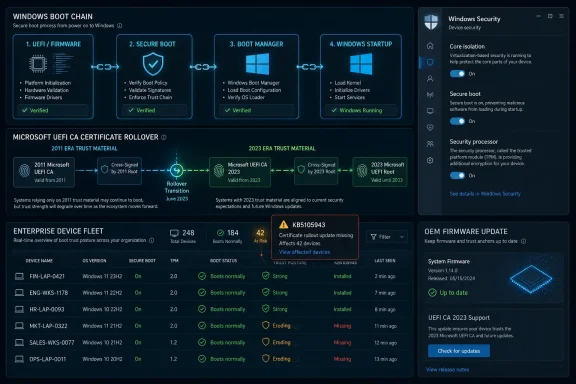 Microsoft’s Certificate Rollover Has Become a Hardware Support Test
Secure Boot was designed to keep untrusted code from running before the operating system loads, which is precisely the point in the boot sequence where malware has the most leverage and defenders have the least visibility. The feature depends on certificates stored in firmware trust databases, and those certificates are now aging out of their original design window. Microsoft’s new support article is less a warning about a single patch than a reminder that Windows security is partly anchored in firmware decisions made by OEMs years ago.The new certificates are meant to replace the 2011-era Secure Boot authorities with newer 2023 trust material. Microsoft has been preparing this transition for months, and for most consumer and business PCs the process is supposed to happen through Windows Update. If the machine’s firmware can accept the updated Secure Boot database and the device is in a supported servicing state, the user may never notice the handoff.
KB5105943 exists because “most” is not “all.” Some devices cannot complete the certificate update automatically because the firmware needs an OEM update first. Others may be in a more terminal category: the hardware or firmware does not support the automated update path, or the manufacturer no longer supports the model well enough to provide the required firmware change.
That distinction matters. Microsoft can service Windows, but it cannot unilaterally rewrite every OEM firmware implementation in the field. Secure Boot was built as a chain of trust, and chains are only as strong as the link controlled by the least responsive vendor.
The PC Still Boots, Which Is Why the Risk Is Easy to Misread
The most important sentence in Microsoft’s guidance is also the one most likely to be misunderstood: if a device reaches certificate expiration without the new certificates, it will continue to start and operate normally. That means this is not another “your PC will stop working” deadline. It is subtler, and arguably more dangerous because of that.Windows quality updates and ordinary monthly security updates are expected to keep installing. Apps will still open. Networking will still work. Browsers will still browse. Users who think of security only in terms of visible breakage may conclude nothing happened.
But Secure Boot is not there to make daily computing feel different. It is there to prevent malicious or vulnerable boot components from being trusted before Windows gets a chance to defend itself. A machine that cannot receive future Secure Boot and Boot Manager protections is not immediately compromised, but it becomes less able to respond to new boot-level threats.
That is the practical meaning of Microsoft’s “gradual reduction in long-term security” language. The device keeps yesterday’s protections, but it may not receive tomorrow’s boot-chain defenses. In security terms, that is not a crash; it is erosion.
The New Support Message Is a Triage Label for the Fleet
The article calls out two classes of messages users may see in Windows Security. One says updates are temporarily paused because the device is affected by a known issue while Microsoft and partners work toward a supported resolution. The other says Secure Boot is enabled but the device does not support the automated Secure Boot certificate update because of hardware or firmware limitations.Those messages may look similar to an end user, but for IT they imply very different operational paths. A temporary pause suggests the device is still in the remediation pipeline. A hardware or firmware limitation suggests procurement history has caught up with the security baseline.
The first group belongs in a monitoring queue. Administrators should track OEM advisories, firmware releases, Windows Security status, event logs, and management-platform signals. The second group belongs in a risk register, because “contact your device manufacturer” may be a polite way of saying the device’s support lifecycle is now the limiting factor.
This is where home users and enterprises diverge. A home user can check the PC maker’s support page and hope for a firmware update. An enterprise has to answer harder questions: how many models are affected, which business units own them, whether they process regulated data, and whether replacement is cheaper than sustaining exceptions.
Firmware Has Reentered the Windows Patch Conversation
For years, Microsoft has tried to make Windows servicing feel like a cloud-managed conveyor belt: cumulative updates arrive, policies govern timing, telemetry reports success, and the endpoint moves forward. Secure Boot certificate rotation breaks that mental model because the OS update is only one part of the transaction. The firmware has to be ready to accept the new trust configuration.That dependency is not new, but it is newly visible. Firmware has long been the awkward basement of endpoint management: essential, risky to update, inconsistent across vendors, and frequently outside the neat compliance dashboards built around Windows Update. Certificate rollover brings that basement into the executive briefing.
The most competent IT teams will treat this as a firmware hygiene event, not merely a Windows patch event. They will confirm BIOS and UEFI update channels, test representative models, stage rollouts, verify recovery media, and document the failure modes before the help desk discovers them through tickets.
The least prepared environments will discover that “fully patched Windows” does not necessarily mean “fully protected boot chain.” That gap is exactly what attackers, auditors, and incident responders care about.
Old Machines Are Not Being Bricked, They Are Being Reclassified
Microsoft is careful to say affected devices remain usable. That caution is necessary because Secure Boot headlines easily turn into panic. But the absence of a brick does not mean the absence of a consequence.An older PC that cannot receive the new certificates is effectively being moved into a weaker long-term security class. It may still be appropriate for light-duty home use, lab work, kiosk scenarios, or offline roles. It may no longer be appropriate for sensitive enterprise workloads, privileged administration, remote access, or environments where boot integrity is part of the compliance story.
That reclassification will sting because many of these systems may otherwise feel healthy. They might have enough RAM, a decent SSD, and years of useful mechanical life left. The failure is not performance; it is platform trust.
This is the uncomfortable bargain of modern endpoint security. The useful life of a PC is no longer determined only by CPU speed or battery wear. It is increasingly determined by whether the firmware, TPM, boot chain, and OS servicing stack can keep meeting the current security baseline.
Windows 10 Makes the Timing More Politically Charged
The support matrix in KB5105943 spans a broad set of Windows 10, Windows 11, and Windows Server releases, including LTSC and IoT editions. That breadth is important because Secure Boot certificates sit beneath the familiar Windows version debate. This is not just a Windows 11 story, and it is not just a consumer story.Still, Windows 10 gives the issue its sharpest edge. Many organizations remain in extended migration planning, and many home users are stretching older machines because they do not meet Windows 11’s hardware requirements. Secure Boot certificate rotation adds another pressure point to an already fraught end-of-life conversation.
Microsoft’s position is predictable: supported systems should receive the necessary updates through normal channels, while unsupported systems should not be expected to receive new platform protections forever. That is defensible from a security engineering standpoint. It is also frustrating for users whose machines are technically functional but fall outside the supported trust path.
The result is a familiar Windows lifecycle squeeze. Microsoft can say, accurately, that it is not intentionally breaking older PCs. Users can say, also accurately, that security expectations are being used to shorten the practical life of hardware that still works.
Server Administrators Have Less Room for Ambiguity
On servers, this issue deserves more urgency than it will get in many shops. Windows Server 2012 ESU, Server 2012 R2 ESU, Server 2016, Server 2019, Server 2022, and Server 2025 are all in scope. That means the problem spans everything from aging line-of-business hosts to current infrastructure.A server that continues to boot normally can lull teams into postponing the work. But servers are where boot-chain protection intersects with ransomware risk, credential theft, virtualization hosts, remote management, and regulatory obligations. A machine that cannot accept future boot revocations or Boot Manager protections may remain operational while quietly becoming a more attractive persistence target.
The operational burden is also heavier. Firmware updates on servers often require maintenance windows, vendor-specific tools, cluster planning, out-of-band management validation, and rollback preparation. Administrators cannot treat this as a casual driver update.
The better approach is to fold Secure Boot certificate status into existing lifecycle and vulnerability management processes. If a server model needs firmware, that requirement should be tracked like any other security dependency. If the vendor cannot provide it, the replacement conversation should start before an auditor or incident makes it urgent.
Disabling Secure Boot Is the Wrong Escape Hatch
Microsoft’s warning not to disable Secure Boot is more than boilerplate. Users facing confusing certificate messages may be tempted to turn Secure Boot off in firmware, especially if a forum post or support script suggests it as a workaround for update friction. That would trade a manageable degradation for an immediate weakening of the platform.Leaving Secure Boot enabled preserves protection against threats already covered by the current trust database. Disabling it removes a major pre-OS guardrail altogether. In other words, a device stuck on older certificates is less future-ready; a device with Secure Boot turned off is less protected right now.
That difference should be central to help desk scripts and user-facing guidance. The correct response to a blocked certificate update is not panic and not firmware tinkering by guesswork. It is inventory, vendor confirmation, update testing, and a decision about whether the machine can remain in its current role.
This is especially important for BitLocker and device encryption scenarios. Secure Boot status can influence the trust measurements used during startup, and careless firmware changes can trigger recovery prompts or operational disruption. Administrators should plan certificate and firmware work with recovery keys, remote access constraints, and user communication in mind.
The Security App Is Now a Front Door to a Firmware Problem
Microsoft points users to the Windows Security app as the easiest way to check whether Secure Boot certificate status is current or whether a firmware update is required. That is a sensible consumer entry point, but it also underscores a larger shift. Windows is increasingly surfacing platform health issues that the OS alone cannot fix.For enthusiasts, this is a reason to learn the OEM update stack. Dell, HP, Lenovo, ASUS, Microsoft Surface, and other vendors each have their own firmware delivery rhythms and support pages. The right answer may arrive through Windows Update, a vendor utility, a BIOS package, or an enterprise management tool.
For IT pros, the Windows Security app is only the visible layer. Fleet-scale verification needs telemetry. That means checking management inventory, event logs, registry indicators, firmware versions, and vendor advisories across hardware models. A single green check on a single laptop does not prove the fleet is ready.
The uncomfortable truth is that endpoint security is becoming less OS-centric. The operating system can report the problem, but the remediation may live in firmware supply chains, OEM lifecycle policies, and procurement records.
The Industry Is Paying Down a 2011 Design Debt
Secure Boot arrived in the Windows 8 era as part of a broader push to harden the PC boot process against rootkits and bootkits. The certificates now expiring were never meant to last forever. In that sense, this rollover is normal cryptographic lifecycle management.What makes it feel abnormal is scale. Windows runs on a chaotic universe of hardware models, firmware implementations, deployment images, recovery media, embedded devices, servers, and user habits. Rotating a certificate in that ecosystem is not like updating a browser root store. It touches the machinery that decides whether an operating system loader is allowed to run.
The 2011 certificates also became embedded in workflows far beyond simple Windows startup. Recovery environments, imaging tools, third-party boot components, security products, anti-cheat systems, and specialized enterprise tooling can all intersect with Secure Boot trust. Even when Microsoft’s own update path works, adjacent dependencies may need testing.
That is why the article should not be read as a narrow support note. It is a public admission that platform security maintenance has entered a messy phase. The cryptography is doing what cryptography is supposed to do: expire before it becomes indefinite authority. The ecosystem is doing what ecosystems do: revealing all the places where “standard” was implemented differently.
The Machines Most Likely to Be Missed Are the Ones That Matter Later
The obvious candidates for attention are daily-use laptops and managed desktops. They are online, visible, and likely to receive Windows updates. The more dangerous misses are devices that spend long periods powered off, disconnected, embedded, or forgotten.Spare laptops in storage, lab systems, point-of-sale terminals, factory PCs, classroom carts, medical-adjacent workstations, signage controllers, and branch-office servers can all fall outside routine maintenance. These are exactly the machines that turn into emergency projects when someone needs them quickly. A device that has not been online during the staged rollout may not have received the firmware or certificate sequence expected by newer recovery media or boot components.
Enterprises should therefore think in terms of dormant inventory as well as active inventory. A clean dashboard of currently managed endpoints is useful, but it may not include the machines that will be pulled from a cabinet during a hardware shortage or incident response event.
The risk is not that those devices all fail on the same morning. The risk is that they slowly diverge from the supported boot baseline and then reappear in production when nobody remembers why they were not updated.
Microsoft’s Message Is Reassurance Wrapped Around a Deadline
The tone of KB5105943 is carefully balanced. Microsoft wants users to understand that their PCs will not suddenly stop working. It also wants them to understand that doing nothing may leave the device progressively less protected against future boot threats.That dual message is difficult to communicate because modern users have been trained to interpret security notices as either catastrophic or ignorable. This one is neither. It is a maintenance deadline with uneven blast radius.
The company’s most important practical advice is to keep Windows updated, check the Windows Security app, and follow OEM guidance when firmware is required. For many users, that will be enough. For organizations, it is merely the start of a project plan.
The deeper message is that Secure Boot has become a shared responsibility between Microsoft, the OEM, and the device owner. If any one of those parties drops the handoff, the machine may keep running but stop advancing.
The Real Deadline Is the Day Your Next Boot Threat Arrives
There is a temptation to treat certificate expiration as a calendar event: June 2026 arrives, something either happens or it does not. Microsoft’s own guidance argues against that interpretation. The consequence of missing the update is not a dramatic flip from safe to unsafe; it is the inability to receive certain future protections.That means the meaningful deadline differs by environment. For a low-risk home PC, the practical urgency may be moderate, assuming Windows and the browser remain patched and the user avoids risky behavior. For an enterprise domain admin workstation, a virtualization host, or a device in a regulated environment, the urgency is much higher.
The security model also depends on future events we cannot predict. If a serious boot-level vulnerability emerges and Microsoft ships mitigations that require the new certificates, machines without the updated trust material could be left behind at exactly the wrong moment. That is the risk administrators are being asked to reduce now.
In that sense, the certificate rollout is preventative maintenance against an unknown incident. It is hard to sell because nothing visible is broken. It is important for the same reason.
The Fleet That Survives This Cleanly Will Be the One That Treats Firmware as Patchable
The practical lessons from KB5105943 are concrete, but they are not glamorous. They involve inventory, firmware channels, OEM support matrices, and exception handling. That is precisely why they matter.- Devices that receive the updated Secure Boot certificates automatically through Windows Update should remain on the normal servicing path without user intervention.
- Devices showing a temporary pause or known-issue message should be monitored until Microsoft and OEM partners provide a supported resolution.
- Devices requiring firmware updates should be matched to the manufacturer’s Secure Boot guidance and updated through approved OEM channels.
- Devices that cannot support the automated certificate update should be treated as long-term security exceptions, not merely as machines with a cosmetic warning.
- Disabling Secure Boot is a worse security state than leaving Secure Boot enabled with the existing trust configuration.
- Servers, dormant devices, LTSC systems, IoT deployments, and recovery workflows deserve special attention because they are easier to miss and harder to fix under pressure.
Microsoft’s latest Secure Boot guidance is not a disaster notice; it is a lifecycle notice with security consequences. Most users will pass through the certificate rollover quietly, and many will never know it happened. But for the machines that cannot cross the bridge automatically, the question is no longer whether Windows boots today. It is whether the device can still participate in the next generation of boot-chain defense tomorrow.
References
- Primary source: Microsoft Support
Published: Mon, 29 Jun 2026 23:58:24 Z
If you’re prevented from updating Secure Boot certificates - Microsoft Support
 support.microsoft.com
- Official source: learn.microsoft.com
Update Secure Boot Certificates for Windows Devices - Windows Client | Microsoft Learn
Update your Windows devices to maintain Secure Boot protection with 2023 certificates before they expire in June 2026.learn.microsoft.com - Official source: microsoft.com
Prepare your servers for Secure Boot certificate updates | Microsoft Windows Server Blog
The original Secure Boot certificates introduced in 2011 are approaching the end of their planned lifecycle, with expirations beginning in late June 2026.www.microsoft.com - Related coverage: windowscentral.com
Microsoft warns Secure Boot certificates will expire in 2026 | Windows Central
After 15 years, the original Secure Boot certificates that keep your PC secure during boot are expiring. Here's what you need to know.www.windowscentral.com - Related coverage: notebookcheck.net
Microsoft sets 2026 deadline for Secure Boot certificate expiration - Notebookcheck News
Microsoft has issued new guidance warning that 2011 Secure Boot certificates begin expiring in June 2026. Windows updates are rolling out 2023 replacement certificates, with some PCs requiring OEM firmware updates. www.notebookcheck.net
- Related coverage: asus.com
- Related coverage: windowslatest.com
Microsoft confirms the new Secure Boot folder in Windows 11 isn't a bug, you don't need to delete it
New “SecureBoot” folder created by Windows 11 KB5089549 is expected behavior for Secure Boot certificates update and not a known issue. www.windowslatest.com
- Related coverage: tomshardware.com
Microsoft is refreshing Secure Boot certificates to plug security holes before they happen — if you bought a PC last year, you should be set | Tom's Hardware
Be sure to keep Windows 11 systems updated to get refreshed security certificates.www.tomshardware.com - Related coverage: techradar.com
Still using Windows 10? Microsoft is automatically replacing Secure Boot certificates on older PCs ahead of expiration, so you might want to update ASAP | TechRadar
Secure Boot certificate upgrades is bad news for Windows 10www.techradar.com - Related coverage: cisco.com
- Related coverage: tomsguide.com
Windows 10 users warned to upgrade now or risk a ‘degraded security state’ as Microsoft ends Secure Boot support | Tom's Guide
Support for Windows 10 officially ended in October 2025, and Microsoft says devices that don’t upgrade could enter a degraded security state — leaving them vulnerable to threats. Here’s what it means for your PC and how to protect it.www.tomsguide.com - Related coverage: pcgamer.com
Secure Boot certificates used by anti-cheat software are set to expire in June but new ones are already in the mail | PC Gamer
You shouldn't have to worry about expired certificates if you keep your PC up-to-date.www.pcgamer.com - Related coverage: techriver.com