

Kerberos RC4 enforcement should not be delayed across an entire organization because one legacy workload remains incompatible. Administrators should inventory each RC4 dependency, then upgrade it, place it under a narrow, time-limited supported exception with isolation controls, or retire it—while managing customer-operated Active Directory Domain Services, Microsoft Entra Domain Services, and Azure Files as distinct control planes.
Kerberos readiness depends on the complete authentication path: client, KDC, identity, application, and target service. A spreadsheet column marked “AES supported” cannot prove that path works.
Place every detected dependency into one of these control planes:
Azure Files applicability boundary: The cited Azure Files change applies to SMB Azure file shares using on-premises AD DS identity-based authentication. Customers using Microsoft Entra Kerberos, Microsoft Entra Domain Services, or storage-account-key access need no action for that specific Azure Files change. They should still review any separate guidance governing their chosen authentication architecture.
The queue should be reviewed as operational work. A detected appliance with no owner is not an accepted exception; it is an unresolved dependency.
For an in-scope share using on-premises AD DS identity-based authentication:
Use a consistent process:
Access restrictions, dedicated identities, network segmentation, and additional monitoring can be recorded as recommended compensating controls. Their effectiveness depends on the environment, and they neither create AES compatibility nor make an unsupported Kerberos configuration acceptable.
If no supported narrow exception exists, the choices are to remediate the workload, move it to a supported architecture, or retire it. Broadly restoring RC4 because one dependency remains defeats the purpose of classifying and owning the work.
Microsoft’s AD DS and Azure Files documentation provides the basis for action. WindowsForum coverage—including reports titled Windows Kerberos Hardening: AES Defaults and RC4 Disablement by 2026 and Microsoft Flips Kerberos Default from RC4 to AES-SHA1 in Active Directory by 2026—adds useful community context by framing the transition as an application-compatibility project rather than a domain-controller checkbox. Administrators should use current Microsoft product documentation, not article titles or a single reported date, to schedule production changes.Do not disable RC4 domain-wide until you have audited active RC4 tickets, classified each dependency by AD DS/Entra Domain Services/Azure Files, tested its AES path, and assigned any remaining dependency to a supported temporary exception or retirement plan.
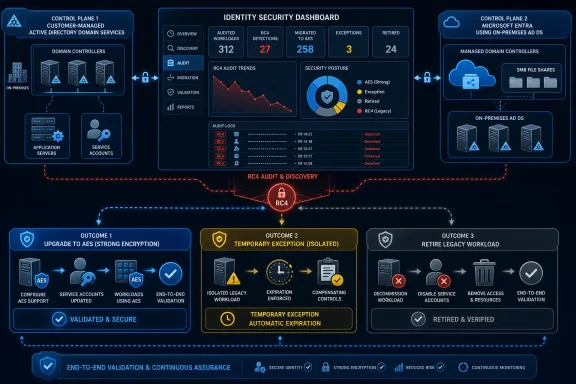 Divide the Estate Before Touching Kerberos Policy
Kerberos readiness depends on the complete authentication path: client, KDC, identity, application, and target service. A spreadsheet column marked “AES supported” cannot prove that path works.Place every detected dependency into one of these control planes:
| Control plane | Who controls the change? | Required evidence | Immediate action |
|---|---|---|---|
| Customer-managed AD DS | The organization’s identity, infrastructure, and workload teams | AD DS Kerberos audit records plus end-to-end tests | Collect and review RC4 ticket activity, remediate affected identities and services, validate AES, then enforce the supported policy |
| Microsoft Entra Domain Services | Microsoft controls the managed domain; the customer controls dependent workloads | Service notices, current managed-service guidance, and workload tests | Identify dependent applications, follow the managed service’s supported process, and confirm exception options with Microsoft |
| Azure Files with on-premises AD DS authentication | Storage, AD DS, endpoint, and application owners | Azure Files configuration, related AD DS evidence, and new SMB connection tests | Follow the Azure Files AES-256 upgrade procedure for the affected storage configuration and validate from representative clients |
Methodology note
This article limits exact event fields, commands, account settings, and exception mechanisms to what Microsoft documents for the deployed product and version. Where no universal implementation detail is established, the steps below direct administrators to the applicable Microsoft-supported procedure rather than proposing an unverified setting.Do This Now: Customer-Managed AD DS
Use Microsoft’s current procedure to detect and remediate RC4 use in Kerberos. Execute the work in this order:- Collect: Enable the auditing specified by Microsoft and collect Kerberos ticket activity from the relevant domain controllers for a representative business period. Include infrequent jobs, scheduled tasks, batch processing, appliances, and applications that may not authenticate every day.
- Review: Identify observed RC4 ticket use and map each occurrence to the target service, account, client population, application owner, and business process. Do not classify readiness solely from operating-system age or directory metadata.
- Remediate: Apply the Microsoft- or vendor-supported AES path. That may require coordinated work on the identity, application, service configuration, client, or cryptographic key material. Enumerate every consumer before changing a shared service credential.
- Validate: Test the entire authentication path in a controlled environment. As an operational recommendation, create a fresh authentication attempt instead of relying only on an existing application session, then compare post-change audit evidence with the baseline.
- Enforce: After every detected dependency has a completed remediation, supported temporary exception, or retirement plan, apply the enforcement configuration documented by Microsoft for the deployed Windows Server versions.
- Monitor: Continue collecting audit evidence after enforcement. Route unexpected ticket or application failures to the workload owner rather than immediately restoring RC4 across the domain.
Turn Every Detection into a Disposition
Use one row per observed dependency. If the same identity serves several applications, create separate rows where ownership, testing, or retirement dates differ.| Required field | Administrator’s decision or action |
|---|---|
| Dependency and control plane | Name the application, service, share, device, or job; classify it as customer-managed AD DS, Entra Domain Services, or Azure Files |
| RC4 evidence | Record the audit evidence, date range, affected identity, client, and target service |
| AES remediation path | Cite the Microsoft or vendor procedure; list required account, application, client, service, or key changes |
| AES test | Define representative clients, test identity, target service, expected result, and rollback trigger |
| Temporary supported exception | Record the documented exception mechanism, approving authority, exact scope, review date, and expiration date; write “none available” if unsupported |
| Isolation controls | As risk-management recommendations, document dedicated identities, access restrictions, network boundaries, and enhanced monitoring where appropriate; do not treat these as a substitute for supported Kerberos configuration |
| Retirement owner | Assign one named technical owner and one business owner |
| Deadline | Set the remediation or retirement date and an earlier exception review date |
| Proof of success | Attach successful end-to-end test results and post-change evidence showing that the tested path no longer depends on RC4 |
| Final disposition | Mark AES remediated, supported temporary exception, or retired; do not close an ownerless or untested item |
Do This Now: Microsoft Entra Domain Services
Microsoft Entra Domain Services uses managed domain controllers, so customers should not copy an AD DS Group Policy, registry setting, or local exception design into this control plane.- Inventory applications, appliances, clients, service identities, and trusts that authenticate through the managed domain.
- Review current Microsoft Entra Domain Services documentation, service-health communications, and tenant notices for the applicable rollout and supported configuration.
- Map observed or suspected RC4-dependent workloads to owners and confirm their AES support with the vendor.
- Test each workload against the managed domain using its normal sign-in or service path.
- Open a Microsoft support case if the documentation does not establish a supported remediation or temporary exception for a required dependency.
- Assign unresolved workloads a dated upgrade or retirement plan, then retain test records as proof of readiness.
Do This Now: Azure Files with On-Premises AD DS
First verify the authentication architecture. If the SMB Azure file share uses Microsoft Entra Kerberos, Microsoft Entra Domain Services, or storage-account-key access, stop: no action is required for this specific Azure Files change.For an in-scope share using on-premises AD DS identity-based authentication:
- Inventory the affected storage accounts, shares, AD DS objects, identities, clients, applications, and business owners.
- Follow Microsoft’s current Azure Files procedure for upgrading the applicable configuration and Kerberos material to AES-256.
- Coordinate any identity or key changes with every consumer of the storage account or associated AD DS identity.
- Test from representative endpoints and applications, including business-critical sign-in, startup, batch, or data-access paths.
- As an operational validation recommendation, establish a new SMB authentication attempt using the Microsoft- and application-supported method rather than treating an already open connection as sufficient proof.
- Capture successful access results and related authentication evidence, monitor the workload, and close the item only after the owner accepts the proof.
Troubleshoot at the Service Boundary
After a policy change, an application may present only an access or authentication error. Treat that as a diagnostic starting point, not proof that RC4 enforcement caused the failure.Use a consistent process:
- Reproduce the issue in a controlled test.
- Identify the client, identity, target service, application, and KDC.
- Confirm which of the three control planes owns the authentication path.
- Collect evidence using Microsoft’s or the vendor’s supported method.
- Compare the result with the pre-change baseline.
- Apply the remediation documented for that service.
- Repeat the end-to-end test and preserve the result.
Exceptions Need Owners and Expiration Dates
A temporary exception must use a configuration supported for the relevant product and architecture. It should identify the affected workload, evidence of need, precise scope, approval, monitoring, rollback procedure, review date, expiration date, and retirement or upgrade owner.Access restrictions, dedicated identities, network segmentation, and additional monitoring can be recorded as recommended compensating controls. Their effectiveness depends on the environment, and they neither create AES compatibility nor make an unsupported Kerberos configuration acceptable.
If no supported narrow exception exists, the choices are to remediate the workload, move it to a supported architecture, or retire it. Broadly restoring RC4 because one dependency remains defeats the purpose of classifying and owning the work.
Frequently Asked Questions
Is there one RC4 switch for AD DS, Microsoft Entra Domain Services, and Azure Files?
No. Customer-managed AD DS policy does not automatically configure Microsoft Entra Domain Services or complete the Azure Files AES-256 upgrade for SMB shares using on-premises AD DS authentication.Can we delay the entire migration for one legacy application?
Avoid doing so. Use a supported, narrowly scoped, expiring exception if one exists, with an assigned upgrade or retirement owner. If no supported exception exists, escalate the application’s remediation or replacement.Does an account setting prove that a workload is AES-ready?
No. Closure requires a successful end-to-end test covering the relevant client, KDC, identity, application, and target service, supported by post-change evidence.Should administrators use commands or event values copied from older guidance?
Only after confirming that they appear in current Microsoft documentation for the deployed product and version. Do not rely on an old script, event-field interpretation, LDAP filter, bitmask, or policy location without that validation.What evidence is sufficient to close an RC4 migration item?
The record should identify the owner and control plane, cite the supported remediation, contain a successful test of the authentication path, and include post-change evidence that the tested dependency no longer requires RC4. An exception remains open until it is removed or the workload is retired.References
- Primary source: learn.microsoft.com
Detect and Remediate RC4 Usage in Kerberos | Microsoft Learn
Learn how to detect and limit or disable RC4 usage in Kerberos to enhance security in Active Directory domain environments.learn.microsoft.com - Primary source: WindowsForum
Windows Kerberos Hardening: AES Defaults and RC4 Disablement by 2026 | Windows Forum
Microsoft has begun a staged hardening of Kerberos on Windows domain controllers: starting with security updates released on January 13, 2026, domain...windowsforum.com