

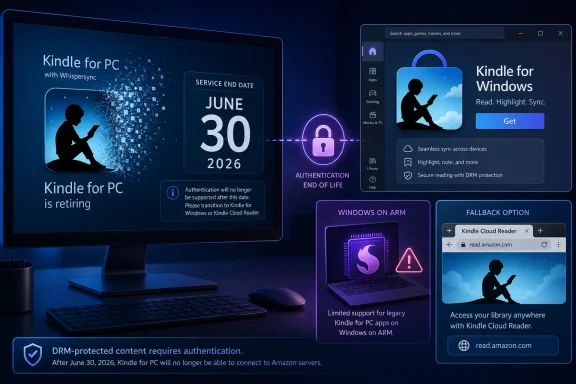
Amazon is disabling the legacy Kindle for PC app on June 30, 2026, replacing it with a Microsoft Store Kindle for Windows app for compatible Windows 10 and Windows 11 PCs, while leaving Windows on ARM users and some international storefront customers without a clean upgrade path. This is not a routine app retirement. It is a server-side cutoff for a DRM-protected reading platform, and that makes the story bigger than one aging desktop client. Amazon is reminding Windows users that a Kindle library is not merely something stored on a PC; it is an access relationship controlled from Amazon’s end.
Most Windows users understand what abandoned software looks like. An old installer keeps working, a help page disappears, and security updates stop arriving. Kindle for PC’s shutdown is sharper because Amazon is not merely walking away from the application; it is cutting off the authentication path that lets the old app prove a reader is entitled to open purchased books.
That distinction matters. A copy of Kindle for PC already installed on a machine is not a self-contained reader in the old sense of a media player opening a local file. The app depends on Amazon’s servers to validate the account and license, and once that back end stops accepting the legacy client, the software becomes a shell around content it can no longer unlock.
The official replacement is the new Kindle for Windows app distributed through the Microsoft Store. It is free, it is available now for supported systems, and the Microsoft Store listing indicates support for Windows 10 version 1809 and later as well as Windows 11. For most modern Intel and AMD Windows users, the migration should be annoying rather than catastrophic.
But the edge cases are not small in meaning. Windows on ARM users are finding themselves outside the supported path, and some Amazon international storefronts have reportedly continued pointing users toward the very legacy installer that is being retired. That is the sort of operational mismatch that turns a planned migration into a trust problem.
The app was not elegant by modern standards, but it did something important: it gave Kindle customers a way to read their libraries on the same PCs where they worked, studied, researched, and managed documents. Students used it for textbooks. Reviewers and researchers used it alongside notes and citations. Ordinary readers used it because a laptop screen was often the largest Kindle-compatible display they owned.
Its age also made it unusually useful to power users. Older Kindle desktop workflows became part of larger personal library systems, annotation routines, and offline reading habits. Not all of those workflows were blessed by Amazon, and some existed precisely because older Kindle delivery methods were easier to inspect, back up, or manipulate than newer app-store-based models.
That helps explain the intensity of the reaction. Amazon sees an aging 32-bit client that no longer fits its security and platform strategy. A certain class of Windows user sees the removal of one of the last flexible bridges between a purchased Kindle library and a general-purpose PC.
The Microsoft Store is the obvious vehicle for that shift. It gives Amazon a controlled distribution path, a simpler update mechanism, and a cleaner compatibility baseline. It also lets Amazon align the Windows reader with the broader direction of consumer apps: sandboxed packaging, store-mediated installs, and less reliance on random installers scattered across support pages and mirror sites.
For users, the benefits are more mixed. The new Kindle for Windows app reportedly supports e-books, comics, manga, ComiXology-style reading features, Audible-linked content, personal documents, touch input, and the usual synchronization of reading position, highlights, and notes. That is the feature set Amazon wants most customers to notice.
The tradeoff is that migration is not just an update. Books downloaded in the old Kindle for PC app do not simply roll forward as local content in the new one. Users must sign in again, see their library in the cloud, and re-download what they want available offline. That is a minor inconvenience for a casual reader and a significant chore for anyone with a large library, limited bandwidth, or a carefully organized offline setup.
The more fundamental tradeoff is control. A Microsoft Store app with stronger DRM and tighter device binding may be more secure from Amazon’s point of view, but it is also less transparent and less forgiving. In practice, that means fewer user-controlled escape hatches when a platform transition goes sideways.
The Microsoft Store listing tells a more practical story. The new Kindle app’s minimum Windows requirement is Windows 10 version 1809, also known as the October 2018 Update, or later. That means most Windows 10 systems still in ordinary use should be able to install it, assuming the machine is using a supported processor architecture.
This discrepancy is not merely pedantic. Users deciding whether they can continue reading purchased books on a PC need a clear answer, not contradictory breadcrumbs spread across Amazon help pages, storefront download links, and Store metadata. If the Microsoft Store allows installation, that is currently the most reliable compatibility signal.
Amazon’s documentation should have been cleaner before shutdown day. A forced migration for paid content is the wrong moment to make users triangulate support status from third-party reporting and app-store requirements. The app may work on Windows 10, but the communication around it has looked like a product transition managed in fragments.
That leaves owners of devices such as Snapdragon-based Surface Pro and Surface Laptop models in an absurd position. They have some of the newest Windows hardware on the market, running a platform Microsoft is actively promoting, but they cannot install the official successor to a 2009-era Kindle desktop app. For a reading app, of all things, that is a hard compatibility gap to defend.
Windows on ARM can emulate many x86 and x64 applications, and Microsoft has invested heavily in making that compatibility story less painful. But app-store architecture flags, packaging decisions, DRM requirements, and vendor support policies can still block users before emulation ever gets a chance. The issue is not whether a Snapdragon PC is powerful enough to display an e-book; it is whether Amazon has packaged, authorized, and distributed the app for that class of device.
Amazon has not publicly offered a clear timeline for ARM support. Until it does, the browser-based Kindle Cloud Reader is the obvious fallback. That fallback works, but it is not the same thing as a native desktop app with predictable offline support and OS-level integration. It is a workaround for users who bought into the modern Windows hardware story and then discovered Amazon had not followed them there.
The problem is obvious. A user in the wrong region could follow Amazon’s own download link, install the legacy app, and discover that the software is days or hours away from failing authentication. That is not a user error. That is a storefront governance failure.
The reported regional inconsistency is especially strange because Amazon is one of the world’s most sophisticated e-commerce operators. The company can localize pricing, inventory, delivery windows, and compliance messaging across markets at enormous scale. Yet for a paid-content access migration, some storefronts apparently lagged behind the US path.
Even if Amazon corrected those links before the final cutoff, the episode points to a larger weakness in digital ownership systems. Users are told to rely on official channels, but official channels are not always internally consistent. When the content is DRM-protected and the vendor is the only legal gatekeeper, bad routing is not just inconvenient; it can temporarily sever practical access.
That is the core of the story. If a music player stops working, users may have other ways to play locally owned audio files. If a PDF reader dies, dozens of alternatives can open the same document. If an old Kindle app dies, a competing e-reader cannot simply step in and read the protected Kindle library.
This is not an accident or a hidden bug. It is the business and technical design of the platform. DRM gives publishers and Amazon control over copying and access, but it also makes the customer’s practical ownership dependent on continuing authorization from the platform operator.
Amazon is not deleting Kindle libraries today. Users’ purchased titles remain in their Amazon accounts, and the new app provides a supported path for many Windows PCs. But the shutdown makes the conditional nature of that access visible. The old app cannot be preserved as a functional fallback because the right to read is checked elsewhere.
That is why this event will resonate beyond Kindle. The more software, media, and personal libraries move into account-bound ecosystems, the more “I bought it” becomes shorthand for “I can access it as long as the service continues to authorize the approved client.” Kindle for PC is simply making that bargain harder to ignore.
The new app’s tighter integration with modern Windows security features fits that trajectory. Hardware-backed trust, device binding, and store-mediated updates all reduce the attack surface for certain kinds of tampering. They also make life harder for tools and workflows that depended on older Kindle delivery mechanisms.
That is where the security story becomes inseparable from the control story. A more secure DRM implementation can protect publishers’ interests, but it can also reduce user agency. It can make legitimate offline archiving harder, complicate accessibility workflows, and narrow the range of devices that can participate in a library a customer may have built over a decade.
Amazon would argue that the supported alternatives are enough: use the new Windows app, a Kindle device, mobile apps, or the browser reader. For many people, that will be true. But the point of a platform transition is not whether the median user survives it. The point is whether the vendor has accounted for the users at the edges who are still paying customers with legitimate needs.
But a browser reader is not the same as a desktop client. Offline behavior can be more limited or less predictable, integration with local workflows is weaker, and users who prefer dedicated apps for focus or accessibility may find it inferior. A browser tab is a useful safety net, not a complete replacement for a native Windows app.
For managed environments, the distinction matters even more. Schools, libraries, and businesses often control browser policies, local storage, sign-in behavior, and app deployment differently. A Microsoft Store app has one set of administrative implications; a web app has another. Amazon’s transition gives those administrators less time and less clarity than they should have had.
The Cloud Reader also does not address the deeper ownership issue. It may restore access, but it reinforces the central dependency: the reading experience exists inside Amazon’s authorized channels. When one channel closes, users move to another channel Amazon controls.
The immediate action is simple enough. Inventory machines that still have Kindle for PC installed, verify whether users actually need it, and move compatible x86 or x64 Windows 10 and Windows 11 systems to the Microsoft Store app. For unsupported systems, document Kindle Cloud Reader as the fallback and set expectations around offline reading.
The harder question is policy. Organizations that allow personal Microsoft Store apps may handle the transition differently from those that block Store access. Environments with Windows on ARM pilots should treat Kindle as another data point in the broader compatibility audit. The app itself may be minor, but the pattern is not.
The consumerization of enterprise software has taught IT departments to expect app retirements. What is more difficult is explaining to users that content they paid for may be unavailable on a perfectly functional PC because the vendor’s licensing and packaging decisions changed. Kindle for PC is a small support ticket with a large philosophical payload.
The users who should slow down are those with older Windows 10 builds, ARM-based Windows hardware, or region-specific Amazon download pages that still appear confused. They should not assume that an installer from Amazon’s site is the correct one merely because it is official. On shutdown day, the Microsoft Store listing is the better source of truth for the new Windows app.
Users with important annotations should verify them separately through Amazon’s notebook interface. The shutdown should not erase account-stored notes, but migrations are exactly when people discover that some cherished workflow was more fragile than expected. If notes, highlights, or reading positions matter, check them before relying on any single app.
The same goes for offline access. A library visible in the cloud is not the same as a library downloaded to the machine. Anyone traveling, working with poor connectivity, or depending on a PC for study should open the new app and download the necessary titles before they need them.
That ambiguity is the story Windows users should remember. The replacement app is real, and many people will be fine. But the gaps reveal how dependent modern content ownership is on packaging, authentication, store policy, processor support, and vendor communication.
 Amazon Turns a Software Retirement Into an Access Test
Most Windows users understand what abandoned software looks like. An old installer keeps working, a help page disappears, and security updates stop arriving. Kindle for PC’s shutdown is sharper because Amazon is not merely walking away from the application; it is cutting off the authentication path that lets the old app prove a reader is entitled to open purchased books.That distinction matters. A copy of Kindle for PC already installed on a machine is not a self-contained reader in the old sense of a media player opening a local file. The app depends on Amazon’s servers to validate the account and license, and once that back end stops accepting the legacy client, the software becomes a shell around content it can no longer unlock.
The official replacement is the new Kindle for Windows app distributed through the Microsoft Store. It is free, it is available now for supported systems, and the Microsoft Store listing indicates support for Windows 10 version 1809 and later as well as Windows 11. For most modern Intel and AMD Windows users, the migration should be annoying rather than catastrophic.
But the edge cases are not small in meaning. Windows on ARM users are finding themselves outside the supported path, and some Amazon international storefronts have reportedly continued pointing users toward the very legacy installer that is being retired. That is the sort of operational mismatch that turns a planned migration into a trust problem.
The Old Kindle for PC Was a Relic With Real Utility
Kindle for PC launched in the era when Windows desktop software was still the default answer to almost every consumer computing problem. It was a conventional Win32 app, distributed as a standalone download, and it ran across a broad range of Windows machines. For years, that breadth was part of its appeal.The app was not elegant by modern standards, but it did something important: it gave Kindle customers a way to read their libraries on the same PCs where they worked, studied, researched, and managed documents. Students used it for textbooks. Reviewers and researchers used it alongside notes and citations. Ordinary readers used it because a laptop screen was often the largest Kindle-compatible display they owned.
Its age also made it unusually useful to power users. Older Kindle desktop workflows became part of larger personal library systems, annotation routines, and offline reading habits. Not all of those workflows were blessed by Amazon, and some existed precisely because older Kindle delivery methods were easier to inspect, back up, or manipulate than newer app-store-based models.
That helps explain the intensity of the reaction. Amazon sees an aging 32-bit client that no longer fits its security and platform strategy. A certain class of Windows user sees the removal of one of the last flexible bridges between a purchased Kindle library and a general-purpose PC.
The Store App Solves Amazon’s Problem Before It Solves the User’s
Amazon’s stated direction is clear enough. The company wants the Windows Kindle experience to move into a modern app distribution channel, with a newer codebase and stronger device-linked content protection. From Amazon’s perspective, the legacy app is technical debt wrapped around a licensing system that has to survive on modern Windows machines.The Microsoft Store is the obvious vehicle for that shift. It gives Amazon a controlled distribution path, a simpler update mechanism, and a cleaner compatibility baseline. It also lets Amazon align the Windows reader with the broader direction of consumer apps: sandboxed packaging, store-mediated installs, and less reliance on random installers scattered across support pages and mirror sites.
For users, the benefits are more mixed. The new Kindle for Windows app reportedly supports e-books, comics, manga, ComiXology-style reading features, Audible-linked content, personal documents, touch input, and the usual synchronization of reading position, highlights, and notes. That is the feature set Amazon wants most customers to notice.
The tradeoff is that migration is not just an update. Books downloaded in the old Kindle for PC app do not simply roll forward as local content in the new one. Users must sign in again, see their library in the cloud, and re-download what they want available offline. That is a minor inconvenience for a casual reader and a significant chore for anyone with a large library, limited bandwidth, or a carefully organized offline setup.
The more fundamental tradeoff is control. A Microsoft Store app with stronger DRM and tighter device binding may be more secure from Amazon’s point of view, but it is also less transparent and less forgiving. In practice, that means fewer user-controlled escape hatches when a platform transition goes sideways.
Windows 10 Support Is Real, but Amazon’s Messaging Made It Murky
The most confusing part of this transition has been Windows 10. Early reporting and some Amazon-facing documentation suggested the new app was a Windows 11 affair, which would have turned Kindle for PC’s retirement into another pressure point in the broader Windows 10 endgame. That would have been explosive timing, given that Windows 10’s own consumer support deadline is approaching in October 2025 and many PCs remain on it.The Microsoft Store listing tells a more practical story. The new Kindle app’s minimum Windows requirement is Windows 10 version 1809, also known as the October 2018 Update, or later. That means most Windows 10 systems still in ordinary use should be able to install it, assuming the machine is using a supported processor architecture.
This discrepancy is not merely pedantic. Users deciding whether they can continue reading purchased books on a PC need a clear answer, not contradictory breadcrumbs spread across Amazon help pages, storefront download links, and Store metadata. If the Microsoft Store allows installation, that is currently the most reliable compatibility signal.
Amazon’s documentation should have been cleaner before shutdown day. A forced migration for paid content is the wrong moment to make users triangulate support status from third-party reporting and app-store requirements. The app may work on Windows 10, but the communication around it has looked like a product transition managed in fragments.
Windows on ARM Gets the Most Modern Hardware and the Worst Kindle Answer
The most awkward exclusion is Windows on ARM. Microsoft, Qualcomm, and PC makers have spent the last two years positioning Snapdragon-based Windows laptops as the future of battery-efficient mobile PCs. Amazon’s new Kindle for Windows app, however, is not available through the Microsoft Store for those machines in the normal path.That leaves owners of devices such as Snapdragon-based Surface Pro and Surface Laptop models in an absurd position. They have some of the newest Windows hardware on the market, running a platform Microsoft is actively promoting, but they cannot install the official successor to a 2009-era Kindle desktop app. For a reading app, of all things, that is a hard compatibility gap to defend.
Windows on ARM can emulate many x86 and x64 applications, and Microsoft has invested heavily in making that compatibility story less painful. But app-store architecture flags, packaging decisions, DRM requirements, and vendor support policies can still block users before emulation ever gets a chance. The issue is not whether a Snapdragon PC is powerful enough to display an e-book; it is whether Amazon has packaged, authorized, and distributed the app for that class of device.
Amazon has not publicly offered a clear timeline for ARM support. Until it does, the browser-based Kindle Cloud Reader is the obvious fallback. That fallback works, but it is not the same thing as a native desktop app with predictable offline support and OS-level integration. It is a workaround for users who bought into the modern Windows hardware story and then discovered Amazon had not followed them there.
The International Storefront Mess Makes the Cutoff Feel Sloppy
A platform migration this sensitive depends on clean routing. If an old app is about to stop working, every official download path should steer users to the replacement well before the cutoff. Reports that some Amazon international storefronts were still pointing to the legacy Kindle for PC installer in mid-June are therefore more than a clerical annoyance.The problem is obvious. A user in the wrong region could follow Amazon’s own download link, install the legacy app, and discover that the software is days or hours away from failing authentication. That is not a user error. That is a storefront governance failure.
The reported regional inconsistency is especially strange because Amazon is one of the world’s most sophisticated e-commerce operators. The company can localize pricing, inventory, delivery windows, and compliance messaging across markets at enormous scale. Yet for a paid-content access migration, some storefronts apparently lagged behind the US path.
Even if Amazon corrected those links before the final cutoff, the episode points to a larger weakness in digital ownership systems. Users are told to rely on official channels, but official channels are not always internally consistent. When the content is DRM-protected and the vendor is the only legal gatekeeper, bad routing is not just inconvenient; it can temporarily sever practical access.
DRM Turns an App Migration Into a Lesson in Ownership
The Kindle for PC shutdown lands differently from a normal software retirement because Kindle books are not ordinary files in the user’s possession. They are licenses to access content through Amazon-approved software and devices. The files, where present, are wrapped in digital rights management that only Amazon’s ecosystem is authorized to unlock.That is the core of the story. If a music player stops working, users may have other ways to play locally owned audio files. If a PDF reader dies, dozens of alternatives can open the same document. If an old Kindle app dies, a competing e-reader cannot simply step in and read the protected Kindle library.
This is not an accident or a hidden bug. It is the business and technical design of the platform. DRM gives publishers and Amazon control over copying and access, but it also makes the customer’s practical ownership dependent on continuing authorization from the platform operator.
Amazon is not deleting Kindle libraries today. Users’ purchased titles remain in their Amazon accounts, and the new app provides a supported path for many Windows PCs. But the shutdown makes the conditional nature of that access visible. The old app cannot be preserved as a functional fallback because the right to read is checked elsewhere.
That is why this event will resonate beyond Kindle. The more software, media, and personal libraries move into account-bound ecosystems, the more “I bought it” becomes shorthand for “I can access it as long as the service continues to authorize the approved client.” Kindle for PC is simply making that bargain harder to ignore.
The Security Argument Is Plausible, but It Is Not the Whole Story
Amazon’s technical case is not frivolous. A legacy 32-bit Win32 app built for an earlier Windows era is a poor long-term home for a large commercial reading platform. Security expectations have changed, Windows itself has changed, and publishers have every incentive to demand stronger controls over digital book delivery.The new app’s tighter integration with modern Windows security features fits that trajectory. Hardware-backed trust, device binding, and store-mediated updates all reduce the attack surface for certain kinds of tampering. They also make life harder for tools and workflows that depended on older Kindle delivery mechanisms.
That is where the security story becomes inseparable from the control story. A more secure DRM implementation can protect publishers’ interests, but it can also reduce user agency. It can make legitimate offline archiving harder, complicate accessibility workflows, and narrow the range of devices that can participate in a library a customer may have built over a decade.
Amazon would argue that the supported alternatives are enough: use the new Windows app, a Kindle device, mobile apps, or the browser reader. For many people, that will be true. But the point of a platform transition is not whether the median user survives it. The point is whether the vendor has accounted for the users at the edges who are still paying customers with legitimate needs.
The Browser Fallback Is Useful, but It Is Not a Desktop Replacement
Kindle Cloud Reader is the practical answer for users blocked from the new Windows app, especially Windows on ARM owners. It works in mainstream browsers and avoids the Microsoft Store architecture problem. It also keeps Amazon in control of the reading session without requiring a native app install.But a browser reader is not the same as a desktop client. Offline behavior can be more limited or less predictable, integration with local workflows is weaker, and users who prefer dedicated apps for focus or accessibility may find it inferior. A browser tab is a useful safety net, not a complete replacement for a native Windows app.
For managed environments, the distinction matters even more. Schools, libraries, and businesses often control browser policies, local storage, sign-in behavior, and app deployment differently. A Microsoft Store app has one set of administrative implications; a web app has another. Amazon’s transition gives those administrators less time and less clarity than they should have had.
The Cloud Reader also does not address the deeper ownership issue. It may restore access, but it reinforces the central dependency: the reading experience exists inside Amazon’s authorized channels. When one channel closes, users move to another channel Amazon controls.
The Windows Admin View Is Less About Books Than Precedent
For sysadmins, Kindle for PC may not look like a strategic application. It is not Office, Teams, OneDrive, a VPN client, or a security agent. Yet its shutdown follows a pattern administrators know well: a vendor retires a legacy client, moves distribution into an app store or cloud-controlled channel, and leaves the last-mile compatibility questions to users and IT staff.The immediate action is simple enough. Inventory machines that still have Kindle for PC installed, verify whether users actually need it, and move compatible x86 or x64 Windows 10 and Windows 11 systems to the Microsoft Store app. For unsupported systems, document Kindle Cloud Reader as the fallback and set expectations around offline reading.
The harder question is policy. Organizations that allow personal Microsoft Store apps may handle the transition differently from those that block Store access. Environments with Windows on ARM pilots should treat Kindle as another data point in the broader compatibility audit. The app itself may be minor, but the pattern is not.
The consumerization of enterprise software has taught IT departments to expect app retirements. What is more difficult is explaining to users that content they paid for may be unavailable on a perfectly functional PC because the vendor’s licensing and packaging decisions changed. Kindle for PC is a small support ticket with a large philosophical payload.
The User Migration Is Simple Until It Isn’t
For most Windows users, the migration path is direct. Open the Microsoft Store on a supported Windows 10 or Windows 11 PC, install the Kindle app, sign in with the same Amazon account, and re-download books as needed. Highlights, notes, and reading progress should follow the account rather than the old local installation.The users who should slow down are those with older Windows 10 builds, ARM-based Windows hardware, or region-specific Amazon download pages that still appear confused. They should not assume that an installer from Amazon’s site is the correct one merely because it is official. On shutdown day, the Microsoft Store listing is the better source of truth for the new Windows app.
Users with important annotations should verify them separately through Amazon’s notebook interface. The shutdown should not erase account-stored notes, but migrations are exactly when people discover that some cherished workflow was more fragile than expected. If notes, highlights, or reading positions matter, check them before relying on any single app.
The same goes for offline access. A library visible in the cloud is not the same as a library downloaded to the machine. Anyone traveling, working with poor connectivity, or depending on a PC for study should open the new app and download the necessary titles before they need them.
The Shutdown Leaves a Paper Trail of Practical Lessons
The cleanest version of this transition would have been boring. Amazon would have announced the cutoff, corrected every regional download page, stated the exact Windows and processor requirements, shipped native ARM support or explained its absence, and moved users with minimal drama. Instead, the company has delivered a mostly functional replacement surrounded by avoidable ambiguity.That ambiguity is the story Windows users should remember. The replacement app is real, and many people will be fine. But the gaps reveal how dependent modern content ownership is on packaging, authentication, store policy, processor support, and vendor communication.
- The legacy Kindle for PC app stops being a viable Windows reading client on June 30, 2026, because Amazon is ending the authentication path it needs to open protected books.
- The replacement is the Microsoft Store Kindle for Windows app, which should install on compatible x86 and x64 PCs running Windows 10 version 1809 or later, as well as Windows 11.
- Windows on ARM users do not currently have a normal Microsoft Store installation path for the new app, leaving Kindle Cloud Reader as the most practical fallback.
- Books already downloaded in the old app do not become a migrated local library in the new app, so users must sign in and download titles again.
- Amazon’s inconsistent storefront and documentation signals made the transition more confusing than it needed to be, especially for international users and Windows 10 holdouts.
- The shutdown does not delete purchased Kindle libraries, but it shows that access to DRM-protected books depends on Amazon continuing to authorize supported software.
References
- Primary source: Tech Times
Published: 2026-06-30T19:18:08.992068
Kindle for PC Shuts Down Today: Which Windows App Replaces It and Who Cannot Upgrade
Kindle for PC is permanently disabled today, June 30, 2026, with Amazon killing the legacy 32-bit Win32 app server-side. The free replacement Kindle Windows app is now in the Microsoft Store andwww.techtimes.com - Related coverage: androidcentral.com
A brand new Kindle for only $85?!? Time to make an iced matcha and curl up under a tree with a good book | Android Central
I legit thought this was a pricing error until we checked with Amazon.www.androidcentral.com - Related coverage: heise.de
Amazon: Kindle app for PC moves to the Microsoft Store | heise online
Amazon will no longer offer the current Kindle app for PC after June 30. It will be replaced by a new version from the Microsoft Store. www.heise.de
- Related coverage: epubor.com
Amazon to Discontinue Legacy Kindle for PC on June 30, 2026
Amazon will discontinue the Kindle for PC app on June 30, 2026. Learn how this affects your eBook backups, DRM removal.www.epubor.com
- Related coverage: chip.de
Am 30. Juni ist Schluss: Amazon zieht Kindle-PC-App den Stecker - CHIP
Amazon beendet Ende Juni die Unterstützung für Kindle für PC. Eine neue App soll es nur für Windows‑11‑Nutzer im Microsoft Store geben.www.chip.de
- Related coverage: windowsforum.com
Amazon Kindle for PC Ends June 30, 2026: Store Link Confusion for Windows Users | Windows Forum
Amazon is still directing many international Windows users to the legacy Kindle for PC application in mid-June 2026, even though that app is scheduled to...windowsforum.com
- Related coverage: bgr.com
The Kindle For PC App Is Being Discontinued — And Its Replacement Might Not Work For You
Amazon's Kindle for PC shutdown could affect Windows 10 users, since the planned replacement app is expected to require Windows 11.www.bgr.com - Related coverage: computerbase.de
Stichtag 30. Juni 2026: Amazon soll „Kindle für PC“-App einstellen wollen - ComputerBase
Anwender sollen beim Update auf Version 2.9.1 von Kindle für PC die Meldung erhalten, dass Amazon die Anwendung zum 30. Juni 2026 einstellt.www.computerbase.de
- Related coverage: cincodias.elpais.com
Kindle para Windows se renueva, ahora es mejor leer ebooks en el PC
Esta nueva versión del desarrollo de Amazon llega a la tienda de Microsoft (primero en EEUU) para mejorar la experiencia con los ordenadores.cincodias.elpais.com
- Related coverage: techradar.com
Which Kindle should I buy? A guide to Amazon's excellent e-reader range | TechRadar
Colorsoft, Paperwhite, Scribe... here are the key differences you need to knowwww.techradar.com
