

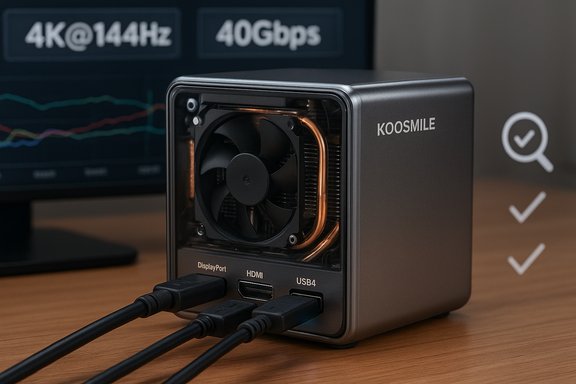
The KOOSMILE mini PC being marketed with an Intel Core i9-12900HK, 32GB DDR4, 1TB PCIe SSD, DisplayPort 1.4, HDMI 2.0 and a USB4/Thunderbolt‑4-capable Type‑C port promises to shrink desktop workstation power into a palm‑sized chassis — but the reality behind those headline specs needs careful verification. This feature examines what the spec sheet actually means, which claims are verifiable, which require caution, and what buyers should check before spending several hundred dollars on a compact, high‑performance mini PC.
Mini PCs have matured from underpowered media boxes into flexible, compact desktops for productivity, creative work and even light gaming. Retailers and smaller OEMs now frequently ship mini systems built around laptop H‑series CPUs such as the Intel Core i9‑12900HK to squeeze high single‑ and multi‑thread performance into a very small footprint. KOOSMILE’s advertised SKU — Core i9‑12900HK, 32GB DDR4, 1TB NVMe SSD, Windows 11 Pro and a broad video I/O mix including HDMI 2.0, DisplayPort 1.4 and a USB4/Thunderbolt‑capable Type‑C — is the kind of package that catches attention because it reads like a full workstation in a tiny box. Several online listings for KOOSMILE or similarly branded mini PCs repeat almost identical claims on ports and wireless features, which is common among small‑brand listings. What follows is a verification and practical analysis of those claims, cross‑checked against hardware references and standard protocols, plus a buyer’s checklist and risk analysis specific to high‑spec mini PCs.
Independent reviews of high‑power mini PCs repeatedly note that thermal throttling is a realistic risk under sustained loads, and that real‑world performance depends as much on the chassis’ cooling and power profile as on the CPU’s published specs. Expect excellent short‑burst and interactive performance, but temper expectations for long, sustained heavy workloads unless the manufacturer publishes verified thermal/power profiles or independent reviewers confirm sustained throughput.
Practical advice: request confirmation of activation and the license type from the seller before completing the purchase. Keep screenshots of activation state on first boot and retain return options if the delivered unit differs from the listing.
Confirm the precise port functions (especially whether the Type‑C is genuine Thunderbolt‑4/USB4), check whether DP1.4 supports DSC and the monitor modes you plan to use, verify Windows activation and license type, and look for independent hands‑on reports about thermal throttling and noise. Where possible, buy from sellers with clear returns and a reasonable warranty. Approached with this scrutiny, a high‑spec mini PC can be an excellent way to bring workstation power to a tiny desktop footprint — but skipping verification leaves room for disappointment.
Key verification references used in this analysis include published CPU databases and technical reviews for the Intel Core i9‑12900HK, the VESA DisplayPort 1.4 specification for 8K/4K capabilities with DSC, Intel’s Thunderbolt 4 documentation for USB4/Thunderbolt video/data characteristics, and multiple retail product listings and community discussion threads highlighting common mini PC caveats (port ambiguity, SKU variance, Windows activation uncertainty).
Source: theglobalfilipinomagazine.com https://theglobalfilipinomagazine.c...-Windows-11-Pro-Mini-Computers-Intel-Core-I9/
 Background / Overview
Mini PCs have matured from underpowered media boxes into flexible, compact desktops for productivity, creative work and even light gaming. Retailers and smaller OEMs now frequently ship mini systems built around laptop H‑series CPUs such as the Intel Core i9‑12900HK to squeeze high single‑ and multi‑thread performance into a very small footprint. KOOSMILE’s advertised SKU — Core i9‑12900HK, 32GB DDR4, 1TB NVMe SSD, Windows 11 Pro and a broad video I/O mix including HDMI 2.0, DisplayPort 1.4 and a USB4/Thunderbolt‑capable Type‑C — is the kind of package that catches attention because it reads like a full workstation in a tiny box. Several online listings for KOOSMILE or similarly branded mini PCs repeat almost identical claims on ports and wireless features, which is common among small‑brand listings. What follows is a verification and practical analysis of those claims, cross‑checked against hardware references and standard protocols, plus a buyer’s checklist and risk analysis specific to high‑spec mini PCs.What’s verifiable: the CPU and core performance claims
Intel Core i9‑12900HK — real capabilities
The Intel Core i9‑12900HK is a 12th‑generation Alder Lake mobile CPU with a hybrid core layout: 6 performance (P) cores and 8 efficiency (E) cores for a total of 14 cores and 20 threads. Published specifications list a nominal base of about 2.5 GHz on the P‑cores and a maximum Turbo frequency up to 5.0 GHz on the performance cores, with a 45 W base TDP and significantly higher turbo package power allowances under short bursts. These are processor‑level facts confirmed by independent CPU databases and technical reviews. Why this matters: the i9‑12900HK is a genuine laptop‑class high‑performance part. In the right thermal envelope it can deliver excellent single‑thread bursts (important for many desktop apps) and strong multi‑threaded throughput for background tasks, compiling, virtualization or content creation. But peak CPU numbers are only half the story for mini PCs — how that silicon is fed (power budgets, cooling) determines sustained performance in practice.Display and video I/O: what the standards allow vs. what vendors often advertise
DisplayPort 1.4 and 8K/4K@144Hz claims
DisplayPort 1.4 is commonly advertised as capable of driving 8K@60Hz or 4K@120–144Hz when using Display Stream Compression (DSC). VESA’s DP1.4 specification introduced DSC 1.2 and forward error correction which enables visually lossless compression that makes 8K@60 and 4K@120+ feasible over DP1.4 links. In short: a DP1.4 implementation can support 8K (with DSC) and high refresh‑rate 4K modes — but only if the upstream controller, cabling, and the display all support those modes. Practical takeaway: a product claiming “DisplayPort 1.4 supporting up to 8K or 4K@144Hz” is consistent with the DP1.4 spec. However, buyers should verify that the actual port wiring and firmware on the mini PC and the connected monitors support DSC, the proper color sampling, and the required bandwidth. Not every vendor‑declared DP1.4 port provides the full set of DP1.4 features in practice.HDMI 2.0 and 4K@60Hz
HDMI 2.0 is widely used for 4K@60Hz output; claims that an HDMI 2.0 port will drive 4K@60 are standard and reasonable. Where the marketing can mislead is when a listing suggests HDMI will match higher DP refresh rates or when HDMI is confused with HDMI 2.1 (which supports much higher bandwidths). Verify the HDMI version printed on the product page and the retail photos.USB4 / Thunderbolt‑4 / “USB4.0” marketing
USB4 and Thunderbolt 4 both specify 40 Gbps high‑speed links and can carry DisplayPort Alt‑Mode video, enabling high‑resolution external displays over a Type‑C connector. Thunderbolt 4 mandates 40 Gbps and provides robust features (PCIe tunnelling, DMA protection, power delivery), while USB4 implementations vary more widely depending on the vendor’s controller and firmware. If a product explicitly advertises USB4/Thunderbolt 4 ×1 with 40Gbps bandwidth, that is plausible — but buyers must confirm it’s a certified Thunderbolt 4 controller (or a full USB4 implementation with the DisplayPort Alt‑Mode and the advertised bandwidth) rather than a USB‑C port limited to USB 3.x speeds or power delivery only. Intel’s Thunderbolt 4 documentation clarifies the 40Gbps baseline and video capabilities. Practical takeaway: the presence of a Type‑C port on a mini PC does not automatically guarantee Thunderbolt 4/USB4 functionality. Verify product photos, model‑specific spec sheets, and — if possible — user reviews for confirmation.Memory, storage and wireless: typical implementations and what to verify
- Memory: The listing’s 32GB DDR4 claim is straightforward — many mini PCs use two SO‑DIMM slots for DDR4 SO‑DIMMs, enabling user upgrades. Confirm whether memory is soldered or in SODIMM sockets (user upgradability matters). Several retail pages for similar i9 mini systems list 2x SODIMM slots supporting up to 64GB DDR4.
- Storage: 1TB PCIe 3.0 NVMe SSD is a common factory configuration. In some chassis you’ll find a single M.2 slot; others add a second M.2 or even a 2.5" bay. Confirm the physical expansion options.
- Wireless: Wi‑Fi 6 and Bluetooth 5.2 are realistic features for modern mini PCs. However, wireless module versions vary by SKU and can be region‑ or batch‑dependent. Don’t assume the presence of Wi‑Fi 6E or Wi‑Fi 7 — check the exact wireless chipset listed in the spec sheet or in photos of the internal board. The broader mini PC category shows inconsistency in wireless versions across SKUs from smaller vendors.
Thermal design and sustained performance — the elephant in every tiny box
Packing a 45 W laptop‑class i9 into a compact mini chassis introduces a central trade‑off: burst performance vs sustained throughput. In a larger laptop with robust cooling, the i9‑12900HK can sustain higher package power for longer periods. In a small metal box with a single compact fan or heat pipes, thermal and power limits will often force the CPU into throttling states during prolonged multi‑threaded workloads such as long video exports, heavy virtualization, or continuous compression/transcoding.Independent reviews of high‑power mini PCs repeatedly note that thermal throttling is a realistic risk under sustained loads, and that real‑world performance depends as much on the chassis’ cooling and power profile as on the CPU’s published specs. Expect excellent short‑burst and interactive performance, but temper expectations for long, sustained heavy workloads unless the manufacturer publishes verified thermal/power profiles or independent reviewers confirm sustained throughput.
Software and activation: Windows 11 Pro caveats
Many mini PCs ship with Windows 11 Pro preinstalled. In practice, activation state and license provenance vary among small‑brand sellers. Some units arrive with an activated OEM key while others require customers to provide/activate their own license. Commercial writeups and community threads consistently recommend verifying whether Windows 11 Pro is actually activated on arrival and whether the license is OEM‑tied or a transferable retail key. For business purchases, the license type matters.Practical advice: request confirmation of activation and the license type from the seller before completing the purchase. Keep screenshots of activation state on first boot and retain return options if the delivered unit differs from the listing.
Buyer risk analysis: marketing vs. reality
Common pitfalls seen across many mini PC listings
- Port‑function ambiguity: Type‑C ports are often described ambiguously. Some listings call a Type‑C “supports video” when in fact it is PD only or limited to USB 3.x data rates. Confirm exactly which Type‑C supports DisplayPort Alt‑Mode or Thunderbolt/USB4.
- SKU variance across regions and sellers: Photos and spec sheets can be inconsistent. The exact wireless chipset, SSD vendor, or RAM configuration may differ between the ad and the shipped unit. Confirm the precise SKU and get the seller to state the internal components.
- Warranty/after‑sales support: Smaller OEMs and marketplace sellers may offer limited support or slow RMA processing. Check the seller’s returns policy, warranty duration, and the feasibility of local support.
- Thermal & noise tradeoffs: Squeezing a powerful CPU into a tiny chassis often forces fan curves that are either loud under pressure or aggressive thermal throttling. Check user reviews for real noise and sustained performance data.
Marketing claims that need verification on arrival
- “USB4/Thunderbolt‑4 ×1 with 40Gbps” — confirm controller certification or test reports; a plain Type‑C photo is not proof.
- “DisplayPort 1.4 ×1 supporting up to 8K or 4K@144Hz” — confirm DSC support and cable/monitor compatibility; DP1.4 supports those modes only under the right conditions.
- “Windows 11 Pro preinstalled” — verify activation and whether it’s OEM vs retail.
- Any “smart lid display” or unique hardware feature shown in listings — verify with multiple product photos, seller confirmation, or independent review because such features are sometimes present on specific batches only.
Practical shopping checklist — what to verify before you buy
- Confirm the exact SKU on the vendor page and ask the seller to confirm these explicit points in writing:
- Is the Type‑C port full Thunderbolt 4 certified or USB4? If Thunderbolt 4, which controller (vendor/model)?
- Does the DisplayPort 1.4 implementation include DSC and support 8K@60 or 4K@144Hz with full chroma?
- Request a photo (or product manual page) showing the internal layout: are RAM modules SODIMM (user‑replaceable) or soldered? Is there more than one M.2 slot?
- Ask whether Windows 11 Pro is activated out of the box, and whether the license is OEM or retail.
- Verify warranty terms, return window, and where RMA service is handled. Prefer established retailers or sellers with fast return policies.
- Search for hands‑on reviews or user feedback for the exact model number to check thermal behaviour and noise under load. If no independent reviews exist, treat performance claims as provisional.
Alternatives and positioning
A small but significant segment of the mini PC market offers similar spec sheets — Intel H‑series i9 or i7 in compact boxes from names like Geekom, Minisforum, Beelink and other boutique manufacturers. Each balances price, cooling, and port functionality differently: some prioritize long sustained power with larger housings and thicker heat pipes; others optimize silence and limit package power. For buyers who require consistent high sustained throughput (continuous rendering, virtual machine hosts), consider larger compact desktops with better cooling or tower systems. For typical office workflows, trading some sustained headroom for a compact footprint is often a net win. Independent product reviews for high‑power mini PCs emphasize checking real thermal/performance tests before deciding.Final assessment: who should consider this KOOSMILE i9 mini PC?
- Good fit for:
- Users who want best‑in‑class burst CPU performance in a tiny form factor for productivity, trading, or multi‑window workflows.
- Buyers who value triple‑display outputs (if the vendor’s port mapping is correct) and a small footprint for VESA mounting behind a monitor.
- Those who plan typical office, web, and light creative tasks where brief CPU bursts matter more than hours‑long renders.
- Not a good fit for:
- Professionals who need guaranteed, top‑tier sustained rendering or continuous high‑CPU workloads unless third‑party reviews show the specific KOOSMILE model sustains package power without throttling.
- Buyers who require rock‑solid, vendor‑backed warranties and local support (some smaller brands can be hit‑or‑miss).
- Anyone who assumes a small Type‑C port equals Thunderbolt‑4 or that every DisplayPort will drive 8K without checking the fine print.
Conclusion
KOOSMILE’s advertised specs — an Intel Core i9‑12900HK, 32GB DDR4, 1TB NVMe, DisplayPort 1.4, HDMI 2.0, and a USB4/Thunderbolt‑capable Type‑C — are technically plausible and align with what the standards permit. The CPU itself is an authentic high‑end mobile part with verified published specs. But the important distinction for buyers is between what the standards allow and what a particular SKU actually implements and sustains.Confirm the precise port functions (especially whether the Type‑C is genuine Thunderbolt‑4/USB4), check whether DP1.4 supports DSC and the monitor modes you plan to use, verify Windows activation and license type, and look for independent hands‑on reports about thermal throttling and noise. Where possible, buy from sellers with clear returns and a reasonable warranty. Approached with this scrutiny, a high‑spec mini PC can be an excellent way to bring workstation power to a tiny desktop footprint — but skipping verification leaves room for disappointment.
Key verification references used in this analysis include published CPU databases and technical reviews for the Intel Core i9‑12900HK, the VESA DisplayPort 1.4 specification for 8K/4K capabilities with DSC, Intel’s Thunderbolt 4 documentation for USB4/Thunderbolt video/data characteristics, and multiple retail product listings and community discussion threads highlighting common mini PC caveats (port ambiguity, SKU variance, Windows activation uncertainty).
Source: theglobalfilipinomagazine.com https://theglobalfilipinomagazine.c...-Windows-11-Pro-Mini-Computers-Intel-Core-I9/
