

The LattePanda IOTA lands as a palm-sized x86 SBC that pairs an Intel Processor N150 (Twin Lake) with a built-in Raspberry Pi RP2040 co‑processor, ships in compact kits with UPS, PoE and M.2 expansion options, and — in hands‑on testing — proved capable and versatile for Windows 11 edge and embedded tasks while exposing a handful of real‑world limits and implementation quirks.
The LattePanda IOTA is DFRobot’s modern refresh of the LattePanda V1 form factor: a very small single‑board computer (88 × 70 mm) built around the Intel N150, offering LPDDR5 memory, onboard eMMC, an RP2040 microcontroller for real‑time I/O duties, and a family of stackable expansion boards that add UPS, PoE, cellular and NVMe storage. The vendor lists configurable TDP modes (6 W fanless up to 15 W with active cooling), multi‑OS support (Windows 10/11, Ubuntu 22.04/24.04), and a host of I/O including HDMI 2.1, Gigabit Ethernet, and three USB 3.2 Gen2 Type‑A ports. This review synthesizes the CNX Software hands‑on testing with vendor documentation and primary component specs to: (1) verify the platform’s advertised hardware and measured performance; (2) highlight practical engineering tradeoffs (thermal behavior, video decode, expansion lane limits); and (3) assess suitability across likely use cases such as industrial gateways, media players, testbeds and small Windows‑based kiosks. The core CNX hands‑on report provides the test measurements referenced throughout.
Source: CNX Software LattePanda IOTA review - An Intel N150 + RP2040 SBC tested with Windows 11, UPS expansion, PoE, NVMe SSD, and more - CNX Software
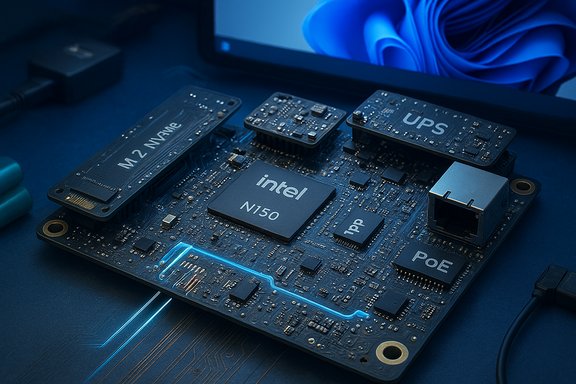 Background / Overview
The LattePanda IOTA is DFRobot’s modern refresh of the LattePanda V1 form factor: a very small single‑board computer (88 × 70 mm) built around the Intel N150, offering LPDDR5 memory, onboard eMMC, an RP2040 microcontroller for real‑time I/O duties, and a family of stackable expansion boards that add UPS, PoE, cellular and NVMe storage. The vendor lists configurable TDP modes (6 W fanless up to 15 W with active cooling), multi‑OS support (Windows 10/11, Ubuntu 22.04/24.04), and a host of I/O including HDMI 2.1, Gigabit Ethernet, and three USB 3.2 Gen2 Type‑A ports. This review synthesizes the CNX Software hands‑on testing with vendor documentation and primary component specs to: (1) verify the platform’s advertised hardware and measured performance; (2) highlight practical engineering tradeoffs (thermal behavior, video decode, expansion lane limits); and (3) assess suitability across likely use cases such as industrial gateways, media players, testbeds and small Windows‑based kiosks. The core CNX hands‑on report provides the test measurements referenced throughout. What LattePanda claims and what the hardware actually is
Core silicon and memory
- SoC: Intel Processor N150 — a low‑power Twin Lake (Alder Lake‑N family) quad‑core part rated up to 3.6 GHz turbo and commonly deployed with a 6 W baseline TDP, with vendor device houses sometimes enabling higher sustained envelopes. This matches the vendor positioning for quiet, efficient, embedded Windows systems. Independent CPU spec summaries and Intel‑family database entries confirm the N150’s 4c/4t topology and low‑power design.
- Co‑processor: Raspberry Pi RP2040 — dual‑core Arm Cortex‑M0+ at up to 133 MHz used for GPIO, ADC and sensor tasks; programmable via UF2 drag‑and‑drop and compatible with MicroPython and Thonny. This is the same RP2040 silicon used on Raspberry Pi Pico boards and behaves accordingly.
- Memory & storage: Typical SKUs ship with 8 GB LPDDR5 and 64 GB eMMC 5.1 (vendor lists 16 GB / 128 GB options as well). The board exposes an M.2 E‑Key (AX210 Wi‑Fi 6E) and an optional M‑Key HAT for NVMe or accelerator cards.
Expansion ecosystem and I/O
LattePanda’s modular approach is a major differentiator: UPS expansion (battery backed using three 18650s), a 51 W PoE HAT, M.2 M‑Key NVMe HAT, an M.2 4G/LTE adapter, and a thin active cooler. The vendor documents configurable TDP and multiple power input options (USB‑C PD and DC barrel). CNX’s review exercised most of these add‑ons and documented functional behavior and measured runtimes.What the independent data shows (verification)
When verifying manufacturer claims it’s important to cross‑check the silicon, wireless module, and microcontroller specifications against primary datasheets and independent sources.- Intel’s family and third‑party CPU databases list the N150 as a 4‑core Twin Lake part with up to 3.6 GHz turbo and a very low TDP target — consistent with the IOTA’s stated performance envelope and configurable 6 W–15 W modes. This explains why vendors advertise fanless operation at the low end and active cooling when higher sustained throughput is desired.
- The Intel AX210 Wi‑Fi 6E module used in the review sample is Intel’s 2×2 Wi‑Fi 6E solution with Bluetooth 5.3 support and up to theoretical PHY rates in the multi‑Gb/s range on ideal channels; the vendor installs that in M.2 2230 form factor and CNX confirmed full recognition under Windows.
- RP2040 behavior, drag‑and‑drop UF2 firmware flashing, ADC sampling, and MicroPython compatibility are standard RP2040 features and were validated in CNX’s RP2040 experiments (MicroPython blink and ADC sampling at 50 Hz). Expect the same developer experience as Raspberry Pi Pico devices.
Hands‑on highlights from the CNX Software tests
Out‑of‑the‑box experience and Windows 11
- CNX received a sample that booted Windows 11 Pro 24H2 (unactivated display) with all hardware detected by Device Manager and HWiNFO64. The provided Windows image and driver bundle on LattePanda’s docs makes first‑boot driver discovery smooth. Device detection included Intel AX210, Realtek GbE, and the RP2040.
Storage: eMMC and NVMe expansion
- Onboard eMMC: CrystalDiskMark runs showed the 64 GB eMMC delivering sequential reads ~312 MB/s and writes ~221 MB/s, and respectable 4K random throughput in the tens of MB/s — solid for modern eMMC 5.1 parts. These numbers match CNX’s measured runs and make the eMMC adequate for OS and light apps but not a substitute for NVMe when performance is essential.
- NVMe via M.2 M‑Key HAT: With a WD Blue SN5000 500 GB NVMe, CNX measured sequential reads/writes ~890/835 MB/s and strong 4K random performance — behavior consistent with a PCIe Gen3 x1 physical lane delivering roughly 1 GB/s theoretical ceiling. That means the expansion HAT reliably attaches NVMe media, but expect Gen3 x1 throughput rather than native x4 Gen3/Gen4 speeds unless the vendor’s HAT exposes more lanes. The observed sustained throughput and consistent test results argue for a stable link.
CPU & GPU benchmarking
- Geekbench 6: CNX recorded CPU scores slightly below vendor claims (single-core ~1,163 vs vendor 1,193; multi‑core ~2,632 vs vendor 2,820), which is within normal variance for small‑form‑factor devices where firmware, power profile, ambient temperature and background services matter. Cinebench results were modest; some Cinebench 2024 multi‑core tests failed due to GPU memory allocation limits in that specific build. Overall the N150 delivers predictable daily‑use performance: snappy for documents, web and lightweight workloads, but not a workstation chip for long, sustained multi‑thread rendering.
Video playback and hardware decode
- CNX’s YouTube playback testing showed smooth playback up to 1080p with minor frame drops at 1080p and sharp degradation beyond 1440p; 4K playback was problematic. Importantly, HWiNFO and the diagnostic metrics indicated little use of the integrated video decode engine, with CPU handling most decoding work — a surprising result given that Alder Lake‑N silicon includes hardware codecs. This suggests a combination of driver/Windows configuration and platform firmware can affect whether browser/video‑player stacks properly offload to hardware acceleration. CNX flagged the same behavior when comparing to other N‑series devices, and recommended checking drivers/firmware and testing different browsers for improved offload. This behavior is measurable and potentially fixable, but it’s not a universal hardware limitation.
RP2040 microcontroller tasks
- The RP2040 subsystem proved robust and easy to program with MicroPython via Thonny; CNX used the RP2040 to blink an LED and sample ADC input at 50 Hz, demonstrating that the co‑processor is effectively the same developer experience as a Raspberry Pi Pico but integrated into the x86 SBC and accessible through its own USB interface. This is a practical advantage for embedded automation and sensor sampling workloads.
UPS, PoE, and thermal behavior
- The Smart UPS HAT delivered portable operation with runtime characteristics that depended heavily on workload: CNX measured long idle runtimes (vendor claims up to 8 hours idle) and substantially shorter periods under 4K playback load. The PoE HAT delivered the expected 51 W and stable Ethernet connectivity. Thermal imaging showed idle board hotspots in the low‑40 °C range and under load mid‑40s to ~50 °C — acceptable for continuous operation but worth monitoring in hotter ambient or enclosed deployments. Fan noise from the active cooler was measurable and centered around 3.6–4.1 kHz, audible at close range.
Strengths: Where LattePanda IOTA really earns its keep
- Compact x86 + MCU combo: Integrating an Intel N150 with an RP2040 yields a flexible platform for hybrid workloads: Windows apps and edge AI or processing on the x86 side, and deterministic I/O, sensor sampling or safety functions on the RP2040. This hybrid model solves a common maker/industrial problem — synchronous I/O with a full Windows environment.
- Rich expansion ecosystem: UPS, PoE, NVMe and cellular HATs let deployments scale from battery‑backed kiosks to PoE‑powered sensors and local storage caching. The modular HAT approach preserves the small footprint but allows use‑case specialization.
- Good developer UX for MCU: RP2040’s UF2 drag‑and‑drop and MicroPython compatibility make getting to working firmware fast, matching widely used Raspberry Pi Pico tooling.
- Reasonable out‑of‑the‑box Windows support: DFRobot supplies a Windows image with drivers; CNX’s sample booted to Windows 11 Pro with complete driver presence reported in Device Manager. That minimizes first‑time integration friction for Windows‑based projects.
Risks, limitations and cautions
- Video decode and acceleration may not be fully automatic: CNX’s observed reliance on CPU for YouTube playback at higher resolutions indicates that hardware video offload may be limited by drivers, browser selection, or firmware. This is a notable caveat for media‑centric deployments and requires testing with your intended browser/player chain. Flagged as actionable — not necessarily immutable hardware fault.
- NVMe expansion lane limits: The M.2 M‑Key HAT produced ~880–900 MB/s in sequential tests, which aligns with a PCIe Gen3 x1 link ceiling. If your application expects PCIe Gen3 x4 or Gen4 performance from an NVMe SSD, the expansion board’s physical lane mapping will be the limiting factor. Measure/test with your expected drive and workload.
- Thermal and acoustic tradeoffs: At higher sustained power modes the active cooler is required; even then, the fan produces a measurable audible tone. For noise‑sensitive or thermally constrained installations, plan for fanless 6 W mode behavior and test whether that meets your performance needs.
- Mechanical mismatch & assembly friction: CNX noted that stacking expansion boards requires careful matching of hex spacer lengths and screw head styles; the supplied hardware may not match the illustrated manual precisely. This is a small but practical pain point for integrators assembling multi‑HAT systems.
- Windows licensing nuance: The board can ship with activated or unactivated Windows; confirm license provenance at purchase if you need a transferable retail license versus an OEM/embedded key. This matters for enterprise procurement and warranty considerations.
Practical buying and deployment guidance
- For kiosk, gateway, or automation deployments where Windows compatibility matters and on‑board real‑time I/O is valuable, the LattePanda IOTA is a compelling option: small, well‑documented, and expandable without major mechanical redesigns. The integrated RP2040 reduces the need for separate microcontroller boards for sensor tasks.
- If your project is media‑heavy (4K streaming, many concurrent 1440p+ streams, or GPU‑accelerated visualization), validate the specific browser and driver stack for hardware decode and consider higher‑performance mini PCs with confirmed 4K decode offload or discrete GPUs. CNX’s tests show the IOTA is solid up to 1080p but becomes CPU‑bound at higher resolutions unless offload is explicitly working.
- For local high‑throughput NVMe storage (e.g., scratch disks for media editing), expect Gen3 x1‑class performance from the expansion HAT. If you need x4 bandwidth, confirm lane mapping with the vendor or choose a platform that exposes full PCIe lanes to the M.2 slot.
- Battery‑backed UPS operation is viable but workload‑dependent. CNX’s UPS tests show idle runtimes much longer than heavy‑playback scenarios, so profile your target workload to set realistic runtime expectations when planning battery capacity.
Technical checklist for integrators (quick verifications before purchase or deployment)
- Confirm the SKU: 8 GB / 64 GB eMMC vs 16 GB / 128 GB options; check whether Windows is activated and what license type is supplied.
- Validate NVMe HAT lane mapping if you need >1 GB/s throughput. Run CrystalDiskMark on your target SSD or ask the vendor for lane details.
- Test your target browser or media player for hardware decode at the needed resolution; try Chrome/Edge/FF and check GPU video engine activity with HWiNFO or vendor diagnostics.
- For PoE deployments, verify switch/injector capability for 51 W PoE if you intend to power peripherals via the PoE HAT.
- If quiet operation is required, prefer the low‑TDP fanless mode and bench key workloads to confirm performance suffices.
Final assessment
The LattePanda IOTA is a thoughtfully engineered, compact x86 SBC that brings real Windows 11 capability to edge, kiosk, and maker use cases while adding a pragmatic embedded twist through the integrated RP2040. CNX Software’s hands‑on testing validates the platform’s functionality — drivers are available, the RP2040 behaves exactly like a Pico, the M.2 expansion works, and the UPS and PoE boards perform — while also surfacing practical limits that integrators should treat as part of the design equation: NVMe lane ceilings, occasional lack of browser hardware decode, fan noise under active cooling, and minor mechanical assembly friction. For anyone evaluating a compact Windows‑based SBC that must also handle deterministic I/O or local sensor aggregation, the IOTA brings a rare combination of features and an attractive expansion ecosystem. For media‑heavy or sustained multi‑thread compute tasks, carefully validate the system in your target configuration and consider higher‑bandwidth platforms if raw NVMe or 4K decode performance is non‑negotiable. The LattePanda IOTA is a useful toolkit in the small‑form‑factor toolbox — flexible, expandable, and honest about where its strengths and limits lie.Source: CNX Software LattePanda IOTA review - An Intel N150 + RP2040 SBC tested with Windows 11, UPS expansion, PoE, NVMe SSD, and more - CNX Software
