

Technobezz has published a July 19 guide urging League of Legends players to check Riot’s regional service dashboard before reinstalling the game, resetting their network, or changing Windows settings when login, matchmaking, or launch failures appear.
The advice is sound, and particularly relevant for PC players now that Riot’s client, Vanguard, account services, and regional game servers can each produce similar-looking errors. A failed launch is not automatically a broken League installation; it may be maintenance, an authentication problem, or an overloaded regional service.
Riot’s own Service Status dashboard remains the primary source. Players should select League of Legends, confirm the correct region—such as NA, EUW, EUNE, KR, or OCE—and read both current messages and recently closed incidents. Riot’s dashboard currently presents separate product and region selections, which matters: a clean North America listing does not rule out a problem affecting another League region.
Technobezz’s central point is that community reports and outage trackers are useful corroboration, not confirmation. Downdetector spikes, Reddit threads, Discord complaints, and posts on X can show that an issue is widespread before Riot publishes an incident, but they also routinely blend local ISP failures, account trouble, broken client installs, and anti-cheat errors into one apparent “outage.”
That distinction is important for Windows users. Riot’s own support material identifies some login failures as local Vanguard or Windows security configuration problems. For example, Riot’s current guidance for VAN 9002 says the error can stem from disabled Windows Exploit Protection settings, rather than a game-server failure. Treating every failed login as a Riot outage can delay the actual fix.
Players should also read the exact message in Riot Client before beginning repairs. An explicit maintenance or service-overload notice is a reason to wait and recheck the status dashboard. A specific Vanguard code, Windows security warning, or persistent account-only error points in a different direction.
More importantly, users should not change the Windows system clock to work around a login problem. Incorrect date and time settings can interfere with certificates, multi-factor authentication, Windows Update, browsers, and other applications. Riot has not positioned clock changes as a current server-status check or general League repair.
A short escalation path is enough:
The advice is sound, and particularly relevant for PC players now that Riot’s client, Vanguard, account services, and regional game servers can each produce similar-looking errors. A failed launch is not automatically a broken League installation; it may be maintenance, an authentication problem, or an overloaded regional service.
Riot’s own Service Status dashboard remains the primary source. Players should select League of Legends, confirm the correct region—such as NA, EUW, EUNE, KR, or OCE—and read both current messages and recently closed incidents. Riot’s dashboard currently presents separate product and region selections, which matters: a clean North America listing does not rule out a problem affecting another League region.
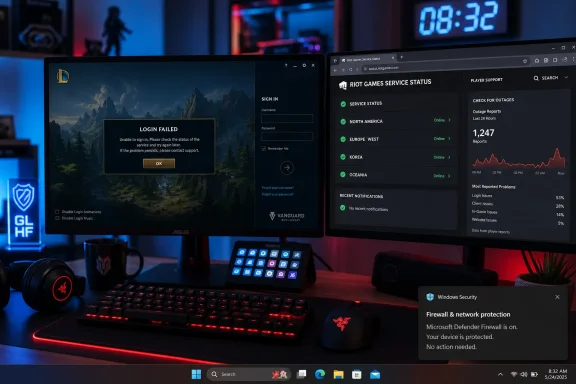 Check the official status first
Technobezz’s central point is that community reports and outage trackers are useful corroboration, not confirmation. Downdetector spikes, Reddit threads, Discord complaints, and posts on X can show that an issue is widespread before Riot publishes an incident, but they also routinely blend local ISP failures, account trouble, broken client installs, and anti-cheat errors into one apparent “outage.”That distinction is important for Windows users. Riot’s own support material identifies some login failures as local Vanguard or Windows security configuration problems. For example, Riot’s current guidance for VAN 9002 says the error can stem from disabled Windows Exploit Protection settings, rather than a game-server failure. Treating every failed login as a Riot outage can delay the actual fix.
Players should also read the exact message in Riot Client before beginning repairs. An explicit maintenance or service-overload notice is a reason to wait and recheck the status dashboard. A specific Vanguard code, Windows security warning, or persistent account-only error points in a different direction.
Avoid outdated “fixes”
Technobezz also flags two pieces of stale advice. The retired Hextech Repair Tool should not be used as an outage detector; Riot’s current repair and diagnostic tooling is for collecting logs and addressing local client problems. It does not establish whether a regional League service is unavailable.More importantly, users should not change the Windows system clock to work around a login problem. Incorrect date and time settings can interfere with certificates, multi-factor authentication, Windows Update, browsers, and other applications. Riot has not positioned clock changes as a current server-status check or general League repair.
A short escalation path is enough:
- Check Riot’s Service Status page for the correct League region.
- Compare the client’s exact error with recent Riot Support updates.
- Use public outage reports only to confirm a regional pattern.
- If official status is clear and the issue persists, send Riot Support the region, error text, and time of failure.
References
- Primary source: Technobezz
Published: 2026-07-19T17:28:23.137000+00:00
Is League of Legends Down? How to Check Right Now | Technobezz
Is League of Legends down? Check Riot status, client messages, and outage reports before troubleshooting your PC.www.technobezz.com - Related coverage: mic.com
'League of Legends' Server Status: What to do if 'LoL' is down or not working
Is League of Legends down? If you're an avid League of Legends player, you probably run into server issues all the time. But how do you know if it's the servers that are the problem, and not just you? Since server maintenance and planned outages…www.mic.com - Related coverage: primagames.com
Is League of Legends Down? - How to Check LoL Server Status - Prima Games
Can't connect to League of Legends? Here is how to check if League of Legends is down for everyone or just for you. primagames.com
