

Microsoft confirmed on June 17, 2026, that legacy Outlook for Mac can blank the original message body when users reply to or forward email, leaving only headers visible while the Outlook team investigates a fix. That sounds like a narrow Mac bug until you remember what email actually is in most offices: the record, the workflow, and the institutional memory. A reply that silently loses its context is not just annoying; it is a small data-integrity failure dressed up as a client glitch. The timing is worse because legacy Outlook for Mac is already on death row, with Exchange Online support ending in October 2026.
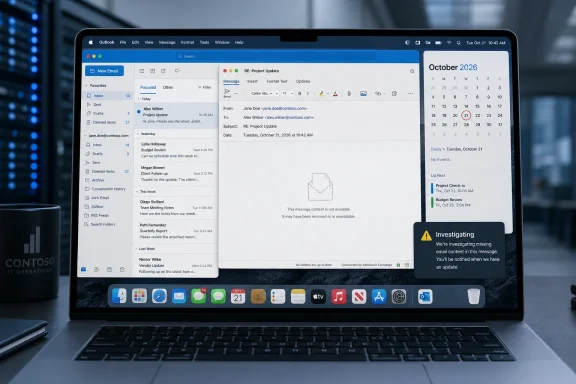
The broken behavior is straightforward. In legacy Outlook for Mac, replying to or forwarding a message may produce a new message that contains the headers from the prior email but not the original body or conversation history. The user sees enough scaffolding to think a thread exists, but the meaningful content is gone.
That distinction matters. If Outlook simply failed to open, users would know they had a problem. If a send operation failed, the message would remain in drafts or produce an error. This bug lives in the more dangerous middle ground: the software appears to perform a familiar task while changing the substance of what gets sent.
For an individual user, that means embarrassment and rework. For a business, it can mean broken approvals, missing contractual context, incomplete handoffs, and confusion in customer-facing threads. Email is old infrastructure, but it still carries modern liability.
Microsoft’s published status is “investigating,” not fixed. The company’s workaround is to switch out of legacy Outlook for Mac into the current Outlook for Mac experience. Users who cannot do that are left with a more awkward path: roll back to an earlier legacy build, reportedly version 16.109 or nearby builds, and hold updates until Microsoft ships a repair.
Starting in October 2026, Microsoft says the legacy Outlook for Mac client will stop working against Exchange Online mailboxes. Exchange on-premises customers get a longer runway, with support stretching to October 9, 2029 in Microsoft’s current guidance, but cloud customers are already inside the final approach. This is not a hypothetical transition anymore. It is a calendar event.
That gives this bug a strange political charge. Microsoft can plausibly say the answer is migration, and in a narrow engineering sense that is true. But users can also plausibly ask why a supported client, still receiving updates, is being allowed to break one of the oldest and most basic email behaviors on the way out.
Software retirements always create an uncomfortable maintenance period. Vendors do not want to invest heavily in code they are replacing. Customers do not want to move until the replacement is unquestionably better for their workflows. Bugs like this expose the bargain: support may continue, but enthusiasm has already left the building.
A purchasing approval may live three replies down. A customer’s acceptance of a workaround may be buried below a signature block. A manager’s caveat may sit inside the older message everyone assumed would ride along with the forward. Remove that history and the new message becomes detached from the thing it is responding to.
That is why this particular Outlook bug feels worse than its patch-note footprint. It does not corrupt a mailbox, delete messages from the server, or expose credentials. But it undermines the social contract of email: when I reply, the thread comes with me unless I intentionally remove it.
There is a difference between a feature changing and an expectation breaking. Microsoft has spent years teaching users to accept new Outlook interfaces, cloud-backed composition, focused inbox sorting, and AI-adjacent assistance. None of that changes the baseline assumption that Reply and Forward mean what they have meant for decades.
On macOS, the situation is not identical. The current Outlook for Mac is a native app, and Microsoft has said the overwhelming majority of Microsoft 365 users have already moved from legacy Outlook for Mac to the newer experience. In other words, Mac users are being pushed off an old client, but not necessarily into the same kind of web-wrapper future that has irritated so many Windows users.
That makes the Mac story more complicated and, in some respects, more revealing. The new Outlook for Mac may be the right long-term destination for most Microsoft 365 customers. It may be more secure, more aligned with Microsoft’s cloud architecture, and easier for the company to support. But that does not erase the reasons some users remained on legacy Outlook in the first place.
Those users are often not merely stubborn. They may depend on add-ins, AppleScript, account behaviors, local workflows, third-party tools, or Exchange configurations that did not migrate cleanly. In IT, “just switch” is only simple when the person saying it does not own the consequences.
There is nothing inherently wrong with that. Vendors should not have to maintain multiple clients forever, and old protocols do carry security and reliability costs. Exchange Web Services was built for another era, and Microsoft’s push toward newer APIs and service models is not irrational.
The problem is trust. When a forced migration and a live bug point in the same direction, users naturally wonder whether the old client is being fixed with the urgency they would expect for a flagship productivity product. Microsoft does not need to be neglectful for that suspicion to arise; the incentives are visible enough.
The more honest reading is probably less conspiratorial and more ordinary. Legacy Outlook for Mac is complex, aging code. The team is focused on the successor. A regression slipped through. The issue is being investigated, but the fastest operational workaround is to leave the old client behind. That explanation is mundane, and it is still frustrating.
Mac fleets are often less centrally governed than Windows fleets, especially in mixed environments where the Microsoft 365 tenant is tightly managed but endpoint habits vary by department. Creative teams, executives, legal staff, and higher education users are common pockets of Mac dependency. They may also be exactly the groups most likely to rely on long email histories.
An organization that discovers this bug through a VIP complaint has already lost the first round. The better posture is to identify legacy Outlook for Mac installs, determine who is using Exchange Online, test the newer Outlook experience against those users’ workflows, and create a short-term rollback or migration plan. The bug is a prod; the October cutoff is the real deadline.
The uncomfortable part is that rollback is not a strategic answer. Installing an older legacy build may restore reply behavior, but it also leaves IT managing a shrinking runway with a client that is about to lose Exchange Online viability. It buys time. It does not change the destination.
That does not mean testing is easy. Outlook is a sprawling product with multiple account types, server back ends, composition engines, message formats, signatures, add-ins, localization issues, and legacy code paths. A regression can hide in a specific configuration that automated tests did not cover.
But “hard to test” is not the same as “acceptable to miss.” If a supported email client can ship an update that breaks conversation preservation in replies and forwards, the test matrix is telling users something: the paths that matter to legacy holdouts may no longer be getting the same practical weight as the paths Microsoft wants them to use next.
That is the core tension of the final year of a product. The vendor says it is supported. The customer hears “safe to use.” Engineering reality often means “supported enough to keep running, but not where the future is being built.”
Microsoft is currently asking users to accept several Outlook transitions at once. Windows users are being nudged toward a new Outlook experience that does not map cleanly to classic Outlook. Mac users are being pushed away from legacy Outlook before Exchange Online support ends. Administrators are being asked to prepare for the broader retirement of Exchange Web Services in cloud environments.
Each change may be defensible on its own. Together, they create the sense of a product family being rebuilt while millions of people are still trying to use it as the stable layer of their workday. A bug like this becomes a symbol because it arrives in that atmosphere.
That symbolism is not fair in a courtroom sense, but it is fair in a customer sense. Users judge platforms by accumulated friction. If every month brings another deprecation notice, missing feature, changed workflow, or regression, even a confirmed bug with a workaround becomes evidence in a larger case.
But minorities in enterprise software are often where the hard problems live. The last 5 percent may include the most complex mailboxes, the most specialized workflows, the most conservative compliance groups, or the users whose calendars and inboxes are operational infrastructure. Moving them is less about flipping a toggle than removing blockers.
The new Outlook for Mac does not have to reproduce every quirk of the old client forever. It does, however, have to cover the real-world behaviors that kept people on legacy in the first place. If users stayed because of local workflows, account support, delegation, automation, or third-party integrations, telling them the new client is the future is not the same as proving it is ready for their day.
That is why Microsoft’s migration messaging needs to be paired with practical clarity. Which legacy gaps remain? Which are closed? Which will never return? Which workflows require admin policy changes or user retraining? The more precise Microsoft is, the less every bug feels like a shove.
IT pros understand this. Many have spent years disabling basic authentication, tightening conditional access, and hunting legacy clients that quietly bypass modern protections. Nobody serious wants business-critical email to depend indefinitely on old assumptions.
Still, security modernization does not absolve vendors from transition quality. A secure future reached through brittle migration paths can create its own risk. Users who distrust the new client may delay updates, pin old builds, invent unsupported workarounds, or move sensitive workflows into shadow systems.
The goal should not be to shame users off legacy Outlook. It should be to make staying on it less attractive because the replacement is obviously better and operationally safer. This bug, unfortunately, makes the old client look unreliable before the new one has earned universal trust.
For individual users, the safest immediate step is to check replies and forwards before sending, especially on long or consequential chains. If the prior message body is missing, switching to the current Outlook for Mac is Microsoft’s recommended workaround. If that is not viable, rolling back to a known-good legacy build may be a short-term option, but it should not become a comfort blanket.
For administrators, this is the moment to move from awareness to inventory. A migration project that starts with “who is still on legacy Outlook for Mac?” is already better than one triggered by a broken executive email thread.
 Microsoft’s Bug Is Small Enough to Dismiss and Big Enough to Matter
The broken behavior is straightforward. In legacy Outlook for Mac, replying to or forwarding a message may produce a new message that contains the headers from the prior email but not the original body or conversation history. The user sees enough scaffolding to think a thread exists, but the meaningful content is gone.That distinction matters. If Outlook simply failed to open, users would know they had a problem. If a send operation failed, the message would remain in drafts or produce an error. This bug lives in the more dangerous middle ground: the software appears to perform a familiar task while changing the substance of what gets sent.
For an individual user, that means embarrassment and rework. For a business, it can mean broken approvals, missing contractual context, incomplete handoffs, and confusion in customer-facing threads. Email is old infrastructure, but it still carries modern liability.
Microsoft’s published status is “investigating,” not fixed. The company’s workaround is to switch out of legacy Outlook for Mac into the current Outlook for Mac experience. Users who cannot do that are left with a more awkward path: roll back to an earlier legacy build, reportedly version 16.109 or nearby builds, and hold updates until Microsoft ships a repair.
The Context Was the Product
The bug lands in a product Microsoft has already told customers to leave behind. Legacy Outlook for Mac is the older client lineage, the one many Mac-heavy offices kept around because it behaved like a mature desktop application and supported workflows the newer client did not always match. It is also tied to older plumbing, including Exchange Web Services, which Microsoft has been trying to retire from Exchange Online.Starting in October 2026, Microsoft says the legacy Outlook for Mac client will stop working against Exchange Online mailboxes. Exchange on-premises customers get a longer runway, with support stretching to October 9, 2029 in Microsoft’s current guidance, but cloud customers are already inside the final approach. This is not a hypothetical transition anymore. It is a calendar event.
That gives this bug a strange political charge. Microsoft can plausibly say the answer is migration, and in a narrow engineering sense that is true. But users can also plausibly ask why a supported client, still receiving updates, is being allowed to break one of the oldest and most basic email behaviors on the way out.
Software retirements always create an uncomfortable maintenance period. Vendors do not want to invest heavily in code they are replacing. Customers do not want to move until the replacement is unquestionably better for their workflows. Bugs like this expose the bargain: support may continue, but enthusiasm has already left the building.
Reply Threads Are Not Cosmetic
People outside IT often underestimate how much practical meaning is embedded in a quoted email chain. The body of the earlier message is not just a convenience for lazy readers. It is the audit trail most organizations actually use because the official audit trail is too slow, too siloed, or too hard to search.A purchasing approval may live three replies down. A customer’s acceptance of a workaround may be buried below a signature block. A manager’s caveat may sit inside the older message everyone assumed would ride along with the forward. Remove that history and the new message becomes detached from the thing it is responding to.
That is why this particular Outlook bug feels worse than its patch-note footprint. It does not corrupt a mailbox, delete messages from the server, or expose credentials. But it undermines the social contract of email: when I reply, the thread comes with me unless I intentionally remove it.
There is a difference between a feature changing and an expectation breaking. Microsoft has spent years teaching users to accept new Outlook interfaces, cloud-backed composition, focused inbox sorting, and AI-adjacent assistance. None of that changes the baseline assumption that Reply and Forward mean what they have meant for decades.
The Mac Version Is Living a Different Outlook Drama Than Windows
The Outlook brand now hides a messy platform split. On Windows, the “new Outlook” controversy has centered on Microsoft’s replacement of the classic Win32 Outlook experience with a web-based app architecture for many users. That shift has been criticized for missing features, changing workflows, and feeling less like a full desktop client than the Outlook it is meant to replace.On macOS, the situation is not identical. The current Outlook for Mac is a native app, and Microsoft has said the overwhelming majority of Microsoft 365 users have already moved from legacy Outlook for Mac to the newer experience. In other words, Mac users are being pushed off an old client, but not necessarily into the same kind of web-wrapper future that has irritated so many Windows users.
That makes the Mac story more complicated and, in some respects, more revealing. The new Outlook for Mac may be the right long-term destination for most Microsoft 365 customers. It may be more secure, more aligned with Microsoft’s cloud architecture, and easier for the company to support. But that does not erase the reasons some users remained on legacy Outlook in the first place.
Those users are often not merely stubborn. They may depend on add-ins, AppleScript, account behaviors, local workflows, third-party tools, or Exchange configurations that did not migrate cleanly. In IT, “just switch” is only simple when the person saying it does not own the consequences.
Microsoft’s Recommended Workaround Is Also Its Migration Strategy
Microsoft’s official workaround is telling: switch to the current Outlook for Mac by turning off the Legacy Outlook toggle. That is both practical advice and corporate strategy. The supported path through the bug is the same path Microsoft wants customers to take before October.There is nothing inherently wrong with that. Vendors should not have to maintain multiple clients forever, and old protocols do carry security and reliability costs. Exchange Web Services was built for another era, and Microsoft’s push toward newer APIs and service models is not irrational.
The problem is trust. When a forced migration and a live bug point in the same direction, users naturally wonder whether the old client is being fixed with the urgency they would expect for a flagship productivity product. Microsoft does not need to be neglectful for that suspicion to arise; the incentives are visible enough.
The more honest reading is probably less conspiratorial and more ordinary. Legacy Outlook for Mac is complex, aging code. The team is focused on the successor. A regression slipped through. The issue is being investigated, but the fastest operational workaround is to leave the old client behind. That explanation is mundane, and it is still frustrating.
The Enterprise Problem Is Not the Bug, It Is the Inventory
For administrators, the immediate question is not whether the bug exists. It does. The question is where legacy Outlook for Mac still exists in the environment and why. The worst answer is “we do not know.”Mac fleets are often less centrally governed than Windows fleets, especially in mixed environments where the Microsoft 365 tenant is tightly managed but endpoint habits vary by department. Creative teams, executives, legal staff, and higher education users are common pockets of Mac dependency. They may also be exactly the groups most likely to rely on long email histories.
An organization that discovers this bug through a VIP complaint has already lost the first round. The better posture is to identify legacy Outlook for Mac installs, determine who is using Exchange Online, test the newer Outlook experience against those users’ workflows, and create a short-term rollback or migration plan. The bug is a prod; the October cutoff is the real deadline.
The uncomfortable part is that rollback is not a strategic answer. Installing an older legacy build may restore reply behavior, but it also leaves IT managing a shrinking runway with a client that is about to lose Exchange Online viability. It buys time. It does not change the destination.
The Regression Also Says Something About Testing
Users are right to be angry that a reply and forward regression reached them. This is not a niche rendering bug in an obscure preference pane. Replying and forwarding are among the highest-frequency operations in any mail client, and preserving the prior message body is a core behavioral expectation.That does not mean testing is easy. Outlook is a sprawling product with multiple account types, server back ends, composition engines, message formats, signatures, add-ins, localization issues, and legacy code paths. A regression can hide in a specific configuration that automated tests did not cover.
But “hard to test” is not the same as “acceptable to miss.” If a supported email client can ship an update that breaks conversation preservation in replies and forwards, the test matrix is telling users something: the paths that matter to legacy holdouts may no longer be getting the same practical weight as the paths Microsoft wants them to use next.
That is the core tension of the final year of a product. The vendor says it is supported. The customer hears “safe to use.” Engineering reality often means “supported enough to keep running, but not where the future is being built.”
Outlook’s Reputation Is Carrying Too Many Transitions at Once
Outlook has survived for decades because it is not merely an app. It is the front end for workplace communication, calendaring, delegation, compliance habits, and organizational muscle memory. That durability is also why changes to Outlook provoke reactions that look disproportionate to outsiders.Microsoft is currently asking users to accept several Outlook transitions at once. Windows users are being nudged toward a new Outlook experience that does not map cleanly to classic Outlook. Mac users are being pushed away from legacy Outlook before Exchange Online support ends. Administrators are being asked to prepare for the broader retirement of Exchange Web Services in cloud environments.
Each change may be defensible on its own. Together, they create the sense of a product family being rebuilt while millions of people are still trying to use it as the stable layer of their workday. A bug like this becomes a symbol because it arrives in that atmosphere.
That symbolism is not fair in a courtroom sense, but it is fair in a customer sense. Users judge platforms by accumulated friction. If every month brings another deprecation notice, missing feature, changed workflow, or regression, even a confirmed bug with a workaround becomes evidence in a larger case.
The New Outlook for Mac Has to Win on Workflows, Not Just Architecture
Microsoft’s strongest argument for the new Outlook for Mac is that most Microsoft 365 users have already moved. Adoption matters. It suggests the current client is good enough for the broad base and that legacy Outlook’s remaining users are a minority.But minorities in enterprise software are often where the hard problems live. The last 5 percent may include the most complex mailboxes, the most specialized workflows, the most conservative compliance groups, or the users whose calendars and inboxes are operational infrastructure. Moving them is less about flipping a toggle than removing blockers.
The new Outlook for Mac does not have to reproduce every quirk of the old client forever. It does, however, have to cover the real-world behaviors that kept people on legacy in the first place. If users stayed because of local workflows, account support, delegation, automation, or third-party integrations, telling them the new client is the future is not the same as proving it is ready for their day.
That is why Microsoft’s migration messaging needs to be paired with practical clarity. Which legacy gaps remain? Which are closed? Which will never return? Which workflows require admin policy changes or user retraining? The more precise Microsoft is, the less every bug feels like a shove.
The Security Argument Is Real, but It Does Not End the Conversation
Microsoft’s retirement of older Exchange technologies is not merely a product-management whim. Old protocols and older client architectures can create attack surface, authentication complexity, and support burdens. Standardizing on newer service models gives Microsoft more control over reliability and security.IT pros understand this. Many have spent years disabling basic authentication, tightening conditional access, and hunting legacy clients that quietly bypass modern protections. Nobody serious wants business-critical email to depend indefinitely on old assumptions.
Still, security modernization does not absolve vendors from transition quality. A secure future reached through brittle migration paths can create its own risk. Users who distrust the new client may delay updates, pin old builds, invent unsupported workarounds, or move sensitive workflows into shadow systems.
The goal should not be to shame users off legacy Outlook. It should be to make staying on it less attractive because the replacement is obviously better and operationally safer. This bug, unfortunately, makes the old client look unreliable before the new one has earned universal trust.
What Users Should Do Before the Thread Goes Missing Again
There is a practical lesson hiding under the annoyance: treat this as both an incident and a migration warning. If you are using legacy Outlook for Mac and you rely on Exchange Online, you should assume the clock is now part of the bug report. October 2026 is close enough that temporary fixes need to feed a permanent plan.For individual users, the safest immediate step is to check replies and forwards before sending, especially on long or consequential chains. If the prior message body is missing, switching to the current Outlook for Mac is Microsoft’s recommended workaround. If that is not viable, rolling back to a known-good legacy build may be a short-term option, but it should not become a comfort blanket.
For administrators, this is the moment to move from awareness to inventory. A migration project that starts with “who is still on legacy Outlook for Mac?” is already better than one triggered by a broken executive email thread.
The Last Legacy Outlook Bug Before the Exit Sign Will Not Be the Last Surprise
This incident is concrete enough to act on and broad enough to remember. The important points are not complicated, but they are easy to postpone because the affected app is already considered old.- Microsoft has confirmed that legacy Outlook for Mac can omit the original message body when users reply to or forward email.
- The issue was still under investigation after Microsoft documented it on June 17, 2026, with no shipped fix identified in the support note.
- Microsoft’s preferred workaround is to switch from legacy Outlook for Mac to the current Outlook for Mac experience.
- Rolling back to an earlier legacy build may help affected users, but it is a temporary operational choice rather than a long-term strategy.
- Legacy Outlook for Mac is scheduled to stop working with Exchange Online mailboxes starting in October 2026.
- Administrators should use this bug as a reason to identify remaining legacy Outlook for Mac users before the retirement deadline forces the issue.
References
- Primary source: Windows Central
Published: 2026-06-22T20:03:07.172879
Microsoft confirms an Outlook bug could wreck your replies by dropping the original message | Windows Central
A bizarre bug in the legacy version of Outlook for Mac strips out the original message text when replying or forwarding emails.www.windowscentral.com - Official source: support.microsoft.com
- Official source: learn.microsoft.com
Legacy Outlook for Mac is now removing history when emails are replied or forwarded - Microsoft Q&A
Hi All, I use Outlook version 16.110 on a Mac (M2Pro) running MacOS Tahoe 26.5 After last Microsoft update, when i am replying or forwarding; i see history of the email chain is getting removed. This is not expected as we cant check the email to…learn.microsoft.com - Related coverage: support.nylas.com
Microsoft don't include the body of previous messages in a Thread – Nylas
Why don't my email replies show the full conversation thread in Microsoft Outlook recipients' inboxes? Microsoft has changed its email...support.nylas.com - Related coverage: hcsonline.com
- Related coverage: messagingarchitects.com

- Related coverage: villanova.edu
</rdf:Alt> </dc:title> <dc:description> <rdf:Alt> <rdf:li xml:lang="x-default"/> </rdf:Alt> </dc:description> <dc:creator> <rdf:Seq> <rdf:li>Gabriel
</rdf:Alt> </dc:description> <dc:creator> <rdf:Seq> <rdf:li>Gabrielle Varanowww.villanova.edu
- Related coverage: macgadget.de
Microsoft verlängert Support für alte Outlook-Version | MacGadget
MacGadget liefert Nachrichten, Tipps und Hintergründe zu Apple, Mac, macOS, iPhone, iOS und iPadwww.macgadget.de
- Related coverage: techradar.com
Microsoft starts the countdown for the end of Exchange Web Services | TechRadar
Exchange Web Services will be shut down from April 2027www.techradar.com - Related coverage: xtraxtor.com
Legacy Outlook for Mac Is Ending in 2026: User Guide
Legacy Outlook for Mac is ending in 2026. Learn what this means, available options & how to safely move or convert your Outlook for Mac data before it ends.xtraxtor.com
- Related coverage: trndigital.com
Exchange Online EWS Retirement: Timeline & Required Action for Admins - TrnDigital
Microsoft has confirmed the phased retirement of Exchange Web Services (EWS) in Exchange Online, with disablement beginning in October 2026 and full shutdown www.trndigital.com
- Related coverage: it.ucsf.edu
Microsoft Will Discontinue Support of Legacy Microsoft Outlook for Mac | UCSF IT
The legacy version of Outlook for Mac will be ending at the end of October 2026 as Microsoft seeks to provide users with a feature-rich and secure email experience for Macintosh users using Microsoit.ucsf.edu
- Official source: directionsonmicrosoft.com
Legacy Outlook for Mac Phaseout Starts Oct. 2025 - Directions on Microsoft
Customers should migrate their Macs off legacy Outlook as soon as possible if they access Exchange Online or get Outlook for Mac through Microsoft 365. Not affected: Macs that get Outlook through Office LTSC and don’t use Exchange Online. Legacy Outlook for Mac will stop working for...www.directionsonmicrosoft.com - Related coverage: mc.merill.net
MC1227454 - Exchange Web Services (EWS) retirement update | Microsoft 365 Message Center Archive
Exchange Web Services (EWS) in Exchange Online will be phased out starting October 1, 2026, with full retirement by April 1, 2027, replaced by Microsoft Graph. Organizations…mc.merill.net - Official source: cdn-dynmedia-1.microsoft.com
- Official source: techcommunity.microsoft.com
Preparing for key End of Support milestones coming in 2025
Microsoft Buildtechcommunity.microsoft.com
- Related coverage: techriver.com
