

Microsoft’s new Outlook for Windows is now rolling out support for adding email attachments while offline, a June 2026 improvement reported by PCWorld and Windows Latest that lets drafted messages queue locally and send automatically when the PC reconnects. The feature matters because it closes one of the more embarrassing gaps in Microsoft’s long campaign to move Windows users from classic Outlook to the newer web-based client. It does not, however, settle the larger argument about whether the new Outlook is a modern mail app or a cloud service wearing a desktop costume.
The new Outlook has always had a trust problem, and offline work sits at the center of it. Email is one of the few applications users still expect to behave like infrastructure: boring, local enough, predictable enough, and available even when the network is not. When Microsoft replaced the old Windows Mail and Calendar direction with the new Outlook for Windows, it inherited not just the Outlook brand but decades of user expectations attached to that brand.
Adding offline attachment support sounds modest because it is modest. A user can now compose a message, attach a file without an active connection, and let Outlook send it once the machine is back online. That is table-stakes behavior for a desktop mail client, especially for business travelers, field workers, students, consultants, and anyone whose workday is not lived entirely on reliable fiber and corporate Wi-Fi.
But the smallness of the feature is the point. Microsoft is not merely adding a convenience; it is filling in a missing assumption. Classic Outlook users did not think of offline attachments as a premium capability or a roadmap milestone. They thought of it as part of what Outlook was.
That gap has made Microsoft’s migration story harder than it needed to be. The company has spent years arguing that the new Outlook is the future of mail on Windows, while many users have encountered it as a reminder that “new” does not automatically mean more capable. Every incremental offline feature is therefore both progress and an admission.
The problem is that users do not experience architecture diagrams. They experience latency, missing features, altered workflows, broken muscle memory, and places where the app behaves less like a Windows citizen than a browser tab with extra permissions. When a mail client cannot do something offline that users have done for years, the architectural debate becomes personal very quickly.
Offline attachment support chips away at that perception. It suggests Microsoft understands that a Windows mail client has to survive outside ideal network conditions. It also shows that the company is still rebuilding capabilities that classic Outlook users took for granted, one feature at a time.
That rebuild is complicated because the classic Outlook for Windows is not merely a mail viewer. It is a sprawling productivity environment with decades of enterprise assumptions baked in: PST files, shared mailboxes, add-ins, MAPI workflows, automation hooks, mail merge, local search behavior, advanced rules, delegated access, compliance patterns, and weird departmental processes nobody wants to admit still exist. The new Outlook does not have to replicate every historical quirk forever, but it does have to replace enough of them to make migration feel like modernization rather than deprivation.
This is why small features carry outsized symbolic weight. Offline attachments are not glamorous. They do not demo well on a keynote stage. But they are exactly the sort of thing that determines whether an app feels dependable.
The new Outlook tries to be the answer to all of them. That is an ambitious product strategy and a risky one, because compromise becomes visible at every edge. A free Windows inbox app can tolerate limitations that a corporate Outlook replacement cannot. A web-first client can move quickly in ways administrators like, but it can also break or change workflows in ways administrators hate.
The result is an adoption story that feels less like a clean upgrade path and more like a negotiation. Microsoft can point to a steady stream of improvements: offline reading, calendar work, better account support, security changes, and now offline attachments. Users can point back to the features still missing, the performance concerns still discussed in forums, and the general feeling that Microsoft is pushing before the replacement has fully earned the job.
That feeling matters because Outlook is not a peripheral app in the Microsoft ecosystem. It is the front door to work for millions of people. If the calendar is wrong, if attachments fail, if search is unreliable, if shared mailbox behavior changes, the user does not blame a roadmap; they blame Outlook.
The company’s challenge is therefore not only technical. It is reputational. Microsoft must persuade users that the new Outlook is not merely the app they will eventually be forced to use, but one they would choose because it is better.
A sales rep on a train, a consultant in a hotel with captive portal chaos, a technician at a customer site, a student on a flight, a journalist in a basement press room, or a manager trying to clear mail during a service outage all still need the same thing: the ability to prepare work when the network is absent and trust the machine to finish the job later. Email is asynchronous by design. A mail app that cannot tolerate temporary disconnection misunderstands the medium.
Attachments sharpen that point because they are often the work product itself. The email body may be a sentence or two, but the spreadsheet, PDF, photo, contract, presentation, log file, or invoice is the reason the message exists. If the app lets a user draft offline but not attach the actual deliverable, offline mode becomes performative.
The new feature therefore moves Outlook closer to the mental model users already have. Compose the message. Attach the file. Hit send. Let the outbox handle the rest. That workflow is old because it is good.
Still, the implementation will need to prove itself in the messy real world. Users will want to know whether large files behave consistently, how failures are surfaced, whether cloud-linked attachments and local file attachments are treated differently, and how the app handles conflicts if a file changes before the connection returns. Microsoft has improved the story, but reliability will be judged by edge cases, not the happy path.
That is where the new Outlook’s web-first model remains a source of skepticism. A cloud-connected client can simplify some management tasks, but it can also blur the boundary between local application behavior and service-side behavior. When something breaks, help desks need to know whether they are dealing with a workstation issue, a profile issue, an Exchange Online issue, a policy issue, a browser engine issue, a service incident, or an incomplete feature.
Classic Outlook is hardly a paragon of simplicity. Anyone who has repaired profiles, rebuilt OST files, untangled add-ins, or fought with cached Exchange mode knows that the old client has its own mythology of failure. But those failures are familiar. Enterprises have scripts, runbooks, muscle memory, and scar tissue.
The new Outlook asks administrators to trade known complexity for newer complexity. That trade may be rational over time, especially if Microsoft can deliver faster fixes, better security defaults, and a more consistent cross-platform experience. But it is not free. Every missing or immature feature becomes another reason for IT to delay broad deployment.
Offline attachments help because they remove a practical objection. They do not remove the need for pilot programs, user training, policy review, add-in testing, and careful segmentation between users who can move now and users whose workflows still depend on classic Outlook.
From Microsoft’s perspective, the old model is increasingly expensive. Maintaining multiple Outlook clients with different codebases, feature sets, and release rhythms slows the company down. It complicates security work. It makes it harder to ship AI-driven features consistently. It preserves local-era assumptions in a business now built around Microsoft 365 subscriptions and cloud telemetry.
From the user’s perspective, that old model is exactly what made Outlook powerful. The classic Windows app felt like a local command center for mail, calendar, contacts, tasks, archives, add-ins, and enterprise oddities. It could be heavy and maddening, but it was also capable in ways that web clients often were not.
The new Outlook sits between those worlds. Microsoft wants the reach and manageability of the web with enough native-feeling behavior to keep Windows users from revolting. Offline attachments are part of that compromise: local enough to be useful, cloud-aligned enough to fit the new architecture.
The danger is that users interpret every incremental catch-up feature as evidence that Microsoft shipped the replacement before it was finished. That interpretation may be unfair to the engineers doing the hard work of modernizing a massive product. It is also understandable. When a vendor asks users to leave a mature application, the replacement is judged not by its roadmap velocity but by today’s missing affordances.
This is especially true in business environments where Outlook is not used in isolation. It is wired into document workflows, CRM systems, line-of-business applications, legal discovery habits, shared calendars, executive assistant routines, mailbox delegation, and years of local archive practices. If the new Outlook interrupts any one of those workflows, the whole migration can stall.
Microsoft knows this, which is why the transition has been gradual rather than instant. The company has continued to publish feature updates and migration guidance while leaving classic Outlook in place for many Microsoft 365 users. That coexistence is both necessary and awkward. It gives customers time, but it also keeps reminding them that they have a choice.
The new Outlook’s biggest competitor is not Thunderbird, Gmail, or some insurgent productivity startup. It is Outlook. Specifically, it is the version of Outlook users already know, already installed, and already trust enough to complain about rather than abandon.
That makes Microsoft’s task unusually difficult. The company is not trying to introduce a new product into a vacuum. It is trying to replace a habit.
A robust offline attachment workflow needs to respect the same controls users expect when connected. That includes sensitivity labels, attachment scanning, tenant policies, file type restrictions, encryption behavior, and the distinction between sending a physical file and sharing a cloud link. If a message is queued offline, users and administrators need confidence that policy enforcement happens before the message actually leaves the environment.
This is where Microsoft’s cloud-first approach could become an advantage. Centralized policy enforcement, service-side scanning, and consistent behavior across Outlook on the web and the new Windows client can reduce fragmentation. In theory, the new Outlook can become more secure and manageable precisely because it is less of an independent local island.
But that advantage only works if the user experience remains intelligible. If a message appears ready to send offline but fails later because a policy rejects the attachment, the app must explain that clearly. If a cloud attachment cannot be resolved while offline, the app must not pretend otherwise. Security that manifests as mysterious failure is not security users respect; it is friction they route around.
The attachment update should therefore be viewed as a foundation, not a finish line. Microsoft needs offline behavior that is not only possible, but auditable, explainable, and compatible with real tenant policies.
The new Outlook has suffered from that broader fatigue. Users who dislike it often do not object to modernization in principle. They object to being told that a less complete tool is the future, then being asked to celebrate when it regains features they already had.
That dynamic creates a messaging trap for Microsoft. If the company promotes every restored capability as a major improvement, it risks reminding users how much was missing. If it says too little, users assume the app is stagnant. The only durable solution is to make the product good enough that the debate becomes boring.
Offline attachment support is one step toward boring, and boring is exactly what email should be. Nobody wants to think about whether the mail client can attach a file on a plane. They want to attach the file, close the lid, and assume the message will go out later.
The best version of the new Outlook would disappear into that assumption. It would keep the advantages of the web architecture while restoring the trust users associate with a mature desktop client. That is harder than adding a button, and more important.
Microsoft is making the new Outlook better, and offline attachment support is the kind of unglamorous repair that the app badly needs. But the company’s Outlook problem has never been only a missing feature list; it is a deficit of confidence created by asking users to move before the destination felt complete. If Microsoft keeps closing those gaps, the new Outlook may eventually become the default by merit rather than momentum, but until then every small offline improvement will read as both progress and a reminder of how much trust remains to be rebuilt.
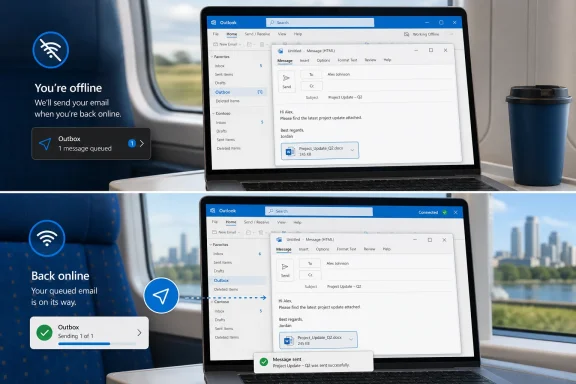 Microsoft Fixes the Offline Gap It Created
The new Outlook has always had a trust problem, and offline work sits at the center of it. Email is one of the few applications users still expect to behave like infrastructure: boring, local enough, predictable enough, and available even when the network is not. When Microsoft replaced the old Windows Mail and Calendar direction with the new Outlook for Windows, it inherited not just the Outlook brand but decades of user expectations attached to that brand.Adding offline attachment support sounds modest because it is modest. A user can now compose a message, attach a file without an active connection, and let Outlook send it once the machine is back online. That is table-stakes behavior for a desktop mail client, especially for business travelers, field workers, students, consultants, and anyone whose workday is not lived entirely on reliable fiber and corporate Wi-Fi.
But the smallness of the feature is the point. Microsoft is not merely adding a convenience; it is filling in a missing assumption. Classic Outlook users did not think of offline attachments as a premium capability or a roadmap milestone. They thought of it as part of what Outlook was.
That gap has made Microsoft’s migration story harder than it needed to be. The company has spent years arguing that the new Outlook is the future of mail on Windows, while many users have encountered it as a reminder that “new” does not automatically mean more capable. Every incremental offline feature is therefore both progress and an admission.
The New Outlook Is Still Paying Down Its Web-App Debt
The complaint that the new Outlook is “just a web app” can be overstated, but it is not baseless. Microsoft’s design direction is clear: unify Outlook across Windows, the web, and Microsoft 365 services, then move faster by sharing the same foundation across surfaces. That strategy has obvious benefits for Microsoft, including faster feature deployment, lower maintenance burden, and tighter integration with cloud services such as Exchange Online, OneDrive, Teams, Loop, and Copilot.The problem is that users do not experience architecture diagrams. They experience latency, missing features, altered workflows, broken muscle memory, and places where the app behaves less like a Windows citizen than a browser tab with extra permissions. When a mail client cannot do something offline that users have done for years, the architectural debate becomes personal very quickly.
Offline attachment support chips away at that perception. It suggests Microsoft understands that a Windows mail client has to survive outside ideal network conditions. It also shows that the company is still rebuilding capabilities that classic Outlook users took for granted, one feature at a time.
That rebuild is complicated because the classic Outlook for Windows is not merely a mail viewer. It is a sprawling productivity environment with decades of enterprise assumptions baked in: PST files, shared mailboxes, add-ins, MAPI workflows, automation hooks, mail merge, local search behavior, advanced rules, delegated access, compliance patterns, and weird departmental processes nobody wants to admit still exist. The new Outlook does not have to replicate every historical quirk forever, but it does have to replace enough of them to make migration feel like modernization rather than deprivation.
This is why small features carry outsized symbolic weight. Offline attachments are not glamorous. They do not demo well on a keynote stage. But they are exactly the sort of thing that determines whether an app feels dependable.
Microsoft’s Migration Pitch Has Outrun User Confidence
Microsoft’s broader Outlook transition has been unusually fraught because the company is trying to serve several audiences at once. Consumers who lost the old Mail and Calendar apps need something free and simple. Microsoft 365 subscribers expect a serious productivity client. Enterprise administrators need predictable policy controls and compatibility. Power users want the desktop Outlook they know, preferably with fewer bugs and less bloat.The new Outlook tries to be the answer to all of them. That is an ambitious product strategy and a risky one, because compromise becomes visible at every edge. A free Windows inbox app can tolerate limitations that a corporate Outlook replacement cannot. A web-first client can move quickly in ways administrators like, but it can also break or change workflows in ways administrators hate.
The result is an adoption story that feels less like a clean upgrade path and more like a negotiation. Microsoft can point to a steady stream of improvements: offline reading, calendar work, better account support, security changes, and now offline attachments. Users can point back to the features still missing, the performance concerns still discussed in forums, and the general feeling that Microsoft is pushing before the replacement has fully earned the job.
That feeling matters because Outlook is not a peripheral app in the Microsoft ecosystem. It is the front door to work for millions of people. If the calendar is wrong, if attachments fail, if search is unreliable, if shared mailbox behavior changes, the user does not blame a roadmap; they blame Outlook.
The company’s challenge is therefore not only technical. It is reputational. Microsoft must persuade users that the new Outlook is not merely the app they will eventually be forced to use, but one they would choose because it is better.
Offline Email Is a Productivity Feature, Not a Nostalgia Feature
It is tempting to treat offline support as a relic of an earlier computing era. After all, Microsoft 365 is cloud-native, Exchange Online is the center of the modern Outlook universe, and many users already live inside webmail. But offline work has not vanished. It has simply become more unevenly distributed.A sales rep on a train, a consultant in a hotel with captive portal chaos, a technician at a customer site, a student on a flight, a journalist in a basement press room, or a manager trying to clear mail during a service outage all still need the same thing: the ability to prepare work when the network is absent and trust the machine to finish the job later. Email is asynchronous by design. A mail app that cannot tolerate temporary disconnection misunderstands the medium.
Attachments sharpen that point because they are often the work product itself. The email body may be a sentence or two, but the spreadsheet, PDF, photo, contract, presentation, log file, or invoice is the reason the message exists. If the app lets a user draft offline but not attach the actual deliverable, offline mode becomes performative.
The new feature therefore moves Outlook closer to the mental model users already have. Compose the message. Attach the file. Hit send. Let the outbox handle the rest. That workflow is old because it is good.
Still, the implementation will need to prove itself in the messy real world. Users will want to know whether large files behave consistently, how failures are surfaced, whether cloud-linked attachments and local file attachments are treated differently, and how the app handles conflicts if a file changes before the connection returns. Microsoft has improved the story, but reliability will be judged by edge cases, not the happy path.
The Enterprise Test Is Less About Features Than Failure Modes
For IT departments, offline attachment support is welcome but not decisive. Administrators do not evaluate Outlook only by asking whether a feature exists. They ask how it fails, how it can be controlled, how it logs errors, how it interacts with compliance, and whether support staff can explain the behavior to users without escalating every oddity to Microsoft.That is where the new Outlook’s web-first model remains a source of skepticism. A cloud-connected client can simplify some management tasks, but it can also blur the boundary between local application behavior and service-side behavior. When something breaks, help desks need to know whether they are dealing with a workstation issue, a profile issue, an Exchange Online issue, a policy issue, a browser engine issue, a service incident, or an incomplete feature.
Classic Outlook is hardly a paragon of simplicity. Anyone who has repaired profiles, rebuilt OST files, untangled add-ins, or fought with cached Exchange mode knows that the old client has its own mythology of failure. But those failures are familiar. Enterprises have scripts, runbooks, muscle memory, and scar tissue.
The new Outlook asks administrators to trade known complexity for newer complexity. That trade may be rational over time, especially if Microsoft can deliver faster fixes, better security defaults, and a more consistent cross-platform experience. But it is not free. Every missing or immature feature becomes another reason for IT to delay broad deployment.
Offline attachments help because they remove a practical objection. They do not remove the need for pilot programs, user training, policy review, add-in testing, and careful segmentation between users who can move now and users whose workflows still depend on classic Outlook.
The Attachment Update Exposes Microsoft’s Real Outlook Strategy
Microsoft’s Outlook strategy is not simply to replace an old app with a new one. It is to redefine Outlook as a service experience that happens to run on Windows. That distinction explains both the company’s persistence and user resistance.From Microsoft’s perspective, the old model is increasingly expensive. Maintaining multiple Outlook clients with different codebases, feature sets, and release rhythms slows the company down. It complicates security work. It makes it harder to ship AI-driven features consistently. It preserves local-era assumptions in a business now built around Microsoft 365 subscriptions and cloud telemetry.
From the user’s perspective, that old model is exactly what made Outlook powerful. The classic Windows app felt like a local command center for mail, calendar, contacts, tasks, archives, add-ins, and enterprise oddities. It could be heavy and maddening, but it was also capable in ways that web clients often were not.
The new Outlook sits between those worlds. Microsoft wants the reach and manageability of the web with enough native-feeling behavior to keep Windows users from revolting. Offline attachments are part of that compromise: local enough to be useful, cloud-aligned enough to fit the new architecture.
The danger is that users interpret every incremental catch-up feature as evidence that Microsoft shipped the replacement before it was finished. That interpretation may be unfair to the engineers doing the hard work of modernizing a massive product. It is also understandable. When a vendor asks users to leave a mature application, the replacement is judged not by its roadmap velocity but by today’s missing affordances.
Classic Outlook Remains the Benchmark Microsoft Cannot Escape
Classic Outlook’s staying power is not just sentimentality. It remains the benchmark because it embodies a certain bargain: complexity in exchange for control. Users tolerate its density because it can do things the newer client still struggles to match or has only recently begun to address.This is especially true in business environments where Outlook is not used in isolation. It is wired into document workflows, CRM systems, line-of-business applications, legal discovery habits, shared calendars, executive assistant routines, mailbox delegation, and years of local archive practices. If the new Outlook interrupts any one of those workflows, the whole migration can stall.
Microsoft knows this, which is why the transition has been gradual rather than instant. The company has continued to publish feature updates and migration guidance while leaving classic Outlook in place for many Microsoft 365 users. That coexistence is both necessary and awkward. It gives customers time, but it also keeps reminding them that they have a choice.
The new Outlook’s biggest competitor is not Thunderbird, Gmail, or some insurgent productivity startup. It is Outlook. Specifically, it is the version of Outlook users already know, already installed, and already trust enough to complain about rather than abandon.
That makes Microsoft’s task unusually difficult. The company is not trying to introduce a new product into a vacuum. It is trying to replace a habit.
Security and Compliance Will Shape the Next Phase
Attachments are not merely productivity objects; they are security objects. They carry malware, leak data, trigger data loss prevention policies, and generate compliance obligations. Any change in how Outlook handles attachments, especially across offline and online states, has implications beyond convenience.A robust offline attachment workflow needs to respect the same controls users expect when connected. That includes sensitivity labels, attachment scanning, tenant policies, file type restrictions, encryption behavior, and the distinction between sending a physical file and sharing a cloud link. If a message is queued offline, users and administrators need confidence that policy enforcement happens before the message actually leaves the environment.
This is where Microsoft’s cloud-first approach could become an advantage. Centralized policy enforcement, service-side scanning, and consistent behavior across Outlook on the web and the new Windows client can reduce fragmentation. In theory, the new Outlook can become more secure and manageable precisely because it is less of an independent local island.
But that advantage only works if the user experience remains intelligible. If a message appears ready to send offline but fails later because a policy rejects the attachment, the app must explain that clearly. If a cloud attachment cannot be resolved while offline, the app must not pretend otherwise. Security that manifests as mysterious failure is not security users respect; it is friction they route around.
The attachment update should therefore be viewed as a foundation, not a finish line. Microsoft needs offline behavior that is not only possible, but auditable, explainable, and compatible with real tenant policies.
Windows Users Are Tired of Being Migrated Into Betas
The emotional backdrop to this story is bigger than Outlook. Windows users have spent years watching Microsoft replace familiar local apps with web-backed or service-driven experiences. Sometimes the result is better. Sometimes it is lighter, faster to update, and more consistent. Sometimes it feels like the user has been drafted into a vendor efficiency project.The new Outlook has suffered from that broader fatigue. Users who dislike it often do not object to modernization in principle. They object to being told that a less complete tool is the future, then being asked to celebrate when it regains features they already had.
That dynamic creates a messaging trap for Microsoft. If the company promotes every restored capability as a major improvement, it risks reminding users how much was missing. If it says too little, users assume the app is stagnant. The only durable solution is to make the product good enough that the debate becomes boring.
Offline attachment support is one step toward boring, and boring is exactly what email should be. Nobody wants to think about whether the mail client can attach a file on a plane. They want to attach the file, close the lid, and assume the message will go out later.
The best version of the new Outlook would disappear into that assumption. It would keep the advantages of the web architecture while restoring the trust users associate with a mature desktop client. That is harder than adding a button, and more important.
The Small Attachment Button Carries a Large Migration Lesson
Microsoft’s latest Outlook improvement is useful, but its real significance is what it reveals about the state of the transition. The company is still converting the new Outlook from a plausible webmail wrapper into a credible Windows productivity client.- Users can now add attachments to messages while offline in the new Outlook for Windows, with sending deferred until connectivity returns.
- The update addresses a practical weakness for travelers, field workers, and anyone who prepares mail away from stable internet access.
- The feature does not erase broader concerns about classic Outlook parity, especially in enterprise workflows with add-ins, archives, delegated mailboxes, and legacy processes.
- IT departments should treat the improvement as a reason to retest the new Outlook, not as proof that every user group is ready to migrate.
- Microsoft’s long-term bet is that a cloud-aligned Outlook can eventually offer enough local resilience to satisfy Windows users without preserving the old desktop model forever.
Microsoft is making the new Outlook better, and offline attachment support is the kind of unglamorous repair that the app badly needs. But the company’s Outlook problem has never been only a missing feature list; it is a deficit of confidence created by asking users to move before the destination felt complete. If Microsoft keeps closing those gaps, the new Outlook may eventually become the default by merit rather than momentum, but until then every small offline improvement will read as both progress and a reminder of how much trust remains to be rebuilt.
References
- Primary source: PCWorld
Published: Thu, 18 Jun 2026 14:18:00 GMT
Microsoft's new Outlook now supports offline email attachments | PCWorld
Microsoft is rolling out improved offline support in its 'new' Outlook app for Windows 11.www.pcworld.com - Official source: support.microsoft.com
How to work offline in Outlook for Windows | Microsoft Support
You can make Outlook work online or offline with your mail server.support.microsoft.com - Official source: microsoft.com
Microsoft 365 Roadmap | Microsoft 365
The Microsoft 365 Roadmap lists updates that are currently planned for applicable subscribers. Check here for more information on the status of new features and updates.www.microsoft.com
- Official source: learn.microsoft.com
New Outlook - Working offline?? - Microsoft Q&A
After trying the New Outlook app, it appears not to work offline. Or at least not well. Attachments were not downloaded or available. Settings only allowed up to six months of offline storage. Generally it appears the new app is not designed for offline…learn.microsoft.com - Related coverage: techradar.com
SVG images used in attacks will no longer display in Microsoft Outlook | TechRadar
User will just see blank spaces where these images would have beenwww.techradar.com - Related coverage: windowscentral.com
Microsoft fixes bug preventing classic Outlook launch — but still recommends the new Outlook for Windows as a workaround, despite it not being prime-time ready | Windows Central
The software giant recently indicated that it had fixed an annoying bug preventing users from launching the classic Outlook email client.www.windowscentral.com
- Official source: adoption.microsoft.com
- Related coverage: tech-talk.com
- Official source: techcommunity.microsoft.com
Preparing for key End of Support milestones coming in 2025
Microsoft Buildtechcommunity.microsoft.com
- Official source: cdn-dynmedia-1.microsoft.com
- Official source: download.microsoft.com
Microsoft - Technology Support for our Older Adults Community
Global Playbookdownload.microsoft.com
