

New analysis published by digit.fyi says Droplet found that organisations still running Windows Server 2003, 2008, and 2012 may be assuming they have viable backups even where vendor support has been absent or partial for years. That is not a niche lifecycle footnote; it is a resilience failure hiding in procurement language. The uncomfortable lesson is that end-of-support dates do not merely stop patches from arriving. They can quietly break the chain of trust between production systems, backup platforms, recovery plans, cyber insurance, and regulatory evidence.
The most dangerous sentence in enterprise IT is not “we were breached.” It is “we thought we were covered.” Droplet’s warning lands because it attacks one of the most comforting assumptions in operations: that if a backup product is installed, scheduled, invoiced, and green on a dashboard, the organisation has a recoverable copy of the thing that matters.
That assumption becomes brittle around legacy Windows estates. A server may still boot, still run the line-of-business application, still answer requests from a creaking database, and still appear in asset management as “known.” But the ecosystem around it may have moved on: agents deprecated, support matrices narrowed, application-consistent snapshots abandoned, restore testing skipped because nobody wants to touch the old box.
This is the hidden layer of technical debt. It is not the unsupported operating system itself; everyone in IT knows those exist. It is the invisible contract drift around that system, where backup vendors, support providers, auditors, and internal risk owners no longer mean the same thing when they say “protected.”
Droplet’s cited example of an organisation with more than 900 unsupported servers is dramatic, but it is plausible precisely because it is mundane. Large estates rarely fail through one catastrophic decision. They fail through years of exceptions that became permanent, renewals that preserved spend without preserving scope, and infrastructure teams forced to keep ancient workloads alive because the business never funded the migration.
The problem is that lifecycle clarity at Microsoft does not translate neatly into lifecycle clarity inside the enterprise. A CIO may know that Windows Server 2016 has a date circled on the calendar. A platform engineer may know that a particular 2012 R2 machine cannot be upgraded because it hosts a vendor application frozen in time. A backup administrator may know the agent technically installs but does not guarantee modern recovery semantics. Legal and procurement may simply know that the backup contract renewed.
Those are four different truths, and the gap between them is where resilience goes to die. End of support is often treated as an operating system issue, but it is really a dependency event. Monitoring agents, endpoint tools, hypervisor integrations, backup software, identity connectors, storage drivers, and compliance tooling all have their own support matrices. When one layer falls out of scope, the whole recovery story becomes conditional.
Windows Server 2016 is therefore the next forcing function. The date is close enough for boards and risk committees to ask for plans, but far enough away for many organisations to postpone expensive work. That is the danger zone: the period in which everyone agrees action is needed but nobody has yet forced the budget, downtime, testing, and ownership decisions required to make it real.
Old Windows workloads are especially treacherous because they are rarely isolated. They may rely on deprecated authentication flows, hard-coded service accounts, obsolete SQL versions, unsigned drivers, old .NET frameworks, SMB configurations that security teams would rather forget, and third-party applications whose original vendor has merged, pivoted, or disappeared. A backup of the disk is only one piece of the organism.
This is why Droplet’s language about a “backup black hole” is effective. The black hole is not necessarily a blank space where no data exists. It is a place where confidence cannot escape. The organisation may have files, images, tapes, snapshots, or vault copies, but it may not have a supportable path back to service.
Ransomware has made this distinction painfully practical. Attackers do not need every backup to be missing; they need recovery to be slow, uncertain, politically chaotic, and commercially painful. If the crown-jewel application sits on Windows Server 2008 and the backup vendor’s support obligations are caveated into oblivion, the incident response room inherits a legal and technical mess at the exact moment it needs certainty.
This is a procurement problem disguised as an engineering problem. Contracts are often written around service descriptions, platform families, broad coverage terms, and product names that sound durable. Support matrices, by contrast, are living documents. They change as vendors retire agents, drop testing against old kernels, or limit support to “best effort” language that sounds reassuring until an outage turns it into a dispute.
For IT leaders, the lesson is brutal: a backup invoice is not evidence of backup coverage. Nor is a successful job status, by itself, evidence of recoverability. The relevant evidence is specific and uncomfortable: the exact Windows Server version, the exact backup agent version, the vendor’s current support position, the restore method, the last tested recovery date, and the business owner who accepts the residual risk.
This is where many enterprises discover that accountability has been smeared thinly across teams. Infrastructure owns the server, applications own the workload, security owns the risk register, procurement owns the contract, and audit owns the annual questionnaire. But nobody owns the sentence: “If this unsupported system is encrypted tonight, here is how we recover it tomorrow.”
That distinction is often lost in board-level conversations. ESUs can reduce exposure to known vulnerabilities by providing certain security fixes for eligible systems. They do not generally deliver new features, broad product improvements, or a guarantee that every adjacent vendor will continue supporting every integration. Paying Microsoft for more runway does not automatically make a backup vendor’s unsupported agent supported again.
The same limitation applies to “critical updates only” arrangements elsewhere in the stack. A narrow stream of emergency fixes can be valuable, but it is not equivalent to being on a current operating system with current tooling, current testing, and current vendor incentives. Legacy estates become risky not only because they stop receiving patches, but because they stop participating in the normal rhythm of engineering attention.
This is why organisations that frame Windows Server 2016’s deadline as a patching issue are already underestimating it. The better framing is dependency retirement. Every 2016 server should be treated as the center of a small solar system: backup, monitoring, endpoint protection, identity, network access, application vendor support, database compatibility, and recovery orchestration. If any of those planets have already drifted away, ESU does not pull them back into orbit.
Hospitals cannot simply switch off old systems if they support medical devices, patient administration, imaging workflows, or lab integrations. Transport operators may have scheduling, signalling, telemetry, or maintenance platforms with long certification tails. Utilities often run industrial and operational technology environments where uptime, safety, and vendor certification matter more than tidy software currency.
These environments accumulate “do not touch” infrastructure for understandable reasons. The system works. The original project team has gone. The replacement requires capital approval. The outage window is politically impossible. The application vendor says an upgrade path exists but behaves as if it requires a small moon landing.
Yet resilience does not care whether the reasons are understandable. An unsupported server is still an unsupported server. A non-restorable backup is still non-restorable. A regulator, insurer, or public inquiry after a major incident is unlikely to be impressed by the fact that everyone had been meaning to modernise the estate since 2019.
That matters because backup coverage is not merely a technical control. It is evidence. It is the proof an organisation can bring to an auditor, regulator, insurer, customer, or board committee to show that critical services can be restored after disruption. If a legacy Windows estate has not been recoverably backed up for years, the failure is not confined to IT operations. It becomes a governance failure.
The phrase “contract consciousness” may sound like consultancy jargon, but it captures a real governance gap. Many organisations know what they bought at the start of a supplier relationship. Far fewer continuously verify whether that service still maps to the live estate, especially after years of operating system retirements, platform consolidation, cloud migrations, and supplier product changes.
A tighter regulatory environment will make that gap harder to excuse. The question will not be whether a backup contract exists. It will be whether the organisation can demonstrate that critical legacy systems are included, supported, tested, recoverable, and governed by a risk decision made by someone with the authority to accept the consequences.
But containers are not magic dust for Windows technical debt. Some legacy applications are too tightly coupled to the operating system, registry, drivers, services, hardware dongles, domain assumptions, or local storage paths to move neatly. Others can be encapsulated only after serious discovery work. Containerising a mess can preserve the mess in a tidier box if the organisation does not understand what it is preserving.
The useful way to think about containers is as one route to resilience compression. They may reduce the gap between “we cannot fully modernise this today” and “we cannot tolerate having no credible recovery path.” For a subset of applications, that is valuable. For others, the right answer will be replatforming, replacement, vendor upgrade, cloud migration, or retirement.
The mistake would be treating any one technique as the universal answer. Legacy Windows risk is not a single disease. It is a family of conditions: unsupported operating systems, unsupported applications, weak backups, unknown dependencies, missing owners, expired contracts, fragile authentication, and poor recovery testing. Containers can treat some symptoms and occasionally help cure the patient. They cannot substitute for diagnosis.
This work is tedious and politically sensitive because it exposes unfunded liabilities. A server that has been quietly running for years becomes a budget item. A forgotten application becomes a compliance issue. A backup exception becomes a board risk. That is precisely why the work matters.
The coming Windows Server 2016 deadline gives IT leaders a rare advantage: a clear external date. January 2027 is not a surprise. It is close enough to justify urgency and far enough away to do more than panic-buy extended support. The organisations that handle it well will use the deadline to force cross-functional decisions rather than leaving infrastructure teams to carry the risk alone.
Those decisions should be explicit. Some systems will be migrated. Some will be isolated. Some will be wrapped in compensating controls. Some will receive paid extended updates. Some will be retired after the business finally admits nobody knows why they still exist. The outcome is less important than the governance: every exception should have an owner, a date, a control set, and a recovery test.
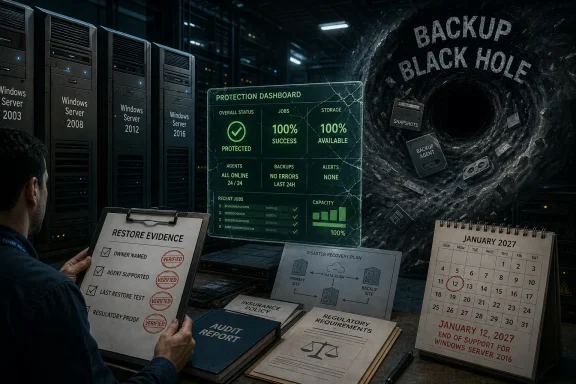
A green backup dashboard can be dangerously soothing. It may show that a job completed, not that the job is supported. It may show that data moved, not that the application can return. It may show that a server image exists, not that the restored system can authenticate, patch, communicate, and run without violating every modern security rule in the estate.
This is especially true in hybrid environments. A legacy Windows server may sit in a data centre, replicate into cloud storage, depend on on-premises Active Directory, talk to an old database, and be monitored by a SaaS platform. The recovery path crosses organisational and technical boundaries. If nobody has rehearsed that path, the backup is a theory.
Recovery testing is where comforting assumptions go to be judged. It is also where organisations often discover that old systems are more important than anyone admitted. The test fails, the business owner appears, and suddenly the server that was “just legacy” becomes “critical to month-end billing.”
Windows Server 2019, 2022, and 2025 will all have their own lifecycle pressures. So will SQL Server, Exchange remnants, embedded Windows systems, industrial software, and the third-party agents that surround them. The point is not to sprint from cliff to cliff. The point is to build a habit of lifecycle-aware resilience.
That habit requires the security team and infrastructure team to stop treating backup as a back-office utility. It is a cyber control, a business continuity control, a regulatory control, and a commercial control. It is also one of the few controls whose failure is often discovered only when everything else has already gone wrong.
The organisations most at risk are not necessarily the ones with the oldest servers. They are the ones with the largest gap between belief and evidence. A fully documented Windows Server 2008 workload with tested isolation and a credible recovery plan may be less dangerous than a Windows Server 2016 workload everyone assumes is fine because the support deadline has not arrived yet.
The next year will reward organisations that treat Windows Server 2016’s end-of-support date as a governance deadline, not merely an upgrade milestone. The winners will not be the ones with the cleanest slide decks or the longest vendor contracts, but the ones that can sit in an incident room and say, with evidence, exactly what can be restored, how long it will take, and which legacy systems no longer get to hide behind a green tick.
Source: digit.fyi Legacy Windows Systems Pose Hidden Risk to Enterprise Resilience
 The Backup Was Never Just a Backup
The most dangerous sentence in enterprise IT is not “we were breached.” It is “we thought we were covered.” Droplet’s warning lands because it attacks one of the most comforting assumptions in operations: that if a backup product is installed, scheduled, invoiced, and green on a dashboard, the organisation has a recoverable copy of the thing that matters.That assumption becomes brittle around legacy Windows estates. A server may still boot, still run the line-of-business application, still answer requests from a creaking database, and still appear in asset management as “known.” But the ecosystem around it may have moved on: agents deprecated, support matrices narrowed, application-consistent snapshots abandoned, restore testing skipped because nobody wants to touch the old box.
This is the hidden layer of technical debt. It is not the unsupported operating system itself; everyone in IT knows those exist. It is the invisible contract drift around that system, where backup vendors, support providers, auditors, and internal risk owners no longer mean the same thing when they say “protected.”
Droplet’s cited example of an organisation with more than 900 unsupported servers is dramatic, but it is plausible precisely because it is mundane. Large estates rarely fail through one catastrophic decision. They fail through years of exceptions that became permanent, renewals that preserved spend without preserving scope, and infrastructure teams forced to keep ancient workloads alive because the business never funded the migration.
Microsoft’s Lifecycle Clock Is a Business Risk Multiplier
Microsoft’s Windows Server lifecycle is not ambiguous. Windows Server 2016 remains in extended support until January 12, 2027, after which organisations that cannot migrate will be looking at paid Extended Security Updates or unsupported exposure. Windows Server 2012 and 2012 R2 already exited extended support in October 2023, while Windows Server 2008 and 2008 R2 have long since left normal support behind, with only special paid and cloud-linked arrangements extending life for some customers.The problem is that lifecycle clarity at Microsoft does not translate neatly into lifecycle clarity inside the enterprise. A CIO may know that Windows Server 2016 has a date circled on the calendar. A platform engineer may know that a particular 2012 R2 machine cannot be upgraded because it hosts a vendor application frozen in time. A backup administrator may know the agent technically installs but does not guarantee modern recovery semantics. Legal and procurement may simply know that the backup contract renewed.
Those are four different truths, and the gap between them is where resilience goes to die. End of support is often treated as an operating system issue, but it is really a dependency event. Monitoring agents, endpoint tools, hypervisor integrations, backup software, identity connectors, storage drivers, and compliance tooling all have their own support matrices. When one layer falls out of scope, the whole recovery story becomes conditional.
Windows Server 2016 is therefore the next forcing function. The date is close enough for boards and risk committees to ask for plans, but far enough away for many organisations to postpone expensive work. That is the danger zone: the period in which everyone agrees action is needed but nobody has yet forced the budget, downtime, testing, and ownership decisions required to make it real.
The Real Exposure Is the Restore Nobody Has Proved
Backup conversations often stop at whether data is being copied. Recovery conversations start with whether the business can operate after a failure. The distinction matters because a legacy Windows server can produce something that looks like a backup while still failing the test that matters most: can the organisation restore it, boot it, authenticate into it, reconnect its dependencies, and trust the recovered application under pressure?Old Windows workloads are especially treacherous because they are rarely isolated. They may rely on deprecated authentication flows, hard-coded service accounts, obsolete SQL versions, unsigned drivers, old .NET frameworks, SMB configurations that security teams would rather forget, and third-party applications whose original vendor has merged, pivoted, or disappeared. A backup of the disk is only one piece of the organism.
This is why Droplet’s language about a “backup black hole” is effective. The black hole is not necessarily a blank space where no data exists. It is a place where confidence cannot escape. The organisation may have files, images, tapes, snapshots, or vault copies, but it may not have a supportable path back to service.
Ransomware has made this distinction painfully practical. Attackers do not need every backup to be missing; they need recovery to be slow, uncertain, politically chaotic, and commercially painful. If the crown-jewel application sits on Windows Server 2008 and the backup vendor’s support obligations are caveated into oblivion, the incident response room inherits a legal and technical mess at the exact moment it needs certainty.
Contracts Can Age Faster Than Servers
The most revealing part of Droplet’s warning is not that old Windows versions are risky. That story has been told for two decades. The sharper claim is that organisations may have continued paying for backup services while misunderstanding what those services covered once the underlying operating systems aged out.This is a procurement problem disguised as an engineering problem. Contracts are often written around service descriptions, platform families, broad coverage terms, and product names that sound durable. Support matrices, by contrast, are living documents. They change as vendors retire agents, drop testing against old kernels, or limit support to “best effort” language that sounds reassuring until an outage turns it into a dispute.
For IT leaders, the lesson is brutal: a backup invoice is not evidence of backup coverage. Nor is a successful job status, by itself, evidence of recoverability. The relevant evidence is specific and uncomfortable: the exact Windows Server version, the exact backup agent version, the vendor’s current support position, the restore method, the last tested recovery date, and the business owner who accepts the residual risk.
This is where many enterprises discover that accountability has been smeared thinly across teams. Infrastructure owns the server, applications own the workload, security owns the risk register, procurement owns the contract, and audit owns the annual questionnaire. But nobody owns the sentence: “If this unsupported system is encrypted tonight, here is how we recover it tomorrow.”
Extended Security Updates Are Not a Resilience Strategy
Microsoft’s Extended Security Updates are useful, and for some organisations they will be unavoidable. They buy time. They do not buy modernity, and they do not turn old platforms into fully supported, fully integrated citizens of a modern resilience architecture.That distinction is often lost in board-level conversations. ESUs can reduce exposure to known vulnerabilities by providing certain security fixes for eligible systems. They do not generally deliver new features, broad product improvements, or a guarantee that every adjacent vendor will continue supporting every integration. Paying Microsoft for more runway does not automatically make a backup vendor’s unsupported agent supported again.
The same limitation applies to “critical updates only” arrangements elsewhere in the stack. A narrow stream of emergency fixes can be valuable, but it is not equivalent to being on a current operating system with current tooling, current testing, and current vendor incentives. Legacy estates become risky not only because they stop receiving patches, but because they stop participating in the normal rhythm of engineering attention.
This is why organisations that frame Windows Server 2016’s deadline as a patching issue are already underestimating it. The better framing is dependency retirement. Every 2016 server should be treated as the center of a small solar system: backup, monitoring, endpoint protection, identity, network access, application vendor support, database compatibility, and recovery orchestration. If any of those planets have already drifted away, ESU does not pull them back into orbit.
Essential Services Have the Worst Migration Physics
Droplet’s remarks about utilities, transport, and healthcare are not incidental. Essential services are where the case for legacy dependency is often strongest and the tolerance for resilience failure is lowest. That contradiction defines much of modern cyber risk.Hospitals cannot simply switch off old systems if they support medical devices, patient administration, imaging workflows, or lab integrations. Transport operators may have scheduling, signalling, telemetry, or maintenance platforms with long certification tails. Utilities often run industrial and operational technology environments where uptime, safety, and vendor certification matter more than tidy software currency.
These environments accumulate “do not touch” infrastructure for understandable reasons. The system works. The original project team has gone. The replacement requires capital approval. The outage window is politically impossible. The application vendor says an upgrade path exists but behaves as if it requires a small moon landing.
Yet resilience does not care whether the reasons are understandable. An unsupported server is still an unsupported server. A non-restorable backup is still non-restorable. A regulator, insurer, or public inquiry after a major incident is unlikely to be impressed by the fact that everyone had been meaning to modernise the estate since 2019.
The UK’s Cyber Bill Turns Operational Drift Into Legal Exposure
The UK’s Cyber Security and Resilience Bill adds another edge to this story. The bill is intended to strengthen the cyber resilience obligations around essential and digital services, building on the existing Network and Information Systems regime. For organisations in scope, the direction of travel is obvious: more scrutiny of supply chains, more attention to managed service providers, and less tolerance for cyber resilience that exists only in policy documents.That matters because backup coverage is not merely a technical control. It is evidence. It is the proof an organisation can bring to an auditor, regulator, insurer, customer, or board committee to show that critical services can be restored after disruption. If a legacy Windows estate has not been recoverably backed up for years, the failure is not confined to IT operations. It becomes a governance failure.
The phrase “contract consciousness” may sound like consultancy jargon, but it captures a real governance gap. Many organisations know what they bought at the start of a supplier relationship. Far fewer continuously verify whether that service still maps to the live estate, especially after years of operating system retirements, platform consolidation, cloud migrations, and supplier product changes.
A tighter regulatory environment will make that gap harder to excuse. The question will not be whether a backup contract exists. It will be whether the organisation can demonstrate that critical legacy systems are included, supported, tested, recoverable, and governed by a risk decision made by someone with the authority to accept the consequences.
Containers Offer a Bridge, Not an Escape Hatch
Droplet’s own answer, unsurprisingly, points toward protecting critical applications and data inside secure containers. That pitch deserves both attention and skepticism. Containerisation can be a pragmatic bridge for legacy workloads, especially where the application is more important than the ageing operating system around it. It can help isolate dependencies, standardise runtime environments, and create more portable recovery patterns.But containers are not magic dust for Windows technical debt. Some legacy applications are too tightly coupled to the operating system, registry, drivers, services, hardware dongles, domain assumptions, or local storage paths to move neatly. Others can be encapsulated only after serious discovery work. Containerising a mess can preserve the mess in a tidier box if the organisation does not understand what it is preserving.
The useful way to think about containers is as one route to resilience compression. They may reduce the gap between “we cannot fully modernise this today” and “we cannot tolerate having no credible recovery path.” For a subset of applications, that is valuable. For others, the right answer will be replatforming, replacement, vendor upgrade, cloud migration, or retirement.
The mistake would be treating any one technique as the universal answer. Legacy Windows risk is not a single disease. It is a family of conditions: unsupported operating systems, unsupported applications, weak backups, unknown dependencies, missing owners, expired contracts, fragile authentication, and poor recovery testing. Containers can treat some symptoms and occasionally help cure the patient. They cannot substitute for diagnosis.
The Migration Plan Must Start With the Ugly Inventory
The practical response begins with inventory, but not the polite inventory that counts servers and versions. Organisations need an ugly inventory: the list that includes business owners, application criticality, backup support status, last restore test, authentication dependencies, data classification, vendor support position, and the actual consequence if the system is lost for a day, a week, or permanently.This work is tedious and politically sensitive because it exposes unfunded liabilities. A server that has been quietly running for years becomes a budget item. A forgotten application becomes a compliance issue. A backup exception becomes a board risk. That is precisely why the work matters.
The coming Windows Server 2016 deadline gives IT leaders a rare advantage: a clear external date. January 2027 is not a surprise. It is close enough to justify urgency and far enough away to do more than panic-buy extended support. The organisations that handle it well will use the deadline to force cross-functional decisions rather than leaving infrastructure teams to carry the risk alone.
Those decisions should be explicit. Some systems will be migrated. Some will be isolated. Some will be wrapped in compensating controls. Some will receive paid extended updates. Some will be retired after the business finally admits nobody knows why they still exist. The outcome is less important than the governance: every exception should have an owner, a date, a control set, and a recovery test.
The Dashboard Green Light Is Not Enough
The industry has spent years teaching executives to ask whether backups exist. That was progress, but it is no longer sufficient. The better question is whether the organisation has recoverable service capability for each critical workload, including those still chained to legacy Windows.A green backup dashboard can be dangerously soothing. It may show that a job completed, not that the job is supported. It may show that data moved, not that the application can return. It may show that a server image exists, not that the restored system can authenticate, patch, communicate, and run without violating every modern security rule in the estate.
This is especially true in hybrid environments. A legacy Windows server may sit in a data centre, replicate into cloud storage, depend on on-premises Active Directory, talk to an old database, and be monitored by a SaaS platform. The recovery path crosses organisational and technical boundaries. If nobody has rehearsed that path, the backup is a theory.
Recovery testing is where comforting assumptions go to be judged. It is also where organisations often discover that old systems are more important than anyone admitted. The test fails, the business owner appears, and suddenly the server that was “just legacy” becomes “critical to month-end billing.”
The Windows Server 2016 Deadline Should Be Treated as a Rehearsal
There is a temptation to treat Server 2016 as the next isolated lifecycle cliff. That would be a mistake. It is better understood as a rehearsal for a more continuous model of platform risk, where operating systems, applications, backup agents, and regulatory expectations move on overlapping timelines.Windows Server 2019, 2022, and 2025 will all have their own lifecycle pressures. So will SQL Server, Exchange remnants, embedded Windows systems, industrial software, and the third-party agents that surround them. The point is not to sprint from cliff to cliff. The point is to build a habit of lifecycle-aware resilience.
That habit requires the security team and infrastructure team to stop treating backup as a back-office utility. It is a cyber control, a business continuity control, a regulatory control, and a commercial control. It is also one of the few controls whose failure is often discovered only when everything else has already gone wrong.
The organisations most at risk are not necessarily the ones with the oldest servers. They are the ones with the largest gap between belief and evidence. A fully documented Windows Server 2008 workload with tested isolation and a credible recovery plan may be less dangerous than a Windows Server 2016 workload everyone assumes is fine because the support deadline has not arrived yet.
The Six Checks That Decide Whether Legacy Windows Is a Liability
The uncomfortable work now is to turn a vague legacy concern into a set of provable facts. That means moving past lifecycle spreadsheets and asking whether each ageing Windows workload can survive the incident everyone claims to be preparing for.- Every Windows Server 2003, 2008, 2012, and 2016 system should be matched to a named business owner and a named technical owner.
- Every backup contract should be checked against the vendor’s current support position for the exact operating system, agent, hypervisor, and recovery method in use.
- Every critical legacy workload should have a recent restore test that proves application-level recovery, not merely file or image recovery.
- Every exception to migration should have a documented risk acceptance, expiry date, compensating controls, and budget path.
- Every plan for Extended Security Updates should be treated as a temporary bridge rather than a substitute for modernisation.
- Every regulatory or audit assertion about resilience should be backed by restore evidence that includes legacy systems, not just modern platforms.
The next year will reward organisations that treat Windows Server 2016’s end-of-support date as a governance deadline, not merely an upgrade milestone. The winners will not be the ones with the cleanest slide decks or the longest vendor contracts, but the ones that can sit in an incident room and say, with evidence, exactly what can be restored, how long it will take, and which legacy systems no longer get to hide behind a green tick.
Source: digit.fyi Legacy Windows Systems Pose Hidden Risk to Enterprise Resilience
