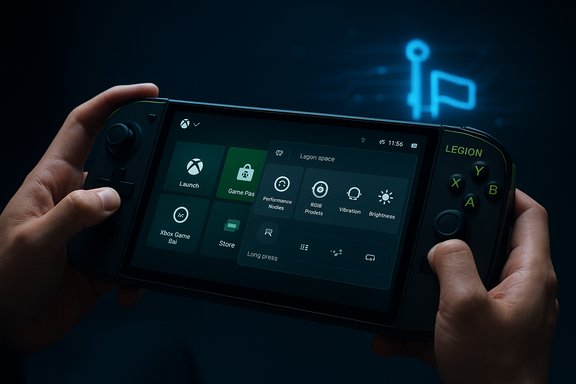
Lenovo’s latest Legion Space update tightens the bridge between PC handhelds and console-style gaming by adding native toggles, Game Bar widgets, and input remaps that make the Xbox Full Screen Experience (FSE) feel more integrated on Legion Go devices — but it also exposes new fault lines in the fragmented Windows handheld ecosystem that buyers and power users need to understand.
The handheld PC market has matured from a niche curiosity into a competitive segment where hardware vendors and platform holders are racing to deliver the most polished, controller-first experience. Microsoft answered that demand with the Xbox Full Screen Experience, a Windows 11 mode that replaces the desktop shell with a full-screen Xbox app and a handheld-optimized Game Bar, while trimming background processes to reclaim system resources for games.
Lenovo’s Legion Go family — including the original Legion Go, Legion Go S, and Legion Go 2 — ships with its own launcher and system utility, Legion Space, which groups games and exposes quick system controls. In a recent update to Legion Space (reported as version 1.3.4.9), Lenovo added direct integration points for Microsoft’s FSE: a native toggle in Legion Space, a dedicated Legion Space widget inside the Xbox Game Bar, input behaviour updates for the Legion R button, and background configuration changes intended to make Windows treat the device more like a purpose-built handheld.
These changes are rolling out in waves to Legion Go devices and are meant to make switching into the Xbox Full Screen Experience faster and more coherent. The update is an incremental, software-side optimization — it does not itself enable FSE; the mode still needs to be toggled on via Windows Settings when available on your device.
However, a few technical details are not directly traceable to an official Lenovo changelog at this time. Specifically:
That said:
That said, the update exposes the ongoing tension in the Windows handheld market: software-level stopgaps (FSE, launcher integrations) can only go so far while hardware, drivers, and platform fragmentation persist. Users should welcome the convenience and experiment with the new features, but remain cautious: test your favorite titles, verify settings after the update, and be prepared to roll back or tweak behavior if you rely on custom tooling or workflows.
Lenovo’s latest Legion Space release nudges the Legion Go family a bit further down the console-like path many handheld gamers want. It simplifies switching to Microsoft’s Xbox Full Screen Experience and centralizes useful hardware controls in the Game Bar — both valuable additions. At the same time, the update highlights the need for clearer documentation, better QA before rollouts, and more transparent handling of system-level changes. For gamers who prize convenience and are comfortable testing settings, this release is a welcome usability win; for power users and enterprise environments, it’s another reminder to test before you trust.
Source: Windows Central https://www.windowscentral.com/hard...ion-go-handhelds-xbox-full-screen-experience/
 Background
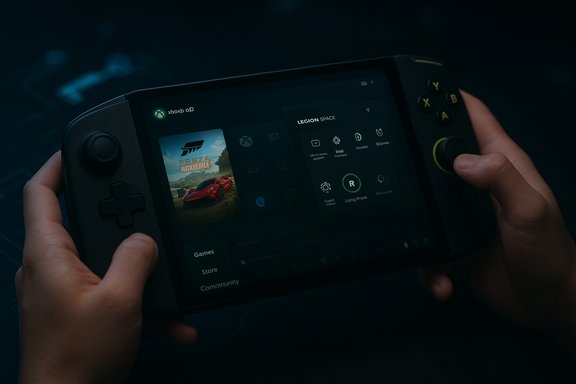
The handheld PC market has matured from a niche curiosity into a competitive segment where hardware vendors and platform holders are racing to deliver the most polished, controller-first experience. Microsoft answered that demand with the Xbox Full Screen Experience, a Windows 11 mode that replaces the desktop shell with a full-screen Xbox app and a handheld-optimized Game Bar, while trimming background processes to reclaim system resources for games.Lenovo’s Legion Go family — including the original Legion Go, Legion Go S, and Legion Go 2 — ships with its own launcher and system utility, Legion Space, which groups games and exposes quick system controls. In a recent update to Legion Space (reported as version 1.3.4.9), Lenovo added direct integration points for Microsoft’s FSE: a native toggle in Legion Space, a dedicated Legion Space widget inside the Xbox Game Bar, input behaviour updates for the Legion R button, and background configuration changes intended to make Windows treat the device more like a purpose-built handheld.
These changes are rolling out in waves to Legion Go devices and are meant to make switching into the Xbox Full Screen Experience faster and more coherent. The update is an incremental, software-side optimization — it does not itself enable FSE; the mode still needs to be toggled on via Windows Settings when available on your device.
What the Legion Space 1.3.4.9 update adds
Quick feature overview
- FSE toggle inside Legion Space: A new quick setting placed in Legion Space and its quick-menu widget allows users to enable or disable the Xbox Full Screen Experience without first opening the Xbox app or digging through Settings.
- Legion Space widget in Xbox Game Bar: Legion Space now appears as a widget inside the Xbox Game Bar, offering live shortcuts for:
- Performance modes (thermal and power profiles)
- RGB lighting presets
- Vibration intensity
- Quick system toggles (brightness, refresh rate changes)
- Input remapping for Legion R: Short-press behavior remains (open Legion Space widget), but a long-press now triggers the Windows Task Switcher equivalent (Win + Tab), matching Microsoft’s recommended handheld mappings.
- Registry/behavioral change when FSE is active: The device reportedly writes a registry or system key to indicate “handheld” mode so Windows and certain services allocate resources differently while FSE is running.
- Wider device coverage: The update is being pushed to Legion Go 1, Legion Go S, and Legion Go 2 in phased waves.
Why each change matters
- The in-app toggle lowers friction: users who already rely on Legion Space can switch into a controller-optimized mode without hunting down the Xbox app. This makes the Legion Go more console-like and reduces context switching during play sessions.
- The Game Bar widget moves device-level performance controls into the same controller-accessible overlay gamers already use, avoiding the need to alt-tab to a desktop utility mid-session.
- Task-switcher mapping improves discoverability for handheld navigation and helps standardize behavior across different hardware vendors.
- The handheld flag is intended to let the OS prioritize GPU/CPU and trim background services — in theory freeing memory and reducing contention while gaming.
The Xbox Full Screen Experience — how it works (briefly)
The Xbox Full Screen Experience (FSE) is a mode in Windows 11 intended to provide a console-like front end for gaming on small devices and controllers. Its core functions are:- Boot or switch into a full-screen Xbox app that aggregates games across installed PC storefronts and the Xbox ecosystem.
- Use a controller-first UI and handheld-friendly Game Bar to navigate, launch games, and access quick settings.
- Reduce the number of background Explorer and desktop tasks to reclaim memory and CPU headroom for games.
- Offer system shortcuts to toggle the experience (Win + F11, or through Task View / Game Bar) and to quickly return to desktop apps.
Cross-check and verification: what’s confirmed and what’s still murky
Several industry outlets have reported the Legion Space update and its FSE-focused features. Independent coverage from multiple publications confirms the broad strokes: Legion Space received an update with an in-app FSE toggle, a Game Bar widget, and changed input behavior for the Legion R button. Community threads and user reports corroborate that the update is rolling out in waves to Legion Go-family devices.However, a few technical details are not directly traceable to an official Lenovo changelog at this time. Specifically:
- The claim that Legion Space writes a registry key explicitly named "handheld" when FSE is enabled has appeared in reporting and community posts. While multiple independent reports reference a device-level adjustment to mark the device as a handheld, the exact registry key path and the precise implementation details were not published by Lenovo in a public changelog at the time of reporting. Treat that specific registry-string detail as likely based on user-observed behavior and third-party reporting, not an official Lenovo-issued specification.
- The version number 1.3.4.9 is widely mentioned in reporting but may vary by region or carrier-specific firmware bundles. Users should check their local Lenovo update channel for the exact build number on their unit.
Deep dive: practical implications for Legion Go owners
Faster switching, but not automatic
With the new Legion Space toggle, switching into Xbox FSE can be done from the same overlay that controls RGB and performance modes. That convenience matters when you want to quickly move from desktop mode to a controller-first interface. Remember: this is a convenience addition — FSE still needs to be enabled via Windows 11 Settings (Settings > Gaming > Full screen experience) or toggled with the Game Bar if your device already supports it.Controller input behavior changed — pay attention to long-press vs short-press
The Legion R button has historically been used to open the Legion Space overlay. Lenovo’s update keeps that short-press behavior intact but reserves a long-press to open Task Switcher (Win + Tab) — a move to align with Microsoft’s handheld guidelines. That benefits users who expect a fast, controller-driven way to move between apps and games, but it may break muscle memory for users who previously used longer presses for alternative shortcuts or third-party remapping utilities.Game Bar integration reduces alt-tab friction
Placing a Legion Space widget inside the Xbox Game Bar makes it possible to change thermal profiles, enable performance modes, and tweak RGB without leaving the full-screen experience. That helps preserve immersion and reduces the need for external utilities or desktop toggles during gameplay.Registry/wrapper changes could be a double-edged sword
Marking the device as a “handheld” to the OS is intended to help Windows prioritize resources correctly. In many cases this translates into memory savings by suppressing Explorer shell processes and unnecessary services. On the other hand:- Any automatic registry edits or system flags introduce a change to the device’s baseline configuration that some users and admins may want to audit before accepting.
- Third-party tools and launchers that expect a desktop environment may behave differently when the device is treated as a handheld by Windows.
- Power-users who use custom scripts or tooling should test workflows after the update.
Compatibility, rollout, and how to get it
- The update is being distributed in waves to Lenovo Legion Go, Legion Go S, and Legion Go 2 units. If the update hasn’t arrived yet, it should appear via the Legion Space updater or system update channel over time.
- Xbox Full Screen Experience must be available on your Windows 11 build to use it. Microsoft has been rolling FSE to handhelds and Windows Insiders in batches, and on many devices it became available via Settings > Gaming > Full screen experience.
- If you haven’t received FSE or the Legion Space widget yet: check Windows Update, the Microsoft Store (for the Xbox app), and the Legion Space updater; updates often roll regionally and in phased waves.
- For those who want to revert behavior or avoid FSE: Windows 11 lets you set the Full Screen Experience “Home app” to None, or you can toggle the feature off in Settings. Third-party utilities exist to customize or replace FSE at boot if you prefer alternative launchers.
Step-by-step: enabling FSE with Legion Space (practical guide)
- Update Legion Space through its built-in updater or Lenovo’s update channel until it reports the new build.
- Ensure your Windows 11 build has the Full Screen Experience feature available (Settings > Gaming > Full screen experience). If the option is missing, update Windows and the Xbox app from the Microsoft Store.
- Open Legion Space and use the new quick toggle to request FSE. If that toggle merely opens the Xbox Game Bar entry point, use the Game Bar (Win + G) and select “Enter full screen experience,” or press Win + F11.
- If prompted, reboot for best performance (some setups recommend a restart to fully free system memory).
- While in FSE, use the Legion Space widget in the Game Bar to change thermal profiles, adjust vibration intensity, and set RGB modes without exiting full screen.
- To return to Windows desktop: press the Windows key or use Task View (Win + Tab).
Performance expectations — what FSE realistically buys you
One headline claim from the FSE rollout is that bypassing Explorer and trimming background processes can free as much as ~2GB of memory on a Windows handheld. That is significant for devices with tight memory budgets — freeing RAM can reduce paging, improve texture load times, and increase frame-rate stability in some titles.That said:
- Actual improvements vary wildly by game, driver maturity, and how memory-bound a session is.
- Thermal constraints remain the bigger limiter for sustained performance on many handhelds; freeing RAM won’t solve throttling if the CPU/GPU hits thermal limits.
- Some apps and launchers that rely on desktop services might see degraded behavior in FSE, or they may not appear in the same way in the Xbox front end.
Strengths and tangible wins
- Reduced friction: The Legion Space toggle and Game Bar widget streamline the switch to a handheld-friendly UI, making it faster to spin up a controller-first session.
- Consistency: Standardized long-press mappings (Task Switcher on long-press) reduce cognitive load and better align Legion Go behavior with other handhelds.
- Centralized quick settings: Bringing thermal, vibration, and RGB controls inside the Game Bar prevents disruptive context switches mid-game.
- Easier FSE adoption: For users intimidated by registry hacks or complex enablement steps, Legion Space simplifies activating the Xbox Full Screen Experience.
Risks, limitations, and areas that need scrutiny
- Unofficial confirmations: Some low-level claims (exact registry keys, small implementation details) are reported by third parties and community users but lack a formal Lenovo changelog entry. Users should treat such claims cautiously and validate on their own device.
- Stability complaints: Community threads previously highlighted Legion Space instability after major updates (black screens, overlay failures). New features can introduce regressions; backing up settings and ensuring you can roll back is prudent.
- Ads and bloat: Legion Space has undergone changes that some users describe as promotional or cluttered. If you prefer a minimalist control layer, Legion Space may not be ideal.
- Third-party tool incompatibilities: Power users leveraging custom launchers, hardware-toolkit utilities, or enterprise policies should test workflows, as FSE and the handheld flag can alter expected behaviors.
- Button remapping consequences: The long-press change is useful, but users who previously relied on custom long-press functions will need to remap or adjust.
- Security and transparency: Automatic writing of system flags or registry values during a mode switch demands transparency; Lenovo and Microsoft should publish clear documentation about what changes and how to revert them.
What Lenovo and Microsoft need to do next
- Produce an explicit, public changelog that lists registry keys, system hooks, and precise behaviors introduced by Legion Space updates so power users and admins can audit changes.
- Offer an opt-out or “advanced mode” that keeps the benefits of the Game Bar widget but refrains from writing hidden system flags without an explicit user prompt.
- Coordinate test suites with the handheld community and select power users to catch regressions before wide rollouts, particularly for device overlays and quick menus.
- Improve telemetry and reporting for any FSE-induced regressions so Lenovo and Microsoft can prioritize real-world fixes.
Verdict: a useful, necessary but imperfect step
Lenovo’s Legion Space update is a pragmatic improvement for Legion Go owners who want the Xbox Full Screen Experience to feel native and accessible. The direct toggle, Game Bar widget, and updated button mapping reduce the friction of moving between desktop and controller-first gameplay — which is the central usability problem handheld PC makers have been trying to solve for years.That said, the update exposes the ongoing tension in the Windows handheld market: software-level stopgaps (FSE, launcher integrations) can only go so far while hardware, drivers, and platform fragmentation persist. Users should welcome the convenience and experiment with the new features, but remain cautious: test your favorite titles, verify settings after the update, and be prepared to roll back or tweak behavior if you rely on custom tooling or workflows.
Quick recommendations for owners
- Back up critical configs before applying major updates to Legion Space.
- Update Windows and the Xbox app first; FSE often depends on a recent Microsoft Store Xbox app and Windows build.
- Test performance-sensitive games in both desktop and FSE modes to see whether enabling FSE produces measurable benefits for your titles.
- If you rely on third-party launchers or scripting tools, verify they work under FSE and the Legion Space update before adopting the changes permanently.
- Monitor community threads for bug reports tied to the update; if you see widespread issues, delay installing the update until a hotfix appears.
Lenovo’s latest Legion Space release nudges the Legion Go family a bit further down the console-like path many handheld gamers want. It simplifies switching to Microsoft’s Xbox Full Screen Experience and centralizes useful hardware controls in the Game Bar — both valuable additions. At the same time, the update highlights the need for clearer documentation, better QA before rollouts, and more transparent handling of system-level changes. For gamers who prize convenience and are comfortable testing settings, this release is a welcome usability win; for power users and enterprise environments, it’s another reminder to test before you trust.
Source: Windows Central https://www.windowscentral.com/hard...ion-go-handhelds-xbox-full-screen-experience/