

Lenovo’s Yoga Slim 7x Gen 11 is a 14-inch Windows 11 ultraportable reviewed in June 2026 with Qualcomm’s Snapdragon X2 Elite processor, a 3K 120Hz OLED display, a 70Wh battery, and pricing that reaches £1,669.99 in the tested high-end configuration. The machine is not just another premium thin-and-light; it is one of the first serious tests of whether second-generation Windows on Arm laptops can stop being interesting experiments and start being safe mainstream buys. Trusted Reviews’ verdict is broadly positive, and Lenovo’s own specification sheet backs up the headline hardware claims, but the review also exposes the remaining tension in this category: Arm laptops are finally fast enough, yet they still ask buyers to accept a narrower hardware and software bargain than similarly priced x86 rivals.
The first wave of Snapdragon X Elite laptops made Windows on Arm feel real in a way earlier Surface Pro X-era machines never did. They had competitive battery life, fan noise was often low, and the user experience no longer collapsed the moment you opened a normal desktop app. But for many buyers, especially the people who read spec sheets before they read marketing copy, the first generation still carried a warning label: check your apps, check your drivers, and check your tolerance for edge cases.
The Yoga Slim 7x Gen 11 lands in a different climate. Qualcomm’s Snapdragon X2 Elite family, announced in 2025 and now appearing in 2026 systems, pushes the platform into a higher performance class. Qualcomm’s published materials describe an 18-core ceiling for the X2 Elite line and an upgraded Hexagon NPU rated up to 80 TOPS, while Lenovo’s PSREF documentation lists Yoga Slim 7x Gen 11 configurations with Snapdragon X2 Plus and Snapdragon X2 Elite options.
Trusted Reviews tested the higher-end Snapdragon X2 Elite configuration with 18 CPU cores, 32GB of memory, and a 2TB SSD. That matters because this is not the cheapest version of the laptop, and it is not the version most buyers will casually pick up on discount. It is Lenovo’s best case for the machine: maximum memory, a large SSD, the premium display, and Qualcomm’s new silicon doing the heavy lifting.
The result, according to Trusted Reviews, is a laptop that feels substantially faster than the prior Snapdragon X Elite Yoga Slim 7x. Synthetic benchmark numbers reportedly put it close enough to Snapdragon X2 Elite Extreme systems that the gap becomes more about product segmentation than day-to-day feel. That is exactly where Qualcomm needs to be. It does not need every laptop to beat every MacBook or every Intel Core Ultra notebook in every test; it needs normal buyers to stop noticing the Arm compromise.
The MacBook Air comparison is unavoidable because Lenovo appears to have made the same basic trade: prioritize thinness, battery, keyboard feel, display quality, and a clean silhouette over old-fashioned I/O abundance. That gives the Yoga Slim 7x Gen 11 an elegant simplicity, but it also makes the machine less adaptable out of the box. Three USB-C ports may be technically modern, especially when they support USB4-class connectivity, but they are not the same thing as a varied port layout.
This is where Asus has put Lenovo under pressure. Trusted Reviews notes that the Zenbook A14 offers USB-C, HDMI, USB-A, and a headphone jack in a thinner body. That comparison stings because port selection is not a philosophical debate for a traveling worker; it is the difference between giving a presentation with the adapter you remembered and giving a presentation with the adapter you forgot.
Lenovo’s answer is that the rest of the physical experience is polished. The keyboard, by the account of the review, remains a Lenovo strength: quiet, tactile, and shaped with the familiar deep-dish keycaps that have kept the company’s laptop reputation alive through years of otherwise uneven consumer designs. The large glassy trackpad also sounds appropriate for a premium ultraportable. This is not a cheap chassis wrapped around an expensive processor.
The problem is that premium Windows laptops now compete in a brutally specific way. A nice shell, a good keyboard, and a beautiful display are no longer enough to justify top-of-market pricing. Buyers want to know what was sacrificed, and in this case the sacrifice is obvious every time you reach for a USB-A drive, an HDMI cable, or wired headphones.
That combination matters more on a laptop than many spec-sheet skeptics admit. A high-refresh OLED display changes the perceived speed of the machine, not just the appearance of photos and video. Scrolling feels smoother, text rendering benefits from the high resolution, and the deep blacks make Windows 11’s modern interface look less like a collection of translucent compromises.
There is, however, one oddity in Lenovo’s configuration ladder. The base display is reportedly a 1920×1200 60Hz OLED touchscreen, while the higher-end 3K 120Hz OLED panel loses touch. That is a very Windows-laptop kind of decision: each configuration gives something up, and neither feels like the obvious universal choice. Buyers who want a sharper, smoother panel must surrender the touch capability that some Windows users still expect in a premium Yoga-branded system.
The display also helps explain the machine’s price problem. OLED panels are no longer rare in high-end laptops, but a 3K 120Hz OLED panel with wide-gamut color and high brightness still sits above the commodity tier. Lenovo is clearly positioning the top-spec Yoga Slim 7x Gen 11 as a premium productivity and creative machine, not merely a long-lasting browser with a nice keyboard.
That makes the lack of broader ports more noticeable. A screen this good invites photo work, video review, color-sensitive editing, and media consumption. Those workflows often come with cameras, external displays, storage devices, and audio gear. Lenovo gives the user the display for that world, then quietly assumes the dongle bag will handle the rest.
That is the promise Windows on Arm has been trying to sell for years. Not just “good battery life,” but a different relationship with the charger. The laptop becomes something you can toss in a bag with less planning, open in a meeting without battery anxiety, and use on a train or plane without immediately scanning the floor for outlets.
The 70Wh battery is doing some of the work, but Qualcomm’s platform efficiency is the bigger story. Intel and AMD have both improved dramatically in mobile efficiency, and Apple’s MacBook Air remains the benchmark for many buyers, but Qualcomm’s appeal is clearest in thin laptops that need to stay quiet and last long. Lenovo’s design leans into that pitch rather than fighting it.
Charging performance also appears practical. Trusted Reviews reports roughly 40 minutes to reach 50 percent and about 75 minutes for a full charge with the included 65W charger. That is not a headline-grabbing number, but it is exactly the kind of recovery time that makes long battery life more useful in practice. A machine that lasts all day and refuels quickly during lunch is more valuable than one that merely posts a flattering endurance figure in a chart.
The caveat is that battery tests can flatter Arm laptops when the workload is simple and native. Real-world endurance will depend on whether the user spends the day in native Arm64 apps, browser tabs, Teams calls, web dashboards, and Office documents — or in translated legacy software, external peripherals, and workloads that keep the system awake and busy. Still, the direction is clear: battery life is no longer a consolation prize for accepting Arm. It is the platform’s strongest commercial weapon.
For mainstream users, this may be nearly invisible. Microsoft 365, Chromium-based browsers, Adobe’s major creative apps, Zoom, Teams, Slack, Spotify, and many everyday utilities are either native, translated well, or available in web form. The old nightmare of buying a Windows laptop and discovering that half the normal software world is unusable is no longer an accurate description of the platform.
For IT pros and power users, the remaining edge cases still matter. VPN clients, endpoint security agents, hardware management tools, printer drivers, old accounting packages, niche engineering apps, kernel-level utilities, and game anti-cheat systems are precisely the kinds of software that turn “mostly fine” into a helpdesk ticket. A laptop can be wonderful for a reviewer’s workflow and still be a bad fit for a specific business environment.
That is not Lenovo’s fault alone. It is the structural challenge of trying to graft a new CPU architecture onto the enormous installed base of Windows software. Microsoft and Qualcomm have done the hard work of making the transition feel ordinary most of the time, but enterprise deployment is governed by exceptions. One unsupported driver can outweigh ten impressive benchmarks.
This is where WindowsForum readers should be especially skeptical of generic buying advice. If your laptop life is browser, Office, video calls, email, media, and light Adobe work, the Yoga Slim 7x Gen 11 sounds close to ideal. If your laptop is a portable control panel for weird hardware, legacy software, custom scripts, and corporate security tooling, the only responsible answer is to test your stack before standardizing on Arm.
But the review makes clear that the actual laptop story is still grounded in old-fashioned virtues. The keyboard matters. The screen matters. The battery matters. The price and ports matter. Copilot+ branding may help Microsoft and OEMs organize the market, but buyers still judge laptops by the everyday friction they remove or create.
Recall remains the most politically loaded part of the Copilot+ bundle. Microsoft has revised and reworked the feature after earlier criticism, but the basic idea — a searchable local history of user activity — continues to demand trust. On a consumer laptop, that may be a settings decision. In managed environments, it is a policy conversation involving security teams, compliance officers, and user expectations.
The stronger argument for the NPU is less flashy. Local AI acceleration can make camera effects more efficient, improve background tasks without hammering the CPU, and give developers a target for future Windows features that do not require cloud round-trips. That is not as marketable as a magic assistant, but it is more plausible as a long-term platform shift.
Still, no one should buy the Yoga Slim 7x Gen 11 because of a promise that Windows AI will become indispensable later. Buy it because it is fast, efficient, light, and has a very good display. If Copilot+ becomes genuinely useful over the ownership life of the machine, that is upside — not the foundation of the purchase.
The Asus Zenbook A14, as framed by Trusted Reviews, is the most direct problem. It reportedly offers similar Snapdragon X2 Elite performance, better port variety, and longer battery life at a lower UK price, though with a lower-resolution OLED panel. That is a classic ultraportable trade: Lenovo wins the display sharpness argument, Asus wins the practical travel-machine argument.
The Acer Swift Edge 14 AI complicates matters from the x86 side. With Intel Lunar Lake silicon, a high-resolution OLED display, richer ports, and a lower cited price, it offers a safer software compatibility profile for users who do not specifically want Arm. It may not match the Snapdragon machine’s exact endurance or NPU story in every respect, but it does not require the same app-compatibility homework.
Then there is Apple. The MacBook Air remains the machine every premium ultraportable is secretly arguing with, even when reviewers are discussing Windows competitors. Lenovo can match the MacBook Air’s minimalist vibe and exceed it in some display specs, but Apple’s advantage is the coherence of the whole platform: hardware, silicon, software, battery behavior, and resale value all reinforce each other. Windows OEMs have to win more of the comparison on raw features and price because they cannot rely on that same integrated halo.
Lenovo’s problem is not that the Yoga Slim 7x Gen 11 is overpriced in a vacuum. It is that the top configuration lives in a neighborhood full of excellent laptops. When a buyer is spending nearly two grand in dollars or more than sixteen hundred pounds in the UK, “lovely” is not enough. The device needs to feel like the obvious answer to a specific kind of buyer.
It makes less sense for someone who treats a laptop as a universal adapter for the entire PC world. If your daily routine includes random peripherals, old utilities, unusual drivers, local VMs, specialized engineering tools, or games with aggressive anti-cheat systems, a conventional Intel or AMD laptop remains the safer recommendation. That may change, but platform transitions are not completed by optimism.
For sysadmins, the question is not whether the Yoga Slim 7x Gen 11 is good. It appears to be very good. The question is whether the fleet management, security tooling, application catalog, repair workflow, and support scripts are ready for another architecture. A single executive pilot machine is easy; a department-wide rollout is where assumptions get expensive.
For Windows enthusiasts, the machine is more exciting. It shows the category maturing from “interesting because it is Arm” to “interesting because it is a good laptop.” That is a major milestone. The best version of Windows on Arm is one where the architecture fades into the background, and the Yoga Slim 7x Gen 11 seems closer to that ideal than most of its predecessors.
 Qualcomm’s Second Act Looks Much More Convincing Than Its First
The first wave of Snapdragon X Elite laptops made Windows on Arm feel real in a way earlier Surface Pro X-era machines never did. They had competitive battery life, fan noise was often low, and the user experience no longer collapsed the moment you opened a normal desktop app. But for many buyers, especially the people who read spec sheets before they read marketing copy, the first generation still carried a warning label: check your apps, check your drivers, and check your tolerance for edge cases.The Yoga Slim 7x Gen 11 lands in a different climate. Qualcomm’s Snapdragon X2 Elite family, announced in 2025 and now appearing in 2026 systems, pushes the platform into a higher performance class. Qualcomm’s published materials describe an 18-core ceiling for the X2 Elite line and an upgraded Hexagon NPU rated up to 80 TOPS, while Lenovo’s PSREF documentation lists Yoga Slim 7x Gen 11 configurations with Snapdragon X2 Plus and Snapdragon X2 Elite options.
Trusted Reviews tested the higher-end Snapdragon X2 Elite configuration with 18 CPU cores, 32GB of memory, and a 2TB SSD. That matters because this is not the cheapest version of the laptop, and it is not the version most buyers will casually pick up on discount. It is Lenovo’s best case for the machine: maximum memory, a large SSD, the premium display, and Qualcomm’s new silicon doing the heavy lifting.
The result, according to Trusted Reviews, is a laptop that feels substantially faster than the prior Snapdragon X Elite Yoga Slim 7x. Synthetic benchmark numbers reportedly put it close enough to Snapdragon X2 Elite Extreme systems that the gap becomes more about product segmentation than day-to-day feel. That is exactly where Qualcomm needs to be. It does not need every laptop to beat every MacBook or every Intel Core Ultra notebook in every test; it needs normal buyers to stop noticing the Arm compromise.
Lenovo Builds the Arm Laptop Like a MacBook Air, for Better and Worse
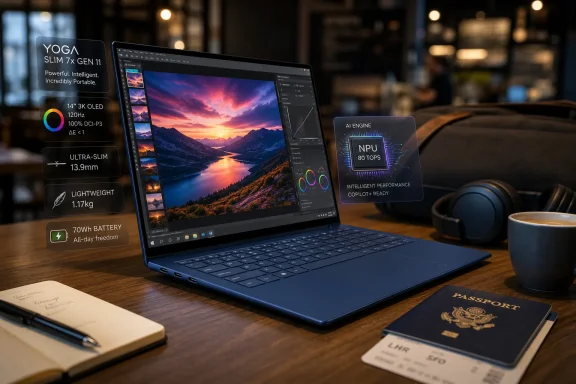
The Yoga Slim 7x Gen 11 is physically conservative, and that is probably the right choice. Trusted Reviews describes a dark blue metal chassis, a sturdy feel, and a 1.17kg weight, making it light enough for daily carry without chasing the sub-1kg bragging rights of rivals such as the Asus Zenbook A14 and Acer Swift Edge 14 AI. At 13.9mm thick, it sits firmly in modern ultraportable territory.The MacBook Air comparison is unavoidable because Lenovo appears to have made the same basic trade: prioritize thinness, battery, keyboard feel, display quality, and a clean silhouette over old-fashioned I/O abundance. That gives the Yoga Slim 7x Gen 11 an elegant simplicity, but it also makes the machine less adaptable out of the box. Three USB-C ports may be technically modern, especially when they support USB4-class connectivity, but they are not the same thing as a varied port layout.
This is where Asus has put Lenovo under pressure. Trusted Reviews notes that the Zenbook A14 offers USB-C, HDMI, USB-A, and a headphone jack in a thinner body. That comparison stings because port selection is not a philosophical debate for a traveling worker; it is the difference between giving a presentation with the adapter you remembered and giving a presentation with the adapter you forgot.
Lenovo’s answer is that the rest of the physical experience is polished. The keyboard, by the account of the review, remains a Lenovo strength: quiet, tactile, and shaped with the familiar deep-dish keycaps that have kept the company’s laptop reputation alive through years of otherwise uneven consumer designs. The large glassy trackpad also sounds appropriate for a premium ultraportable. This is not a cheap chassis wrapped around an expensive processor.
The problem is that premium Windows laptops now compete in a brutally specific way. A nice shell, a good keyboard, and a beautiful display are no longer enough to justify top-of-market pricing. Buyers want to know what was sacrificed, and in this case the sacrifice is obvious every time you reach for a USB-A drive, an HDMI cable, or wired headphones.
The OLED Screen Is the Luxury Feature That Still Feels Worth Paying For
If the Snapdragon X2 Elite is the strategic reason this laptop exists, the OLED screen is the emotional one. Trusted Reviews tested the higher-end 14-inch 2880×1800 OLED panel with a 120Hz refresh rate, measuring strong SDR brightness, effectively perfect sRGB and DCI-P3 coverage, and excellent contrast. Lenovo also advertises DisplayHDR True Black 1000-class capability on the premium panel.That combination matters more on a laptop than many spec-sheet skeptics admit. A high-refresh OLED display changes the perceived speed of the machine, not just the appearance of photos and video. Scrolling feels smoother, text rendering benefits from the high resolution, and the deep blacks make Windows 11’s modern interface look less like a collection of translucent compromises.
There is, however, one oddity in Lenovo’s configuration ladder. The base display is reportedly a 1920×1200 60Hz OLED touchscreen, while the higher-end 3K 120Hz OLED panel loses touch. That is a very Windows-laptop kind of decision: each configuration gives something up, and neither feels like the obvious universal choice. Buyers who want a sharper, smoother panel must surrender the touch capability that some Windows users still expect in a premium Yoga-branded system.
The display also helps explain the machine’s price problem. OLED panels are no longer rare in high-end laptops, but a 3K 120Hz OLED panel with wide-gamut color and high brightness still sits above the commodity tier. Lenovo is clearly positioning the top-spec Yoga Slim 7x Gen 11 as a premium productivity and creative machine, not merely a long-lasting browser with a nice keyboard.
That makes the lack of broader ports more noticeable. A screen this good invites photo work, video review, color-sensitive editing, and media consumption. Those workflows often come with cameras, external displays, storage devices, and audio gear. Lenovo gives the user the display for that world, then quietly assumes the dongle bag will handle the rest.
Battery Life Is the Argument Windows on Arm Was Built to Win
The most important number in the Trusted Reviews test is not the benchmark score. It is 19 hours and 42 minutes in the publication’s video-loop battery test at 150 nits. Lab battery tests do not map perfectly to messy human workdays, but that result puts the Yoga Slim 7x Gen 11 in the class of machines that can plausibly survive two working days and, with light use, flirt with a third.That is the promise Windows on Arm has been trying to sell for years. Not just “good battery life,” but a different relationship with the charger. The laptop becomes something you can toss in a bag with less planning, open in a meeting without battery anxiety, and use on a train or plane without immediately scanning the floor for outlets.
The 70Wh battery is doing some of the work, but Qualcomm’s platform efficiency is the bigger story. Intel and AMD have both improved dramatically in mobile efficiency, and Apple’s MacBook Air remains the benchmark for many buyers, but Qualcomm’s appeal is clearest in thin laptops that need to stay quiet and last long. Lenovo’s design leans into that pitch rather than fighting it.
Charging performance also appears practical. Trusted Reviews reports roughly 40 minutes to reach 50 percent and about 75 minutes for a full charge with the included 65W charger. That is not a headline-grabbing number, but it is exactly the kind of recovery time that makes long battery life more useful in practice. A machine that lasts all day and refuels quickly during lunch is more valuable than one that merely posts a flattering endurance figure in a chart.
The caveat is that battery tests can flatter Arm laptops when the workload is simple and native. Real-world endurance will depend on whether the user spends the day in native Arm64 apps, browser tabs, Teams calls, web dashboards, and Office documents — or in translated legacy software, external peripherals, and workloads that keep the system awake and busy. Still, the direction is clear: battery life is no longer a consolation prize for accepting Arm. It is the platform’s strongest commercial weapon.
The Compatibility Story Has Improved, but It Has Not Disappeared
The most dangerous phrase in Windows on Arm coverage is “compatibility is mostly fine.” It is often true, and it is also not the same as “compatibility is solved.” The Yoga Slim 7x Gen 11 benefits from Microsoft’s Prism translation layer and from a much healthier native Arm software ecosystem than buyers faced a few years ago, but Trusted Reviews still notes minor compatibility issues and the familiar inability to run the full PCMark 10 benchmark suite.For mainstream users, this may be nearly invisible. Microsoft 365, Chromium-based browsers, Adobe’s major creative apps, Zoom, Teams, Slack, Spotify, and many everyday utilities are either native, translated well, or available in web form. The old nightmare of buying a Windows laptop and discovering that half the normal software world is unusable is no longer an accurate description of the platform.
For IT pros and power users, the remaining edge cases still matter. VPN clients, endpoint security agents, hardware management tools, printer drivers, old accounting packages, niche engineering apps, kernel-level utilities, and game anti-cheat systems are precisely the kinds of software that turn “mostly fine” into a helpdesk ticket. A laptop can be wonderful for a reviewer’s workflow and still be a bad fit for a specific business environment.
That is not Lenovo’s fault alone. It is the structural challenge of trying to graft a new CPU architecture onto the enormous installed base of Windows software. Microsoft and Qualcomm have done the hard work of making the transition feel ordinary most of the time, but enterprise deployment is governed by exceptions. One unsupported driver can outweigh ten impressive benchmarks.
This is where WindowsForum readers should be especially skeptical of generic buying advice. If your laptop life is browser, Office, video calls, email, media, and light Adobe work, the Yoga Slim 7x Gen 11 sounds close to ideal. If your laptop is a portable control panel for weird hardware, legacy software, custom scripts, and corporate security tooling, the only responsible answer is to test your stack before standardizing on Arm.
Copilot+ Is Along for the Ride, but It Is Not the Reason to Buy
The Yoga Slim 7x Gen 11 is a Copilot+ PC, which means it has enough local AI hardware to support Microsoft’s current and future on-device Windows AI features. Qualcomm’s 80 TOPS-class NPU gives Microsoft plenty of headroom for effects such as Windows Studio camera features, generative tools in Paint and Photos, and the more controversial Recall feature in supported Windows 11 builds. Lenovo is not merely selling a fast laptop; it is selling admission to Microsoft’s AI-branded Windows roadmap.But the review makes clear that the actual laptop story is still grounded in old-fashioned virtues. The keyboard matters. The screen matters. The battery matters. The price and ports matter. Copilot+ branding may help Microsoft and OEMs organize the market, but buyers still judge laptops by the everyday friction they remove or create.
Recall remains the most politically loaded part of the Copilot+ bundle. Microsoft has revised and reworked the feature after earlier criticism, but the basic idea — a searchable local history of user activity — continues to demand trust. On a consumer laptop, that may be a settings decision. In managed environments, it is a policy conversation involving security teams, compliance officers, and user expectations.
The stronger argument for the NPU is less flashy. Local AI acceleration can make camera effects more efficient, improve background tasks without hammering the CPU, and give developers a target for future Windows features that do not require cloud round-trips. That is not as marketable as a magic assistant, but it is more plausible as a long-term platform shift.
Still, no one should buy the Yoga Slim 7x Gen 11 because of a promise that Windows AI will become indispensable later. Buy it because it is fast, efficient, light, and has a very good display. If Copilot+ becomes genuinely useful over the ownership life of the machine, that is upside — not the foundation of the purchase.
Lenovo’s Pricing Makes the Rivals Look Sharper
The tested configuration’s £1,669.99 and $1,899.99 pricing is where the Yoga Slim 7x Gen 11 stops being an easy recommendation. Trusted Reviews is right to praise the machine’s strengths, but this is a lot of money for a laptop with three USB-C ports and lingering Arm caveats. At this tier, buyers are not simply comparing performance; they are comparing excuses.The Asus Zenbook A14, as framed by Trusted Reviews, is the most direct problem. It reportedly offers similar Snapdragon X2 Elite performance, better port variety, and longer battery life at a lower UK price, though with a lower-resolution OLED panel. That is a classic ultraportable trade: Lenovo wins the display sharpness argument, Asus wins the practical travel-machine argument.
The Acer Swift Edge 14 AI complicates matters from the x86 side. With Intel Lunar Lake silicon, a high-resolution OLED display, richer ports, and a lower cited price, it offers a safer software compatibility profile for users who do not specifically want Arm. It may not match the Snapdragon machine’s exact endurance or NPU story in every respect, but it does not require the same app-compatibility homework.
Then there is Apple. The MacBook Air remains the machine every premium ultraportable is secretly arguing with, even when reviewers are discussing Windows competitors. Lenovo can match the MacBook Air’s minimalist vibe and exceed it in some display specs, but Apple’s advantage is the coherence of the whole platform: hardware, silicon, software, battery behavior, and resale value all reinforce each other. Windows OEMs have to win more of the comparison on raw features and price because they cannot rely on that same integrated halo.
Lenovo’s problem is not that the Yoga Slim 7x Gen 11 is overpriced in a vacuum. It is that the top configuration lives in a neighborhood full of excellent laptops. When a buyer is spending nearly two grand in dollars or more than sixteen hundred pounds in the UK, “lovely” is not enough. The device needs to feel like the obvious answer to a specific kind of buyer.
The Real Buyer Is a Premium Windows User Who Already Lives in the Cloud
The Yoga Slim 7x Gen 11 makes the most sense for a user whose work is modern, mobile, and mostly architecture-neutral. That means a lot of browser-based apps, Microsoft 365, Teams or Zoom, cloud storage, web development tools that behave on Arm, and creative software with native or well-translated support. This buyer wants a great screen, a great keyboard, excellent battery life, and a machine that looks and feels premium without crossing into workstation territory.It makes less sense for someone who treats a laptop as a universal adapter for the entire PC world. If your daily routine includes random peripherals, old utilities, unusual drivers, local VMs, specialized engineering tools, or games with aggressive anti-cheat systems, a conventional Intel or AMD laptop remains the safer recommendation. That may change, but platform transitions are not completed by optimism.
For sysadmins, the question is not whether the Yoga Slim 7x Gen 11 is good. It appears to be very good. The question is whether the fleet management, security tooling, application catalog, repair workflow, and support scripts are ready for another architecture. A single executive pilot machine is easy; a department-wide rollout is where assumptions get expensive.
For Windows enthusiasts, the machine is more exciting. It shows the category maturing from “interesting because it is Arm” to “interesting because it is a good laptop.” That is a major milestone. The best version of Windows on Arm is one where the architecture fades into the background, and the Yoga Slim 7x Gen 11 seems closer to that ideal than most of its predecessors.
The Yoga Slim 7x Gen 11 Forces a More Practical Arm Conversation
The useful lesson from this review is not that Lenovo has built the perfect ultrabook. It has not. The useful lesson is that the Windows on Arm conversation has moved from viability to fit, which is exactly where a maturing platform should be.- The Snapdragon X2 Elite configuration tested by Trusted Reviews appears to deliver a major performance uplift over first-generation Snapdragon X Elite laptops.
- The 3K 120Hz OLED display is one of the strongest reasons to choose Lenovo’s premium configuration over cheaper rivals.
- Battery life is excellent enough that the charger becomes less central to the daily experience.
- The three-port USB-C-only design is modern but less flexible than competing ultraportables with HDMI, USB-A, or a headphone jack.
- Arm compatibility is much better than it used to be, but specialist software, drivers, VPNs, security tools, and gaming edge cases still need verification before purchase.
- The top-spec price puts the Yoga Slim 7x Gen 11 against excellent Windows and Mac alternatives, so the best buyer is someone who specifically values its mix of OLED quality, endurance, keyboard feel, and Snapdragon efficiency.
References
- Primary source: Trusted Reviews
Published: 2026-07-03T10:10:13.719923
Lenovo Yoga Slim 7x Gen 11 Review - Trusted Reviews
The Lenovo Yoga Slim 7x Gen 11 updates its longstanding line of excellent all-round ultrabooks with quite a boost in power.www.trustedreviews.com - Related coverage: tomshardware.com
Lenovo Yoga Slim 7x review: Snapdragon X2 Elite makes its case | Tom's Hardware
A sleek ARM ultraportable that bets big on Snapdragon for all-day power and stamina.www.tomshardware.com - Related coverage: lenovo.com
- Related coverage: pcworld.com
Lenovo Yoga Slim 7x Gen 11 review: Powerful but inconsistent | PCWorld
The Lenovo Yoga Slim 7x Gen 11 has a lot going for it as a quality on-the-go machine, but its Snapdragon chip doesn’t always deliver on performance or efficiency.www.pcworld.com - Related coverage: windowscentral.com
Lenovo Yoga Slim 7x review: A top Windows choice for students | Windows Central
The new Yoga Slim 7x (Gen 11) is a premium laptop through and through, yet it starts at $1,199. Here's what you need to know before buying.www.windowscentral.com - Related coverage: notebookcheck.net
Lenovo Yoga Slim 7x Gen 11 - Notebookcheck Reviews Collection
This page provides reviews and other infos about the Lenovo Yoga Slim 7x Gen 11 of the series Yoga Slim 7x. www.notebookcheck.net
- Related coverage: techgear-guide.com
Lenovo Yoga Slim 7x (Gen 11)レビュー:Snapdragon X2 Elite搭載で$1,199.99から | Tech Gear Guide
LenovoのYoga Slim 7x (Gen 11)はQualcomm Snapdragon X2 Elite搭載の14インチ薄型ノート。$1,199.99(約18万円)から、セール時は$1,099.99。Windows Centralのレビューを解説します。techgear-guide.com - Related coverage: thurrott.com
Lenovo Yoga Slim 7x Gen-11 Review - Thurrott.com
Thanks to its Snapdragon X2 Elite underpinnings, Lenovo has hit another one out of the park with the Yoga Slim 7x.www.thurrott.com - Related coverage: psref.lenovo.com
- Related coverage: psrefstuff.lenovo.com
- Related coverage: techradar.com
Lenovo Yoga Slim 7x Review: Thought OLED was overrated? Not with this laptop - it's one of the best-looking I've ever used | TechRadar
If you want a true taste of an OLED display's offerings, the Lenovo Yoga Slim 7x should be on your radarwww.techradar.com
