

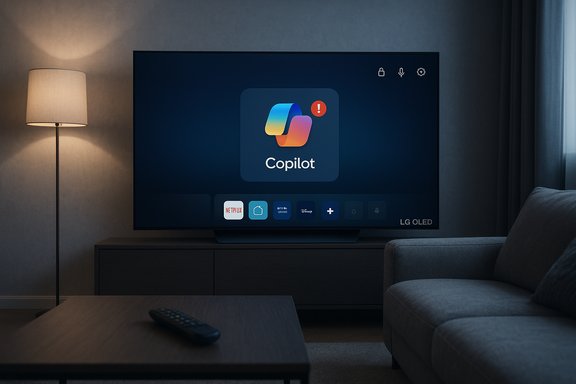
LG’s decision to push a Microsoft Copilot shortcut onto customers’ home screens via a webOS update — and then backtrack after an online outcry — exposes a fast-growing tension in the smart-TV market: manufacturers racing to ship AI features while users demand predictable control over their devices. The story is simple in outline but consequential in practice: a recent webOS firmware update added a Copilot icon to some LG TVs, the tile acted as a browser shortcut rather than a native app, owners discovered they could hide but not delete it, and LG has since said it will add a way to remove the shortcut following widespread user backlash.
Source: PCWorld LG will let TV owners remove Microsoft's Copilot app after backlash
 Background
What LG announced at CES and the AI push into TVs
At CES LG and Microsoft announced a partnership to bring “Copilot” — Microsoft’s branded AI assistant — into LG’s “AI TV” vision. The pitch framed Copilot as a convenience feature for recommendations, search, and conversational interactions tied into the living-room experience. Integrations like this are part of a broader industry trend that has already seen similar moves from Samsung and other TV makers to bake large-language-model–style assistants into their platforms.The December webOS update that sparked the uproar
In mid-December, owners of certain LG TVs noticed a new tile labeled Copilot pinned on their home screens immediately after a webOS update. That tile launched Microsoft’s Copilot interface in the TV’s built-in browser rather than acting as a native webOS app. Users quickly discovered they could move or hide the tile but not uninstall it, which is what generated the viral reaction on Reddit and broader tech press coverage.What actually happened: the facts verified
- The Copilot icon arrived on some LG TVs after a webOS update and appeared on the homescreen like other app tiles.
- LG characterizes the item not as an installed system app but as a browser shortcut that opens the Copilot web experience.
- At the time it appeared, the tile could be hidden or moved but not fully deleted from the device by users through the normal UI.
- LG has told media it will provide an update that lets users delete the shortcut icon if they wish, but the company has not publicly committed to a specific timeline for that change.
Why owners were upset
Loss of control and the perception of forced features
Smart TVs are already contentious for many owners because of bundled services, preinstalled apps, and user interfaces cluttered by retailer partnerships and advertising tiles. When a manufacturer uses an over-the-air update to put a third-party AI shortcut directly on the home screen — without an obvious uninstall path — it amplifies that frustration. Many users felt the addition was effectively forced onto devices they already own. The reaction on social platforms and specialized forums was immediate and vocal.Privacy and microphone concerns
A second layer of concern stems from privacy and sensor access. Smart TVs have microphones, cameras, and access to viewing and usage signals; adding an AI that could, in theory, ask for microphone permission to accept voice input raises instinctive privacy alarms. LG and Microsoft have emphasized that features such as microphone input require explicit user consent and that the Copilot tile only opens a web interface, but those reassurances did not fully quell user worry. The practical point remains: users want clear, easy, granular control over what third-party AI services can access.Confusion over whether it was a native integration or a web shortcut
Many users initially assumed Copilot had been deeply integrated into webOS — a native system assistant — because the tile sat beside Netflix and YouTube on the home screen. When reports clarified that it is a web shortcut, some users still found the distinction unsatisfying because the result was the same: a visible, persistent UI element they couldn’t easily remove. That gap between perception and technical reality partly explains the intensity of the backlash.Technical anatomy: web shortcut vs. native app
What a browser shortcut means in practice
A browser shortcut is a tile that points to a specific URL and opens within the TV’s web browser, not a package the OS has installed. Technically, this keeps Copilot from being a system-level process on the TV, reducing attack surface in some ways but not eliminating concerns about data flows that occur once a user interacts with the web service. Because the shortcut is added by an OTA update to the launcher configuration, it behaves like a preconfigured bookmark on the home screen.Permissions: microphone and sensors
LG has stated that microphone access and related features will only activate if the user explicitly grants permission within the browser session. That is consistent with how modern smart-TV browsers handle permissions: the browser must ask the user before granting a site access to media devices. Still, the presence of the tile may increase the likelihood that users will interact with the service and encounter permission prompts, which is the behavioral effect that triggers many privacy concerns.Why it might have been pushed via firmware
Pushing a tile via a webOS update is operationally simple for manufacturers and ensures consistent exposure of new features across a product lineup. It’s a low-friction way to drive adoption of partner services and highlight strategic alliances without waiting for users to discover the feature. But because the change modifies the system launcher, it inevitably raises questions about where to draw the line between system updates and user autonomy.Industry context: you’re not alone — Samsung and others have similar moves
When major TV makers add assistant tiles or preinstalled AI features, the consumer response often follows two tracks: curiosity from users who want new functionality, and pushback from those who view the move as bloatware or a privacy risk. Samsung integrated Microsoft Copilot into parts of its 2025 lineup and faced its own debates over presence, integration, and user control. LG’s move is the latest example of manufacturers testing how aggressively they can surface AI without triggering regulatory scrutiny or customer revolt.Legal, regulatory, and reputational implications
Consumer-rights and trust
For many consumers the issue is simple: they bought hardware and expect reasonable control over installed software. Regulators and consumer-protection bodies have historically scrutinized undisclosed or non-removable software that modifies a product’s feature set after purchase. While no explicit law currently forbids shipping a browser shortcut via an OTA update, the practice could attract attention if users argue that such updates diminish a device’s advertised functionality or privacy posture.Data and privacy law considerations
Depending on jurisdiction, the act of steering users toward a third-party AI service raises data-protection questions. If a web shortcut drives users to a service that collects personal data, the manufacturer has a responsibility to ensure users have clear, transparent information about data flows and consent mechanisms. In regions with strict privacy frameworks, regulators could be interested in whether the update sufficiently informed users about the new functionality and any data handling implications.Reputational risk for LG (and partners)
The PR cost of an avoidable backlash can outweigh short-term marketing gains. LG’s prompt announcement that it will add a deletion option demonstrates an acute awareness of that reputational risk. But repeated moves that prioritize partner exposure over user preference could degrade brand goodwill — a fragile asset in a market where device longevity and trust are selling points.Practical guidance for affected TV owners right now
- Hide the Copilot tile from the home screen using the launcher’s “hide” or “move” functionality; it prevents accidental activation but does not delete the underlying shortcut.
- If you prefer not to interact with Copilot at all, disconnecting the TV from the internet will prevent the web interface from loading, though that also disables streaming and other online services.
- For more advanced users: network-level controls (router or DNS filtering) can block access to specific endpoints, but that requires technical know-how and may violate service agreements or warranty terms. Exercise caution and avoid instructions that could damage devices or break terms of service. (This is a general observation; precise blocking steps vary by network and model and were not uniformly documented in public reports.
Critical analysis: strengths, risks, and missed opportunities
The strengths of the approach
- Rapid availability: shipping a web shortcut lets manufacturers expose new services quickly to a broad install base without waiting for full native app development. This reduces time-to-market for partnership features and eases rollout complexity.
- Lower integration risk: because it’s a browser-based service, stability and compatibility risks are lower than with deeply embedded system apps. The service can be updated server-side without further TV firmware patches.
The risks and shortcomings
- Perceived coercion: adding visible UI elements without a deletion option feels like an imposition and erodes user trust. That reaction can cascade into broader skepticism about future AI features.
- Privacy friction: even when microphone access requires consent, surfacing an assistant tile increases the chance users will engage and potentially grant permissions, raising the bar for responsible data-handling communication.
- Ambiguity about permanence: shipping something that looks like an app but is actually a shortcut creates confusion about what users can and cannot control; that ambiguity itself is a reputational risk.
Missed opportunities
LG could have preempted the backlash by:- Communicating the change before the OTA rollout with a choice-based prompt (opt-in/out) in the update notes.
- Providing a clear, immediate “remove tile” option via the update settings or launcher UI at the time of rollout.
- Publishing a short privacy explainer that outlines exactly what data Copilot would access and how users control permissions.
What LG (and other TV makers) should do next
- Ship an immediate firmware update that provides a one-tap deletion option for the Copilot tile and similar future additions. That’s the minimal, reputationally restoring step.
- Improve update transparency by including an “opt in to new services” checkbox during major UI or feature updates and putting clear messaging in both the interface and release notes.
- Publish concise privacy and permissions documentation for any AI services surfaced on the home screen, explaining data flow and where to control sensor permissions.
- Reassess the practice of adding tiles via OTA for third-party services; prefer opt-in installation flows or temporary promotional tiles that expire unless accepted by the user.
Broader implications for the smart-home AI era
This incident highlights a recurring tension in connected-device design: manufacturers and platform partners chase engagement metrics and strategic alignments, while owners expect stable, personally controlled appliances. If the industry normalizes preinstalled AI shortcuts and baked-in assistant tiles, the living room could become a new battleground for data-mining and third-party exposure. That makes transparent consent, granular controls, and explicit user choice not just good privacy practice but a competitive differentiator. Regulators are watching how companies add and surface AI capabilities to consumer devices, and consumer backlash can catalyze policy attention. Companies that proactively respect user autonomy will likely avoid both the trust erosion and regulatory heat that follow hard-pushed integrations.Conclusion
LG’s quick public concession to allow deletion of the Microsoft Copilot shortcut was the right PR move, but it exposed a core tension that will only intensify as TV makers weave more AI features into living-room devices. The core technical choice — a web shortcut pushed through a webOS update — is defensible from an engineering standpoint, but the rollout overlooked the user expectation of control over device software. Manufacturers must treat on-device UI changes as a consumer-rights issue as much as a product-marketing opportunity. Absent clear opt-in mechanisms, robust privacy explanations, and straightforward removal options, every future AI tile risks provoking the same kind of backlash — and that outcome undermines the very adoption those partnerships are meant to accelerate.Source: PCWorld LG will let TV owners remove Microsoft's Copilot app after backlash
