

LG owners woke up to a new entry on their home screens this month after a routine webOS over‑the‑air update quietly placed Microsoft Copilot on many sets — and for a large number of users the tile behaved like a system item that could be hidden but not uninstalled, prompting a broad backlash over device ownership, privacy, and how AI is being pushed onto consumer hardware.
LG and Microsoft spent much of 2025 positioning Copilot as a cross‑device assistant that would move from PCs and mobile to the living room, and OEM roadmaps shown at CES signaled that Copilot would be a headline feature for many 2025 smart TVs. The December webOS rollout made that promise tangible — but the method of delivery created the controversy.
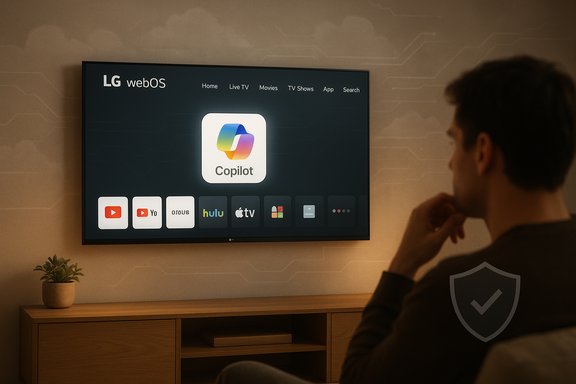
What owners actually observed was straightforward and repeatable: after the update a Copilot tile appeared on the home ribbon or the AI section of webOS. Launching the tile typically opens a Copilot web interface (a browser‑hosted Copilot page, not a locally running large language model), and the TV’s app editor in many reported cases offered only Hide or Disable, not Uninstall. Users who performed factory resets often found the tile restored afterward, which strongly suggests the tile was delivered as a privileged system component or included in a firmware image.
What we can verify:
Practical remedies exist for both sides. LG can ship the promised delete option, publish model‑level telemetry disclosures, and default new AI features to privacy‑minimal settings. Microsoft and partners can insist on user‑first rollout practices. Consumers, for their part, can mitigate exposure with settings changes, network segmentation, or by using external streamers when they want predictable, independent control.
This moment should nudge the industry toward a standard that treats AI features on shared household devices as opt‑in enhancements backed by clear documentation — not as mandatory, permanent fixtures of hardware people already own.
Source: Chronik.fr LG TV update installs Microsoft Copilot that can't be removed: users say it harvests their data - chronik.fr
 Background / Overview
LG and Microsoft spent much of 2025 positioning Copilot as a cross‑device assistant that would move from PCs and mobile to the living room, and OEM roadmaps shown at CES signaled that Copilot would be a headline feature for many 2025 smart TVs. The December webOS rollout made that promise tangible — but the method of delivery created the controversy.What owners actually observed was straightforward and repeatable: after the update a Copilot tile appeared on the home ribbon or the AI section of webOS. Launching the tile typically opens a Copilot web interface (a browser‑hosted Copilot page, not a locally running large language model), and the TV’s app editor in many reported cases offered only Hide or Disable, not Uninstall. Users who performed factory resets often found the tile restored afterward, which strongly suggests the tile was delivered as a privileged system component or included in a firmware image.
What changed after the webOS update
The visible change
- A Copilot icon or tile appeared automatically on affected LG webOS TVs.
- The tile sits alongside apps like Netflix and YouTube on the home ribbon and in some cases in a new AI section.
- Launching it opens a web‑based Copilot interface inside the TV’s browser; mic access is gated by on‑screen permission prompts in that context.
The removal problem
- The app‑management UI often lacks a trash‑can/uninstall affordance for Copilot; only hide/disable is shown.
- In multiple community tests the item reappeared after a factory reset, consistent with firmware‑baked provisioning or a privileged system package.
Technical anatomy: why the tile felt “unremovable”
Smart‑TV platforms like webOS support multiple delivery models for software and UI components. Three common models are useful to understand:- User‑installed Content Store apps (removable via the app manager).
- System/privileged packages (installed outside the user sandbox, often only hideable or disableable).
- Firmware‑baked assets (included in the firmware image delivered by FOTA and restored by factory resets).
Web shortcut vs native app
LG and Microsoft clarified to reporters that, in many affected cases, Copilot is surfaced as a browser‑hosted shortcut rather than a fully native webOS application. That means the heavy model inference and data handling occur in Microsoft’s cloud; the TV is a thin client. From a security and performance perspective this reduces on‑device resource pressure and local model risks, but it shifts the privacy and telemetry boundary toward cloud endpoints and vendor servers. The packaging decision (system tile vs store app) is what primarily determined the removal friction, not whether Copilot runs natively.Privacy and data‑collection concerns: grounded facts and open questions
The strongest driver of anxiety in community threads was not merely that the tile appeared — it was the fear that adding a Copilot entry would expand the TV’s telemetry footprint or make the device a vector for additional profiling and advertising.What we can verify:
- The interface being pushed in many reports is a web‑hosted Copilot page; microphone activation for voice interactions is said by LG to require explicit user consent when the web page requests it. This means the assistant should not be always listening by virtue of being a browser shortcut.
- LG’s platform historically offers features such as Live Plus (automatic content recognition / ACR) and ad personalization that can be enabled to surface personalized recommendations and ads; those features and their defaults vary by model and region. ACR-type systems can increase the telemetry richness available on a TV.
- Claims that the Copilot tile “harvests” household data indiscriminately are not proven by the available public technical reporting. Community posts express reasonable suspicion, but public vendor statements and the observable architecture (a web shortcut) do not demonstrate silent audio capture beyond user-initiated interactions. Treat broad “data harvesting” claims as allegations until vendor telemetry documentation or independent forensic analysis confirms specific data flows tied to Copilot.
User reaction: scale, tone, and features users cited
The story rapidly reached mainstream visibility after a Reddit post showing the Copilot tile gained massive engagement; dozens of online outlets then amplified user screenshots and firsthand accounts. Reaction ranged from mild irritation to outright anger, with many users saying their central gripe was lack of choice rather than technical failure. Some owners responded practically by isolating TVs from the network or returning to external streaming devices to avoid native smart UX updates. Key user observations reported in thread aggregations:- Many said the tile appeared silently through automatic updates.
- Several owners who performed factory resets reported the Copilot tile returning.
- A subset of users said they encountered related AI settings (ACR/Live Plus) in privacy menus, sharpening privacy concerns.
Vendor responses and timeline
LG publicly explained that the Copilot tile is a browser shortcut that opens Microsoft’s Copilot web experience, and emphasized that microphone input is activated only with explicit user consent in the browser session. Facing consumer backlash, LG said it would provide a future webOS update that allows users to delete the shortcut icon, although at the time of reporting the company did not publish a firm rollout date for that fix. Several outlets independently confirmed LG’s response while noting the promised delete option is still pending. Microsoft’s position in coverage focused on enabling Copilot across devices; detailed telemetry or data‑flow specifications for TV deployments have not been widely published in a model‑by‑model telemetry FAQ at the time of the initial backlash. That gap — combined with the packaging choice — is a major part of the trust problem.Practical guidance: how owners can respond now
For owners who find the tile intrusive or who want to reduce telemetry exposure, practical mitigations include:- Use the Home Screen’s Edit/App Manager and select Hide to remove daily visibility. This does not uninstall the component but reduces immediate annoyance.
- Review and disable ACR/Live Plus, ad personalization, and other data‑sharing toggles in Settings → Privacy/Personalization. This reduces the TV’s surface for content‑recognition signals.
- If privacy is paramount, put the TV on a separate guest Wi‑Fi network, a router‑level blocklist, or use DNS filtering (Pi‑hole) to restrict unwanted endpoints — but be aware this can break legitimate features and may prevent firmware/security updates.
- Avoid signing in with vendor or ecosystem accounts unless necessary; account linkage can increase cross‑service telemetry linking.
- Use an external streaming device (Roku, Apple TV, Chromecast, Fire TV) and disable the TV’s smart features for a predictable, user‑controlled experience.
- Open Settings → Apps → Edit App List; choose Hide for Copilot.
- Open Settings → Privacy → Turn off Live Plus / Content recognition and ad personalization.
- If technically comfortable, isolate the set on a segmented network or block known Copilot endpoints at the router level.
- Monitor LG’s webOS updates and apply the deletion update once LG ships it.
Industry implications and regulatory risks
This incident is more than a single UI misstep; it illustrates broader tensions in modern consumer electronics:- Business incentives vs user agency: OEMs and platform partners have clear incentives to maximize exposure for partner services (drive adoption metrics, enable cross‑service linking, and increase ad personalization value). Those incentives frequently collide with buyers’ expectations of device ownership and control.
- Transparency requirements: When a post‑sale update adds system‑level features, clear release notes, visible opt‑outs, and durable deletion mechanisms should be standard practice to avoid trust erosion.
- Regulatory scrutiny: Civil enforcement and state actions targeting undisclosed TV telemetry mean vendors risk legal exposure if updates materially change data collection without clear consent and documentation. Regulators have already scrutinized ACR/telemetry practices in TVs; adding AI access points raises the profile of those concerns.
Recommendations for LG, Microsoft and other OEMs
To restore trust and set an industry standard, vendors should adopt a set of practical, prioritized actions:- Publish a model‑by‑model rollout timeline and technical release notes explaining what the update changes, how it’s implemented (web shortcut vs native app), and exactly which settings and telemetry endpoints are affected.
- Ship a durable deletion mechanism for third‑party shortcuts that persists across factory resets or provide a documented rollback path for affected firmware.
- Release a clear telemetry FAQ listing endpoints, what metadata is collected, retention windows, and how account sign‑ins link data across services.
- Default to privacy‑minimal settings for new AI features and require explicit, granular consent (with visible indicators) before enabling microphone or ACR use.
- Improve in‑OS update communication: present an explicit, one‑click opt‑out or removal option during or immediately after an update that adds new user‑facing services.
Strengths of the Copilot integration — why OEMs want it
It is important to acknowledge the legitimate product case for Copilot on TVs:- Convenience and discovery: A conversational assistant can make content search, recap, and accessibility features faster and more intuitive on large screens.
- Ecosystem continuity: For households that already use Microsoft services, Copilot on the TV can create a seamless cross‑device experience.
- Low hardware impact: A browser‑hosted Copilot avoids heavy local inference and enables a consistent experience across lower‑powered TV SoCs.
Risks and why this rollout backfired
The rollout missteps expose several predictable risks:- Loss of user agency: Packaging a partner service as a privileged or firmware‑baked component undermines a buyer’s expectation that the device remains under their control.
- Privacy signal amplification: Even if Copilot itself is a web shortcut, linking an assistant to ACR or personalization features increases the telemetry profile available to ecosystems and advertisers.
- Trust erosion: Silent or poorly explained post‑sale changes reduce confidence in firmware updates and may push users toward non‑smart alternatives or third‑party streamers.
- Regulatory exposure: If telemetry or ACR is enabled by default or if opt‑out flows are opaque, vendors may attract enforcement actions or class‑action litigation.
Closing assessment
The Copilot on LG TV episode is a case study in how delivery and governance matter at least as much as capability when rolling AI into everyday devices. The assistant itself — a browser‑hosted Copilot — can offer useful assistance on the big screen. The core mistake was how it was delivered: silently, as a persistent system tile on many sets, with no durable uninstall mechanism and insufficient upfront transparency about telemetry and consent.Practical remedies exist for both sides. LG can ship the promised delete option, publish model‑level telemetry disclosures, and default new AI features to privacy‑minimal settings. Microsoft and partners can insist on user‑first rollout practices. Consumers, for their part, can mitigate exposure with settings changes, network segmentation, or by using external streamers when they want predictable, independent control.
This moment should nudge the industry toward a standard that treats AI features on shared household devices as opt‑in enhancements backed by clear documentation — not as mandatory, permanent fixtures of hardware people already own.
Source: Chronik.fr LG TV update installs Microsoft Copilot that can't be removed: users say it harvests their data - chronik.fr
