

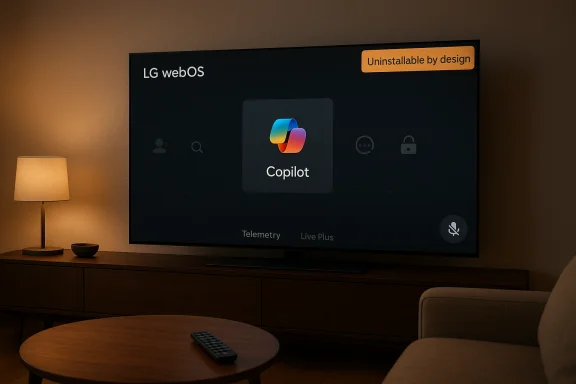
LG’s recent webOS push that planted Microsoft Copilot on many owners’ televisions — initially as a pinned, apparently “non‑removable” tile — has become a live case study in how post‑sale updates, platform design, and AI rollout practices collide with user expectations about device ownership, privacy, and control. What began as a viral Reddit screenshot and a wave of annoyance quickly prompted LG to confirm the Copilot tile is a web shortcut, clarify microphone behavior, and promise a future update that will let people delete the icon — but the episode leaves open hard questions about firmware delivery, default settings, and what “opt‑in” should mean for AI on the big screen.
Source: Thurrott.com Microsoft Copilot LG TV - Thurrott.com
 Background
The CES promise and industry context
Microsoft positioned Copilot as a cross‑platform conversational assistant long before TVs entered the picture, and at CES 2025 major TV OEMs — notably LG and Samsung — announced plans to surface Copilot on 2025‑era smart TVs as part of an “AI TV” push. The idea was straightforward: add a voice‑driven, conversational layer for content discovery, show recaps, and quick queries on a large screen, and integrate Copilot with each vendor’s platform features and remote control experiences. Early previews and marketing materials framed Copilot as a useful enhancement to discovery and accessibility on the living‑room TV.Two different vendor approaches
Samsung and LG approached integration differently. Samsung shipped a staged, documented rollout on Tizen with a dedicated remote mic button and a more “native” presentation. LG’s public messaging emphasized Copilot as part of a broader webOS “AI TV” strategy and an AI‑branded remote experience, but did not publish the same kind of public, staged rollout schedule. That difference in ship‑strategy matters because it shaped how the Copilot presence would appear on customers’ sets when the code actually reached devices.What happened, step by step
The update and the discovery
In mid‑December 2025, many LG owners found a new Copilot tile on their webOS home ribbon after a routine over‑the‑air firmware update. A Reddit post showing the tile quickly went viral, accumulating tens of thousands of votes and prompting widespread user reports and screenshots. Owners described the tile as being pinned among streaming apps — but unlike third‑party apps they could usually delete, Copilot lacked a standard “uninstall” affordance in the TV’s app‑management UI. In many reported cases, hiding was possible, but deleting was not; in some reports a factory reset restored the tile, an indicator the component may have been provisioned as part of the system image rather than installed as a removable store app.How the tile actually behaves
Investigations by reporters and community members reveal the Copilot entry on affected LG sets functions as a web shortcut that opens Microsoft Copilot in the TV’s built‑in browser rather than a fully native, locally executed webOS app. LG later told the press the tile is a convenience shortcut and not an application embedded in the OS. Still, because the shortcut was delivered through a firmware update and packaged in ways that prevented the usual uninstall flow, the practical effect felt like a permanent addition on many devices.The backlash and vendor response
User outrage focused less on Copilot’s capabilities and more on the surprise and the lack of an obvious uninstall path. That reaction pushed LG to publicly acknowledge the problem and promise a change: the company said it “respects consumer choice” and will add a true delete option for the Copilot shortcut in a future webOS update. LG also emphasized microphone and voice features require explicit user consent. The pledge to add a removal option calmed some immediate complaints, but left timing and technical details open.Technical anatomy: shortcut, system tile, or firmware component?
Three packaging models and why they matter
- System/privileged package: software installed outside the normal store sandbox and flagged as a system app. These are often non‑removable because other system services may depend on them.
- Firmware‑baked component: code included in the factory image pushed by a FOTA (firmware‑over‑the‑air) update; a factory reset restores firmware defaults, including baked‑in items.
- Store app / user‑installed package: the typical removable app downloaded through the TV’s app store and fully controllable by the user.
Why using a web shortcut matters (and what it doesn’t)
A web shortcut has practical implications:- Pros: rapid rollout (no complex native integration), simpler updates for the web experience, and potentially easier rollback for the vendor.
- Cons: different permission and telemetry characteristics than a native integration, ambiguous lifecycle management (is it a removable application or a system provisioning?, and user expectations mismatch if it’s pushed as a persistent tile.
Privacy, security, and data‑use concerns
Immediate user worries
Owners and privacy advocates voiced concerns about:- Microphone activation and accidental audio capture
- Automatic enabling of content‑recognition features (e.g., Live Plus) that track what’s on screen for recommendations and advertising
- Hidden telemetry endpoints or new data‑collection flows introduced by the update
- The precedent of vendors adding third‑party services to devices after sale without an explicit opt‑in process
What is confirmed vs. what remains unverified
- Confirmed: Copilot appeared on many LG TVs after a webOS update; the tile often lacked an uninstall option and acted as a web shortcut; LG has promised to add a delete option. These points are corroborated by multiple reporters and the vendor’s public comments.
- Not (yet) confirmed: covert audio capture, undisclosed telemetry endpoints, or creative new server‑side tracking introduced specifically by the Copilot tile. Independent security analyses and packet captures would be needed to confirm whether the update introduced new telemetry. Security researchers and privacy groups are likely to inspect traffic and firmware images; until that work publishes, claims about hidden telemetry should be treated as potential risks rather than established facts.
Strengths and potential benefits
What Copilot on a TV can legitimately offer
- Improved content discovery: conversational search and context aware recaps can help users find shows or skip spoilers.
- Accessibility and convenience: voice interactions and show summarization provide value for users with mobility or reading constraints.
- Ecosystem value for Windows users: integration with Microsoft accounts, Xbox cloud gaming stories, or cross‑device continuity could be helpful for users deep in Microsoft’s ecosystem.
Risks and downsides (beyond the immediate UX annoyance)
- Erosion of user control: shipping post‑sale changes that can’t be easily removed undermines consumer expectations of ownership and control.
- Privacy creep: default enabling of recognition features or aggressive pre‑provisioning raises long‑term questions about acceptable defaults on devices that live in private spaces.
- Trust damage: forcing AI features onto already sold hardware can damage reputation and make owners distrust vendor updates.
- Regulatory attention: repeated “forced” installs of third‑party services on consumer devices can attract scrutiny from consumer protection agencies that increasingly treat digital defaults as subject to regulation.
Practical guidance for owners — what you can do now
If you own an LG webOS TV and are concerned about the Copilot tile or related settings, here are practical, verifiable steps to regain control while LG issues a formal removal update.- Check the tile management options first:
- Use the TV’s Edit/App Manager flow to hide the Copilot tile from the home ribbon if you don’t want to see it frequently. Hiding is commonly available even when delete isn’t.
- Disable content recognition and personalization features:
- Navigate to Settings > General > Additional Settings (or the similarly named section on your model) and turn off Live Plus or ad personalization options. Several reports identify this path to disable on‑screen recognition features.
- Don’t sign into Copilot or Microsoft accounts on the TV:
- If you avoid signing in, personalization won’t attach to your account and microphone features won’t be activated (LG says in‑browser microphone requires explicit consent).
- Network segmentation and DNS blocking (for advanced users):
- Put the TV on an isolated guest Wi‑Fi network or use a Pi‑hole / DNS blocking solution to limit which domains the TV can reach. Some power users have reported success blocking specific LG update domains to prevent future unwanted pushes. Use this technique cautiously — blocking update domains can prevent security fixes and app updates. Community reports list domains commonly associated with LG updates and services, but blocking should be a last resort.
- Consider an external streaming device:
- If you want a minimal, controllable smart platform, use an external streamer (Roku, Apple TV, Fire TV, Shield, etc. and keep the TV offline or restrict its network access. This gives you control over the app surface you use while retaining the TV purely as a display.
- Monitor vendor communications and firmware notes:
- LG has pledged to add a delete option — watch for that update and the accompanying release notes before taking more intrusive measures like firmware downgrades or blocking updates indefinitely.
What vendors and regulators should learn
- Design for explicit opt‑in: if a feature requires access to private sensors (microphones, camera) or expands telemetry, it should be opt‑in by default with transparent choices at first run.
- Document update mechanics: ship notes should clearly tell owners when firmware updates will add system‑level tiles or services and what the uninstall path will be.
- Offer meaningful user control: hiding is not enough when a factory reset or update restores a service — deletion and setting persistence across resets matter.
- Preserve the update‑vs‑feature contract: hardware purchased by a consumer should not silently convert into a new platform quadrant without obvious, immediate exit ramps.
Critical analysis and verdict
LG’s reversal — promising to let users delete the Copilot shortcut after a wave of complaints — is the right move from a product‑management and ethical standpoint, but it is a narrow corrective for a broader design problem. The benefits of conversational AI on TVs are real for many users, but the rollout highlights several failures:- Communication failure: the absence of a clear consumer‑facing announcement about pushing Copilot to existing TVs created an avoidable surprise.
- Packaging mistake: using firmware provisioning to place a web shortcut that behaves as a non‑removable system tile violated user expectations about removable apps.
- Privacy optics: even if microphone functionality requires consent, the simultaneous surfacing of Live Plus and a pinned AI tile creates legitimate concerns about default data collection.
Final takeaways
- The Copilot‑on‑LG episode is an instructive snapshot of modern platform tensions: the technical ability to push cloud AI to existing devices collides with long‑standing expectations about ownership and consent.
- LG’s promise to provide a deletion option is a positive step, but owners should remain cautious: watch firmware release notes, disable personalization features, and use network or device‑level workarounds if you value minimal tracking.
- For the industry, the lesson is clear: how a feature is delivered matters at least as much as what the feature does. Respectful defaults, transparent permissions, and user‑first uninstall controls are essential if AI is to be broadly adopted without eroding consumer trust.
Source: Thurrott.com Microsoft Copilot LG TV - Thurrott.com
