

LibreOffice is the free, open-source office suite from The Document Foundation that runs on Windows, macOS, and Linux, offering Writer, Calc, Impress, Draw, Base, and Math without a Microsoft 365 or Google Workspace subscription. That simple fact is more disruptive than it sounds. In an era when productivity software increasingly arrives wrapped in cloud accounts, AI prompts, telemetry, and recurring fees, LibreOffice remains stubbornly local, portable, and user-controlled. Its weakness is not that it is obsolete; its weakness is that it asks users to remember office software can still be software.
The modern office suite has become less a product than a habitat. Microsoft 365 is no longer just Word, Excel, and PowerPoint; it is identity, storage, Teams, Copilot, SharePoint, compliance tooling, and a licensing model that encourages organizations to stay put. Google Workspace is similarly sticky, binding documents to browser sessions, Drive permissions, Gmail identities, and collaboration habits that are hard to unwind once a team has standardized on them.
LibreOffice challenges that model by being almost boringly direct. You install it, open a document, edit it, save it, and leave. There is no subscription tier to decode, no administrative dashboard to tolerate, and no cloud account required before the blank page appears.
That sounds quaint until you consider how many users do not actually need the sprawling collaboration machinery bundled into paid office platforms. A novelist, student, researcher, small business owner, local nonprofit, retiree, or home lab enthusiast may need word processing and spreadsheets far more than they need an enterprise content graph. LibreOffice’s great argument is that the baseline office job never became complicated enough to justify renting the tools forever.
The suite’s default file format is OpenDocument Format, an open standard designed to outlive any one vendor’s product strategy. That matters because office documents are not disposable artifacts. Contracts, policies, theses, manuals, invoices, and family archives often need to remain readable long after a login expires or a subscription lapses.
LibreOffice also reads and writes Microsoft Office formats, including DOCX, XLSX, and PPTX. That compatibility is the hinge on which the whole proposition turns. If LibreOffice could not function in a Microsoft-shaped document world, it would be a principled island; because it can, it becomes a practical alternative.
Compatibility, however, is not magic. Heavily formatted Word files, macro-laden Excel workbooks, and corporate templates that lean on obscure Office behavior can still expose the edges. LibreOffice is good enough for a vast amount of daily work, but it is not a perfect drop-in replacement for every Microsoft-dependent workflow.
That distinction has grown sharper as productivity suites absorb AI features. Microsoft has pushed Copilot throughout Microsoft 365, while Google has woven Gemini into Workspace. These systems can be useful, but they also change the emotional contract between user and application: the document is no longer merely opened by software; it may be interpreted, summarized, suggested against, indexed, or routed through services whose boundaries ordinary users rarely inspect.
LibreOffice’s privacy story is simpler because its default architecture is simpler. It runs locally. It does not require a sign-in. It does not need to upload your draft to a remote system to justify its existence.
That is not merely ideological. Journalists, lawyers, researchers, activists, public-sector workers, and anyone handling sensitive material have reasons to prefer tools that do less by default. In security, boring is often a virtue.
The current release cadence also undercuts the idea that LibreOffice is frozen in amber. Recent versions have continued to improve Microsoft Office compatibility, performance, spreadsheet functions, interface polish, accessibility, and export behavior. These are not the kinds of changes that produce flashy launch videos, but they are exactly the work that determines whether an office suite remains usable year after year.
This is the part many casual comparisons miss. LibreOffice does not need to beat Microsoft at Microsoft’s own platform game to matter. It needs to remain good enough, trustworthy enough, and independent enough to keep a viable exit door open.
That exit door has public value. Even users who never install LibreOffice benefit from the existence of a serious non-subscription office suite, because it pressures the market not to treat document editing as a solved monopoly.
But that is not the same as failure. LibreOffice is strongest when the document is the work product, not merely a node inside a larger collaboration system. Reports, letters, academic papers, invoices, slide decks, budgets, offline spreadsheets, and long-form drafts are its natural territory.
The danger is evaluating LibreOffice only by asking whether it can impersonate Microsoft 365 for the most complex enterprise cases. That is like judging a bicycle because it cannot tow a freight trailer. The more relevant question is how many users have been sold a freight trailer when they only needed to get across town.
For Windows users in particular, LibreOffice occupies a useful middle ground. It is familiar enough to avoid the culture shock of a minimalist web editor, but independent enough to avoid the gravitational pull of a cloud suite. That makes it especially attractive on secondary PCs, offline machines, lab systems, family devices, and older hardware where a full Microsoft subscription feels excessive.
That is not a casual replacement for Google Docs for everyone. Self-hosting has a cost, even when the software is free. Someone must operate the server, handle updates, configure access, protect backups, and understand the difference between a weekend experiment and a dependable collaboration service.
Still, the existence of that path matters. It turns LibreOffice from a solitary desktop alternative into part of a broader sovereignty argument: individuals and organizations can decide where documents live, who administers them, and what trade-offs they will accept. That does not make the open-source route effortless, but it makes it available.
For home lab users and small organizations already running Nextcloud, the proposition is especially interesting. At that point, office documents become another service in a stack the owner controls. The benefit is not just avoiding a subscription; it is avoiding dependency on another company’s roadmap.
A Microsoft 365 subscription may be reasonable for one person and indispensable for a business. Yet subscriptions have a way of becoming the default answer to every computing problem. Music, storage, password management, note-taking, design, video editing, email, VPNs, accounting, and productivity all want a monthly claim on the user’s budget.
LibreOffice interrupts that pattern. It says that one of the oldest categories of personal computing does not have to be financed indefinitely. You can still acquire a tool, install it, and use it without a renewal date hanging over the task.
That is not nostalgia. It is a useful counterweight to the assumption that every durable software category must become a service. Some work benefits from constant cloud mediation; some work just needs a reliable local application.
Administrators should think about it the same way they think about alternative browsers, PDF readers, imaging tools, and rescue utilities. A monoculture is convenient until it is not. Licensing problems, account lockouts, outages, policy changes, budget cuts, and privacy requirements all look less dramatic when there is a competent alternative already tested.
LibreOffice also gives IT teams a cleaner option for machines that do not justify paid Office licensing. Kiosk PCs, training labs, shared community systems, air-gapped environments, and temporary deployments often need document handling without the full weight of Microsoft 365. In those contexts, LibreOffice is not a compromise; it is often the more proportionate tool.
The same logic applies at home. A family PC should not need an enterprise productivity subscription just so someone can open a school worksheet, edit a résumé, or make a simple budget. LibreOffice restores a sense of scale.
But that is precisely why its persistence is important. LibreOffice is not trying to be the operating layer for your entire work life. It is trying to be an office suite.
That restraint is almost radical now. Microsoft and Google are racing to make productivity software feel ambient, predictive, and deeply integrated with identity and AI. LibreOffice’s pitch is narrower: your files, your machine, your formats, your choice.
In a healthier software market, that would not be a rebellious stance. It would be one of several normal options. The fact that it now feels unusual says more about the subscription economy than it does about LibreOffice.
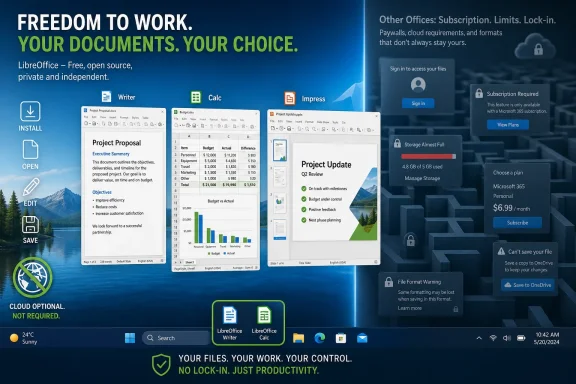 LibreOffice Makes the Subscription Era Look Less Inevitable
The modern office suite has become less a product than a habitat. Microsoft 365 is no longer just Word, Excel, and PowerPoint; it is identity, storage, Teams, Copilot, SharePoint, compliance tooling, and a licensing model that encourages organizations to stay put. Google Workspace is similarly sticky, binding documents to browser sessions, Drive permissions, Gmail identities, and collaboration habits that are hard to unwind once a team has standardized on them.LibreOffice challenges that model by being almost boringly direct. You install it, open a document, edit it, save it, and leave. There is no subscription tier to decode, no administrative dashboard to tolerate, and no cloud account required before the blank page appears.
That sounds quaint until you consider how many users do not actually need the sprawling collaboration machinery bundled into paid office platforms. A novelist, student, researcher, small business owner, local nonprofit, retiree, or home lab enthusiast may need word processing and spreadsheets far more than they need an enterprise content graph. LibreOffice’s great argument is that the baseline office job never became complicated enough to justify renting the tools forever.
The Old Desktop Suite Still Solves the Work Most People Actually Do
LibreOffice’s app lineup is broad in the old-school sense. Writer handles documents, Calc handles spreadsheets, Impress handles presentations, Draw handles diagrams and vector graphics, Base handles databases, and Math handles formulas. That roster is not glamorous, but it is complete in a way many “free” cloud tools are not.The suite’s default file format is OpenDocument Format, an open standard designed to outlive any one vendor’s product strategy. That matters because office documents are not disposable artifacts. Contracts, policies, theses, manuals, invoices, and family archives often need to remain readable long after a login expires or a subscription lapses.
LibreOffice also reads and writes Microsoft Office formats, including DOCX, XLSX, and PPTX. That compatibility is the hinge on which the whole proposition turns. If LibreOffice could not function in a Microsoft-shaped document world, it would be a principled island; because it can, it becomes a practical alternative.
Compatibility, however, is not magic. Heavily formatted Word files, macro-laden Excel workbooks, and corporate templates that lean on obscure Office behavior can still expose the edges. LibreOffice is good enough for a vast amount of daily work, but it is not a perfect drop-in replacement for every Microsoft-dependent workflow.
The Real Divide Is Not Features, But Control
The MakeUseOf argument lands because it frames LibreOffice less as a budget substitute and more as a control layer. The key distinction is not whether Writer’s toolbar feels exactly like Word’s ribbon. It is whether your document must pass through someone else’s cloud before you can do ordinary work.That distinction has grown sharper as productivity suites absorb AI features. Microsoft has pushed Copilot throughout Microsoft 365, while Google has woven Gemini into Workspace. These systems can be useful, but they also change the emotional contract between user and application: the document is no longer merely opened by software; it may be interpreted, summarized, suggested against, indexed, or routed through services whose boundaries ordinary users rarely inspect.
LibreOffice’s privacy story is simpler because its default architecture is simpler. It runs locally. It does not require a sign-in. It does not need to upload your draft to a remote system to justify its existence.
That is not merely ideological. Journalists, lawyers, researchers, activists, public-sector workers, and anyone handling sensitive material have reasons to prefer tools that do less by default. In security, boring is often a virtue.
Open Source Is Not the Same as Abandoned
One lingering stereotype around open-source desktop software is that it is either half-finished or maintained by a heroic loner on borrowed time. LibreOffice does not fit that caricature. It is a mature project with predictable releases, maintenance updates, documentation, translators, testers, and a development community organized around The Document Foundation.The current release cadence also undercuts the idea that LibreOffice is frozen in amber. Recent versions have continued to improve Microsoft Office compatibility, performance, spreadsheet functions, interface polish, accessibility, and export behavior. These are not the kinds of changes that produce flashy launch videos, but they are exactly the work that determines whether an office suite remains usable year after year.
This is the part many casual comparisons miss. LibreOffice does not need to beat Microsoft at Microsoft’s own platform game to matter. It needs to remain good enough, trustworthy enough, and independent enough to keep a viable exit door open.
That exit door has public value. Even users who never install LibreOffice benefit from the existence of a serious non-subscription office suite, because it pressures the market not to treat document editing as a solved monopoly.
Microsoft Office Compatibility Is a Bridge, Not a Passport
The most honest case for LibreOffice includes its limits. If your company lives inside Excel macros, Power Query pipelines, SharePoint workflows, sensitivity labels, and Teams meetings, LibreOffice will not replicate that environment with a single installer. Nor will it make Google Docs-style link sharing feel frictionless for clients who expect a browser tab and a comment thread.But that is not the same as failure. LibreOffice is strongest when the document is the work product, not merely a node inside a larger collaboration system. Reports, letters, academic papers, invoices, slide decks, budgets, offline spreadsheets, and long-form drafts are its natural territory.
The danger is evaluating LibreOffice only by asking whether it can impersonate Microsoft 365 for the most complex enterprise cases. That is like judging a bicycle because it cannot tow a freight trailer. The more relevant question is how many users have been sold a freight trailer when they only needed to get across town.
For Windows users in particular, LibreOffice occupies a useful middle ground. It is familiar enough to avoid the culture shock of a minimalist web editor, but independent enough to avoid the gravitational pull of a cloud suite. That makes it especially attractive on secondary PCs, offline machines, lab systems, family devices, and older hardware where a full Microsoft subscription feels excessive.
The Cloud Is Optional, Not Mandatory
LibreOffice is most often discussed as a desktop suite, but the ecosystem around it complicates the idea that choosing open source means abandoning collaboration. Collabora Online, built on LibreOffice technology, brings browser-based document editing to self-hosted environments. Paired with platforms such as Nextcloud, it can provide shared files and real-time editing without handing documents to Microsoft or Google.That is not a casual replacement for Google Docs for everyone. Self-hosting has a cost, even when the software is free. Someone must operate the server, handle updates, configure access, protect backups, and understand the difference between a weekend experiment and a dependable collaboration service.
Still, the existence of that path matters. It turns LibreOffice from a solitary desktop alternative into part of a broader sovereignty argument: individuals and organizations can decide where documents live, who administers them, and what trade-offs they will accept. That does not make the open-source route effortless, but it makes it available.
For home lab users and small organizations already running Nextcloud, the proposition is especially interesting. At that point, office documents become another service in a stack the owner controls. The benefit is not just avoiding a subscription; it is avoiding dependency on another company’s roadmap.
The Cost Argument Is Bigger Than Zero Dollars
LibreOffice being free is the easiest fact to understand and the easiest one to underestimate. Zero dollars matters to students, families, small businesses, community groups, and users in countries where subscription pricing lands very differently than it does for a U.S. enterprise buyer. But the larger cost argument is about accumulation.A Microsoft 365 subscription may be reasonable for one person and indispensable for a business. Yet subscriptions have a way of becoming the default answer to every computing problem. Music, storage, password management, note-taking, design, video editing, email, VPNs, accounting, and productivity all want a monthly claim on the user’s budget.
LibreOffice interrupts that pattern. It says that one of the oldest categories of personal computing does not have to be financed indefinitely. You can still acquire a tool, install it, and use it without a renewal date hanging over the task.
That is not nostalgia. It is a useful counterweight to the assumption that every durable software category must become a service. Some work benefits from constant cloud mediation; some work just needs a reliable local application.
Windows Users Should Treat LibreOffice as Insurance
For the WindowsForum audience, LibreOffice’s practical value may be less about replacing Microsoft 365 tomorrow and more about reducing dependency over time. Even committed Office users can keep LibreOffice installed as a compatibility tool, an offline fallback, or a way to inspect documents without tying every machine to a Microsoft account.Administrators should think about it the same way they think about alternative browsers, PDF readers, imaging tools, and rescue utilities. A monoculture is convenient until it is not. Licensing problems, account lockouts, outages, policy changes, budget cuts, and privacy requirements all look less dramatic when there is a competent alternative already tested.
LibreOffice also gives IT teams a cleaner option for machines that do not justify paid Office licensing. Kiosk PCs, training labs, shared community systems, air-gapped environments, and temporary deployments often need document handling without the full weight of Microsoft 365. In those contexts, LibreOffice is not a compromise; it is often the more proportionate tool.
The same logic applies at home. A family PC should not need an enterprise productivity subscription just so someone can open a school worksheet, edit a résumé, or make a simple budget. LibreOffice restores a sense of scale.
The Office Suite That Wins by Refusing to Become a Platform
LibreOffice will not replace Microsoft 365 inside most large enterprises. It will not beat Google Docs at instant link-based collaboration for casual teams. It will not make every complex Office document render perfectly, and it will not satisfy users whose workflows depend on proprietary macros or cloud-native business processes.But that is precisely why its persistence is important. LibreOffice is not trying to be the operating layer for your entire work life. It is trying to be an office suite.
That restraint is almost radical now. Microsoft and Google are racing to make productivity software feel ambient, predictive, and deeply integrated with identity and AI. LibreOffice’s pitch is narrower: your files, your machine, your formats, your choice.
In a healthier software market, that would not be a rebellious stance. It would be one of several normal options. The fact that it now feels unusual says more about the subscription economy than it does about LibreOffice.
The Practical Case for Installing It Before You Need It
LibreOffice is most useful when users approach it with realistic expectations. It is not a magic spell that dissolves platform lock-in, but it is a serious tool that can reduce the amount of lock-in you accept by default. The smartest move is not to wait until a subscription expires or a cloud service disappoints you; it is to test the suite while there is no crisis.- LibreOffice is best for users who need strong local document, spreadsheet, and presentation tools without a recurring subscription.
- Microsoft Office compatibility is good enough for many everyday files, but complex macros and heavily formatted enterprise documents still require testing.
- OpenDocument Format gives users a vendor-neutral default for long-term file access.
- Collabora Online and Nextcloud make browser-based collaboration possible, but self-hosting shifts responsibility from a vendor to the administrator.
- Windows users can treat LibreOffice as both a daily driver and a fallback tool, especially on systems where Microsoft 365 licensing is unnecessary.
References
- Primary source: MakeUseOf
Published: Wed, 24 Jun 2026 20:00:18 GMT
My favorite office suite isn't Microsoft 365 or Google Docs — it's free and runs anywhere
Save your money and get back to work. www.makeuseof.com
- Related coverage: nextcloud.com
Nextcloud Office - Self-hosted online office suite
Nextcloud Office is a powerful online office platform with full collaborative editing tools, supporting all major document file formats.nextcloud.com - Related coverage: techradar.com
How to host your files online using Nextcloud Hub | TechRadar
Why spend money storing your important files when you can use Nextcloud Hub, an open-source software tool that is simple to install and use?www.techradar.com - Related coverage: univention-summit.de
