

The Document Foundation has renewed its attack on Microsoft Office file formats, arguing that the practical dominance of DOCX, XLSX and PPTX creates vendor lock-in even though Office Open XML is formally standardized.
In a July 17 post, the LibreOffice steward said the problem is not simply that Microsoft Office is widely deployed. It is that documents saved in its default formats can rely on behavior, extensions, fonts and layout handling that other suites cannot always reproduce exactly. TDF calls the resulting compatibility gaps “silent friction”: users can open a file in LibreOffice or another suite, but a shifted table, altered heading or changed slide layout can make the Microsoft application appear to be the only safe choice.
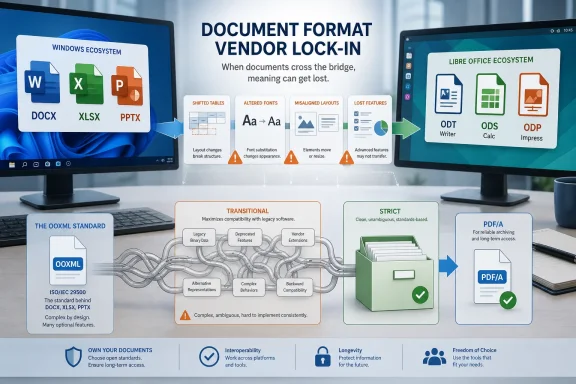
TDF’s argument centers on OOXML Transitional, the variant used by Microsoft Office by default. OOXML is an ISO/IEC standard, but TDF says the Transitional specification carries decades of legacy compatibility behavior and Microsoft-specific implementation details that make a complete independent implementation difficult.
The foundation contrasts it with OOXML Strict, a cleaner conformance class that strips out many legacy constructs. Its companion technical paper says Strict has never been Office’s default save format and is not consistently offered across Microsoft 365 editions. TDF’s conclusion is blunt: a standard that only one implementation fully supports remains proprietary in practical terms.
This is advocacy, not a newly discovered defect in Office. Microsoft has long documented that format conversion can change formatting and feature behavior. Its support documentation also confirms that Word, Excel and PowerPoint can open and save ODF files, while warning that unsupported features may be altered or lost when documents move between Office and OpenDocument formats.
For organizations, TDF frames the concern as governance and archiving. A legal form, clinical template or government record that must render precisely is a poor candidate for an uncontrolled mix of authoring tools and formats. The foundation argues that retaining documents for decades in a format predominantly implemented by one vendor creates a dependency on that vendor’s ongoing compatibility decisions.
Its prescription is native ODF for editable institutional documents, open fonts to reduce layout variation, and PDF/A for records intended for long-term preservation. It has made the same point repeatedly during its campaign against European office initiatives that default to OOXML.
Administrators with sovereignty, compliance or archival requirements should instead define formats by use case and test them with the actual Office, LibreOffice and browser clients their staff use. Keep a reference rendering for high-consequence templates, standardize approved fonts, and export fixed records to PDF/A where editing is no longer required.
The immediate result is another LibreOffice policy push, while the practical work remains document-format testing rather than a wholesale Office migration.
In a July 17 post, the LibreOffice steward said the problem is not simply that Microsoft Office is widely deployed. It is that documents saved in its default formats can rely on behavior, extensions, fonts and layout handling that other suites cannot always reproduce exactly. TDF calls the resulting compatibility gaps “silent friction”: users can open a file in LibreOffice or another suite, but a shifted table, altered heading or changed slide layout can make the Microsoft application appear to be the only safe choice.
 Standards on paper, compatibility in practice
TDF’s argument centers on OOXML Transitional, the variant used by Microsoft Office by default. OOXML is an ISO/IEC standard, but TDF says the Transitional specification carries decades of legacy compatibility behavior and Microsoft-specific implementation details that make a complete independent implementation difficult.The foundation contrasts it with OOXML Strict, a cleaner conformance class that strips out many legacy constructs. Its companion technical paper says Strict has never been Office’s default save format and is not consistently offered across Microsoft 365 editions. TDF’s conclusion is blunt: a standard that only one implementation fully supports remains proprietary in practical terms.
This is advocacy, not a newly discovered defect in Office. Microsoft has long documented that format conversion can change formatting and feature behavior. Its support documentation also confirms that Word, Excel and PowerPoint can open and save ODF files, while warning that unsupported features may be altered or lost when documents move between Office and OpenDocument formats.
Why Windows administrators should care
For ordinary Windows users, the issue is mostly interoperability pain. A document with a complicated layout, custom fonts, embedded objects, macros or advanced spreadsheet features is more likely to show differences after a round trip between Office and LibreOffice.For organizations, TDF frames the concern as governance and archiving. A legal form, clinical template or government record that must render precisely is a poor candidate for an uncontrolled mix of authoring tools and formats. The foundation argues that retaining documents for decades in a format predominantly implemented by one vendor creates a dependency on that vendor’s ongoing compatibility decisions.
Its prescription is native ODF for editable institutional documents, open fonts to reduce layout variation, and PDF/A for records intended for long-term preservation. It has made the same point repeatedly during its campaign against European office initiatives that default to OOXML.
Practical response
There is no need for Windows shops to convert every existing Office document. Microsoft’s formats remain the collaboration default across much of business, and switching a workflow without testing is a reliable way to create the very formatting failures TDF describes.Administrators with sovereignty, compliance or archival requirements should instead define formats by use case and test them with the actual Office, LibreOffice and browser clients their staff use. Keep a reference rendering for high-consequence templates, standardize approved fonts, and export fixed records to PDF/A where editing is no longer required.
The immediate result is another LibreOffice policy push, while the practical work remains document-format testing rather than a wholesale Office migration.
References
- Primary source: Techzine Global
Published: 2026-07-20T09:28:34+00:00
- Related coverage: neowin.net
LibreOffice developer criticizes Microsoft for proprietary Office formats again - Neowin
LibreOffice's developer is urging users and organizations to rethink their document choices, warning that convenience today may carry hidden costs tomorrow. www.neowin.net
- Related coverage: techradar.com
LibreOffice slams rival Euro-Office as a 'de facto ally' of Microsoft lock-in — as concerns over possible Russian interference rise | TechRadar
Euro-Office criticized over sovereignty claimswww.techradar.com - Related coverage: windowscentral.com
LibreOffice slams Euro-Office as "a freeware clone" of Microsoft Office — riding on digital sovereignty | Windows Central
The Document Foundation says Euro-Office isn't the first European open-source office suite.www.windowscentral.com
