

Linux 7.3 is expected to add a new Direct Rendering Manager “color format” connector property later in 2026, with AMDGPU as the first kernel graphics driver wired up to let user space request RGB or YUV output formats. That sounds like a small plumbing change, and in one sense it is. But for anyone who has fought a monitor, TV, dock, cable, or GPU into producing the right pixels instead of merely producing an image, it is also a sign that Linux display configuration is still maturing where Windows users have long expected a checkbox. The kernel is not suddenly becoming a full color-management control panel, but it is giving compositors a missing lever.
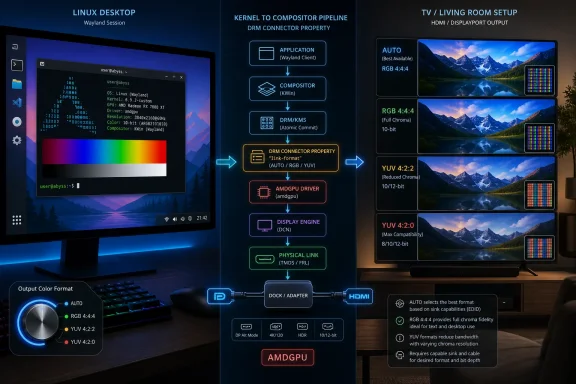
The new DRM property is aimed at display connectors, not at applications, games, or video decoders directly. Its job is narrow: allow user space to ask the kernel display driver to output a particular color format, including automatic selection, RGB, YUV 4:4:4, YUV 4:2:2, and YUV 4:2:0. In practical terms, it gives the compositor a standardized way to say, “Use this kind of signal on this connector,” rather than leaving that choice buried in driver heuristics.
That matters because display output format is one of those settings that becomes invisible when it works and maddening when it does not. A PC monitor over DisplayPort may happily take RGB at full chroma. A television over HDMI may accept a higher refresh rate only if the signal moves to YUV 4:2:0. A dock, adapter, or older receiver may report a mode matrix that forces awkward trade-offs between refresh rate, bit depth, HDR ambitions, and text clarity.
On Windows, these settings are usually exposed through GPU vendor control panels, display settings, or both. On Linux, the story has historically been more fragmented. The kernel has the low-level knowledge, the compositor owns the modern desktop session, and the user often has to infer what happened from blurry text, odd colors, or a monitor on-screen menu that says “YCbCr” when they expected RGB.
The color format property does not make those trade-offs disappear. It makes them more explicit, which is the first step toward making them manageable.
That distinction is important. The image in GPU memory, the composition pipeline, the link over HDMI or DisplayPort, and the monitor’s internal processing are different stages. Users tend to experience them as one thing — “the display looks wrong” — but the stack has to describe them separately. A desktop can render an RGB buffer and still transmit a YUV signal to the display if the link budget, sink capabilities, or driver policy points that way.
This is why a “color format” property belongs in DRM rather than in a distro-specific settings panel alone. A settings panel can only be reliable if the compositor and kernel driver share a vocabulary. Without a standard property, each driver or compositor ends up relying on private behavior, fragile assumptions, or no control at all.
The long review history also tells the story. The work reportedly went through many revisions before being queued for drm-misc-next, and earlier versions circulated with driver implementations beyond AMDGPU. That is exactly what kernel graphics work often looks like when the goal is not merely to support one device, but to introduce a user-space API that other drivers may have to live with for years.
The typical pain point is not “can the GPU produce a picture?” It is whether it can produce the preferred picture at the preferred mode. A 4K panel at 60Hz, 120Hz, or above may sit at the edge of what a given HDMI path can handle, especially when color depth rises. RGB or YUV 4:4:4 preserves full chroma detail; YUV 4:2:2 and 4:2:0 reduce chroma resolution to fit bandwidth or device constraints. For video playback, that may be acceptable or even expected. For desktop text, it can be ugly.
That difference is why this change will feel more important to some users than its terse kernel description suggests. A media-center box may benefit from explicitly requesting a TV-friendly YUV mode. A desktop user may want to avoid an automatic fallback that makes fonts look smeared. A compositor developer may want to make those choices visible without inventing a driver-specific hack.
AMDGPU support also gives the new property an immediate test bed. Kernel APIs are only as useful as their driver implementations, and display properties are particularly dependent on real hardware. HDMI sinks, DisplayPort monitors, adapters, KVM switches, AV receivers, and docks all bring their own interpretations of what the display path can do.
Linux has been doing serious color pipeline work elsewhere, including kernel and compositor plumbing intended to make HDR and advanced color management less experimental. Those efforts involve different questions: how colors are represented, transformed, blended, mapped, and presented. The new connector property is more about the format of the signal leaving the GPU.
Still, these pieces are related. If Linux desktops are going to compete with Windows and macOS on modern displays, they need both policy and plumbing. Policy decides what the user wants: accuracy, compatibility, battery life, high refresh, HDR, low latency, or a compromise. Plumbing lets the compositor express that choice to the kernel and hardware.
For years, Linux display work has often been excellent at the engineering level while poor at the “why does my screen look like this?” level. This property helps close that gap. It gives desktop environments and tools a clearer way to reflect what is happening at the connector, where users actually see the result.
Under X11, much of the display stack grew up around a different division of responsibility. Under Wayland, the compositor is the display server, window manager, policy engine, and often the place where output configuration becomes real. That makes standardized DRM properties more valuable, because the compositor must be able to query capabilities, choose modes, and apply settings without depending on vendor control panels.
This is one reason kernel display changes can take years to become visible to ordinary users. The kernel property is the foundation. Compositors then need to expose it intelligently. Desktop environments need UI that does not confuse users. Distributions need kernel and Mesa stacks new enough to support it. Applications may never know the property exists, but they will benefit if the session produces the right output.
A good implementation should probably not dump “YUV 4:2:2” into every settings panel and call it a day. Some users want that level of control, especially WindowsForum’s more hardware-minded crowd. Most users need clearer choices: prioritize text clarity, prioritize compatibility, prioritize HDR, prioritize high refresh. The compositor can map those choices to color formats when the hardware makes the trade-off unavoidable.
For HDMI, the expected automatic behavior may prefer RGB in ordinary cases but fall back when a display mode requires a lower-bandwidth YUV format. That is sensible engineering. It also creates the classic support-forum nightmare: one user reports that 4K works only in a subsampled format, another says their fonts are blurry, a third says the same monitor works fine on Windows, and all of them are technically describing different edges of the same negotiation.
Making AUTO a first-class value is better than pretending everything can be manual. The desktop needs a safe default. But the existence of explicit RGB and YUV choices acknowledges that automatic selection is not enough, especially when the display’s EDID data, the cable, or the driver’s assumptions produce a result the user can see and dislike.
This is where Linux can learn from Windows without copying it exactly. Windows users are accustomed to GPU control panels that expose pixel format, color depth, dynamic range, and sometimes limited-versus-full range settings. Those panels can be messy, duplicated, and vendor-specific, but they provide a place for power users to force the issue. Linux has the opportunity to build a cleaner version because the compositor can become the policy layer rather than leaving every GPU stack to invent its own UI.
Desktop computing is different. Text, UI glyphs, colored edges, thin lines, and high-contrast interface elements are brutal tests for chroma resolution. A display path that looks acceptable for video can make a desktop feel subtly broken. Red or blue text may blur. Fine UI edges may shimmer. Remote desktops, IDEs, terminals, and browser text can all expose the compromise.
That is why a simple “the display works” verdict is not enough. A home-theater PC and a developer workstation may want different output choices from the same GPU and monitor. A Steam Machine-style box may prefer the mode that keeps 4K120 alive. A workstation user may prefer RGB 4:4:4 at a lower refresh rate rather than accept soft text.
The new property gives Linux a way to represent that distinction at the connector. It does not decide the right answer. It lets the compositor and, eventually, the user choose one.
Linux has often been stronger in openness and weaker in discoverability. The AMDGPU driver is open, the kernel discussions are public, and the implementation can be reviewed by anyone with the patience to read DRM patches. Yet the actual desktop user may have had fewer obvious knobs than someone running a proprietary Windows driver stack.
That trade-off is changing, but slowly. The Wayland era has pushed Linux toward a more coherent display architecture. It has also exposed the fact that many old assumptions were held together by X11-era utilities, driver quirks, and “good enough” defaults. Modern HDR monitors, OLED TVs, docks, high-refresh panels, and gaming handhelds are less forgiving.
Windows is not perfect here either. Vendor panels can disagree with Windows settings. HDR can alter color behavior in ways users do not understand. Limited versus full range can still go wrong. But Windows has long treated output format as a user-visible concern, while Linux has tended to treat it as an implementation detail. This DRM property is a step toward correcting that imbalance.
That is how modern Linux graphics has been advancing. Atomic modesetting, explicit synchronization, color pipeline work, HDR-related plumbing, variable refresh support, scaling behavior, and power-saving policies all depend on the same basic idea: the compositor needs accurate capabilities and reliable controls. If those controls are standardized, GNOME, KDE, wlroots compositors, Weston, and niche environments can build on them without hard-coding every driver’s personality.
There is a cost. Kernel user-space APIs are hard to revise once released. A bad property can fossilize a bad abstraction. That is why the review process can look slow from the outside. Fifteen revisions may sound excessive until one remembers that the API is meant to outlive today’s monitors, today’s GPUs, and today’s desktop settings panels.
The phrasing also matters. The property is not a vague “make colors better” switch. It defines specific output format choices. That precision is what makes it useful. Linux does not need more magic toggles; it needs composable primitives that user-space can turn into sane policy.
Intel support would be especially important for laptops, mini PCs, corporate desktops, and the enormous installed base of integrated graphics systems. Rockchip support would matter in the ARM board and embedded-display world, where HDMI output and media use cases are common. AMD going first is useful, but broad adoption is what makes compositor UI worthwhile.
Desktop environments are cautious about exposing controls that work only on one driver. If a setting appears on AMD but not Intel, or on HDMI but not DisplayPort, or only on certain generations, it becomes a support burden. That does not mean the UI should wait for universal support, but it does mean compositors will likely begin with hidden, experimental, or diagnostic exposure before presenting polished controls to ordinary users.
This is where Linux’s diversity is both a strength and a drag. The ecosystem can move quickly in one driver and slowly across the whole stack. Enthusiasts may get early benefits. Enterprise desktops may not care until a distribution with a long-term kernel picks up the feature. The standard is the bridge between those worlds.
Modern office deployments increasingly include USB-C docks, mixed monitor fleets, conference-room displays, digital signage panels, and hybrid work setups where laptops move between displays constantly. When output negotiation fails, help desks rarely get a precise bug report. They get “the monitor looks fuzzy,” “colors are wrong,” or “the screen only works at 30Hz.”
A standardized output format property can improve diagnostics even if administrators never manually set it. Tools can report what the connector is using. Compositors can make more predictable choices. Fleet policies may eventually prefer compatibility or clarity depending on deployment type. The ability to observe and request a format is valuable in managed environments because it turns a subjective complaint into a inspectable state.
There is also a security-adjacent angle, though not in the dramatic sense. Clear display state reduces misconfiguration. In regulated or color-sensitive environments — medical imaging, design review, media production, control rooms — administrators already care about calibration, color paths, and display consistency. This property is not a compliance solution, but it is one more piece of the stack becoming explicit rather than implicit.
Even after a kernel release, distribution timing matters. Rolling-release users may see the plumbing relatively soon. Fedora, Arch, openSUSE Tumbleweed, and similar ecosystems tend to expose new graphics stack work earlier. Ubuntu LTS users, Debian stable users, and enterprise distributions will see it on a different schedule, often mediated by hardware-enablement kernels or vendor backports.
Then there is the compositor layer. A kernel with the property is not the same thing as a settings panel that lets a user select RGB. Weston patches are a proof point, not a guarantee that every desktop will expose the feature in a friendly way at launch. KDE and GNOME will have their own design and engineering decisions to make if and when they surface it.
This is the kernel graphics pattern in miniature: important work lands as infrastructure first, then becomes a visible feature later. Users judge the desktop by the visible feature. Developers know the feature was impossible without the infrastructure.
A connector color format property makes the state easier to reason about. If the compositor can query and set the output format, tools can show it. If tools can show it, support threads can move from guesswork to evidence. If users can request a format, they can test whether the display path is bandwidth-limited, misdetected, or simply making a defensible automatic trade-off.
That does not eliminate hardware weirdness. EDID data can still be wrong. HDMI implementations can still be constrained by licensing, firmware, or hardware generations. Cheap adapters can still lie. TVs can still apply processing modes that make PC output look bad unless the input is labeled correctly.
But it changes the nature of the conversation. Instead of “Linux looks bad on my TV,” the report can become “the connector is using YUV 4:2:0 at this mode, and RGB is rejected.” That is the difference between folklore and engineering.
 Linux Is Finally Giving Compositors the Knob Users Thought They Already Had
The new DRM property is aimed at display connectors, not at applications, games, or video decoders directly. Its job is narrow: allow user space to ask the kernel display driver to output a particular color format, including automatic selection, RGB, YUV 4:4:4, YUV 4:2:2, and YUV 4:2:0. In practical terms, it gives the compositor a standardized way to say, “Use this kind of signal on this connector,” rather than leaving that choice buried in driver heuristics.That matters because display output format is one of those settings that becomes invisible when it works and maddening when it does not. A PC monitor over DisplayPort may happily take RGB at full chroma. A television over HDMI may accept a higher refresh rate only if the signal moves to YUV 4:2:0. A dock, adapter, or older receiver may report a mode matrix that forces awkward trade-offs between refresh rate, bit depth, HDR ambitions, and text clarity.
On Windows, these settings are usually exposed through GPU vendor control panels, display settings, or both. On Linux, the story has historically been more fragmented. The kernel has the low-level knowledge, the compositor owns the modern desktop session, and the user often has to infer what happened from blurry text, odd colors, or a monitor on-screen menu that says “YCbCr” when they expected RGB.
The color format property does not make those trade-offs disappear. It makes them more explicit, which is the first step toward making them manageable.
The Patch Is Small Because the Fight Was Architectural
The headline is not that Linux suddenly learned what RGB and YUV are. The DRM subsystem has long dealt with pixel formats, framebuffers, planes, color spaces, transfer functions, and connector capabilities. The meaningful change is that a general connector property is being introduced so user space can request the output encoding in a consistent way across drivers.That distinction is important. The image in GPU memory, the composition pipeline, the link over HDMI or DisplayPort, and the monitor’s internal processing are different stages. Users tend to experience them as one thing — “the display looks wrong” — but the stack has to describe them separately. A desktop can render an RGB buffer and still transmit a YUV signal to the display if the link budget, sink capabilities, or driver policy points that way.
This is why a “color format” property belongs in DRM rather than in a distro-specific settings panel alone. A settings panel can only be reliable if the compositor and kernel driver share a vocabulary. Without a standard property, each driver or compositor ends up relying on private behavior, fragile assumptions, or no control at all.
The long review history also tells the story. The work reportedly went through many revisions before being queued for drm-misc-next, and earlier versions circulated with driver implementations beyond AMDGPU. That is exactly what kernel graphics work often looks like when the goal is not merely to support one device, but to introduce a user-space API that other drivers may have to live with for years.
AMDGPU Goes First Because Linux Display Pain Often Shows Up in the Living Room
AMDGPU being first is not surprising. AMD’s open Linux graphics stack is widely used by desktop Linux enthusiasts, Steam Deck-adjacent projects, living-room PCs, and users who connect machines to TVs rather than traditional monitors. Those are precisely the environments where chroma subsampling and output format negotiations become visible.The typical pain point is not “can the GPU produce a picture?” It is whether it can produce the preferred picture at the preferred mode. A 4K panel at 60Hz, 120Hz, or above may sit at the edge of what a given HDMI path can handle, especially when color depth rises. RGB or YUV 4:4:4 preserves full chroma detail; YUV 4:2:2 and 4:2:0 reduce chroma resolution to fit bandwidth or device constraints. For video playback, that may be acceptable or even expected. For desktop text, it can be ugly.
That difference is why this change will feel more important to some users than its terse kernel description suggests. A media-center box may benefit from explicitly requesting a TV-friendly YUV mode. A desktop user may want to avoid an automatic fallback that makes fonts look smeared. A compositor developer may want to make those choices visible without inventing a driver-specific hack.
AMDGPU support also gives the new property an immediate test bed. Kernel APIs are only as useful as their driver implementations, and display properties are particularly dependent on real hardware. HDMI sinks, DisplayPort monitors, adapters, KVM switches, AV receivers, and docks all bring their own interpretations of what the display path can do.
The New Property Does Not Replace Color Management
The risk with a feature like this is over-reading it. “Color format” sounds grander than it is. This is not the whole Linux answer to HDR, wide color gamut, calibration, ICC workflows, tone mapping, or per-application color accuracy. It is one connector-level control in a much larger display pipeline.Linux has been doing serious color pipeline work elsewhere, including kernel and compositor plumbing intended to make HDR and advanced color management less experimental. Those efforts involve different questions: how colors are represented, transformed, blended, mapped, and presented. The new connector property is more about the format of the signal leaving the GPU.
Still, these pieces are related. If Linux desktops are going to compete with Windows and macOS on modern displays, they need both policy and plumbing. Policy decides what the user wants: accuracy, compatibility, battery life, high refresh, HDR, low latency, or a compromise. Plumbing lets the compositor express that choice to the kernel and hardware.
For years, Linux display work has often been excellent at the engineering level while poor at the “why does my screen look like this?” level. This property helps close that gap. It gives desktop environments and tools a clearer way to reflect what is happening at the connector, where users actually see the result.
Wayland Is the Real Customer for This Kernel API
The most important consumer of this work is not a command-line utility. It is the Wayland compositor. Weston already has patches available to use the property, which makes sense because Weston often serves as both a reference compositor and a proving ground for display protocol ideas.Under X11, much of the display stack grew up around a different division of responsibility. Under Wayland, the compositor is the display server, window manager, policy engine, and often the place where output configuration becomes real. That makes standardized DRM properties more valuable, because the compositor must be able to query capabilities, choose modes, and apply settings without depending on vendor control panels.
This is one reason kernel display changes can take years to become visible to ordinary users. The kernel property is the foundation. Compositors then need to expose it intelligently. Desktop environments need UI that does not confuse users. Distributions need kernel and Mesa stacks new enough to support it. Applications may never know the property exists, but they will benefit if the session produces the right output.
A good implementation should probably not dump “YUV 4:2:2” into every settings panel and call it a day. Some users want that level of control, especially WindowsForum’s more hardware-minded crowd. Most users need clearer choices: prioritize text clarity, prioritize compatibility, prioritize HDR, prioritize high refresh. The compositor can map those choices to color formats when the hardware makes the trade-off unavoidable.
AUTO Is a Policy Decision Wearing a Technical Name
The inclusion of AUTO is essential and contentious. Automatic behavior is what keeps most systems usable. It is also what users blame when their display silently chooses the wrong compromise.For HDMI, the expected automatic behavior may prefer RGB in ordinary cases but fall back when a display mode requires a lower-bandwidth YUV format. That is sensible engineering. It also creates the classic support-forum nightmare: one user reports that 4K works only in a subsampled format, another says their fonts are blurry, a third says the same monitor works fine on Windows, and all of them are technically describing different edges of the same negotiation.
Making AUTO a first-class value is better than pretending everything can be manual. The desktop needs a safe default. But the existence of explicit RGB and YUV choices acknowledges that automatic selection is not enough, especially when the display’s EDID data, the cable, or the driver’s assumptions produce a result the user can see and dislike.
This is where Linux can learn from Windows without copying it exactly. Windows users are accustomed to GPU control panels that expose pixel format, color depth, dynamic range, and sometimes limited-versus-full range settings. Those panels can be messy, duplicated, and vendor-specific, but they provide a place for power users to force the issue. Linux has the opportunity to build a cleaner version because the compositor can become the policy layer rather than leaving every GPU stack to invent its own UI.
Chroma Subsampling Is Fine Until It Touches Text
The reason RGB versus YUV becomes emotional is that not all content suffers equally. Video is often encoded using chroma subsampling because human vision is more sensitive to luminance detail than color detail. For movies and streaming, YUV 4:2:0 can be perfectly normal. The eye may barely notice the loss in many scenes.Desktop computing is different. Text, UI glyphs, colored edges, thin lines, and high-contrast interface elements are brutal tests for chroma resolution. A display path that looks acceptable for video can make a desktop feel subtly broken. Red or blue text may blur. Fine UI edges may shimmer. Remote desktops, IDEs, terminals, and browser text can all expose the compromise.
That is why a simple “the display works” verdict is not enough. A home-theater PC and a developer workstation may want different output choices from the same GPU and monitor. A Steam Machine-style box may prefer the mode that keeps 4K120 alive. A workstation user may prefer RGB 4:4:4 at a lower refresh rate rather than accept soft text.
The new property gives Linux a way to represent that distinction at the connector. It does not decide the right answer. It lets the compositor and, eventually, the user choose one.
The Windows Comparison Cuts Both Ways
For a WindowsForum audience, the obvious comparison is the Radeon or NVIDIA control panel. Windows users may take for granted that they can open a vendor utility and select RGB, YCbCr 4:4:4, 4:2:2, or 4:2:0 depending on the GPU and display. That capability is not just a convenience; it is a diagnostic tool. If the screen looks wrong, the user can check what the driver is sending.Linux has often been stronger in openness and weaker in discoverability. The AMDGPU driver is open, the kernel discussions are public, and the implementation can be reviewed by anyone with the patience to read DRM patches. Yet the actual desktop user may have had fewer obvious knobs than someone running a proprietary Windows driver stack.
That trade-off is changing, but slowly. The Wayland era has pushed Linux toward a more coherent display architecture. It has also exposed the fact that many old assumptions were held together by X11-era utilities, driver quirks, and “good enough” defaults. Modern HDR monitors, OLED TVs, docks, high-refresh panels, and gaming handhelds are less forgiving.
Windows is not perfect here either. Vendor panels can disagree with Windows settings. HDR can alter color behavior in ways users do not understand. Limited versus full range can still go wrong. But Windows has long treated output format as a user-visible concern, while Linux has tended to treat it as an implementation detail. This DRM property is a step toward correcting that imbalance.
The Kernel Is Becoming a Contract With the Desktop
The most interesting part of the change is not AMD-specific. It is the expansion of DRM’s role as a contract between kernel drivers and compositors. Every time a common property lands, Linux desktop developers get one more standardized tool and one fewer private workaround.That is how modern Linux graphics has been advancing. Atomic modesetting, explicit synchronization, color pipeline work, HDR-related plumbing, variable refresh support, scaling behavior, and power-saving policies all depend on the same basic idea: the compositor needs accurate capabilities and reliable controls. If those controls are standardized, GNOME, KDE, wlroots compositors, Weston, and niche environments can build on them without hard-coding every driver’s personality.
There is a cost. Kernel user-space APIs are hard to revise once released. A bad property can fossilize a bad abstraction. That is why the review process can look slow from the outside. Fifteen revisions may sound excessive until one remembers that the API is meant to outlive today’s monitors, today’s GPUs, and today’s desktop settings panels.
The phrasing also matters. The property is not a vague “make colors better” switch. It defines specific output format choices. That precision is what makes it useful. Linux does not need more magic toggles; it needs composable primitives that user-space can turn into sane policy.
Intel and Rockchip Would Turn This From an AMD Feature Into a Linux Feature
The early pull reportedly includes AMDGPU support, while Intel and Rockchip patches have also been floated. That matters because a DRM property only becomes truly powerful when multiple drivers implement it. Otherwise, it risks becoming a common name with uncommon availability.Intel support would be especially important for laptops, mini PCs, corporate desktops, and the enormous installed base of integrated graphics systems. Rockchip support would matter in the ARM board and embedded-display world, where HDMI output and media use cases are common. AMD going first is useful, but broad adoption is what makes compositor UI worthwhile.
Desktop environments are cautious about exposing controls that work only on one driver. If a setting appears on AMD but not Intel, or on HDMI but not DisplayPort, or only on certain generations, it becomes a support burden. That does not mean the UI should wait for universal support, but it does mean compositors will likely begin with hidden, experimental, or diagnostic exposure before presenting polished controls to ordinary users.
This is where Linux’s diversity is both a strength and a drag. The ecosystem can move quickly in one driver and slowly across the whole stack. Enthusiasts may get early benefits. Enterprise desktops may not care until a distribution with a long-term kernel picks up the feature. The standard is the bridge between those worlds.
The Enterprise Impact Is Quiet but Real
At first glance, this looks like enthusiast news. It has all the ingredients: kernel merge windows, AMDGPU, Wayland, YUV formats, Phoronix, and the sort of display minutiae that fills forum threads at 2 a.m. But enterprise IT should not dismiss it.Modern office deployments increasingly include USB-C docks, mixed monitor fleets, conference-room displays, digital signage panels, and hybrid work setups where laptops move between displays constantly. When output negotiation fails, help desks rarely get a precise bug report. They get “the monitor looks fuzzy,” “colors are wrong,” or “the screen only works at 30Hz.”
A standardized output format property can improve diagnostics even if administrators never manually set it. Tools can report what the connector is using. Compositors can make more predictable choices. Fleet policies may eventually prefer compatibility or clarity depending on deployment type. The ability to observe and request a format is valuable in managed environments because it turns a subjective complaint into a inspectable state.
There is also a security-adjacent angle, though not in the dramatic sense. Clear display state reduces misconfiguration. In regulated or color-sensitive environments — medical imaging, design review, media production, control rooms — administrators already care about calibration, color paths, and display consistency. This property is not a compliance solution, but it is one more piece of the stack becoming explicit rather than implicit.
The Schedule Is a Reminder That Kernel News Is Not Product News
The timing needs careful reading. Linux 7.2’s merge window is just closing, while this work is queued for the Linux 7.3 cycle later in the year. That means it is not a feature most users will touch tomorrow. It also means it can still evolve before it reaches a stable release, depending on the usual kernel development process.Even after a kernel release, distribution timing matters. Rolling-release users may see the plumbing relatively soon. Fedora, Arch, openSUSE Tumbleweed, and similar ecosystems tend to expose new graphics stack work earlier. Ubuntu LTS users, Debian stable users, and enterprise distributions will see it on a different schedule, often mediated by hardware-enablement kernels or vendor backports.
Then there is the compositor layer. A kernel with the property is not the same thing as a settings panel that lets a user select RGB. Weston patches are a proof point, not a guarantee that every desktop will expose the feature in a friendly way at launch. KDE and GNOME will have their own design and engineering decisions to make if and when they surface it.
This is the kernel graphics pattern in miniature: important work lands as infrastructure first, then becomes a visible feature later. Users judge the desktop by the visible feature. Developers know the feature was impossible without the infrastructure.
The Real Winner Is the Troubleshooter
The most immediate beneficiaries may be the people who debug other people’s displays. Today, a Linux user with blurry text on a TV might be told to check EDID, try a different cable, switch ports, change refresh rate, use DisplayPort, disable HDR, change compositor settings, or patch something. Some of that advice is good. Some of it is superstition born from missing visibility.A connector color format property makes the state easier to reason about. If the compositor can query and set the output format, tools can show it. If tools can show it, support threads can move from guesswork to evidence. If users can request a format, they can test whether the display path is bandwidth-limited, misdetected, or simply making a defensible automatic trade-off.
That does not eliminate hardware weirdness. EDID data can still be wrong. HDMI implementations can still be constrained by licensing, firmware, or hardware generations. Cheap adapters can still lie. TVs can still apply processing modes that make PC output look bad unless the input is labeled correctly.
But it changes the nature of the conversation. Instead of “Linux looks bad on my TV,” the report can become “the connector is using YUV 4:2:0 at this mode, and RGB is rejected.” That is the difference between folklore and engineering.
The Small Kernel Knob That Explains a Decade of Display Complaints
The concrete lesson from the Linux 7.3 color format work is that modern display quality depends on a chain of decisions, and Linux is still turning some of those decisions into first-class controls. This is not the glamorous part of graphics development. It is the part that determines whether the glamorous part looks right on the panel in front of you.- Linux 7.3 is expected to introduce a DRM connector property that lets user space request AUTO, RGB, YUV 4:4:4, YUV 4:2:2, or YUV 4:2:0 output.
- AMDGPU is the first driver support queued with the initial work, while Intel and Rockchip support has reportedly been discussed in patch form.
- The feature is most relevant to HDMI and TV-style setups where bandwidth, refresh rate, bit depth, and chroma subsampling can collide.
- Wayland compositors are the practical audience for the API, because they own modern Linux display policy and output configuration.
- Users should not confuse this property with full HDR or color-management support, because it controls output format rather than the entire color pipeline.
- The likely short-term value is better diagnostics and compositor plumbing, with polished desktop UI arriving later and unevenly across distributions.
References
- Primary source: Phoronix
Published: Sun, 28 Jun 2026 13:34:00 GMT
Linux 7.3 To Introduce DRM "Color Format" Property With AMD GPU Driver Support - Phoronix
While the Linux 7.2 kernel merge window is only ending later today to cap off the feature work on this next version of the Linux kernel, already for the Linux 7.3 kernel cycle later in the year there is one notable feature on the way: the DRM color format property is being introduced and being...www.phoronix.com
- Related coverage: linux.org

News - [Phoronix] Linux 7.3 To Introduce DRM "Color Format" Property With AMD GPU Driver Support | Linux.org
News - [Phoronix] Linux 7.3 To Introduce DRM "Color Format" Property With AMD GPU Driver Support - Linux.org - Friendly Linux Forum
www.linux.org
- Related coverage: lists.infradead.org
