

Lively Wallpaper is having a very Windows 11 moment: it sits neatly at the intersection of customization, nostalgia, and practical performance, and that’s exactly why it keeps attracting power users who want more than a static Bloom image. The app’s promise is simple but compelling — animated, interactive, and even web-based wallpapers on a modern Windows desktop — yet its appeal goes deeper because it’s free, open-source, and built around WinUI 3, which helps it feel like a native part of Windows 11 rather than a bolted-on utility riting the idea of motion on the desktop, third-party wallpaper tools are no longer just novelty software; they’re part of the conversation about what the Windows experience should look and feel like.
Windows has always treated the desktop background as more than decoration, but the platform has historically been conservative about letting that background move. Microsoft’s own official experiments with animated wallpaper go back to Windows DreamScene in the Vista era, and the feature disappeared as quickly as it arrived, leaving enthusiasts to rely on community tools and commercial apps. That gap created an ecosystem where wallpaper managers became a small but surprisingly durable category of Windows customization software, especially for people who wanted their PCs to feel more personal and expressive.
Lively Wallpaper enters that tradition with a different pitch than older wallpaper changers. It doesn’t just rotate static images; it supports GIFs, videos, websites, and interactive content, and it does so through a modern UI stack that fits Windows 11 more naturally than many older utilities . The app’s design matters because desktopare judged not just by what they can display, but by how comfortably they coexist with the rest of the operating system.
At the same time, the marketplace is not empty. Wallpaper Engine remains the best-known rival, with a massive Steam audience, an editor, a workshop ecosystem, and broad support for animated scenes, websites, and interactive wallpapers. That means Lively Wallpaper is competing not against a void, but against a mature and beloved product with strong distribution and a deeply engaged user base. Its strongest differentiator is not feature parity; it is that it is free, open-source, and lightweight enough to win users who want quality without a paywall.
What makes the current moment especially interesting is that Microsoft seems to be circling back to the same territory from the platform side. Windows 11 has been spotted testing native video wallpaper support in Insider builds, echoing DreamScene and reducing the need for third-party tools for basic animated bacner obsolete. If anything, it validates the category and pushes the conversation toward richer, more interactive desktop experiences.
Lively Wallpaper therefore lives in a sweet spot: useful today, relevant tomorrow, and positioned as both a practical utility and a statement about what Windows personalization can be. The app’s biggest challenge is not whether people want motion on the desktop. It is whether they want that motion to be simple, efficient, and integrated enough to use every day.
The article that prompted this discussion emphasizes that Lively Wallpaper is most effective when used with lightly animated content rather than heavy, attention-hogging video. That’s a sound conclusion, because the best desktop wallpaper is still background first and centerpiece second. A subtle rain effect, an ambient landscape, or a low-motion loop tends to complement the operating system instead of competing with it.
Lively’s support for websites is one of its more ambitious tricks, but also one of its most misunderstood. A web-based wallpaper can be interactive and visually rich, but not every web source is a good wallpaper source. The Windows Central piece specifically warns against using YouTube as a wallpaper input because the experience becomes clumsy, ad-heavy, and awkward to control.
A good wallpaper app must also respect the way people actually use Windows. It needs to disappear when a game is full-screen, keep resource use sensible, and avoid adding friction to normal work. Lively’s own website and the article both frame that expectation explicitly, and that is important because wallpaper apps that behave like greedy background processes quickly lose trust.
Windows 11 is a design-heavy operating system. Rounded corners, Mica materials, centered controls, and softer visual hierarchy all send a message that software should feel polished and deliberate. An app that respects those conventions immediately earns more credibility, especially when it lives as close to the shell as a wallpaper manager does. Lively’s contemporary UI approach helps it avoid the “utility from another era” vibe that still haunts many desktop customization tools.
There’s also a practical side to this. A modern framework can help with scaling across different display sizes, DPI settings, and multi-monitor configurations. That matters because wallpaper applications are often used by enthusiasts who run ultrawide panels, laptop screens, docked external displays, or mixed-resolution setups.
That is the tension at the heart of the market. One camp wants a full creative platform; the other wants a simple, elegant enhancement. Lively Wallpapper positions itself closer to the second group while still offering enough power to satisfy enthusiasts.
Still, the article is careful to point out that “0% CPU” is not the same as zero resource cost. Even when inactive, Lively continued to use around 245.5MB of memory, and when the desktop was fully visible it rose to roughly 255MB. Those numbers are not dramatic on a modern laptop with 32GB of RAM, but they matter very differently on budget systems, older notebooks, or machines already stretched by browser tabs and video calls.
The biggest resource jump came from a YouTube video wallpaper, which the author saw consume about 800MB of RAM and around 4.5% CPU. That is a useful reminder that the wallpaper type matters as much as the wallpaper app. A quiet animated loop is one thing; a browser-driven video canvas is another.
This distinction matters more on laptops than desktops. Battery life, thermals, and fan noise can all shift quickly when a wallpaper source is more ambitious than the system can comfortably sustain. On high-end machines, the overhead may be trivial; on ultraportables, it can be noticeable.
That price difference is not the whole story, though. Wallpaper Engine’s ecosystem is a major advantage if you want to browse, create, and share wallpapers at scale. Lively’s appeal is more focused: install it, feed it content, and get moving backgrounds without buying into a larger platform. For many users, that is exactly the right amount of commitment.
There is also a philosophical split. Wallpaper Engine feels like a polished commercial creative suite. Lively feels like a community-driven utility that punches above its weight. Those are different products serving different psychologies, even if they overlap in functionality.
For power users, both apps can coexist as examples of how desktop personalization has evolved beyond static JPEGs. For casual users, the deciding factors are simpler: price, ease, and whether the app feels like a native Windows 11 companion rather than a hobby project. Lively scores very well on that latter point.
The author’s experience is telling. Even with YouTube Premium, the wallpaper workflow became awkward because it required extra clicking, maximizing, and navigating around an interface that was never intended to live behind desktop icons. That makes the wallpaper feel like a workaround, not a feature.
This is a useful lesson in product design. A good wallpaper source should be lightweight, quiet, and compatible with being background content. Video platforms are optimized for engagement, not for invisibility. The more a wallpaper source behaves like a normal website, the less it behaves like a wallpaper.
This also reflects a broader truth about desktop customization: convenience and elegance are not the same thing. A wallpaper that looks good but interrupts your workflow is not really an upgrade. The best background is the one you notice just enough to enjoy, and then forget while you work.
For users, this could be a convenience win. If Microsoft integrates the feature directly into Settings, the average person may no longer need a third-party app just to enjoy motion on the desktop. That would make animated backgrounds more mainstream and less dependent on enthusiast tools.
But for apps like Lively Wallpaper, Microsoft’s move is more opportunity than threat. Native support for basic video backgrounds could expand user interest in the category, just as built-in note apps often increase demand for richer third-party alternatives. If the OS handles the simple case, third-party tools can focus on the creative and interactive edge.
That layered market is usually good news for consumers. It means the system-level option can coexist with more ambitious apps, rather than killing them outright. It also means the best wallpaper apps will need to differentiate on polish, content depth, and performance tuning rather than simply on the ability to play video.
That divide helps explain why animated wallpaper tools remain niche even when they are popular. Enthusiasts love them because they change the emotional temperature of a PC. Administrators are cautious because a wallpaper app is still software running on every endpoint, with all the usual concerns about memory use, stability, and update behavior.
Lively’s open-source status may help on trust, but it does not eliminate management questions. Enterprises often prefer predictable, centrally governed software with clear support pathways. A free desktop personalization tool can still be too much freedom for a managed environment, especially if the organization standardizes branding and visual consistency.
This is why wallpaper customization remains an odd but revealing category. It sits at the boundary of art and systems management. It is deeply personal software that also has to respect machine-level realities.
If that happens, Lively’s future may actually improve. Native wallpaper support will teach more users that motion on the desktop is normal, and once that habit exists, a portion of those users will inevitably want more control, more content sources, and more creative flexibility. That is where Lively can shine, especially if it keeps its interface modern and its performance sensible.
In the end, the dream of desktop customization is not about motion for its own sake. It is about giving users a desktop that reflects taste, mood, and identity without getting in the way. Lively Wallpaper succeeds because it gets close to that ideal — and if Microsoft is serious about bringing animated backgrounds back to Windows in a native way, it may be because tools like Lively have already proven that the idea still has real staying power.
Source: Windows Central https://www.windowscentral.com/soft...ate-my-desktop-its-a-dream-for-customization/
 Overview
Windows has always treated the desktop background as more than decoration, but the platform has historically been conservative about letting that background move. Microsoft’s own official experiments with animated wallpaper go back to Windows DreamScene in the Vista era, and the feature disappeared as quickly as it arrived, leaving enthusiasts to rely on community tools and commercial apps. That gap created an ecosystem where wallpaper managers became a small but surprisingly durable category of Windows customization software, especially for people who wanted their PCs to feel more personal and expressive.Lively Wallpaper enters that tradition with a different pitch than older wallpaper changers. It doesn’t just rotate static images; it supports GIFs, videos, websites, and interactive content, and it does so through a modern UI stack that fits Windows 11 more naturally than many older utilities . The app’s design matters because desktopare judged not just by what they can display, but by how comfortably they coexist with the rest of the operating system.
At the same time, the marketplace is not empty. Wallpaper Engine remains the best-known rival, with a massive Steam audience, an editor, a workshop ecosystem, and broad support for animated scenes, websites, and interactive wallpapers. That means Lively Wallpaper is competing not against a void, but against a mature and beloved product with strong distribution and a deeply engaged user base. Its strongest differentiator is not feature parity; it is that it is free, open-source, and lightweight enough to win users who want quality without a paywall.
What makes the current moment especially interesting is that Microsoft seems to be circling back to the same territory from the platform side. Windows 11 has been spotted testing native video wallpaper support in Insider builds, echoing DreamScene and reducing the need for third-party tools for basic animated bacner obsolete. If anything, it validates the category and pushes the conversation toward richer, more interactive desktop experiences.
Lively Wallpaper therefore lives in a sweet spot: useful today, relevant tomorrow, and positioned as both a practical utility and a statement about what Windows personalization can be. The app’s biggest challenge is not whether people want motion on the desktop. It is whether they want that motion to be simple, efficient, and integrated enough to use every day.
What Lively Wallpaper Actually Does
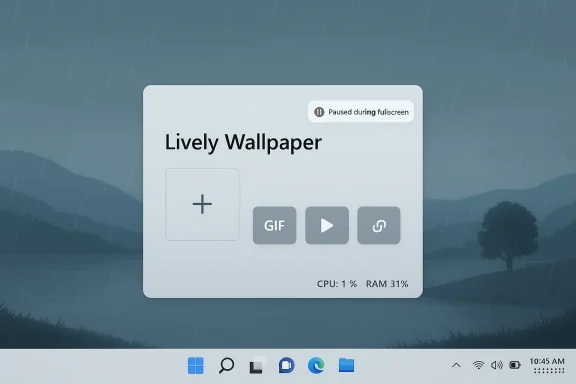
At its core, Lively Wallpaper turns your desktop background into a media surface. The app supports local videos, animated GIFs, webpages, and other live content, and it lets users add new wallpapers through a simple plus button rather than a labyrinth of settings . That ease of entry matters becaustools lose users the moment configuration becomes more work than the effect is worth.The article that prompted this discussion emphasizes that Lively Wallpaper is most effective when used with lightly animated content rather than heavy, attention-hogging video. That’s a sound conclusion, because the best desktop wallpaper is still background first and centerpiece second. A subtle rain effect, an ambient landscape, or a low-motion loop tends to complement the operating system instead of competing with it.
Lively’s support for websites is one of its more ambitious tricks, but also one of its most misunderstood. A web-based wallpaper can be interactive and visually rich, but not every web source is a good wallpaper source. The Windows Central piece specifically warns against using YouTube as a wallpaper input because the experience becomes clumsy, ad-heavy, and awkward to control.
Why the Wallpaper Mode Matters
The key product decision is not just that Lively can play media, but that it can place media into the wallpaper layer without turning the desktop into a separate app. That distinction is what makes wallpaper tools feel magical rather than merely convenient. They preserve the sense that your PC is still your PC, only a more expressive version of it.A good wallpaper app must also respect the way people actually use Windows. It needs to disappear when a game is full-screen, keep resource use sensible, and avoid adding friction to normal work. Lively’s own website and the article both frame that expectation explicitly, and that is important because wallpaper apps that behave like greedy background processes quickly lose trust.
- Supports GIFs, video files, and web links
- Lets users add wallpapers quickly via a plus control
- Works best with subtle animation
- Is designed to pause or minimize impact during fullscreen apps
- Feels native thanks to its WinUI 3 foundation
Why WinUI 3 Changes the Feel
One of the strongest observations in the Windows Central piece is that Lively Wallpaper is built with WinUI 3, and that gives it a more Windows 11-appropriate aesthetic and behavior than older alternatives . This is not merely about looks. In a platform like Winuage of an app influences whether users experience it as integrated or improvised.Windows 11 is a design-heavy operating system. Rounded corners, Mica materials, centered controls, and softer visual hierarchy all send a message that software should feel polished and deliberate. An app that respects those conventions immediately earns more credibility, especially when it lives as close to the shell as a wallpaper manager does. Lively’s contemporary UI approach helps it avoid the “utility from another era” vibe that still haunts many desktop customization tools.
There’s also a practical side to this. A modern framework can help with scaling across different display sizes, DPI settings, and multi-monitor configurations. That matters because wallpaper applications are often used by enthusiasts who run ultrawide panels, laptop screens, docked external displays, or mixed-resolution setups.
Native-Fit vs. Feature-Depth
The trade-off is that a cleaner, more native-feeling app does not automatically win on depth. Wallpaper Engine remains the richer ecosystem in many respects, with broader content sharing and a mature editor backed by Steam Workshop support. But Lively’s more restrained approach may actually be better aligned with the mainstream Windows user who wants motion without joining a hobbyist subculture.That is the tension at the heart of the market. One camp wants a full creative platform; the other wants a simple, elegant enhancement. Lively Wallpapper positions itself closer to the second group while still offering enough power to satisfy enthusiasts.
- WinUI 3 helps Lively feel contemporary on Windows 11
- Better scaling supports varied displays and resolutions
- The design language fits Microsoft’s modern shell
- The app avoids the “legacy utility” problem
- The result is more native-feeling than many older competitors
Performance: The Real Test
Wallpaper software always lives or dies on performance, and the Windows Central hands-on makes that point plainly. Lively Wallpaper’s site promises roughly “0% usage” when fullscreen apps or games are active, and the author reports that CPU-side claim largely held true in testing . Tha essential because no one wants a decorative app undermining a gaming session or draining a work machine for no obvious reason.Still, the article is careful to point out that “0% CPU” is not the same as zero resource cost. Even when inactive, Lively continued to use around 245.5MB of memory, and when the desktop was fully visible it rose to roughly 255MB. Those numbers are not dramatic on a modern laptop with 32GB of RAM, but they matter very differently on budget systems, older notebooks, or machines already stretched by browser tabs and video calls.
The biggest resource jump came from a YouTube video wallpaper, which the author saw consume about 800MB of RAM and around 4.5% CPU. That is a useful reminder that the wallpaper type matters as much as the wallpaper app. A quiet animated loop is one thing; a browser-driven video canvas is another.
Performance Is Relative
The real takeaway is not that Lively Wallpaper is heavy. It is that content choice determines cost. A simple rainy-day wallpaper is comparatively cheap, while a browser-backed or video-rich source can become substantially more demanding. That makes the app flexible, but it also places responsibility on the user to choose wisely.This distinction matters more on laptops than desktops. Battery life, thermals, and fan noise can all shift quickly when a wallpaper source is more ambitious than the system can comfortably sustain. On high-end machines, the overhead may be trivial; on ultraportables, it can be noticeable.
- Light animated wallpapers are usually the best balance
- Memory use stays modest in common scenarios
- Browser-based or video-heavy wallpapers cost more
- Fullscreen pausing helps preserve gaming and productivity performance
- System impact depends heavily on the content source
Lively Wallpaper vs. Wallpaper Engine
The comparison between Lively Wallpaper and Wallpaper Engine is one of the most important parts of the story because it defines the audience for each app. Wallpaper Engine is a commercial product sold through Steam for $4.99, and it comes with a huge library, workshop sharing, an editor, and strong community infrastructure. Lively, by contrast, is free and open-source, which immediately lowers the barrier to entry.That price difference is not the whole story, though. Wallpaper Engine’s ecosystem is a major advantage if you want to browse, create, and share wallpapers at scale. Lively’s appeal is more focused: install it, feed it content, and get moving backgrounds without buying into a larger platform. For many users, that is exactly the right amount of commitment.
There is also a philosophical split. Wallpaper Engine feels like a polished commercial creative suite. Lively feels like a community-driven utility that punches above its weight. Those are different products serving different psychologies, even if they overlap in functionality.
Where Each App Wins
Wallpaper Engine still leads when users want a sprawling content marketplace and a mature editor. Lively may be the better choice for people who value open-source transparency, easier entry, or a more Windows-native appearance. The choice is less about which app is universally better and more about which one aligns with a user’s tolerance for complexity, cost, and ecosystem lock-in.For power users, both apps can coexist as examples of how desktop personalization has evolved beyond static JPEGs. For casual users, the deciding factors are simpler: price, ease, and whether the app feels like a native Windows 11 companion rather than a hobby project. Lively scores very well on that latter point.
- Wallpaper Engine: stronger ecosystem, workshop, editor, paid
- Lively Wallpaper: free, open-source, Windows-friendly
- Wallpaper Engine is better for massive content discovery
- Lively is better for low-friction adoption
- The best choice depends on whether you want a platform or a tool
The YouTube Question
The most pointed advice in the article is the warning against using YouTube as a wallpaper source. On paper, it sounds convenient: if video wallpapers are the goal, why not use the world’s biggest video platform? In practice, the answer is that YouTube is designed for viewing, not for behaving like a clean embedded wallpaper feed.The author’s experience is telling. Even with YouTube Premium, the wallpaper workflow became awkward because it required extra clicking, maximizing, and navigating around an interface that was never intended to live behind desktop icons. That makes the wallpaper feel like a workaround, not a feature.
This is a useful lesson in product design. A good wallpaper source should be lightweight, quiet, and compatible with being background content. Video platforms are optimized for engagement, not for invisibility. The more a wallpaper source behaves like a normal website, the less it behaves like a wallpaper.
Better Sources Than Streaming Video
That doesn’t mean webpages are a bad wallpaper category. It means the source matters. A purpose-built ambient video loop, a local MP4, or a subtle animated scene is more suitable than a full streaming service page. The more direct the media path, the smoother the result.This also reflects a broader truth about desktop customization: convenience and elegance are not the same thing. A wallpaper that looks good but interrupts your workflow is not really an upgrade. The best background is the one you notice just enough to enjoy, and then forget while you work.
- YouTube is technically possible but usually not ideal
- The UI friction can defeat the purpose of a wallpaper
- Streaming sites are built for engagement, not background use
- Local files or dedicated wallpaper assets are usually better
- Subtle media creates a calmer desktop experience
What Microsoft’s Own Plans Mean
The timing of Lively Wallpaper’s appeal is sharpened by Microsoft’s apparent renewed interest in native video wallpapers for Windows 11. Insider builds have reportedly exposed a DreamScene-style feature that lets users set ordinary video files as looping o . That is the clearest sign yet that Microsoft sees animated personalization as something worth revisiting.For users, this could be a convenience win. If Microsoft integrates the feature directly into Settings, the average person may no longer need a third-party app just to enjoy motion on the desktop. That would make animated backgrounds more mainstream and less dependent on enthusiast tools.
But for apps like Lively Wallpaper, Microsoft’s move is more opportunity than threat. Native support for basic video backgrounds could expand user interest in the category, just as built-in note apps often increase demand for richer third-party alternatives. If the OS handles the simple case, third-party tools can focus on the creative and interactive edge.
The Platform Effect
This is where Windows history comes full circle. DreamScene existed as an experiment, disappeared, and left a vacuum. Third-party wallpaper tools filled that vacuum, and now Microsoft appears to be acknowledging that the demand never really went away. The result is likely to be a layered market: native features for casual users, specialized tools for power users.That layered market is usually good news for consumers. It means the system-level option can coexist with more ambitious apps, rather than killing them outright. It also means the best wallpaper apps will need to differentiate on polish, content depth, and performance tuning rather than simply on the ability to play video.
- Microsoft’s native support could normalize animated desktop backgrounds
- Third-party apps may shift toward deeper customization
- Basic video wallpaper may become a built-in feature
- Advanced wallpaper ecosystems will still have room to grow
- User expectations for desktop motion will likely rise
Enterprise and Consumer Impact
Desktop wallpapers may seem like a consumer-only issue, but the implications stretch further when you think about fleet management, battery life, and standardization. In consumer settings, Lively Wallpaper is a personalization tool first and an efficiency decision second. Users care about visual joy, novelty, and desktop identity. In enterprise settings, the calculation is much stricter, because wallpaper software is one more background process that IT must evaluate, whitelist, and sometimes disable.That divide helps explain why animated wallpaper tools remain niche even when they are popular. Enthusiasts love them because they change the emotional temperature of a PC. Administrators are cautious because a wallpaper app is still software running on every endpoint, with all the usual concerns about memory use, stability, and update behavior.
Lively’s open-source status may help on trust, but it does not eliminate management questions. Enterprises often prefer predictable, centrally governed software with clear support pathways. A free desktop personalization tool can still be too much freedom for a managed environment, especially if the organization standardizes branding and visual consistency.
Consumer Delight, IT Friction
For consumers, the benefits are easy to see. The desktop looks alive, the machine feels more personal, and Windows 11’s design language gets a richer backdrop. For IT, the same visuals can translate into support complexity, especially on laptops where battery impact and user behavior matter more than aesthetics.This is why wallpaper customization remains an odd but revealing category. It sits at the boundary of art and systems management. It is deeply personal software that also has to respect machine-level realities.
- Consumers want expression
- Enterprises want predictability
- Open-source tools improve transparency
- Managed fleets care about memory and battery use
- Wallpaper software can still be a legitimate policy issue
Strengths and Opportunities
Lively Wallpaper’s biggest strengths are obvious once you step back from the novelty of animated backgrounds and look at the product as a whole. It combines accessibility, modern design, and enough technical restraint to be genuinely usable on everyday Windows 11 systems. That balance creates room for broader adoption than many niche customization tools ever achieve.- Free and open-source, which lowers adoption barriers
- WinUI 3 design that feels at home on Windows 11
- Supports videos, GIFs, webpages, and interactive content
- Better fit for users who want subtle motion rather than spectacle
- Stronger perceived trust than opaque background utilities
- Good opportunity to grow as Microsoft normalizes animated backgrounds
- Can appeal to both hobbyists and mainstream users
Risks and Concerns
The most obvious risk is that animated wallpaper remains easy to overdo. A background that is too busy becomes visual noise, and a wallpaper that demands too many resources becomes a liability instead of a delight. That makes user judgment critical, especially on laptops and lower-memory systems.- High-resource wallpapers can consume noticeable RAM
- Browser-based sources may hurt performance and usability
- YouTube wallpapers are convenient in theory but awkward in practice
- Some users may mistake “pretty” for “productive”
- Enterprise environments may resist any always-running background app
- Microsoft’s native video wallpapers could reduce the need for third-party apps in basic use cases
- Enthusiasts may expect more content polish than casual users can easily create
Looking Ahead
The next phase of desktop personalization will likely be defined by coexistence rather than replacement. Microsoft is moving toward a built-in video wallpaper baseline, while third-party developers continue to push richer, more expressive forms of desktop motion. That means the market may split into “good enough” system features and “enthusiast-grade” creative tools, with Lively Wallpaper sitting comfortably in the second camp.If that happens, Lively’s future may actually improve. Native wallpaper support will teach more users that motion on the desktop is normal, and once that habit exists, a portion of those users will inevitably want more control, more content sources, and more creative flexibility. That is where Lively can shine, especially if it keeps its interface modern and its performance sensible.
What to Watch
- Whether Microsoft expands native video wallpaper support beyond Insider builds
- Whether Lively emphasizes interactive wallpapers more aggressively
- Whether resource optimization improves for browser-based wallpaper sources
- Whether open-source customization tools gain more attention as Windows 11 evolves
- Whether wallpaper apps become a more common part of desktop identity on Windows
In the end, the dream of desktop customization is not about motion for its own sake. It is about giving users a desktop that reflects taste, mood, and identity without getting in the way. Lively Wallpaper succeeds because it gets close to that ideal — and if Microsoft is serious about bringing animated backgrounds back to Windows in a native way, it may be because tools like Lively have already proven that the idea still has real staying power.
Source: Windows Central https://www.windowscentral.com/soft...ate-my-desktop-its-a-dream-for-customization/
