

Local accounts are not nostalgia — they are a practical option that preserves offline use, reduces cloud coupling, and protects specific privacy and deployment scenarios — and the battle over whether Windows will make that option easy or invisible matters more than most users realize.
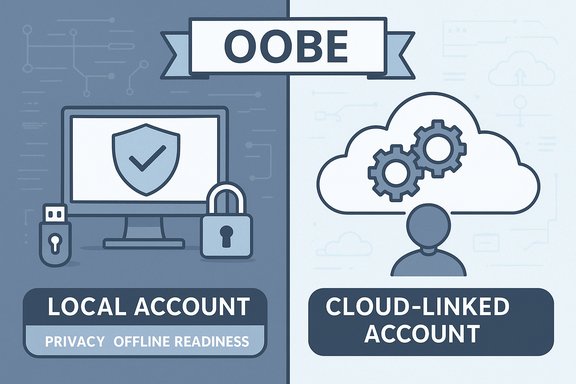
A local account is the simple, traditional user account model: credentials and user data are stored on the device and the account can be created without any internet connection or vendor-issued identity. It’s the difference between “this PC is mine and runs independent of the cloud” and “this PC is linked to a remote profile that syncs settings, stores recovery keys, and ties some device features to an online identity.”
For years Windows offered both paths. Over time Microsoft has favored cloud‑backed accounts because they enable integrated services — OneDrive, synced settings, passwordless sign‑in and recovery, and cloud backup for BitLocker keys — but that convenience comes at a cost for some users: more persistent telemetry, dependency on online services, and the potential for lockout if the cloud identity is unavailable. Community testing and ecosystem commentary in recent months show Microsoft intentionally hardening the Out‑Of‑Box Experience (OOBE) toward an account‑first flow.
This is not a small UX tweak. When an OS makes a cloud-tied identity the default and removes the low-effort ways to avoid it, that nudges millions of users — many unknowingly — into a cloud‑backed setup. That nudge has real implications for privacy, offline readiness, refurbishers, IT provisioning, and alternative OS adoption.
For privacy advocates, refurbishers, sysadmins, and hobbyists, maintaining low‑friction local account options matters because it preserves the device as an autonomous tool that can be provisioned, imaged, and used without cloud dependency. For mainstream consumers, the benefits of cloud accounts are substantial and often worth the trade. That tension is healthy and worth debating publicly.
If you care about local accounts, there are practical, supported ways to keep them — but they require either a little extra preparation (autounattend.xml, provisioning) or the occasional use of third‑party media creation tools. The landscape will continue to change; those who value local control should test their workflows regularly and migrate to supported provisioning when scaling beyond single‑device installs.
The fight for local Windows accounts is not purely symbolic: it determines who controls recovery flows, where encryption keys are stored, how easily machines can be used offline, and how defaults steer millions of users into cloud ecosystems. That’s why this debate matters — not just to enthusiasts but to anyone who values control, resilience, and privacy on their personal computing devices.
Source: How-To Geek The fight for local Windows accounts matters—here's why
 Background / Overview
A local account is the simple, traditional user account model: credentials and user data are stored on the device and the account can be created without any internet connection or vendor-issued identity. It’s the difference between “this PC is mine and runs independent of the cloud” and “this PC is linked to a remote profile that syncs settings, stores recovery keys, and ties some device features to an online identity.”For years Windows offered both paths. Over time Microsoft has favored cloud‑backed accounts because they enable integrated services — OneDrive, synced settings, passwordless sign‑in and recovery, and cloud backup for BitLocker keys — but that convenience comes at a cost for some users: more persistent telemetry, dependency on online services, and the potential for lockout if the cloud identity is unavailable. Community testing and ecosystem commentary in recent months show Microsoft intentionally hardening the Out‑Of‑Box Experience (OOBE) toward an account‑first flow.
This is not a small UX tweak. When an OS makes a cloud-tied identity the default and removes the low-effort ways to avoid it, that nudges millions of users — many unknowingly — into a cloud‑backed setup. That nudge has real implications for privacy, offline readiness, refurbishers, IT provisioning, and alternative OS adoption.
What changed, technically: how Microsoft closed the easy exits
The specific mechanics Microsoft removed
In insider releases and public testing channels Microsoft explicitly documented the removal of “known mechanisms for creating a local account in the Windows Setup experience (OOBE).” That change was included in recent Insider Build notes and has been reproduced by independent testers. The most visible effects are:- The classic OOBE bypass script/flow invoked by commands like oobe\bypassnro has been neutralized on many preview builds.
- Simpler URI/command tricks (for example start ms‑cxh:localonly executed from the OOBE command prompt) have been disabled or made to loop the setup process.
- Microsoft states the rationale: ad‑hoc bypasses sometimes skip essential setup screens and can result in devices that are not “fully configured for use,” so the company prefers users to complete OOBE with internet and a Microsoft Account to ensure feature/configuration completeness.
What wasn’t removed (important nuance)
Microsoft’s changes do not delete local‑account support from Windows itself. The OS still supports:- Enterprise and technician provisioning flows (autounattend.xml, MDT/SCCM, Autopilot/Intune). These are the supported, deterministic ways to preseed a local account or to automate installs at scale.
- Image‑based installs and customized ISOs — third‑party tooling that modifies the installer image can still create an experience that restores local account creation for OOBE in many cases. Tools like Rufus provide options to alter the installation image and restore a local account path in the interactive setup — though these are now a target for ongoing change and may be less stable over time.
Why local accounts still matter — practical reasons
Below are the most consequential, concrete reasons local accounts remain important to many Windows users, and why the platform conflict matters beyond “old preferences.”- Offline readiness and resilience. A local account lets you install and use a PC entirely offline. That is essential for air‑gapped machines, lab appliances, test rigs, media servers, or repair tools that must function without any dependency on external services. Without that option, a machine becomes harder to provision in constrained or disconnected environments.
- Privacy and telemetry minimization. Local accounts reduce the automatic surface area for cloud syncing and account‑linked recovery. Users who choose local accounts often do so to limit the default types of telemetry and cloud relationships that are established automatically during OOBE. Microsoft documents diagnostic and telemetry types and provides controls, but the default cloud path still increases the chance settings will be enabled by default.
- Single‑purpose devices and security boundaries. Kiosks, dedicated media servers (like a Plex box), lab machines, and guest PCs benefit from being independent of a personal cloud identity. Tying such devices to an MSA can create unnecessary account entanglement, surprising access issues, or recovery key exposures that are irrelevant to the device’s role. Real world examples from refurbishers and hobbyists show this clearly.
- Avoiding cloud lockout scenarios. If a user’s cloud account is compromised, locked, or subject to multifactor issues, that can complicate local device access and recovery paths. A local account with properly managed local recovery plans avoids those scenarios. Microsoft provides recovery features for MSAs — which are useful — but they are only helpful if you want your device bound to that service in the first place.
- Choice and platform portability. Defaults steer behavior. When an OS’ easiest interactive flow forces a cloud identity, many users accept it passively. That loss of choice drives some users to alternatives — Linux distributions or macOS — because those platforms either default to local accounts or make cloud linkage optional. Community reaction and migration statistics around Windows 10 end‑of‑support show real movement to Linux in some quarters.
How Microsoft defends its choice — valid points and tradeoffs
Microsoft’s public explanation is operational and security‑oriented: interactive workarounds sometimes skip setup screens that configure protections or device features. The company argues that requiring a connected experience during OOBE improves the reliability and security posture of the device (for example automatic BitLocker escrow, recovery services, and Windows Update readiness). Those are valid, measurable benefits for many customers and especially for supervised corporate fleets. Other practical strengths Microsoft gains by defaulting to cloud accounts:- Faster recovery and cross‑device sync for mainstream users.
- Higher adoption of integrated security features that depend on cloud escrow of tokens and keys.
- A more consistent support surface for helpdesks (one canonical account model to guide troubleshooting).
How users and technicians are responding (and practical options)
There are durable, supported methods and a few fragile community tricks. This list lays them out objectively, with the relative durability and professional suitability of each approach.1. The supported, deterministic approach: unattended / provisioning (recommended for fleets)
- Create an autounattend.xml or use Windows Deployment tools (Windows ADK, MDT, SCCM, Autopilot/Intune).
- Preseed a local administrator or user account, OOBE choices, and privacy settings in the image.
- Deploy the image to devices.
2. Use Rufus or similar external media creators (repeatable, currently effective for many)
- Rufus exposes an option to “Remove requirement for an online Microsoft account” when it crafts a Windows 11 USB image; it can also optionally create a named local account in the image. This makes a repeatable consumer‑facing installer that yields an offline/local OOBE flow on many builds.
- Repeatable and easier for non‑IT users than autounattend.xml once set up.
Cons: - Not officially supported by Microsoft in the sense that heuristics may change; Microsoft is actively closing some of these workarounds in newer builds — so future updates may neutralize this path. Test before relying on it for production.
3. Temporary Microsoft Account, then convert (simple, robust for one‑offs)
- Sign in during OOBE with a minimal Microsoft Account to finish setup.
- After you reach the desktop, create a local administrator account and migrate files.
- Remove/unlink the Microsoft Account if you want the machine local‑only.
4. Pro‑only detour: Domain join / “Work or school” path (Windows Pro)
Windows 11 Pro sometimes exposes a “Domain join instead” or “Work or school” flow during OOBE that can result in a local account. This is a useful alternative for Pro devices but is not available on Home editions.5. Fragile console tricks (avoid for future‑proofing)
- Shift+F10 then oobe\bypassnro, or start ms‑cxh:localonly, used to work on many builds. Microsoft explicitly removed or neutralized these in Insider builds; they may work inconsistently and are a poor choice for repeatable deployments. Use only as last‑resort or lab experiments.
Practical checklist for local‑first installs
- Always test your chosen method on a spare device before wide deployment.
- If you plan to use BitLocker and avoid MS account escrow, store recovery keys offline (USB, secure KMS, or corporate escrow). Failure to do so can permanently lock devices.
- If you use Rufus or custom ISOs, confirm the Rufus version and Windows ISO are compatible — options are ISO‑ and build‑dependent.
Risks, privacy realities, and what to watch next
Telemetry and data collection — what Microsoft actually collects
Microsoft documents two telemetry levels for Windows: Required diagnostic data (minimum) and Optional (Full) diagnostic data. Required data includes device configuration, connectivity, and basic error reports; optional data can include fuller app and browsing metadata. Microsoft provides tools and settings to view and control what’s sent, but many defaults are still set to collect at least the required level. For users who prefer minimal telemetry, a local account does not guarantee zero telemetry — you must also review diagnostic settings and optional services.Support and updates
Microsoft can and does change installer behavior. Community workarounds that work today may break after a patch or a feature update. If you adopt an unsupported install path, vendor or Microsoft support may be limited if you encounter problems. For long‑term fleet reliability, use supported deployment tooling.Security tradeoffs
Defaulting to cloud accounts gives Microsoft a reliable path for features like Windows Hello recovery and automatic BitLocker key escrow, and that can materially help users recover or secure compromised devices. Conversely, avoiding MSAs requires you to take on more responsibility for backups and key management. Neither choice is intrinsically “more secure” — they are different threat models.The policy dimension
When a dominant OS makes an account‑first choice the default interaction model, it shapes what third parties build, what help desks expect, and what new users learn. Historically, defaults have a powerful downstream effect; this move nudges the ecosystem toward cloud‑backed experiences. That matters for competition, choice, and long‑term user sovereignty.Concrete recommendations for different readers
If you’re a home user who values privacy and simplicity
- For a single machine, use the temporary MSA then convert flow for the least friction: finish OOBE using a Microsoft account, then immediately create a local admin and unlink cloud services. Verify OneDrive is unlinked and export BitLocker keys if used.
If you refurbish, reimage, or deploy many machines
- Invest the time in a supported unattended image (autounattend.xml) or use standard deployment tooling. It’s reproducible, auditable, and durable against UI changes. Test images every time Microsoft ships feature updates.
If you maintain servers, media boxes, or lab hardware
- Build minimal images that include local accounts and ensure your NIC drivers are included so offline installs can proceed. Keep recovery media and driver packs for troubleshooting.
If you’re considering walking away from Windows
- Evaluate Linux distributions that default to local accounts and make cloud connectors optional. Linux has matured dramatically; for many single‑purpose or privacy‑sensitive machines it is now a realistic and often simpler alternative. macOS is also local‑capable but has its own telemetry and vendor couplings — choose based on apps, hardware budget, and desired privacy model.
Final assessment — why the fight matters
This is more than a UI argument about an extra click during setup. It’s about where the default power in the PC ecosystem sits: with the device owner or with the cloud provider. Defaults are design choices that shape behavior at scale. Microsoft’s move to harden OOBE for account‑first installs is defensible from a service and security standpoint, but it also reduces the discoverability and convenience of local accounts for legitimate use cases.For privacy advocates, refurbishers, sysadmins, and hobbyists, maintaining low‑friction local account options matters because it preserves the device as an autonomous tool that can be provisioned, imaged, and used without cloud dependency. For mainstream consumers, the benefits of cloud accounts are substantial and often worth the trade. That tension is healthy and worth debating publicly.
If you care about local accounts, there are practical, supported ways to keep them — but they require either a little extra preparation (autounattend.xml, provisioning) or the occasional use of third‑party media creation tools. The landscape will continue to change; those who value local control should test their workflows regularly and migrate to supported provisioning when scaling beyond single‑device installs.
The fight for local Windows accounts is not purely symbolic: it determines who controls recovery flows, where encryption keys are stored, how easily machines can be used offline, and how defaults steer millions of users into cloud ecosystems. That’s why this debate matters — not just to enthusiasts but to anyone who values control, resilience, and privacy on their personal computing devices.
Source: How-To Geek The fight for local Windows accounts matters—here's why
