

Microsoft has added public-preview code interpreter tools to Azure Logic Apps Standard agent workflows, letting an AI agent generate and run Python code in Hyper-V isolated Azure Container Apps dynamic sessions while handling files, transformations, and analysis inside a governed workflow. The announcement is not just another checkbox in Microsoft’s agent platform sprawl. It is a bet that the next useful enterprise agent will look less like a chatbot and more like an integration workflow that can safely improvise. For WindowsForum readers, the interesting part is not that Logic Apps can now run code; it is that Microsoft is trying to make untrusted, model-written code boring enough for enterprise plumbing.
The popular mental model for an AI agent is still a conversational box with a helpful personality and a vague permission to “do things.” Microsoft’s Logic Apps move argues for a different shape. In this version, the agent sits inside a workflow designer, surrounded by triggers, connectors, managed identities, retries, human approval steps, and audit trails.
That matters because most enterprise automation does not begin with a philosophical prompt. It begins with a file arriving in storage, a ticket being opened, an invoice being submitted, a spreadsheet being emailed, or a row appearing in a database. Logic Apps has long been Microsoft’s connective tissue for those events, and the new code interpreter turns that connective tissue into something more adaptive.
The traditional workflow bargain was predictability in exchange for rigidity. You mapped fields, transformed JSON, called APIs, and handled errors, but anything more analytical quickly escaped into Azure Functions, notebooks, or custom services. The new bargain is more ambitious: let the model write the little bit of code that the workflow author did not want to maintain, but execute it in a place where a bad guess does not become a bad day.
That is a subtle but important shift. Microsoft is not saying every business user should become a developer by proxy. It is saying that some workflow steps are too variable for point-and-click transformations, yet too small and contextual to deserve a separately deployed microservice.
Code generated by an LLM is useful precisely because it can synthesize a script for the task at hand. It is risky for the same reason. A model that can generate a pandas script to summarize sales by region can also generate brittle file handling, unexpected imports, unsafe network calls, or code that simply misunderstands the shape of the data.
Microsoft’s answer is Azure Container Apps dynamic sessions. Each session runs in an isolated environment backed by Hyper-V, the same family of virtualization technology that underpins many of Microsoft’s stronger workload-isolation stories. That does not make model-written code magically correct, but it changes the blast radius.
This is where the announcement becomes more than marketing. Enterprises do not merely need agents that can reason; they need agents whose mistakes are constrained. A hallucinated transformation can produce bad output, and administrators still need validation, review, and monitoring. But it should not be able to corrupt the host, wander across tenants, or casually reach systems it was never meant to touch.
The phrase sandboxed code interpreter risks becoming another AI-era buzzword. In practice, it is the difference between “the model wrote a script” and “the model wrote a script that ran in a short-lived, isolated execution context designed for untrusted code.” That distinction is exactly the sort of thing security teams will care about once the demo glow fades.
Before this update, the usual answer was to leave Logic Apps for a custom component. Azure Functions is the canonical Microsoft answer, and it remains the right answer for durable, tested, reusable business logic. But for one-off analysis inside a workflow, a Function can be overhead: repository, deployment pipeline, configuration, versioning, dependencies, logging, and ownership.
The code interpreter gives Logic Apps a native escape hatch. The workflow can upload a CSV or Excel file into the session, have the agent generate Python to inspect and transform it, execute that code, then return the result to the workflow for the next step. In the happy path, the business user describes the desired outcome while the platform handles the tool call.
The phrase “happy path” is doing work here. The best enterprise use cases will not be blind automation over consequential decisions. They will be bounded workflows where the agent creates intermediate analysis, the workflow records what happened, and a person or downstream policy can decide whether the output is acceptable.
That makes the feature more interesting, not less. The near-term winner in enterprise AI is unlikely to be a fully autonomous digital employee with broad authority. It is more likely to be a workflow that removes tedious glue work while keeping the operational skeleton visible.
The Logic Apps code interpreter helps clarify the map. Copilot Studio is where Microsoft wants business-facing conversational experiences to live, especially when they are embedded in Microsoft 365. Foundry is where developers and AI engineers go when model choice, orchestration, evaluation, and multi-agent patterns are the center of gravity. Logic Apps is where the agent is less the product than the operator inside a business process.
That last category is important. Many enterprises do not need an agent that chats elegantly. They need an agent that can open a ticket, check an ERP system, transform a file, ask for human approval in Teams, update a CRM record, and leave an audit trail. Logic Apps already has the connectors and operational semantics for that world.
This is why the “450-plus connectors” pitch is not just a catalog boast. Connectors are the permissions surface and integration surface of enterprise automation. By putting code interpretation inside that environment, Microsoft is trying to keep agents from becoming yet another integration island.
The risk, of course, is that Microsoft creates overlapping islands anyway. Architects will need to decide whether a given agent belongs in Foundry, Copilot Studio, Logic Apps, or a custom application. The code interpreter does not eliminate that choice, but it makes the Logic Apps option stronger whenever the work is integration-heavy and event-driven.
AI agents make code execution feel conversational. That is convenient, but it can also hide the severity of what is happening. When a user asks, “Can you analyze this spreadsheet and plot revenue by customer segment?”, the agent may generate a script, load libraries, read files, create artifacts, and return a chart. The user experiences a single answer; the platform experiences arbitrary code execution.
Microsoft’s Hyper-V boundary is a conservative answer. Compared with lighter-weight isolation approaches, virtualization tends to carry more operational cost but offers a stronger separation story. That is the trade Microsoft is leaning into: if enterprises are going to let LLMs generate executable code, the cloud provider should provide a sandbox that security architects can recognize.
That does not absolve customers from design choices. Session identifiers must be protected. Managed identities need least-privilege assignment. Network access should be intentionally configured rather than casually left open. Sensitive data should not be placed in a session unless the workflow design and user model justify it.
The important point is that Microsoft is not asking administrators to run model-generated code in the Logic Apps host process. The interpreter is a tool reached through a managed session pool. That architecture gives platform teams something concrete to govern.
It has a trigger. It has a workflow definition. It has known connectors. It has a managed identity. It has a session pool. It has a finite task. It may generate code, but that code exists inside a constrained step rather than an open-ended adventure.
That is not as glamorous as the sci-fi version of agents, but it is closer to how enterprise automation survives contact with production. Administrators do not merely ask whether a system can complete a task. They ask who can invoke it, where data flows, how failures are retried, what logs exist, how approvals happen, and what happens when the model is wrong.
Logic Apps already speaks much of that language. The code interpreter extends it into data analysis and transformation, but the surrounding governance model remains familiar. That may be Microsoft’s strongest argument: not that Logic Apps agents are the most advanced agents, but that they are agents placed where enterprise controls already live.
The current emphasis on Python also matters. Microsoft’s broader messaging mentions multiple languages across code interpreter scenarios, but the Logic Apps documentation most directly frames the built-in connector around Python Container Apps sessions. That makes sense for data analysis, but it means teams should verify exactly which runtime options are supported for their intended workflow rather than assuming every language appears everywhere in the same way.
There are also observability questions. Code interpreter sessions can return execution output, but logging behavior differs between code interpreter and custom container sessions. For regulated environments, that distinction is not trivia. If an agent generates code that produces a disputed number in a finance workflow, teams will want to know not only the final answer but also the inputs, generated code, runtime output, and approval path.
Cost modeling is another open concern. Dynamic sessions may reduce the engineering cost of building custom compute steps, but they still introduce Azure resources, session pools, concurrency settings, and potentially new operational patterns. A workflow that casually spins through thousands of file-analysis requests is not the same as a demo that summarizes one spreadsheet.
None of these caveats undercut the feature. They simply place it where it belongs: promising, practical, and still in the phase where architecture discipline matters more than promotional enthusiasm.
The differences matter because they reveal strategy. Lighter isolation can be fast and portable, especially for edge or high-scale request patterns. Kubernetes-native approaches appeal to teams that want infrastructure portability and open-source alignment. Microsoft’s Hyper-V-backed dynamic sessions fit naturally into Azure’s enterprise security story and its existing Container Apps abstraction.
For many customers, the choice will not be ideological. It will follow the rest of the estate. If the workflow already lives in Azure, talks to Microsoft 365, uses managed identities, and depends on Logic Apps connectors, Microsoft’s approach will feel like the shortest path. If the agent platform is Kubernetes-first or edge-first, another sandbox model may be more natural.
That is why the code interpreter strengthens Azure’s platform gravity. It reduces the number of reasons to leave the workflow for custom compute. Every time a customer does not have to create an Azure Function, deploy a container, or call an external analysis service, Azure’s integrated story becomes stickier.
The flip side is lock-in by convenience. A Logic Apps workflow that depends on ACA dynamic sessions, managed identities, built-in connectors, and Azure-specific governance is not portable in any simple sense. That may be acceptable, even desirable, for Microsoft-centric enterprises. But architects should name the tradeoff rather than pretending the agent layer floats above infrastructure choices.
A safe version of “natural language to PowerShell” has obvious appeal and obvious danger. An agent that drafts a remediation script for a fleet issue could save time. An agent that misunderstands scope, deletes the wrong object, or runs with excessive privileges could create a spectacular incident.
That is why the sandbox alone is only part of the answer. Sandboxing protects the execution environment; it does not make administrative intent correct. If future Logic Apps patterns lean into PowerShell more deeply, the winning designs will pair generated code with approval gates, dry runs, constrained identities, and clear separation between analysis and action.
This is where Logic Apps has a structural advantage over a standalone chat experience. A workflow can require human review before execution against production. It can route high-risk actions differently from low-risk ones. It can record who approved what and when. It can run generated code in an isolated environment first, then pass only validated outputs forward.
For Windows shops, that may be the difference between a toy and a tool. Nobody responsible for production Active Directory should want an unconstrained agent with broad admin rights. But many would welcome an assistant that can inspect logs, correlate signals, draft remediation, and package the result for review inside an auditable workflow.
That would miss the operational point. Spreadsheets are not merely files; they are the unofficial API of business. They move between departments, vendors, finance teams, sales organizations, and operations groups precisely because they are flexible enough to survive imperfect processes.
Enterprise IT has spent decades trying to tame that flexibility with systems of record. Yet the spreadsheet persists because real workflows contain exceptions, partial data, and one-off analysis. A code interpreter inside Logic Apps gives Microsoft a way to meet that mess without pretending it can all be modeled upfront.
The same pattern applies beyond sales. Security teams can parse exported logs. Finance teams can inspect expense anomalies. Operations teams can clean CSVs from industrial systems. Support teams can summarize incident data. The value is not that the model knows everything; it is that the workflow can ask the model to write a small transformation at the exact moment the data arrives.
This is where agents may quietly change business process automation. Not by replacing core applications, but by reducing the penalty for messy intermediate data. If every awkward file no longer requires a bespoke script or manual spreadsheet work, workflows can become more ambitious.
The better version is also plausible. Platform teams create approved session pools, network boundaries, identity patterns, logging conventions, and workflow templates. Business teams gain a controlled way to automate file-heavy analysis without filing a ticket for every small transformation. Security teams get a clearer execution boundary than they would with ad hoc scripts running on desktops or personal notebooks.
The difference between those futures is governance. Microsoft can provide the primitives, but customers must decide how agents are allowed to use them. That means treating generated code as a first-class risk category, not as a magical implementation detail hidden behind a natural-language prompt.
Enterprises should also be honest about accuracy. Sandboxing prevents certain classes of damage, but it does not validate statistical reasoning, data interpretation, or business meaning. An isolated wrong answer is still a wrong answer. Workflows that affect money, compliance, security posture, or customer commitments need verification steps proportional to the stakes.
The strongest early deployments will probably be internal, bounded, and reviewable. Let the agent summarize, transform, plot, and draft. Let humans approve consequential actions. Let telemetry accumulate before expanding the scope.
The prerequisite of an Azure Container Apps code interpreter session pool is not a minor implementation detail. It means this is not a purely Logic Apps feature; it is a cross-platform composition of workflow orchestration, AI model calls, managed identity, and serverless sandbox compute. That composition is exactly how Microsoft wants Azure customers to build: not by picking one monolithic AI product, but by wiring managed services together.
The model-selection story also matters. Architects want control over which deployed model drives a workflow or agent, especially when cost, latency, data sensitivity, and output quality vary by use case. Logic Apps agents fitting into Azure OpenAI-backed deployments gives teams a familiar enterprise control point, even as the workflow itself becomes more adaptive.
There is a strategic irony here. The more capable agents become, the more valuable old-fashioned workflow controls become. Triggers, retries, approvals, identities, and logs look mundane beside model reasoning, but they are what make automation survivable.
Microsoft appears to understand that. Rather than positioning the code interpreter as a standalone marvel, it is embedding it inside the machinery that already moves enterprise data around.
Teams should start with low-risk workflows where the input and expected output are easy to inspect. They should prefer workflows that benefit from generated analysis but do not immediately execute irreversible changes. They should design for auditability from the beginning, not after the first executive asks where a number came from.
The feature also rewards clear boundaries. A session should be scoped to the task. The identity should have only the permissions it needs. Network access should be closed unless there is a reason to open it. Generated artifacts should be retained or discarded according to policy, not convenience.
This is the kind of feature that can look deceptively simple in a demo. The hard part is not making an agent plot a chart. The hard part is making that chart part of a repeatable, governed business process.
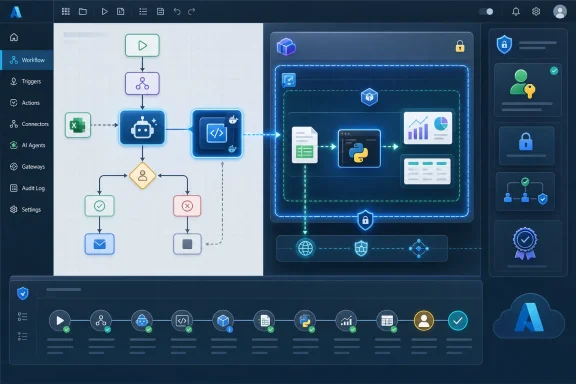 Microsoft Moves the Agent From the Chat Window to the Workflow Engine
The popular mental model for an AI agent is still a conversational box with a helpful personality and a vague permission to “do things.” Microsoft’s Logic Apps move argues for a different shape. In this version, the agent sits inside a workflow designer, surrounded by triggers, connectors, managed identities, retries, human approval steps, and audit trails.That matters because most enterprise automation does not begin with a philosophical prompt. It begins with a file arriving in storage, a ticket being opened, an invoice being submitted, a spreadsheet being emailed, or a row appearing in a database. Logic Apps has long been Microsoft’s connective tissue for those events, and the new code interpreter turns that connective tissue into something more adaptive.
The traditional workflow bargain was predictability in exchange for rigidity. You mapped fields, transformed JSON, called APIs, and handled errors, but anything more analytical quickly escaped into Azure Functions, notebooks, or custom services. The new bargain is more ambitious: let the model write the little bit of code that the workflow author did not want to maintain, but execute it in a place where a bad guess does not become a bad day.
That is a subtle but important shift. Microsoft is not saying every business user should become a developer by proxy. It is saying that some workflow steps are too variable for point-and-click transformations, yet too small and contextual to deserve a separately deployed microservice.
The Sandbox Is the Product, Not the Syntax
The headline languages are familiar: Python is the obvious first-class citizen for analysis, with JavaScript, C#, and PowerShell fitting the broader Azure and Windows automation world. But the language list is not the real story. The real product is the execution boundary.Code generated by an LLM is useful precisely because it can synthesize a script for the task at hand. It is risky for the same reason. A model that can generate a pandas script to summarize sales by region can also generate brittle file handling, unexpected imports, unsafe network calls, or code that simply misunderstands the shape of the data.
Microsoft’s answer is Azure Container Apps dynamic sessions. Each session runs in an isolated environment backed by Hyper-V, the same family of virtualization technology that underpins many of Microsoft’s stronger workload-isolation stories. That does not make model-written code magically correct, but it changes the blast radius.
This is where the announcement becomes more than marketing. Enterprises do not merely need agents that can reason; they need agents whose mistakes are constrained. A hallucinated transformation can produce bad output, and administrators still need validation, review, and monitoring. But it should not be able to corrupt the host, wander across tenants, or casually reach systems it was never meant to touch.
The phrase sandboxed code interpreter risks becoming another AI-era buzzword. In practice, it is the difference between “the model wrote a script” and “the model wrote a script that ran in a short-lived, isolated execution context designed for untrusted code.” That distinction is exactly the sort of thing security teams will care about once the demo glow fades.
Logic Apps Gets a Native Escape Hatch for the Messy Middle
Anyone who has built real integration workflows knows the awkward middle. A connector can fetch a file, a parser can extract fields, and a workflow can route approvals. Then comes the annoying part: normalize the inconsistent columns, infer the missing category, calculate the outliers, generate a chart, or summarize a file that has just enough structure to be useful and just enough mess to be painful.Before this update, the usual answer was to leave Logic Apps for a custom component. Azure Functions is the canonical Microsoft answer, and it remains the right answer for durable, tested, reusable business logic. But for one-off analysis inside a workflow, a Function can be overhead: repository, deployment pipeline, configuration, versioning, dependencies, logging, and ownership.
The code interpreter gives Logic Apps a native escape hatch. The workflow can upload a CSV or Excel file into the session, have the agent generate Python to inspect and transform it, execute that code, then return the result to the workflow for the next step. In the happy path, the business user describes the desired outcome while the platform handles the tool call.
The phrase “happy path” is doing work here. The best enterprise use cases will not be blind automation over consequential decisions. They will be bounded workflows where the agent creates intermediate analysis, the workflow records what happened, and a person or downstream policy can decide whether the output is acceptable.
That makes the feature more interesting, not less. The near-term winner in enterprise AI is unlikely to be a fully autonomous digital employee with broad authority. It is more likely to be a workflow that removes tedious glue work while keeping the operational skeleton visible.
Microsoft’s Agent Portfolio Is Starting to Sort Itself
Microsoft’s agent story can feel sprawling because it is sprawling. There is Copilot Studio for low-code conversational agents, Azure AI Foundry for pro-code model orchestration, Microsoft 365 Copilot extensions for productivity contexts, Semantic Kernel for developers, and now increasingly agentic capabilities inside Logic Apps.The Logic Apps code interpreter helps clarify the map. Copilot Studio is where Microsoft wants business-facing conversational experiences to live, especially when they are embedded in Microsoft 365. Foundry is where developers and AI engineers go when model choice, orchestration, evaluation, and multi-agent patterns are the center of gravity. Logic Apps is where the agent is less the product than the operator inside a business process.
That last category is important. Many enterprises do not need an agent that chats elegantly. They need an agent that can open a ticket, check an ERP system, transform a file, ask for human approval in Teams, update a CRM record, and leave an audit trail. Logic Apps already has the connectors and operational semantics for that world.
This is why the “450-plus connectors” pitch is not just a catalog boast. Connectors are the permissions surface and integration surface of enterprise automation. By putting code interpretation inside that environment, Microsoft is trying to keep agents from becoming yet another integration island.
The risk, of course, is that Microsoft creates overlapping islands anyway. Architects will need to decide whether a given agent belongs in Foundry, Copilot Studio, Logic Apps, or a custom application. The code interpreter does not eliminate that choice, but it makes the Logic Apps option stronger whenever the work is integration-heavy and event-driven.
Hyper-V Isolation Is a Familiar Answer to a New AI Problem
Running untrusted code is not a new problem. Browsers, container platforms, online judges, notebook services, malware sandboxes, and multi-tenant cloud platforms have all wrestled with it for years. What is new is the volume and normality of code that no human has written line by line.AI agents make code execution feel conversational. That is convenient, but it can also hide the severity of what is happening. When a user asks, “Can you analyze this spreadsheet and plot revenue by customer segment?”, the agent may generate a script, load libraries, read files, create artifacts, and return a chart. The user experiences a single answer; the platform experiences arbitrary code execution.
Microsoft’s Hyper-V boundary is a conservative answer. Compared with lighter-weight isolation approaches, virtualization tends to carry more operational cost but offers a stronger separation story. That is the trade Microsoft is leaning into: if enterprises are going to let LLMs generate executable code, the cloud provider should provide a sandbox that security architects can recognize.
That does not absolve customers from design choices. Session identifiers must be protected. Managed identities need least-privilege assignment. Network access should be intentionally configured rather than casually left open. Sensitive data should not be placed in a session unless the workflow design and user model justify it.
The important point is that Microsoft is not asking administrators to run model-generated code in the Logic Apps host process. The interpreter is a tool reached through a managed session pool. That architecture gives platform teams something concrete to govern.
The Most Useful Agents Will Be Boring on Purpose
There is a temptation in every agent announcement to imagine a general-purpose assistant floating above the enterprise, improvising its way through systems. Logic Apps points toward a more prosaic and probably more valuable future. The useful agent is boxed in by design.It has a trigger. It has a workflow definition. It has known connectors. It has a managed identity. It has a session pool. It has a finite task. It may generate code, but that code exists inside a constrained step rather than an open-ended adventure.
That is not as glamorous as the sci-fi version of agents, but it is closer to how enterprise automation survives contact with production. Administrators do not merely ask whether a system can complete a task. They ask who can invoke it, where data flows, how failures are retried, what logs exist, how approvals happen, and what happens when the model is wrong.
Logic Apps already speaks much of that language. The code interpreter extends it into data analysis and transformation, but the surrounding governance model remains familiar. That may be Microsoft’s strongest argument: not that Logic Apps agents are the most advanced agents, but that they are agents placed where enterprise controls already live.
Preview Status Keeps the Fine Print in View
The feature is in public preview, and that should temper production enthusiasm. Preview services are where Microsoft collects feedback, sharpens documentation, and discovers which edge cases customers actually hit. They are not where cautious enterprises should place irreplaceable workflows without a rollback plan.The current emphasis on Python also matters. Microsoft’s broader messaging mentions multiple languages across code interpreter scenarios, but the Logic Apps documentation most directly frames the built-in connector around Python Container Apps sessions. That makes sense for data analysis, but it means teams should verify exactly which runtime options are supported for their intended workflow rather than assuming every language appears everywhere in the same way.
There are also observability questions. Code interpreter sessions can return execution output, but logging behavior differs between code interpreter and custom container sessions. For regulated environments, that distinction is not trivia. If an agent generates code that produces a disputed number in a finance workflow, teams will want to know not only the final answer but also the inputs, generated code, runtime output, and approval path.
Cost modeling is another open concern. Dynamic sessions may reduce the engineering cost of building custom compute steps, but they still introduce Azure resources, session pools, concurrency settings, and potentially new operational patterns. A workflow that casually spins through thousands of file-analysis requests is not the same as a demo that summarizes one spreadsheet.
None of these caveats undercut the feature. They simply place it where it belongs: promising, practical, and still in the phase where architecture discipline matters more than promotional enthusiasm.
The Competitive Frame Is Isolation Versus Convenience
Microsoft is not alone in treating sandboxed execution as a core building block for agents. Cloudflare has leaned on container and isolate-based approaches at the edge. Google has promoted sandboxing primitives such as gVisor in Kubernetes contexts. The broader market is converging on the same premise: agents need tools, tools sometimes need code, and code needs containment.The differences matter because they reveal strategy. Lighter isolation can be fast and portable, especially for edge or high-scale request patterns. Kubernetes-native approaches appeal to teams that want infrastructure portability and open-source alignment. Microsoft’s Hyper-V-backed dynamic sessions fit naturally into Azure’s enterprise security story and its existing Container Apps abstraction.
For many customers, the choice will not be ideological. It will follow the rest of the estate. If the workflow already lives in Azure, talks to Microsoft 365, uses managed identities, and depends on Logic Apps connectors, Microsoft’s approach will feel like the shortest path. If the agent platform is Kubernetes-first or edge-first, another sandbox model may be more natural.
That is why the code interpreter strengthens Azure’s platform gravity. It reduces the number of reasons to leave the workflow for custom compute. Every time a customer does not have to create an Azure Function, deploy a container, or call an external analysis service, Azure’s integrated story becomes stickier.
The flip side is lock-in by convenience. A Logic Apps workflow that depends on ACA dynamic sessions, managed identities, built-in connectors, and Azure-specific governance is not portable in any simple sense. That may be acceptable, even desirable, for Microsoft-centric enterprises. But architects should name the tradeoff rather than pretending the agent layer floats above infrastructure choices.
PowerShell Makes This a Windows Admin Story Too
For Windows administrators, the most intriguing long-term angle is not only Python analytics. It is the possibility of governed PowerShell execution inside agent-driven workflows. PowerShell remains the administrative bloodstream of Windows Server, Microsoft 365, Exchange, Entra ID, Intune, and countless internal scripts.A safe version of “natural language to PowerShell” has obvious appeal and obvious danger. An agent that drafts a remediation script for a fleet issue could save time. An agent that misunderstands scope, deletes the wrong object, or runs with excessive privileges could create a spectacular incident.
That is why the sandbox alone is only part of the answer. Sandboxing protects the execution environment; it does not make administrative intent correct. If future Logic Apps patterns lean into PowerShell more deeply, the winning designs will pair generated code with approval gates, dry runs, constrained identities, and clear separation between analysis and action.
This is where Logic Apps has a structural advantage over a standalone chat experience. A workflow can require human review before execution against production. It can route high-risk actions differently from low-risk ones. It can record who approved what and when. It can run generated code in an isolated environment first, then pass only validated outputs forward.
For Windows shops, that may be the difference between a toy and a tool. Nobody responsible for production Active Directory should want an unconstrained agent with broad admin rights. But many would welcome an assistant that can inspect logs, correlate signals, draft remediation, and package the result for review inside an auditable workflow.
The Spreadsheet Demo Hints at a Larger Data-Operations Shift
The canonical demo is a sales spreadsheet. The workflow receives the file, the agent uploads it to a session, Python inspects the data, generates trends or visualizations, and the result comes back to the requester. It is easy to dismiss this as another “AI analyzes Excel” story.That would miss the operational point. Spreadsheets are not merely files; they are the unofficial API of business. They move between departments, vendors, finance teams, sales organizations, and operations groups precisely because they are flexible enough to survive imperfect processes.
Enterprise IT has spent decades trying to tame that flexibility with systems of record. Yet the spreadsheet persists because real workflows contain exceptions, partial data, and one-off analysis. A code interpreter inside Logic Apps gives Microsoft a way to meet that mess without pretending it can all be modeled upfront.
The same pattern applies beyond sales. Security teams can parse exported logs. Finance teams can inspect expense anomalies. Operations teams can clean CSVs from industrial systems. Support teams can summarize incident data. The value is not that the model knows everything; it is that the workflow can ask the model to write a small transformation at the exact moment the data arrives.
This is where agents may quietly change business process automation. Not by replacing core applications, but by reducing the penalty for messy intermediate data. If every awkward file no longer requires a bespoke script or manual spreadsheet work, workflows can become more ambitious.
Governance Will Decide Whether This Scales or Sprawls
The nightmare version of this feature is easy to imagine. Every department creates agent workflows that generate opaque code, produce unverified reports, and quietly become decision infrastructure. The organization wakes up later with dozens of preview-era automations nobody fully understands.The better version is also plausible. Platform teams create approved session pools, network boundaries, identity patterns, logging conventions, and workflow templates. Business teams gain a controlled way to automate file-heavy analysis without filing a ticket for every small transformation. Security teams get a clearer execution boundary than they would with ad hoc scripts running on desktops or personal notebooks.
The difference between those futures is governance. Microsoft can provide the primitives, but customers must decide how agents are allowed to use them. That means treating generated code as a first-class risk category, not as a magical implementation detail hidden behind a natural-language prompt.
Enterprises should also be honest about accuracy. Sandboxing prevents certain classes of damage, but it does not validate statistical reasoning, data interpretation, or business meaning. An isolated wrong answer is still a wrong answer. Workflows that affect money, compliance, security posture, or customer commitments need verification steps proportional to the stakes.
The strongest early deployments will probably be internal, bounded, and reviewable. Let the agent summarize, transform, plot, and draft. Let humans approve consequential actions. Let telemetry accumulate before expanding the scope.
The Calendar Says Preview, but the Direction Is Production
Microsoft’s public-preview label says “not finished.” The architecture says “this is where the platform is going.” Agentic workflows need tools, and tools need somewhere safe to run code. Logic Apps now has that place.The prerequisite of an Azure Container Apps code interpreter session pool is not a minor implementation detail. It means this is not a purely Logic Apps feature; it is a cross-platform composition of workflow orchestration, AI model calls, managed identity, and serverless sandbox compute. That composition is exactly how Microsoft wants Azure customers to build: not by picking one monolithic AI product, but by wiring managed services together.
The model-selection story also matters. Architects want control over which deployed model drives a workflow or agent, especially when cost, latency, data sensitivity, and output quality vary by use case. Logic Apps agents fitting into Azure OpenAI-backed deployments gives teams a familiar enterprise control point, even as the workflow itself becomes more adaptive.
There is a strategic irony here. The more capable agents become, the more valuable old-fashioned workflow controls become. Triggers, retries, approvals, identities, and logs look mundane beside model reasoning, but they are what make automation survivable.
Microsoft appears to understand that. Rather than positioning the code interpreter as a standalone marvel, it is embedding it inside the machinery that already moves enterprise data around.
The Practical Read for Azure Shops
The most concrete way to view this release is as a new middle tier between no-code transformation and custom compute. It will not replace Azure Functions, notebooks, data pipelines, or carefully engineered services. It will replace some of the small glue scripts and manual spreadsheet operations that currently live in the shadows.Teams should start with low-risk workflows where the input and expected output are easy to inspect. They should prefer workflows that benefit from generated analysis but do not immediately execute irreversible changes. They should design for auditability from the beginning, not after the first executive asks where a number came from.
The feature also rewards clear boundaries. A session should be scoped to the task. The identity should have only the permissions it needs. Network access should be closed unless there is a reason to open it. Generated artifacts should be retained or discarded according to policy, not convenience.
This is the kind of feature that can look deceptively simple in a demo. The hard part is not making an agent plot a chart. The hard part is making that chart part of a repeatable, governed business process.
The Azure Agent Stack Gets Its Integration Workhorse
Logic Apps’ code interpreter support is not the flashiest agent announcement Microsoft will make, but it may be one of the more practical ones for enterprise IT. It gives the integration layer a controlled way to handle the messy analytical work that used to spill into custom services or manual effort.- Microsoft is positioning Logic Apps as the agent platform for integration-heavy business workflows rather than as a general chatbot builder.
- Azure Container Apps dynamic sessions provide the isolation layer that makes model-generated code more plausible in enterprise environments.
- The most immediate use cases are file-heavy workflows involving CSV, Excel, JSON, logs, reports, and ad hoc data transformations.
- Public-preview status means teams should validate runtime support, observability, cost, and governance before treating the feature as production infrastructure.
- The feature strengthens Azure’s platform gravity by reducing the need to leave Logic Apps for small custom compute steps.
- The security story depends not only on Hyper-V isolation, but also on managed identity design, session handling, network controls, human review, and output validation.
References
- Primary source: infoq.com
Published: Wed, 27 May 2026 09:45:33 GMT
Azure Logic Apps Adds Sandboxed Code Interpreters to Agent Workflows - InfoQ
Microsoft added sandboxed code interpreters to Azure Logic Apps, enabling agents within integration workflows to generate and execute Python, JavaScript, C#, and PowerShell in Hyper-V isolated sessionwww.infoq.com
- Official source: learn.microsoft.com
Serverless Code Interpreter Sessions in Azure Container Apps | Microsoft Learn
Learn how to run a serverless code interpreter session in Azure Container Apps.learn.microsoft.com - Official source: techcommunity.microsoft.com
Azure Container Apps dynamic sessions general availability, and more | Microsoft Community Hub
Python code interpreter and custom sessions are now GA. JavaScript code interpreter in public preview. Microsoft Copilot uses Azure Container Apps dynamic... techcommunity.microsoft.com
- Official source: azure.microsoft.com
Azure Container Apps | Microsoft Azure
Explore Azure Container Apps, a fully managed serverless container service that quickly builds and deploys AI apps and agents at scale with Microsoft Azure.azure.microsoft.com
- Related coverage: ebisuda.net
Azure Container AppsのDynamic SessionsにMCPエンドポイントが登場——AIエージェントがミリ秒でコード実行 | ebisuda.net
MicrosoftがAzure Container AppsのDynamic SessionsにMCPエンドポイントを追加、AIエージェントがHyper-V隔離サンドボックスでコードを安全・高速に実行可能に。www.ebisuda.net
- Official source: microsoft.github.io

ACA Dynamic Sessions Code Executor — AutoGen
microsoft.github.io
