

Apple’s macOS 27 Golden Gate public beta turns Siri into a system-wide conversational assistant capable of reading onscreen content, using personal context, and carrying out tasks across apps. Released to public testers on July 13, 2026, the update is the most complete demonstration yet of the Apple Intelligence vision that Cupertino originally pitched alongside macOS Sequoia in 2024.
A hands-on preview published by PCMag found the promised AI features present and broadly integrated throughout the operating system rather than confined to a chatbot window. Apple’s own macOS preview describes Siri AI as a conversational assistant with onscreen awareness, access to relevant personal information, and the ability to act across supported apps.
Golden Gate is still prerelease software, and its automation gaps make that status apparent. Even so, it offers the clearest picture yet of how Apple intends to turn generative AI into a desktop feature rather than another website users must keep open beside their work.
Siri AI is accessible from the macOS menu bar, by voice, through a keyboard shortcut, and from a new standalone Siri app that preserves previous conversations. Users can speak or type naturally, continue a discussion over multiple prompts, and ask questions about content displayed elsewhere on the Mac.
In PCMag’s testing, Siri summarized a document open in Preview and generated a detailed description of an image inside another application. Apple calls this capability Visual Intelligence, and on the Mac it can work from a selected area or screenshot to identify, explain, search for, or take action on onscreen material.
That placement matters more than another round of model-performance claims. ChatGPT and Claude can already analyze documents and images, but Golden Gate reduces the handoff between the desktop and the AI service. There is less copying, uploading, window switching, and re-explaining what the user is looking at.
Siri also appears contextually inside Apple applications. A Command-click in apps such as Calendar and Messages can expose an Ask Siri option, allowing the assistant to work from the selected object. When PCMag asked for the best route to a Calendar appointment in another city, Siri returned a route that opened in Apple Maps.
The result resembles the direction Microsoft has pursued with Copilot on Windows, but with a more tightly controlled application surface. Apple owns macOS, Siri, Shortcuts, Mail, Messages, Calendar, Photos, Maps, and the underlying App Intents framework, giving it an architectural advantage when those components cooperate correctly.
The obvious limitation is that the experience depends heavily on what each application exposes. Apple’s developer documentation directs software makers to make actions and content available through App Intents and assistant schemas. Until third-party developers adopt those interfaces, Siri’s deepest abilities are likely to remain concentrated in Apple’s own software.
A user can describe the desired outcome, and Apple Intelligence assembles a multistep workflow using actions exposed by macOS applications. Apple’s developer materials explicitly position this as a way for people to create powerful shortcuts without first understanding the structure of the Shortcuts editor.
PCMag asked it to create a workflow that reported the current distance from the user to a home city. Shortcuts generated the automation in seconds, demonstrating how natural-language construction can make desktop scripting accessible to people who would never write conventional code.
Running the shortcut exposed a less glamorous part of the experience. Shortcuts lacked location permission and reported the problem without directing the user to the necessary control under System Settings. The automation was technically correct, but the surrounding permission flow was not intelligent enough to finish the job.
That is a crucial distinction for both consumer support and managed environments. Generating a workflow is only one stage; macOS must also explain required permissions, request them at an appropriate point, and handle a denial without leaving the user stranded. Administrators will additionally need to consider how generated automations interact with privacy controls, application entitlements, data-loss policies, and audit requirements.
Shortcuts also cannot invent native capabilities that an application does not expose. When asked to move a selected Mail message into a particular folder, it reportedly acknowledged that the requested Shortcuts action was unavailable and proposed an unrelated unread-mail workflow instead.
The fallback was surprisingly effective: Apple Intelligence generated an AppleScript application that could perform the task. That example shows why AppleScript remains strategically useful, even as Apple deemphasizes the aging scripting language. Generative AI can hide much of its awkward syntax while retaining access to mature automation hooks that newer frameworks do not yet match.
For power users, this combination could become Golden Gate’s defining feature. Natural-language Shortcuts provide the approachable front end, while AppleScript supplies an escape route when the modern action catalog runs out.
The notable part is not simply that macOS can generate pixels. The tool sits beside cropping, rotation, and color controls, presenting AI manipulation as another editing operation rather than directing users into a separate experimental application. That kind of integration is what makes the release feel more coherent than Apple’s earlier, piecemeal Intelligence rollout.
Text generation is less transformative. When asked to compose a polite reply to a message open in Mail, Siri produced an accurate but generic response whose machine-generated tone was immediately recognizable, according to the preview.
Apple claims Siri can match a user’s writing style, punctuation, and tone in Mail and Messages. The beta experience suggests that this remains a goal rather than a consistently convincing result. Context awareness can ensure a response addresses the correct email, but it does not guarantee that the prose sounds personal, specific, or worth sending unchanged.
This is where Apple’s desktop integration cuts both ways. A mediocre chatbot answer is easy to discard; a mediocre answer placed directly in a message composer is easier to send without scrutiny. Organizations evaluating Golden Gate will need policies that treat generated text as a draft, particularly for customer communication, legal material, technical instructions, and security-sensitive requests.
The Apple Intelligence and Siri AI features require an M1-class Mac or newer, aligning the operating system’s support boundary with the hardware needed for its AI stack. For mixed estates, Golden Gate is therefore not merely another annual feature update; it is a hardware segmentation point.
The current public beta follows macOS 27 beta 3. Apple’s developer release records identify the July 13 revision as beta 3 version 2, build 26A5378n, while the original beta 3 build, 26A5378j, arrived on July 6. Apple’s release notes still document known issues across frameworks and system components, making deployment on production Macs difficult to justify.
Interested testers can enroll through Apple’s beta program and select the macOS 27 beta under System Settings, General, and Software Update. A full backup and a non-critical Mac remain the sensible prerequisites, especially where Shortcuts, AppleScript, security tools, VPN clients, device-management agents, or specialist peripherals are involved.
Golden Gate’s immediate achievement is not that Siri suddenly outperforms every competing model. It is that Apple has finally connected conversation, onscreen understanding, personal context, application actions, Shortcuts, and legacy scripting into a recognizable desktop workflow. The remaining test is whether Apple and third-party developers can close the permission and application-integration gaps before macOS 27 reaches its stable release later in 2026.
A hands-on preview published by PCMag found the promised AI features present and broadly integrated throughout the operating system rather than confined to a chatbot window. Apple’s own macOS preview describes Siri AI as a conversational assistant with onscreen awareness, access to relevant personal information, and the ability to act across supported apps.
Golden Gate is still prerelease software, and its automation gaps make that status apparent. Even so, it offers the clearest picture yet of how Apple intends to turn generative AI into a desktop feature rather than another website users must keep open beside their work.
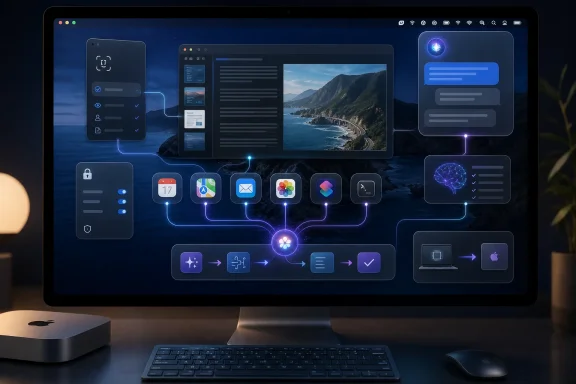 Siri Moves Into the Desktop Workflow
Siri AI is accessible from the macOS menu bar, by voice, through a keyboard shortcut, and from a new standalone Siri app that preserves previous conversations. Users can speak or type naturally, continue a discussion over multiple prompts, and ask questions about content displayed elsewhere on the Mac.In PCMag’s testing, Siri summarized a document open in Preview and generated a detailed description of an image inside another application. Apple calls this capability Visual Intelligence, and on the Mac it can work from a selected area or screenshot to identify, explain, search for, or take action on onscreen material.
That placement matters more than another round of model-performance claims. ChatGPT and Claude can already analyze documents and images, but Golden Gate reduces the handoff between the desktop and the AI service. There is less copying, uploading, window switching, and re-explaining what the user is looking at.
Siri also appears contextually inside Apple applications. A Command-click in apps such as Calendar and Messages can expose an Ask Siri option, allowing the assistant to work from the selected object. When PCMag asked for the best route to a Calendar appointment in another city, Siri returned a route that opened in Apple Maps.
The result resembles the direction Microsoft has pursued with Copilot on Windows, but with a more tightly controlled application surface. Apple owns macOS, Siri, Shortcuts, Mail, Messages, Calendar, Photos, Maps, and the underlying App Intents framework, giving it an architectural advantage when those components cooperate correctly.
The obvious limitation is that the experience depends heavily on what each application exposes. Apple’s developer documentation directs software makers to make actions and content available through App Intents and assistant schemas. Until third-party developers adopt those interfaces, Siri’s deepest abilities are likely to remain concentrated in Apple’s own software.
Shortcuts Becomes the Real Power Feature
The most consequential Golden Gate feature may not be the Siri conversation window at all. Shortcuts can now build automations from a plain-language description, removing much of the fiddly action-by-action construction that previously limited the tool’s audience.A user can describe the desired outcome, and Apple Intelligence assembles a multistep workflow using actions exposed by macOS applications. Apple’s developer materials explicitly position this as a way for people to create powerful shortcuts without first understanding the structure of the Shortcuts editor.
PCMag asked it to create a workflow that reported the current distance from the user to a home city. Shortcuts generated the automation in seconds, demonstrating how natural-language construction can make desktop scripting accessible to people who would never write conventional code.
Running the shortcut exposed a less glamorous part of the experience. Shortcuts lacked location permission and reported the problem without directing the user to the necessary control under System Settings. The automation was technically correct, but the surrounding permission flow was not intelligent enough to finish the job.
That is a crucial distinction for both consumer support and managed environments. Generating a workflow is only one stage; macOS must also explain required permissions, request them at an appropriate point, and handle a denial without leaving the user stranded. Administrators will additionally need to consider how generated automations interact with privacy controls, application entitlements, data-loss policies, and audit requirements.
Shortcuts also cannot invent native capabilities that an application does not expose. When asked to move a selected Mail message into a particular folder, it reportedly acknowledged that the requested Shortcuts action was unavailable and proposed an unrelated unread-mail workflow instead.
The fallback was surprisingly effective: Apple Intelligence generated an AppleScript application that could perform the task. That example shows why AppleScript remains strategically useful, even as Apple deemphasizes the aging scripting language. Generative AI can hide much of its awkward syntax while retaining access to mature automation hooks that newer frameworks do not yet match.
For power users, this combination could become Golden Gate’s defining feature. Natural-language Shortcuts provide the approachable front end, while AppleScript supplies an escape route when the modern action catalog runs out.
Photos Shows the Ambition, Mail Shows the Ceiling
Golden Gate also places generative editing alongside conventional tools in Photos. In one PCMag test, Apple Intelligence reframed a photograph so that its subject appeared to face forward, synthesizing additional visual detail around the adjusted perspective.The notable part is not simply that macOS can generate pixels. The tool sits beside cropping, rotation, and color controls, presenting AI manipulation as another editing operation rather than directing users into a separate experimental application. That kind of integration is what makes the release feel more coherent than Apple’s earlier, piecemeal Intelligence rollout.
Text generation is less transformative. When asked to compose a polite reply to a message open in Mail, Siri produced an accurate but generic response whose machine-generated tone was immediately recognizable, according to the preview.
Apple claims Siri can match a user’s writing style, punctuation, and tone in Mail and Messages. The beta experience suggests that this remains a goal rather than a consistently convincing result. Context awareness can ensure a response addresses the correct email, but it does not guarantee that the prose sounds personal, specific, or worth sending unchanged.
This is where Apple’s desktop integration cuts both ways. A mediocre chatbot answer is easy to discard; a mediocre answer placed directly in a message composer is easier to send without scrutiny. Organizations evaluating Golden Gate will need policies that treat generated text as a draft, particularly for customer communication, legal material, technical instructions, and security-sensitive requests.
Golden Gate Leaves Intel Macs Behind
macOS 27 also formalizes Apple’s transition away from Intel. Apple lists compatibility only for Apple silicon systems: MacBook Air and MacBook Pro models from 2020 onward, iMac models from 2021 onward, Mac mini models from 2020 onward, Mac Studio models from 2022 onward, the 2023 Apple silicon Mac Pro, and the 2026 MacBook Neo.The Apple Intelligence and Siri AI features require an M1-class Mac or newer, aligning the operating system’s support boundary with the hardware needed for its AI stack. For mixed estates, Golden Gate is therefore not merely another annual feature update; it is a hardware segmentation point.
The current public beta follows macOS 27 beta 3. Apple’s developer release records identify the July 13 revision as beta 3 version 2, build 26A5378n, while the original beta 3 build, 26A5378j, arrived on July 6. Apple’s release notes still document known issues across frameworks and system components, making deployment on production Macs difficult to justify.
Interested testers can enroll through Apple’s beta program and select the macOS 27 beta under System Settings, General, and Software Update. A full backup and a non-critical Mac remain the sensible prerequisites, especially where Shortcuts, AppleScript, security tools, VPN clients, device-management agents, or specialist peripherals are involved.
Golden Gate’s immediate achievement is not that Siri suddenly outperforms every competing model. It is that Apple has finally connected conversation, onscreen understanding, personal context, application actions, Shortcuts, and legacy scripting into a recognizable desktop workflow. The remaining test is whether Apple and third-party developers can close the permission and application-integration gaps before macOS 27 reaches its stable release later in 2026.
References
- Primary source: PCMag
Published: 2026-07-13T21:01:20+00:00
Apple macOS Golden Gate Preview: The Company's Most Complete Desktop Release in Years | PCMag
Apple finally delivers on its desktop AI promises with macOS Golden Gate, pairing genuinely useful Apple Intelligence features with long-overdue usability and performance improvements.www.pcmag.com - Related coverage: macrumors.com
First macOS Golden Gate Public Beta Now Available
Apple today released the first public beta of macOS Golden Gate, expanding the macOS 27 beta test to non-developers. You can sign up to test the update on Apple's beta website, and then download it by going to System Settings > General > Software Update and toggling on the...www.macrumors.com - Official source: apple.com
OS - macOS 27 Golden Gate - Apple
macOS 27 Golden Gate with all-new Siri AI powered by Apple Intelligence and new features for a more responsive, delightful experience.www.apple.com - Official source: images.apple.com
- Related coverage: tomsguide.com
The macOS Golden Gate developer beta is live — here’s how to download it | Tom's Guide
Apple's macOS Golden Gate developer beta is available now. Here's how you can download it and test out all the new Apple Intelligence features for Macs.www.tomsguide.com - Related coverage: tomshardware.com
Apple demonstrates cross-platform Siri upgrades in macOS 27 Golden Gate at WWDC — update brings Liquid Glass improvements and unifies AI strategy | Tom's Hardware
macOS 27 brings new AI features and, finally, matching corner radii.www.tomshardware.com
