

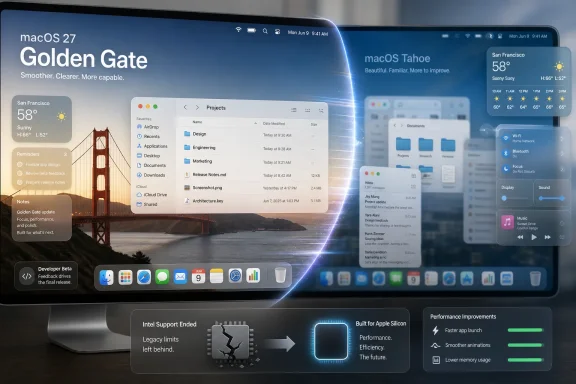
Apple announced macOS 27 Golden Gate at WWDC 2026 on June 8, releasing the first developer beta the same day for Apple silicon Macs while ending major-version support for Intel-based Macs. The strange part is not that Mac users noticed; it is that some rushed toward a first beta as if it were a rescue build. That says less about Golden Gate’s feature list than it does about the state of desktop operating systems in 2026. Windows 11 is not alone in needing repair work, and Apple’s own maintenance release is becoming a referendum on how much users now value speed, legibility, and restraint over spectacle.
Golden Gate is not being sold as a grand reinvention of the Mac. It is being described, by Apple and by early observers, as a release heavy on polish: performance, stability, interface refinement, and the kind of small behavioral fixes that rarely carry a keynote segment by themselves. In a healthier year for macOS, that would sound boring.
Instead, it sounds like exactly what many Mac users wanted.
The reaction to the first developer beta has been unusually enthusiastic because it appears to address the everyday irritations that make an operating system feel old before the hardware does. Users are reporting smoother animations, faster app launches, less stutter, and a system that feels more responsive on Apple silicon machines that should never have felt sluggish in the first place. That is the kind of feedback vendors dream about when launching new hardware, not early software still wearing a beta warning label.
The key point is not that every early Reddit post should be treated as a benchmark. First betas are self-selecting environments populated by enthusiasts, developers, and people with a higher-than-average tolerance for reinstalling things at midnight. But when the recurring language is that a Mac “feels new again,” the emotional payload is obvious: Tahoe made some users feel as if Apple had taken performance headroom away.
That is a dangerous perception for any platform owner, but especially for Apple. The Mac’s post-Intel renaissance was built on the promise that Apple silicon would give users quiet speed, long battery life, and years of useful life. If the operating system starts making those same machines feel compromised, the problem is not just technical. It cuts into the story Apple has been telling since the M1 arrived.
The Mac is not merely a canvas for attractive surfaces. It is a place where users stack windows, compare documents, parse menus, and leave dense professional applications open for days. Transparency, blur, and icon-heavy navigation can look impressive in a keynote and still become fatiguing in a 10-hour workday.
That is why Golden Gate’s reported interface changes matter more than their modest description suggests. Cleaning up menu icons, improving contrast, reducing blur, and making sidebars behave more predictably are not cosmetic concessions. They are Apple admitting, without quite saying so, that Tahoe pushed some Mac interface ideas past the point where elegance became interference.
The strongest desktop interfaces are not the ones users admire most often. They are the ones users stop noticing. Golden Gate’s early praise suggests Apple has remembered that the Mac’s job is not to perform visual modernity at all times, but to get out of the way.
That is why performance regressions are so corrosive. Most users cannot identify the subsystem responsible for a slower animation or a hung settings panel. They simply know the machine feels worse than it did before, and they blame the update.
The early Golden Gate reaction appears to be driven by precisely that sensory reversal. People who found Tahoe heavy are describing Golden Gate as lighter, sharper, and more immediate. Even if some of that enthusiasm fades as more machines and workloads join the beta pool, the signal is hard to miss: Apple’s most important macOS 27 feature may be the restoration of confidence.
This is familiar territory for Windows users. Microsoft has spent years trying to convince people that Windows 11 is more coherent, more secure, and more modern than Windows 10, while users often judge it by Start menu behavior, File Explorer responsiveness, update annoyance, and whether a familiar workflow has been disrupted for no visible gain. Apple has now run into a version of the same wall.
When users say a beta feels better than the stable release, they are not just praising the beta. They are indicting the stable release.
Still, the willingness of some users to take that risk tells us something important. People do not usually flee a shipping operating system for a developer beta because they want minor UI refinements. They do it because the status quo has become irritating enough that instability feels like a fair trade.
That is the story underneath the “mind-blowing” posts. Golden Gate’s appeal is not simply novelty. It is relief.
There is also a community dynamic at work. Once a few early adopters report dramatic improvements, others who were already frustrated begin to treat the beta as an escape hatch. That can create its own momentum, and it can exaggerate the apparent consensus. But it does not come from nowhere; it feeds on a real appetite for a Mac that feels less burdened by its own operating system.
Apple will not want ordinary users installing developer builds en masse. But it should pay attention to why they are tempted.
This was inevitable. Apple has spent years moving the Mac to its own silicon, and maintaining Intel support indefinitely would carry engineering, testing, security, and feature costs. The company wants to optimize aggressively for the machines it now controls from CPU to neural engine to firmware. Golden Gate’s performance story is easier to tell if Apple no longer has to drag old Intel configurations through every major architectural decision.
For owners of Apple silicon Macs, that may be good news. A narrower hardware target can mean cleaner optimization, fewer compromises, and faster adoption of features that depend on Apple’s own chips. The positive early performance reports fit neatly into that narrative, whether or not the end of Intel support is the main cause.
For owners of Intel Macs, it is another kind of message. Some of those machines remain perfectly usable computers, especially high-end MacBook Pros, iMacs, and Mac Pros bought late in the Intel cycle. They may continue receiving security support for some time, but the line has been drawn: the future Mac platform no longer includes them.
WindowsForum readers will recognize the shape of the argument. Microsoft drew its own controversial hardware line with Windows 11, using security and platform modernization to justify leaving many capable PCs behind. Apple’s line is cleaner because it follows a full architecture transition, but the lived experience for users can feel similar: the computer still works, yet the software future has moved on.
Both have learned that “modern” is not automatically a compliment.
Windows 11’s problems have often been visible in policy and product decisions: hardware requirements, taskbar limitations, forced account flows, advertising-like surfaces, Settings migrations, and AI features whose usefulness varies wildly by user. macOS Tahoe’s reported issues were more classically Apple: a design system pushed hard enough that some users felt performance and clarity suffered.
The platforms differ, but the pattern rhymes. Desktop operating systems are now so mature that users are less impressed by reinvention than vendors expect. The audience wants security improvements, yes. It wants AI where AI is genuinely useful. It wants better search, better windowing, better device continuity, and better power management. But it does not want those things purchased with sluggishness, opacity, or interface churn.
This is why both companies are now in repair mode. Microsoft’s Windows 11 campaign has increasingly focused on quality-of-life fixes, performance work, and making the system feel less hostile to established workflows. Apple’s Golden Gate appears to be doing something similar for macOS after Tahoe’s more ambitious visual push.
The industry spent years treating desktop operating systems as launchpads for services. Users are now reminding vendors that the launchpad itself still matters.
For years, operating system updates have trained people to expect tradeoffs. Install the new version and you may get better security, a new design language, new integration features, and some useful enhancements. You may also get broken peripherals, changed defaults, background processes that behave differently, or UI decisions that make old habits less efficient.
That bargain is wearing thin.
The more essential computers become to work, school, administration, and creative production, the less patience users have for updates that feel like product experiments. A MacBook is not an app a user can casually abandon for a competitor in five minutes. It is an expensive, deeply configured work environment. When an OS update makes it feel less reliable, users remember.
Golden Gate’s early stability narrative is powerful because it suggests Apple may be prioritizing the foundational contract again. The computer should wake quickly. Apps should open without drama. Menus should be readable. Windows should move fluidly. Battery and memory behavior should not surprise you.
That sounds basic because it is. It is also the part of computing people miss most when it is gone.
A phone interface usually presents one dominant app at a time. A desktop interface hosts overlapping contexts: browser windows, terminal sessions, chat apps, spreadsheets, code editors, virtual machines, Finder windows, and system dialogs. Effects that make a single surface feel alive can make a full workspace feel visually noisy.
That appears to be the tension Golden Gate is trying to resolve. The company is not abandoning Liquid Glass. It is sanding down its worst interactions with text, menus, sidebars, and window boundaries. That is exactly what a second-year design system release should do.
The question is why Tahoe shipped with so much friction in the first place. Apple has enormous design talent and a famously opinionated interface culture. But large companies can still mistake internal coherence for user coherence. A design language can be consistent across platforms and still be poorly tuned for one of them.
Golden Gate’s refinements look less like a retreat than a correction. The Mac can absorb modern visual ideas, but it cannot become an iPad with a menu bar. Its users will tolerate beauty only so long as beauty does not slow down the work.
Golden Gate is not Snow Leopard in a literal sense. The Mac ecosystem is more complex now, Apple’s services layer is larger, security requirements are heavier, and AI has become a platform mandate. Even a “quiet” macOS release now carries more moving parts than the classic maintenance releases people remember.
But the appetite is similar. Users want Apple to spend a cycle paying down experience debt. They want fewer micro-delays, fewer visual ambiguities, fewer “why did they change that?” moments. They want the machine to feel as if the vendor understands the difference between progress and disturbance.
That desire is not nostalgia. It is an operational demand.
For IT pros, the maintenance-release instinct is especially appealing. New features are rarely free in managed environments. They require testing, documentation, help desk scripts, compatibility checks, and user communication. A release that improves performance and reduces complaints can be more valuable than one that adds a dozen features nobody asked for.
A developer beta that feels fast on an enthusiast’s MacBook is not enough for a fleet decision. Administrators care about identity integration, MDM behavior, endpoint security compatibility, VPN clients, backup agents, developer toolchains, printer drivers, compliance workflows, and whether the update breaks the one aging line-of-business app nobody has budgeted to replace. They also care about support timelines for Intel Macs that may still sit in conference rooms, labs, and executive offices.
Golden Gate’s Apple silicon-only future simplifies Apple’s engineering map, but it complicates some organizations’ hardware planning. Shops that stretched Intel Macs for longer replacement cycles will need to decide whether to freeze those systems on Tahoe, accelerate hardware refreshes, or segment their Mac fleet more explicitly. That is not catastrophic, but it is work.
The performance story may help justify that work. If Golden Gate really does make older Apple silicon systems feel significantly better, it could extend the practical life of M1 and M2 machines. That matters in a budget environment where organizations are trying to sweat assets longer without handing users machines that feel tired.
The irony is sharp. Golden Gate may make some four- or five-year-old Apple silicon Macs feel newly viable while simultaneously telling Intel Macs of similar vintage that they are outside the future. That is the logic of platform transitions: optimization for one cohort becomes obsolescence for another.
That can be healthy. Supporting too many old OS versions can slow adoption of new frameworks, complicate testing, and discourage developers from using capabilities that make apps better on current hardware. At some point, platforms have to move.
But the transition has costs. Independent Mac developers often support older versions because their customers do. Enterprise developers may have internal users on locked-down or slow-moving systems. Open-source maintainers may not have the hardware matrix or time to validate every new Apple requirement the week WWDC lands.
Golden Gate’s early performance praise should not obscure that this is also a consolidation release. Apple is narrowing the lane: Apple silicon, newer APIs, more current deployment assumptions, deeper integration with its AI and security models. The Mac is becoming more coherent, but also less forgiving of old edges.
That is a familiar tradeoff in modern computing. The question is not whether Apple can justify it. The question is whether the benefits arrive clearly enough that users and developers accept the cost.
Microsoft has often struggled because Windows is expected to be everything to everyone: gaming rig, enterprise workstation, cheap school laptop, industrial controller, developer box, kiosk, and government desktop. Apple has a smaller, more controlled hardware universe, and even Apple managed to ship an OS whose performance and interface choices frustrated a meaningful slice of users. That should make Redmond humble.
Windows 11’s path forward depends on Microsoft understanding that trust is cumulative and fragile. Every unwanted prompt, every inconsistent settings pane, every sluggish shell animation, every feature that feels like an upsell rather than an improvement becomes part of the user’s mental ledger. Fixes matter only when they reduce that ledger.
Apple’s advantage is that Golden Gate can be framed as a purposeful refinement after a visually ambitious release. Microsoft’s challenge is broader because Windows 11’s complaints are scattered across UX, policy, hardware eligibility, update cadence, and monetization anxieties. Still, the same principle applies: the best 2026 desktop OS update may be the one users notice by complaining less.
That is not a glamorous metric. It may be the most important one.
Apple’s challenge now is to carry that early impression through the public beta and final release. First impressions can evaporate once more hardware configurations, third-party software, and edge cases enter the mix. A developer beta can feel clean in part because it is being used by people prepared to forgive rough edges.
But the direction is promising. If Golden Gate lands as a stability-and-performance release that also corrects Tahoe’s interface excesses, Apple will have done something more valuable than adding another marquee feature. It will have restored the sense that macOS is tuned for the people who live in it all day.
That matters because desktop loyalty is increasingly defensive. People do not remain on a platform because every update delights them. They remain because the platform respects their habits, protects their work, and improves without making them feel like unpaid testers for a design philosophy.
The most concrete early signals are easy to separate from the noise:
 Apple’s Quiet Release Became the Loudest Kind of Criticism
Golden Gate is not being sold as a grand reinvention of the Mac. It is being described, by Apple and by early observers, as a release heavy on polish: performance, stability, interface refinement, and the kind of small behavioral fixes that rarely carry a keynote segment by themselves. In a healthier year for macOS, that would sound boring.Instead, it sounds like exactly what many Mac users wanted.
The reaction to the first developer beta has been unusually enthusiastic because it appears to address the everyday irritations that make an operating system feel old before the hardware does. Users are reporting smoother animations, faster app launches, less stutter, and a system that feels more responsive on Apple silicon machines that should never have felt sluggish in the first place. That is the kind of feedback vendors dream about when launching new hardware, not early software still wearing a beta warning label.
The key point is not that every early Reddit post should be treated as a benchmark. First betas are self-selecting environments populated by enthusiasts, developers, and people with a higher-than-average tolerance for reinstalling things at midnight. But when the recurring language is that a Mac “feels new again,” the emotional payload is obvious: Tahoe made some users feel as if Apple had taken performance headroom away.
That is a dangerous perception for any platform owner, but especially for Apple. The Mac’s post-Intel renaissance was built on the promise that Apple silicon would give users quiet speed, long battery life, and years of useful life. If the operating system starts making those same machines feel compromised, the problem is not just technical. It cuts into the story Apple has been telling since the M1 arrived.
Tahoe Turned Design Ambition Into Daily Friction
macOS Tahoe was supposed to carry Apple’s Liquid Glass design language onto the Mac and align the company’s platforms around a more translucent, fluid interface. In theory, this was the sort of cross-platform cohesion Apple can execute better than almost anyone else. In practice, Tahoe became a reminder that visual systems behave differently on a desktop than they do on a phone.The Mac is not merely a canvas for attractive surfaces. It is a place where users stack windows, compare documents, parse menus, and leave dense professional applications open for days. Transparency, blur, and icon-heavy navigation can look impressive in a keynote and still become fatiguing in a 10-hour workday.
That is why Golden Gate’s reported interface changes matter more than their modest description suggests. Cleaning up menu icons, improving contrast, reducing blur, and making sidebars behave more predictably are not cosmetic concessions. They are Apple admitting, without quite saying so, that Tahoe pushed some Mac interface ideas past the point where elegance became interference.
The strongest desktop interfaces are not the ones users admire most often. They are the ones users stop noticing. Golden Gate’s early praise suggests Apple has remembered that the Mac’s job is not to perform visual modernity at all times, but to get out of the way.
Performance Is the Feature Users Actually Felt Missing
Operating system vendors love to talk about features because features are countable. They can be listed in press releases, grouped into screenshots, and demonstrated onstage. Performance, by contrast, is slippery. It is experienced in half-seconds, in fans that do not spin up, in beach balls that do not appear, and in the absence of friction.That is why performance regressions are so corrosive. Most users cannot identify the subsystem responsible for a slower animation or a hung settings panel. They simply know the machine feels worse than it did before, and they blame the update.
The early Golden Gate reaction appears to be driven by precisely that sensory reversal. People who found Tahoe heavy are describing Golden Gate as lighter, sharper, and more immediate. Even if some of that enthusiasm fades as more machines and workloads join the beta pool, the signal is hard to miss: Apple’s most important macOS 27 feature may be the restoration of confidence.
This is familiar territory for Windows users. Microsoft has spent years trying to convince people that Windows 11 is more coherent, more secure, and more modern than Windows 10, while users often judge it by Start menu behavior, File Explorer responsiveness, update annoyance, and whether a familiar workflow has been disrupted for no visible gain. Apple has now run into a version of the same wall.
When users say a beta feels better than the stable release, they are not just praising the beta. They are indicting the stable release.
The Developer Beta Rush Is a Symptom, Not a Recommendation
Nobody should mistake the early stampede toward macOS 27 for a sensible upgrade strategy. A first developer beta is not meant for a primary machine, and Apple labels it that way for a reason. APIs can shift, third-party apps can break, battery life can behave unpredictably, and one person’s “rock solid” beta can become another person’s afternoon lost to recovery mode.Still, the willingness of some users to take that risk tells us something important. People do not usually flee a shipping operating system for a developer beta because they want minor UI refinements. They do it because the status quo has become irritating enough that instability feels like a fair trade.
That is the story underneath the “mind-blowing” posts. Golden Gate’s appeal is not simply novelty. It is relief.
There is also a community dynamic at work. Once a few early adopters report dramatic improvements, others who were already frustrated begin to treat the beta as an escape hatch. That can create its own momentum, and it can exaggerate the apparent consensus. But it does not come from nowhere; it feeds on a real appetite for a Mac that feels less burdened by its own operating system.
Apple will not want ordinary users installing developer builds en masse. But it should pay attention to why they are tempted.
Apple Silicon Finally Gets a Hard Software Line
Golden Gate’s other major message is blunt: the Intel Mac era is over for new macOS versions. Tahoe was the bridge. Golden Gate is the other side.This was inevitable. Apple has spent years moving the Mac to its own silicon, and maintaining Intel support indefinitely would carry engineering, testing, security, and feature costs. The company wants to optimize aggressively for the machines it now controls from CPU to neural engine to firmware. Golden Gate’s performance story is easier to tell if Apple no longer has to drag old Intel configurations through every major architectural decision.
For owners of Apple silicon Macs, that may be good news. A narrower hardware target can mean cleaner optimization, fewer compromises, and faster adoption of features that depend on Apple’s own chips. The positive early performance reports fit neatly into that narrative, whether or not the end of Intel support is the main cause.
For owners of Intel Macs, it is another kind of message. Some of those machines remain perfectly usable computers, especially high-end MacBook Pros, iMacs, and Mac Pros bought late in the Intel cycle. They may continue receiving security support for some time, but the line has been drawn: the future Mac platform no longer includes them.
WindowsForum readers will recognize the shape of the argument. Microsoft drew its own controversial hardware line with Windows 11, using security and platform modernization to justify leaving many capable PCs behind. Apple’s line is cleaner because it follows a full architecture transition, but the lived experience for users can feel similar: the computer still works, yet the software future has moved on.
The Windows 11 Comparison Is Uncomfortable Because It Fits
The TechRadar framing is right to note that Windows 11 is not the only desktop OS in need of fixing. That comparison may irritate Mac loyalists, but it is increasingly hard to avoid. Both Microsoft and Apple have spent recent years trying to modernize mature desktop platforms without alienating people who rely on muscle memory and predictable performance.Both have learned that “modern” is not automatically a compliment.
Windows 11’s problems have often been visible in policy and product decisions: hardware requirements, taskbar limitations, forced account flows, advertising-like surfaces, Settings migrations, and AI features whose usefulness varies wildly by user. macOS Tahoe’s reported issues were more classically Apple: a design system pushed hard enough that some users felt performance and clarity suffered.
The platforms differ, but the pattern rhymes. Desktop operating systems are now so mature that users are less impressed by reinvention than vendors expect. The audience wants security improvements, yes. It wants AI where AI is genuinely useful. It wants better search, better windowing, better device continuity, and better power management. But it does not want those things purchased with sluggishness, opacity, or interface churn.
This is why both companies are now in repair mode. Microsoft’s Windows 11 campaign has increasingly focused on quality-of-life fixes, performance work, and making the system feel less hostile to established workflows. Apple’s Golden Gate appears to be doing something similar for macOS after Tahoe’s more ambitious visual push.
The industry spent years treating desktop operating systems as launchpads for services. Users are now reminding vendors that the launchpad itself still matters.
Stability Has Become a Competitive Feature Again
It is striking how much of the early Golden Gate praise centers not only on speed but on stability. A stable developer beta should not be treated as proof of a flawless release cycle, but the reaction reveals how starved users are for uneventful computing.For years, operating system updates have trained people to expect tradeoffs. Install the new version and you may get better security, a new design language, new integration features, and some useful enhancements. You may also get broken peripherals, changed defaults, background processes that behave differently, or UI decisions that make old habits less efficient.
That bargain is wearing thin.
The more essential computers become to work, school, administration, and creative production, the less patience users have for updates that feel like product experiments. A MacBook is not an app a user can casually abandon for a competitor in five minutes. It is an expensive, deeply configured work environment. When an OS update makes it feel less reliable, users remember.
Golden Gate’s early stability narrative is powerful because it suggests Apple may be prioritizing the foundational contract again. The computer should wake quickly. Apps should open without drama. Menus should be readable. Windows should move fluidly. Battery and memory behavior should not surprise you.
That sounds basic because it is. It is also the part of computing people miss most when it is gone.
Liquid Glass Meets the Limits of Taste
Liquid Glass was never a bad idea in the abstract. Apple has long used translucency, depth, animation, and material effects to communicate hierarchy and place. The problem is that on a desktop, visual effects have to coexist with density.A phone interface usually presents one dominant app at a time. A desktop interface hosts overlapping contexts: browser windows, terminal sessions, chat apps, spreadsheets, code editors, virtual machines, Finder windows, and system dialogs. Effects that make a single surface feel alive can make a full workspace feel visually noisy.
That appears to be the tension Golden Gate is trying to resolve. The company is not abandoning Liquid Glass. It is sanding down its worst interactions with text, menus, sidebars, and window boundaries. That is exactly what a second-year design system release should do.
The question is why Tahoe shipped with so much friction in the first place. Apple has enormous design talent and a famously opinionated interface culture. But large companies can still mistake internal coherence for user coherence. A design language can be consistent across platforms and still be poorly tuned for one of them.
Golden Gate’s refinements look less like a retreat than a correction. The Mac can absorb modern visual ideas, but it cannot become an iPad with a menu bar. Its users will tolerate beauty only so long as beauty does not slow down the work.
The Snow Leopard Memory Still Haunts Every Maintenance Release
Any time Apple ships a release focused on polish, the ghost of Mac OS X Snow Leopard appears. That 2009 release became shorthand for the idea that an operating system can win loyalty by doing less and doing it better. The comparison is overused, but it persists because users still want what Snow Leopard symbolized: restraint.Golden Gate is not Snow Leopard in a literal sense. The Mac ecosystem is more complex now, Apple’s services layer is larger, security requirements are heavier, and AI has become a platform mandate. Even a “quiet” macOS release now carries more moving parts than the classic maintenance releases people remember.
But the appetite is similar. Users want Apple to spend a cycle paying down experience debt. They want fewer micro-delays, fewer visual ambiguities, fewer “why did they change that?” moments. They want the machine to feel as if the vendor understands the difference between progress and disturbance.
That desire is not nostalgia. It is an operational demand.
For IT pros, the maintenance-release instinct is especially appealing. New features are rarely free in managed environments. They require testing, documentation, help desk scripts, compatibility checks, and user communication. A release that improves performance and reduces complaints can be more valuable than one that adds a dozen features nobody asked for.
Enterprise IT Will Read the Beta Praise Differently
Consumer enthusiasm for Golden Gate is one thing. Enterprise confidence is another.A developer beta that feels fast on an enthusiast’s MacBook is not enough for a fleet decision. Administrators care about identity integration, MDM behavior, endpoint security compatibility, VPN clients, backup agents, developer toolchains, printer drivers, compliance workflows, and whether the update breaks the one aging line-of-business app nobody has budgeted to replace. They also care about support timelines for Intel Macs that may still sit in conference rooms, labs, and executive offices.
Golden Gate’s Apple silicon-only future simplifies Apple’s engineering map, but it complicates some organizations’ hardware planning. Shops that stretched Intel Macs for longer replacement cycles will need to decide whether to freeze those systems on Tahoe, accelerate hardware refreshes, or segment their Mac fleet more explicitly. That is not catastrophic, but it is work.
The performance story may help justify that work. If Golden Gate really does make older Apple silicon systems feel significantly better, it could extend the practical life of M1 and M2 machines. That matters in a budget environment where organizations are trying to sweat assets longer without handing users machines that feel tired.
The irony is sharp. Golden Gate may make some four- or five-year-old Apple silicon Macs feel newly viable while simultaneously telling Intel Macs of similar vintage that they are outside the future. That is the logic of platform transitions: optimization for one cohort becomes obsolescence for another.
Developers Get the Real Warning Before Users Do
The first macOS 27 beta is also a developer signal. Apple is not merely refreshing the user-facing OS; it is moving the build and compatibility baseline forward. Reports that Xcode 27 tightens deployment support for older macOS versions point in the same direction as the Intel cutoff: Apple wants the ecosystem to stop looking backward.That can be healthy. Supporting too many old OS versions can slow adoption of new frameworks, complicate testing, and discourage developers from using capabilities that make apps better on current hardware. At some point, platforms have to move.
But the transition has costs. Independent Mac developers often support older versions because their customers do. Enterprise developers may have internal users on locked-down or slow-moving systems. Open-source maintainers may not have the hardware matrix or time to validate every new Apple requirement the week WWDC lands.
Golden Gate’s early performance praise should not obscure that this is also a consolidation release. Apple is narrowing the lane: Apple silicon, newer APIs, more current deployment assumptions, deeper integration with its AI and security models. The Mac is becoming more coherent, but also less forgiving of old edges.
That is a familiar tradeoff in modern computing. The question is not whether Apple can justify it. The question is whether the benefits arrive clearly enough that users and developers accept the cost.
Microsoft Should Watch the Reaction Closely
There is a lesson here for Windows 11, and it is not that Microsoft should copy Apple’s design choices. It is that users will reward repair when repair is visible.Microsoft has often struggled because Windows is expected to be everything to everyone: gaming rig, enterprise workstation, cheap school laptop, industrial controller, developer box, kiosk, and government desktop. Apple has a smaller, more controlled hardware universe, and even Apple managed to ship an OS whose performance and interface choices frustrated a meaningful slice of users. That should make Redmond humble.
Windows 11’s path forward depends on Microsoft understanding that trust is cumulative and fragile. Every unwanted prompt, every inconsistent settings pane, every sluggish shell animation, every feature that feels like an upsell rather than an improvement becomes part of the user’s mental ledger. Fixes matter only when they reduce that ledger.
Apple’s advantage is that Golden Gate can be framed as a purposeful refinement after a visually ambitious release. Microsoft’s challenge is broader because Windows 11’s complaints are scattered across UX, policy, hardware eligibility, update cadence, and monetization anxieties. Still, the same principle applies: the best 2026 desktop OS update may be the one users notice by complaining less.
That is not a glamorous metric. It may be the most important one.
The Golden Gate Bet Is That Boring Can Feel New
The first macOS 27 beta has become interesting because it appears to make boring work feel dramatic. Faster launches, smoother animations, clearer menus, better contrast, fewer stutters, and more predictable windows are not keynote fireworks. They are the difference between a computer that feels expensive and one that merely was expensive.Apple’s challenge now is to carry that early impression through the public beta and final release. First impressions can evaporate once more hardware configurations, third-party software, and edge cases enter the mix. A developer beta can feel clean in part because it is being used by people prepared to forgive rough edges.
But the direction is promising. If Golden Gate lands as a stability-and-performance release that also corrects Tahoe’s interface excesses, Apple will have done something more valuable than adding another marquee feature. It will have restored the sense that macOS is tuned for the people who live in it all day.
That matters because desktop loyalty is increasingly defensive. People do not remain on a platform because every update delights them. They remain because the platform respects their habits, protects their work, and improves without making them feel like unpaid testers for a design philosophy.
The Upgrade Story Is Clearer Than the Hype
For all the enthusiasm, the practical advice is still conservative. Developers and testers can explore Golden Gate now, but everyday users should wait for the public beta at minimum, and most production machines should wait for the final release or the first post-launch patch. That is not cynicism; it is basic operating system hygiene.The most concrete early signals are easy to separate from the noise:
- Apple released the first macOS 27 Golden Gate developer beta on June 8, 2026, immediately after announcing it at WWDC 2026.
- Golden Gate drops major-version support for Intel Macs and makes Apple silicon the baseline for the next macOS generation.
- Early testers are reporting meaningful performance improvements over macOS Tahoe, especially around responsiveness, animations, and general smoothness.
- Apple appears to be refining the Liquid Glass interface rather than abandoning it, with changes aimed at readability, menu clarity, and window behavior.
- The enthusiasm around a developer beta should be treated as a warning about Tahoe as much as praise for Golden Gate.
- Windows 11 and macOS are both entering a phase where polish, restraint, and reliability may matter more to users than another round of headline features.
References
- Primary source: TechRadar
Published: 2026-06-14T11:10:10.425859
The macOS 27 beta is already a 'mind-blowing' revelation for some MacBook owners — here are 3 reasons why it isn't the lowkey release it seems | TechRadar
'Performance is mind-blowing on the new macOS 27 beta'www.techradar.com - Related coverage: tomsguide.com
macOS Golden Gate: The biggest updates coming to Macs | Tom's Guide
From a more intelligent Siri, performance upgrades, and UI updates, here's everything you need to know about macOS 27.www.tomsguide.com - Related coverage: macrumors.com
Apple Unveils macOS Tahoe With Liquid Glass Design, Phone App, Live Translation, and More
Apple has announced macOS Tahoe 26 at WWDC 2025, introducing a striking visual redesign alongside expanded Apple Intelligence capabilities and new Continuity features that further integrate Mac and iPhone workflows. The update centers around what Apple calls a "gorgeous new design" built with...www.macrumors.com - Related coverage: macobserver.com
Apple Releases macOS 27 Golden Gate Beta 1: Here's What's New
Apple releases the first macOS 27 Golden Gate beta with Siri AI upgrades, design refinements, smarter search, and performance improvements.www.macobserver.com - Related coverage: tomshardware.com
Apple demonstrates cross-platform Siri upgrades in macOS 27 Golden Gate at WWDC — update brings Liquid Glass improvements and unifies AI strategy | Tom's Hardware
macOS 27 brings new AI features and, finally, matching corner radii.www.tomshardware.com - Related coverage: livemint.com
Apple WWDC 2026 Highlights: Apple launches iOS 27, macOS Golden Gate and Siri AI | Mint
Apple WWDC 2026 LIVE Updates: Apple has launched iOS 27, macOS Golden Gate, Siri AI and Apple Intelligence updates for iPhones and other related ecosystem. www.livemint.com
- Related coverage: macos-tahoe.com
macOS 27 Golden Gate Announced: Features, Compatibility, Release
macOS 27 Golden Gate is official from WWDC 2026: a Snow Leopard-style performance release, Siri AI, the end of Intel Macs, and the final Rosetta 2.macos-tahoe.com
- Official source: developer.apple.com
macOS Golden Gate 27 Beta Release Notes | Apple Developer Documentation
Update your apps to use new features, and test your apps against API changes.developer.apple.com
- Related coverage: macworld.com
macOS 27 Golden Gate vs macOS 26 Tahoe: What's new and should you upgrade? | Macworld
macOS Golden Gate brings a refined Liquid Glass design, smarter Siri AI, upgraded Safari features, and more. Here's how it compares with macOS Tahoe and whether it's worth upgrading.www.macworld.com - Related coverage: lowendmac.com
macOS 27.0 Golden Gate - Low End MacLow End Mac
On June 8th 2026, Apple announced the first version of macOS intended solely for Apple Silicon – macOS Golden Gate. This version of the operating system brings some refinements to the Liquid Glass UI, making some changes through user feedback. It’s also the final version of macOS to natively run...lowendmac.com - Related coverage: los40.com
WWDC 2026: Siri AI, macOS "Golden Gate" y el fin de una era en Apple | Tecnología | LOS40
La última keynote liderada por Tim Cook como CEO, nos ha dado una profunda renovación de sistemas operativos y una agresiva integración de la inteligencia artificial nativa a través de Apple Intelligence.los40.com - Related coverage: cincodias.elpais.com
Apple escucha las críticas y mejorará Liquid Glass en macOS 27 | Lifestyle | SmartLife | Cinco Días
En junio sabremos máscincodias.elpais.com
