

Barracuda reported in late May 2026 that malicious Microsoft 365 logins from traditionally low-risk countries, including the United States and United Kingdom, rose by about 25 percent in April, as attackers used legitimate credentials and trusted-looking infrastructure to avoid obvious authentication alarms. The finding is not shocking because the cloud identity perimeter has been eroding for years. It is important because it shows how much defensive logic still treats a successful login as a reassuring event rather than the beginning of an investigation. The uncomfortable lesson for Microsoft 365 tenants is that normal-looking access has become one of the attacker’s most valuable tools.
For years, the easiest way to explain account compromise was to point at the noisy parts: hundreds of failed password guesses, strange geography, a clearly malicious IP block, or a login at 3 a.m. from a country where the employee has never worked. Those signals still matter, but Barracuda’s latest data suggests attackers are increasingly learning to route around them.
The method is simple in concept and difficult in practice to defend against. If an attacker has a real credential, an access token, or a session path that looks sufficiently ordinary, the authentication layer may not see a crime in progress. The login succeeds, the user appears to be where a user plausibly could be, and the security team may not see the incident until something downstream starts to smell wrong.
That is the real shift. The attacker is not merely trying to break into Microsoft 365; the attacker is trying to become a believable Microsoft 365 user for long enough to read mail, create forwarding rules, harvest files, register an app, pivot into Teams, or stage the next phishing campaign from inside the tenant.
Barracuda’s observation that malicious logins increasingly originate from “low-risk” countries is a reminder that geography was always a proxy, not proof. A login from the United States may be less suspicious for many American companies than a login from a sanctioned or unexpected region, but residential proxies and VPN infrastructure have turned that assumption into a brittle shortcut.
That is why identity attacks have become so attractive. Exploiting a vulnerable server can still produce spectacular results, but it often requires technical friction and leaves traces defenders understand well. Logging in as a real user offers something more elegant: access that begins with a green checkmark.
The modern compromise chain also does not need to defeat every control. A phished session token, a device-code lure, a stolen browser credential, or a successful MFA fatigue attack can give the intruder enough legitimacy to pass through the front gate. Once inside, the attacker’s problem becomes less about authentication and more about avoiding behavioral detection.
This is where many organizations remain unevenly prepared. They have invested in MFA, email filtering, endpoint protection, and security awareness training, but their monitoring may still overweight the drama of failed access attempts. A successful sign-in from a plausible IP address can slide into the audit log as routine, even when the next five minutes tell a very different story.
But the attacker who already has a credential does not need to fail repeatedly. The attacker needs to succeed once, preferably from infrastructure that looks ordinary enough to avoid immediate friction. This creates a visibility gap: the events most likely to trigger alerts are not always the events most likely to indicate the compromise that actually happened.
Microsoft 365 environments produce enormous volumes of sign-in data. The challenge is not that logs do not exist; it is that logs without context are an expensive fog machine. A clean authentication result tells the defender that the request met the configured requirements. It does not prove that the human behind the session was the legitimate user.
That distinction matters. Authentication is a point-in-time decision. Trust is a continuing bet. If the session begins normally but immediately proceeds to unusual mailbox access, suspicious file downloads, OAuth consent abuse, inbox rule creation, or privilege-seeking behavior, the real evidence emerges after the login.
Residential proxy networks, commercial VPNs, compromised devices, cloud hosting, and rotating IP services let attackers shape the apparent origin of a login. If the victim works in Chicago, a login from a U.S. IP address may attract less attention than one from Eastern Europe or Southeast Asia. If the victim’s company has remote workers scattered across several regions, the baseline becomes even harder to interpret.
This does not make location useless. Impossible travel, unfamiliar sign-in properties, and anonymous IP indicators remain valuable, especially when combined with other signals. What it does mean is that location cannot carry the burden alone.
The same is true for IP reputation. Some infrastructure is obviously dirty, and blocking it is common sense. But when malicious access comes through infrastructure that appears consumer-grade, local, or recently unremarkable, reputation systems may lag behind reality. Attackers only need the infrastructure to look clean long enough to complete the session.
A finance employee who signs in from a familiar region but immediately creates a mailbox forwarding rule deserves attention. A user who has never touched a sensitive SharePoint library but suddenly downloads large volumes of files deserves attention. A low-privilege account that starts probing administrative portals deserves attention. A session that registers new OAuth permissions or grants a third-party app unusual access deserves very serious attention.
This is not exotic threat hunting. It is the logical consequence of accepting that credentials can be stolen and MFA can be bypassed or socially engineered. Once that premise is accepted, defenders must ask a different question: not merely “Was the login allowed?” but “Does the session behave like the person it claims to be?”
That requires correlation. Identity telemetry alone may show a successful login. Endpoint telemetry may show a suspicious browser profile, infostealer residue, or command execution. Network telemetry may show connections to infrastructure associated with proxy services or known campaigns. Email telemetry may show internal phishing messages sent after the compromise. None of those signals is always decisive by itself, but together they can turn a vague suspicion into a defensible incident.
The right reaction is to stop treating all MFA as equal. Phishing-resistant methods such as passkeys, FIDO2 security keys, and certificate-based approaches offer better protection than push approvals that can be fatigued, tricked, or relayed. Conditional Access policies can also require stronger authentication for risky sessions, privileged roles, unmanaged devices, and sensitive applications.
But MFA does not erase the need to monitor sessions. Device-code phishing and token theft show why. In those scenarios, the attacker may not need to know the password in the traditional sense, and the user may complete a real Microsoft authentication flow while unknowingly authorizing the attacker’s access. The login can be technically legitimate and operationally malicious at the same time.
This is the uncomfortable middle ground defenders now occupy. MFA remains mandatory, but it is not the finish line. It is one layer in a system that must assume some sessions will pass initial checks and still turn hostile.
The problem is not only that legacy authentication can be abused. It is that it creates exceptions, and exceptions become where attackers look first. An organization may proudly enforce MFA for browser sign-ins while an old mail protocol quietly remains available to a subset of users or devices.
Blocking legacy authentication through Conditional Access or security defaults is one of the least glamorous but most practical improvements a tenant can make. The work is rarely just flipping a switch. Administrators need to identify real dependencies, replace outdated workflows, preserve emergency access, and avoid locking out critical services.
Still, the direction is clear. If the organization’s cloud identity story depends on modern controls, then protocols that bypass those controls are not charming artifacts. They are liabilities with usernames attached.
That is no longer enough for high-value environments. Conditional Access should be treated as a living policy engine that reflects how the business actually works. Risky sign-ins, unmanaged devices, unfamiliar locations, impossible travel, device-code flow, legacy protocols, session frequency, and application sensitivity all deserve deliberate policy decisions.
Report-only mode is useful because it lets administrators see who would be affected before enforcement begins. But report-only policies that never graduate into production are just documentation with better telemetry. At some point, the organization must decide which risks it is willing to block, which it will challenge, and which it will monitor.
The goal is not to create a miserable user experience. The goal is to reserve friction for the sessions that deserve it. A known user on a managed device accessing ordinary resources during normal hours should not be treated like a privileged admin consenting to a new app from an unfamiliar device. Mature policy makes that distinction.
This is why phishing has evolved from crude credential harvesting into a more ambiguous world of token theft, consent abuse, device-code manipulation, and business-process impersonation. The victim may see a real Microsoft page. The link may pass through infrastructure that initially appears harmless. The session may produce a valid token. The attacker’s advantage comes from bending legitimate systems into malicious workflows.
For defenders, this complicates the old advice to “look for the fake.” Sometimes the user interaction is real, but the context is fraudulent. Sometimes the sign-in page is legitimate, but the request was initiated by an attacker. Sometimes the application exists, but its permissions are excessive or its publisher cannot be trusted.
That is why application governance and OAuth permission review matter. A compromised mailbox is bad. A compromised identity that can grant persistent application access is worse. In Microsoft 365, the attacker who turns a one-time user mistake into durable API access has moved beyond a simple login event.
This is where extended detection and response platforms, SIEM correlation, identity protection, and endpoint telemetry earn their keep. The incident is not necessarily one spectacular event. It may be a modestly unusual login, followed by a slightly odd mailbox action, followed by an unfamiliar device, followed by a small set of file downloads, followed by an internal message that looks almost legitimate.
Attackers understand alert fatigue. They know that many teams are drowning in dashboards and that a single low-severity event may never be investigated. Their strategy is to keep each action plausibly deniable until the objective is complete.
The defender’s answer is not merely “more alerts.” It is better stories. A useful detection connects the login, the device, the IP, the application, the mailbox behavior, and the data movement into a narrative an analyst can act on. Without that correlation, the organization sees fragments and calls them normal.
Normal is not the same for every user. A sales executive traveling across regions, a remote developer using multiple cloud tools, a finance clerk working fixed hours, and a global administrator maintaining tenant settings all have different patterns. Treating them identically produces either excessive noise or dangerous blind spots.
The practical answer is segmentation. Privileged users need tighter controls and more aggressive monitoring. High-risk departments need stronger scrutiny over mail forwarding, external sharing, and payment-related workflows. Service accounts need inventory and ownership. Guests and external collaborators need expiration and review. Dormant accounts need removal.
The hard part is that this work is operational, not glamorous. It requires identity hygiene, asset ownership, licensing awareness, and coordination between security and IT operations. Attackers benefit precisely because many tenants accumulate years of exceptions, stale accounts, and half-finished migrations.
The useful version of zero trust is not a slogan. It is a set of design choices: verify explicitly, use least privilege, assume breach, and keep checking after the session starts. Those principles map directly onto Microsoft 365 identity defense.
Verify explicitly means the tenant considers user, device, location, risk, application, and session context before granting access. Least privilege means users and apps do not retain broad permissions simply because nobody has reviewed them recently. Assume breach means successful authentication does not end monitoring. Continuous evaluation means a session can be challenged, limited, or revoked when risk changes.
The danger is that organizations adopt zero-trust language without changing the daily mechanics of access. A slide deck cannot detect a suspicious inbox rule. A strategy memo cannot revoke a stolen session token. The doctrine only matters when it becomes enforceable policy and operational response.
The practical work starts with visibility. Administrators should know where sign-in logs live, how long they are retained, which licenses unlock which risk signals, and how alerts flow into the SOC or ticketing process. A tenant that cannot quickly answer “who logged in, from where, using what device, and what did they do next?” is operating at a disadvantage.
The next step is reducing avoidable exposure. Legacy authentication should be blocked unless a documented exception exists. Privileged accounts should use phishing-resistant MFA wherever possible. Conditional Access policies should be tested, staged, and enforced. OAuth app consent should be governed rather than left to user impulse.
Finally, incident response needs to match identity reality. Resetting a password may not be enough if tokens remain valid, inbox rules persist, OAuth grants survive, or the attacker has already created secondary access. A real response includes session revocation, mailbox rule review, app permission cleanup, endpoint investigation, and a search for lateral activity.
The most concrete takeaways are operational rather than theoretical:
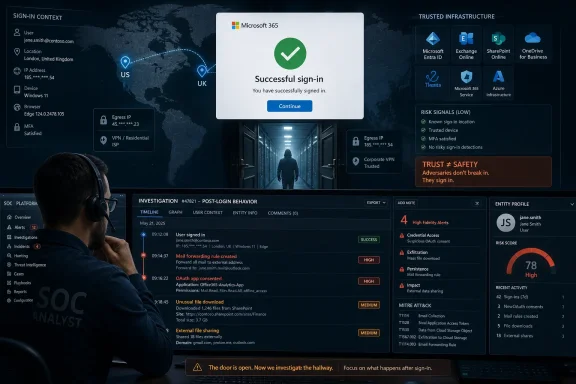 The Attack No Longer Has to Look Like an Attack
For years, the easiest way to explain account compromise was to point at the noisy parts: hundreds of failed password guesses, strange geography, a clearly malicious IP block, or a login at 3 a.m. from a country where the employee has never worked. Those signals still matter, but Barracuda’s latest data suggests attackers are increasingly learning to route around them.The method is simple in concept and difficult in practice to defend against. If an attacker has a real credential, an access token, or a session path that looks sufficiently ordinary, the authentication layer may not see a crime in progress. The login succeeds, the user appears to be where a user plausibly could be, and the security team may not see the incident until something downstream starts to smell wrong.
That is the real shift. The attacker is not merely trying to break into Microsoft 365; the attacker is trying to become a believable Microsoft 365 user for long enough to read mail, create forwarding rules, harvest files, register an app, pivot into Teams, or stage the next phishing campaign from inside the tenant.
Barracuda’s observation that malicious logins increasingly originate from “low-risk” countries is a reminder that geography was always a proxy, not proof. A login from the United States may be less suspicious for many American companies than a login from a sanctioned or unexpected region, but residential proxies and VPN infrastructure have turned that assumption into a brittle shortcut.
Microsoft 365 Became the Prize Because Identity Became the Perimeter
Microsoft 365 is not just email with a subscription plan. For many organizations, it is the operational fabric: Exchange Online, Teams, SharePoint, OneDrive, Entra ID, Power Platform, Defender telemetry, compliance workflows, and the documents that describe how the business actually works. A Microsoft 365 account is often not a doorway into one application; it is a badge for the whole office.That is why identity attacks have become so attractive. Exploiting a vulnerable server can still produce spectacular results, but it often requires technical friction and leaves traces defenders understand well. Logging in as a real user offers something more elegant: access that begins with a green checkmark.
The modern compromise chain also does not need to defeat every control. A phished session token, a device-code lure, a stolen browser credential, or a successful MFA fatigue attack can give the intruder enough legitimacy to pass through the front gate. Once inside, the attacker’s problem becomes less about authentication and more about avoiding behavioral detection.
This is where many organizations remain unevenly prepared. They have invested in MFA, email filtering, endpoint protection, and security awareness training, but their monitoring may still overweight the drama of failed access attempts. A successful sign-in from a plausible IP address can slide into the audit log as routine, even when the next five minutes tell a very different story.
Failed Logins Are Loud, Successful Logins Are Useful
The security industry has trained administrators to watch for password spraying, brute force attempts, and repeated failed authentications. That training was not wrong. Failed login storms remain a real indicator of credential attacks, especially against exposed services and legacy protocols.But the attacker who already has a credential does not need to fail repeatedly. The attacker needs to succeed once, preferably from infrastructure that looks ordinary enough to avoid immediate friction. This creates a visibility gap: the events most likely to trigger alerts are not always the events most likely to indicate the compromise that actually happened.
Microsoft 365 environments produce enormous volumes of sign-in data. The challenge is not that logs do not exist; it is that logs without context are an expensive fog machine. A clean authentication result tells the defender that the request met the configured requirements. It does not prove that the human behind the session was the legitimate user.
That distinction matters. Authentication is a point-in-time decision. Trust is a continuing bet. If the session begins normally but immediately proceeds to unusual mailbox access, suspicious file downloads, OAuth consent abuse, inbox rule creation, or privilege-seeking behavior, the real evidence emerges after the login.
Low-Risk Countries Are Becoming High-Value Camouflage
Barracuda’s reported increase in malicious Microsoft 365 logins from countries such as the United States and United Kingdom is best understood as a tactical adaptation. Attackers are not abandoning infrastructure in historically suspicious regions out of courtesy. They are buying proximity.Residential proxy networks, commercial VPNs, compromised devices, cloud hosting, and rotating IP services let attackers shape the apparent origin of a login. If the victim works in Chicago, a login from a U.S. IP address may attract less attention than one from Eastern Europe or Southeast Asia. If the victim’s company has remote workers scattered across several regions, the baseline becomes even harder to interpret.
This does not make location useless. Impossible travel, unfamiliar sign-in properties, and anonymous IP indicators remain valuable, especially when combined with other signals. What it does mean is that location cannot carry the burden alone.
The same is true for IP reputation. Some infrastructure is obviously dirty, and blocking it is common sense. But when malicious access comes through infrastructure that appears consumer-grade, local, or recently unremarkable, reputation systems may lag behind reality. Attackers only need the infrastructure to look clean long enough to complete the session.
The Post-Login Story Is Where the Compromise Reveals Itself
If the front door no longer gives defenders a clean answer, the hallway matters more. The strongest clues often appear after access is granted: what the account touches, what it changes, what it downloads, and what it attempts to authorize.A finance employee who signs in from a familiar region but immediately creates a mailbox forwarding rule deserves attention. A user who has never touched a sensitive SharePoint library but suddenly downloads large volumes of files deserves attention. A low-privilege account that starts probing administrative portals deserves attention. A session that registers new OAuth permissions or grants a third-party app unusual access deserves very serious attention.
This is not exotic threat hunting. It is the logical consequence of accepting that credentials can be stolen and MFA can be bypassed or socially engineered. Once that premise is accepted, defenders must ask a different question: not merely “Was the login allowed?” but “Does the session behave like the person it claims to be?”
That requires correlation. Identity telemetry alone may show a successful login. Endpoint telemetry may show a suspicious browser profile, infostealer residue, or command execution. Network telemetry may show connections to infrastructure associated with proxy services or known campaigns. Email telemetry may show internal phishing messages sent after the compromise. None of those signals is always decisive by itself, but together they can turn a vague suspicion into a defensible incident.
MFA Is Necessary, but It Is Not a Magical Boundary
The wrong reaction to reports like this is to declare MFA broken. Multifactor authentication remains one of the most important baseline controls in Microsoft 365 and Entra ID environments. Organizations that have not deployed it broadly are still leaving the easiest door open.The right reaction is to stop treating all MFA as equal. Phishing-resistant methods such as passkeys, FIDO2 security keys, and certificate-based approaches offer better protection than push approvals that can be fatigued, tricked, or relayed. Conditional Access policies can also require stronger authentication for risky sessions, privileged roles, unmanaged devices, and sensitive applications.
But MFA does not erase the need to monitor sessions. Device-code phishing and token theft show why. In those scenarios, the attacker may not need to know the password in the traditional sense, and the user may complete a real Microsoft authentication flow while unknowingly authorizing the attacker’s access. The login can be technically legitimate and operationally malicious at the same time.
This is the uncomfortable middle ground defenders now occupy. MFA remains mandatory, but it is not the finish line. It is one layer in a system that must assume some sessions will pass initial checks and still turn hostile.
Legacy Authentication Is Still the Ghost in the Tenant
No serious Microsoft 365 hardening conversation can avoid legacy authentication. Older protocols that do not support modern MFA remain a favorite path for credential attacks, and Microsoft has spent years pushing customers away from them. Yet old clients, service accounts, scanners, mail devices, and forgotten workflows have a way of surviving every cleanup project.The problem is not only that legacy authentication can be abused. It is that it creates exceptions, and exceptions become where attackers look first. An organization may proudly enforce MFA for browser sign-ins while an old mail protocol quietly remains available to a subset of users or devices.
Blocking legacy authentication through Conditional Access or security defaults is one of the least glamorous but most practical improvements a tenant can make. The work is rarely just flipping a switch. Administrators need to identify real dependencies, replace outdated workflows, preserve emergency access, and avoid locking out critical services.
Still, the direction is clear. If the organization’s cloud identity story depends on modern controls, then protocols that bypass those controls are not charming artifacts. They are liabilities with usernames attached.
Conditional Access Has to Become More Than a Compliance Checkbox
Conditional Access is one of Microsoft’s most powerful answers to identity risk, but many deployments remain conservative. Policies require MFA for administrators, block obviously risky countries, maybe demand compliant devices for a few applications, and then leave the rest of the tenant to broad assumptions.That is no longer enough for high-value environments. Conditional Access should be treated as a living policy engine that reflects how the business actually works. Risky sign-ins, unmanaged devices, unfamiliar locations, impossible travel, device-code flow, legacy protocols, session frequency, and application sensitivity all deserve deliberate policy decisions.
Report-only mode is useful because it lets administrators see who would be affected before enforcement begins. But report-only policies that never graduate into production are just documentation with better telemetry. At some point, the organization must decide which risks it is willing to block, which it will challenge, and which it will monitor.
The goal is not to create a miserable user experience. The goal is to reserve friction for the sessions that deserve it. A known user on a managed device accessing ordinary resources during normal hours should not be treated like a privileged admin consenting to a new app from an unfamiliar device. Mature policy makes that distinction.
Attackers Are Borrowing Trust From Brands, Devices, and Networks
Barracuda’s quoted warning about activity associated with trusted brands is especially relevant in the Microsoft 365 ecosystem. Attackers do not need to invent trust from scratch when they can borrow it from Microsoft login pages, familiar cloud services, Teams messages, OneDrive links, or legitimate OAuth flows.This is why phishing has evolved from crude credential harvesting into a more ambiguous world of token theft, consent abuse, device-code manipulation, and business-process impersonation. The victim may see a real Microsoft page. The link may pass through infrastructure that initially appears harmless. The session may produce a valid token. The attacker’s advantage comes from bending legitimate systems into malicious workflows.
For defenders, this complicates the old advice to “look for the fake.” Sometimes the user interaction is real, but the context is fraudulent. Sometimes the sign-in page is legitimate, but the request was initiated by an attacker. Sometimes the application exists, but its permissions are excessive or its publisher cannot be trusted.
That is why application governance and OAuth permission review matter. A compromised mailbox is bad. A compromised identity that can grant persistent application access is worse. In Microsoft 365, the attacker who turns a one-time user mistake into durable API access has moved beyond a simple login event.
The SOC’s Job Is Moving From Gatekeeping to Pattern Recognition
Security operations teams have always had to separate signal from noise, but identity attacks raise the difficulty. The old gatekeeping model asks whether something should be allowed. The new pattern-recognition model asks whether a chain of allowed actions makes sense.This is where extended detection and response platforms, SIEM correlation, identity protection, and endpoint telemetry earn their keep. The incident is not necessarily one spectacular event. It may be a modestly unusual login, followed by a slightly odd mailbox action, followed by an unfamiliar device, followed by a small set of file downloads, followed by an internal message that looks almost legitimate.
Attackers understand alert fatigue. They know that many teams are drowning in dashboards and that a single low-severity event may never be investigated. Their strategy is to keep each action plausibly deniable until the objective is complete.
The defender’s answer is not merely “more alerts.” It is better stories. A useful detection connects the login, the device, the IP, the application, the mailbox behavior, and the data movement into a narrative an analyst can act on. Without that correlation, the organization sees fragments and calls them normal.
Administrators Need to Rethink What “Normal” Means
The phrase “baseline user behavior” can sound like vendor wallpaper, but the concept is essential. If an organization cannot describe what normal looks like, it cannot reliably identify abnormal activity that arrives wearing a normal costume.Normal is not the same for every user. A sales executive traveling across regions, a remote developer using multiple cloud tools, a finance clerk working fixed hours, and a global administrator maintaining tenant settings all have different patterns. Treating them identically produces either excessive noise or dangerous blind spots.
The practical answer is segmentation. Privileged users need tighter controls and more aggressive monitoring. High-risk departments need stronger scrutiny over mail forwarding, external sharing, and payment-related workflows. Service accounts need inventory and ownership. Guests and external collaborators need expiration and review. Dormant accounts need removal.
The hard part is that this work is operational, not glamorous. It requires identity hygiene, asset ownership, licensing awareness, and coordination between security and IT operations. Attackers benefit precisely because many tenants accumulate years of exceptions, stale accounts, and half-finished migrations.
Zero Trust Sounds Like Marketing Until the Credential Is Real
“Zero trust” has been overused so badly that many administrators understandably roll their eyes at it. Yet the Barracuda findings describe exactly the scenario zero trust was supposed to address: an attacker with a valid-looking login entering from a plausible location and exploiting the assumption that successful authentication equals trust.The useful version of zero trust is not a slogan. It is a set of design choices: verify explicitly, use least privilege, assume breach, and keep checking after the session starts. Those principles map directly onto Microsoft 365 identity defense.
Verify explicitly means the tenant considers user, device, location, risk, application, and session context before granting access. Least privilege means users and apps do not retain broad permissions simply because nobody has reviewed them recently. Assume breach means successful authentication does not end monitoring. Continuous evaluation means a session can be challenged, limited, or revoked when risk changes.
The danger is that organizations adopt zero-trust language without changing the daily mechanics of access. A slide deck cannot detect a suspicious inbox rule. A strategy memo cannot revoke a stolen session token. The doctrine only matters when it becomes enforceable policy and operational response.
The Windows Admin’s View Is Still Practical, Not Philosophical
For WindowsForum readers, the Microsoft 365 identity problem is not abstract. It lands in the admin center, the Entra portal, the help desk queue, the Teams tenant, the Exchange audit log, and the emergency meeting after an executive’s mailbox starts sending convincing internal phish.The practical work starts with visibility. Administrators should know where sign-in logs live, how long they are retained, which licenses unlock which risk signals, and how alerts flow into the SOC or ticketing process. A tenant that cannot quickly answer “who logged in, from where, using what device, and what did they do next?” is operating at a disadvantage.
The next step is reducing avoidable exposure. Legacy authentication should be blocked unless a documented exception exists. Privileged accounts should use phishing-resistant MFA wherever possible. Conditional Access policies should be tested, staged, and enforced. OAuth app consent should be governed rather than left to user impulse.
Finally, incident response needs to match identity reality. Resetting a password may not be enough if tokens remain valid, inbox rules persist, OAuth grants survive, or the attacker has already created secondary access. A real response includes session revocation, mailbox rule review, app permission cleanup, endpoint investigation, and a search for lateral activity.
The Evidence Points to a Tenant That Must Watch After the Door Opens
Barracuda’s data point is narrow, but the lesson is broad. The April 2026 rise in malicious logins from low-risk countries should not be read as a statistical curiosity. It should be read as another sign that attackers are optimizing for believability.The most concrete takeaways are operational rather than theoretical:
- Organizations should monitor successful Microsoft 365 logins with the same seriousness they apply to repeated failed authentication attempts.
- Geographic location and IP reputation should be treated as context signals, not final judgments about whether a session is legitimate.
- Conditional Access policies should account for user risk, sign-in risk, device state, application sensitivity, legacy protocols, and device-code flow where appropriate.
- Phishing-resistant MFA should be prioritized for administrators, finance staff, executives, and other high-impact users before expanding as broadly as licensing and hardware allow.
- Post-login behaviors such as mailbox rule creation, unusual file access, OAuth consent, privilege changes, and abnormal Teams or email activity should be correlated into investigations.
- Incident response for account compromise should include token revocation, permission review, mailbox inspection, and endpoint checks rather than stopping at password reset.
References
- Primary source: eSecurity Planet
Published: 2026-06-04T13:12:08.624807
Barracuda Finds Malicious Microsoft 365 Logins Are Blending In | eSecurity Planet
Barracuda finds that trusted Microsoft 365 logins can hide attacks. www.esecurityplanet.com
- Related coverage: blog.barracuda.com
SOC Threat Radar — May 2026
Barracuda’s May 2026 SOC Threat Radar reveals key cyber threats facing businesses, including malicious Microsoft 365 logins, fake AI installers, and stealthy malware attacks.blog.barracuda.com
- Related coverage: securityboulevard.com
Report Surfaces Sharp Spike in Malicious Logins from Low-Risk Sources - Security Boulevard
A report published by Barracuda Networks finds there has been a 25% increase in successful malicious logins to the Microsoft 365 platform.securityboulevard.com - Related coverage: securitytoday.de
Adaptive MFA: Device-Code-Phishing umgeht Entra- und Okta-MFA - SecurityToday
Barracuda 23.04.2026: 7 Mio Device-Code-Phishing. Erfahren Sie, warum Adaptive-MFA-Risiko-Engines versagen und welche 3 Gegenmaßnahmen jetzt greifen.www.securitytoday.de - Official source: microsoft.com
Inside an AI‑enabled device code phishing campaign | Microsoft Security Blog
A new wave of device code phishing shows how threat actors are scaling account compromise using AI and end‑to‑end automation. This campaign goes beyond traditional phishing by generating live authentication codes on demand, enabling higher success rates and sustained post‑compromise access.www.microsoft.com - Related coverage: barracuda.com
2026 Email Threats Report | Barracuda Networks
www.barracuda.com
- Related coverage: emerce.nl
Devicecode-phishing is de nieuwe frontlinie voor phishing: Barracuda detecteert 7 miljoen aanvallen in vier weken - Emerce
Venlo, 23 april 2026 – Nieuw onderzoek van Barracuda biedt inzicht in hoe aanvallers misbruik maken van authenticatie via devicecodes […]www.emerce.nl
- Related coverage: assets.barracuda.com
