

Bungie has set a firm launch date for Marathon — March 5, 2026 — and alongside that announcement the studio and Steam have published the game’s official PC system requirements, giving PC players a clear picture of the hardware they’ll need to join Marathon’s extraction-shooter loop at launch. The requirements are refreshingly modest on paper, with an 8 GB RAM minimum and mainstream GPUs listed for both minimum and recommended tiers, but a few implementation details (Resizable BAR notes for Intel Arc GPUs, DirectX 12, and a warning that storage requirements may increase) mean there are important caveats. This article unpacks the published Marathon system requirements, explains what they mean in practical terms for players, highlights optimization and upgrade advice, and flags potential technical and policy risks you should consider before launch.
Bungie’s Marathon is the studio’s return to an original, live-service extraction-shooter experience, pitching players as “Runners” scavenging gear across hostile zones with PvPvE combat, persistent progression, and a strong emphasis on risk-versus-reward. The project has experienced a visible development arc: public testing across 2024–2025, a delay to incorporate player feedback, and a series of adjustments intended to address early criticisms about tension, UI clarity, and solo play. Ahead of the March 5, 2026 release, Bungie is staging an open preview (a “Server Slam”) in late February to stress-test servers and shake out launch-day issues — a welcome move given the game’s always-online nature.
With that context, the system requirements Bungie and Steam published are the first authoritative indication of how accessible Marathon will be to the broad PC market.
Compared with titles in the extraction/shooter space that can require beefier hardware to hit stable 60 FPS (especially with dense simulation and large maps), Marathon’s specs suggest Bungie has taken performance optimization seriously during the late-stage development cycle. That said, real-world performance will depend heavily on in-game concurrency, server load, and shader/cache streaming — all of which the Server Slam preview is designed to test.
However, accessibility does not guarantee a trouble-free experience. The 8 GB minimum and ReBAR caveats mean some players will need to tweak platform settings or upgrade modest components to achieve reliable performance. Marathon’s always-online nature and potential for rapid post-launch patches also mean players should be prepared for server-related teething problems and download-size growth.
For players with midrange rigs built in the last five years — dual-channel memory, an SSD, and a GPU from the GTX 16xx/20xx or Radeon 5000/6000 class — Marathon should be within reach at sensible settings. If you’re on older hardware, plan upgrades around memory and storage first, and use the Server Slam preview to test your setup before the full launch on March 5, 2026.
That said, the practical experience will depend on variables beyond the numbers: server health, driver maturity (especially for Intel Arc), background system load, and the game’s own runtime optimizations. If you plan to jump into Marathon at or soon after launch, prepare by upgrading to 16 GB of RAM if possible, installing the game on an SSD, ensuring your GPU drivers and BIOS are current, and using Bungie’s Server Slam preview to tune settings under real-world conditions.
Marathon’s hardware bar is welcoming, but prudent preparation will deliver the most satisfying and consistent experience when Bungie opens the world on March 5, 2026.
Source: Turtle Beach https://uk.turtlebeach.com/blog/marathon-system-requirements-minimum-recommended-and-more/
 Background
Bungie’s Marathon is the studio’s return to an original, live-service extraction-shooter experience, pitching players as “Runners” scavenging gear across hostile zones with PvPvE combat, persistent progression, and a strong emphasis on risk-versus-reward. The project has experienced a visible development arc: public testing across 2024–2025, a delay to incorporate player feedback, and a series of adjustments intended to address early criticisms about tension, UI clarity, and solo play. Ahead of the March 5, 2026 release, Bungie is staging an open preview (a “Server Slam”) in late February to stress-test servers and shake out launch-day issues — a welcome move given the game’s always-online nature.With that context, the system requirements Bungie and Steam published are the first authoritative indication of how accessible Marathon will be to the broad PC market.
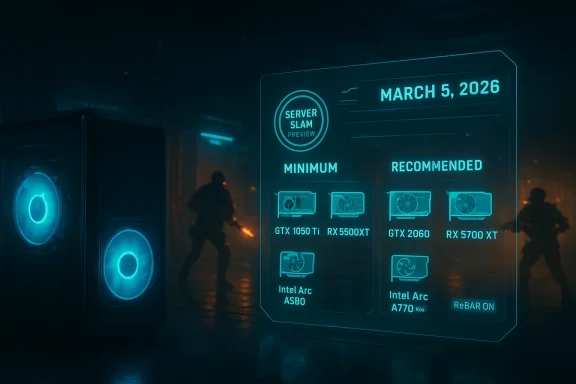
Official Marathon system requirements — quick summary
Bungie and Steam list two PC tiers: Minimum and Recommended. Key points from the published requirements:- Minimum
- OS: Windows 10 64-bit (latest Service Pack)
- CPU: Intel Core i5-6600 or AMD Ryzen 5 2600
- RAM: 8 GB
- GPU: NVIDIA GeForce GTX 1050 Ti (4 GB) / AMD Radeon RX 5500 XT (4 GB) / Intel Arc A580 (8 GB, with Resizable BAR on)
- DirectX: Version 12
- Network: Broadband Internet
- Recommended
- OS: Windows 10 64-bit (latest Service Pack)
- CPU: Intel Core i5-10400 or AMD Ryzen 5 3500
- RAM: 16 GB
- GPU: NVIDIA GeForce GTX 2060 (6 GB) / AMD Radeon RX 5700 XT (8 GB) / Intel Arc A770 (16 GB, with Resizable BAR on)
- DirectX: Version 12
- Network: Broadband Internet
What the minimum requirements actually mean
At first glance, Marathon’s minimum spec appears intentionally conservative. Here’s a practical interpretation:- 8 GB RAM minimum: This is the bare floor. On a modern Windows 10 system, the OS and background applications typically consume several gigabytes, so 8 GB leaves limited headroom. Expect to run into stutters, texture pop-in, or background-process contention if you try to play Marathon with only 8 GB and background apps active. For basic play at low settings and 1080p, 8 GB is possible, but not ideal.
- CPU: Intel Core i5-6600 / AMD Ryzen 5 2600: Both are midrange chips from earlier CPU generations. The Core i5-6600 is a 4-core/4-thread Skylake part (2015 era), while the Ryzen 5 2600 is a 6-core/12-thread Zen+ processor (2018 era). Marathon’s listing of the i5-6600 as equivalent to the Ryzen 5 2600 suggests single-threaded CPU demands are modest, but the inclusion of the Ryzen 5 2600 signals some ability to leverage multithreading. Expect tighter CPU-bound scenarios (large AI presence, many players in proximity) to stress older 4-core chips.
- GPU: GTX 1050 Ti / RX 5500 XT / Intel Arc A580: These GPUs represent the low to lower-mid range. The GTX 1050 Ti targets 1080p at low-to-medium settings in modern titles; the RX 5500 XT (4 GB) is a contemporaneous AMD low-mid part. The inclusion of Intel Arc A580 (with an 8 GB framebuffer and ReBAR requirement) shows Bungie tested on discrete Intel GPU silicon and tailored guidance accordingly.
- DirectX 12: Marathon requires modern API support; older systems without DX12 drivers are out.
What the recommended requirements imply for 1080p/1440p play
The recommended tier offers a much clearer baseline for a solid experience:- 16 GB RAM: This matches modern expectations for gaming PCs and is the practical sweet spot. If you want to run chat apps, browsers, and overlays alongside Marathon, 16 GB is the minimum to avoid swapping and frame hitching.
- CPU: Intel Core i5-10400 / AMD Ryzen 5 3500: These CPUs provide better multicore throughput and single-core performance than the minimum-tier Intel chip. They indicate Bungie expects players using recommended hardware to sustain more consistent frame rates, particularly in contested encounters.
- GPU: GTX 2060 / RX 5700 XT / Intel Arc A770: These GPUs sit in the true midrange. Expect stable 1080p high/ultra settings at or near 60 FPS in many scenarios, and decent 1440p performance at medium-to-high settings. The GTX 2060 (6 GB) and RX 5700 XT (8 GB) are capable parts from the 2019–2020 generation; Bungie’s recommendation suggests Marathon’s visuals and shader complexity aren’t pushing the bleeding edge.
- ReBAR + Intel Arc A770 (16 GB): The Arc A770 expectation notes ReBAR, implying that some GPU memory and CPU-GPU addressability features can materially affect performance on certain hardware. Intel Arc owners should ensure Resizable BAR is enabled to meet the stated performance assumptions Bungie tested.
The Resizable BAR mention — why does it matter?
Resizable BAR (ReBAR) is an advanced PCIe feature that allows the CPU to access the GPU framebuffer more flexibly, potentially improving performance in some workloads. Bungie’s explicit ReBAR note for Intel Arc A580/A770 entries is a data point with two likely interpretations:- Testing parity: Bungie measured Arc GPUs with ReBAR enabled and found a measurable uplift, so they included the ReBAR note to ensure players match Bungie’s test configuration.
- Performance sensitivity: Marathon’s rendering pipeline may respond well to wider CPU-to-GPU memory access windows in certain streaming or draw-call-heavy scenarios. For Intel Arc owners, enabling ReBAR in BIOS and ensuring up-to-date firmware/drivers is a practical pre-launch checklist item.
Storage, updates, and “may increase” warnings
Bungie’s statement that hard drive storage requirements are subject to increase is standard but important. Live-service games with seasonal content and ongoing updates regularly expand in size. Practical notes:- Plan for at least double the estimated initial install size as a safe buffer.
- Use an SSD where possible: extraction shooters benefit from faster streaming to reduce texture pop-in and level load times.
- Keep a few tens of gigabytes free on your system drive to avoid Windows and game-level I/O slowdowns.
Gameplay features that affect performance
Marathon is an always-online extraction shooter with PvPvE combat and AI populations. Several gameplay elements have direct performance consequences:- Player density and AI count: Areas with high player or AI activity will be CPU-bound and may cause dips on older CPUs.
- Cross-play matches: Network latency and anti-cheat layers can add CPU overhead.
- Proximity chat and voice features: Live voice encoding adds background CPU/network usage.
- Large-scale particle effects and post-processing: Explosion effects, volumetric fog, and complex lighting can spike GPU load.
Optimization and tuning — practical steps to get the best performance
If you plan to play Marathon at launch, here’s a prioritized checklist to prepare your PC and maximize performance.- Update drivers and Windows
- Install the latest GPU drivers from your hardware vendor.
- Ensure Windows 10 is updated to the latest service pack and all platform updates are applied.
- Enable ReBAR if you have Intel Arc (and consider it for NVIDIA/AMD)
- Update your motherboard BIOS and GPU driver.
- Turn on Resizable BAR in BIOS and verify it’s active via your GPU control panel or vendor utility.
- Use an SSD
- Install Marathon on an SSD for faster streaming; NVMe devices are preferred for the best load times.
- Set in-game graphics appropriately
- Start with the recommended preset for your GPU and adjust shadows, occlusion, and volumetrics down if you encounter dips.
- Prefer “frame-rate target” or V-Sync off with a frame limiter to avoid input lag.
- Background tasks
- Close unnecessary applications, especially browsers with many tabs and streaming apps.
- Disable unnecessary overlays (unless you rely on them for communication).
- Monitor temps and throttle
- Ensure CPU/GPU cooling is adequate; thermal throttling can masquerade as low performance.
- Network
- Use a wired connection where possible; for Wi‑Fi, ensure you’re on a 5 GHz band and close to your router.
- Memory
- If you only have 8 GB of RAM, consider upgrading to 16 GB before launch to avoid swapping and stutters.
Upgrade advice — where to invest for the biggest payoff
If you’re evaluating upgrades specifically for Marathon, the order of effectiveness is:- Memory to 16 GB — the cheapest and most impactful for modern Windows gaming.
- SSD (if you’re on HDD) — for load times and streaming.
- GPU upgrade to midrange (GTX 2060 / RX 5700 XT class or better) — yields clear improvements in visual settings and frame rate.
- CPU upgrade only if your chip is very old (e.g., pre-2016 quad-core with no SMT) — this helps in crowded, CPU-bound scenes.
Comparisons: Marathon vs. other extraction shooters
Marathon’s published requirements put it in the accessible camp compared to some high-fidelity shooters that demand current-generation hardware. By targeting GTX 1050 Ti for minimum and GTX 2060 for recommended, Bungie signals that Marathon aims to be playable across a wide swath of systems rather than pushing only cutting-edge GPUs.Compared with titles in the extraction/shooter space that can require beefier hardware to hit stable 60 FPS (especially with dense simulation and large maps), Marathon’s specs suggest Bungie has taken performance optimization seriously during the late-stage development cycle. That said, real-world performance will depend heavily on in-game concurrency, server load, and shader/cache streaming — all of which the Server Slam preview is designed to test.
Risks, caveats, and things to watch after launch
Bungie’s history as a live-service studio brings strengths and risks. Here are the most salient technical and community-facing concerns around Marathon’s launch:- Always-online dependency: Marathon requires network access for core gameplay. Server outages or DDoS attacks can render the game unplayable even for solo runs.
- Post-launch patches and growing install size: Live-service games rapidly increase in footprint. Players with capped storage or metered connections should plan accordingly.
- Microtransaction and economy design: Bungie’s approach to in-game purchases and progression pacing can affect player experience long-term. While this is not a purely technical issue, monetization choices can drive frequent client updates and feature patches.
- Anti-cheat performance impact: Many multiplayer games ship with kernel-level anti-cheat drivers that can impact system stability or compatibility. Pay attention to what Bungie ships at launch.
- Server-side balancing / instability: Early access tests indicated areas where gameplay balance and UI clarity needed polish. If those areas aren’t fully resolved at launch, players may experience mismatched expectations and frequent hotfixes.
- Hardware-specific quirks: The ReBAR note suggests platform-specific configurations matter. Expect vendor-specific patches (especially for Intel Arc drivers or AMD/NVIDIA shaders) in the weeks after launch.
- Accessibility of lower-end hardware: While specs are modest on paper, the 8 GB RAM minimum risks delivering a poor experience on entry-level systems — and that can translate into negative impressions among players on lower-tier hardware.
Preparing for launch and the Server Slam preview
Bungie’s Server Slam (an open preview) runs in the days immediately before launch to stress-test servers and gather live telemetry. If you plan to participate:- Use the Server Slam to test your hardware and network setup in real conditions.
- Make a checklist: update drivers, enable ReBAR if applicable, install on an SSD, and clear background processes.
- Use the preview to determine the in-game settings that give you the best blend of visuals and frame times.
- Watch for hotfixes and updated GPU drivers during the preview window; vendors sometimes ship targeted driver changes in response to new AAA launches.
Frequently asked technical questions (and short answers)
- Will Marathon run on older integrated GPUs?
- Integrated GPUs are not listed in Bungie’s official minimums. Playable performance on integrated solutions is unlikely to meet the minimum expectations and will vary wildly.
- Do I need Windows 11?
- No. Marathon’s official minimum is Windows 10 64-bit (latest Service Pack). Windows 11 is supported implicitly, but Windows 10 remains the listed baseline.
- Is Resizable BAR required for Intel Arc?
- Bungie lists Intel Arc GPUs with the caveat “with ReBAR on.” That implies ReBAR was enabled for testing and likely recommended for best performance on Arc hardware.
- Will Marathon be capped by storage?
- The install size can expand over time. Plan for additional space for patches and seasonal content.
- Is 8 GB RAM truly playable?
- Technically yes, but expect compromises. 16 GB is highly recommended for a smoother experience.
Final analysis — is Marathon accessible for most PC gamers?
Yes — with nuance. Bungie has set system requirements that make Marathon accessible to many mainstream PCs without forcing everyone onto bleeding-edge hardware. The use of midrange GPUs (GTX 1050 Ti minimum, GTX 2060 recommended) and common CPUs suggests a wide install base can join at launch.However, accessibility does not guarantee a trouble-free experience. The 8 GB minimum and ReBAR caveats mean some players will need to tweak platform settings or upgrade modest components to achieve reliable performance. Marathon’s always-online nature and potential for rapid post-launch patches also mean players should be prepared for server-related teething problems and download-size growth.
For players with midrange rigs built in the last five years — dual-channel memory, an SSD, and a GPU from the GTX 16xx/20xx or Radeon 5000/6000 class — Marathon should be within reach at sensible settings. If you’re on older hardware, plan upgrades around memory and storage first, and use the Server Slam preview to test your setup before the full launch on March 5, 2026.
Conclusion
Bungie’s release of Marathon’s system requirements paints the picture of an extraction shooter designed to be broadly playable on midrange PCs while still offering richer visuals and more stable performance on contemporary hardware. The published minimum and recommended specs are feasible for a large portion of the PC gaming community, and the inclusion of Intel Arc configurations with ReBAR notes shows Bungie is testing across a wider range of GPUs.That said, the practical experience will depend on variables beyond the numbers: server health, driver maturity (especially for Intel Arc), background system load, and the game’s own runtime optimizations. If you plan to jump into Marathon at or soon after launch, prepare by upgrading to 16 GB of RAM if possible, installing the game on an SSD, ensuring your GPU drivers and BIOS are current, and using Bungie’s Server Slam preview to tune settings under real-world conditions.
Marathon’s hardware bar is welcoming, but prudent preparation will deliver the most satisfying and consistent experience when Bungie opens the world on March 5, 2026.
Source: Turtle Beach https://uk.turtlebeach.com/blog/marathon-system-requirements-minimum-recommended-and-more/
