

Microsoft’s Copilot ecosystem now has a formal bridge to the rest of an enterprise’s systems: the Model Context Protocol (MCP). That bridge is no niche add-on — MCP is an open, standardized protocol designed to let large language model (LLM) agents discover and call external tools, query structured and unstructured resources, and use repeatable prompt templates. In Microsoft’s implementation, MCP becomes a first-class mechanism inside Copilot Studio and Windows: it reduces bespoke connector work, centralizes business logic on MCP servers, and enables Copilots to access live data while Microsoft and third parties provide gating, tracing, and policy controls. This change accelerates agent development and deployment — but it also raises new governance, security, and operational responsibilities that IT teams must treat as foundational rather than optional.
Anthropic originally published MCP as an open protocol to standardize how LLMs connect to external systems; the project provides SDKs, protocol guidance and reference server implementations so agents and tool providers can communicate in a predictable JSON‑RPC/transport model. Anthropic’s docs present MCP as “the USB‑C for AI,” a standard port that lets many models and many tools interoperate rather than forcing bespoke integrations for every pairing. Microsoft has adopted MCP as part of its Copilot platform roadmap and has moved MCP integration from preview into general availability inside Copilot Studio, adding features such as tool listing, streamable transports, and enhanced tracing so makers and administrators can see which MCP server and tool were invoked at runtime. The company’s Copilot Studio guidance lays out a straightforward three‑step pattern: build an MCP server, create a connector, and add that connector as a tool inside Copilot Studio. Microsoft’s practical Windows integration goes further: Windows itself exposes an on‑device registry and built‑in MCP connectors (for example, File Explorer and Windows Settings in Insider preview builds), enabling agents that run on devices to discover local MCP servers and request scoped access to files and settings under explicit user consent. That OS-level plumbing ties MCP into identity, audit logging, and enterprise policy surfaces — a necessary condition for production agent usage on managed endpoints.
Mitigations:
Mitigations:
Mitigations:
Mitigations:
At the same time, MCP concentrates capability — and therefore risk — into new critical paths. Security teams must treat MCP servers and manifests as first‑class assets: apply least privilege, insist on OAuth and discovery for identity mapping, require robust tracing and SIEM integration, and validate vendor claims during procurement. Vendor connector counts and semantic model promises are compelling, but they should be validated in pilots and through security & performance testing before being relied on in production.
For IT leaders, the practical judgment is straightforward: adopt MCP as the standard integration approach for agentic workflows, but do so under strict governance, with staged pilots, and with corporate policies that treat agent‑to‑tool interactions with the same scrutiny as human‑to‑system access. When that operational discipline is in place, MCP turns Copilot from a clever assistant into a reliable and governable automation platform — one that finally makes “agents that act” a realistic tool in the enterprise toolbox.
Source: Petri IT Knowledgebase What Is Microsoft Copilot MCP? | Petri IT Knowledgebase
 Background / Overview
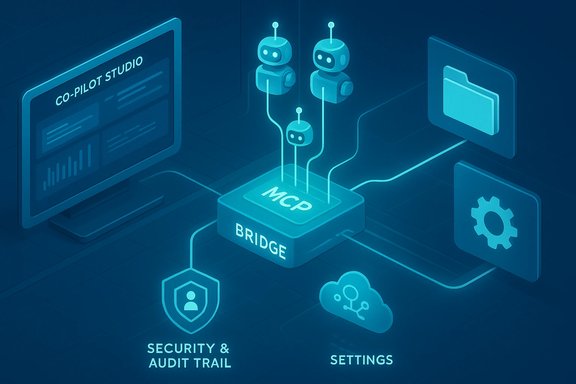
Anthropic originally published MCP as an open protocol to standardize how LLMs connect to external systems; the project provides SDKs, protocol guidance and reference server implementations so agents and tool providers can communicate in a predictable JSON‑RPC/transport model. Anthropic’s docs present MCP as “the USB‑C for AI,” a standard port that lets many models and many tools interoperate rather than forcing bespoke integrations for every pairing. Microsoft has adopted MCP as part of its Copilot platform roadmap and has moved MCP integration from preview into general availability inside Copilot Studio, adding features such as tool listing, streamable transports, and enhanced tracing so makers and administrators can see which MCP server and tool were invoked at runtime. The company’s Copilot Studio guidance lays out a straightforward three‑step pattern: build an MCP server, create a connector, and add that connector as a tool inside Copilot Studio. Microsoft’s practical Windows integration goes further: Windows itself exposes an on‑device registry and built‑in MCP connectors (for example, File Explorer and Windows Settings in Insider preview builds), enabling agents that run on devices to discover local MCP servers and request scoped access to files and settings under explicit user consent. That OS-level plumbing ties MCP into identity, audit logging, and enterprise policy surfaces — a necessary condition for production agent usage on managed endpoints.What MCP actually is (technical anatomy)
MCP is a client–server protocol and ecosystem of SDKs intended to standardize three things for agent-tool interoperability:- Tools — callable, orchestrated functions or workflows (for example: search LinkedIn for candidates, create a purchase order, run a SQL query).
- Resources — passive, typically read‑only data sources such as documents, knowledge bases, calendars, or structured tables; resources expose schemas and metadata so agents can reason over fields and relationships.
- Prompts (prompt templates) — prebuilt LLM instructions that agents can reuse; template manifests reduce brittle prompt engineering by ensuring stable, versioned guidance to the model.
Protocol and transports
MCP supports multiple transports (e.g., HTTP streaming transports and local stdio servers), SDKs in several languages, and a manifest-first approach where servers publish the tools/resources they support along with input/output schemas and metadata. Microsoft’s Copilot Studio explicitly supports streamable transports and has deprecated older SSE patterns in favor of more robust streaming support in GA. These choices matter for throughput (large file transfers, streaming results) and for predictable model grounding.How Microsoft integrates MCP into Copilot Studio and Windows
Copilot Studio as MCP host
Copilot Studio acts as an MCP host/discovery surface: when you register an MCP server, Studio downloads server metadata — tool definitions, resource schemas, prompt templates and version/capability descriptions — and exposes these as available tools inside the agent authoring environment. Studio’s activity maps and tracing allow authors and admins to see which MCP server and which tool was used during an agent run, improving observability and making debugging and compliance easier. Copilot Studio also provides an onboarding wizard to streamline connection setup.Windows on‑device MCP
Windows adds an on‑device registry (ODR) for MCP servers so locally installed MCP endpoints are discoverable by agents. Preview builds shipped with two built‑in connectors — File Explorer (permissioned access to known folders with semantic search) and Windows Settings (check/modify system settings on Copilot+ devices) — showing how MCP becomes the standard way for agents to reach system capabilities. Built‑in containment and per‑agent identities are central to Microsoft’s approach: agents run in isolated Agent Workspaces and operate under distinct agent accounts, with consent prompts and auditing enforced by the OS.Versioning and centralized business logic
One of MCP’s architectural benefits — emphasized in Microsoft’s flow — is moving business logic into MCP servers rather than embedding it into each Copilot. The server becomes the single authoritative place for connectors, tools, and transformations; when tools are updated server‑side, all Copilots pick up changes automatically because Copilot Studio refreshes metadata and versions. This significantly reduces the operational cost of maintaining many Copilots across an organization.Developer and admin workflow
- Prerequisites: an MCP client, a reachable service endpoint, and typical dev tooling (Visual Studio Code is common; GitHub Copilot can assist with code authoring).
- Build: implement an MCP server (use available SDKs) and define tool manifests, resource schemas, and prompt templates.
- Connect: use the Copilot Studio onboarding wizard (preferred) or create a custom PowerApps connector; configure authentication (API Key or OAuth 2.0).
- Test: validate schema, run tool calls, check tracing and activity maps in Copilot Studio.
- Deploy: register the MCP server in production tenant; enforce RBAC and auditing.
Key benefits for organizations
- Faster integration: MCP removes the N×M problem — write one server, serve many agents — cutting connector engineering time.
- Semantic grounding: schema and metadata reduce hallucination risk by giving models structured facts to reason with instead of raw blobs.
- Centralized governance: registering MCP servers in Copilot Studio/Agent 365 exposes tool usage to centralized tracing, auditing and policy controls.
- Immediate change propagation: updates to server-side tools and business logic automatically flow to all Copilots that consume the server’s manifests.
- Ecosystem leverage: managed MCP providers and connector catalogs mean teams can buy rather than build many integrations. Vendor offerings advertise hundreds of connectors (claims vary between 300–350+), but these are vendor statements that should be validated during procurement and pilot testing.
Notable strengths — why MCP matters now
- Interoperability at scale: MCP is emerging as a cross‑vendor standard (Anthropic’s reference implementations, Microsoft’s Copilot Studio GA and multiple third‑party MCP servers), enabling agents and tools from different vendors to interoperate without bespoke glue.
- Deterministic tool calls: structured inputs and outputs make agent behavior testable and auditable compared with purely prompt-driven workflows.
- Reduced token costs: server-side pushdown and semantic filtering keeps the LLM context window lean, reducing token consumption and latency for multi‑step flows. Vendor collateral highlights this as a practical benefit, though exact savings depend on your workloads.
Risks, unknowns, and mitigations
MCP introduces powerful capabilities but also concentrates new attack surfaces and operational complexity. Below are the principal risks and practical mitigations.Risk: Data exfiltration and unchecked tool access
Agents that can call tools and read resources open avenues for data leakage if permissions, DLP, or RBAC are misconfigured.Mitigations:
- Enforce least‑privilege in tool manifests and resource schemas.
- Use OAuth passthrough where possible so calls inherit upstream permissions.
- Leverage platform-level controls (Agent 365 allow‑lists, ODR policies) to restrict which MCP servers and tools can be discovered and used.
Risk: Prompt injection and tool poisoning
Tool manifests and prompts are attack surfaces — a malicious tool or crafted response could force an agent to perform unexpected actions.Mitigations:
- Validate and sign server manifests and templates where possible.
- Keep business‑critical actions behind additional confirmation steps and human review.
- Monitor tool invocation patterns in Copilot Studio activity maps and audit logs for anomalies.
Risk: Rogue third‑party MCP servers
Managed MCP providers advertise broad connector coverage; using a third‑party MCP server may introduce vendor access to sensitive metadata unless contractually and technically restricted.Mitigations:
- Narrow the scope of external MCP servers to read‑only or canned operations where possible.
- Require written security attestations and contractual data‑handling commitments from providers.
- Prefer self‑hosted MCP servers for highly sensitive on‑prem data and use managed providers for cloud/SaaS connectors that are less sensitive.
Risk: Operational complexity & auditing gaps
Centralizing business logic in MCP servers simplifies change management, but it also centralizes failure modes and increases the blast radius of misconfigurations.Mitigations:
- Treat MCP servers like any other critical backend service: CI/CD, testing/staging, canary deployments, and schema regression tests.
- Make tracing and observability mandatory: require activity maps and per‑tool telemetry be enabled and integrated into SIEM/monitoring.
Real‑world vendor ecosystem and claims — what to verify in procurement
Several vendors and security suppliers have announced MCP integrations or MCP‑based connectors for Copilot Studio and Agent 365. Examples reported in the community include managed MCP connector platforms and security intelligence providers exposing MCP tools for Copilot. Vendor claims typically include:- Number of connectors (e.g., 300–350+).
- Semantic modeling of source schemas and relationships.
- Identity passthrough and audit trails.
- The exact connector list, supported API versions and maintenance commitments.
- How identity is mapped and whether RBAC is preserved or proxied.
- Latency and query pushdown behavior for high‑volume queries.
- Access controls (can the server be constrained to read-only, sanitized returns, or filtered fields?.
Practical checklist for IT leaders (quick, actionable)
- Inventory: identify candidate workflows where agentic automation adds value and an MCP connector simplifies work (HR searches, contract summarization, IT ticket triage).
- Pilot: run an MCP server in a dev tenant and integrate it into Copilot Studio using the onboarding wizard; require admin consent flows for any production registration.
- Auth: prefer OAuth 2.0 discovery & delegated access for tenant grounding. Avoid API keys for high‑sensitivity sources.
- Least privilege: expose minimal tools and narrow resource schemas; require confirmations for write actions.
- Observability: enable Copilot Studio tracing, integrate activity logs with SIEM, and require per‑tool telemetry retention policies.
- Governance: define acceptable use policies for agents, allowed MCP servers and entitlements; include MCP server reviews in vendor risk management.
- Security testing: run adversarial tests (prompt injection, malicious tool responses) and validate containment and revocation workflows.
Regulatory and compliance considerations
When agents access regulated data (PII, PHI, financial records), MCP servers must be mapped into existing compliance controls. Key points:- Data residency: confirm whether MCP servers or managed connector vendors cache or index data outside the tenant boundary.
- Audit trails: ensure MCP call logs are preserved as required by retention policies and integrated into compliance reporting.
- Data minimization: use server‑side filtering to return only the fields necessary for agent reasoning and redact or pseudonymize where possible.
- Contracts and DPIAs: update vendor contracts and perform Data Protection Impact Assessments where MCP servers access regulated data.
The industry context and governance
MCP’s rapid adoption has drawn wide industry attention. Anthropic’s MCP documentation and reference implementations established the technical baseline, while Microsoft’s Copilot Studio GA demonstrates major platform adoption. In parallel, industry reporting shows the protocol is being positioned for neutral governance (recent moves to donate agent standards into neutral foundations have been reported), signaling a broader push to make agent interoperability open and community‑governed rather than proprietary. These developments are promising for long‑term interoperability, but they do not remove the immediate operational tasks required to secure and manage MCP in your environment.Conclusion — measured optimism with operational discipline
MCP is a practical, standards‑based answer to a real engineering problem: how to let LLMs and agents access the broad set of tools and data sources enterprises need without writing brittle, bespoke connectors for every combination. Microsoft’s integration of MCP into Copilot Studio and Windows accelerates adoption and brings strong observability and identity primitives to bear. These are genuine advances that can reduce time‑to‑value for agent initiatives and make Copilot‑powered automation more deterministic and auditable.At the same time, MCP concentrates capability — and therefore risk — into new critical paths. Security teams must treat MCP servers and manifests as first‑class assets: apply least privilege, insist on OAuth and discovery for identity mapping, require robust tracing and SIEM integration, and validate vendor claims during procurement. Vendor connector counts and semantic model promises are compelling, but they should be validated in pilots and through security & performance testing before being relied on in production.
For IT leaders, the practical judgment is straightforward: adopt MCP as the standard integration approach for agentic workflows, but do so under strict governance, with staged pilots, and with corporate policies that treat agent‑to‑tool interactions with the same scrutiny as human‑to‑system access. When that operational discipline is in place, MCP turns Copilot from a clever assistant into a reliable and governable automation platform — one that finally makes “agents that act” a realistic tool in the enterprise toolbox.
Source: Petri IT Knowledgebase What Is Microsoft Copilot MCP? | Petri IT Knowledgebase
