

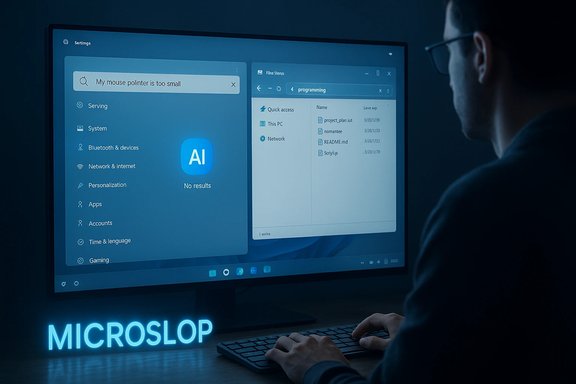
A thirty‑second clip went viral over the weekend because it did something Microsoft’s PR can’t fix: it made what the company calls “Copilot” look both useless and intrusive at the same time. In the video, programmer Ryan Fleury follows a settings search suggestion in Windows 11 — a brightly lit AI icon tells him to search the exact sentence “My mouse pointer is too small” — and the system returns nothing. Typing a single short keyword seconds later gives results. The clip, reposted and mocked across social platforms, crystallized a larger user backlash that’s now being summed up with a scathing new nickname: “Microslop.” The moment matters because it’s not just a meme — it exposes a real gap between Microsoft’s AI marketing and the day‑to‑day reliability and privacy expectations of Windows users.
Windows stopped being just a window into your apps and files the moment vendors decided AI could be the new interface. Over the past two years Microsoft has aggressively rebranded a loose set of features as the Copilot family, and then moved to bake Copilot into core Windows surfaces: the taskbar, File Explorer, the Search bar, and even low‑level services aimed at enabling agentic behaviors (features that act on your behalf). Microsoft’s public messaging — from executive blog posts to product pages — frames the shift as inevitable and beneficial: AI as a “cognitive amplifier,” and Windows 11 as a “canvas for AI.” At the same time, the company timed these pushes to coincide with a hard product milestone: mainstream support for Windows 10 ended on October 14, 2025, tightening Microsoft’s hand in nudging users toward Windows 11 and its new AI surfaces. The result is a visible tension: Microsoft says these features are optional, gated, and subject to security design, while many users — developers, IT admins, privacy‑minded consumers — experience the rollouts as defaults, fragile in practice, and often poorly explained. That tension is what “Microslop” captures: not just individual bugs, but a pattern where spectacle and aggressive surface placement outrun engineering polish and governance.
If Microsoft does the messy work of systems engineering — reproducible metrics, opt‑in defaults, auditable agent logs, independent NPU and privacy benchmarks, and enterprise‑grade admin controls — the company can justify its vision for an agentic OS. If, instead, the strategy doubles down on spectacle and aggressive surface placements without those guardrails, the backlash embodied by “Microslop” will calcify and begin to shape procurement, regulation, and consumer behavior.
The immediate takeaway for Windows users and admins is pragmatic: pilot where the value is clear, demand and test the privacy and reliability claims, and treat the new Copilot surfaces as powerful but unproven until independent verification and conservative defaults are in place. The next six months will show whether Microsoft treats Microslop as a wake‑up call to prioritize reliability and trust — or as an annoyance that PR can out‑shout.
(end of article)
Source: Futurism "Microslop": Infuriating Video Sums Up How Microsoft Is Ruining Windows With AI
 Background: how we got here
Windows stopped being just a window into your apps and files the moment vendors decided AI could be the new interface. Over the past two years Microsoft has aggressively rebranded a loose set of features as the Copilot family, and then moved to bake Copilot into core Windows surfaces: the taskbar, File Explorer, the Search bar, and even low‑level services aimed at enabling agentic behaviors (features that act on your behalf). Microsoft’s public messaging — from executive blog posts to product pages — frames the shift as inevitable and beneficial: AI as a “cognitive amplifier,” and Windows 11 as a “canvas for AI.” At the same time, the company timed these pushes to coincide with a hard product milestone: mainstream support for Windows 10 ended on October 14, 2025, tightening Microsoft’s hand in nudging users toward Windows 11 and its new AI surfaces. The result is a visible tension: Microsoft says these features are optional, gated, and subject to security design, while many users — developers, IT admins, privacy‑minded consumers — experience the rollouts as defaults, fragile in practice, and often poorly explained. That tension is what “Microslop” captures: not just individual bugs, but a pattern where spectacle and aggressive surface placement outrun engineering polish and governance.The viral clip that crystallized the backlash
The video that set off the latest surge in criticism is short and mundane. It shows the Windows 11 settings search offering an AI‑styled suggestion that reads like a complete sentence — “My mouse pointer is too small.” When the user follows the suggestion exactly, the AI search returns nothing; typing a terse keyword produces results immediately afterward. The contrast is funny and infuriating: the UI telegraphs help but the underlying behavior doesn’t deliver. Futurism ran the clip and tied it to the larger Micrsofot AI backlash; the post quotes the tweet, reproduces the user reaction, and frames the video as emblematic of broader reliability problems. This is an important moment precisely because it’s reproducible and easy to explain: you don’t need to read a long bug report or reverse‑engineer a model stack to understand the failure. A suggestion that encourages users to write a whole sentence should not require teaching the user to reformulate the sentence into a single keyword. When everyday interactions like search degrade, the credibility of more complex AI features — summary generation, vision‑based assistants, agentic tasks — is affected by association. The meme economy captured that in a single word: Microslop.What Microsoft is actually shipping (and promising)
Microsoft’s product roadmap has two simultaneous threads:- A visible, user‑facing thread that surfaces Copilot across Windows: a central Copilot pill on the taskbar, an “Ask Copilot” field, Copilot Vision for screen analysis, right‑click Copilot actions in File Explorer for summaries and edits, and modular agent features (Copilot Actions) that can perform multi‑step tasks on behalf of the user. These are showing up in preview and staged rollouts for Insiders and Copilot+ PCs.
- A lower‑level technical thread that ties some of the richest experiences to on‑device acceleration and a new class of Copilot+ hardware — NPUs and performance guidance expressed in TOPS — plus platform primitives for memory, entitlements, and secure enclaves. Microsoft argues this is necessary for latency, privacy, and offline capability.
- Faster discovery and in‑context help (search plus generative prompts in one surface).
- Accessibility gains through voice and vision inputs (e.g., “Hey, Copilot” voice activation and image‑to‑text analysis).
- Productivity wins for workflows that benefit from summarization and automation.
The real, reproducible failings users are reporting
Critics and independent testers have assembled a consistent list of problem classes that match the public ridicule behind “Microslop”:- Hallucinations and incorrect guidance: Copilot’s step‑by‑step instructions sometimes misidentify UI elements or recommend actions that don’t work in real workflows. That’s a classical generative AI failure when underlying UI mapping and instrumentation are incomplete.
- Inconsistent vision and assistant behavior: vision features that analyze the screen can mislabel or miss key content; OCR and UI understanding are fragile across apps and window states. When a feature is promoted as “share any window” the expectation is broad coverage; in reality, coverage is narrow and brittle.
- Intrusive placements and defaults: Copilot entry points are appearing in highly visible places (taskbar, File Explorer context menus), and users complain about difficulty finding clear, baked‑in opt‑outs. That amplifies the perception that Microsoft is pushing Copilot rather than offering it.
- Performance and resource impact: AI hooks and background indexing can increase CPU, memory, and battery use on older machines; the Copilot+ hardware story aggravates the impression of enforced upgrades.
- Privacy and security uncertainty: features that keep local histories (like Recall) or scan screens raise acute concerns about sensitive data capture, retention, and if — or how — those screenshots are protected. Multiple independent reports show scenarios where Recall captured sensitive fields in screenshots; Microsoft responded with stronger isolation and encryption promises, but the controversy lingers.
Recall: illustrative case study on privacy trade‑offs
Recall — Microsoft’s “photographic memory” feature for Copilot+ PCs — is the clearest example of both potential utility and risk. In theory, Recall lets you search a local timeline of screen snapshots to find that chat, report, or image you saw earlier. That’s a valuable capability when implemented safely. In practice, early testing and reporting showed Recall capturing sensitive details under some conditions (usernames, partial banking info, form fields). Microsoft subsequently reworked Recall’s architecture to require explicit opt‑in, to run critical components inside a Virtualization‑based Security (VBS) enclave, and to require Windows Hello authentication before access. Microsoft’s public posts emphasize encryption, local processing, and user control. Independent security commentators, however, remain skeptical about whether the feature can be made safe for broad enterprise deployment without very conservative defaults and strong admin controls. Caution: some stories circulating online attribute a particular “unprotected folder” or a precise leak of Social Security numbers to a specific Recall build. That precise formulation is difficult to corroborate with publicly available responsible technical disclosures. Multiple outlets confirm Recall captured sensitive on‑screen content in some tester scenarios and that Microsoft moved to harden the architecture, but claims tying the feature to a specific, permanent unprotected folder with exposed SSNs require direct forensic evidence that has not been published in the public domain. Treat such specific claims as plausible but unverified until a reproducible public report or Microsoft post documents the exact failure mode and its remediation.Why “Microslop” matters beyond memes
A meme is only dangerous to a company when it signals a persistent gap between promises and product reality. “Microslop” has the potential to:- Lower trust among enterprise buyers who now demand auditable, provable SLAs before deploying agentic features in regulated workflows.
- Trigger regulatory attention: features that process or retain user screens, audio, or personal data will attract privacy authorities — especially in strict data regimes.
- Accelerate procurement friction and delayed adoption: IT leaders may require independent benchmarks for Copilot+ claims (e.g., 40+ TOPS guidance), and insist on opt‑out policies before enabling agentic features on corporate images.
- Damage the brand among the developer and power‑user communities that historically defended Windows’ resilience; losing that constituency could have second‑order effects on platform health.
Strengths Microsoft still brings to the table
This isn’t an argument to abandon AI. Microsoft possesses real technical and commercial assets that could make these features worthwhile if executed carefully:- Scale and integration: Microsoft controls Azure, a large model‑serving stack, and deep integrations across Office, Edge, and Windows. That enables cross‑product workflows few rivals can match.
- On‑device acceleration and security primitives: the Copilot+ hardware story and VBS enclave work show Microsoft is thinking about latency and isolation in ways that could reduce cloud exposure and improve privacy if broadly adopted and verified.
- Enterprise channels and management tooling: Microsoft’s large enterprise customer base and ecosystem mean it can pilot conservative, audited agentic workflows where strong governance is required. Done right, that could present a credible, incremental path to adoption.
Concrete fixes Microsoft should prioritize (and what IT pros should demand)
If Microsoft wants to escape the Microslop moment, it must do three things simultaneously: improve reliability; restore user agency and transparency; and invite independent verification. Concretely:- Publish reproducible reliability metrics and test suites for core Copilot flows (search, vision, and actions). Make those suites available to independent labs.
- Default to opt‑in for any persistent memory or background snapshot features. Where persistence is useful, offer granular per‑app exclusions and enterprise policy controls.
- Expose provenance and confidence UI affordances by default: visible source badges, confidence scores, and one‑click undo/verify for any “do it for me” automation.
- Ship admin‑grade controls and Group Policy/MDM support from day one; do not rely on registry hacks as the enterprise mechanism for disabling features.
- Fund independent NPU, battery, and privacy benchmark suites for Copilot+ claims so customers can verify the “40+ TOPS” guidance and real device impact.
- Commit to quarterly transparency reports showing measures of failure modes, deployment coverage, and remediation timelines.
Practical guidance for Windows users and IT administrators today
- Treat Copilot features as optional experiments. Evaluate them in a small pilot group before broad enterprise enablement.
- Harden defaults: in managed environments, set policies to disable Recall and other background snapshotting features until the organization has validated retention, encryption, and access controls. Microsoft’s documentation now documents these admin settings for Insiders.
- Monitor performance and battery on representative devices before enabling Copilot hooks on a fleet. Consider Copilot+ hardware only for users who will materially benefit from low‑latency, on‑device AI.
- Demand provenance and explainability: if an automation or summary changes financial, legal, or compliance‑relevant states, require human confirmation and audit logs.
- Keep older machines on Extended Security Updates only as a short bridge — Windows 10 mainstream support ended October 14, 2025. Plan migrations with dates and testing windows in mind.
Where Microsoft’s messaging went wrong — and why optics matter
Satya Nadella’s December blog asking the industry to “get beyond the arguments of slop vs. sophistication” was a strategic reframing: move from hype to systems engineering. That message is defensible. But it landed poorly amid visible product misfires and a cultural moment in which “slop” had already become shorthand for low‑quality mass‑produced AI outputs. When leadership rhetoric reads as dismissive of concrete, reproducible product failures, it amplifies the negative narrative rather than containing it. For many users, “slop” is not an abstract linguistic choice — it’s their lived experience when summaries are wrong, vision flows misidentify, or an assistant nudges default telemetry and account linking. Microsoft’s communications needed to pair high‑level strategy with immediate, verifiable commitments: metrics, timelines, and opt‑in reassurances. The absence of that pairing allowed a meme to become a reputational wedge.Final analysis: a narrow path from Microslop to meaningful agentic computing
The Microslop moment is a real product‑and‑trust inflection point, not a one‑off social media joke. Microsoft has the technical foundations and the partner channels to make integrated desktop AI genuinely useful — but that will take patience, honest transparency, and slower, measurable rollouts.If Microsoft does the messy work of systems engineering — reproducible metrics, opt‑in defaults, auditable agent logs, independent NPU and privacy benchmarks, and enterprise‑grade admin controls — the company can justify its vision for an agentic OS. If, instead, the strategy doubles down on spectacle and aggressive surface placements without those guardrails, the backlash embodied by “Microslop” will calcify and begin to shape procurement, regulation, and consumer behavior.
The immediate takeaway for Windows users and admins is pragmatic: pilot where the value is clear, demand and test the privacy and reliability claims, and treat the new Copilot surfaces as powerful but unproven until independent verification and conservative defaults are in place. The next six months will show whether Microsoft treats Microslop as a wake‑up call to prioritize reliability and trust — or as an annoyance that PR can out‑shout.
(end of article)
Source: Futurism "Microslop": Infuriating Video Sums Up How Microsoft Is Ruining Windows With AI
