

Microsoft 365 administrators should use the service desk as the system of record for multi-person, cross-shift, security-sensitive, or major-incident escalations. Microsoft has retired the Add Note control from the Microsoft 365 admin center’s Need Help experience, so email-only case management is acceptable only for low-volume cases with a named shared owner.
Adopt this operating model immediately:
This is not a Microsoft 365 support-ticket outage. Microsoft says support-request creation and resolution workflows remain unchanged. Case communication continues through the support-case email thread, phone callbacks, and other supported support experiences.
The operational break occurs inside organizations that used Add Note as a shared working history. Administrators may have recorded investigation results, changes in business impact, callback summaries, troubleshooting outcomes, and shift-handoff details beside the Microsoft case. That input path is no longer available.
WindowsForum’s reports about Microsoft 365 feature retirements have repeatedly highlighted the administrative work hidden behind apparently small interface changes. Readers discussing the retirement of legacy Microsoft 365 tools have likewise focused on runbooks, ownership, and replacement workflows—not merely the disappearing control. Add Note is another example: the feature was small, but some teams quietly made it part of their escalation process.
Use the following migration process:
The template is deliberately short. Supporting details can remain in chronological ticket entries, attachments, or linked incident records, but these fields should always show the current state.
Email alone is weaker when responsibility moves between teams or shifts. The Microsoft thread may show what the vendor and sender exchanged, but it may not contain internal troubleshooting, business decisions, parallel workstreams, security analysis, or information intentionally withheld from the vendor.
A private mailbox also creates an ownership risk. If the recipient changes role, leaves the incident, becomes unavailable, or fails to include another analyst, the external conversation can become separated from the people expected to act.
An email-led process therefore needs:
This approach also fits themes raised by WindowsForum users examining Microsoft 365’s changing administration interfaces. Reports about newer feature-access management experiences describe administrators juggling policies, PowerShell, and changing portals. A stable internal ticket provides continuity even when Microsoft’s interface changes again.
Do not assume or predict what will happen to historical notes. Instead, inventory open and recently significant cases, identify records your organization requires, and preserve those records through an approved process where necessary.
The review should involve the service desk and, where appropriate, records-management, compliance, security, or legal teams. Individual administrators should not improvise a preservation method for sensitive case material.
Possible preservation formats can have different consequences:
Preservation also should not become indiscriminate copying. Support exchanges can contain tenant identifiers, user information, configuration details, diagnostic output, and security-sensitive data. Store only what is required, use approved locations, and apply appropriate access controls.
WindowsForum’s coverage of 2025 Microsoft 365 changes and broader legacy-tool retirements has emphasized that administrators need to assess local dependencies before a feature disappears. The same principle applies here without assuming anything about the future availability of previous notes: evaluate what your organization requires and preserve it through its own controlled records process.
Updates should be written so the next analyst can act without contacting the previous one. Use this compact escalation-update format:
This is stronger than a pile of forwarded messages because it exposes missing ownership and overdue actions. If the next analyst cannot understand the case from the service-desk record, the workflow has failed even if every email was retained somewhere.
Managers should validate the process with evidence rather than relying only on a completed runbook edit. Open a recent Microsoft escalation and ask a second analyst to reconstruct it. If that analyst must search private inboxes, contact the original owner, or guess what occurred during a callback, the replacement workflow is not ready.
Do not treat the missing Add Note control as a browser problem that requires repeated tests. Confirm that staff can still locate or open Microsoft support cases, that case emails reach the correct shared owners, and that callbacks are entered into the internal timeline.
WindowsForum user reports about Microsoft 365’s broader overhaul describe a continuing movement away from legacy tools toward newer experiences and integrations. Whatever the rationale for an individual retirement, administrators still have to absorb its operational consequences. Here, the practical response is to separate vendor communication from internal case governance.
Microsoft continues to provide support-case creation, email communication, and callbacks. Organizations must supply the shared chronology that their teams need. Use the Microsoft case thread to communicate with Microsoft, use the service desk to coordinate the organization, and connect both with the Microsoft case ID.
Adopt this operating model immediately:
- Open or locate the Microsoft support case through the Microsoft 365 admin center’s Need Help/support experience.
- Record the Microsoft case ID in the internal service-desk ticket.
- Make the internal ticket the authoritative timeline.
- Reply to Microsoft only through the email thread associated with that case.
- Log every Microsoft callback, decision, request, and commitment in the internal ticket.
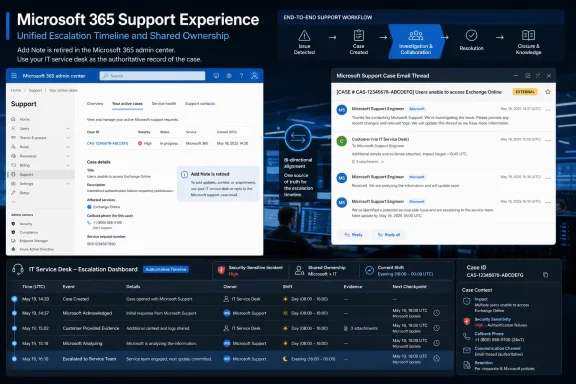 Rebuild the Escalation Record Now
This is not a Microsoft 365 support-ticket outage. Microsoft says support-request creation and resolution workflows remain unchanged. Case communication continues through the support-case email thread, phone callbacks, and other supported support experiences.The operational break occurs inside organizations that used Add Note as a shared working history. Administrators may have recorded investigation results, changes in business impact, callback summaries, troubleshooting outcomes, and shift-handoff details beside the Microsoft case. That input path is no longer available.
WindowsForum’s reports about Microsoft 365 feature retirements have repeatedly highlighted the administrative work hidden behind apparently small interface changes. Readers discussing the retirement of legacy Microsoft 365 tools have likewise focused on runbooks, ownership, and replacement workflows—not merely the disappearing control. Add Note is another example: the feature was small, but some teams quietly made it part of their escalation process.
Use the following migration process:
- Find every dependency on Add Note. Review runbooks, internal wikis, onboarding material, incident templates, personal checklists, and service-desk procedures. Search for instructions such as “update the Microsoft ticket,” “add findings to the case,” or “record the callback in the admin center.”
- Declare one authoritative system. For complex cases, this should be the service desk, incident platform, or approved case-management system. Do not let each analyst decide independently whether email, personal notes, or the admin center contains the definitive history.
- Connect the two records. Put the Microsoft case ID in the internal ticket and, where appropriate, the internal incident or ticket number in communications with Microsoft. This reduces case-matching errors without exposing internal-only information.
- Define how email is captured. Analysts can attach messages, forward them to the service desk, or summarize relevant exchanges. Choose one approved method and use it consistently.
- Log callbacks immediately. Record the time, participants, guidance, requested diagnostics, commitments, and next checkpoint. Do not leave a callback summary in one administrator’s memory or private notebook.
- Test a real handoff. Give an active or recent case to an analyst who did not open it. That person should be able to identify the impact, completed work, latest Microsoft response, outstanding actions, owner, and next checkpoint from the internal record alone.
- Correct operational documentation. Remove Add Note instructions and tell staff where updates now belong. Include the change in shift briefings and service-desk notices rather than assuming every administrator read MC1338811.
Minimum Case Record
Copy and paste this template into the service desk for every Microsoft escalation:
Code:
MINIMUM MICROSOFT ESCALATION RECORD

Internal ticket:
Microsoft case ID:

Current impact:
[Users, services, locations, severity, and business effect]

Latest Microsoft response:
[Date/time, responder, guidance, request, or status]

Evidence sent to Microsoft:
[Logs, screenshots, traces, diagnostics, timestamps, and delivery time]

Internal actions:
[Action, result, owner, and completion time]

Microsoft actions:
[Requested investigation, commitment, owner if known, and due time]

Current owner:
[Named person or team responsible for coordinating the escalation]

Next checkpoint:
[Date/time, expected contact, review, or escalation point]Email Is a Communication Channel, Not Automatically a Case Record
Microsoft’s stated replacement channels are straightforward: use the email thread associated with the support request and engage during phone callbacks. That can be sufficient when a named shared owner handles a small number of low-impact cases and the organization has clear mailbox coverage.Email alone is weaker when responsibility moves between teams or shifts. The Microsoft thread may show what the vendor and sender exchanged, but it may not contain internal troubleshooting, business decisions, parallel workstreams, security analysis, or information intentionally withheld from the vendor.
A private mailbox also creates an ownership risk. If the recipient changes role, leaves the incident, becomes unavailable, or fails to include another analyst, the external conversation can become separated from the people expected to act.
An email-led process therefore needs:
- A named shared owner rather than dependence on one person.
- A consistent Microsoft case-ID convention.
- Defined mailbox access and backup coverage.
- Rules for adding or removing participants.
- A separate approved location for internal-only analysis.
- Immediate documentation of phone conversations.
This approach also fits themes raised by WindowsForum users examining Microsoft 365’s changing administration interfaces. Reports about newer feature-access management experiences describe administrators juggling policies, PowerShell, and changing portals. A stable internal ticket provides continuity even when Microsoft’s interface changes again.
Evaluate Records You Need to Preserve
Microsoft’s stated replacement channels do not by themselves define your records-retention process. Each organization must determine what support history it needs for operations, audits, incident reviews, security investigations, contractual requirements, or other approved purposes.Do not assume or predict what will happen to historical notes. Instead, inventory open and recently significant cases, identify records your organization requires, and preserve those records through an approved process where necessary.
The review should involve the service desk and, where appropriate, records-management, compliance, security, or legal teams. Individual administrators should not improvise a preservation method for sensitive case material.
Possible preservation formats can have different consequences:
- Copied text may be searchable but can lose surrounding context.
- Screenshots may preserve presentation but be difficult to search.
- Ticket attachments may inherit service-desk access and retention controls.
- Manually created documents may introduce duplicate or unmanaged copies.
Preservation also should not become indiscriminate copying. Support exchanges can contain tenant identifiers, user information, configuration details, diagnostic output, and security-sensitive data. Store only what is required, use approved locations, and apply appropriate access controls.
WindowsForum’s coverage of 2025 Microsoft 365 changes and broader legacy-tool retirements has emphasized that administrators need to assess local dependencies before a feature disappears. The same principle applies here without assuming anything about the future availability of previous notes: evaluate what your organization requires and preserve it through its own controlled records process.
Assign One Owner and Keep One Timeline
Every active Microsoft escalation should have one named coordinating owner, even when several specialists contribute. That owner does not need to perform every technical task. The owner is responsible for reconciling Microsoft communications with the internal record, following up on pending actions, and ensuring requested evidence is supplied through the proper case thread.Updates should be written so the next analyst can act without contacting the previous one. Use this compact escalation-update format:
Code:
ESCALATION UPDATE — [DATE/TIME]

Impact now:
Microsoft's latest position:
Evidence sent since last update:
Internal work completed and result:
Waiting on Microsoft:
Waiting on us:
Owner:
Next checkpoint:Managers should validate the process with evidence rather than relying only on a completed runbook edit. Open a recent Microsoft escalation and ask a second analyst to reconstruct it. If that analyst must search private inboxes, contact the original owner, or guess what occurred during a callback, the replacement workflow is not ready.
Treat the Retirement as a Production Change
MC1338811 scheduled the retirement to start in early July 2026 and reach full removal by mid-July. Administrators should now validate actual tenant behavior and their replacement process rather than prepare for a future wave.Do not treat the missing Add Note control as a browser problem that requires repeated tests. Confirm that staff can still locate or open Microsoft support cases, that case emails reach the correct shared owners, and that callbacks are entered into the internal timeline.
WindowsForum user reports about Microsoft 365’s broader overhaul describe a continuing movement away from legacy tools toward newer experiences and integrations. Whatever the rationale for an individual retirement, administrators still have to absorb its operational consequences. Here, the practical response is to separate vendor communication from internal case governance.
Microsoft continues to provide support-case creation, email communication, and callbacks. Organizations must supply the shared chronology that their teams need. Use the Microsoft case thread to communicate with Microsoft, use the service desk to coordinate the organization, and connect both with the Microsoft case ID.
Frequently Asked Questions
Can administrators still open Microsoft 365 support cases?
Yes. Microsoft says support-request creation and resolution workflows remain unchanged. The retirement concerns the Add Note control in the Need Help experience, not the overall ability to create and work support requests.Where should we send information requested by Microsoft Support?
Reply through the email thread associated with the Microsoft case unless Microsoft provides another supported instruction for that case. Record what was sent, when it was sent, and by whom in the internal ticket.Is email alone an acceptable replacement?
Only for low-volume cases with a named shared owner, reliable mailbox coverage, and straightforward handoffs. For multi-person, cross-shift, security-sensitive, or major-incident escalations, the service desk should be the system of record.What should we record after a Microsoft callback?
Record the callback time, participants, Microsoft’s guidance, requested evidence, commitments, internal actions, owners, and next checkpoint. Add the entry immediately while the details are still clear.Should we copy every support exchange into the service desk?
Not necessarily. Use the organization’s approved method, such as attachments, forwarded messages, or concise summaries. Capture enough context to reconstruct decisions and actions without unnecessarily duplicating sensitive information.What should we do about records already associated with cases?
Evaluate which records the organization requires and preserve them through approved records-management processes where necessary. Do not assume or predict future platform behavior; make the preservation decision according to your own operational, security, and retention requirements.References
- Primary source: learn.microsoft.com
Message center updates - Microsoft 365 admin | Microsoft Learn
See what's new with Microsoft 365 Message center to help you track new and changed features.learn.microsoft.com - Independent coverage: support.microsoft.com
Microsoft 365 admin center reports | Microsoft Support
Microsoft 365 admin center reportssupport.microsoft.com - Independent coverage: techcommunity.microsoft.com
- Independent coverage: microsoft.com
Microsoft 365 Roadmap | Microsoft 365
The Microsoft 365 Roadmap lists updates that are currently planned for applicable subscribers. Check here for more information on the status of new features and updates.www.microsoft.com
- Primary source: WindowsForum
Microsoft 365 Feature Retirements: Impacts and Solutions for Sysadmins | Windows Forum
Microsoft has been busy streamlining its ecosystem, announcing a series of feature retirements across the Microsoft 365 (M365) environment. According to...windowsforum.com