

Microsoft plans to bring a Microsoft 365 Admin Agent into Microsoft Teams for small and midsize business administrators in August 2026, letting authorized admins add users, assign licenses, and receive setup and security guidance from the Teams desktop app. The feature, listed as Roadmap ID 558255 and still marked in development, is not a replacement for the Microsoft 365 admin center so much as an admission that many SMB administrators already live somewhere else. Microsoft is betting that the next productivity gain in small-business IT will not come from another portal, but from collapsing routine administration into the collaboration surface employees already keep open all day.
That sounds modest until you consider the target audience. In large enterprises, identity, licensing, endpoint security, and Teams governance are usually divided among specialized teams with ticket queues and change-control rituals. In smaller organizations, the “Microsoft 365 admin” may be the office manager, the MSP technician on rotation, the founder with Global Administrator rights, or the one unlucky power user who knows where the billing page is. For that world, shaving five clicks off user onboarding is not cosmetic. It is Microsoft redesigning administration around interruption.
The Microsoft 365 admin center has always been a compromise between power and intimidation. It exposes the machinery of a tenant: users, roles, billing, domains, licenses, security defaults, service health, Teams settings, SharePoint policies, and a growing stack of Copilot and agent governance controls. For a trained administrator, that centralization is useful. For a small-business operator who only needs to add a new employee before payroll closes, it can feel like being handed the cockpit checklist for a regional jet.
The Admin Agent in Teams is aimed at that gap. According to the roadmap description, SMB admins will be able to complete common tasks and get guidance on “critical setup actions” without leaving Teams. Microsoft specifically names adding users, assigning licenses, organization setup, security settings, and password resets as areas the agent can help with.
That framing matters because Microsoft is not describing a chatbot that merely points users toward documentation. It says the agent can perform actions “on behalf of the admin.” In the language of Microsoft 365, that crosses a line from search and advice into delegated operation. The value proposition is not “ask Teams where the license page is.” It is “tell Teams to do the boring thing, and have the Microsoft 365 substrate carry it out.”
This is also why Teams is the natural host. Microsoft has spent years turning Teams from a meeting and chat client into a work shell: calls, calendars, apps, approvals, workflow bots, Viva modules, Copilot experiences, and third-party integrations all jostle inside the same desktop frame. Admin Agent extends that strategy inward, from employee workflow to tenant administration. Teams is no longer only where work is discussed. It is increasingly where work is authorized.
For WindowsForum readers, the Windows angle is less about the OS than the work pattern. Teams on the desktop is already a permanent fixture on many Windows machines, especially in Microsoft 365 Business tenants. If the admin surface arrives there first, it becomes part of the daily Windows admin experience whether or not it has anything to do with Control Panel, Settings, or MMC snap-ins.
That operational reality has long clashed with Microsoft 365’s security model. Least privilege is the right principle, but it is often implemented poorly in SMBs because the overhead of designing granular roles feels disproportionate. The result is predictable: too many Global Administrators, stale emergency accounts, shared admin credentials in the worst cases, and a general sense that “someone needs to be able to fix it quickly.”
An Admin Agent inside Teams could improve that situation if it nudges smaller tenants toward constrained, task-specific administration. A well-designed agent would know not only what the admin wants, but whether the admin has the right role, whether the request requires elevation, and whether the change should be logged or confirmed. In that version of the future, conversational administration becomes a friendlier front end for better permissions.
The less flattering version is also possible. If the agent becomes a convenience layer over broad admin rights, it could normalize performing sensitive actions from the same interface where users receive chats, files, meeting invites, and app notifications. That increases the importance of conditional access, multifactor authentication, session controls, audit logging, and careful role assignment. The agent’s convenience must not become a new excuse for overprivileged accounts.
This is where Microsoft’s SMB focus is both sensible and risky. SMB tenants are where the need is clearest, because the friction of the admin center is felt most acutely. But SMB tenants are also where security hygiene varies most dramatically. The product will succeed only if it makes the safe path faster than the unsafe one.
A drafting assistant can make an awkward paragraph. An admin assistant can create an account, assign a paid license, or guide someone through a security change. Those are not comparable risks. In administration, ambiguity is expensive.
That means the agent’s interaction design will matter as much as its underlying capability. The safest useful version will likely be conservative: it should ask for confirmation before committing changes, show exactly which user or license is affected, display the role context under which it is acting, and make rollback or correction obvious. It should avoid treating admin intent as a guessing game. “Add Alex” is not enough if there are three Alexes, two license SKUs, and a usage location requirement.
The roadmap entry does not provide those details. It does not say which roles will be supported, how confirmations will work, whether actions will be scoped by existing Microsoft 365 admin roles, or how the agent’s activity will appear in audit logs. Those are the details that will determine whether this is a helpful SMB feature or another item administrators must immediately govern.
Microsoft’s broader documentation around agents emphasizes management, deployment, access control, and visibility through admin tooling. That is the right direction, but Admin Agent raises a sharper question: who watches the agent that helps watch the tenant? The answer cannot be “trust the chat.” It has to be auditable, role-aware, and boringly predictable.
Small Microsoft 365 tenants often suffer from half-finished configuration. The domain is connected, but SPF, DKIM, and DMARC may be neglected. Users have licenses, but MFA enforcement may be inconsistent. Teams exists, but external access, guest access, app policies, retention, and meeting settings may remain whatever the defaults happened to be when the tenant was created. Backups, device management, secure score recommendations, and account recovery procedures are frequently handled later, which in practice can mean never.
If Admin Agent can surface the next best administrative action in plain language, it could become a lightweight guardrail for organizations without dedicated IT governance. That is the version of this feature with the most practical upside. Not just “create Jane’s account,” but “Jane has a license; now decide whether she needs access to this shared mailbox, this team, and this device policy.”
Microsoft has been trying for years to make the admin center more approachable for smaller organizations, including simplified views and setup experiences. Moving the guidance into Teams changes the timing. Instead of asking an SMB admin to periodically visit a dashboard and interpret warnings, Microsoft can put the prompt into the flow of work. The danger, of course, is notification fatigue. The opportunity is contextual help at the moment an admin is already trying to solve a problem.
For MSPs, this may be the most interesting angle. Many managed service providers live inside Microsoft 365 tenants all day, but their profitability depends on repeatable, low-friction operations. If Admin Agent becomes reliable, it could reduce the time spent on routine tickets. If it becomes another inconsistent assistant that needs supervision, MSPs will route around it with PowerShell, Graph scripts, and their existing RMM and PSA workflows.
That division is useful. Most administrators do not want to configure every policy through a conversational interface. They want fast paths for repetitive work and reliable dashboards for inspection. A good admin experience should let a human say, “Create the user and assign Business Premium,” while still preserving the detailed controls for edge cases.
The challenge is state visibility. Admin centers work because they make configuration inspectable. You can see a list of users, roles, groups, licenses, and settings. A chat-style assistant can obscure that unless it is designed to show receipts. Every completed task should leave behind a clear trail: what changed, who requested it, what permissions were used, and where to verify it.
That is doubly important because Teams itself is noisy. An admin command should not feel like just another chat message lost between meeting reminders and channel chatter. Microsoft will need to make the boundary between conversation and command unmistakable. When an agent is about to spend money by assigning a license, the UI should not be subtle.
There is also a training issue. The same SMB admin who benefits from simplified administration may not fully understand the blast radius of a change. The agent should not merely execute. It should explain consequences in plain English before it acts, especially for security settings and password resets.
Password resets are the obvious example. Resetting a password can be routine helpdesk work, but it can also be part of account takeover if the requester is compromised or the process is poorly verified. Adding a user is simple, unless that user is added with the wrong domain, the wrong role, or access to sensitive groups. Assigning a license is operationally mundane, but it may unlock mailbox access, Teams, SharePoint, OneDrive, Power Platform, or Copilot-related capabilities depending on the SKU.
The agent should therefore be judged by the friction it keeps, not only the friction it removes. Confirmation prompts, identity verification, conditional access enforcement, role checks, and audit trails are not annoyances here. They are the product.
There is a phishing dimension as well. Users are already conditioned to interact with Teams messages, apps, and bots. If “admin tasks in Teams” becomes familiar, attackers will imitate that pattern. Microsoft will need to make official admin-agent interactions visually distinct and resistant to spoofing by rogue apps, malicious chats, or consent-phishing campaigns.
For administrators, the first rollout posture should be cautious. Treat the agent like any other privileged admin surface. Decide who can use it, test it in a low-risk tenant or with limited accounts, review audit logs, and document which tasks are acceptable through Teams versus the full admin center. Convenience should be adopted deliberately, not absorbed by default.
The desktop platform detail is also worth noting. Microsoft is specifically positioning this for Teams desktop, which makes sense for the SMB admin scenario. Desktop Teams is where multitasking, identity persistence, and day-to-day admin interruptions converge. It also means organizations should pay attention to Teams client readiness, update channels, app policies, and whether the feature appears as an app, agent, Copilot-adjacent experience, or embedded admin component.
The cloud instance limitation is unsurprising but relevant. Worldwide standard multi-tenant coverage excludes sovereign and specialized clouds unless Microsoft later expands availability. Government, regulated, and highly segmented environments should not assume parity until Microsoft says so.
Between now and August 2026, the practical work is mostly governance prep. SMBs should know who their admins are, which accounts have Global Administrator rights, whether MFA and conditional access are enforced, and whether license assignment is already standardized. If those basics are messy, an agent will make the mess faster.
That means Admin Agent has to compete with institutional muscle memory. A technician who can complete onboarding from a PowerShell script or PSA-integrated workflow will not switch because the agent is novel. They will switch only if it is faster, safer, easier to audit, and less brittle.
For less mature organizations, the comparison is different. The agent is not competing with a runbook; it is competing with improvisation. That is where it could have the most immediate effect. If Microsoft can turn ad hoc admin work into guided, permission-aware steps, it may raise the floor for SMB tenant management.
There is a business motive here too. License assignment is not just administration; it is revenue realization. The easier Microsoft makes it to add users and assign licenses inside the flow of work, the less likely small businesses are to delay seat expansion. That does not make the feature cynical, but it does explain why Microsoft cares about this particular friction point.
The best reading is that Microsoft sees SMB administration as a growth bottleneck. If Microsoft 365 is too complex to manage, customers lean on partners, postpone features, or underuse what they buy. Admin Agent is an attempt to make the suite feel less like a collection of portals and more like an operating environment.
Admin Agent in Teams is part of that long migration. The admin’s “desktop” is no longer the Windows desktop alone. It is the authenticated Microsoft 365 session that follows the admin through Teams, browser portals, Entra, Intune, Exchange, SharePoint, Defender, and PowerShell. The operating environment is increasingly the tenant.
For Windows enthusiasts, that can feel like a loss of tactile control. For small-business admins, it may feel like relief. The work they need to do is not editing the registry; it is making sure a new hire has the right account, license, groups, Teams access, security posture, and recovery options before Monday morning.
The danger is abstraction without understanding. When administration becomes conversational, the system can hide complexity that still matters. Licensing dependencies, group membership, mailbox provisioning delays, Teams policy propagation, and identity synchronization do not disappear because a friendly agent summarizes them. They simply become easier to forget until something breaks.
That is why Microsoft’s agent strategy should be judged not by how human it sounds, but by how honestly it represents the underlying system. A good admin agent should reduce toil without pretending Microsoft 365 is simple. It should be a translator, not a magician.
Microsoft’s Admin Agent for Teams is small in the way many important platform shifts are small at first: a few routine tasks, a familiar interface, a promise of guidance, and a roadmap date. But the direction is unmistakable. Microsoft wants administration to move closer to where work happens, and the next test is whether it can do that without making privileged work feel ordinary.
That sounds modest until you consider the target audience. In large enterprises, identity, licensing, endpoint security, and Teams governance are usually divided among specialized teams with ticket queues and change-control rituals. In smaller organizations, the “Microsoft 365 admin” may be the office manager, the MSP technician on rotation, the founder with Global Administrator rights, or the one unlucky power user who knows where the billing page is. For that world, shaving five clicks off user onboarding is not cosmetic. It is Microsoft redesigning administration around interruption.
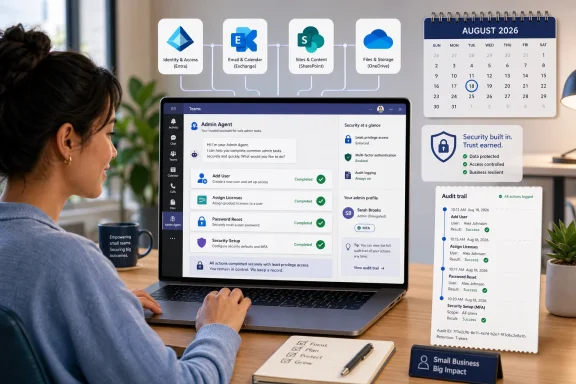 Microsoft Moves the Admin Console Into the Workday
The Microsoft 365 admin center has always been a compromise between power and intimidation. It exposes the machinery of a tenant: users, roles, billing, domains, licenses, security defaults, service health, Teams settings, SharePoint policies, and a growing stack of Copilot and agent governance controls. For a trained administrator, that centralization is useful. For a small-business operator who only needs to add a new employee before payroll closes, it can feel like being handed the cockpit checklist for a regional jet.The Admin Agent in Teams is aimed at that gap. According to the roadmap description, SMB admins will be able to complete common tasks and get guidance on “critical setup actions” without leaving Teams. Microsoft specifically names adding users, assigning licenses, organization setup, security settings, and password resets as areas the agent can help with.
That framing matters because Microsoft is not describing a chatbot that merely points users toward documentation. It says the agent can perform actions “on behalf of the admin.” In the language of Microsoft 365, that crosses a line from search and advice into delegated operation. The value proposition is not “ask Teams where the license page is.” It is “tell Teams to do the boring thing, and have the Microsoft 365 substrate carry it out.”
This is also why Teams is the natural host. Microsoft has spent years turning Teams from a meeting and chat client into a work shell: calls, calendars, apps, approvals, workflow bots, Viva modules, Copilot experiences, and third-party integrations all jostle inside the same desktop frame. Admin Agent extends that strategy inward, from employee workflow to tenant administration. Teams is no longer only where work is discussed. It is increasingly where work is authorized.
For WindowsForum readers, the Windows angle is less about the OS than the work pattern. Teams on the desktop is already a permanent fixture on many Windows machines, especially in Microsoft 365 Business tenants. If the admin surface arrives there first, it becomes part of the daily Windows admin experience whether or not it has anything to do with Control Panel, Settings, or MMC snap-ins.
SMB IT Has Always Been a Permission Problem Wearing a Productivity Hat
Microsoft’s pitch is speed, but the deeper issue is role design. In small organizations, administrative work is not neatly separated from business work. The person who knows a new hire needs access may also be the person who approves the license cost, creates the mailbox, adds the Teams membership, resets the forgotten password, and tells the user where to install Office.That operational reality has long clashed with Microsoft 365’s security model. Least privilege is the right principle, but it is often implemented poorly in SMBs because the overhead of designing granular roles feels disproportionate. The result is predictable: too many Global Administrators, stale emergency accounts, shared admin credentials in the worst cases, and a general sense that “someone needs to be able to fix it quickly.”
An Admin Agent inside Teams could improve that situation if it nudges smaller tenants toward constrained, task-specific administration. A well-designed agent would know not only what the admin wants, but whether the admin has the right role, whether the request requires elevation, and whether the change should be logged or confirmed. In that version of the future, conversational administration becomes a friendlier front end for better permissions.
The less flattering version is also possible. If the agent becomes a convenience layer over broad admin rights, it could normalize performing sensitive actions from the same interface where users receive chats, files, meeting invites, and app notifications. That increases the importance of conditional access, multifactor authentication, session controls, audit logging, and careful role assignment. The agent’s convenience must not become a new excuse for overprivileged accounts.
This is where Microsoft’s SMB focus is both sensible and risky. SMB tenants are where the need is clearest, because the friction of the admin center is felt most acutely. But SMB tenants are also where security hygiene varies most dramatically. The product will succeed only if it makes the safe path faster than the unsafe one.
The Agent Is Really a Test of Microsoft’s AI Administration Model
The phrase “Admin Agent” arrives in a Microsoft ecosystem already thick with agents. Copilot agents, Teams agents, SharePoint agents, custom agents, and governance tooling around agents all point in the same direction: Microsoft wants AI-mediated work to become a normal control surface across Microsoft 365. Admin Agent is notable because administration is one of the highest-trust categories Microsoft could expose this way.A drafting assistant can make an awkward paragraph. An admin assistant can create an account, assign a paid license, or guide someone through a security change. Those are not comparable risks. In administration, ambiguity is expensive.
That means the agent’s interaction design will matter as much as its underlying capability. The safest useful version will likely be conservative: it should ask for confirmation before committing changes, show exactly which user or license is affected, display the role context under which it is acting, and make rollback or correction obvious. It should avoid treating admin intent as a guessing game. “Add Alex” is not enough if there are three Alexes, two license SKUs, and a usage location requirement.
The roadmap entry does not provide those details. It does not say which roles will be supported, how confirmations will work, whether actions will be scoped by existing Microsoft 365 admin roles, or how the agent’s activity will appear in audit logs. Those are the details that will determine whether this is a helpful SMB feature or another item administrators must immediately govern.
Microsoft’s broader documentation around agents emphasizes management, deployment, access control, and visibility through admin tooling. That is the right direction, but Admin Agent raises a sharper question: who watches the agent that helps watch the tenant? The answer cannot be “trust the chat.” It has to be auditable, role-aware, and boringly predictable.
The Most Important Feature May Be the One Microsoft Barely Mentions
The roadmap description leads with actions: add users, assign licenses, reset passwords. Those are easy to understand and easy to demo. But the more consequential promise may be guidance on critical setup actions.Small Microsoft 365 tenants often suffer from half-finished configuration. The domain is connected, but SPF, DKIM, and DMARC may be neglected. Users have licenses, but MFA enforcement may be inconsistent. Teams exists, but external access, guest access, app policies, retention, and meeting settings may remain whatever the defaults happened to be when the tenant was created. Backups, device management, secure score recommendations, and account recovery procedures are frequently handled later, which in practice can mean never.
If Admin Agent can surface the next best administrative action in plain language, it could become a lightweight guardrail for organizations without dedicated IT governance. That is the version of this feature with the most practical upside. Not just “create Jane’s account,” but “Jane has a license; now decide whether she needs access to this shared mailbox, this team, and this device policy.”
Microsoft has been trying for years to make the admin center more approachable for smaller organizations, including simplified views and setup experiences. Moving the guidance into Teams changes the timing. Instead of asking an SMB admin to periodically visit a dashboard and interpret warnings, Microsoft can put the prompt into the flow of work. The danger, of course, is notification fatigue. The opportunity is contextual help at the moment an admin is already trying to solve a problem.
For MSPs, this may be the most interesting angle. Many managed service providers live inside Microsoft 365 tenants all day, but their profitability depends on repeatable, low-friction operations. If Admin Agent becomes reliable, it could reduce the time spent on routine tickets. If it becomes another inconsistent assistant that needs supervision, MSPs will route around it with PowerShell, Graph scripts, and their existing RMM and PSA workflows.
Teams Becomes the Front Door, but the Admin Center Remains the Source of Truth
It would be a mistake to read this as Microsoft abandoning the Microsoft 365 admin center. The admin center remains where complex configuration, billing review, reporting, service health, role management, and cross-workload administration live. Teams is becoming a front door for common action, not the vault where the entire tenant is managed.That division is useful. Most administrators do not want to configure every policy through a conversational interface. They want fast paths for repetitive work and reliable dashboards for inspection. A good admin experience should let a human say, “Create the user and assign Business Premium,” while still preserving the detailed controls for edge cases.
The challenge is state visibility. Admin centers work because they make configuration inspectable. You can see a list of users, roles, groups, licenses, and settings. A chat-style assistant can obscure that unless it is designed to show receipts. Every completed task should leave behind a clear trail: what changed, who requested it, what permissions were used, and where to verify it.
That is doubly important because Teams itself is noisy. An admin command should not feel like just another chat message lost between meeting reminders and channel chatter. Microsoft will need to make the boundary between conversation and command unmistakable. When an agent is about to spend money by assigning a license, the UI should not be subtle.
There is also a training issue. The same SMB admin who benefits from simplified administration may not fully understand the blast radius of a change. The agent should not merely execute. It should explain consequences in plain English before it acts, especially for security settings and password resets.
The Security Bar Is Higher Because the Interface Is Friendlier
The friendlier an admin interface becomes, the more disciplined its security model must be. A portal that looks intimidating at least signals seriousness. A conversational agent inside Teams risks making privileged actions feel casual.Password resets are the obvious example. Resetting a password can be routine helpdesk work, but it can also be part of account takeover if the requester is compromised or the process is poorly verified. Adding a user is simple, unless that user is added with the wrong domain, the wrong role, or access to sensitive groups. Assigning a license is operationally mundane, but it may unlock mailbox access, Teams, SharePoint, OneDrive, Power Platform, or Copilot-related capabilities depending on the SKU.
The agent should therefore be judged by the friction it keeps, not only the friction it removes. Confirmation prompts, identity verification, conditional access enforcement, role checks, and audit trails are not annoyances here. They are the product.
There is a phishing dimension as well. Users are already conditioned to interact with Teams messages, apps, and bots. If “admin tasks in Teams” becomes familiar, attackers will imitate that pattern. Microsoft will need to make official admin-agent interactions visually distinct and resistant to spoofing by rogue apps, malicious chats, or consent-phishing campaigns.
For administrators, the first rollout posture should be cautious. Treat the agent like any other privileged admin surface. Decide who can use it, test it in a low-risk tenant or with limited accounts, review audit logs, and document which tasks are acceptable through Teams versus the full admin center. Convenience should be adopted deliberately, not absorbed by default.
Microsoft’s Calendar Says August, but Admins Should Read That as a Planning Window
The roadmap lists general availability for August 2026, with Targeted Release and Worldwide standard multi-tenant cloud availability. That does not mean every tenant will experience the feature in exactly the same way on the first day of the month. Microsoft 365 roadmap dates are planning signals, and features often roll out gradually across tenants, rings, clients, and regions.The desktop platform detail is also worth noting. Microsoft is specifically positioning this for Teams desktop, which makes sense for the SMB admin scenario. Desktop Teams is where multitasking, identity persistence, and day-to-day admin interruptions converge. It also means organizations should pay attention to Teams client readiness, update channels, app policies, and whether the feature appears as an app, agent, Copilot-adjacent experience, or embedded admin component.
The cloud instance limitation is unsurprising but relevant. Worldwide standard multi-tenant coverage excludes sovereign and specialized clouds unless Microsoft later expands availability. Government, regulated, and highly segmented environments should not assume parity until Microsoft says so.
Between now and August 2026, the practical work is mostly governance prep. SMBs should know who their admins are, which accounts have Global Administrator rights, whether MFA and conditional access are enforced, and whether license assignment is already standardized. If those basics are messy, an agent will make the mess faster.
The Real Competition Is Not Another Portal, but the MSP Runbook
Microsoft often talks about AI agents as though the alternative is human drudgery. In SMB administration, the alternative is frequently a runbook. MSPs and experienced admins already have scripts, templates, checklists, and documented workflows for onboarding, offboarding, password resets, mailbox delegation, license changes, and Teams setup.That means Admin Agent has to compete with institutional muscle memory. A technician who can complete onboarding from a PowerShell script or PSA-integrated workflow will not switch because the agent is novel. They will switch only if it is faster, safer, easier to audit, and less brittle.
For less mature organizations, the comparison is different. The agent is not competing with a runbook; it is competing with improvisation. That is where it could have the most immediate effect. If Microsoft can turn ad hoc admin work into guided, permission-aware steps, it may raise the floor for SMB tenant management.
There is a business motive here too. License assignment is not just administration; it is revenue realization. The easier Microsoft makes it to add users and assign licenses inside the flow of work, the less likely small businesses are to delay seat expansion. That does not make the feature cynical, but it does explain why Microsoft cares about this particular friction point.
The best reading is that Microsoft sees SMB administration as a growth bottleneck. If Microsoft 365 is too complex to manage, customers lean on partners, postpone features, or underuse what they buy. Admin Agent is an attempt to make the suite feel less like a collection of portals and more like an operating environment.
The Windows Admin Habit Keeps Changing Shape
There is an old version of Windows administration built around local tools: Event Viewer, Computer Management, Group Policy Management Console, Services, Device Manager, PowerShell, and a browser full of admin portals. That world still exists, especially for hybrid environments. But Microsoft 365 has steadily moved the center of gravity upward, from machine administration to identity, policy, collaboration, and cloud service configuration.Admin Agent in Teams is part of that long migration. The admin’s “desktop” is no longer the Windows desktop alone. It is the authenticated Microsoft 365 session that follows the admin through Teams, browser portals, Entra, Intune, Exchange, SharePoint, Defender, and PowerShell. The operating environment is increasingly the tenant.
For Windows enthusiasts, that can feel like a loss of tactile control. For small-business admins, it may feel like relief. The work they need to do is not editing the registry; it is making sure a new hire has the right account, license, groups, Teams access, security posture, and recovery options before Monday morning.
The danger is abstraction without understanding. When administration becomes conversational, the system can hide complexity that still matters. Licensing dependencies, group membership, mailbox provisioning delays, Teams policy propagation, and identity synchronization do not disappear because a friendly agent summarizes them. They simply become easier to forget until something breaks.
That is why Microsoft’s agent strategy should be judged not by how human it sounds, but by how honestly it represents the underlying system. A good admin agent should reduce toil without pretending Microsoft 365 is simple. It should be a translator, not a magician.
The August Rollout Gives SMB Admins a Checklist, Not a Finish Line
The most useful response to this roadmap item is not hype or panic. It is preparation. If Microsoft delivers Admin Agent on schedule, SMB tenants that already have clean roles, strong authentication, and documented onboarding will get the most benefit with the least risk.- Organizations should review who currently holds Global Administrator and other privileged Microsoft 365 roles before enabling or relying on agent-driven administration.
- Administrators should confirm that multifactor authentication and conditional access policies protect every account that could use the Admin Agent.
- SMBs should standardize license assignment patterns now, because an agent can only accelerate a process that the organization already understands.
- IT teams and MSPs should test whether agent-completed actions appear clearly in audit logs and operational records before using the feature for production workflows.
- Security-conscious tenants should treat Teams-based administration as a privileged surface and govern app access, admin roles, and user training accordingly.
- Smaller organizations should use the feature as a prompt to finish neglected setup work, not merely as a faster way to repeat old habits.
Microsoft’s Admin Agent for Teams is small in the way many important platform shifts are small at first: a few routine tasks, a familiar interface, a promise of guidance, and a roadmap date. But the direction is unmistakable. Microsoft wants administration to move closer to where work happens, and the next test is whether it can do that without making privileged work feel ordinary.
References
- Primary source: Microsoft 365 Roadmap
Published: 2026-06-23T23:15:39.6678540Z
Microsoft 365 Roadmap | Microsoft 365
The Microsoft 365 Roadmap lists updates that are currently planned for applicable subscribers. Check here for more information on the status of new features and updates.www.microsoft.com
- Official source: learn.microsoft.com
About administrator roles in the Microsoft 365 admin center - Microsoft 365 admin | Microsoft Learn
Learn about administrator roles, such as the global administrator role, or the service administrator role. Roles map to specific business functions and give permissions to do specific tasks in the Microsoft 365 admin center.learn.microsoft.com - Official source: support.microsoft.com
Microsoft 365 admin center - Overview - Microsoft 365 admin | Microsoft Learn
Use either simplified view in the Microsoft 365 admin center to manage common tasks or dashboard view for more complex settings and tasks.support.microsoft.com - Official source: download.microsoft.com
- Official source: cdn.techcommunity.microsoft.com
