

Windows Server 2022 can remain securely serviced until October 14, 2031, but organizations using it to host Microsoft 365 Apps should not mistake that date for an Office support guarantee. For Remote Desktop Services and virtual desktop deployments, the practical decision arrives on October 14, 2026, when support for Microsoft 365 Apps on Windows Server 2022 ends; administrators should migrate those application hosts to a supported platform unless they are prepared to operate an unsupported configuration.
Microsoft’s lifecycle documentation confirms that Windows Server 2022 leaves Mainstream Support on October 13, 2026, then remains in Extended Support through October 14, 2031. WindowsForum user reports about the Server 2022 lifecycle have focused on that transition from mainstream to extended support. The important planning issue is that the operating system and Microsoft 365 Apps have separate support timelines.
October 14, 2026 is specifically the support end date for Microsoft 365 Apps on Windows Server 2022. It is not a universal deadline for every Office product, every perpetual Office edition, or every application installed on Server 2022. Administrators must check the lifecycle and supported operating systems for each installed product.
Windows Server 2022 does not reach the end of its overall support lifecycle in October 2026. It moves from Mainstream Support into Extended Support, which continues through October 14, 2031.
That distinction matters for servers running file services, directory infrastructure, line-of-business applications, or workloads that do not depend on products with shorter support requirements. Administrators may conclude that Windows Server 2022 remains suitable for some stable roles, subject to their organizations’ security, compliance, hardware, application-support, and operational requirements.
The WindowsForum user reports supplied for this issue identify October 13, 2026 as the end of Mainstream Support and October 14, 2031 as the end of Extended Support. Those operating-system dates do not extend the supported life of applications installed on the server.
Microsoft 365 Apps creates the earlier decision point. A lifecycle inventory that records only “Windows Server 2022—supported until 2031” can therefore misclassify shared Office hosts as low-priority systems. The inventory must identify the applications and deployment images associated with each host.
Migration planning must cover more than installing a newer operating system. A shared Office environment can depend on activation configuration, license eligibility, user profiles, Outlook settings, add-ins, printers, file associations, authentication components, profile containers, macros, document-management systems, and third-party integrations. Each dependency must be validated for the proposed architecture.
Windows Server 2025 is Microsoft’s current Long-Term Servicing Channel release, but that fact alone does not establish support for every Microsoft 365 Apps deployment. Before choosing it as a destination, administrators must consult Microsoft’s current Microsoft 365 Apps supported-operating-system matrix and verify licensing, application compatibility, activation, and multi-session requirements.
Microsoft also recommends evaluating Windows 365 and Azure Virtual Desktop when a Windows Server version does not support Microsoft 365 Apps. They should not be treated as interchangeable or automatically validated migration targets. Before selecting either service, verify:
A successful base-platform deployment also does not prove that Office is ready. The pilot must demonstrate Microsoft 365 sign-in, activation, profile loading, Outlook behavior, add-ins, document workflows, protected content, printing, and representative multi-session use.
Microsoft warns that running Microsoft 365 Apps on an unsupported operating system can cause performance and reliability problems, including features not working as expected. That is enough to make migration necessary for organizations that require a supported configuration, without speculating about whether a particular application will open after the deadline.
Testing must cover complete workflows rather than a simple launch check. Identity services, cloud connections, add-ins, document-management integrations, protection controls, and authentication processes can change independently of the Server 2022 operating system. Opening a document successfully does not demonstrate that the environment is supported or that every dependent workflow remains reliable.
WindowsForum reports about Microsoft 365 Apps on Windows 10 similarly centered on an application-support date tied to a particular operating system. For Server 2022 planning, the useful principle is to track the operating system and each major application as separate lifecycle items.
The exception should identify affected users and workflows, the business owner accepting the risk, monitoring and compensating controls, and the planned exit date. It should also account for possible performance, reliability, or feature problems associated with running Microsoft 365 Apps on an unsupported operating system.
Compliance consequences will depend on the organization’s policies, contracts, insurance terms, and regulatory obligations. Administrators should nevertheless distinguish between an operating system remaining in Extended Support and an application being deployed on a supported operating system. They are not the same assurance.
Microsoft’s lifecycle documentation confirms that Windows Server 2022 leaves Mainstream Support on October 13, 2026, then remains in Extended Support through October 14, 2031. WindowsForum user reports about the Server 2022 lifecycle have focused on that transition from mainstream to extended support. The important planning issue is that the operating system and Microsoft 365 Apps have separate support timelines.
October 14, 2026 is specifically the support end date for Microsoft 365 Apps on Windows Server 2022. It is not a universal deadline for every Office product, every perpetual Office edition, or every application installed on Server 2022. Administrators must check the lifecycle and supported operating systems for each installed product.
| Current Server 2022 role | Required decision |
|---|---|
| Does not host Microsoft 365 Apps | Treat retention or migration as an operating-system lifecycle decision through October 14, 2031, while checking every other application separately |
| Hosts Microsoft 365 Apps | Verify supported target platforms, complete a pilot, and migrate before October 14, 2026 |
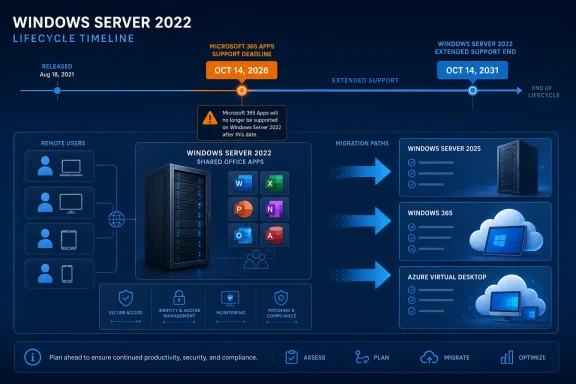 The Operating System Is Not Reaching End of Life
Windows Server 2022 does not reach the end of its overall support lifecycle in October 2026. It moves from Mainstream Support into Extended Support, which continues through October 14, 2031.That distinction matters for servers running file services, directory infrastructure, line-of-business applications, or workloads that do not depend on products with shorter support requirements. Administrators may conclude that Windows Server 2022 remains suitable for some stable roles, subject to their organizations’ security, compliance, hardware, application-support, and operational requirements.
The WindowsForum user reports supplied for this issue identify October 13, 2026 as the end of Mainstream Support and October 14, 2031 as the end of Extended Support. Those operating-system dates do not extend the supported life of applications installed on the server.
Microsoft 365 Apps creates the earlier decision point. A lifecycle inventory that records only “Windows Server 2022—supported until 2031” can therefore misclassify shared Office hosts as low-priority systems. The inventory must identify the applications and deployment images associated with each host.
RDS and VDI Hosts Face the Earlier Deadline
The mismatch is particularly important on Remote Desktop Session Host servers and other shared application platforms. These systems may deliver Word, Excel, Outlook, PowerPoint, or subscription editions of Visio and Project to many users from a relatively small number of hosts.Migration planning must cover more than installing a newer operating system. A shared Office environment can depend on activation configuration, license eligibility, user profiles, Outlook settings, add-ins, printers, file associations, authentication components, profile containers, macros, document-management systems, and third-party integrations. Each dependency must be validated for the proposed architecture.
Windows Server 2025 is Microsoft’s current Long-Term Servicing Channel release, but that fact alone does not establish support for every Microsoft 365 Apps deployment. Before choosing it as a destination, administrators must consult Microsoft’s current Microsoft 365 Apps supported-operating-system matrix and verify licensing, application compatibility, activation, and multi-session requirements.
Microsoft also recommends evaluating Windows 365 and Azure Virtual Desktop when a Windows Server version does not support Microsoft 365 Apps. They should not be treated as interchangeable or automatically validated migration targets. Before selecting either service, verify:
- Microsoft 365 Apps and Office deployment requirements
- License eligibility and activation design
- Line-of-business application and add-in compatibility
- Identity, authentication, and conditional-access dependencies
- User-profile, Outlook, and data-storage requirements
- Printing, peripherals, and local-resource redirection
- Multi-session behavior and expected capacity
- Network latency, service availability, regional support, and data-location requirements
- Management, security, monitoring, backup, and recovery responsibilities
A successful base-platform deployment also does not prove that Office is ready. The pilot must demonstrate Microsoft 365 sign-in, activation, profile loading, Outlook behavior, add-ins, document workflows, protected content, printing, and representative multi-session use.
Unsupported Means the Combination Leaves Microsoft’s Support Matrix
After October 14, 2026, Microsoft 365 Apps on Windows Server 2022 is an unsupported operating-system and application combination. Administrators should not infer a specific launch or failure behavior from the support date.Microsoft warns that running Microsoft 365 Apps on an unsupported operating system can cause performance and reliability problems, including features not working as expected. That is enough to make migration necessary for organizations that require a supported configuration, without speculating about whether a particular application will open after the deadline.
Testing must cover complete workflows rather than a simple launch check. Identity services, cloud connections, add-ins, document-management integrations, protection controls, and authentication processes can change independently of the Server 2022 operating system. Opening a document successfully does not demonstrate that the environment is supported or that every dependent workflow remains reliable.
WindowsForum reports about Microsoft 365 Apps on Windows 10 similarly centered on an application-support date tied to a particular operating system. For Server 2022 planning, the useful principle is to track the operating system and each major application as separate lifecycle items.
Use This Migration Decision Procedure
The remediation path should be executable, not merely a planning checklist:- Find every affected host and image. Identify all Windows Server 2022 systems containing Microsoft 365 Apps, including production RDS hosts, published-application servers, VDI pools, test systems, disaster-recovery machines, powered-off templates, and image-building pipelines.
- Record the existing deployment. Capture the Microsoft 365 Apps edition, build, update channel, deployment configuration, activation configuration, update controls, and assigned owner. Document license eligibility against current product terms and the organization’s Microsoft agreement.
- Check Microsoft’s current supported-OS matrix for each candidate. Do not assume that Windows Server 2025, Windows 365, Azure Virtual Desktop, or another platform supports the intended Office deployment merely because the platform is current. Verify Microsoft 365 Apps support and relevant multi-session, licensing, and activation conditions.
- Select the target architecture. Choose an on-premises server, Windows 365, Azure Virtual Desktop, or another confirmed supported design based on application compatibility, identity, profiles, capacity, operations, regional availability, service requirements, and cost.
- Create a representative pilot. Include normal user personas, access methods, policies, security controls, profile technology, applications, add-ins, printers, and expected concurrency. Do not limit testing to an administrator account.
- Validate the complete user experience. Test activation, Microsoft 365 sign-in, profile creation and loading, Outlook, add-ins, macros, printing, protected content, file associations, authentication, document-management integrations, and multi-session behavior. Test performance under a representative load.
- Prepare migration and rollback plans. Separate the plans for the host platform, Microsoft 365 Apps deployment, profiles, user data, dependent applications, and access configuration. Assign owners and completion dates.
- Migrate before October 14, 2026. Move production users only after the pilot’s acceptance criteria have been met. Any system that cannot move should enter a documented exception process with a business owner, risk acceptance, compensating controls, and a firm exit date.
- Retire old hosts and images. Remove obsolete Server 2022 Office hosts, templates, snapshots, deployment tasks, and recovery images. Otherwise, a later pool rebuild or disaster-recovery operation could silently reintroduce the unsupported combination.
- No Microsoft 365 Apps
- Migrate to Server 2025 after support-matrix validation
- Evaluate Windows 365 or Azure Virtual Desktop after full requirements validation
Staying Put Is a Business Exception, Not a Lifecycle Strategy
Some organizations may remain on Windows Server 2022 with Microsoft 365 Apps after October 2026 because a dependent application, vendor certification, budget cycle, or infrastructure project prevents migration. That decision should be recorded as an exception rather than justified with “Windows Server is supported until 2031.”The exception should identify affected users and workflows, the business owner accepting the risk, monitoring and compensating controls, and the planned exit date. It should also account for possible performance, reliability, or feature problems associated with running Microsoft 365 Apps on an unsupported operating system.
Compliance consequences will depend on the organization’s policies, contracts, insurance terms, and regulatory obligations. Administrators should nevertheless distinguish between an operating system remaining in Extended Support and an application being deployed on a supported operating system. They are not the same assurance.