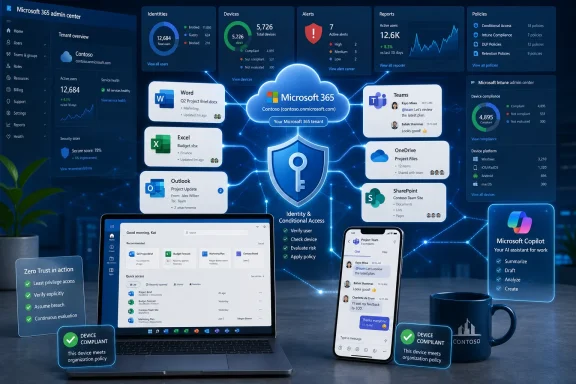
Microsoft 365 Business Premium is Microsoft’s SMB bundle for organizations of up to 300 users, combining Office apps, Exchange Online, Teams, OneDrive, Intune device management, Microsoft Defender security, and identity controls in a per-user subscription sold through Microsoft and partners. It is not merely “Office with email.” It is Microsoft’s argument that small businesses should buy their productivity stack, security baseline, endpoint management, and AI readiness from the same tenant. That argument is increasingly persuasive operationally — and increasingly uncomfortable strategically.
The old mental model for Microsoft 365 Business Premium is too small. For years, many buyers treated it as the expensive sibling of Business Standard: the one you bought if you wanted the desktop Office apps plus “some security stuff.” That description was never entirely fair, but it is now actively misleading.
Business Premium is better understood as a compact control plane for the modern small company. It gives the business email, collaboration, local Office apps, cloud storage, identity policy, device enrollment, mobile app management, endpoint protection, and anti-phishing defenses under one commercial roof. For an IT generalist supporting 40 users across laptops, phones, and home networks, that is less a bundle than a survival strategy.
The power of the product is not that each component is best in class in isolation. It is that the pieces know about each other. A user signs in with a Microsoft Entra ID account, gets access to Outlook and Teams, lands in SharePoint and OneDrive, and can be governed by conditional access and Intune compliance rules. In the real world of small-business IT, integration is often worth more than theoretical superiority.
That is why Microsoft 365 Business Premium matters beyond the license table. It is one of the clearest examples of Microsoft’s post-Windows strategy: make Windows, Office, identity, security, and cloud administration feel like one operating environment, even when the user is on a MacBook, an iPhone, or a browser tab.
That limit also creates a psychological boundary. Below 300 seats, Business Premium can feel like a cheat code: enterprise-flavored controls without enterprise plan pricing. Above it, the conversation changes toward Microsoft 365 E3, E5, security add-ons, and more complicated licensing math. Microsoft is not hiding the ladder; it is painting the lower rungs in friendlier colors.
For SMBs, the practical question is whether Business Premium is a destination or an on-ramp. A company can run on it for years and be perfectly well served. But the moment it grows into deeper compliance, advanced eDiscovery, complex data governance, security operations, or larger-scale endpoint scenarios, Microsoft’s ecosystem has plenty of adjacent doors to open.
That is the genius of the bundle. It solves enough problems to be useful immediately, while leaving enough headroom for upsell. The small business gets a manageable platform; Microsoft gets recurring revenue and a tenant that becomes harder to leave with every mailbox, device policy, SharePoint site, and Teams archive.
Business Premium addresses that shift by putting security in places users already touch. Defender for Office 365 Plan 1 brings anti-phishing, Safe Links, and Safe Attachments-style protections into the mail and collaboration flow. Defender for Business adds endpoint protection aimed at smaller organizations. Data loss prevention and sensitivity-aware controls help reduce the odds that a spreadsheet full of customer information walks out through email unnoticed.
None of this makes a small business “secure” by default. A misconfigured tenant, over-permissive SharePoint site, weak admin account, or unmanaged personal device can still wreck the day. But Business Premium changes the baseline from “install antivirus and hope” to “manage identity, devices, apps, and threats from a coherent admin model.”
That matters because many SMBs do not have security teams. They have a managed service provider, a part-time consultant, or one unlucky person who knows how to reset passwords. For them, a security product that requires constant expert tuning is often a shelf ornament. A security stack embedded into the productivity subscription has a much better chance of actually being turned on.
The risk is complacency. Microsoft’s branding can make protection feel automatic, and automatic protection is never the same as mature security operations. Business Premium supplies the parts; it does not write the incident response plan, review audit logs, train users, or decide which admin accounts deserve phishing-resistant multifactor authentication.
For Windows shops, the combination of Intune and Windows Autopilot is especially important. A new laptop can be shipped directly to a worker, enrolled during setup, and shaped by policy after sign-in. Apps arrive, encryption requirements apply, Wi-Fi and VPN profiles can be configured, and access to company resources can depend on whether the device is compliant.
That is not glamorous technology, but it is deeply practical. Hybrid work made the old office-first endpoint model brittle. Small companies discovered that “bring the laptop in so we can set it up” does not scale when hiring is remote, branch offices are thinly staffed, and employees expect to work from anywhere.
Business Premium does not eliminate endpoint complexity. Intune still requires planning, testing, and a tolerance for Microsoft admin portals that can feel like a city built by several committees over several decades. But the direction is clear: Microsoft wants the SMB endpoint to be cloud-managed by default, and Business Premium is the most accessible version of that future.
The Mac and mobile story is more nuanced. Intune can manage macOS, iOS, and Android, but the experience is not identical to Microsoft’s home turf. Still, for many small firms, “good enough cross-platform management in the same console as our Windows policies” beats paying for separate tools that only the MSP remembers how to operate.
What Business Premium does provide is the governance substrate that makes AI deployment less reckless. Copilot’s usefulness depends on access to organizational content, and access to organizational content depends on identity, permissions, labels, sharing settings, and data hygiene. If a company’s SharePoint permissions are a decade of accidents, AI will not make that cleaner. It may simply make the mess searchable in more fluent language.
This is the uncomfortable truth behind AI productivity suites: the assistant inherits the tenant. If too many users can read the finance folder, a chat interface may make that overexposure easier to discover. If old Teams channels contain sensitive customer negotiations, an AI summary can surface what the organization forgot it had stored.
Business Premium therefore becomes more than a security bundle. It is a prerequisite for responsible AI adoption in the SMB market, not because it solves every governance problem, but because it gives smaller firms a fighting chance to define who can access what, from which device, under which conditions.
Microsoft understands this perfectly. The company’s AI story is not just about model quality or clever prompts. It is about convincing customers that their Microsoft 365 tenant is the safest place for AI-assisted work because the identity, compliance, and content layers already live there. Business Premium turns that enterprise argument into an SMB-sized package.
Administrators also save something more precious than license spend: attention. Fewer vendors mean fewer renewals, fewer dashboards, fewer support contracts, and fewer integration seams. In a small business, that administrative compression has real value.
But consolidation is not the same as free efficiency. The deeper a company goes into Microsoft’s stack, the more switching costs accumulate. Mailboxes, Teams chat history, SharePoint document libraries, OneDrive sync habits, Intune device records, Entra ID policies, Defender alerts, and compliance configurations become a kind of organizational sediment. Leaving is possible; leaving cleanly is expensive.
That dependence is not accidental. Microsoft’s commercial genius has always been bundling at the boundary between convenience and lock-in. Business Premium continues that tradition in cloud form. The customer gets a coherent platform, and Microsoft gets a durable relationship that extends from the user’s inbox to the device posture check that decides whether the inbox opens at all.
For investors, that is exactly the point. Business Premium is not a one-off software sale. It is recurring revenue tied to daily workflows, security posture, and future AI attach. A small company that standardizes on Business Premium today is a candidate for Copilot, Dynamics 365, Power BI, Azure services, additional Defender products, Purview capabilities, and partner-managed services tomorrow.
Microsoft has improved onboarding flows and security recommendations, but the product still assumes a level of administrative judgment that many small firms lack internally. Turning on multifactor authentication is easy compared with designing conditional access that does not lock out executives during travel. Enrolling devices is easy compared with deciding how to handle personal phones, contractors, legacy apps, and shared workstations.
This is where the partner ecosystem becomes part of the product. For many SMBs, Business Premium is not bought directly from Microsoft and lovingly configured by an internal IT department. It is sold, deployed, and maintained by a managed service provider that translates Microsoft’s platform into policy choices the business can understand.
That dependency can be healthy. A good MSP can harden the tenant, standardize device enrollment, tune Defender settings, document recovery processes, and stop the business from treating the default configuration as a strategy. A poor one can merely resell licenses and leave the customer with the illusion of security.
The gap between license entitlement and operational maturity is the central caveat in every Microsoft 365 security story. Business Premium gives smaller firms access to tools that would once have seemed enterprise-grade. It does not guarantee that anyone has configured them well.
That daily familiarity lowers the barrier to adopting the less visible pieces. A business may not wake up excited about conditional access, but it does care whether employees can open Outlook safely from a hotel network. It may not ask for mobile application management by name, but it does want company data removed from a personal phone when an employee leaves.
This is how Microsoft turns productivity into security distribution. The email account becomes the identity. The identity becomes the access policy. The device becomes the enforcement point. The document library becomes the governance problem. The meeting transcript becomes the AI input.
Competitors can beat Microsoft in individual categories, and often do. Slack partisans prefer Slack to Teams. Security specialists may prefer other endpoint or email defense tools. Apple-focused shops may want different device management. But Microsoft’s advantage is that the default path is already paved from the productivity app to the admin policy.
For SMBs, defaults matter. The company without a large IT staff tends to choose the path that is least likely to break Monday morning. Business Premium is designed to be that path.
Windows Autopilot, Entra ID sign-in, BitLocker policy, Defender integration, update controls, app deployment, and compliance checks make the modern Windows PC feel like an extension of the Microsoft 365 tenant. That is a major shift from the old era when the Windows machine was primarily joined to a local domain and governed by on-premises infrastructure.
The cloud-managed Windows endpoint is now the centerpiece of Microsoft’s SMB architecture. It gives smaller firms a way to approximate enterprise endpoint control without running enterprise infrastructure. It also makes the Windows license part of a broader services relationship rather than a standalone platform decision.
This is good news for Windows in one sense. It keeps the PC central to business operations at a time when work increasingly flows through browsers and mobile apps. A well-managed Windows device still offers Microsoft its richest surface for security, productivity, and AI integration.
But it also means Windows is less sovereign than it once was. The operating system is increasingly valuable because of how it participates in Microsoft 365, not because it stands alone. The center of gravity has moved from the Start menu to the tenant.
Microsoft’s cloud growth story has many engines: Azure consumption, enterprise Microsoft 365, LinkedIn, Dynamics, security, developer tools, and AI infrastructure. Business Premium sits in the less glamorous but highly durable layer of small and mid-sized business productivity. These customers may not make headlines individually, but collectively they represent a broad subscription base.
Security strengthens that base because it turns Microsoft 365 from an office productivity expense into a risk management expense. Businesses can cancel a nice-to-have app more easily than they can abandon the platform that protects email, devices, and identity. AI may strengthen it further if Copilot becomes a standard add-on rather than an experimental perk.
The investor risk is the same as the customer risk viewed from the opposite side. Bundling invites regulatory scrutiny, competitive resentment, and customer anxiety about lock-in. Microsoft has lived this story before. The difference now is that the bundle operates through subscriptions, admin portals, APIs, identity systems, and cloud data rather than boxed software and default browser settings.
That does not make the strategy less powerful. It may make it more durable.
That can be a very rational bet. Microsoft has breadth, scale, partner coverage, and a relentless ability to absorb adjacent categories into the subscription. For a business that wants fewer vendors and more integrated controls, Business Premium is one of the strongest offers in the market.
But the buyer should be honest about the trade. The bundle works best when the organization is willing to live Microsoft-first. If the business prefers Google Workspace, Slack, Zoom, Jamf, Okta, and best-of-breed security tooling, Business Premium may feel like paying for overlap. If the company is heavily Microsoft already, the bundle may feel less like an upsell and more like finishing the architecture.
The practical test is not whether every included feature appears on a comparison chart. It is whether the business will actually deploy and maintain the security and management features that justify the upgrade. Unused Intune entitlement is not device management. Unreviewed Defender alerts are not security operations. Unstructured SharePoint permissions are not AI readiness.
That is where Microsoft’s product strategy meets the customer’s operational discipline. Business Premium can raise the floor dramatically. It cannot raise the floor for an organization that never opens the toolbox.
That first boot captures Microsoft’s entire SMB pitch. Work should be available anywhere, but not unmanaged. Security should be stronger, but not require a dedicated security department. AI should be useful, but not detached from permissions and governance. Administration should be centralized, even when the workforce is scattered.
The friction comes when reality intrudes. Legacy apps still exist. Users still forward files to personal accounts. Contractors still need exceptions. Executives still hate conditional access prompts at airports. Admin centers still hide important settings behind names that have changed twice since the last documentation refresh.
Business Premium does not abolish those problems. It gives organizations a more coherent place to fight them.
 Microsoft Sells the Small Business a Control Plane, Not Just a Suite
The old mental model for Microsoft 365 Business Premium is too small. For years, many buyers treated it as the expensive sibling of Business Standard: the one you bought if you wanted the desktop Office apps plus “some security stuff.” That description was never entirely fair, but it is now actively misleading.Business Premium is better understood as a compact control plane for the modern small company. It gives the business email, collaboration, local Office apps, cloud storage, identity policy, device enrollment, mobile app management, endpoint protection, and anti-phishing defenses under one commercial roof. For an IT generalist supporting 40 users across laptops, phones, and home networks, that is less a bundle than a survival strategy.
The power of the product is not that each component is best in class in isolation. It is that the pieces know about each other. A user signs in with a Microsoft Entra ID account, gets access to Outlook and Teams, lands in SharePoint and OneDrive, and can be governed by conditional access and Intune compliance rules. In the real world of small-business IT, integration is often worth more than theoretical superiority.
That is why Microsoft 365 Business Premium matters beyond the license table. It is one of the clearest examples of Microsoft’s post-Windows strategy: make Windows, Office, identity, security, and cloud administration feel like one operating environment, even when the user is on a MacBook, an iPhone, or a browser tab.
The 300-User Ceiling Is a Product Boundary and a Sales Funnel
Microsoft positions its business plans for organizations up to 300 users, and that ceiling does a lot of work. It defines the intended customer, protects the enterprise licensing ladder above it, and gives partners a tidy way to segment the market. A 25-person law firm and a 220-person manufacturer may have very different risk profiles, but both can be told that Business Premium is the SMB sweet spot.That limit also creates a psychological boundary. Below 300 seats, Business Premium can feel like a cheat code: enterprise-flavored controls without enterprise plan pricing. Above it, the conversation changes toward Microsoft 365 E3, E5, security add-ons, and more complicated licensing math. Microsoft is not hiding the ladder; it is painting the lower rungs in friendlier colors.
For SMBs, the practical question is whether Business Premium is a destination or an on-ramp. A company can run on it for years and be perfectly well served. But the moment it grows into deeper compliance, advanced eDiscovery, complex data governance, security operations, or larger-scale endpoint scenarios, Microsoft’s ecosystem has plenty of adjacent doors to open.
That is the genius of the bundle. It solves enough problems to be useful immediately, while leaving enough headroom for upsell. The small business gets a manageable platform; Microsoft gets recurring revenue and a tenant that becomes harder to leave with every mailbox, device policy, SharePoint site, and Teams archive.
Security Became the Feature Small Firms Could No Longer Ignore
The security pitch for Business Premium lands because SMB security has changed. Small firms once treated advanced protection as something for banks, hospitals, and multinationals. Ransomware crews, credential phishers, and business email compromise operators have spent the last decade proving otherwise.Business Premium addresses that shift by putting security in places users already touch. Defender for Office 365 Plan 1 brings anti-phishing, Safe Links, and Safe Attachments-style protections into the mail and collaboration flow. Defender for Business adds endpoint protection aimed at smaller organizations. Data loss prevention and sensitivity-aware controls help reduce the odds that a spreadsheet full of customer information walks out through email unnoticed.
None of this makes a small business “secure” by default. A misconfigured tenant, over-permissive SharePoint site, weak admin account, or unmanaged personal device can still wreck the day. But Business Premium changes the baseline from “install antivirus and hope” to “manage identity, devices, apps, and threats from a coherent admin model.”
That matters because many SMBs do not have security teams. They have a managed service provider, a part-time consultant, or one unlucky person who knows how to reset passwords. For them, a security product that requires constant expert tuning is often a shelf ornament. A security stack embedded into the productivity subscription has a much better chance of actually being turned on.
The risk is complacency. Microsoft’s branding can make protection feel automatic, and automatic protection is never the same as mature security operations. Business Premium supplies the parts; it does not write the incident response plan, review audit logs, train users, or decide which admin accounts deserve phishing-resistant multifactor authentication.
Intune Is the Quiet Center of the Bundle
If Exchange and Office are the obvious attractions, Intune is the feature that changes how the business runs. Device management used to be a server-room discipline: domain controllers, Group Policy, imaging tools, and a stack of assumptions about corporate networks. Intune moves that work into cloud policy and turns the employee laptop into something that can be prepared, restricted, retired, or wiped without ever touching the office LAN.For Windows shops, the combination of Intune and Windows Autopilot is especially important. A new laptop can be shipped directly to a worker, enrolled during setup, and shaped by policy after sign-in. Apps arrive, encryption requirements apply, Wi-Fi and VPN profiles can be configured, and access to company resources can depend on whether the device is compliant.
That is not glamorous technology, but it is deeply practical. Hybrid work made the old office-first endpoint model brittle. Small companies discovered that “bring the laptop in so we can set it up” does not scale when hiring is remote, branch offices are thinly staffed, and employees expect to work from anywhere.
Business Premium does not eliminate endpoint complexity. Intune still requires planning, testing, and a tolerance for Microsoft admin portals that can feel like a city built by several committees over several decades. But the direction is clear: Microsoft wants the SMB endpoint to be cloud-managed by default, and Business Premium is the most accessible version of that future.
The Mac and mobile story is more nuanced. Intune can manage macOS, iOS, and Android, but the experience is not identical to Microsoft’s home turf. Still, for many small firms, “good enough cross-platform management in the same console as our Windows policies” beats paying for separate tools that only the MSP remembers how to operate.
AI Makes Permissions Boring Until They Become Everything
The source material rightly frames Business Premium as part of Microsoft’s AI push, but the relationship deserves precision. Microsoft 365 Copilot is generally licensed as an add-on for eligible business plans, and Microsoft’s newer Copilot business packaging continues to evolve. Business Premium is not a magic ticket that gives every worker the full Copilot experience inside Word, Excel, Outlook, PowerPoint, and Teams.What Business Premium does provide is the governance substrate that makes AI deployment less reckless. Copilot’s usefulness depends on access to organizational content, and access to organizational content depends on identity, permissions, labels, sharing settings, and data hygiene. If a company’s SharePoint permissions are a decade of accidents, AI will not make that cleaner. It may simply make the mess searchable in more fluent language.
This is the uncomfortable truth behind AI productivity suites: the assistant inherits the tenant. If too many users can read the finance folder, a chat interface may make that overexposure easier to discover. If old Teams channels contain sensitive customer negotiations, an AI summary can surface what the organization forgot it had stored.
Business Premium therefore becomes more than a security bundle. It is a prerequisite for responsible AI adoption in the SMB market, not because it solves every governance problem, but because it gives smaller firms a fighting chance to define who can access what, from which device, under which conditions.
Microsoft understands this perfectly. The company’s AI story is not just about model quality or clever prompts. It is about convincing customers that their Microsoft 365 tenant is the safest place for AI-assisted work because the identity, compliance, and content layers already live there. Business Premium turns that enterprise argument into an SMB-sized package.
The Bundle Saves Money Until It Costs Optionality
The most appealing Business Premium pitch is consolidation. A company paying separately for email hosting, Office apps, endpoint antivirus, mobile device management, password and identity tooling, and email filtering can often simplify by moving more of that stack into Microsoft 365. The monthly per-user price may look high next to Business Standard, but it can look reasonable against a pile of overlapping subscriptions.Administrators also save something more precious than license spend: attention. Fewer vendors mean fewer renewals, fewer dashboards, fewer support contracts, and fewer integration seams. In a small business, that administrative compression has real value.
But consolidation is not the same as free efficiency. The deeper a company goes into Microsoft’s stack, the more switching costs accumulate. Mailboxes, Teams chat history, SharePoint document libraries, OneDrive sync habits, Intune device records, Entra ID policies, Defender alerts, and compliance configurations become a kind of organizational sediment. Leaving is possible; leaving cleanly is expensive.
That dependence is not accidental. Microsoft’s commercial genius has always been bundling at the boundary between convenience and lock-in. Business Premium continues that tradition in cloud form. The customer gets a coherent platform, and Microsoft gets a durable relationship that extends from the user’s inbox to the device posture check that decides whether the inbox opens at all.
For investors, that is exactly the point. Business Premium is not a one-off software sale. It is recurring revenue tied to daily workflows, security posture, and future AI attach. A small company that standardizes on Business Premium today is a candidate for Copilot, Dynamics 365, Power BI, Azure services, additional Defender products, Purview capabilities, and partner-managed services tomorrow.
The Admin Experience Still Shows the Seams
The clean marketing version of Business Premium can obscure how much work remains for the customer or partner. Microsoft 365 administration is powerful, but it is not simple. Settings are distributed across the Microsoft 365 admin center, Entra admin center, Intune admin center, Defender portal, Purview portal, Exchange admin center, Teams admin center, and more.Microsoft has improved onboarding flows and security recommendations, but the product still assumes a level of administrative judgment that many small firms lack internally. Turning on multifactor authentication is easy compared with designing conditional access that does not lock out executives during travel. Enrolling devices is easy compared with deciding how to handle personal phones, contractors, legacy apps, and shared workstations.
This is where the partner ecosystem becomes part of the product. For many SMBs, Business Premium is not bought directly from Microsoft and lovingly configured by an internal IT department. It is sold, deployed, and maintained by a managed service provider that translates Microsoft’s platform into policy choices the business can understand.
That dependency can be healthy. A good MSP can harden the tenant, standardize device enrollment, tune Defender settings, document recovery processes, and stop the business from treating the default configuration as a strategy. A poor one can merely resell licenses and leave the customer with the illusion of security.
The gap between license entitlement and operational maturity is the central caveat in every Microsoft 365 security story. Business Premium gives smaller firms access to tools that would once have seemed enterprise-grade. It does not guarantee that anyone has configured them well.
Teams and Exchange Keep the Gravity Well Spinning
Business Premium’s strategic advantage begins with tools users already know. Exchange Online remains the default business email choice for many organizations, and Outlook remains the habit-forming front end. Teams, despite its critics, has become the collaboration layer where meetings, chats, files, and business workflows converge.That daily familiarity lowers the barrier to adopting the less visible pieces. A business may not wake up excited about conditional access, but it does care whether employees can open Outlook safely from a hotel network. It may not ask for mobile application management by name, but it does want company data removed from a personal phone when an employee leaves.
This is how Microsoft turns productivity into security distribution. The email account becomes the identity. The identity becomes the access policy. The device becomes the enforcement point. The document library becomes the governance problem. The meeting transcript becomes the AI input.
Competitors can beat Microsoft in individual categories, and often do. Slack partisans prefer Slack to Teams. Security specialists may prefer other endpoint or email defense tools. Apple-focused shops may want different device management. But Microsoft’s advantage is that the default path is already paved from the productivity app to the admin policy.
For SMBs, defaults matter. The company without a large IT staff tends to choose the path that is least likely to break Monday morning. Business Premium is designed to be that path.
Windows Is No Longer the Whole Story, But It Still Sets the Terms
For WindowsForum readers, the Windows angle is obvious but worth updating. Business Premium is not a Windows-only subscription, and Microsoft is careful to sell it as cross-platform cloud productivity and security. Yet Windows remains the environment where the bundle feels most native.Windows Autopilot, Entra ID sign-in, BitLocker policy, Defender integration, update controls, app deployment, and compliance checks make the modern Windows PC feel like an extension of the Microsoft 365 tenant. That is a major shift from the old era when the Windows machine was primarily joined to a local domain and governed by on-premises infrastructure.
The cloud-managed Windows endpoint is now the centerpiece of Microsoft’s SMB architecture. It gives smaller firms a way to approximate enterprise endpoint control without running enterprise infrastructure. It also makes the Windows license part of a broader services relationship rather than a standalone platform decision.
This is good news for Windows in one sense. It keeps the PC central to business operations at a time when work increasingly flows through browsers and mobile apps. A well-managed Windows device still offers Microsoft its richest surface for security, productivity, and AI integration.
But it also means Windows is less sovereign than it once was. The operating system is increasingly valuable because of how it participates in Microsoft 365, not because it stands alone. The center of gravity has moved from the Start menu to the tenant.
The Investor Story Is Recurring Revenue With a Security Wrapper
The original source nods to Microsoft shares, and that connection is not incidental. Business Premium is exactly the sort of product investors like because it ties together subscription revenue, customer retention, security demand, and AI upsell. It is not flashy, but it is structurally important.Microsoft’s cloud growth story has many engines: Azure consumption, enterprise Microsoft 365, LinkedIn, Dynamics, security, developer tools, and AI infrastructure. Business Premium sits in the less glamorous but highly durable layer of small and mid-sized business productivity. These customers may not make headlines individually, but collectively they represent a broad subscription base.
Security strengthens that base because it turns Microsoft 365 from an office productivity expense into a risk management expense. Businesses can cancel a nice-to-have app more easily than they can abandon the platform that protects email, devices, and identity. AI may strengthen it further if Copilot becomes a standard add-on rather than an experimental perk.
The investor risk is the same as the customer risk viewed from the opposite side. Bundling invites regulatory scrutiny, competitive resentment, and customer anxiety about lock-in. Microsoft has lived this story before. The difference now is that the bundle operates through subscriptions, admin portals, APIs, identity systems, and cloud data rather than boxed software and default browser settings.
That does not make the strategy less powerful. It may make it more durable.
The Real Purchase Is a Bet on Microsoft as the SMB Operating System
A small business buying Business Premium is not simply choosing a software plan. It is choosing Microsoft as the operating system of the company’s work: the place where users authenticate, communicate, store files, attend meetings, enroll devices, defend endpoints, and increasingly ask AI to interpret the day.That can be a very rational bet. Microsoft has breadth, scale, partner coverage, and a relentless ability to absorb adjacent categories into the subscription. For a business that wants fewer vendors and more integrated controls, Business Premium is one of the strongest offers in the market.
But the buyer should be honest about the trade. The bundle works best when the organization is willing to live Microsoft-first. If the business prefers Google Workspace, Slack, Zoom, Jamf, Okta, and best-of-breed security tooling, Business Premium may feel like paying for overlap. If the company is heavily Microsoft already, the bundle may feel less like an upsell and more like finishing the architecture.
The practical test is not whether every included feature appears on a comparison chart. It is whether the business will actually deploy and maintain the security and management features that justify the upgrade. Unused Intune entitlement is not device management. Unreviewed Defender alerts are not security operations. Unstructured SharePoint permissions are not AI readiness.
That is where Microsoft’s product strategy meets the customer’s operational discipline. Business Premium can raise the floor dramatically. It cannot raise the floor for an organization that never opens the toolbox.
The Bundle’s Promise Fits in the First Boot
The clearest way to understand Business Premium is still the new-hire laptop. The employee opens the lid, signs in, and the machine begins to become a company device. Outlook connects, Teams appears, OneDrive syncs, policies apply, encryption is checked, and access depends on identity and compliance rather than office geography.That first boot captures Microsoft’s entire SMB pitch. Work should be available anywhere, but not unmanaged. Security should be stronger, but not require a dedicated security department. AI should be useful, but not detached from permissions and governance. Administration should be centralized, even when the workforce is scattered.
The friction comes when reality intrudes. Legacy apps still exist. Users still forward files to personal accounts. Contractors still need exceptions. Executives still hate conditional access prompts at airports. Admin centers still hide important settings behind names that have changed twice since the last documentation refresh.
Business Premium does not abolish those problems. It gives organizations a more coherent place to fight them.
The Fine Print Is Where SMBs Win or Lose
The near-term lesson for buyers is concrete: Business Premium is most valuable when deployed as a program, not purchased as a checkbox. The license is only the beginning. The return comes from configuring identity, enrolling devices, tightening sharing, training users, reviewing alerts, and deciding where AI belongs.- Microsoft 365 Business Premium is designed for small and mid-sized organizations of up to 300 users, not for unlimited enterprise deployment.
- The plan’s real differentiator over cheaper business tiers is the combination of security, identity, and Intune device management layered onto familiar Office, email, storage, and collaboration apps.
- Microsoft 365 Copilot generally remains an add-on or separately packaged entitlement, but Business Premium supplies much of the governance foundation needed before AI should touch company data.
- The bundle can reduce vendor sprawl, but it also increases dependence on Microsoft’s tenant, licensing model, admin portals, and partner ecosystem.
- The product works best when an MSP or capable internal administrator actively configures and monitors it rather than assuming Microsoft’s defaults are enough.
- For Windows environments, Business Premium is one of the clearest routes from traditional PC administration to cloud-managed endpoints.
References
- Primary source: ad-hoc-news.de
Published: 2026-06-24T03:24:09.721719
Microsoft 365 Business Premium from Microsoft Corp. - hybrid security and AI bundled for SMBs
Microsoft 365 Business Premium brings Exchange email, Office apps, Intune device management and advanced threat protection together in one subscription for small and mid-sized firms. This subscription stays in focus for holders of Microsoft shares (ISIN US5949181045).www.ad-hoc-news.de - Official source: support.microsoft.com
Introducing Microsoft 365 Premium | Microsoft Support
Introducing Microsoft 365 Premiumsupport.microsoft.com - Official source: learn.microsoft.com
Microsoft 365 Business Premium frequently asked questions | Microsoft Learn
Find answers to the most frequently asked questions about Microsoft 365 Business Premium, a solution designed for small and medium sized businesses (SMB) up to 300 users.learn.microsoft.com - Official source: microsoft.com
Your request has been blocked. This could be due to several reasons.
www.microsoft.com
- Official source: techcommunity.microsoft.com
Introducing new security and compliance add-ons for Microsoft 365 Business Premium | Microsoft Community Hub
Small and medium businesses (SMBs) are under pressure like never before. Cyber threats are evolving rapidly, and regulatory requirements are becoming... techcommunity.microsoft.com
- Related coverage: windowscentral.com
Microsoft combines Office and Copilot Pro under new $20 subscription | Windows Central
Microsoft has announced a new productivity subscription that combines Microsoft 365 Family and Copilot Pro under one $20 a month subscription dubbed Microsoft 365 Premium.www.windowscentral.com
- Official source: cdn-dynmedia-1.microsoft.com
- Related coverage: also.com