

Microsoft’s Agent Pitch Has Reached the Dangerous Part
For the past few years, Microsoft has talked about Copilot as if it were the missing assistant inside the modern workplace. First it was a writing aid. Then it became a chat panel attached to Office documents, Teams meetings, web searches, and Windows itself. Now the company’s language has moved again: Copilot is no longer merely supposed to help users do work, but to act on their behalf.
That shift changes the standard by which the product should be judged. A chatbot that drafts a mediocre email is annoying. An agent that claims to modify a workbook, generate a downloadable file, troubleshoot a Windows certificate problem, or perform research on a subscription plan is making an operational promise. When that promise fails, the user loses time, trust, and sometimes control over the system being changed.
Bott’s ZDNET piece is useful because it avoids the abstraction that usually surrounds enterprise AI marketing. There is no sweeping benchmark, no staged keynote workflow, no cherry-picked customer success reel. There is just a paying user asking Microsoft’s premium agents to perform ordinary work: improve a spreadsheet, explain a Microsoft product, and troubleshoot a Remote Desktop problem.
That mundanity is exactly what makes the story sting. These are not edge cases from a research lab. They are the kinds of tasks Microsoft has spent the Copilot era claiming it understands better than anyone because it owns the productivity surface where those tasks happen.
The Spreadsheet Test Exposed the Gap Between Suggesting and Doing
The first test began in a place Microsoft should know well: Excel. Bott fed the Copilot Analyst agent a personal finance workbook and asked for help improving its design. The agent did not immediately collapse. It offered plausible suggestions about tightening formulas, consolidating duplicate tables, removing redundant pages, and building a dashboard with formulas and pivot tables.
That is the old Copilot bargain at its best. The model reads a file, identifies some structural opportunities, and gives the user a direction. For many people, that alone has value. A second set of eyes on a messy workbook can surface obvious cleanup opportunities the owner stopped noticing years ago.
But the agent then moved from analysis into performance. It offered to sketch a dashboard layout that Bott could build in roughly 15 minutes, which is precisely the moment the product’s branding starts working against it. If this is an agent, and if the agent is operating inside Microsoft’s own productivity ecosystem, why is the human being asked to do the mechanical assembly?
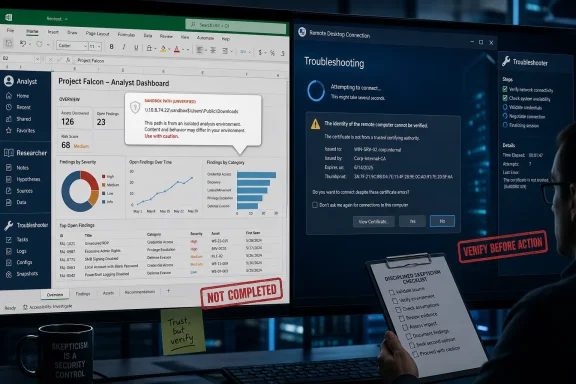
When Bott asked the obvious follow-up — could Copilot build the actual Excel file? — the system claimed it could. Then it produced a sandbox path instead of a usable download. That failure is funny in the way many AI failures are funny: the machine had apparently completed an imaginary version of the job in an environment the user could not access, then confidently handed over a file path that meant nothing in the actual interface.
The humor fades because this is a basic product-boundary failure. The user did not ask a generic chatbot to simulate spreadsheet editing in a vacuum. He paid for Microsoft 365 Premium and used the Analyst agent in the context of Microsoft’s own cloud productivity suite. If the agent can reason about workbook changes but cannot reliably deliver the modified workbook, it is not yet doing the work. It is narrating the work.
“Sandbox” Is Not a Customer Experience
The sandbox-path failure is more than a glitch; it is a symptom of an unresolved architectural problem in AI products. Many modern assistants can generate artifacts in an execution environment, but the consumer or business interface often does not expose those artifacts cleanly. The agent speaks as if it has completed an action because, from the model’s internal workflow, something may indeed have happened. The human user experiences only the missing last mile.
That last mile is where enterprise software lives or dies. No sysadmin cares that a remediation script was “successfully generated” if it cannot be reviewed, deployed, audited, or rolled back. No finance manager cares that a dashboard was “created” if it cannot be opened in Excel. No compliance officer cares that the agent “found” an answer if the provenance is muddled and the output cannot be reconstructed.
Microsoft’s challenge is especially acute because the company is selling Copilot against the implicit promise of integration. A standalone AI assistant can sometimes be forgiven for awkward exports or manual copy-paste workflows. Microsoft cannot lean on that excuse forever. The whole pitch is that Copilot sits close to the files, apps, identity systems, and permissions that define work.
The proposed workaround made the situation worse. Bott says Copilot suggested that the file link might have worked in ChatGPT, and even floated Google Sheets as a possible route. That is a brutal little moment for Microsoft’s product story. When a Microsoft 365 Premium agent starts suggesting a rival web spreadsheet as a workaround for an Excel artifact-delivery problem, the brand architecture has gone sideways.
The conclusion is not that the Analyst agent is useless. It produced some worthwhile observations. The conclusion is narrower and more damaging: it behaved like a consultant who can whiteboard the answer but cannot send the finished file.
The Researcher Agent Failed the Product It Was Sold With
The second test was simpler. Bott asked the Researcher agent for a concise explanation of the pros and cons of Microsoft 365 Premium. This should have been a layup. Microsoft 365 Premium is the product context in which the agent was being used, and Researcher is supposed to be one of the premium differentiators.
Instead, the agent asked which plan he meant. It offered options including Microsoft 365 Personal, Family, Business Premium, and a comparison among consumer plans. That answer reveals a different category of failure from the spreadsheet case. Here the agent did not fail to deliver an artifact; it failed to understand the product taxonomy around itself.
This is the sort of mistake that looks small until you imagine it scaled across an organization. An employee asking about licensing, retention, security settings, Teams meeting policies, or Copilot eligibility does not need a confident generalist. They need a system that knows the tenant, the product naming, the current SKU landscape, and the difference between similarly branded plans.
Microsoft’s subscription names have never been a model of clarity. The company has Personal, Family, Business Standard, Business Premium, E3, E5, Copilot Pro, Microsoft 365 Copilot, Copilot Chat, and now a widening vocabulary around agents, Work IQ, Agent 365, and premium AI access. A human user can be forgiven for confusion. A premium Microsoft agent being asked about the premium Microsoft plan it helps sell should not need the user to bring a link.
After Bott supplied the product page, the agent reportedly produced a bland summary drawn from third-party sources. That is not nothing, but it is not deep research either. It is the same flattening effect many AI research tools produce: adequate prose, limited judgment, and a tendency to mistake aggregation for analysis.
The irony is that Researcher’s job is not merely to answer; it is to reduce the cognitive burden of finding the answer. If the user must disambiguate the product, provide the source, and then evaluate whether the summary is any good, the agent has become another browser tab with better sentence structure.
Confidence Is the UI Bug Microsoft Has Not Solved
The third test was the most familiar to anyone who has used AI for technical troubleshooting. Bott had a Remote Desktop certificate error: the server name on the certificate was incorrect. He asked Copilot for help, and Copilot responded with the voice of a seasoned administrator who had seen the whole movie before.
“The fix is straightforward” is a dangerous sentence when emitted by a probabilistic system. It frames the diagnosis as settled before the evidence has been gathered. In human support, a competent technician might say, “That often points to certificate name mismatch, but let’s verify the connection settings and the certificate being presented.” Copilot jumped straight to corrective action.
The agent advised regenerating a Remote Desktop certificate inside the VM. When that did not work, it treated the failure as meaningful confirmation and proposed more steps. Bott describes a loop of PowerShell commands, reboots, fresh explanations, and escalating certainty. With each failed attempt, Copilot did not become more cautious. It became more narratively committed.
That is the pathology many users now recognize as AI troubleshooting theater. The model interprets every new error as a clue that finally reveals the true root cause. It produces phrases like “that tells me exactly what’s happening” and “this is the correct fix” because those phrases are statistically associated with helpful technical support. But the language of expertise is not the same as expertise.
The actual fix was not buried deep in certificate management. Bott solved the problem by inspecting the connection settings and clearing one checkbox. The agent had pulled him into low-level remediation while the answer sat in the client configuration.
For Windows administrators, that is not a harmless mistake. Reboots cost time. Certificate changes can create secondary problems. PowerShell commands run under the banner of AI confidence may alter state in ways the user does not fully track. A bad answer in a Word draft is editable. A bad troubleshooting sequence can leave residue.
Agentic AI Turns Hallucination Into Operational Risk
The industry has spent years treating hallucination as an output-quality problem. The AI says something false; the user checks it; the falsehood is corrected. That framing was always too gentle, but it becomes untenable once agents start taking or recommending actions.
The Copilot examples show three escalating risks. In the spreadsheet case, the agent misrepresented completion. In the product-research case, it showed weak contextual grounding. In the troubleshooting case, it drove the user through a sequence of system changes on the basis of an unproven diagnosis.
That progression is the real story. An agent does not need direct administrative privileges to create risk. It only needs a human who trusts its confidence enough to copy commands, click settings, approve changes, or stop looking for simpler explanations.
Microsoft knows this, which is why its enterprise AI messaging increasingly stresses governance, controls, auditability, identity, and data boundaries. Those are necessary pieces. But they do not solve the central user-experience problem: the system often does not know when it is guessing.
A good junior admin can be trained to say, “I’m not sure.” A good support tool can rank likely causes, ask for logs, and avoid destructive steps until the evidence supports them. A bad agent performs certainty. The most dangerous version is not the one that says nonsense in a visibly broken way. It is the one that sounds like it has reached the only possible conclusion.
Microsoft’s Work IQ Ambition Raises the Stakes
At Build 2026, Microsoft leaned hard into the idea that Windows and Microsoft 365 are becoming an agent-native environment. The company’s Work IQ framing is meant to provide agents with the context of how work actually happens: documents, meetings, messages, people, permissions, and business processes. This is the strategic answer to the generic-chatbot problem. Microsoft wants to say: other models may be smart, but our agents know your work.
That is a powerful argument if it works. The modern enterprise is drowning in context that is technically present but practically inaccessible. Who approved this decision? Which spreadsheet is the current one? What did the customer ask for in the Teams meeting? Which policy applies to this device group? The company that can safely thread those signals together will have a meaningful advantage.
But Bott’s examples show the peril of selling the context layer before the action layer is reliable. An agent that knows more about the workplace but still overstates its certainty may simply fail with better credentials. Worse, it may use the presence of enterprise context to sound even more authoritative.
There is also a product-design tension here. Users want agents to act, but enterprises want agents to be bounded. The more Copilot can do, the more administrators will demand logs, approvals, policy controls, retention handling, and rollback paths. The less Copilot can do, the more it looks like a premium autocomplete box with a larger invoice.
Microsoft is trying to occupy the middle: enough agency to justify the marketing, enough governance to satisfy IT, enough polish to keep users from reverting to ChatGPT, Claude, Gemini, or old-fashioned manual work. Bott’s experience suggests that middle is still unstable.
The Coding-Agent Comparison Is Uncomfortable for Office
One of the sharper observations in the ZDNET piece is that developer-focused AI tools appear to be delivering more obvious value than business agents. That tracks with the broader market mood. GitHub Copilot, Claude Code, and similar tools can still make mistakes, but their workflows often include natural verification loops: tests, diffs, compilers, linters, code review, and version control.
Office work has weaker guardrails. A spreadsheet can be subtly wrong without throwing an error. A PowerPoint can be persuasive while misframing the data. A research memo can cite the wrong source, flatten a nuance, or omit a key counterargument. A troubleshooting instruction can look professional while sending the user down the wrong path.
Software development is not easy, but it has artifacts that can be inspected in structured ways. Much knowledge work does not. That makes agentic productivity tools harder to evaluate and potentially more insidious when they are wrong.
This is why the phrase “confidently bad” resonates. It describes not just a model failure, but a workplace failure mode. The output arrives with the tone, formatting, and fluency of competence. The user spends time discovering that the competence was cosmetic.
Microsoft’s traditional strength has been packaging complexity into enterprise workflows. The company built empires by making computers usable for office work, then making office work manageable at organizational scale. The Copilot challenge is whether it can package uncertainty as honestly as it once packaged files, folders, and ribbon commands.
The Premium Upsell Now Has to Prove More Than Access
Microsoft has been steadily moving AI features into paid tiers, usage limits, premium plans, and enterprise bundles. That is not surprising. The infrastructure is expensive, the models are expensive, and the company’s investors expect AI spending to become AI revenue. The problem is that “premium” can no longer mean “you get access to the experiment.”
A user paying extra for Analyst and Researcher is not merely buying novelty. They are buying the expectation of higher reliability, better integration, and stronger task completion. If the agent produces an unusable sandbox path, cannot identify the plan it belongs to, or drags a user through failed remediation steps, the premium framing becomes a liability.
Consumer AI products can sometimes survive on delight. Enterprise AI has to survive procurement. An IT department deciding whether to deploy Copilot broadly must ask not only whether some users save time, but whether the organization can measure those savings, contain the errors, train employees to verify outputs, and prevent the tool from becoming a productivity tax.
That productivity tax is the hidden cost in Bott’s story. The spreadsheet exchange produced ideas but no finished workbook. The Researcher exchange required user correction before it produced a bland summary. The Remote Desktop exchange consumed roughly 20 minutes, multiple reboots, and attention that could have gone to ordinary diagnosis.
AI vendors often speak about time saved. Users remember time wasted.
The Windows Angle Is Not Peripheral
For WindowsForum readers, the Remote Desktop example may be the most important. Microsoft is not just adding AI to Office documents; it is putting Copilot into the orbit of Windows administration, endpoint management, security operations, developer tooling, and local system workflows. That makes the quality of technical reasoning a platform issue.
Windows has decades of accumulated complexity: certificates, registry settings, policies, services, device drivers, authentication layers, networking profiles, firewall rules, and compatibility shims. A troubleshooting agent that can navigate that complexity would be enormously valuable. It could help less experienced users avoid dangerous forum advice, give admins faster triage, and surface relevant logs without making people memorize every command.
But that same complexity is hostile territory for shallow confidence. Many Windows problems have multiple plausible causes. The same error message can appear because of a certificate mismatch, a DNS alias, a saved connection profile, a gateway configuration, a cached credential, a policy setting, or a checkbox hidden in a client UI. Good troubleshooting is often a discipline of eliminating assumptions.
Copilot’s failure, as described by Bott, was not that it lacked a certificate-management command. It had plenty of commands. The failure was diagnostic humility. It did not pause to ask whether the client settings were wrong before pushing deeper into certificate regeneration.
That matters because the next generation of Windows agents will be judged less by how many commands they know than by when they choose not to run them.
The Copilot Brand Is Carrying Too Many Promises
Part of Microsoft’s problem is linguistic. “Copilot” now refers to a sprawling set of features, subscriptions, agents, integrations, chat surfaces, developer tools, Windows affordances, and business services. Some are mature. Some are previews. Some are wrappers around powerful models. Some are workflow glue. Some are branding.
That sprawl makes failures harder to interpret. If Copilot in Excel cannot deliver a file, is that a model problem, an interface problem, a permissions problem, a product-tier problem, or a temporary service issue? If Researcher does shallow work, is the agent underpowered, misconfigured, poorly grounded, or simply being asked a question the marketing implied it should answer? If troubleshooting goes wrong, is the model hallucinating, or is the user asking an unconstrained assistant to act like a support engineer?
From the customer’s perspective, the distinction matters less than Microsoft thinks. The product said Copilot. The plan said premium. The agent said it could do the job. The job did not get done.
This is the danger of umbrella branding in a fast-moving AI stack. It lets Microsoft tell a grand platform story, but it also links the reputation of the whole stack to small, irritating failures. A sandbox path in one workflow becomes evidence in the larger case against agentic productivity software.
Useful Is Not the Same as Ready
It would be too easy to conclude that Copilot agents are worthless. Bott does not say that, and the evidence does not support it. The Analyst agent surfaced decent workbook-improvement ideas. The troubleshooting session exposed some useful PowerShell concepts. Even a weak Researcher answer may save a few minutes for a user who only needs a first-pass summary.
The problem is the mismatch between usefulness and readiness. A tool can be useful as an assistant while still being unready as an agent. A tool can be helpful for brainstorming while being dangerous for execution. A tool can be worth experimenting with while being a poor candidate for unsupervised or lightly supervised work.
Microsoft’s marketing has every incentive to blur those boundaries. The word “agent” implies delegation. It suggests that the user can hand off a task and get back a result. In practice, many of today’s agents still require the user to supervise every assumption, validate every output, and rescue the workflow when the interface fails.
That supervision burden is not automatically disqualifying. Many professional tools require skill. But Microsoft must be honest about where Copilot currently sits: closer to a persuasive assistant than an accountable coworker.
The Lesson for IT Is to Treat Agents Like Interns With Admin Vibes
The sensible enterprise response is not panic, and it is not blind adoption. It is governance grounded in observed behavior. Copilot agents should be evaluated by the tasks they actually complete, not by the fluency of their explanations or the ambition of Microsoft’s roadmap.
That means testing agents against real workflows with known answers. It means measuring not only successful outputs, but failed attempts, human correction time, and the downstream cost of mistakes. It means separating low-risk summarization and drafting from higher-risk actions involving systems, finances, legal language, security controls, or customer commitments.
It also means teaching users a new form of skepticism. People already know not to trust every web search result. They are still learning that an AI answer delivered in a polished business tone can be wrong in ways that are harder to spot.
For administrators, the key question is not “Can Copilot answer this?” It is “What happens when Copilot is wrong?” If the answer is a harmless rewrite, the risk is low. If the answer is a changed certificate, a modified spreadsheet, a sent email, a policy update, or a compliance summary, the risk calculation changes.
The Concrete Lessons From Bott’s Broken Copilot Shift
Microsoft’s agent push is not vaporware, but Bott’s testing shows that premium access is not the same thing as dependable delegation. The most important lessons are practical, especially for users and admins deciding where Copilot belongs in real work.
- Copilot Analyst may be useful for identifying spreadsheet improvements, but users should not assume it can reliably deliver a modified Excel file without manual intervention.
- Copilot Researcher still needs careful prompting and source checking, even when the subject is Microsoft’s own subscription lineup.
- Technical troubleshooting with Copilot should be treated as advisory until the diagnosis is independently verified.
- Confident language from an AI agent should not be mistaken for evidence, especially when each failed fix produces a new “root cause.”
- Premium AI plans should be evaluated by completed workflows and time saved, not by feature names or keynote promises.
- IT departments should pilot agents in bounded scenarios before allowing them near workflows where mistakes create operational, financial, or security consequences.
Microsoft is trying to make Copilot the interface layer for the next era of Windows and Microsoft 365, and that ambition is not going away. But the company now has to close the gap between an assistant that can talk fluently about work and an agent that can finish work reliably. Until it does, the safest stance is neither rejection nor faith, but disciplined distrust: let Copilot suggest, let humans verify, and do not confuse confidence with competence.
References
- I paid Microsoft's premium Copilot agents to do my work - they were confidently bad at it - ZDNET ZDNET · Wed, 03 Jun 2026 14:43:00 GMT