

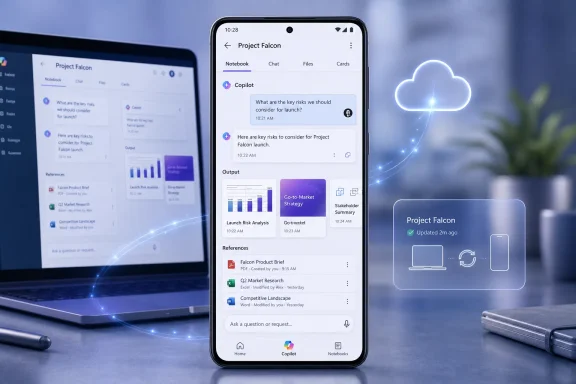
Microsoft is developing a redesigned Copilot Notebooks experience for the Microsoft 365 Copilot app on Android. Listed under Roadmap ID 566704, the feature is in development and targeted for worldwide general availability in August 2026 for the Worldwide Standard Multi-Tenant cloud.
Microsoft describes the redesign as a way to organize related chats, output creations, and references in a persistent AI workspace. The accumulated context within that workspace will ground Copilot’s responses across sessions. In practical terms, the notebook—not an individual prompt or conversation—becomes the container for ongoing work.
The roadmap entry provides a clear direction but limited implementation detail. It does not disclose licensing requirements, interface labels, management controls, configuration paths, or rollout instructions. It also does not establish how closely the Android experience will match Copilot Notebooks on other platforms. Those details will need to be confirmed when Microsoft publishes additional guidance or the redesigned experience reaches eligible users.
Roadmap ID 566704 identifies a new Copilot Notebooks design for the Microsoft 365 Copilot app on Android. Microsoft says the design will organize three types of material:
A conventional AI chat is usually organized around a conversation. Users submit prompts, receive answers, and return to the same thread if they want to continue. A notebook changes the unit of organization by grouping the conversations and supporting material around a continuing subject or project.
That model can be particularly useful for work that cannot be completed in one prompt. A planning exercise, research assignment, incident review, proposal, or content project may involve several discussions and generated outputs. Keeping those elements together gives users a defined place to resume the work rather than requiring them to navigate an undifferentiated list of chats.
The roadmap description also separates chats, output creations, and references into distinct categories. Although Microsoft has not shown how those categories will appear in the Android interface, the wording suggests that the redesign is intended to organize more than conversation history.
The distinction does not make standard chat unnecessary. A new conversation remains a straightforward way to handle an isolated question, quick rewrite, calculation, or short summary. The notebook model is more relevant when several interactions belong to the same body of work and need to remain connected.
Microsoft is describing persistence at the workspace level, not merely the storage of a chat transcript. That makes Roadmap ID 566704 more consequential than a visual refresh alone, even though the entry calls it a new design. The feature’s significance will depend on whether the shipping Android experience makes that workspace practical to navigate and resume.
The roadmap does not confirm any existing Copilot Notebooks behavior on Android. It should therefore not be read as evidence that Android users can already continue notebook conversations, access notebook references, or manage notebook workspaces in a particular way. The entry establishes only what Microsoft plans to introduce through the redesigned experience.
The roadmap does not provide enough information to describe the interface, deployment process, eligibility rules, or administrative controls. In particular, it does not specify:
The August 2026 date should likewise be treated as Microsoft’s general-availability target. The supplied roadmap information does not establish whether access will begin for all eligible users simultaneously, whether there will be preview stages, or whether any organization-specific conditions will affect timing. Administrators should avoid promising a precise deployment date until Microsoft provides release instructions applicable to their environments.
The roadmap also does not explain the boundaries of the accumulated context. It confirms that chats, output creations, and references will be organized within the persistent workspace, but it does not identify supported reference types or state whether Copilot will draw from any material outside the notebook. Claims about OneDrive, email, Teams, the web, previous conversations, Microsoft 365 file types, or user-selected reference boundaries would require additional documentation that is not supplied here.
Similarly, Roadmap ID 566704 does not describe permissions, data protection, retention, sharing, ownership, or compliance behavior. Existing organizational policies will remain relevant to any enterprise deployment, but the roadmap alone cannot establish how those policies interact with this specific Android design.
That distinction matters for both users and IT teams. The announcement supports confidence in the broad product direction, but it does not yet support detailed training, screenshots, configuration instructions, or governance claims.
Phone sessions are often shorter and more interrupted than desktop sessions. A user may open the Copilot app between meetings, while traveling, or when away from the computer where the work began. Under those conditions, the time required to locate the correct conversation and reconstruct the task can consume much of the available session.
A persistent workspace can reduce that burden by keeping related parts of the work under one project-level container. Instead of treating each chat as a separate destination, the notebook model can preserve the relationship among discussions, created outputs, and the references associated with them.
Consider a project that develops over several days. One conversation may define the assignment, another may explore options, and a later interaction may produce an output based on the earlier work. A chronological chat list can preserve those conversations, but it may not communicate how they fit together. The notebook provides an organizing layer above the individual exchanges.
That difference is especially relevant on a narrow screen. Desktop users can compensate for fragmented organization by opening several windows, comparing documents, searching for files, and keeping project material visible side by side. Android users have less screen space and may need to switch repeatedly between views or applications. A workspace that gathers related material can make a short mobile session more useful, provided that users can understand what the workspace contains.
The roadmap’s reference to accumulated context across sessions is therefore more important than the word “redesign” might suggest. It indicates that the user should be able to return to a continuing body of work rather than approach every session as a fresh interaction.
Persistence does not guarantee accuracy or completeness. Copilot’s responses will still need to be reviewed, and the quality of any context-grounded result will depend in part on the material available to the workspace. The roadmap does not state how references will be validated, updated, prioritized, or removed. It also does not say how the Android interface will distinguish current material from obsolete or conflicting material.
Those are product questions rather than reasons to dismiss the model. A persistent workspace can provide valuable continuity without becoming an authoritative record. Users will still need to verify important outputs and understand that a fluent response is not proof that every relevant source was present or interpreted correctly.
The strongest potential benefit on Android is not that the phone replaces a desktop project environment. It is that the phone can become a credible point of return. Users may be able to reopen a defined workspace, review related material, ask the next question, and continue the task without restating its entire background.
Whether Microsoft achieves that goal will depend heavily on the interface. Roadmap ID 566704 confirms the categories the design will organize, but it does not disclose how users will move among them or how much notebook management will be possible from Android.
The eventual design should be evaluated on how quickly a returning user can answer three questions: Which workspace am I in? What material belongs to it? What can I productively do next? Those questions reflect the practical value of persistence on a phone without assuming features Microsoft has not announced.
Administrators can still prepare by identifying the questions they will need to answer when the release approaches. That preparation should remain provisional and should not be presented internally as confirmed Microsoft guidance.
Users should also verify several points when the feature becomes available:
Roadmap ID 566704 points toward a more project-oriented form of Copilot on Android. Rather than making every prompt carry the full burden of context, Microsoft plans to organize related chats, output creations, and references inside a workspace that persists across sessions.
That is a focused but meaningful change. It could make Android a more effective place to return to ongoing Copilot work, particularly when users need to regain context quickly. At the same time, the roadmap leaves most implementation and deployment questions unanswered.
For now, the grounded conclusion is straightforward: Microsoft has announced an in-development Android redesign for Copilot Notebooks, targeted for general availability in August 2026 for the Worldwide Standard Multi-Tenant cloud. Its value will be determined not simply by visual polish, but by whether the released app makes persistent project context understandable, navigable, and useful on a mobile screen.
Microsoft describes the redesign as a way to organize related chats, output creations, and references in a persistent AI workspace. The accumulated context within that workspace will ground Copilot’s responses across sessions. In practical terms, the notebook—not an individual prompt or conversation—becomes the container for ongoing work.
The roadmap entry provides a clear direction but limited implementation detail. It does not disclose licensing requirements, interface labels, management controls, configuration paths, or rollout instructions. It also does not establish how closely the Android experience will match Copilot Notebooks on other platforms. Those details will need to be confirmed when Microsoft publishes additional guidance or the redesigned experience reaches eligible users.
 What Microsoft Announced
Roadmap ID 566704 identifies a new Copilot Notebooks design for the Microsoft 365 Copilot app on Android. Microsoft says the design will organize three types of material:- Related Copilot chats
- Output creations
- References associated with the work
A conventional AI chat is usually organized around a conversation. Users submit prompts, receive answers, and return to the same thread if they want to continue. A notebook changes the unit of organization by grouping the conversations and supporting material around a continuing subject or project.
That model can be particularly useful for work that cannot be completed in one prompt. A planning exercise, research assignment, incident review, proposal, or content project may involve several discussions and generated outputs. Keeping those elements together gives users a defined place to resume the work rather than requiring them to navigate an undifferentiated list of chats.
The roadmap description also separates chats, output creations, and references into distinct categories. Although Microsoft has not shown how those categories will appear in the Android interface, the wording suggests that the redesign is intended to organize more than conversation history.
| Working dimension | Standard Copilot chat | Announced Copilot Notebook model |
|---|---|---|
| Primary container | An individual conversation | A persistent workspace |
| Organization | Prompts and responses within a chat | Related chats, output creations, and references |
| Context described by the roadmap | The active conversation | Accumulated notebook context |
| Returning later | Resume or review a conversation | Continue within the persistent workspace across sessions |
| Likely use case | Short or self-contained tasks | Ongoing work involving related material |
Microsoft is describing persistence at the workspace level, not merely the storage of a chat transcript. That makes Roadmap ID 566704 more consequential than a visual refresh alone, even though the entry calls it a new design. The feature’s significance will depend on whether the shipping Android experience makes that workspace practical to navigate and resume.
The roadmap does not confirm any existing Copilot Notebooks behavior on Android. It should therefore not be read as evidence that Android users can already continue notebook conversations, access notebook references, or manage notebook workspaces in a particular way. The entry establishes only what Microsoft plans to introduce through the redesigned experience.
What Is Confirmed—and What Remains Unknown
The confirmed information is narrow enough to summarize directly:- Product: The Microsoft 365 Copilot app
- Platform: Android
- Roadmap ID: 566704
- Status: In development
- Cloud instance: Worldwide Standard Multi-Tenant
- General availability target: August 2026
- Purpose: A new Copilot Notebooks design
- Organization model: Related chats, output creations, and references in one persistent workspace
- Grounding model: Copilot responses use the workspace’s accumulated context across sessions
The roadmap does not provide enough information to describe the interface, deployment process, eligibility rules, or administrative controls. In particular, it does not specify:
- Required Microsoft 365 or Copilot licenses
- Whether the feature will be enabled by default
- Whether administrators will receive a dedicated control
- A Settings, Intune, Microsoft 365 admin center, or other management path
- The minimum supported version of the Android app
- Android operating-system requirements
- Interface labels, navigation paths, tabs, menus, or screen layouts
- How notebooks will be created, renamed, shared, archived, or deleted
- Which kinds of references can be added
- Whether users can add or remove references from Android
- What Microsoft means by “output creations” in the shipping interface
- Whether generated outputs can be edited, exported, or converted into other formats
- How notebook context will be displayed or explained to users
- Whether all notebook capabilities available elsewhere will appear on Android
- The exact sequence or duration of the general-availability release
The August 2026 date should likewise be treated as Microsoft’s general-availability target. The supplied roadmap information does not establish whether access will begin for all eligible users simultaneously, whether there will be preview stages, or whether any organization-specific conditions will affect timing. Administrators should avoid promising a precise deployment date until Microsoft provides release instructions applicable to their environments.
The roadmap also does not explain the boundaries of the accumulated context. It confirms that chats, output creations, and references will be organized within the persistent workspace, but it does not identify supported reference types or state whether Copilot will draw from any material outside the notebook. Claims about OneDrive, email, Teams, the web, previous conversations, Microsoft 365 file types, or user-selected reference boundaries would require additional documentation that is not supplied here.
Similarly, Roadmap ID 566704 does not describe permissions, data protection, retention, sharing, ownership, or compliance behavior. Existing organizational policies will remain relevant to any enterprise deployment, but the roadmap alone cannot establish how those policies interact with this specific Android design.
That distinction matters for both users and IT teams. The announcement supports confidence in the broad product direction, but it does not yet support detailed training, screenshots, configuration instructions, or governance claims.
Why the Persistent-Workspace Model Matters on Android
Persistent project context is useful on any platform, but it addresses a particularly visible mobile problem: re-entry.Phone sessions are often shorter and more interrupted than desktop sessions. A user may open the Copilot app between meetings, while traveling, or when away from the computer where the work began. Under those conditions, the time required to locate the correct conversation and reconstruct the task can consume much of the available session.
A persistent workspace can reduce that burden by keeping related parts of the work under one project-level container. Instead of treating each chat as a separate destination, the notebook model can preserve the relationship among discussions, created outputs, and the references associated with them.
Consider a project that develops over several days. One conversation may define the assignment, another may explore options, and a later interaction may produce an output based on the earlier work. A chronological chat list can preserve those conversations, but it may not communicate how they fit together. The notebook provides an organizing layer above the individual exchanges.
That difference is especially relevant on a narrow screen. Desktop users can compensate for fragmented organization by opening several windows, comparing documents, searching for files, and keeping project material visible side by side. Android users have less screen space and may need to switch repeatedly between views or applications. A workspace that gathers related material can make a short mobile session more useful, provided that users can understand what the workspace contains.
The roadmap’s reference to accumulated context across sessions is therefore more important than the word “redesign” might suggest. It indicates that the user should be able to return to a continuing body of work rather than approach every session as a fresh interaction.
Persistence does not guarantee accuracy or completeness. Copilot’s responses will still need to be reviewed, and the quality of any context-grounded result will depend in part on the material available to the workspace. The roadmap does not state how references will be validated, updated, prioritized, or removed. It also does not say how the Android interface will distinguish current material from obsolete or conflicting material.
Those are product questions rather than reasons to dismiss the model. A persistent workspace can provide valuable continuity without becoming an authoritative record. Users will still need to verify important outputs and understand that a fluent response is not proof that every relevant source was present or interpreted correctly.
The strongest potential benefit on Android is not that the phone replaces a desktop project environment. It is that the phone can become a credible point of return. Users may be able to reopen a defined workspace, review related material, ask the next question, and continue the task without restating its entire background.
Whether Microsoft achieves that goal will depend heavily on the interface. Roadmap ID 566704 confirms the categories the design will organize, but it does not disclose how users will move among them or how much notebook management will be possible from Android.
What to watch for in the shipping design
The following points are editorial criteria for evaluating the release, not confirmed product requirements or descriptions of existing behavior:- Clear workspace identity: Users should be able to tell which notebook or project they have opened and avoid submitting a prompt in the wrong context.
- Understandable context cues: The design should make it reasonably clear that a response is being grounded in accumulated notebook context rather than presented as an isolated chat answer.
- Separation of material types: Chats, references, and AI-created outputs should be distinguishable so that a generated draft is not easily mistaken for source material.
- Inspectable references: Users should have a practical way to review the material associated with a notebook, particularly when checking a surprising or consequential response.
- Efficient re-entry: Opening an existing notebook should help the user understand where the work stands without forcing a search through numerous conversations.
- Mobile-appropriate navigation: Microsoft should avoid reproducing a complex desktop hierarchy on a smaller screen without adaptation.
- Visible change and status signals: If feasible, the interface should help users recognize newly created or recently used material within the workspace.
- Safe context maintenance: If Android supports adding, removing, or changing references, those actions should be clear enough to prevent accidental changes to the notebook’s grounding context.
- Output labeling: The meaning of “output creations” should be apparent, including whether an item is a draft, a saved artifact, or another form of generated result.
- Accessible verification paths: Users should not have to abandon the notebook entirely just to understand the basis of a response.
The eventual design should be evaluated on how quickly a returning user can answer three questions: Which workspace am I in? What material belongs to it? What can I productively do next? Those questions reflect the practical value of persistence on a phone without assuming features Microsoft has not announced.
What Admins and Users Should Verify at Release
Organizations cannot yet perform feature-specific configuration based on Roadmap ID 566704. The roadmap provides no licensing requirements, Settings path, interface labels, management controls, policy names, or rollout instructions. Any detailed deployment procedure written before those items are published would be speculative.Administrators can still prepare by identifying the questions they will need to answer when the release approaches. That preparation should remain provisional and should not be presented internally as confirmed Microsoft guidance.
Provisional admin checklist
- Confirm eligibility. Determine which licenses, subscriptions, account types, or service plans Microsoft identifies for the Android Copilot Notebooks redesign.
- Confirm availability. Check whether the feature is available to the organization and whether Microsoft has issued a more specific release schedule.
- Identify app requirements. Verify the required Microsoft 365 Copilot app version and any minimum Android operating-system version.
- Find official controls. Determine whether Microsoft provides a tenant-level, group-level, user-level, app-management, or device-management control for the feature.
- Document the actual navigation path. Build internal instructions only after the shipping app reveals its interface labels and Settings location.
- Test notebook access. Confirm which users can open, create, manage, or otherwise interact with notebooks from Android.
- Test reference handling. Verify which reference types are supported and whether Android users can add, remove, inspect, or update them.
- Test output handling. Establish what “output creations” are, how they are labeled, and what users can do with them.
- Review sharing behavior. Determine whether notebooks or their contents can be shared and how access changes affect participants.
- Review governance behavior. Validate applicable retention, audit, compliance, data-protection, and information-management behavior using Microsoft’s release documentation and the organization’s own testing.
- Check offboarding and role changes. Determine what happens to notebook access and ownership when a user leaves a project or the organization.
- Prepare scoped training. Explain only the capabilities verified in the released Android experience, and distinguish confirmed behavior from recommended working practices.
- Run realistic pilots. Test with multi-session projects containing several chats, references, and outputs rather than relying only on a simple demonstration notebook.
- Monitor release communications. Watch for changes to the August 2026 target and for Microsoft guidance that answers questions left open by the roadmap.
Users should also verify several points when the feature becomes available:
- What belongs to the notebook? Review the chats, references, and outputs associated with the workspace before relying on an answer.
- What is Copilot using? Look for any indicators Microsoft provides about notebook context and grounding.
- Is the source set current? Check whether important references are missing, obsolete, duplicated, or contradictory.
- What kind of item is each output? Distinguish source material from AI-generated content and drafts from approved work.
- Can important claims be verified? Use the underlying references or other authoritative material to check consequential responses.
- What actions are available on Android? Confirm whether the app supports only reviewing and continuing work or also provides notebook-management functions.
- What happens across sessions? Test whether the workspace retains the expected organization and whether later responses reflect the accumulated context described by Microsoft.
Roadmap ID 566704 points toward a more project-oriented form of Copilot on Android. Rather than making every prompt carry the full burden of context, Microsoft plans to organize related chats, output creations, and references inside a workspace that persists across sessions.
That is a focused but meaningful change. It could make Android a more effective place to return to ongoing Copilot work, particularly when users need to regain context quickly. At the same time, the roadmap leaves most implementation and deployment questions unanswered.
For now, the grounded conclusion is straightforward: Microsoft has announced an in-development Android redesign for Copilot Notebooks, targeted for general availability in August 2026 for the Worldwide Standard Multi-Tenant cloud. Its value will be determined not simply by visual polish, but by whether the released app makes persistent project context understandable, navigable, and useful on a mobile screen.
References
- Primary source: Microsoft 365 Roadmap
Published: 2026-07-09T23:00:39.7653153Z
Loading…
www.microsoft.com - Official source: support.microsoft.com
Add references to your Microsoft 365 Copilot Notebook | Microsoft Support
Copilot Notebooks let you gather chats, Pages, links, and files into one place. Copilot suggests content as you build, grounding replies in your notebook.support.microsoft.com - Official source: learn.microsoft.com
Overview of Microsoft 365 Copilot Chat | Microsoft Learn
Microsoft 365 Copilot Chat (formerly Microsoft Copilot) protects workplace AI-powered chats providing enterprise data protection to keep organizations safe.learn.microsoft.com - Official source: download.microsoft.com
- Official source: cdn-dynmedia-1.microsoft.com
- Official source: techcommunity.microsoft.com
Loading…
techcommunity.microsoft.com
