

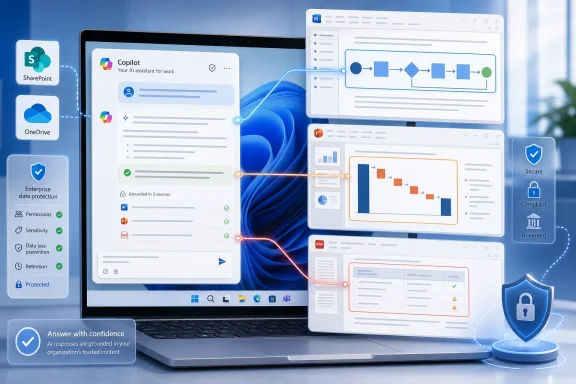
Microsoft began rolling out a Microsoft 365 Copilot Chat update in June 2026 that lets Copilot ground answers in images embedded inside Word documents, PowerPoint decks, and PDFs on desktop for worldwide commercial tenants. The change sounds modest, almost like another checkbox on the Microsoft 365 Roadmap. It is not. It pushes Copilot closer to the way office work actually happens: in documents where the most important information is often trapped in screenshots, diagrams, charts, and slide visuals rather than neatly written paragraphs.
For Windows users and IT departments, this is one of those Copilot updates whose value will depend less on the demo and more on the mess. If it works reliably, Copilot Chat becomes a better reader of the files people already send around every day. If it works inconsistently, it becomes another AI feature that seems magical until the quarterly business review depends on a chart it misunderstood.
The original promise of Microsoft 365 Copilot was that it would understand work. Not the abstract internet, not a blank prompt box, but the living pile of email, meetings, chats, spreadsheets, proposals, contracts, tickets, presentations, and PDFs that make up an organization’s institutional memory. That promise has always had a practical flaw: much of that memory is visual.
A Word document may contain a process diagram that explains the whole operating model. A PowerPoint deck may bury the actual conclusion in a waterfall chart. A PDF may include screenshots of an error message, a network topology, or a scanned procurement table. Treating those files as text containers was never enough.
Roadmap ID 560540 addresses that gap directly. Microsoft says Copilot Chat can now interpret and ground responses using images embedded in files such as .docx, .pptx, and PDF documents. In plain English, Copilot is no longer supposed to ignore the chart just because the chart is not written as prose.
That matters because office documents are hybrid artifacts. They are not books. They are arguments, dashboards, screenshots, annotations, legal exhibits, mockups, project plans, and status reports dressed up as files. The more senior the audience, the more likely the point has been compressed into a visual.
Microsoft’s move is therefore less about image recognition as a novelty and more about repairing a blind spot in enterprise AI. A Copilot that can summarize a strategy deck but cannot understand the market-share chart on slide seven is not a workplace assistant. It is a fast reader with one eye closed.
The wider implication is that Copilot Chat is becoming a multimodal document analyst by default. Users do not need to copy an image into a separate vision tool, describe it manually, or hope the surrounding text explains it. The file itself can become the prompt context.
That is a major shift for everyday workflows. Consider a support lead asking Copilot to summarize a postmortem PDF that includes screenshots from monitoring tools. Previously, the answer might lean heavily on the written incident notes. With embedded image understanding, Copilot can potentially account for the graph that shows the spike, the screenshot that shows the alert threshold, or the diagram that explains the service dependency.
The same applies to finance, sales, engineering, HR, compliance, and operations. PowerPoint is the native language of internal persuasion, and PowerPoint is mostly visual. A Copilot that can read embedded visuals is a Copilot that can participate in the actual conversation rather than merely paraphrase speaker notes.
There is also a subtler consequence: users will expect more. Once Copilot can “see” embedded images, people will stop forgiving answers that miss visual evidence. The standard for a good AI summary changes when the assistant is no longer allowed to pretend the diagram was invisible.
In consumer AI, a model can look at a picture and describe it. In enterprise AI, the more valuable capability is tying that visual interpretation to a user’s work question and the surrounding document context. A chart in isolation may show a declining line. A chart inside a sales review deck may show churn risk in a specific region. A screenshot inside a compliance report may be evidence, not decoration.
This is where Copilot’s integration with Microsoft 365 becomes strategically important. Microsoft does not want Copilot to be another browser tab. It wants Copilot to be the interface layer across files, meetings, mail, and apps. Embedded image understanding strengthens that bet because it reduces the need to extract work from Microsoft 365 before AI can operate on it.
The real competition is not only Google Workspace or ChatGPT Enterprise. It is the old habit of humans translating visual context into text for machines. Every time a worker writes, “As you can see in the chart above,” they are relying on a human reader to bridge the gap. Copilot is now being asked to cross that bridge itself.
If that works, the productivity gain is not just faster summarization. It is fewer manual explanations, fewer brittle copy-and-paste workflows, and fewer cases where a user must restate the obvious visual evidence in words before the assistant can help.
But grounding also raises the stakes. A visually grounded answer can be more useful because it incorporates more evidence. It can also be more dangerous if the visual interpretation is wrong but delivered with the confidence of a document-grounded response. In enterprise settings, the difference between “the chart appears to show a decline” and “revenue declined” is not academic.
Copilot’s new capability quietly concedes that the document is not going away. Rather than forcing every insight into structured fields, Microsoft is teaching the assistant to cope with the semi-structured sprawl where knowledge already lives. That is a pragmatic turn.
The embedded image update is especially relevant because visuals are often where structured data becomes human-readable. A chart may originate in Excel or Power BI, but by the time it reaches leadership, it is a pasted image in PowerPoint. A network diagram may come from Visio, but it circulates as a PDF. A product bug may live in Jira, but the decisive evidence is a screenshot in a Word report.
This creates a strange but very Microsoft future: the file itself becomes a lightweight database. Not because it has rows and columns, but because Copilot can extract meaning from text, layout, and images together. The richer the assistant’s perception, the more valuable old-fashioned Office documents become as AI-readable knowledge containers.
That is good news for organizations with decades of accumulated documents. It is also a reminder that information architecture still matters. A badly labeled chart, a low-resolution screenshot, or a confusing slide deck may become newly “accessible” to AI, but accessible does not mean accurate. Garbage in, hallucination out remains a risk, only now the garbage may be visual.
Imagine asking Copilot to compare two vendor proposal decks. Text extraction can summarize claims, pricing language, and implementation timelines. Visual understanding can add whether the architecture diagrams imply different integration complexity, whether the roadmap slide places key milestones before or after a dependency, or whether a chart’s visual trend supports the written conclusion.
That kind of analysis is exactly where AI assistants are both appealing and risky. They can surface patterns quickly. They can also overread visuals that were designed more for persuasion than precision. A PowerPoint arrow may imply causality without proving it. A chart may omit scale. A diagram may simplify away the hard part.
Copilot’s usefulness will therefore depend on how well it expresses uncertainty. The best version of this feature does not simply say, “The chart shows improvement.” It says, “The chart appears to show improvement in the final two quarters, but the axis and source data are not visible.” That is the difference between an assistant and a liability.
For WindowsForum’s IT pro audience, this is the governance angle hiding inside the product announcement. Multimodal AI is not only a user-experience enhancement. It is a new class of interpretation entering the workflow, and interpretation needs guardrails.
Many PDFs are text-readable. Many others are visual soups: scanned pages, embedded tables, screenshots, watermarked exhibits, exported slide decks, or flattened reports. Copilot’s ability to account for embedded imagery could make PDF analysis less brittle, especially when the document’s substance lives in charts or screenshots.
That has immediate practical value. A procurement team could ask about differences between vendor architecture diagrams. A security analyst could ask Copilot to summarize a PDF assessment that includes screenshots of console settings. A project manager could ask for risks from a status report where the Gantt chart is more informative than the prose.
The danger is that PDFs carry authority. Users tend to treat them as official artifacts, and AI answers grounded in PDFs may inherit that aura. If Copilot misreads a screenshot or chart inside a PDF, the result may feel more credible because it is “from the document.”
This is where organizations will need to train users away from magical thinking. Copilot can accelerate review, but it should not become the sole reviewer for visual evidence in legal, financial, security, or compliance contexts. The assistant can point to what deserves attention; humans still need to verify what carries consequence.
A Copilot that understands those embedded images can do more than summarize. It can potentially reconcile text with visuals. It may notice when a written process says approvals go from manager to director, while the diagram shows legal review in between. It may explain a screenshot in a troubleshooting guide. It may extract meaning from a chart that an author forgot to describe.
That is extremely useful for knowledge management. It also exposes a new category of document hygiene. If images lack captions, source labels, timestamps, or readable text, Copilot may infer context from nearby paragraphs. Sometimes that inference will be right. Sometimes it will be a polished guess.
There is an accessibility dimension too. For years, organizations have urged employees to add alt text to images, label charts, and make documents accessible to screen readers. AI vision does not eliminate that requirement. If anything, it reinforces the value of well-described visuals because the same practices that help humans can help AI systems interpret documents more reliably.
The lesson is not that users can stop writing clear captions because Copilot can see images. The lesson is that every poorly explained visual now has a second audience: an AI assistant that may be asked to summarize, compare, or act on it.
This matters because Copilot Chat has been both a product and a funnel. Microsoft has used it to put AI in front of more commercial users while reserving richer app-integrated experiences, advanced reasoning, and broader work grounding for paid Microsoft 365 Copilot licenses. The result can be confusing even for technically literate users: Copilot may exist in the app, in the browser, in Teams, in Edge, and in the Microsoft 365 Copilot app, but not always with the same abilities.
The embedded image feature adds another reason for administrators to document exactly what users have. A helpdesk ticket that says “Copilot can’t read my PowerPoint images” may be a rollout issue, a licensing issue, a file-support issue, a tenant policy issue, or simply a limitation of the model’s interpretation. That is a messy support surface.
Microsoft’s long-term direction is clear enough. The company wants Copilot to become the paid intelligence layer over Microsoft 365, with Copilot Chat as the common conversational interface. Visual grounding inside files makes that layer more compelling, but it also makes the boundary between “included AI chat” and “full Copilot for work” more politically sensitive inside organizations.
For IT leaders, the question is not merely whether the feature is available. It is who gets it, under what license, in which app surface, with what data access, and with what auditability.
A user may have permission to open a document without realizing that a screenshot inside it contains customer names, API keys, internal URLs, system topology, unreleased product details, or confidential pricing. If Copilot can interpret that screenshot, the sensitive content becomes part of the answerable context. The risk is not only data leakage outside the tenant; it is inappropriate internal resurfacing.
Microsoft’s permission model remains the first line of defense. Copilot can only be as safe as the organization’s identity, sharing, retention, labeling, and access controls allow. If SharePoint and OneDrive are over-permissioned, Copilot’s growing comprehension makes the consequences more visible.
This is why the embedded image rollout should be treated as a prompt to revisit information governance. Sensitivity labels, data loss prevention, retention policies, oversharing reviews, and least-privilege access are not glamorous. They are the boring controls that become more important when AI can read more of the file.
There is also a new reason to examine visual redaction practices. Blurring a screenshot poorly, covering text with a shape layer, or pasting a “redacted” image that still contains readable metadata can create trouble. If humans can zoom in and infer it, AI may eventually do the same. Organizations should assume that visual content in files is content, not decoration.
Charts are especially treacherous. A line chart can mislead if the axis starts above zero. A stacked bar chart can obscure category changes. A pie chart can exaggerate small differences. A dashboard screenshot can include filters that change the meaning of the data. A model that describes the visible pattern without recognizing those caveats can sound helpful while being wrong.
Diagrams have their own traps. A network diagram may use icons inconsistently. A workflow chart may be aspirational rather than current state. A product mockup may show a planned interface, not a shipped one. A screenshot may be from a test environment. Visual context is rich precisely because it carries assumptions.
The best enterprise use of this feature will be adversarial in a constructive sense. Users should ask Copilot not only “what does this document say?” but “what visual evidence supports that conclusion?” and “what should I verify manually?” If Copilot can help users inspect documents more critically, it becomes a force multiplier. If it merely produces smoother summaries, it may become a confidence machine.
Microsoft has an incentive to emphasize the former. Customers adopting Copilot at scale need trust more than theatrics. Multimodal grounding is valuable only if it makes answers more accountable, not merely more fluent.
The right response is not to block enthusiasm. It is to channel it. IT teams should create a small validation set of real but non-sensitive documents: a PowerPoint deck with charts, a Word report with screenshots, and a PDF with diagrams. Then they should test common prompts and compare Copilot’s answers with human expectations.
This is not about catching the model in a trick. It is about establishing practical norms. Which charts does it summarize well? Does it recognize screenshots of common Windows error dialogs? Does it distinguish labels from data? Does it overstate conclusions? Does it handle low-resolution images? Does it tell users when it cannot determine something?
Training should be equally practical. Employees do not need a lecture on multimodal transformers. They need examples of good prompts, examples of verification, and reminders that Copilot’s answer is not a source of truth merely because it came from a file. The phrase “grounded in your document” should not be mistaken for “guaranteed correct.”
Support desks should also prepare for ambiguity. “Copilot didn’t read the image” could mean the feature has not reached the user, the file is unsupported, the image quality is poor, the content is restricted, or the prompt was too vague. Triage will require more than asking whether the user rebooted Office.
A Copilot Chat that can interpret those embedded screenshots could help summarize the issue, extract visible error codes, identify missing steps, or prepare a response. It will not replace a knowledgeable admin, but it could shorten the path from artifact to diagnosis.
The same applies to architecture and planning work. Developers often encounter diagrams in PDFs and slide decks that describe APIs, deployment flows, identity boundaries, or data movement. Visual grounding may help Copilot answer questions that previously required the user to manually describe the diagram. That is a meaningful convenience when reviewing vendor documentation or inherited system designs.
Power users should still be cautious with code, configuration, and security interpretation. A screenshot of a command output may be incomplete. A diagram may omit network rules. A chart may be generated from stale data. Copilot can accelerate comprehension, but it cannot create missing evidence.
The best workflow is likely iterative: ask Copilot to summarize the visual content, ask it to list assumptions, then verify the parts that matter. That is less glamorous than a one-shot answer. It is also how professionals should use AI in the real world.
That increased confidence is commercially valuable. It helps justify Microsoft 365 Copilot licensing. It differentiates Microsoft from generic AI tools that require uploads, exports, or separate data handling. It also makes the Microsoft 365 ecosystem stickier because the assistant becomes more useful inside the file universe where work already lives.
But confidence is not the same as correctness. The more Copilot can see, the more users may assume it understood. That assumption is dangerous when documents contain ambiguous visuals, poor design, or sensitive information. The interface must make uncertainty visible, and organizations must teach users to demand evidence.
This is the paradox of better AI at work. Each capability that makes the assistant more helpful also makes it easier to delegate judgment too quickly. The answer is not to reject the feature. It is to operationalize skepticism.
For Microsoft, the challenge is to make Copilot’s visual reasoning legible. Users should know when an answer is based on text, an embedded image, or both. They should be able to ask for the basis of a claim. They should receive caveats when visual quality, missing labels, or unclear axes limit interpretation. Otherwise, “richer, more accurate answers” becomes a promise users cannot inspect.
The update also narrows the gap between how humans read documents and how AI systems process them. Humans do not separate a proposal into text tokens and image blobs. They scan the page, interpret emphasis, compare chart and caption, and decide whether the argument holds together. Copilot is still far from human judgment, but this feature moves it in the right direction.
For WindowsForum readers, the practical advice is simple: test it with the documents your organization actually uses. Do not rely on pristine demos. Use the ugly status deck, the exported PDF, the Word report with pasted screenshots, and the slide with a chart nobody labeled properly. That is where the feature will either earn trust or expose its limits.
This is also a moment to improve document practices. Captions, alt text, readable charts, consistent labels, and clean screenshots are no longer merely accessibility or professionalism concerns. They are AI-readiness concerns. The better your files explain themselves, the better Copilot can assist without guessing.
For Windows users and IT departments, this is one of those Copilot updates whose value will depend less on the demo and more on the mess. If it works reliably, Copilot Chat becomes a better reader of the files people already send around every day. If it works inconsistently, it becomes another AI feature that seems magical until the quarterly business review depends on a chart it misunderstood.
 Microsoft Finally Admits the Document Was Never Just Text
The original promise of Microsoft 365 Copilot was that it would understand work. Not the abstract internet, not a blank prompt box, but the living pile of email, meetings, chats, spreadsheets, proposals, contracts, tickets, presentations, and PDFs that make up an organization’s institutional memory. That promise has always had a practical flaw: much of that memory is visual.A Word document may contain a process diagram that explains the whole operating model. A PowerPoint deck may bury the actual conclusion in a waterfall chart. A PDF may include screenshots of an error message, a network topology, or a scanned procurement table. Treating those files as text containers was never enough.
Roadmap ID 560540 addresses that gap directly. Microsoft says Copilot Chat can now interpret and ground responses using images embedded in files such as .docx, .pptx, and PDF documents. In plain English, Copilot is no longer supposed to ignore the chart just because the chart is not written as prose.
That matters because office documents are hybrid artifacts. They are not books. They are arguments, dashboards, screenshots, annotations, legal exhibits, mockups, project plans, and status reports dressed up as files. The more senior the audience, the more likely the point has been compressed into a visual.
Microsoft’s move is therefore less about image recognition as a novelty and more about repairing a blind spot in enterprise AI. A Copilot that can summarize a strategy deck but cannot understand the market-share chart on slide seven is not a workplace assistant. It is a fast reader with one eye closed.
The Roadmap Item Is Small, but the Surface Area Is Huge
The official scope is narrow enough to fit inside a Microsoft 365 roadmap entry: Microsoft 365 Copilot, desktop platform, General Availability, worldwide standard multi-tenant cloud, rolling out in June 2026. That is the familiar language of enterprise feature deployment. It tells administrators when to expect motion, not how much organizational behavior might change.The wider implication is that Copilot Chat is becoming a multimodal document analyst by default. Users do not need to copy an image into a separate vision tool, describe it manually, or hope the surrounding text explains it. The file itself can become the prompt context.
That is a major shift for everyday workflows. Consider a support lead asking Copilot to summarize a postmortem PDF that includes screenshots from monitoring tools. Previously, the answer might lean heavily on the written incident notes. With embedded image understanding, Copilot can potentially account for the graph that shows the spike, the screenshot that shows the alert threshold, or the diagram that explains the service dependency.
The same applies to finance, sales, engineering, HR, compliance, and operations. PowerPoint is the native language of internal persuasion, and PowerPoint is mostly visual. A Copilot that can read embedded visuals is a Copilot that can participate in the actual conversation rather than merely paraphrase speaker notes.
There is also a subtler consequence: users will expect more. Once Copilot can “see” embedded images, people will stop forgiving answers that miss visual evidence. The standard for a good AI summary changes when the assistant is no longer allowed to pretend the diagram was invisible.
The Killer App Is Not Vision; It Is Grounding
Microsoft’s wording is important. The company is not merely saying Copilot can identify an image. It says Copilot can interpret and ground responses using embedded images. Grounding is the enterprise AI word that does the most work here.In consumer AI, a model can look at a picture and describe it. In enterprise AI, the more valuable capability is tying that visual interpretation to a user’s work question and the surrounding document context. A chart in isolation may show a declining line. A chart inside a sales review deck may show churn risk in a specific region. A screenshot inside a compliance report may be evidence, not decoration.
This is where Copilot’s integration with Microsoft 365 becomes strategically important. Microsoft does not want Copilot to be another browser tab. It wants Copilot to be the interface layer across files, meetings, mail, and apps. Embedded image understanding strengthens that bet because it reduces the need to extract work from Microsoft 365 before AI can operate on it.
The real competition is not only Google Workspace or ChatGPT Enterprise. It is the old habit of humans translating visual context into text for machines. Every time a worker writes, “As you can see in the chart above,” they are relying on a human reader to bridge the gap. Copilot is now being asked to cross that bridge itself.
If that works, the productivity gain is not just faster summarization. It is fewer manual explanations, fewer brittle copy-and-paste workflows, and fewer cases where a user must restate the obvious visual evidence in words before the assistant can help.
But grounding also raises the stakes. A visually grounded answer can be more useful because it incorporates more evidence. It can also be more dangerous if the visual interpretation is wrong but delivered with the confidence of a document-grounded response. In enterprise settings, the difference between “the chart appears to show a decline” and “revenue declined” is not academic.
The Office File Has Become the New Database
For decades, IT departments have tried to pull work out of documents and into structured systems. CRM platforms, ticketing systems, data warehouses, SharePoint metadata, Power BI dashboards, and knowledge bases all represent the same instinct: make information queryable. The office file stubbornly survives because humans need narrative, layout, emphasis, and audience-specific packaging.Copilot’s new capability quietly concedes that the document is not going away. Rather than forcing every insight into structured fields, Microsoft is teaching the assistant to cope with the semi-structured sprawl where knowledge already lives. That is a pragmatic turn.
The embedded image update is especially relevant because visuals are often where structured data becomes human-readable. A chart may originate in Excel or Power BI, but by the time it reaches leadership, it is a pasted image in PowerPoint. A network diagram may come from Visio, but it circulates as a PDF. A product bug may live in Jira, but the decisive evidence is a screenshot in a Word report.
This creates a strange but very Microsoft future: the file itself becomes a lightweight database. Not because it has rows and columns, but because Copilot can extract meaning from text, layout, and images together. The richer the assistant’s perception, the more valuable old-fashioned Office documents become as AI-readable knowledge containers.
That is good news for organizations with decades of accumulated documents. It is also a reminder that information architecture still matters. A badly labeled chart, a low-resolution screenshot, or a confusing slide deck may become newly “accessible” to AI, but accessible does not mean accurate. Garbage in, hallucination out remains a risk, only now the garbage may be visual.
PowerPoint Is Where This Feature Will Prove Itself
PowerPoint is the most obvious test case because PowerPoint is where corporate reality is often stylized into rectangles, arrows, and charts. A deck can contain only a few hundred words and still carry a business decision worth millions of dollars. If Copilot Chat can understand those visuals, it becomes far more useful in meetings, planning, and executive review.Imagine asking Copilot to compare two vendor proposal decks. Text extraction can summarize claims, pricing language, and implementation timelines. Visual understanding can add whether the architecture diagrams imply different integration complexity, whether the roadmap slide places key milestones before or after a dependency, or whether a chart’s visual trend supports the written conclusion.
That kind of analysis is exactly where AI assistants are both appealing and risky. They can surface patterns quickly. They can also overread visuals that were designed more for persuasion than precision. A PowerPoint arrow may imply causality without proving it. A chart may omit scale. A diagram may simplify away the hard part.
Copilot’s usefulness will therefore depend on how well it expresses uncertainty. The best version of this feature does not simply say, “The chart shows improvement.” It says, “The chart appears to show improvement in the final two quarters, but the axis and source data are not visible.” That is the difference between an assistant and a liability.
For WindowsForum’s IT pro audience, this is the governance angle hiding inside the product announcement. Multimodal AI is not only a user-experience enhancement. It is a new class of interpretation entering the workflow, and interpretation needs guardrails.
PDFs Are the Messy Prize
PDF support may be the most consequential part of the rollout because PDFs are where organizations send things they do not want changed, cannot easily convert, or never properly structured in the first place. Contracts, invoices, security assessments, scanned reports, compliance packets, software manuals, and vendor documentation all end up as PDFs.Many PDFs are text-readable. Many others are visual soups: scanned pages, embedded tables, screenshots, watermarked exhibits, exported slide decks, or flattened reports. Copilot’s ability to account for embedded imagery could make PDF analysis less brittle, especially when the document’s substance lives in charts or screenshots.
That has immediate practical value. A procurement team could ask about differences between vendor architecture diagrams. A security analyst could ask Copilot to summarize a PDF assessment that includes screenshots of console settings. A project manager could ask for risks from a status report where the Gantt chart is more informative than the prose.
The danger is that PDFs carry authority. Users tend to treat them as official artifacts, and AI answers grounded in PDFs may inherit that aura. If Copilot misreads a screenshot or chart inside a PDF, the result may feel more credible because it is “from the document.”
This is where organizations will need to train users away from magical thinking. Copilot can accelerate review, but it should not become the sole reviewer for visual evidence in legal, financial, security, or compliance contexts. The assistant can point to what deserves attention; humans still need to verify what carries consequence.
Word Documents Get Less Boring and More Dangerous
Word may seem like the least glamorous surface for embedded image understanding, but it may be the most common. Policies, reports, design documents, proposals, audit summaries, and operating procedures often mix paragraphs with screenshots, flowcharts, tables pasted as images, and annotated diagrams.A Copilot that understands those embedded images can do more than summarize. It can potentially reconcile text with visuals. It may notice when a written process says approvals go from manager to director, while the diagram shows legal review in between. It may explain a screenshot in a troubleshooting guide. It may extract meaning from a chart that an author forgot to describe.
That is extremely useful for knowledge management. It also exposes a new category of document hygiene. If images lack captions, source labels, timestamps, or readable text, Copilot may infer context from nearby paragraphs. Sometimes that inference will be right. Sometimes it will be a polished guess.
There is an accessibility dimension too. For years, organizations have urged employees to add alt text to images, label charts, and make documents accessible to screen readers. AI vision does not eliminate that requirement. If anything, it reinforces the value of well-described visuals because the same practices that help humans can help AI systems interpret documents more reliably.
The lesson is not that users can stop writing clear captions because Copilot can see images. The lesson is that every poorly explained visual now has a second audience: an AI assistant that may be asked to summarize, compare, or act on it.
The Licensing Story Still Shadows the Feature
No Copilot feature exists outside Microsoft’s larger licensing and packaging strategy. The roadmap item targets Microsoft 365 Copilot and Microsoft 365 Copilot Chat, and Microsoft has spent the last year refining what Copilot Chat means across free, included, and paid enterprise experiences. For admins, the capability question is inseparable from the entitlement question.This matters because Copilot Chat has been both a product and a funnel. Microsoft has used it to put AI in front of more commercial users while reserving richer app-integrated experiences, advanced reasoning, and broader work grounding for paid Microsoft 365 Copilot licenses. The result can be confusing even for technically literate users: Copilot may exist in the app, in the browser, in Teams, in Edge, and in the Microsoft 365 Copilot app, but not always with the same abilities.
The embedded image feature adds another reason for administrators to document exactly what users have. A helpdesk ticket that says “Copilot can’t read my PowerPoint images” may be a rollout issue, a licensing issue, a file-support issue, a tenant policy issue, or simply a limitation of the model’s interpretation. That is a messy support surface.
Microsoft’s long-term direction is clear enough. The company wants Copilot to become the paid intelligence layer over Microsoft 365, with Copilot Chat as the common conversational interface. Visual grounding inside files makes that layer more compelling, but it also makes the boundary between “included AI chat” and “full Copilot for work” more politically sensitive inside organizations.
For IT leaders, the question is not merely whether the feature is available. It is who gets it, under what license, in which app surface, with what data access, and with what auditability.
Security Teams Will Care About What Copilot Can Now See
Every expansion of Copilot’s understanding is also an expansion of what users may accidentally expose through prompts. Embedded image understanding does not necessarily grant Copilot new permissions to files a user could not already access. But it changes the practical meaning of access.A user may have permission to open a document without realizing that a screenshot inside it contains customer names, API keys, internal URLs, system topology, unreleased product details, or confidential pricing. If Copilot can interpret that screenshot, the sensitive content becomes part of the answerable context. The risk is not only data leakage outside the tenant; it is inappropriate internal resurfacing.
Microsoft’s permission model remains the first line of defense. Copilot can only be as safe as the organization’s identity, sharing, retention, labeling, and access controls allow. If SharePoint and OneDrive are over-permissioned, Copilot’s growing comprehension makes the consequences more visible.
This is why the embedded image rollout should be treated as a prompt to revisit information governance. Sensitivity labels, data loss prevention, retention policies, oversharing reviews, and least-privilege access are not glamorous. They are the boring controls that become more important when AI can read more of the file.
There is also a new reason to examine visual redaction practices. Blurring a screenshot poorly, covering text with a shape layer, or pasting a “redacted” image that still contains readable metadata can create trouble. If humans can zoom in and infer it, AI may eventually do the same. Organizations should assume that visual content in files is content, not decoration.
The Accuracy Problem Moves From Text to Interpretation
The early wave of workplace AI skepticism focused on hallucinated text. Did the model invent a policy? Did it misquote a document? Did it summarize a meeting incorrectly? Embedded image understanding adds a different failure mode: the model may correctly identify the existence of a visual but misinterpret what the visual means.Charts are especially treacherous. A line chart can mislead if the axis starts above zero. A stacked bar chart can obscure category changes. A pie chart can exaggerate small differences. A dashboard screenshot can include filters that change the meaning of the data. A model that describes the visible pattern without recognizing those caveats can sound helpful while being wrong.
Diagrams have their own traps. A network diagram may use icons inconsistently. A workflow chart may be aspirational rather than current state. A product mockup may show a planned interface, not a shipped one. A screenshot may be from a test environment. Visual context is rich precisely because it carries assumptions.
The best enterprise use of this feature will be adversarial in a constructive sense. Users should ask Copilot not only “what does this document say?” but “what visual evidence supports that conclusion?” and “what should I verify manually?” If Copilot can help users inspect documents more critically, it becomes a force multiplier. If it merely produces smoother summaries, it may become a confidence machine.
Microsoft has an incentive to emphasize the former. Customers adopting Copilot at scale need trust more than theatrics. Multimodal grounding is valuable only if it makes answers more accountable, not merely more fluent.
Admins Need a Rollout Plan, Not a Press Release
Because this is a rolling General Availability feature, administrators should expect uneven discovery at first. Some users will see better results before others. Some file types and scenarios will work better than edge cases. Some departments will immediately find value, while others will only notice when Copilot misses something they expected it to catch.The right response is not to block enthusiasm. It is to channel it. IT teams should create a small validation set of real but non-sensitive documents: a PowerPoint deck with charts, a Word report with screenshots, and a PDF with diagrams. Then they should test common prompts and compare Copilot’s answers with human expectations.
This is not about catching the model in a trick. It is about establishing practical norms. Which charts does it summarize well? Does it recognize screenshots of common Windows error dialogs? Does it distinguish labels from data? Does it overstate conclusions? Does it handle low-resolution images? Does it tell users when it cannot determine something?
Training should be equally practical. Employees do not need a lecture on multimodal transformers. They need examples of good prompts, examples of verification, and reminders that Copilot’s answer is not a source of truth merely because it came from a file. The phrase “grounded in your document” should not be mistaken for “guaranteed correct.”
Support desks should also prepare for ambiguity. “Copilot didn’t read the image” could mean the feature has not reached the user, the file is unsupported, the image quality is poor, the content is restricted, or the prompt was too vague. Triage will require more than asking whether the user rebooted Office.
Developers and Power Users Get a New Kind of Shortcut
For developers, analysts, and technical power users, embedded image understanding could reduce one of the most irritating forms of manual translation: turning screenshots and diagrams into actionable text. Windows troubleshooting is full of this problem. A user sends a Word document containing screenshots of error messages, Event Viewer entries, configuration dialogs, or installer failures. The useful evidence is visual.A Copilot Chat that can interpret those embedded screenshots could help summarize the issue, extract visible error codes, identify missing steps, or prepare a response. It will not replace a knowledgeable admin, but it could shorten the path from artifact to diagnosis.
The same applies to architecture and planning work. Developers often encounter diagrams in PDFs and slide decks that describe APIs, deployment flows, identity boundaries, or data movement. Visual grounding may help Copilot answer questions that previously required the user to manually describe the diagram. That is a meaningful convenience when reviewing vendor documentation or inherited system designs.
Power users should still be cautious with code, configuration, and security interpretation. A screenshot of a command output may be incomplete. A diagram may omit network rules. A chart may be generated from stale data. Copilot can accelerate comprehension, but it cannot create missing evidence.
The best workflow is likely iterative: ask Copilot to summarize the visual content, ask it to list assumptions, then verify the parts that matter. That is less glamorous than a one-shot answer. It is also how professionals should use AI in the real world.
The Real Product Is Confidence, and That Cuts Both Ways
Microsoft’s Copilot strategy rests on a behavioral bet: if AI is embedded where people already work, they will use it more often and trust it more. Visual grounding strengthens that bet because it makes Copilot feel less like a chatbot bolted onto Office and more like a participant in document review.That increased confidence is commercially valuable. It helps justify Microsoft 365 Copilot licensing. It differentiates Microsoft from generic AI tools that require uploads, exports, or separate data handling. It also makes the Microsoft 365 ecosystem stickier because the assistant becomes more useful inside the file universe where work already lives.
But confidence is not the same as correctness. The more Copilot can see, the more users may assume it understood. That assumption is dangerous when documents contain ambiguous visuals, poor design, or sensitive information. The interface must make uncertainty visible, and organizations must teach users to demand evidence.
This is the paradox of better AI at work. Each capability that makes the assistant more helpful also makes it easier to delegate judgment too quickly. The answer is not to reject the feature. It is to operationalize skepticism.
For Microsoft, the challenge is to make Copilot’s visual reasoning legible. Users should know when an answer is based on text, an embedded image, or both. They should be able to ask for the basis of a claim. They should receive caveats when visual quality, missing labels, or unclear axes limit interpretation. Otherwise, “richer, more accurate answers” becomes a promise users cannot inspect.
The June Rollout Changes the Copilot Conversation
This release is not the flashiest Copilot update Microsoft has shipped, but it may be one of the more revealing. It shows that the company understands the next phase of workplace AI is not just bigger models or more buttons. It is better contact with the artifacts that carry organizational knowledge.The update also narrows the gap between how humans read documents and how AI systems process them. Humans do not separate a proposal into text tokens and image blobs. They scan the page, interpret emphasis, compare chart and caption, and decide whether the argument holds together. Copilot is still far from human judgment, but this feature moves it in the right direction.
For WindowsForum readers, the practical advice is simple: test it with the documents your organization actually uses. Do not rely on pristine demos. Use the ugly status deck, the exported PDF, the Word report with pasted screenshots, and the slide with a chart nobody labeled properly. That is where the feature will either earn trust or expose its limits.
This is also a moment to improve document practices. Captions, alt text, readable charts, consistent labels, and clean screenshots are no longer merely accessibility or professionalism concerns. They are AI-readiness concerns. The better your files explain themselves, the better Copilot can assist without guessing.
The Copilot Rollout That Makes Your Old Decks Newly Searchable
This update deserves attention not because it makes Copilot flashy, but because it makes everyday Microsoft 365 files more computationally useful. The documents that once frustrated AI systems because their meaning was partly visual are becoming richer sources for chat-based analysis.- Copilot Chat is rolling out the ability to use embedded images in Word, PowerPoint, and PDF files as part of its response grounding on desktop for worldwide Microsoft 365 tenants.
- The most immediate value will come from documents where charts, diagrams, screenshots, and slide visuals carry information that the surrounding text does not fully explain.
- Administrators should test the feature against real internal document patterns before treating it as reliable for business-critical review.
- Security and compliance teams should assume that visual content inside shared files is now more discoverable and should revisit oversharing, labeling, and redaction practices.
- Users should ask Copilot to explain what evidence supports its answers, especially when conclusions depend on charts, diagrams, screenshots, or scanned material.
- Good document hygiene, including captions, readable visuals, and accessible descriptions, will improve both human review and AI-assisted analysis.
References
- Primary source: Microsoft 365 Roadmap
Published: 2026-06-22T23:00:47.0315291Z
Microsoft 365 Roadmap | Microsoft 365
The Microsoft 365 Roadmap lists updates that are currently planned for applicable subscribers. Check here for more information on the status of new features and updates.www.microsoft.com
- Official source: support.microsoft.com
File formats supported by Microsoft 365 Copilot | Microsoft Support
Get a list of the file formats supported by Microsoft 365 Copilot and troubleshooting tips.support.microsoft.com - Official source: learn.microsoft.com
What is Microsoft 365 Copilot? | Microsoft Learn
Learn about what Microsoft 365 Copilot is and common Copilot features in Microsoft 365 apps, like Word, Excel, PowerPoint, and Teams. This article answers common questions about Copilot, including what is Copilot, how Copilot works, and the benefits of using Copilot.learn.microsoft.com - Related coverage: office-watch.com
Copilot Chat in Word, Excel & PowerPoint, a Practical Guide for Microsoft 365 Users
Microsoft is now embedding Copilot Chat directly inside Word, Excel, PowerPoint apps, giving users a conversational AI interface right next to the doc, sheet oroffice-watch.com
- Official source: adoption.microsoft.com
Microsoft 365 Copilot – Microsoft Adoption
Hear directly from Microsoft leaders on how to lead Copilot adoption in your organization.adoption.microsoft.com - Official source: techcommunity.microsoft.com
Add images to Copilot prompts in Word and PowerPoint
You can now upload an image to Copilot prompts in Word and PowerPoint to get more tailored responses and extract text or insights from pictures and charts. techcommunity.microsoft.com
- Related coverage: windowscentral.com
Microsoft 365 is paywalling most of Copilot in its Office apps | Windows Central
Commercial customers will soon need a Microsoft 365 Copilot license to use Copilot Chat in Word, Excel, PowerPoint, and OneNote.www.windowscentral.com - Related coverage: spscc.edu
- Official source: cdn-dynmedia-1.microsoft.com
- Related coverage: m365maps.com
- Related coverage: nubis365.com
</rdf:Alt> </dc:title> <dc:description> <rdf:Alt> <rdf:li xml:lang="x-default"/> </rdf:Alt> </dc:description> <dc:creator> <rdf:Seq> <rdf:li>Mike Wi
</rdf:Alt> </dc:description> <dc:creator> <rdf:Seq> <rdf:li>Mike Windsornubis365.com
- Official source: news.microsoft.com
- Official source: download.microsoft.com
