

Microsoft plans to bring “Suggested edits” to Microsoft 365 Copilot Pages for web users, with preview availability listed for June 2026 and general availability scheduled for July 2026 under Roadmap ID 562351. The feature lets users ask Copilot to review a Page, return actionable writing suggestions, and apply those changes directly. That sounds modest, but it points to a larger shift in Microsoft 365: Copilot is becoming less of a chat box beside your work and more of an editor embedded inside it.
The first wave of workplace AI was obsessed with creation. Generate the email, summarize the meeting, draft the proposal, turn the bullet points into something presentable. Microsoft’s new Copilot Pages feature is more interesting because it aims at the next, messier phase: improving work that already exists.
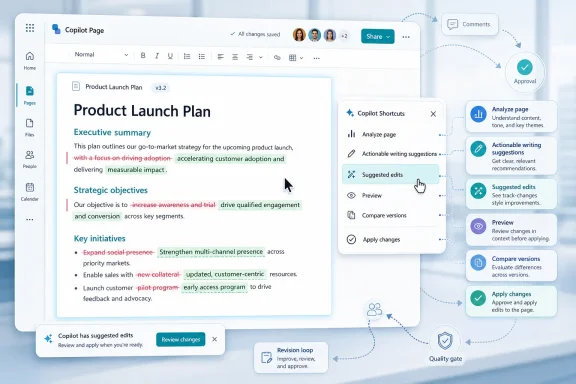
Suggested edits in Copilot Pages gives users a shortcut-driven way to request feedback on the content sitting in front of them. Instead of copying text into a chat pane and asking for “improvements,” the user selects “Suggested edits” from the Copilot Shortcuts menu, lets Copilot analyze the page, and then chooses whether to apply the suggestions.
That workflow matters because it collapses the distance between critique and revision. A writing assistant that lives outside the document is advice; one that can directly change the working canvas is infrastructure. Microsoft is betting that the real productivity gain is not merely asking AI what to write, but letting it participate in the revision loop without forcing the user to leave the page.
That distinction is crucial. Chat is transient by nature: prompts go in, answers come out, and the thread becomes a pile of loosely connected artifacts. Pages gives Microsoft a place to turn those artifacts into something that can be edited, shared, compared, and reused.
Suggested edits strengthens that role. It treats the Page as a living document rather than a pasted Copilot response. The feature is less about novelty than about normalizing an AI-assisted editorial cycle: draft, critique, revise, compare, accept.
For WindowsForum readers who live inside Microsoft 365 all day, this is the part worth watching. Microsoft is not just sprinkling Copilot buttons across apps; it is building a workflow where AI-generated and human-authored content increasingly converge on the same canvas.
Microsoft has already been positioning Copilot shortcuts as a fast-editing layer inside Pages, including options to refine content, adjust tone, change styling, preview changes, and compare versions. “Suggested edits” fits neatly into that model because it gives Copilot a more editorial role without asking the user to invent the right prompt.
That is the subtle product lesson here. Many users do not want to become prompt engineers. They want recognizable commands: improve this, shorten this, make this clearer, suggest edits.
By placing the action in a menu rather than making it depend on a carefully worded chat request, Microsoft reduces the friction that has limited some Copilot adoption. The user does not need to know whether to ask for clarity, concision, structure, tone, grammar, or executive polish. The product supplies the affordance.
But Microsoft 365 Copilot’s real problem has never been whether it can generate text. It has been whether users trust the generated text enough to put it into production. A feature that reviews existing content is Microsoft’s attempt to make Copilot useful even when the first draft did not come from Copilot at all.
That matters in enterprise environments, where the bottleneck is often not blank-page syndrome but review latency. A status update needs tightening. A project plan needs clearer next steps. A customer-facing note needs less ambiguity. A policy draft needs less sludge.
Copilot cannot replace the domain owner who knows whether the content is true. But it can become the first reviewer for structure, readability, and tone. That is a narrower claim than “AI will transform work,” and because it is narrower, it may be more useful.
That distinction will matter to administrators and compliance teams. A feature that suggests edits is easier to justify than one that silently rewrites shared content. The review-and-apply model preserves a visible moment of human approval, even if the product makes accepting changes very easy.
There is still a risk that users will rubber-stamp AI edits because they look polished. Anyone who has reviewed machine-generated prose knows the danger: confident wording can hide weakened meaning. Copilot may improve clarity while accidentally sanding away nuance, caveats, or legally important phrasing.
That is why Microsoft’s implementation details will matter. Version comparison, clear previewing, and the ability to discard edits are not convenience features; they are the guardrails that make this kind of tool acceptable in real workplaces.
The roadmap entry places the feature in Microsoft 365 app and Microsoft Copilot for Microsoft 365 on the web, with Worldwide standard multi-tenant cloud availability. That suggests a mainstream commercial rollout rather than a narrow experimental feature. Preview was listed for June 2026, with general availability in July 2026.
Admins should expect the usual practical pattern: the feature arrives quietly for eligible tenants, users discover it before help desks have updated guidance, and security teams then have to explain what kind of content should or should not be run through Copilot. This is not unique to Microsoft; it is the default rhythm of SaaS AI deployment.
The better organizations will not respond by banning every AI editing tool. They will define which content classes are appropriate, which users need training, and which workflows require human review after Copilot-assisted changes. The worst organizations will either pretend nothing has changed or outsource editorial judgment to the shiniest button in the menu.
Suggested edits is part of Microsoft’s effort to teach Copilot that grammar. It is not enough for AI to answer a prompt. It has to behave like something that belongs inside a document workflow.
That means preserving user control, supporting comparison, respecting collaboration boundaries, and making edits feel reversible. The magic trick is not that Copilot can suggest a better sentence. The magic trick is making the suggestion appear at the exact point where a user is already deciding whether the page is good enough to share.
This is also why Pages matters. Microsoft can use it as a proving ground for AI-native editing behaviors before those patterns spread further across Word, Outlook, Teams, and the broader Microsoft 365 app.
If it works well, Suggested edits becomes a lightweight quality gate. Before a user shares a Page, Copilot can flag vague wording, missing transitions, unclear next steps, or content that does not match the apparent purpose of the document. It may not know whether the quarterly forecast is accurate, but it can tell when the explanation buries the lead.
The catch is that “quality” is contextual. A crisp executive summary, a technical design note, and an incident postmortem should not sound the same. Microsoft will need Copilot to recognize genre and audience without forcing users through a long configuration dance.
That is where the shortcut approach is both promising and limiting. It makes the feature easy to use, but it also hides the assumptions behind the suggestions. Power users will eventually want more control over what “better” means.
For Windows users, that means the feature may be experienced less as a traditional Office update and more as another reason Microsoft wants work to flow through the Microsoft 365 web shell. Copilot Pages already sits naturally in that environment. Suggested edits reinforces the web as the place where AI collaboration features appear early.
This does not mean desktop apps are irrelevant. Word remains the heavyweight editor for many organizations, and Outlook remains the daily command center. But Microsoft’s AI cadence increasingly starts in cloud-connected surfaces, then spreads outward.
That has implications for admins who still think of Microsoft 365 management primarily in terms of desktop app channels. Copilot features often depend on service availability, licensing, tenant settings, and web experiences as much as local software versions. The old question “which build are you on?” is no longer enough.
If Suggested edits optimizes for generic clarity, it may improve rough drafts while flattening voice. Internal documents could become more readable but less specific. Customer communications could become smoother but more sterile. Strategy memos could become less confrontational precisely when they need to name a hard tradeoff.
This is not an argument against the feature. Most business writing could use ruthless simplification. But clarity is not the only virtue, and “quality” is not always the same thing as politeness, brevity, or corporate gloss.
Users will need to learn when to accept Copilot’s edits and when to resist them. The best use of the tool may be adversarial: ask Copilot what is unclear, then make the human decision about how to fix it. The worst use is passive: accept every suggestion because the prose sounds more expensive.
A shortcut here, a suggested edit there, a connector in another app, a context-aware command beside a document. This is how platform shifts often become permanent: not through one dramatic release, but through a thousand small defaults that reshape user expectations.
Suggested edits in Copilot Pages is exactly that kind of change. It will not make headlines like a new Windows version or a major security incident. Yet it may affect daily work more directly than flashier AI demos because it appears at the moment users are preparing work for someone else to read.
That is the terrain Microsoft wants to own. Not merely the blank page, but the almost-finished page. Not merely generation, but judgment.
 Microsoft Moves Copilot From Draft Generator to Desk Editor
The first wave of workplace AI was obsessed with creation. Generate the email, summarize the meeting, draft the proposal, turn the bullet points into something presentable. Microsoft’s new Copilot Pages feature is more interesting because it aims at the next, messier phase: improving work that already exists.Suggested edits in Copilot Pages gives users a shortcut-driven way to request feedback on the content sitting in front of them. Instead of copying text into a chat pane and asking for “improvements,” the user selects “Suggested edits” from the Copilot Shortcuts menu, lets Copilot analyze the page, and then chooses whether to apply the suggestions.
That workflow matters because it collapses the distance between critique and revision. A writing assistant that lives outside the document is advice; one that can directly change the working canvas is infrastructure. Microsoft is betting that the real productivity gain is not merely asking AI what to write, but letting it participate in the revision loop without forcing the user to leave the page.
Copilot Pages Is Becoming the Place Where AI Work Gets Settled
Copilot Pages has always been a slightly awkward but strategically important idea. It is not Word, not Loop in the old sense, not Teams chat, and not just Copilot Chat with a save button. It is Microsoft’s attempt to create a shared, editable surface where AI-generated material can become durable work.That distinction is crucial. Chat is transient by nature: prompts go in, answers come out, and the thread becomes a pile of loosely connected artifacts. Pages gives Microsoft a place to turn those artifacts into something that can be edited, shared, compared, and reused.
Suggested edits strengthens that role. It treats the Page as a living document rather than a pasted Copilot response. The feature is less about novelty than about normalizing an AI-assisted editorial cycle: draft, critique, revise, compare, accept.
For WindowsForum readers who live inside Microsoft 365 all day, this is the part worth watching. Microsoft is not just sprinkling Copilot buttons across apps; it is building a workflow where AI-generated and human-authored content increasingly converge on the same canvas.
The Shortcut Menu Is Microsoft’s Quiet Power Move
The detail that users access this through the Copilot Shortcuts menu may seem like UI trivia. It is not. Shortcuts are how Microsoft turns a feature from an experiment into muscle memory.Microsoft has already been positioning Copilot shortcuts as a fast-editing layer inside Pages, including options to refine content, adjust tone, change styling, preview changes, and compare versions. “Suggested edits” fits neatly into that model because it gives Copilot a more editorial role without asking the user to invent the right prompt.
That is the subtle product lesson here. Many users do not want to become prompt engineers. They want recognizable commands: improve this, shorten this, make this clearer, suggest edits.
By placing the action in a menu rather than making it depend on a carefully worded chat request, Microsoft reduces the friction that has limited some Copilot adoption. The user does not need to know whether to ask for clarity, concision, structure, tone, grammar, or executive polish. The product supplies the affordance.
The Feature Is Small Because the Strategy Is Big
On paper, Roadmap ID 562351 is a writing-quality feature. It analyzes page content and provides actionable suggestions to improve clarity and quality. The user can apply suggestions directly to the page. That is the whole pitch.But Microsoft 365 Copilot’s real problem has never been whether it can generate text. It has been whether users trust the generated text enough to put it into production. A feature that reviews existing content is Microsoft’s attempt to make Copilot useful even when the first draft did not come from Copilot at all.
That matters in enterprise environments, where the bottleneck is often not blank-page syndrome but review latency. A status update needs tightening. A project plan needs clearer next steps. A customer-facing note needs less ambiguity. A policy draft needs less sludge.
Copilot cannot replace the domain owner who knows whether the content is true. But it can become the first reviewer for structure, readability, and tone. That is a narrower claim than “AI will transform work,” and because it is narrower, it may be more useful.
The User Still Owns the Last Mile
Microsoft’s wording around applying suggestions directly to the page is important. The system can propose, but the user still decides. In practical terms, that keeps Copilot on the safer side of the line between assistant and autonomous editor.That distinction will matter to administrators and compliance teams. A feature that suggests edits is easier to justify than one that silently rewrites shared content. The review-and-apply model preserves a visible moment of human approval, even if the product makes accepting changes very easy.
There is still a risk that users will rubber-stamp AI edits because they look polished. Anyone who has reviewed machine-generated prose knows the danger: confident wording can hide weakened meaning. Copilot may improve clarity while accidentally sanding away nuance, caveats, or legally important phrasing.
That is why Microsoft’s implementation details will matter. Version comparison, clear previewing, and the ability to discard edits are not convenience features; they are the guardrails that make this kind of tool acceptable in real workplaces.
The Enterprise Question Is Not Whether It Writes Better
For IT departments, the most important question is not whether Suggested edits can make a paragraph sound smoother. It is where the data goes, which licenses expose the feature, how tenant controls apply, and whether users understand that AI feedback is not the same thing as approval.The roadmap entry places the feature in Microsoft 365 app and Microsoft Copilot for Microsoft 365 on the web, with Worldwide standard multi-tenant cloud availability. That suggests a mainstream commercial rollout rather than a narrow experimental feature. Preview was listed for June 2026, with general availability in July 2026.
Admins should expect the usual practical pattern: the feature arrives quietly for eligible tenants, users discover it before help desks have updated guidance, and security teams then have to explain what kind of content should or should not be run through Copilot. This is not unique to Microsoft; it is the default rhythm of SaaS AI deployment.
The better organizations will not respond by banning every AI editing tool. They will define which content classes are appropriate, which users need training, and which workflows require human review after Copilot-assisted changes. The worst organizations will either pretend nothing has changed or outsource editorial judgment to the shiniest button in the menu.
Copilot Is Learning the Office Grammar of Revision
Microsoft Office succeeded for decades because it understood the grammar of office work: comments, tracked changes, formatting, templates, review cycles, permissions, and file sharing. Generative AI initially arrived as something outside that grammar. It could produce output, but it did not always fit neatly into the way documents actually moved through organizations.Suggested edits is part of Microsoft’s effort to teach Copilot that grammar. It is not enough for AI to answer a prompt. It has to behave like something that belongs inside a document workflow.
That means preserving user control, supporting comparison, respecting collaboration boundaries, and making edits feel reversible. The magic trick is not that Copilot can suggest a better sentence. The magic trick is making the suggestion appear at the exact point where a user is already deciding whether the page is good enough to share.
This is also why Pages matters. Microsoft can use it as a proving ground for AI-native editing behaviors before those patterns spread further across Word, Outlook, Teams, and the broader Microsoft 365 app.
The Writing Assistant Becomes a Quality Gate
There is a temptation to dismiss features like this as another grammar checker with a Copilot badge. That misses the strategic escalation. Traditional grammar tools check sentences; Copilot can evaluate the apparent intent of a page, its organization, and the relationship between sections.If it works well, Suggested edits becomes a lightweight quality gate. Before a user shares a Page, Copilot can flag vague wording, missing transitions, unclear next steps, or content that does not match the apparent purpose of the document. It may not know whether the quarterly forecast is accurate, but it can tell when the explanation buries the lead.
The catch is that “quality” is contextual. A crisp executive summary, a technical design note, and an incident postmortem should not sound the same. Microsoft will need Copilot to recognize genre and audience without forcing users through a long configuration dance.
That is where the shortcut approach is both promising and limiting. It makes the feature easy to use, but it also hides the assumptions behind the suggestions. Power users will eventually want more control over what “better” means.
Windows Users Will Feel This Through the Browser First
The roadmap lists the platform as web, which is increasingly the first stop for Microsoft 365 Copilot features. That is not surprising. The web app gives Microsoft more control over rollout, interface consistency, and service-side AI integration than the older desktop Office architecture.For Windows users, that means the feature may be experienced less as a traditional Office update and more as another reason Microsoft wants work to flow through the Microsoft 365 web shell. Copilot Pages already sits naturally in that environment. Suggested edits reinforces the web as the place where AI collaboration features appear early.
This does not mean desktop apps are irrelevant. Word remains the heavyweight editor for many organizations, and Outlook remains the daily command center. But Microsoft’s AI cadence increasingly starts in cloud-connected surfaces, then spreads outward.
That has implications for admins who still think of Microsoft 365 management primarily in terms of desktop app channels. Copilot features often depend on service availability, licensing, tenant settings, and web experiences as much as local software versions. The old question “which build are you on?” is no longer enough.
The Risk Is Not Bad Writing but Homogenized Writing
The easiest criticism of AI editing tools is that they may make mistakes. They will. But the more interesting problem is that they may make everyone sound the same.If Suggested edits optimizes for generic clarity, it may improve rough drafts while flattening voice. Internal documents could become more readable but less specific. Customer communications could become smoother but more sterile. Strategy memos could become less confrontational precisely when they need to name a hard tradeoff.
This is not an argument against the feature. Most business writing could use ruthless simplification. But clarity is not the only virtue, and “quality” is not always the same thing as politeness, brevity, or corporate gloss.
Users will need to learn when to accept Copilot’s edits and when to resist them. The best use of the tool may be adversarial: ask Copilot what is unclear, then make the human decision about how to fix it. The worst use is passive: accept every suggestion because the prose sounds more expensive.
Microsoft’s AI Rollout Is Becoming More Incremental and More Inescapable
The Copilot story in 2024 and 2025 often felt like a series of big declarations. AI in Windows. AI in Office. AI in Teams. AI in search, security, development, and administration. By 2026, the more revealing changes are smaller.A shortcut here, a suggested edit there, a connector in another app, a context-aware command beside a document. This is how platform shifts often become permanent: not through one dramatic release, but through a thousand small defaults that reshape user expectations.
Suggested edits in Copilot Pages is exactly that kind of change. It will not make headlines like a new Windows version or a major security incident. Yet it may affect daily work more directly than flashier AI demos because it appears at the moment users are preparing work for someone else to read.
That is the terrain Microsoft wants to own. Not merely the blank page, but the almost-finished page. Not merely generation, but judgment.
The July Rollout Makes Copilot Pages Harder to Ignore
This roadmap item is concrete enough for admins and users to plan around, but narrow enough that expectations should stay grounded.- Microsoft lists Suggested edits for Copilot Pages under Roadmap ID 562351, with preview availability in June 2026 and general availability in July 2026.
- The feature is designed for the web experience in Microsoft 365 app and Microsoft Copilot for Microsoft 365.
- Users access it through the Copilot Shortcuts menu by selecting “Suggested edits” on a Copilot Page.
- Copilot analyzes the page and returns actionable suggestions intended to improve clarity and writing quality.
- Users can apply suggestions directly to the page, which makes preview, comparison, and human review especially important.
- Organizations should treat the feature as an AI-assisted editing workflow, not as a substitute for subject-matter, legal, security, or managerial review.
References
- Primary source: Microsoft 365 Roadmap
Published: 2026-07-02T23:12:48.2177075Z
Microsoft 365 Roadmap | Microsoft 365
The Microsoft 365 Roadmap lists updates that are currently planned for applicable subscribers. Check here for more information on the status of new features and updates.www.microsoft.com
- Official source: support.microsoft.com
Use Copilot shortcuts to edit your Microsoft 365 Copilot Page | Microsoft Support
Use Copilot shortcuts in Microsoft 365 Copilot Pages to adjust content, change tone, and format drafts quickly while reviewing and controlling edits.support.microsoft.com - Official source: learn.microsoft.com
Adopt, extend and build Copilot experiences across the Microsoft Cloud | Microsoft Learn
Learn how you can adopt, extend and build Copilot experiences.learn.microsoft.com - Related coverage: m365admin.handsontek.net
Microsoft 365 Copilot: Get suggested edits from Copilot in your Copilot Pages - M365 Admin
Microsoft 365 Copilot will introduce AI-generated suggested edits in Copilot Pages to improve content clarity and quality. Rolling out from June to mid-July 2026, users can request and apply writing feedback directly within pages via Copilot Shortcuts or Chat, with no extra configuration needed...m365admin.handsontek.net - Official source: news.microsoft.com
Introducing Microsoft 365 Copilot — your copilot for work
news.microsoft.com
- Related coverage: techrepublic.com
Microsoft Microsoft 365 Copilot Wave 2 Adds Online Canvas Feature
“Copilot is the new UI for AI,” said Microsoft corporate vice president of AI at Work Jared Spataro at the reveal of Microsoft 365 Copilot Phase 2.www.techrepublic.com
- Related coverage: windowscentral.com
Microsoft Edge may open Copilot automatically from Outlook links | Windows Central
Clicking links in Outlook could soon open Copilot in Edge automatically.www.windowscentral.com - Related coverage: tomsguide.com
Get ready to 'vibe work' in Microsoft Office with new AI agents — here's how | Tom's Guide
Microsoft is adding new AI agents to Word and Excel that let you tell a chatbot what documents to generate or what edits to make, and it should just do it. Here's how it's meant to work.www.tomsguide.com - Related coverage: techradar.com
Microsoft's finally letting you change the Copilot key back to what it was before Windows 11's AI assistant existed | TechRadar
Taking back Right Controlwww.techradar.com - Official source: download.microsoft.com
- Official source: cdn-dynmedia-1.microsoft.com
