

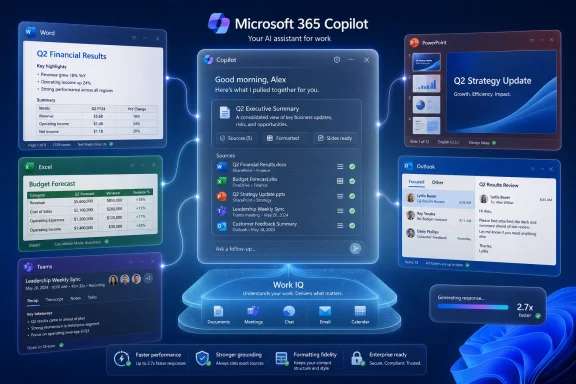
Microsoft announced a redesigned Microsoft 365 Copilot experience on May 28, 2026, promising a cleaner interface, faster startup, smarter work context through Work IQ, and better model selection across Word, Excel, PowerPoint, Outlook, Teams, and the Microsoft 365 Copilot app. The redesign is not merely a fresh coat of Fluent paint; it is Microsoft’s clearest admission yet that Copilot’s biggest obstacle has been workflow friction. For Windows users and enterprise administrators, the real story is whether Microsoft can make AI feel like part of Office rather than another pane, button, or chatbot demanding attention. That is a product-design problem as much as a model problem, and Microsoft is now trying to solve both at once.
The first era of Microsoft 365 Copilot was defined by availability. Microsoft put Copilot buttons into the apps people already used, charged a premium for access, and asked organizations to imagine a future where emails, decks, spreadsheets, meetings, and documents could be summarized or drafted on demand. That strategy made sense as a land grab, but it also made Copilot feel uneven: sometimes magical, sometimes bolted on, and often slower than the task it was meant to accelerate.
The new redesign is Microsoft’s attempt to move from presence to habit. A productivity assistant that requires users to stop, locate the right entry point, restate context, wait too long, and then clean up formatting is not really an assistant; it is another workflow tax. Microsoft’s design language around the update is telling: the company is talking less about novelty and more about reducing the distance between intent and action.
That matters because Office work is full of tiny interruptions. A worker does not always need a grand agentic workflow; sometimes they need a paragraph rewritten, a table cleaned up, a slide tightened, a meeting decision recovered, or a spreadsheet explained without rummaging through three Teams threads and a SharePoint folder. Copilot’s value depends on whether it can appear at those moments without turning them into a ceremony.
The redesign appears aimed at that problem. A cleaner interface, more visible entry points, and a stronger emphasis on chat as the front door all point to the same conclusion: Microsoft wants Copilot to become the connective tissue of Microsoft 365, not a feature users remember only after they have already done the work manually.
A cleaner Microsoft 365 Copilot interface is therefore not just cosmetic. It is a recognition that generative AI products live or die by the activation moment: the instant when a user decides whether to ask the assistant or keep working alone. Every extra click, every ambiguous prompt box, and every confusing boundary between “Copilot in Word” and “Copilot in Microsoft 365” pushes users back toward old habits.
Microsoft has been here before. Office became dominant not because every feature was elegant, but because the suite gradually absorbed the routines of business work. Spell check, templates, collaboration comments, mail merge, pivot tables, and cloud sharing all became normal only after they were placed close enough to the task that users stopped thinking of them as separate tools.
Copilot is more difficult because it is not a single command. It is an interface to interpretation, generation, retrieval, summarization, and increasingly action. That makes design harder: Microsoft has to expose power without creating a cockpit of competing AI affordances.
The redesign’s success will depend on whether Microsoft can make Copilot feel predictable. Users do not need every model name, every agent type, and every grounding source visible at all times. They need to know where to start, what Copilot can see, what it is about to do, and how easily they can correct it when it gets things wrong.
That is the right problem to tackle. Most workers are not prompt engineers, and most useful Office tasks require context scattered across systems. “Draft a customer update” is not a simple writing request if the real answer depends on last week’s Teams call, the current Excel tracker, a PowerPoint from a sales review, and an unresolved email thread with legal.
If Work IQ works as advertised, Copilot becomes less like a generic chatbot and more like a workplace-aware assistant. That distinction is crucial. Generic models can write plausible prose; workplace-aware systems can decide which prose matters, which document should be consulted, and which constraint should not be ignored.
But this is also where the trust problem becomes sharper. The more context Copilot draws from, the more users and administrators will ask exactly what it saw, why it used one source over another, and whether permissions are being honored consistently. Microsoft’s pitch rests on the idea that Copilot can reason across organizational knowledge without becoming a privacy or compliance headache.
For IT pros, Work IQ is therefore both the promise and the audit surface. It may reduce hallucinations by grounding answers in more relevant material, but it also raises the stakes for information architecture. Bad permissions, stale SharePoint sites, poorly labeled documents, and chaotic Teams sprawl become AI quality problems, not just housekeeping problems.
For users, the ideal version of model selection is invisible. A quick rewrite should not require the same reasoning engine as a multi-step research task. A spreadsheet analysis may benefit from one model’s structured reasoning, while a presentation draft may benefit from another model’s style and visual understanding. The user should not need to understand the model marketplace to get a useful result.
For administrators, however, invisibility can be uncomfortable. Model choice affects cost, data handling, latency, and output quality. If Microsoft is going to make Copilot smarter by letting it choose models dynamically, enterprises will want policy controls, logging, and clear documentation about which models are available and under what terms.
This is where Microsoft’s position is stronger than many AI startups but more complicated than it looks. Microsoft owns the productivity surface, controls the identity stack for many enterprises, and can integrate governance into Microsoft 365 admin workflows. At the same time, the more Copilot depends on a constellation of models, connectors, agents, and third-party AI infrastructure, the more important transparency becomes.
The redesign hints at a future where users see Copilot as one assistant, while the system behind it becomes increasingly plural. That may be the right abstraction. But Microsoft will have to prove that abstraction does not become obfuscation.
AI tools are judged differently from traditional software. Users will tolerate a slow export, a long compile, or a big file sync because the waiting is attached to a familiar mechanical task. They are less forgiving when an assistant pauses before helping them think. Latency turns the interaction from conversation into transaction.
This is especially true inside Office. If a user is in Word trying to revise a paragraph, a delay of several seconds changes the mental calculus. The user begins editing manually, loses confidence in the assistant, or treats Copilot as a last resort rather than a constant companion. That is a fatal pattern for a subscription product whose value depends on repeated use.
The 10 percent improvement for complex prompts is more modest, but it may matter in the scenarios Microsoft cares about most. Multi-step queries are where Copilot is supposed to move beyond autocomplete and become a work partner. If those tasks feel too slow or unreliable, the agentic vision collapses back into “summarize this email.”
Performance improvements also have symbolic weight. They suggest Microsoft has heard the complaint that Copilot often felt like an ambitious cloud service squeezed into productivity apps that users expect to be immediate. Office users may forgive an AI assistant for being imperfect; they are less likely to forgive it for making Word or Excel feel heavier.
The hallucination problem has evolved. In the early generative AI boom, the issue was often framed as models inventing facts in isolation. In enterprise settings, the more common problem is subtler: the assistant draws from the wrong file, misses the latest version, ignores an important constraint, or produces an answer that is directionally plausible but operationally unsafe.
Grounding is Microsoft’s way of narrowing that gap. By tying outputs more closely to the user’s documents, meetings, messages, and permissions, Copilot can in theory produce answers that are less generic and more defensible. The challenge is that grounding is not magic. It depends on retrieval quality, document hygiene, metadata, access controls, and the assistant’s ability to explain its own reasoning.
Formatting fidelity is another underrated issue. Office users care deeply about structure, because structure often is the work. A memo that ignores the house style, a spreadsheet answer that breaks table conventions, or a slide draft that mangles layout creates cleanup labor. If Copilot saves five minutes of drafting but adds eight minutes of repair, users will quickly learn not to bother.
Microsoft’s claim that Copilot is getting better at sticking to formatting requests is therefore more than a quality-of-life improvement. It is an attempt to make AI outputs less alien inside the documents where work actually happens.
That control layer is valuable because Microsoft 365 is both broad and messy. The average organization has years of documents, meetings, chats, mailboxes, calendars, lists, and workflows distributed across a stack that users navigate imperfectly. Search helps find things; Copilot is supposed to help interpret and act on them.
This is why the standalone Microsoft 365 Copilot app matters. It gives Microsoft a place to gather work across apps without forcing every interaction to begin inside Word or Teams. If Copilot becomes the place where users ask, decide, draft, and dispatch work, Microsoft gains a new center of gravity inside the productivity suite.
But there is a tension here. Office earned trust by being task-specific. Word is for documents, Excel is for data, PowerPoint is for presentations, Outlook is for communication. Copilot blurs those boundaries, and while that can reduce friction, it can also create uncertainty about where work begins and where artifacts live.
Microsoft must avoid turning Copilot into the new Start menu of productivity: conceptually central, constantly redesigned, and sometimes less efficient than going directly to the app. The best version of Copilot across Microsoft 365 is not a portal users are forced to visit, but a shared intelligence layer that appears wherever the work naturally happens.
The redesign appears to reflect a course correction. Microsoft still wants Copilot to be visible, but visibility is not the same thing as usefulness. A floating button may increase engagement metrics in the short term while irritating users who feel the product is being marketed at them from inside their own workspace.
This is the line Microsoft has to walk. If Copilot is too hidden, users forget it exists. If it is too aggressive, users resent it. The right answer is contextual presence: Copilot should be obvious when it can help and quiet when it cannot.
That design discipline will become more important as Copilot gains agentic capabilities. A suggestion to rewrite a paragraph is one thing; an assistant that can act across files, meetings, and workflows demands a higher standard of consent and clarity. Users need confidence that Copilot is not merely nearby, but appropriately bounded.
The redesign is therefore partly about aesthetics and partly about manners. In enterprise software, manners scale. A tool that respects attention becomes trusted; a tool that constantly announces itself becomes another notification to suppress.
Administrators need predictable rollout controls. They need to know which users receive which Copilot experiences, how model selection is governed, whether third-party model access is involved, how connectors expose business data, and how audit trails work when Copilot synthesizes or acts on information. Microsoft’s design story must be matched by an admin story.
Data readiness will also determine outcomes. Copilot cannot compensate for years of permission sprawl. If everyone can read everything in SharePoint, AI will make that problem more visible. If documents are duplicated, mislabeled, or abandoned, Copilot may retrieve the wrong institutional memory with impressive confidence.
The redesigned experience may even accelerate these issues by increasing usage. A clunky assistant limits risk through neglect; a useful assistant spreads quickly. The better Copilot becomes, the more urgent it is for organizations to revisit retention policies, sensitivity labels, access reviews, connector governance, and user training.
That is not an argument against deployment. It is an argument against treating Copilot as a plug-in. Microsoft is selling Copilot as a new way to work; enterprises should manage it like a new way to expose, combine, and act on knowledge.
That has practical implications. The PC remains the place where many Office workflows happen, especially in managed environments where desktop apps still dominate. If Copilot performance improves in the Microsoft 365 app and inside Office applications, the perceived quality of the Windows productivity experience improves with it.
There is also a hardware and deployment angle. As AI workloads spread across cloud inference, local capabilities, and hybrid experiences, organizations will need to think about device readiness, network performance, identity configuration, update channels, and endpoint management. Copilot may be marketed as software, but its success is felt through the whole Windows estate.
The redesign also reinforces Microsoft’s broader effort to keep Windows relevant in an AI-first productivity world. If the future of work is mediated by assistants, Microsoft wants the assistant to live where Windows users already spend their day. That makes Copilot not just an Office feature, but a defensive layer around Microsoft’s ecosystem.
For users skeptical of AI integration, that may sound like lock-in. For Microsoft, it is the point. The more Copilot understands a user’s files, meetings, messages, and workflows, the harder it becomes to imagine that work moving cleanly elsewhere.
That coherence is visible in the way the pieces fit together. Work IQ supplies context. Model selection supplies capability. Performance improvements reduce friction. UI redesign lowers the cost of asking. Cross-app integration turns Copilot from a feature into a layer.
But coherence does not guarantee success. Microsoft has to persuade users that Copilot is worth trusting repeatedly, not just trying once. It has to persuade administrators that broader context will not become broader exposure. It has to persuade finance teams that usage translates into measurable value rather than another premium SKU sitting underused in the tenant.
The hardest part may be cultural. Office work is full of tacit judgment: knowing which email thread matters, which executive preference is unwritten, which spreadsheet tab is authoritative, and which meeting summary is politically safe to circulate. Copilot can help with that world only if it becomes both context-aware and correction-friendly.
Microsoft’s redesign is a step toward that. It does not settle the debate over AI productivity, but it moves the debate from “can the model do this?” to “can the product make this useful every day?” That is the right question.
The redesigned Microsoft 365 Copilot is aimed squarely at those moments. Faster launch times matter because users will not wait for help with a small task. Better grounding matters because users will not trust an assistant that invents context. Cleaner design matters because users will not hunt through a cluttered interface to save thirty seconds.
This is also why the agentic future depends on mundane reliability. Before users let Copilot coordinate work across apps, they need to see it handle smaller tasks consistently. Trust is accumulated in low-stakes interactions before it is spent on high-stakes delegation.
Microsoft’s advantage is distribution. Copilot does not need to persuade users to adopt a new work platform from scratch; it needs to become more useful inside the platform many organizations already run. Microsoft’s disadvantage is the same distribution: any misstep is immediately felt by millions of people who did not necessarily ask for their Office interface to become an AI experiment.
That is why this redesign is more important than a normal interface refresh. It is Microsoft trying to make Copilot ordinary. In productivity software, ordinary is the prize.
 Microsoft Is Finally Treating Copilot Like an Office Feature, Not an AI Demo
The first era of Microsoft 365 Copilot was defined by availability. Microsoft put Copilot buttons into the apps people already used, charged a premium for access, and asked organizations to imagine a future where emails, decks, spreadsheets, meetings, and documents could be summarized or drafted on demand. That strategy made sense as a land grab, but it also made Copilot feel uneven: sometimes magical, sometimes bolted on, and often slower than the task it was meant to accelerate.The new redesign is Microsoft’s attempt to move from presence to habit. A productivity assistant that requires users to stop, locate the right entry point, restate context, wait too long, and then clean up formatting is not really an assistant; it is another workflow tax. Microsoft’s design language around the update is telling: the company is talking less about novelty and more about reducing the distance between intent and action.
That matters because Office work is full of tiny interruptions. A worker does not always need a grand agentic workflow; sometimes they need a paragraph rewritten, a table cleaned up, a slide tightened, a meeting decision recovered, or a spreadsheet explained without rummaging through three Teams threads and a SharePoint folder. Copilot’s value depends on whether it can appear at those moments without turning them into a ceremony.
The redesign appears aimed at that problem. A cleaner interface, more visible entry points, and a stronger emphasis on chat as the front door all point to the same conclusion: Microsoft wants Copilot to become the connective tissue of Microsoft 365, not a feature users remember only after they have already done the work manually.
The Cleaner Interface Is a Bet on Lowering the Cost of Asking
Microsoft’s redesign puts a premium on simplicity, and that is more consequential than it sounds. Enterprise software often treats capability as the same thing as usability, but Copilot has exposed the gap between those two ideas. Users may have access to powerful models and deep organizational data, yet still fail to adopt the tool if asking for help feels slower, riskier, or more awkward than doing the job themselves.A cleaner Microsoft 365 Copilot interface is therefore not just cosmetic. It is a recognition that generative AI products live or die by the activation moment: the instant when a user decides whether to ask the assistant or keep working alone. Every extra click, every ambiguous prompt box, and every confusing boundary between “Copilot in Word” and “Copilot in Microsoft 365” pushes users back toward old habits.
Microsoft has been here before. Office became dominant not because every feature was elegant, but because the suite gradually absorbed the routines of business work. Spell check, templates, collaboration comments, mail merge, pivot tables, and cloud sharing all became normal only after they were placed close enough to the task that users stopped thinking of them as separate tools.
Copilot is more difficult because it is not a single command. It is an interface to interpretation, generation, retrieval, summarization, and increasingly action. That makes design harder: Microsoft has to expose power without creating a cockpit of competing AI affordances.
The redesign’s success will depend on whether Microsoft can make Copilot feel predictable. Users do not need every model name, every agent type, and every grounding source visible at all times. They need to know where to start, what Copilot can see, what it is about to do, and how easily they can correct it when it gets things wrong.
Work IQ Turns Context Into the Product
The most important phrase in Microsoft’s announcement is not “cleaner interface.” It is Work IQ. Microsoft describes Work IQ as the intelligence layer that helps Copilot understand the user’s work context across files, meetings, chats, email, calendar signals, and organizational data. In plain English, it is Microsoft’s attempt to make Copilot less dependent on the perfect prompt.That is the right problem to tackle. Most workers are not prompt engineers, and most useful Office tasks require context scattered across systems. “Draft a customer update” is not a simple writing request if the real answer depends on last week’s Teams call, the current Excel tracker, a PowerPoint from a sales review, and an unresolved email thread with legal.
If Work IQ works as advertised, Copilot becomes less like a generic chatbot and more like a workplace-aware assistant. That distinction is crucial. Generic models can write plausible prose; workplace-aware systems can decide which prose matters, which document should be consulted, and which constraint should not be ignored.
But this is also where the trust problem becomes sharper. The more context Copilot draws from, the more users and administrators will ask exactly what it saw, why it used one source over another, and whether permissions are being honored consistently. Microsoft’s pitch rests on the idea that Copilot can reason across organizational knowledge without becoming a privacy or compliance headache.
For IT pros, Work IQ is therefore both the promise and the audit surface. It may reduce hallucinations by grounding answers in more relevant material, but it also raises the stakes for information architecture. Bad permissions, stale SharePoint sites, poorly labeled documents, and chaotic Teams sprawl become AI quality problems, not just housekeeping problems.
Model Selection Moves the Battle Behind the Curtain
Microsoft’s redesign also leans into model selection, a trend that has been building across the company’s AI portfolio. Instead of treating Copilot as a single model experience, Microsoft increasingly presents it as a system that can route tasks to different models depending on need. That is a practical concession to reality: no single model is best for every job, and enterprise AI cannot run on vibes alone.For users, the ideal version of model selection is invisible. A quick rewrite should not require the same reasoning engine as a multi-step research task. A spreadsheet analysis may benefit from one model’s structured reasoning, while a presentation draft may benefit from another model’s style and visual understanding. The user should not need to understand the model marketplace to get a useful result.
For administrators, however, invisibility can be uncomfortable. Model choice affects cost, data handling, latency, and output quality. If Microsoft is going to make Copilot smarter by letting it choose models dynamically, enterprises will want policy controls, logging, and clear documentation about which models are available and under what terms.
This is where Microsoft’s position is stronger than many AI startups but more complicated than it looks. Microsoft owns the productivity surface, controls the identity stack for many enterprises, and can integrate governance into Microsoft 365 admin workflows. At the same time, the more Copilot depends on a constellation of models, connectors, agents, and third-party AI infrastructure, the more important transparency becomes.
The redesign hints at a future where users see Copilot as one assistant, while the system behind it becomes increasingly plural. That may be the right abstraction. But Microsoft will have to prove that abstraction does not become obfuscation.
Performance Is the Feature Microsoft Could Least Afford to Ignore
Microsoft says the redesigned Microsoft 365 Copilot app loads more than twice as fast, with load times reduced by over 50 percent. The company also says response times for complex chat prompts have improved by 10 percent. Those numbers may sound like launch-window polish, but they address one of Copilot’s most basic adoption barriers: sluggishness.AI tools are judged differently from traditional software. Users will tolerate a slow export, a long compile, or a big file sync because the waiting is attached to a familiar mechanical task. They are less forgiving when an assistant pauses before helping them think. Latency turns the interaction from conversation into transaction.
This is especially true inside Office. If a user is in Word trying to revise a paragraph, a delay of several seconds changes the mental calculus. The user begins editing manually, loses confidence in the assistant, or treats Copilot as a last resort rather than a constant companion. That is a fatal pattern for a subscription product whose value depends on repeated use.
The 10 percent improvement for complex prompts is more modest, but it may matter in the scenarios Microsoft cares about most. Multi-step queries are where Copilot is supposed to move beyond autocomplete and become a work partner. If those tasks feel too slow or unreliable, the agentic vision collapses back into “summarize this email.”
Performance improvements also have symbolic weight. They suggest Microsoft has heard the complaint that Copilot often felt like an ambitious cloud service squeezed into productivity apps that users expect to be immediate. Office users may forgive an AI assistant for being imperfect; they are less likely to forgive it for making Word or Excel feel heavier.
Better Grounding Is Microsoft’s Answer to the Hallucination Hangover
Microsoft says the redesign includes better internal grounding, reducing hallucinations and improving how closely Copilot follows formatting requests. That sounds incremental, but it goes to the heart of whether Copilot can be trusted with real business work. A confidently wrong summary is not a productivity gain; it is a liability wearing a productivity costume.The hallucination problem has evolved. In the early generative AI boom, the issue was often framed as models inventing facts in isolation. In enterprise settings, the more common problem is subtler: the assistant draws from the wrong file, misses the latest version, ignores an important constraint, or produces an answer that is directionally plausible but operationally unsafe.
Grounding is Microsoft’s way of narrowing that gap. By tying outputs more closely to the user’s documents, meetings, messages, and permissions, Copilot can in theory produce answers that are less generic and more defensible. The challenge is that grounding is not magic. It depends on retrieval quality, document hygiene, metadata, access controls, and the assistant’s ability to explain its own reasoning.
Formatting fidelity is another underrated issue. Office users care deeply about structure, because structure often is the work. A memo that ignores the house style, a spreadsheet answer that breaks table conventions, or a slide draft that mangles layout creates cleanup labor. If Copilot saves five minutes of drafting but adds eight minutes of repair, users will quickly learn not to bother.
Microsoft’s claim that Copilot is getting better at sticking to formatting requests is therefore more than a quality-of-life improvement. It is an attempt to make AI outputs less alien inside the documents where work actually happens.
Copilot Across Microsoft 365 Is Becoming the Real Platform Play
The redesign cannot be understood only as an app update. Microsoft’s larger strategy is to make Copilot the common interface across Microsoft 365, spanning Word, Excel, PowerPoint, Outlook, Teams, OneDrive, SharePoint, and the standalone Microsoft 365 Copilot app. The company is not simply improving a chatbot; it is trying to create a new control layer for work.That control layer is valuable because Microsoft 365 is both broad and messy. The average organization has years of documents, meetings, chats, mailboxes, calendars, lists, and workflows distributed across a stack that users navigate imperfectly. Search helps find things; Copilot is supposed to help interpret and act on them.
This is why the standalone Microsoft 365 Copilot app matters. It gives Microsoft a place to gather work across apps without forcing every interaction to begin inside Word or Teams. If Copilot becomes the place where users ask, decide, draft, and dispatch work, Microsoft gains a new center of gravity inside the productivity suite.
But there is a tension here. Office earned trust by being task-specific. Word is for documents, Excel is for data, PowerPoint is for presentations, Outlook is for communication. Copilot blurs those boundaries, and while that can reduce friction, it can also create uncertainty about where work begins and where artifacts live.
Microsoft must avoid turning Copilot into the new Start menu of productivity: conceptually central, constantly redesigned, and sometimes less efficient than going directly to the app. The best version of Copilot across Microsoft 365 is not a portal users are forced to visit, but a shared intelligence layer that appears wherever the work naturally happens.
The Redesign Also Repairs a Self-Inflicted Adoption Problem
Microsoft has not always handled Copilot’s Office integration gracefully. Some users complained about intrusive Copilot buttons, cluttered surfaces, and AI affordances appearing where they did not fit the rhythm of the app. That pushback was predictable: productivity software is muscle memory, and even small interface changes can feel hostile when they interrupt high-frequency work.The redesign appears to reflect a course correction. Microsoft still wants Copilot to be visible, but visibility is not the same thing as usefulness. A floating button may increase engagement metrics in the short term while irritating users who feel the product is being marketed at them from inside their own workspace.
This is the line Microsoft has to walk. If Copilot is too hidden, users forget it exists. If it is too aggressive, users resent it. The right answer is contextual presence: Copilot should be obvious when it can help and quiet when it cannot.
That design discipline will become more important as Copilot gains agentic capabilities. A suggestion to rewrite a paragraph is one thing; an assistant that can act across files, meetings, and workflows demands a higher standard of consent and clarity. Users need confidence that Copilot is not merely nearby, but appropriately bounded.
The redesign is therefore partly about aesthetics and partly about manners. In enterprise software, manners scale. A tool that respects attention becomes trusted; a tool that constantly announces itself becomes another notification to suppress.
Enterprise IT Will Judge the New Copilot by Governance, Not Shine
For WindowsForum’s sysadmin and IT pro audience, the central question is not whether the new Copilot looks better. It is whether the redesign makes Copilot easier to deploy, govern, support, and explain. A faster UI is welcome, but the operational burden sits elsewhere.Administrators need predictable rollout controls. They need to know which users receive which Copilot experiences, how model selection is governed, whether third-party model access is involved, how connectors expose business data, and how audit trails work when Copilot synthesizes or acts on information. Microsoft’s design story must be matched by an admin story.
Data readiness will also determine outcomes. Copilot cannot compensate for years of permission sprawl. If everyone can read everything in SharePoint, AI will make that problem more visible. If documents are duplicated, mislabeled, or abandoned, Copilot may retrieve the wrong institutional memory with impressive confidence.
The redesigned experience may even accelerate these issues by increasing usage. A clunky assistant limits risk through neglect; a useful assistant spreads quickly. The better Copilot becomes, the more urgent it is for organizations to revisit retention policies, sensitivity labels, access reviews, connector governance, and user training.
That is not an argument against deployment. It is an argument against treating Copilot as a plug-in. Microsoft is selling Copilot as a new way to work; enterprises should manage it like a new way to expose, combine, and act on knowledge.
The Windows Angle Is Quiet but Important
Although this announcement is framed around Microsoft 365, Windows users should pay attention. Microsoft’s AI strategy increasingly spans the desktop, browser, cloud, and productivity suite. The boundaries between Windows Copilot experiences, Microsoft 365 Copilot, Edge, Teams, and Office are becoming less distinct.That has practical implications. The PC remains the place where many Office workflows happen, especially in managed environments where desktop apps still dominate. If Copilot performance improves in the Microsoft 365 app and inside Office applications, the perceived quality of the Windows productivity experience improves with it.
There is also a hardware and deployment angle. As AI workloads spread across cloud inference, local capabilities, and hybrid experiences, organizations will need to think about device readiness, network performance, identity configuration, update channels, and endpoint management. Copilot may be marketed as software, but its success is felt through the whole Windows estate.
The redesign also reinforces Microsoft’s broader effort to keep Windows relevant in an AI-first productivity world. If the future of work is mediated by assistants, Microsoft wants the assistant to live where Windows users already spend their day. That makes Copilot not just an Office feature, but a defensive layer around Microsoft’s ecosystem.
For users skeptical of AI integration, that may sound like lock-in. For Microsoft, it is the point. The more Copilot understands a user’s files, meetings, messages, and workflows, the harder it becomes to imagine that work moving cleanly elsewhere.
Microsoft’s Copilot Pitch Is Getting More Coherent, and More Demanding
The redesigned Microsoft 365 Copilot is part of a broader maturation of enterprise AI. The first wave was about proving that generative models could draft, summarize, and answer. The next wave is about embedding those capabilities into the actual machinery of work. Microsoft now seems to understand that the machinery matters.That coherence is visible in the way the pieces fit together. Work IQ supplies context. Model selection supplies capability. Performance improvements reduce friction. UI redesign lowers the cost of asking. Cross-app integration turns Copilot from a feature into a layer.
But coherence does not guarantee success. Microsoft has to persuade users that Copilot is worth trusting repeatedly, not just trying once. It has to persuade administrators that broader context will not become broader exposure. It has to persuade finance teams that usage translates into measurable value rather than another premium SKU sitting underused in the tenant.
The hardest part may be cultural. Office work is full of tacit judgment: knowing which email thread matters, which executive preference is unwritten, which spreadsheet tab is authoritative, and which meeting summary is politically safe to circulate. Copilot can help with that world only if it becomes both context-aware and correction-friendly.
Microsoft’s redesign is a step toward that. It does not settle the debate over AI productivity, but it moves the debate from “can the model do this?” to “can the product make this useful every day?” That is the right question.
The Office AI Race Will Be Won in the Boring Moments
The most important Copilot use cases are not always the dramatic ones Microsoft shows on stage. They are the boring moments: converting meeting notes into actions, finding the latest version of a plan, turning a rough brief into a polished draft, explaining a spreadsheet formula, or adapting a deck for a different audience. Those moments are where productivity tools become habits.The redesigned Microsoft 365 Copilot is aimed squarely at those moments. Faster launch times matter because users will not wait for help with a small task. Better grounding matters because users will not trust an assistant that invents context. Cleaner design matters because users will not hunt through a cluttered interface to save thirty seconds.
This is also why the agentic future depends on mundane reliability. Before users let Copilot coordinate work across apps, they need to see it handle smaller tasks consistently. Trust is accumulated in low-stakes interactions before it is spent on high-stakes delegation.
Microsoft’s advantage is distribution. Copilot does not need to persuade users to adopt a new work platform from scratch; it needs to become more useful inside the platform many organizations already run. Microsoft’s disadvantage is the same distribution: any misstep is immediately felt by millions of people who did not necessarily ask for their Office interface to become an AI experiment.
That is why this redesign is more important than a normal interface refresh. It is Microsoft trying to make Copilot ordinary. In productivity software, ordinary is the prize.
The Redesign Gives Admins a Shorter Checklist and a Longer Homework Assignment
The concrete message from this update is straightforward: Microsoft 365 Copilot should feel faster, cleaner, and more context-aware than before. The strategic message is bigger: Microsoft is turning Copilot into a work layer that depends on organizational data quality, governance, and user trust. That gives IT leaders a near-term checklist and a longer-term operating model to rethink.- Microsoft announced the redesigned Microsoft 365 Copilot experience on May 28, 2026, with a cleaner interface and tighter integration across Microsoft 365 apps.
- Microsoft says the Copilot app now loads more than twice as fast, with load times reduced by over 50 percent.
- Microsoft says complex chat prompt response times have improved by 10 percent, which matters most for multi-step work rather than simple rewrites.
- Work IQ is the key architectural bet because it uses workplace context to make Copilot more relevant, but it also makes permissions, data hygiene, and governance more important.
- Model selection is becoming part of the Copilot experience, even when users do not see every routing decision behind the scenes.
- The redesign will succeed only if Copilot becomes less intrusive, more predictable, and easier for administrators to control at scale.
References
- Primary source: HotHardware
Published: 2026-05-29T15:18:13.452324

Microsoft Unveils Major Microsoft 365 Copilot Redesign To Streamline Office Workflows
Microsoft unveils a cleaner, faster Microsoft 365 Copilot with a streamlined interface, adaptive prompt box, and consistent in-app side-pane experience.hothardware.com
- Official source: microsoft.com

Introducing a new design for Microsoft 365 Copilot | Microsoft 365 Blog
Copilot’s redesigned experience delivers faster performance, adaptive tools, and clearer AI-powered workflows to help you easily move from intention to outcome. www.microsoft.com
- Official source: blogs.microsoft.com

How Frontier Firms are rebuilding the operating model for the age of AI - The Official Microsoft Blog
Updated May 11, 2026: The post was updated to reflect that third-party plugins will be available starting May 12, 2026. Spend time with any software engineering team right now and you’ll see something worth paying attention to. Over the last few years, the way software gets built has moved... blogs.microsoft.com
- Related coverage: windowscentral.com
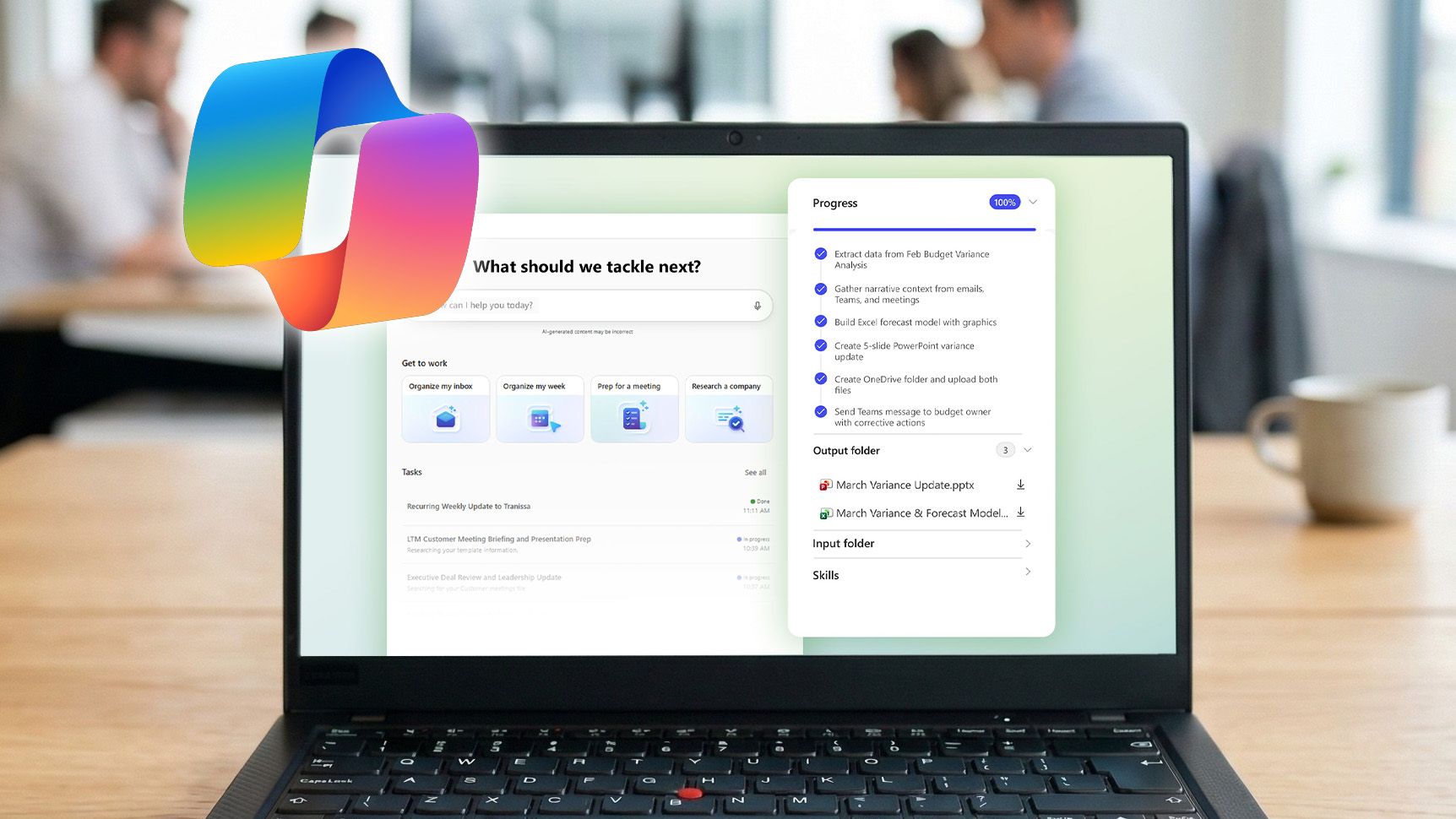
Copilot Cowork suddenly makes Microsoft 365’s AI‑centric E7 subscription far more compelling
Copilot Cowork makes Microsoft 365’s AI‑focused E7 subscription a stronger value proposition for $99 per month. www.windowscentral.com
- Related coverage: techspot.com
- Official source: news.microsoft.com

Copilot Cowork Now Available in the Frontier Program - Source EMEA
 news.microsoft.com
- Official source: techcommunity.microsoft.com
A closer look at Work IQ | Microsoft Community Hub
Work IQ is the intelligence layer that personalizes Microsoft 365 Copilot to you and your organization. techcommunity.microsoft.com
- Official source: learn.microsoft.com

Release Notes for Microsoft 365 Copilot
Lists the features that reach General Availability in each release of Microsoft 365 Copilot.learn.microsoft.com - Related coverage: winbuzzer.com
- Related coverage: computerworld.com

Microsoft upgrades M365 Copilot with Agent Mode
Microsoft wants to usher in an era of “vibe working” with a collaborative AI agent. www.computerworld.com
- Related coverage: techradar.com
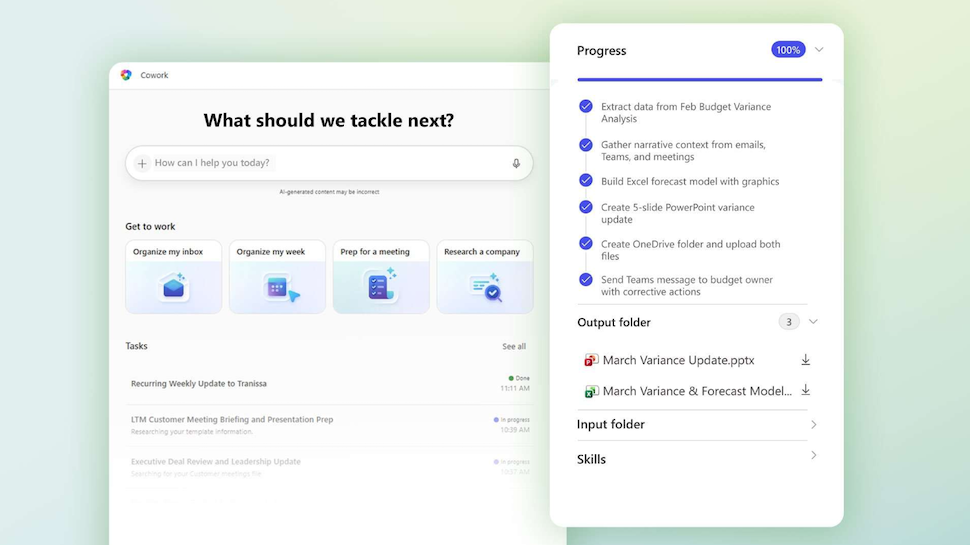
Microsoft and OpenAI are making AI research tools smarter to answer the trickiest questions
Claude will check GPT's research output for qualitywww.techradar.com
- Related coverage: itpro.com

Microsoft unveils Foundry overhaul for managing, optimizing AI agents
The hyperscaler is aiming to simplify AI agent oversight, as organizations grapple with the increasingly complicated business of processing and paying for outputs www.itpro.com
- Official source: cdn-dynmedia-1.microsoft.com
