

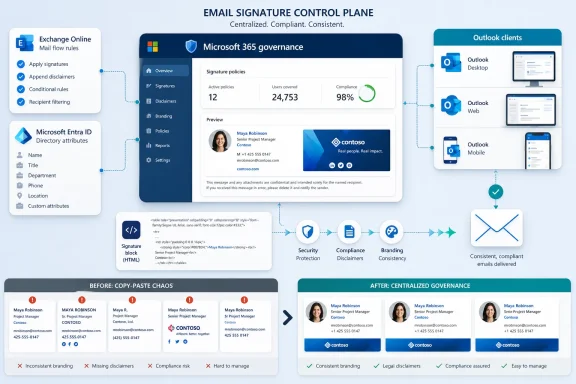
The Humble Email Signature Has Become an IT Control Surface
Email signatures used to be treated as stationery. A name, a title, a phone number, perhaps a corporate logo, and the job was done. In the Microsoft 365 era, that view is increasingly obsolete because the signature is no longer just a cosmetic flourish attached to a message. It is a compliance statement, a brand asset, a directory-dependent identity fragment, and sometimes a marketing channel.
That is why a checklist about signatures is more than vendor collateral dressed up as governance advice. It reflects a familiar enterprise pattern: a small piece of user-facing configuration becomes risky once it scales across thousands of employees, multiple Outlook clients, mobile devices, shared mailboxes, acquisitions, and regional legal requirements. The pain is not that one user’s signature looks ugly. The pain is that the organization cannot reliably say what its outbound mail says about itself.
Microsoft 365 gives administrators several native levers, particularly Exchange Online mail flow rules and Outlook signature settings. But those levers do not automatically create a governance model. They are tools, not operating discipline, and that distinction is where many organizations still get caught.
Microsoft 365 Gives You Pieces, Not a Signature Strategy
The native Microsoft 365 story is split between two worlds. Users can create signatures in Outlook and Outlook on the web, while administrators can append disclaimers, footers, headers, or signature-like blocks through Exchange Online mail flow rules. In theory, that sounds like enough. In practice, it often produces a compromise that satisfies neither users nor administrators.
Transport rules are powerful because they happen after the user sends the message. That makes them attractive for legal disclaimers and standardized footer text, especially when the rule can be scoped by sender, recipient, geography, or message condition. But server-side insertion also means users typically do not see the final signature while composing. For sales, recruiting, legal, and executive communications, that can be more than an aesthetic annoyance; it changes how people proofread and trust the message they are about to send.
Client-side signatures have the opposite problem. Users can see and adjust them while composing, but control becomes fragmented. A signature set in one Outlook environment may not behave identically across classic Outlook, new Outlook, Outlook on the web, and mobile clients. Roaming signatures have improved part of this story by moving user signatures into the cloud for supported scenarios, but roaming is not the same thing as centralized governance.
That is the gap the checklist is aiming at. It is not really about whether signatures can be created. They can. It is about whether the organization can prove that they are accurate, current, secure, consistent, and delegated to the right business owners.
Compliance Is the Least Glamorous Part, Which Is Why It Matters
The checklist’s first pillar, legal and compliance, is predictable but important. Organizations operating under GDPR, CCPA, sector-specific retention rules, financial regulations, or contractual confidentiality obligations often need standardized language on outbound messages. The email disclaimer has been mocked for decades, and not without reason, but the administrative need behind it has not gone away.
The practical issue is not whether a disclaimer magically prevents lawsuits. It is whether the organization can update legally required language quickly and consistently when the business changes. A new office opens in a regulated jurisdiction. A privacy notice changes. A merger introduces a new legal entity. A product line gets spun out. If the signature estate depends on users copying HTML into Outlook, compliance is already losing.
Centralization gives legal teams a way to make controlled changes without trusting thousands of employees to paste the right block into the right client. It also gives IT a recordable mechanism for deployment. That is often the difference between saying “we told everyone to update their signature” and saying “we changed the outbound rule or centralized template on this date.”
But centralization introduces its own governance burden. If every regional legal request becomes an Exchange rule, the environment can become a brittle maze of exceptions. The signature program needs ownership, change control, and periodic review, or yesterday’s compliance fix becomes tomorrow’s mail-flow archaeology.
Security Starts With the Logo Nobody Thinks About
The checklist’s security pillar is more interesting than it first appears. Most users think of email signatures as harmless HTML. Security teams know better. A signature can include externally hosted images, tracking parameters, social links, campaign banners, QR codes, and legal text that users may try to edit or work around.
Visual hosting is a particular blind spot. If logos and banners are hosted on poorly controlled domains, third-party platforms, or abandoned storage locations, the organization has created a dependency in every outbound email. Broken images are embarrassing. Compromised or spoofed assets are worse. A trusted brand mark that pulls from an untrusted location is the sort of mundane weakness that attackers love because nobody thinks to audit it.
Template tampering is another underestimated risk. When users can freely edit signature blocks, they can accidentally remove disclaimers, add outdated titles, include unauthorized claims, or paste malformed HTML that breaks rendering. In higher-risk environments, a user-modified signature can also create impersonation problems inside the company, especially if job titles, certifications, or departmental labels are treated as informal assertions of authority.
None of this means every organization needs a heavyweight signature platform. It does mean security teams should stop treating signatures as mere design work. The attack surface is small, but it is multiplied by every employee and every outbound message.
Entra ID Is Only as Good as the Data Inside It
The checklist’s operational efficiency argument rests on directory synchronization, and that is where Microsoft 365 shops will recognize both the promise and the trap. If signature fields are populated dynamically from Entra ID, IT can stop asking users to paste names, titles, phone numbers, office locations, and department labels into Outlook. The signature becomes an output of the identity system.
That is the right architectural instinct. Identity data should live in the identity platform, not in thousands of hand-edited HTML fragments. When a user changes roles, departments, or locations, the signature should follow the authoritative record rather than depend on human memory.
The trap is that many directories are not as authoritative as people pretend. Job titles are stale. Phone numbers are missing. Departments are inconsistently named. Office fields contain legacy abbreviations from three reorganizations ago. A centralized signature project can therefore become an uncomfortable audit of the organization’s identity hygiene.
That is not a reason to avoid it. It is a reason to treat signature governance as a downstream test of Entra ID quality. If a company cannot generate accurate email signatures from its directory, that weakness likely affects access reviews, dynamic groups, address books, automation, and compliance reporting as well.
Outlook Fragmentation Keeps Making a Small Job Bigger
Cross-device standardization is the pillar that will resonate most with help desks. Outlook is not one thing anymore. It is classic Outlook for Windows, new Outlook for Windows, Outlook on the web, Outlook for Mac, Outlook for iOS, Outlook for Android, and the reality of users sending mail from shared mailboxes, delegated accounts, browser sessions, and mobile devices.
That fragmentation matters because signatures are deeply tied to the compose experience. A signature that looks perfect in desktop Outlook can render differently on mobile. Images may be blocked. Spacing can change. Font fallbacks can mangle a carefully approved template. Reply chains can accumulate duplicate disclaimers if rules are not carefully designed.
The result is a class of IT tickets that feels too trivial to deserve strategic attention but too frequent to ignore. “My logo is huge.” “My signature disappeared.” “The disclaimer shows twice.” “My mobile signature is wrong.” “Marketing says my banner is outdated.” Each one is small. Together they form a tax on support capacity.
The checklist’s promise of unified branding across Outlook clients should be read with some skepticism because no tool can repeal the weirdness of HTML email rendering. But the governance principle is sound: the fewer places signatures are manually created, the fewer places they can drift.
Marketing Wants Agility; IT Wants Fewer Tickets
The collaboration pillar is perhaps the most candid part of the argument. Marketing teams increasingly see email signatures as inventory. Every employee email can carry a campaign banner, event promotion, product launch message, hiring push, or brand update. IT teams, meanwhile, tend to see every banner request as another ticket with unclear ownership and high annoyance potential.
That tension is not unique to signatures. It is the same operating model problem that appears in websites, collaboration platforms, endpoint notifications, and intranet publishing. Business teams want autonomy over content. IT wants guardrails, security, auditability, and a way to avoid being the bottleneck for every minor change.
A mature signature system separates template governance from content operations. IT should own integration, security, permissions, and reliability. Legal should own mandated language. Marketing should own approved campaign content within defined boundaries. HR or operations may own identity field standards. Without that division, the signature estate becomes either locked down and stale or flexible and chaotic.
The checklist is selling “frictionless collaboration,” but the more grounded lesson is that delegation only works when the permissions model matches the business process. Giving marketing autonomy is useful only if IT can constrain where images are hosted, who approves templates, how long campaigns run, and which users or groups receive which content.
The Real Competitor Is Still Copy-and-Paste HTML
For many organizations, the status quo is not a carefully designed Microsoft-native signature system. It is a Word document, an intranet page, or an email from corporate communications telling employees to copy a block of HTML into Outlook. That workflow survives because it is easy to start and cheap to ignore.
It also collapses at scale. Users paste the wrong version. Formatting breaks. Titles are outdated. Remote employees miss the memo. Mobile clients do their own thing. Executives demand special treatment. Regional disclaimers diverge. Nobody knows which campaign banner is live because, in reality, every user controls their own little branch of the brand.
The operational damage is not limited to aesthetics. Manual signature management makes onboarding and offboarding sloppier. It increases support dependency. It creates inconsistent external presentation. It weakens legal update discipline. It also trains users to treat corporate identity artifacts as personal stationery rather than managed business communications.
That is why the checklist’s strongest argument is not that signatures are hard. It is that manual signature maintenance is a bad control model for a cloud-managed workplace.
Native Tools May Be Enough, but Only for the Right Problem
It would be too easy to turn this into a simple “Microsoft 365 cannot do signatures properly” story. The reality is more nuanced. Exchange Online mail flow rules can handle organization-wide disclaimers and signature-like blocks. Outlook can handle user signatures. Roaming signatures help reduce some per-device inconsistency. For smaller organizations with simple requirements, that may be sufficient.
The problems begin when requirements multiply. Different regions need different legal text. Departments need different templates. Marketing wants timed campaigns. Users need to see signatures while composing. Shared mailboxes need consistent treatment. Mobile behavior matters. Directory attributes must suppress empty fields elegantly. Replies should not accumulate duplicate footers. Images must be centrally hosted and controlled.
At that point, native tools often become an exercise in engineering around edge cases. PowerShell scripts, transport rule exceptions, manual templates, and user guidance can all help, but they can also create a maintenance burden that outlives the original project. The hidden cost is not licensing. It is the ongoing attention required to keep the system sane.
Third-party signature platforms exist because that middle ground is messy. The question for IT is not whether a vendor can produce prettier signatures. The question is whether the organization’s requirements have outgrown what Microsoft’s built-in tooling can govern cleanly.
The Checklist Is Also a Buying Signal
ITPro’s checklist is framed as a quick-reference guide, and the language is unmistakably aimed at IT professionals who are tired of formatting bugs and recurring tickets. But it also functions as a buying signal for a category of software that has become more important as Microsoft 365 estates mature. Signature management is no longer just a design add-on; it is part of the broader SaaS governance market.
That market thrives on the gap between what a platform makes possible and what an enterprise needs operationalized. Microsoft 365 provides the foundation: identity, mail flow, policy, clients, and administration. Vendors package workflows around the awkward seams: template design, delegation, campaign scheduling, cross-client rendering, rule targeting, reporting, and support reduction.
This is a familiar Microsoft ecosystem pattern. The platform covers the common case. Partners monetize the messy case. Administrators are left to decide whether their environment is simple enough to stay native or complex enough to justify another managed service in the stack.
That decision should be made with eyes open. A third-party signature platform touches outbound communications, directory data, and sometimes mail routing or message processing. It deserves security review, data-processing scrutiny, resilience planning, and exit strategy analysis. Solving signature chaos by adding an unaudited dependency is not governance; it is outsourcing the blind spot.
The Governance Test Belongs Before the Tool Selection
The best use of the checklist is not to rush into a product evaluation. It is to force a governance conversation that many organizations have postponed. Who owns the signature standard? Which legal entities require specific text? Which Entra ID attributes are authoritative? Who can approve a campaign banner? Where are images hosted? What happens when a user’s department field is blank? How are shared mailboxes handled? How are exceptions documented?
Those questions matter because tool selection without governance simply automates confusion. A centralized system can make bad data propagate faster. A delegated marketing workflow can publish off-brand or expired campaigns faster. A legal template library can become obsolete faster. Automation magnifies discipline and disorder alike.
The right sequence is therefore boring but effective. Define ownership. Clean directory attributes. Document mandatory language. Decide which clients and devices must be supported. Establish hosting rules for visual assets. Test rendering in realistic mail flows. Then decide whether Microsoft-native controls, scripts, or a dedicated platform best fit the operating model.
That approach may sound heavier than the problem deserves. But every IT team that has inherited a sprawling signature mess knows the truth: small unmanaged things become enterprise problems precisely because nobody wanted to treat them as enterprise problems.
The Signature Estate Now Deserves a Control Plane
The concrete lesson from ITPro’s checklist is that signature management has crossed from office-polish chore into governance work. A practical review should leave administrators with a short list of actions, not just a prettier footer.
- Organizations should treat legal disclaimers and required notices as centrally governed content, not as text that users are expected to maintain manually.
- Security teams should review where signature images, banners, links, and templates are hosted because every outbound message can amplify a weak hosting decision.
- Entra ID attribute quality should be tested before dynamic signatures are rolled out, since stale directory data will immediately become visible to customers and partners.
- IT teams should validate signature behavior across classic Outlook, new Outlook, Outlook on the web, Mac, and mobile clients before promising universal consistency.
- Marketing autonomy should be implemented through scoped permissions and approval workflows rather than informal requests to IT.
- Native Microsoft 365 tools may be enough for simple environments, but complex branding, compliance, and campaign requirements often expose the limits of transport rules and user-managed signatures.
The email signature will never be the most exciting part of Microsoft 365 administration, and that is exactly why it keeps causing avoidable trouble. The organizations that get this right will not be the ones with the flashiest footer; they will be the ones that turn a neglected fragment of outbound mail into a governed, auditable, and low-friction service. As Outlook continues to evolve and Microsoft keeps shifting more user experience into the cloud, signature governance will become less about formatting and more about whether IT can impose order on the everyday details that customers actually see.
References
- Email Signature Compliance Checklist IT Pro · 2026-06-22T15:12:12.435673
- learn.microsoft.com learn.microsoft.com