

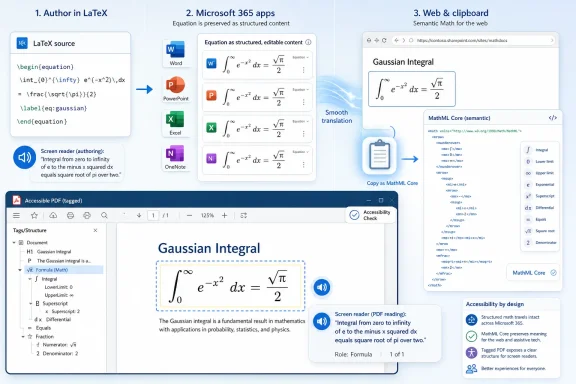
Microsoft is rolling out improved LaTeX handling, MathML Core-compatible clipboard output, and more accessible math in exported PDFs to Microsoft 365 Beta Channel users in June 2026 across Word, PowerPoint, Excel, and OneNote. The change sounds narrow until you remember how often equations are the part of a document workflow that breaks first. Microsoft is not merely polishing the equation editor; it is trying to make math survive the trip between web pages, Office documents, assistive technologies, and PDFs. That is a small product update with unusually large implications for classrooms, research groups, engineering teams, and accessibility offices.
For decades, mainstream productivity software has treated mathematical notation as a special case: useful enough to include, difficult enough to isolate, and fragile enough to become someone else’s problem once the document left the original editor. A formula might look correct on the author’s screen, but turn into a blurry image in a slide deck, a mangled line of symbols in an email, or an inaccessible lump inside a PDF.
The new Microsoft 365 Beta Channel work attacks that problem at the level where it actually lives. Equations need to be editable, portable, and understandable by machines. If they are only visually convincing, they are not really part of the document in the same way a paragraph, table, or chart is.
That shift matters because mathematical communication is no longer confined to journals and textbooks. Students paste from learning platforms into OneNote, researchers move equations from LaTeX notes into Word manuscripts, engineers present calculations in PowerPoint, and accessibility teams are expected to produce PDFs that screen readers can navigate. The old assumption that math is a visual artifact has been collapsing for years.
Microsoft’s update is best read as an interoperability play. LaTeX is the language many technical users already trust; MathML is the web and accessibility standard that machines can parse; PDF remains the stubborn end format that institutions still demand. Microsoft 365 sits in the middle of all three, and that middle position is exactly why this rollout is more important than a routine Insider feature drop.
Microsoft has supported equation entry for years, including linear input that resembles LaTeX in places. The newer work goes further by improving the path between LaTeX math notation and Office Math Markup Language, the internal representation Microsoft uses for equations. That distinction is important: Office is not becoming a LaTeX editor. It is becoming better at translating LaTeX into native Office math objects that can then be edited, displayed, copied, and exported.
For users, the practical benefit is simple. A student can paste a LaTeX equation into Word or PowerPoint and have a better chance of getting a proper editable equation rather than a string of source code. A lecturer can prepare slides from existing material without manually rebuilding every expression. A researcher moving between a LaTeX-first workflow and a Word-required submission process gets fewer opportunities for subtle transcription errors.
There are still boundaries. Microsoft’s own documentation makes clear that supported LaTeX is not the same as an entire TeX distribution with every package, macro, and edge case. That is not a failure so much as a reminder that Office is translating mathematical notation, not executing arbitrary LaTeX projects. Anyone expecting
But most day-to-day equation exchange does not require the whole LaTeX universe. It requires fractions, matrices, roots, Greek symbols, operators, limits, integrals, and notation that round-trips without losing intent. That is where Microsoft’s approach has a chance to make Office feel less hostile to technical users who never wanted to choose between mathematical precision and institutional document requirements.
MathML has had a long and uneven history. It promised semantic and presentational math on the web, but browser support was inconsistent for years, and many platforms fell back to images, JavaScript renderers, or plain-text approximations. MathML Core narrows the scope to a better-defined subset intended for modern browser engines and interoperable implementations.
That makes it a better target for productivity software. If Microsoft 365 can place MathML Core-compatible output on the clipboard, equations copied from Office have a better chance of arriving in web-based learning systems, publishing tools, accessibility workflows, and other applications as structured math rather than decorative pixels. The clipboard becomes less of a dumb transfer pipe and more of a standards-aware bridge.
This is where the update intersects with the web’s slow maturation around math. Technical writing increasingly happens in hybrid spaces: a Word document becomes a PDF, a slide deck becomes a web recording, a learning management system consumes copied content, and a browser-based editor becomes the front end for course material. Copy and paste is still the most common integration layer in the world, which means standards on the clipboard matter.
Microsoft’s move also reduces the isolation of Office Math Markup Language. OMML is powerful inside Office documents, but it is not the lingua franca of the web. By improving MathML import and export, Microsoft can keep its native document model while acknowledging that equations often need to leave the Office ecosystem intact.
The problem is not merely that equations looked bad. The problem is that a visually correct equation could be structurally meaningless. If a formula is exported as an image, assistive technology may get nothing useful. If it is represented as a loose sequence of positioned characters, the reading order and mathematical relationships can be wrong. If the author supplies alt text, that text may be inconsistent, incomplete, or impossible to maintain at scale.
Microsoft’s latest approach embeds mathematical structure into the tagged PDF output so that capable readers and assistive technologies can interpret it. That is the right direction. Accessibility should not depend on a heroic author manually describing every equation after the fact. The document pipeline itself should preserve enough structure that the math remains navigable.
This does not mean every PDF reader or screen reader will immediately deliver a perfect experience. Accessible math in PDF is an ecosystem problem, not a single-vendor switch. Office must export useful structure, PDF readers must expose it correctly, assistive technologies must consume it, and institutions must use export settings that preserve accessibility tags. A broken link anywhere in that chain can still leave users with inaccessible math.
Even so, Microsoft’s role is unusually important because of its reach. Word and PowerPoint are default authoring tools in schools, universities, government offices, and corporate training departments. If these applications produce better tagged PDFs by default, the baseline quality of accessible STEM material can improve without requiring every instructor or administrator to become a markup expert.
This distinction is especially important in schools and enterprises, where Office versions are often pinned, staged, or governed by policy. A university accessibility office may be eager to standardize on improved PDF math exports, but its managed Windows labs might not receive the feature at the same time as individual Insider testers. A government agency may need validation before changing document remediation guidance. A corporate engineering group may have add-ins, templates, or compliance requirements that complicate rapid adoption.
Beta also implies feedback is still part of the story. Math is full of edge cases: nested radicals, aligned equations, custom spacing, chemical notation, matrices, multi-line derivations, and symbols that behave differently depending on context. Accessibility introduces another layer, because a formula that looks right may still be read poorly. Microsoft will need real-world documents from real users to find the cracks.
That said, preview availability is exactly how this kind of feature should arrive. The worst path would be a silent change to production PDF exports or clipboard behavior that breaks established workflows. By starting with Beta Channel users, Microsoft can gather telemetry and complaints from the people most likely to push the feature beyond demo equations.
In education, the update addresses a daily mismatch. Instructors may prepare material in Word or PowerPoint, students may consume it in PDFs or learning management systems, and disabled students may rely on screen readers or braille displays. If equations fail at export time, the burden often lands on the student or an accessibility office after the document is already “finished.”
In research and engineering, the problem is less about legal accessibility requirements and more about fidelity. Equations copied from one environment to another are vulnerable to small errors that can change meaning. Better LaTeX import and MathML-compatible transfer do not eliminate review, but they reduce the number of places where a human must manually reconstruct notation.
For sysadmins, this is one of those Office changes that may seem too academic until it appears in a support ticket. A faculty member asks why a PDF exported from Word is not read correctly. A training department wants to know whether it can publish accessible technical material without a specialist tool. A compliance team asks which Office builds support a given accessibility behavior. The answer will depend on channel, platform, build, and the rest of the PDF toolchain.
This is classic Microsoft 365 platform pragmatism. The company does not need to surrender control of the document experience to make Office more interoperable. It needs enough high-quality import and export that users stop treating Office as a dead end for technical content.
That helps Microsoft defend Office in environments where web-native tools, Markdown workflows, LaTeX editors, and collaborative research platforms have eaten away at its authority. The battle is no longer just whether Word can format a paper. It is whether Word can participate in a workflow that includes GitHub, Canvas, Overleaf, browser-based publishing tools, PDF/UA expectations, and assistive technology.
If the math pipeline improves, Microsoft 365 becomes more credible in STEM-heavy settings where it has often been tolerated rather than loved. A researcher may still prefer LaTeX for final typesetting, but Word becomes less painful for collaboration. A teacher may still use a web platform for assignments, but PowerPoint becomes a better source of accessible content. An accessibility office may still need specialist validation, but the remediation burden can shrink.
Even within LaTeX, user expectations vary wildly. Some people mean simple inline notation. Others mean documents built on custom macros, package-specific environments, and domain-specific conventions. Microsoft can support a useful subset and still disappoint power users who expect Office to behave like a TeX engine.
MathML has its own complications. Presentation MathML can describe how notation should appear, but mathematical meaning is sometimes more nuanced than visual structure. Accessibility tools may read the same expression differently depending on user settings, language, verbosity preferences, and the software stack. There is no single “correct” spoken rendering for every mathematical expression in every educational context.
PDF remains the hardest endpoint. The format’s ubiquity is both its strength and its curse. A tagged PDF with embedded math structure is only as useful as the reader and assistive technology support around it. Microsoft can improve the authoring side, but the ecosystem must catch up before users experience the change consistently.
IT teams should also pay attention to platform differences. Microsoft 365 features often arrive at different times across Windows, Mac, web, iOS, and Android. The user-facing story may say “Microsoft 365,” but the practical support matrix may be more granular. That matters when faculty, students, or employees move between devices.
The other deployment issue is training. Better LaTeX support does not help if users paste equations into ordinary text instead of math zones. Accessible PDF export does not help if users choose export paths that strip tags. MathML compatibility does not help if downstream systems sanitize or discard the markup. The feature reduces friction, but it does not abolish the need for good authoring habits.
This is where Microsoft could make or break the rollout. The technology needs clear guidance in the product, not just documentation pages. Users need to know when an equation is native, when it is an image, when it will export accessibly, and when something has fallen back to a less useful representation. Invisible structure is powerful, but only if authors can trust it.
That is also why the update feels overdue. Microsoft 365 has long been the default productivity suite for institutions that produce enormous amounts of educational and technical material. When the default tools fail at math accessibility, the failure scales. When they improve, the improvement can scale just as dramatically.
The feature also reflects a broader reality about modern Office. Microsoft can no longer assume that documents live entirely inside its own applications. The modern document is copied, exported, uploaded, parsed, indexed, read aloud, converted, and republished. Any content type that cannot survive those transitions becomes a liability.
Math has been one of the clearest examples of that liability. It is semantically dense, visually precise, and often essential to the meaning of the document. Treating it as a picture was always a compromise. Microsoft is now moving closer to treating it as first-class content.
The more concrete implications are straightforward:
 Microsoft Is Finally Treating Equations as Data, Not Decoration
For decades, mainstream productivity software has treated mathematical notation as a special case: useful enough to include, difficult enough to isolate, and fragile enough to become someone else’s problem once the document left the original editor. A formula might look correct on the author’s screen, but turn into a blurry image in a slide deck, a mangled line of symbols in an email, or an inaccessible lump inside a PDF.The new Microsoft 365 Beta Channel work attacks that problem at the level where it actually lives. Equations need to be editable, portable, and understandable by machines. If they are only visually convincing, they are not really part of the document in the same way a paragraph, table, or chart is.
That shift matters because mathematical communication is no longer confined to journals and textbooks. Students paste from learning platforms into OneNote, researchers move equations from LaTeX notes into Word manuscripts, engineers present calculations in PowerPoint, and accessibility teams are expected to produce PDFs that screen readers can navigate. The old assumption that math is a visual artifact has been collapsing for years.
Microsoft’s update is best read as an interoperability play. LaTeX is the language many technical users already trust; MathML is the web and accessibility standard that machines can parse; PDF remains the stubborn end format that institutions still demand. Microsoft 365 sits in the middle of all three, and that middle position is exactly why this rollout is more important than a routine Insider feature drop.
LaTeX Comes Further Inside the Office Perimeter
LaTeX has always occupied a strange place in Microsoft Office culture. It is beloved by mathematicians, physicists, computer scientists, and many engineers, but it comes from a world that values plain text, reproducibility, and typesetting precision more than Office’s familiar graphical editing model. Word, by contrast, won because it made document production approachable for everyone else.Microsoft has supported equation entry for years, including linear input that resembles LaTeX in places. The newer work goes further by improving the path between LaTeX math notation and Office Math Markup Language, the internal representation Microsoft uses for equations. That distinction is important: Office is not becoming a LaTeX editor. It is becoming better at translating LaTeX into native Office math objects that can then be edited, displayed, copied, and exported.
For users, the practical benefit is simple. A student can paste a LaTeX equation into Word or PowerPoint and have a better chance of getting a proper editable equation rather than a string of source code. A lecturer can prepare slides from existing material without manually rebuilding every expression. A researcher moving between a LaTeX-first workflow and a Word-required submission process gets fewer opportunities for subtle transcription errors.
There are still boundaries. Microsoft’s own documentation makes clear that supported LaTeX is not the same as an entire TeX distribution with every package, macro, and edge case. That is not a failure so much as a reminder that Office is translating mathematical notation, not executing arbitrary LaTeX projects. Anyone expecting
amsmath, custom macros, journal templates, and BibTeX-adjacent complexity to behave like they do in a full LaTeX toolchain will still be disappointed.But most day-to-day equation exchange does not require the whole LaTeX universe. It requires fractions, matrices, roots, Greek symbols, operators, limits, integrals, and notation that round-trips without losing intent. That is where Microsoft’s approach has a chance to make Office feel less hostile to technical users who never wanted to choose between mathematical precision and institutional document requirements.
MathML Core Makes Copy and Paste Less Naïve
The second piece of the rollout, MathML Core compatibility, is less flashy than LaTeX but arguably more strategic. LaTeX is how many humans author equations. MathML is how software can represent mathematical structure in a way that browsers, accessibility tools, and document systems can understand.MathML has had a long and uneven history. It promised semantic and presentational math on the web, but browser support was inconsistent for years, and many platforms fell back to images, JavaScript renderers, or plain-text approximations. MathML Core narrows the scope to a better-defined subset intended for modern browser engines and interoperable implementations.
That makes it a better target for productivity software. If Microsoft 365 can place MathML Core-compatible output on the clipboard, equations copied from Office have a better chance of arriving in web-based learning systems, publishing tools, accessibility workflows, and other applications as structured math rather than decorative pixels. The clipboard becomes less of a dumb transfer pipe and more of a standards-aware bridge.
This is where the update intersects with the web’s slow maturation around math. Technical writing increasingly happens in hybrid spaces: a Word document becomes a PDF, a slide deck becomes a web recording, a learning management system consumes copied content, and a browser-based editor becomes the front end for course material. Copy and paste is still the most common integration layer in the world, which means standards on the clipboard matter.
Microsoft’s move also reduces the isolation of Office Math Markup Language. OMML is powerful inside Office documents, but it is not the lingua franca of the web. By improving MathML import and export, Microsoft can keep its native document model while acknowledging that equations often need to leave the Office ecosystem intact.
Accessible PDFs Are the Real Test of the Promise
The accessible PDF work is the most consequential part of the update because it touches a long-running failure in digital publishing. PDFs are everywhere in education, government, law, corporate training, and academic distribution, yet mathematical notation inside PDFs has often been a nightmare for screen readers and braille workflows.The problem is not merely that equations looked bad. The problem is that a visually correct equation could be structurally meaningless. If a formula is exported as an image, assistive technology may get nothing useful. If it is represented as a loose sequence of positioned characters, the reading order and mathematical relationships can be wrong. If the author supplies alt text, that text may be inconsistent, incomplete, or impossible to maintain at scale.
Microsoft’s latest approach embeds mathematical structure into the tagged PDF output so that capable readers and assistive technologies can interpret it. That is the right direction. Accessibility should not depend on a heroic author manually describing every equation after the fact. The document pipeline itself should preserve enough structure that the math remains navigable.
This does not mean every PDF reader or screen reader will immediately deliver a perfect experience. Accessible math in PDF is an ecosystem problem, not a single-vendor switch. Office must export useful structure, PDF readers must expose it correctly, assistive technologies must consume it, and institutions must use export settings that preserve accessibility tags. A broken link anywhere in that chain can still leave users with inaccessible math.
Even so, Microsoft’s role is unusually important because of its reach. Word and PowerPoint are default authoring tools in schools, universities, government offices, and corporate training departments. If these applications produce better tagged PDFs by default, the baseline quality of accessible STEM material can improve without requiring every instructor or administrator to become a markup expert.
The Beta Channel Label Should Temper the Victory Lap
The update is available to Microsoft 365 Beta Channel users, which means it is not yet the universal Office experience. That matters for IT departments and accessibility coordinators who need predictable deployment timelines. A feature in the Beta Channel can be promising, but it is not the same thing as a production guarantee across Current Channel, Monthly Enterprise Channel, and Semi-Annual Enterprise Channel environments.This distinction is especially important in schools and enterprises, where Office versions are often pinned, staged, or governed by policy. A university accessibility office may be eager to standardize on improved PDF math exports, but its managed Windows labs might not receive the feature at the same time as individual Insider testers. A government agency may need validation before changing document remediation guidance. A corporate engineering group may have add-ins, templates, or compliance requirements that complicate rapid adoption.
Beta also implies feedback is still part of the story. Math is full of edge cases: nested radicals, aligned equations, custom spacing, chemical notation, matrices, multi-line derivations, and symbols that behave differently depending on context. Accessibility introduces another layer, because a formula that looks right may still be read poorly. Microsoft will need real-world documents from real users to find the cracks.
That said, preview availability is exactly how this kind of feature should arrive. The worst path would be a silent change to production PDF exports or clipboard behavior that breaks established workflows. By starting with Beta Channel users, Microsoft can gather telemetry and complaints from the people most likely to push the feature beyond demo equations.
The Real Audience Is Bigger Than Mathematicians
It is tempting to frame this as a gift to mathematicians, but that undersells the audience. The obvious beneficiaries include students, educators, researchers, and engineers, yet the downstream users include accessibility specialists, instructional designers, compliance teams, and IT admins who are often responsible for the documents others create.In education, the update addresses a daily mismatch. Instructors may prepare material in Word or PowerPoint, students may consume it in PDFs or learning management systems, and disabled students may rely on screen readers or braille displays. If equations fail at export time, the burden often lands on the student or an accessibility office after the document is already “finished.”
In research and engineering, the problem is less about legal accessibility requirements and more about fidelity. Equations copied from one environment to another are vulnerable to small errors that can change meaning. Better LaTeX import and MathML-compatible transfer do not eliminate review, but they reduce the number of places where a human must manually reconstruct notation.
For sysadmins, this is one of those Office changes that may seem too academic until it appears in a support ticket. A faculty member asks why a PDF exported from Word is not read correctly. A training department wants to know whether it can publish accessible technical material without a specialist tool. A compliance team asks which Office builds support a given accessibility behavior. The answer will depend on channel, platform, build, and the rest of the PDF toolchain.
Microsoft’s Standards Bet Is Also a Platform Bet
The deeper story here is Microsoft’s willingness to route Office math through open standards at the boundaries. Internally, Microsoft can keep OMML because it suits Office’s editing model. Externally, it needs LaTeX and MathML because those are the formats users and other systems recognize.This is classic Microsoft 365 platform pragmatism. The company does not need to surrender control of the document experience to make Office more interoperable. It needs enough high-quality import and export that users stop treating Office as a dead end for technical content.
That helps Microsoft defend Office in environments where web-native tools, Markdown workflows, LaTeX editors, and collaborative research platforms have eaten away at its authority. The battle is no longer just whether Word can format a paper. It is whether Word can participate in a workflow that includes GitHub, Canvas, Overleaf, browser-based publishing tools, PDF/UA expectations, and assistive technology.
If the math pipeline improves, Microsoft 365 becomes more credible in STEM-heavy settings where it has often been tolerated rather than loved. A researcher may still prefer LaTeX for final typesetting, but Word becomes less painful for collaboration. A teacher may still use a web platform for assignments, but PowerPoint becomes a better source of accessible content. An accessibility office may still need specialist validation, but the remediation burden can shrink.
The Catch Is That Interoperability Is Never Finished
There is a danger in overstating what this rollout solves. Math interoperability is not one problem; it is a stack of translation problems with different failure modes. LaTeX to OMML is not the same as OMML to MathML, which is not the same as MathML in a browser, which is not the same as MathML embedded in a tagged PDF and consumed by a screen reader.Even within LaTeX, user expectations vary wildly. Some people mean simple inline notation. Others mean documents built on custom macros, package-specific environments, and domain-specific conventions. Microsoft can support a useful subset and still disappoint power users who expect Office to behave like a TeX engine.
MathML has its own complications. Presentation MathML can describe how notation should appear, but mathematical meaning is sometimes more nuanced than visual structure. Accessibility tools may read the same expression differently depending on user settings, language, verbosity preferences, and the software stack. There is no single “correct” spoken rendering for every mathematical expression in every educational context.
PDF remains the hardest endpoint. The format’s ubiquity is both its strength and its curse. A tagged PDF with embedded math structure is only as useful as the reader and assistive technology support around it. Microsoft can improve the authoring side, but the ecosystem must catch up before users experience the change consistently.
The Office Math Pipeline Is Becoming a Deployment Issue
For organizations, the sensible response is not to declare victory, but to test the new workflow with representative documents. A five-line algebra handout is not the same as a 60-page engineering manual. A slide deck with a few formulas is not the same as a statistics course pack. A PDF opened in one reader on Windows may not behave like the same file opened elsewhere.IT teams should also pay attention to platform differences. Microsoft 365 features often arrive at different times across Windows, Mac, web, iOS, and Android. The user-facing story may say “Microsoft 365,” but the practical support matrix may be more granular. That matters when faculty, students, or employees move between devices.
The other deployment issue is training. Better LaTeX support does not help if users paste equations into ordinary text instead of math zones. Accessible PDF export does not help if users choose export paths that strip tags. MathML compatibility does not help if downstream systems sanitize or discard the markup. The feature reduces friction, but it does not abolish the need for good authoring habits.
This is where Microsoft could make or break the rollout. The technology needs clear guidance in the product, not just documentation pages. Users need to know when an equation is native, when it is an image, when it will export accessibly, and when something has fallen back to a less useful representation. Invisible structure is powerful, but only if authors can trust it.
A Small Insider Feature Points to a Bigger Office Reset
The most interesting thing about this update is that it treats accessibility, interoperability, and authoring convenience as the same problem. That is the correct instinct. A LaTeX equation that imports cleanly, a MathML representation that survives copying, and a PDF export that preserves structure are not separate niceties. They are different faces of the same requirement: mathematical content must remain meaningful after it moves.That is also why the update feels overdue. Microsoft 365 has long been the default productivity suite for institutions that produce enormous amounts of educational and technical material. When the default tools fail at math accessibility, the failure scales. When they improve, the improvement can scale just as dramatically.
The feature also reflects a broader reality about modern Office. Microsoft can no longer assume that documents live entirely inside its own applications. The modern document is copied, exported, uploaded, parsed, indexed, read aloud, converted, and republished. Any content type that cannot survive those transitions becomes a liability.
Math has been one of the clearest examples of that liability. It is semantically dense, visually precise, and often essential to the meaning of the document. Treating it as a picture was always a compromise. Microsoft is now moving closer to treating it as first-class content.
The Equation Editor Finally Has to Answer to the Whole Workflow
The immediate lesson for WindowsForum readers is practical: this is a Beta Channel feature worth watching, but not one to build policy around until it reaches the channels and platforms your organization actually uses. Enthusiasts can test it now. Administrators should track it. Accessibility teams should prepare evaluation documents so they can validate the output when the feature lands in their supported builds.The more concrete implications are straightforward:
- Microsoft 365 is improving the conversion path between LaTeX notation and native Office equations, especially for users moving mathematical content into Word, PowerPoint, Excel, and OneNote.
- MathML Core-compatible clipboard behavior should make equations more portable between Office, browsers, learning platforms, and other standards-aware tools.
- Accessible PDF export is the most important change for institutions that publish STEM material to students, employees, or the public.
- The rollout is still tied to Beta Channel availability, so production environments should verify build numbers and release channels before promising support.
- The quality of the experience will depend on the full chain, including authoring habits, Office export settings, PDF readers, and assistive technologies.
- The update is a sign that Microsoft is treating mathematical notation as structured content rather than a visual exception inside productivity documents.
References
- Primary source: thewincentral.com
Published: 2026-06-04T05:39:10.763425
Microsoft 365 Gets Better LaTeX and Math Accessibility Features - WinCentral
Microsoft 365 Beta adds improved LaTeX, MathML Core support, and accessible PDF exports. - Read in Microsoft 365 News on WinCentral thewincentral.com
- Official source: learn.microsoft.com
MathML Support in Microsoft 365 | Microsoft Learn
Explains the level of support for MathML in Microsoft 365 and known limitations.learn.microsoft.com - Official source: techcommunity.microsoft.com
Writing and presenting about math is easy and inclusive with Microsoft 365
We’re excited to share recent improvements to Microsoft Word, Excel, PowerPoint, and Microsoft 365 Copilot that make writing and presenting about math easier... techcommunity.microsoft.com
- Related coverage: latex-project.org
PDF Association’s press release: Accessible math in PDF – finally!
Press release by the PDF Association (PDFA) on: Accessible math in PDF – finally!www.latex-project.org - Related coverage: webdocs.gmu.edu
- Related coverage: peer.asee.org
Turning the Page on Digital Math Content: Engineering Accessible PDFs with LaTeX (WIP)
PDF documentpeer.asee.org
