

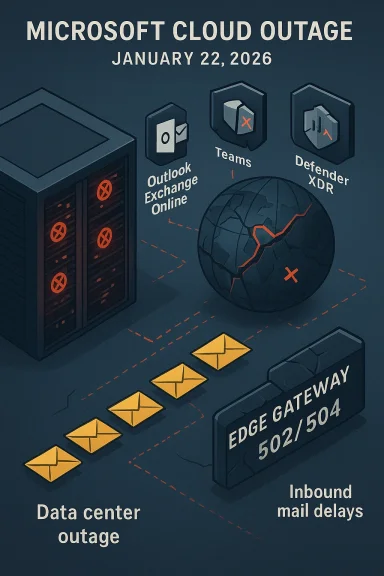
Microsoft's cloud productivity ecosystem experienced a significant service disruption on January 22, 2026, with widespread user reports and official alerts indicating degraded or unavailable access to core Microsoft 365 services — most notably Outlook / Exchange Online, Microsoft Defender / Defender XDR, Microsoft Purview, and Microsoft Teams — while secondary reports raised questions about Azure reachability and whether Gmail experienced related problems at the same time.
The disruption began to surface in public monitoring platforms and technical community forums on January 22, 2026, with a rapid spike in incident reports for Outlook and Microsoft 365 services. Microsoft’s official status account acknowledged an active investigation and pointed administrators to an internal incident ticket identified as MO1221364 in the Microsoft 365 admin center. Impacted users reported delayed or failed inbound email delivery, failed logins to admin portals, and errors when accessing Defender and other security telemetry. The company’s public messaging described the situation as an investigation into a multi-service issue; later updates and community telemetry hinted at networking- and DNS-related behaviour affecting mail flow and portal access.
This feature unpacks what happened, how it unfolded, the technical signals available in public monitoring and community channels, immediate mitigation options for administrators, and the broader operational and business continuity lessons for organizations that rely on Microsoft cloud services.
In the January 22, 2026 incident:
Cautionary note: user reports on social platforms can sometimes create the impression of broader outages when they represent localized network issues, client misconfiguration, or unrelated provider interruptions. At the time of the Microsoft event, Google’s public workspace status did not list a widespread Gmail outage, and major outage aggregators did not show a simultaneous mass spike comparable to the Microsoft reports. Therefore, any claim that Gmail was down globally in lockstep with Microsoft is not supported by the available public telemetry.
Enterprises should treat this outage as a prompt to validate continuity controls: maintain alternate communications channels, invest in resilient mail routing strategies, diversify monitoring, and ensure administrative escape hatches remain available. While cloud providers continue to scale and harden their infrastructure, no single vendor is immune to outages — resilience planning and well-rehearsed incident playbooks remain the best defense for business continuity.
Ultimately, organizations must balance trust in cloud convenience with practical safeguards: the goal is not to avoid outages entirely (that’s impossible), but to ensure that when they occur, impact is minimized and recovery is decisive and well-communicated.
Source: Times Now Microsoft Outage: Users Report Issues In Outlook, Azure, Teams, Defender XDR; Gmail Also Down?
 Overview
The disruption began to surface in public monitoring platforms and technical community forums on January 22, 2026, with a rapid spike in incident reports for Outlook and Microsoft 365 services. Microsoft’s official status account acknowledged an active investigation and pointed administrators to an internal incident ticket identified as MO1221364 in the Microsoft 365 admin center. Impacted users reported delayed or failed inbound email delivery, failed logins to admin portals, and errors when accessing Defender and other security telemetry. The company’s public messaging described the situation as an investigation into a multi-service issue; later updates and community telemetry hinted at networking- and DNS-related behaviour affecting mail flow and portal access.This feature unpacks what happened, how it unfolded, the technical signals available in public monitoring and community channels, immediate mitigation options for administrators, and the broader operational and business continuity lessons for organizations that rely on Microsoft cloud services.
Background
Why a Microsoft 365 outage matters
Microsoft 365 underpins email, identity, collaboration, and security for millions of organizations worldwide. Outages affecting Exchange Online or the identity/authentication layer can produce cascading failures: users can’t read or send email, calendar invites fail, identity-based access to third-party applications breaks, and security telemetry becomes unavailable for defenders. When Defender XDR or Purview is impacted, incident detection and compliance reporting can be disrupted, raising operational and regulatory concerns.Recent context
Cloud providers experience occasional partial or regional failures — networking misconfigurations, routing problems, DNS errors, or software rollouts have historically been the root cause of many large incidents. In recent years, Microsoft and other cloud vendors have experienced outages caused by configuration changes, third-party network issues, and overloaded control plane components. That context is essential when evaluating the January 22 incident because the symptom set (mail delays, admin portal 500 502 errors, Defender telemetry gaps) is consistent with networking, DNS, or front door authentication failures, rather than a single application bug.What happened: timeline and symptoms
Early signals and spike in reports
- Public outage-tracking platforms and technical forums logged a sudden surge in reports for Outlook / Exchange Online and Microsoft 365 around mid-to-late afternoon (US Eastern time) on January 22, 2026.
- Administrators reported receiving SMTP 4xx and 451 temporary error responses when external mail servers attempted delivery to Exchange Online mailboxes, indicating transient server-side rejections or throttling.
- Several managed service provider and sysadmin communities noted inability to access the Microsoft 365 admin center and Exchange admin portals; some users reported HTTP 500 and 502 errors referencing Azure Front Door or upstream service timeouts.
Microsoft’s public acknowledgement
- Microsoft’s central Microsoft 365 status account publicly stated that the company was “investigating a potential issue impacting multiple Microsoft 365 services, including Outlook, Microsoft Defender and Microsoft Purview,” and referenced the incident identifier MO1221364 for tenant admins to consult in the admin center.
- The company’s early messaging characterized the issue as an investigation and, in prior similar incidents, Microsoft has suggested third-party networking issues when telemetry shows external reachability problems. Public updates did not initially list a root cause or a single failed component, which is common in early-stage incident communications.
Reported effects by users
- Email delivery: widespread reports of inbound mail being deferred or queued with “temporary server error” (4xx 451) responses, causing delayed receipt of critical communications.
- Admin and portal access: Exchange and admin dashboards intermittently returned 500/502 errors for many tenants, preventing visibility into tenant health and limiting the ability to file or escalate tickets through normal channels.
- Security telemetry: Microsoft Defender and XDR features suffered degraded visibility; users reported missing or delayed alerts and gaps in advanced hunting views.
- Teams and collaboration: some users experienced trouble joining meetings or accessing calendar-driven functionality, consistent with downstream impacts from identity or Exchange availability issues.
Cross-checked signals and verification
To validate the scope and nature of the disruption, multiple independent sources and community signals were examined:- Public outage trackers showed a rapid spike in Outlook and Microsoft 365 reports coinciding with the reported incident window.
- Technical community forums and managed services communities contained numerous firsthand troubleshooting logs and SMTP error samples from administrators experiencing inbound mail rejections and portal errors.
- Multiple independent news outlets and technical publications reported the outage and Microsoft’s acknowledgement, describing a multi-service impact and referencing the same Microsoft admin incident identifier.
- Aggregated status services and third-party monitoring panels indicated regional variability: some Azure components showed small spikes in reports while others remained nominally up, suggesting a partial networking or regionally-scoped issue rather than a wholesale global shutdown of Azure fabric.
Technical analysis: plausible root causes
The symptom pattern provides valuable diagnostic clues. While Microsoft’s final root cause (if later published) may differ, the observed signals align with several plausible technical explanations:1. Third-party networking or transit provider failures
- Symptom match: transient 4xx/451 SMTP rejections, portal timeouts, and partial geographic impact.
- Rationale: Prior Microsoft incidents have been caused by third-party networking misconfigurations or ISP-level interruptions that prevent traffic from reaching Microsoft’s ingress points. A disruption in a major upstream transit provider can cause routing anomalies and dropped connections for subsets of customers.
2. DNS resolution failures affecting service front-ends
- Symptom match: inability to resolve service-specific hostnames (for example, onmicrosoft.protect related DNS names), mail delivery failures, and sudden portal inaccessibility.
- Rationale: If DNS responses for service endpoints become inconsistent — either returning NXDOMAIN or incorrect records — clients and external mail servers may fail to establish reliable connections. DNS breakdowns often lead to email deferrals because sending servers cannot locate the correct Exchange Online endpoints.
3. Edge or ingress (CDN / front door) outage
- Symptom match: 502/500 errors with references to an edge gateway or Azure Front Door.
- Rationale: A failure or misconfiguration in Microsoft’s edge routing — load balancers, edge proxies, or front-door services — can present as upstream service unavailability despite internal services being healthy.
4. Authentication and identity control plane issues
- Symptom match: inability to log into admin portals, who use centralized identity services; impact on services requiring AAD tokens.
- Rationale: Problems in a centralized identity service can prevent authentication to multiple services, thereby manifesting as broad-service symptoms across email, Teams, and admin centers.
Impact assessment: business, security, and operational risks
Business continuity and operational effects
- Lost productivity: users unable to access email or calendars may miss time-sensitive communications and meetings, disrupting normal operations.
- Customer-facing impacts: delayed inbound messages can affect customer support, order processing, and contractual communications, with financial and reputational consequences.
- Administrative blind spots: when the admin center or health dashboards are inaccessible, organizations lose the ability to review tenant-specific health information and initiate controlled mitigations.
Security and compliance risks
- Reduced threat visibility: degraded Defender XDR telemetry impairs incident detection, slowing response to active threats.
- Regulatory exposure: compliance reporting, eDiscovery, and audit trails could be impaired temporarily — a material concern for regulated industries that rely on continuous logging and retention guarantees.
- Increased phishing risk: attackers often exploit outage periods to send urgent-looking phishing emails or claim they are from vendor support; delayed or absent security telemetry complicates detection.
Financial exposure
- SLA and contractual implications: customers with financial dependencies on email uptime may incur direct losses, and enterprises should track downtime for potential vendor SLA claims.
- Escalation costs: emergency workarounds and overtime for IT teams generate unplanned operational costs.
Admin playbook: immediate steps and mitigations
If your organization was impacted or could be affected during a multi-service Microsoft outage, follow these prioritized steps:- Check centralized status channels
- Log into the Microsoft 365 admin center (if possible) and locate the incident identifier MO1221364 for tenant-scoped details. If the admin portal is inaccessible, rely on secondary comms such as official status posts from Microsoft’s public status account.
- Verify scope locally
- Run simple synthetic checks: DNS resolution for targeted endpoints (nslookup/dig), SMTP test deliveries from external SMTP servers, and authentication checks against Azure AD endpoints.
- Implement temporary mail routing (if appropriate)
- For critical inbound mail, consider temporary route changes: enable fallback MX records hosted with a mail gateway provider that can hold mail and relay once Microsoft services restore. Only implement changes after assessing the risk of split delivery.
- Use alternate collaboration channels
- Stand up alternate communication paths (private Slack, Google Workspace, or other verified channels) for urgent coordination with customers and teams while official Microsoft services recover.
- Document incident details
- Capture timestamps, SMTP error codes, affected regions, and user-facing symptoms. Preserve logs for later root-cause analysis and SLA claims.
- Limit changes during an outage
- Avoid making configuration changes to services that may be affected (DNS, MX records, or large-scale tenant configuration changes) until the root cause is understood and the environment stabilizes.
- Notify stakeholders
- Proactively inform internal teams, customers, and partners about the outage, the potential impact on service level expectations, and the contingencies in place.
- Post-incident review
- After service restoration, perform a formal after-action review with timelines, impact metrics, and lessons learned. Evaluate whether contractual remedies or insurance claims apply.
Practical recommendations for long-term resilience
Outages of core cloud services are reminders that resiliency planning must be proactive. Organizations should consider the following:- Multi-channel continuity: Maintain a playbook that includes verified alternate messaging and collaboration platforms for critical operations.
- Mail redundancy: Implement inbound mail guards or secondary MX with queueing capabilities that can act as a mail sink during provider outages to prevent lost messages.
- Monitoring diversity: Use multiple independent monitoring services that check user experience from diverse network paths and regions; this reduces blind spots when a single aggregator fails or is slow to report.
- Runbooks and automation: Build automated runbooks for quick activation of continuity plans — for example, DNS failover processes, synthetic mail flows, and communication templates — and test them regularly.
- Identity redundancy planning: While multi-cloud identity is complex, ensure robust recovery and admin break-glass accounts isolated from the primary identity provider to avoid lockout scenarios.
- Contractual assurances: Revisit SLAs, incident reporting standards, and escalation commitments in vendor contracts. Ensure a process exists for collecting forensic logs and demonstrating impact for remediation or SLA credit purposes.
Communication and transparency: performance review
Public cloud vendors generally follow a “triage-first, explain-later” approach during incidents: immediate mitigations and containment take precedence, with detailed root-cause analysis published later. That model preserves engineering bandwidth but can frustrate enterprise customers who need immediate, precise information to make operational decisions.In the January 22, 2026 incident:
- Microsoft’s initial public acknowledgement and the incident identifier provided a central reference, which is the correct operational approach for tenant administrators.
- Several customer-facing complaints focused on the inability to access the admin center — a pain point during incidents because it limits tenant-level visibility.
- The lack of immediate root-cause detail is understandable in early incident phases; however, the speed and clarity of subsequent communications (time to confirm cause and remediation steps) are the critical measures of the vendor’s operational maturity.
The Gmail question: was Google affected?
During the Microsoft disruption, some reports and casual social posts asked whether Gmail was also experiencing problems. Analysis of public monitoring platforms and official Google Workspace status tools for the same window shows no evidence of a coordinated, global Gmail outage at the same time. There were isolated user reports in various regions, but aggregated status dashboards did not reflect a large-scale Gmail outage concurrent with the Microsoft incident.Cautionary note: user reports on social platforms can sometimes create the impression of broader outages when they represent localized network issues, client misconfiguration, or unrelated provider interruptions. At the time of the Microsoft event, Google’s public workspace status did not list a widespread Gmail outage, and major outage aggregators did not show a simultaneous mass spike comparable to the Microsoft reports. Therefore, any claim that Gmail was down globally in lockstep with Microsoft is not supported by the available public telemetry.
Historical patterns and what this means next
Cloud outages often follow a pattern: initial symptom reporting and user impact are visible within minutes to an hour, vendor acknowledgment follows, remediation proceeds via rollbacks or configuration changes, and final post-incident reports are published within days to weeks. Historical precedent indicates:- Many Microsoft multi-service incidents have been traced to networking transit issues, misconfigured routing, DNS anomalies, or edge/front-door misconfigurations.
- Rapid rollback of recently deployed configuration changes is a common immediate remediation strategy; if networking or DNS is implicated, re-propagation and cache invalidation can prolong full recovery.
- Post-incident, vendors typically publish a root cause summary. Administrators should wait for that definitive analysis before assuming a specific cause.
Recommended checklist for IT leaders after restoration
- Confirm service restoration across all tenants and regions. Do not assume full recovery without synthetic tests for mail flow, portal access, and security telemetry.
- Reconcile inbound mail queues and confirm no messages were lost. Coordinate with partners if temporary MX or mail routing workarounds were used.
- Review security telemetry for gaps during the outage window. Increase monitoring sensitivity to detect potential exploitation attempts that may have taken advantage of reduced visibility.
- Conduct a post-incident review with timelines, root-cause analysis (once Microsoft publishes it), and remediation actions for your organization.
- Communicate findings and business impact to executive stakeholders and update continuity plans based on lessons learned.
Conclusion
The January 22, 2026 Microsoft disruption underscores the operational dependency modern organizations have on cloud providers. The incident produced tangible impacts across email, security telemetry, and administrative visibility, and it reinforced familiar patterns seen in past outages: symptoms consistent with networking or ingress failures, rapid community reporting, and immediate vendor investigation notices.Enterprises should treat this outage as a prompt to validate continuity controls: maintain alternate communications channels, invest in resilient mail routing strategies, diversify monitoring, and ensure administrative escape hatches remain available. While cloud providers continue to scale and harden their infrastructure, no single vendor is immune to outages — resilience planning and well-rehearsed incident playbooks remain the best defense for business continuity.
Ultimately, organizations must balance trust in cloud convenience with practical safeguards: the goal is not to avoid outages entirely (that’s impossible), but to ensure that when they occur, impact is minimized and recovery is decisive and well-communicated.
Source: Times Now Microsoft Outage: Users Report Issues In Outlook, Azure, Teams, Defender XDR; Gmail Also Down?
