

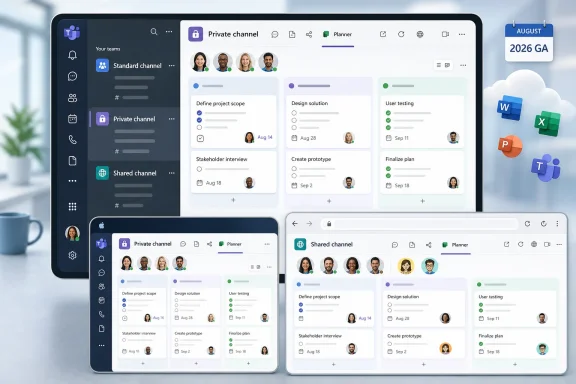
Microsoft is developing Planner tab support for shared and private channels in Microsoft Teams, with worldwide general availability targeted for August 2026 on desktop, Mac, and web. The feature, tracked as Microsoft 365 Roadmap ID 558928, would let users create and manage tasks directly inside channel spaces that are intentionally restricted or shared across collaboration boundaries.
The roadmap entry remains listed as in development, so admins should treat this as a planning signal rather than a setting they can enable today. Still, the change matters because Teams users often expect the work plan to live where the work conversation already happens. Until this update arrives, that expectation has been difficult to satisfy in private and shared channels.
Private and shared channels are commonly used when the audience is narrower, more sensitive, or cross-organizational. Those are exactly the scenarios where task ownership, due dates, and follow-through tend to matter. Planner’s planned arrival in those channel types reduces the need for separate teams, links to outside plans, or substitute tracking tools that do not feel native to Teams.
Microsoft’s roadmap description is direct: users will be able to add Microsoft Planner as a tab in shared and private channels in Microsoft Teams, then create and manage tasks directly within the channel. That moves Planner closer to the channel-level collaboration model Teams users already work in every day.
Until now, the Planner experience has been cleanest in standard channels. A standard channel belongs to the team as a whole, so the audience is usually easier to understand: the team owns the work, the team can see the work, and the Planner tab fits the broad team workspace.
Private and shared channels are different. A private channel narrows participation to selected members of a team. A shared channel is designed for collaboration with people inside or outside the organization without necessarily adding everyone to the parent team. Microsoft’s Teams guidance describes those channel types as separate collaboration spaces with different membership expectations. Planner support in those spaces therefore has to respect a more granular boundary than a standard team-wide channel.
That is why this update is useful. If the conversation, files, and participants are channel-scoped, the task board should be available in that same place. The roadmap item does not make every Teams channel identical, but it does remove a visible inconsistency in the Teams user experience.
For users, that means a private project channel or shared collaboration channel can host its task board directly in the channel tab bar. Users should be able to create and manage tasks there instead of relying on a separate standard channel, a copied link, or a different tracking surface.
For admins, the immediate change is not a new governance model; it is a new place where Planner can appear. Private and shared channels already require attention to membership, ownership, and external collaboration settings. Planner tabs will make those channel spaces more operationally useful, which means the content inside task titles, assignments, comments, attachments, labels, checklists, and due dates may deserve the same scrutiny as the channel conversation and files.
For support teams, the first wave of questions will likely be practical: why the tab appears in some channel types, which clients are covered by the roadmap entry, and whether mobile behavior matches desktop, Mac, and web. The roadmap item names desktop, Mac, and web, so organizations should avoid promising full mobile parity unless Microsoft documents it separately.
Each workaround solved one problem by creating another. A separate team gives users a clean workspace, but it also adds another membership list, another SharePoint-backed collaboration area, another place for notifications, and another object for admins to govern. A standard channel keeps Planner native but widens visibility beyond the people who may need the task board. A web link keeps a plan reachable but does not feel like a fully integrated channel experience.
Microsoft Lists has often been a reasonable fallback for lightweight tracking in restricted collaboration spaces. But Lists and Planner are not the same product experience. Planner users expect buckets, board views, assignments, due dates, task details, and visibility through the broader Planner experience in Microsoft 365.
The result was a productivity tax. Organizations that carefully designed Teams with private channels for leadership work, legal review, finance discussions, security response, hiring processes, or vendor collaboration could not always place Microsoft’s mainstream task board in the same restricted channel where the work was being discussed.
That is the user-level promise of Roadmap ID 558928. A project lead in a private channel should not have to tell colleagues, “The decisions are here, but the tasks are somewhere else.” A partner-facing shared channel should not require users to jump to a separate plan that feels detached from the channel membership and conversation.
The roadmap says the feature is targeted for General Availability and applies to Worldwide Standard Multi-Tenant cloud customers. The listed platforms are desktop, Mac, and web. The entry remains in development, with an August 2026 general availability target.
July 8, 2026 — Microsoft last updated the roadmap entry, with the feature still listed as in development.
August 2026 — Microsoft targets General Availability for Worldwide Standard Multi-Tenant customers on desktop, Mac, and web.
Standard channels are comparatively simple because the audience is broad and predictable. Private channels are deliberately narrower. Shared channels can include people across organizational boundaries. A Planner tab may look similar in all three places, but the membership assumptions behind each channel type are different.
Planner is also a sensitive surface because tasks often contain operational detail. A task title may reveal a customer name, contract issue, incident step, HR action, acquisition plan, or security remediation item. Comments, attachments, checklists, labels, assignments, and due dates can expose the shape of a project even when the main files are properly protected.
That does not mean admins should fear the feature. It means they should treat Planner tabs in private and shared channels as part of the same access model that already governs those channel conversations and files. If the channel is sensitive enough to be private or shared, the task board inside it should be treated as sensitive too.
A shared channel with Planner could become the natural workspace for a vendor project, customer implementation, partner engineering effort, or joint incident response. That is the useful version of the feature. The risky version is a task board that becomes a cross-boundary operational record without anyone reviewing whether the task metadata, assignments, comments, and attachments are appropriate for the whole shared-channel audience.
Microsoft’s Teams guidance frames shared channels as collaboration spaces for people inside and outside an organization, subject to the organization’s configuration. In practice, that means Planner will not exist in isolation. It will sit alongside Teams policies, channel ownership, external collaboration settings, and local rules for what information may be shared with outside parties.
Shared channels make Teams more convenient, but convenience can make collaboration feel less formal than it is. A shared-channel Planner board is not just a to-do list. It can become a record of commitments, blockers, owners, and timelines visible to everyone with access to that channel.
Users should therefore be reminded that a shared-channel plan is visible to the shared-channel audience. A task title or comment that is harmless in an internal private channel may be inappropriate when a supplier, customer, or partner is present.
Planner’s absence weakened that promise. A private channel without a native task board can still host discussion and files, but it is less useful as a project workspace. Sensitive work often needs more task discipline, not less: clear owners, due dates, assignments, status, and follow-up.
Roadmap 558928 points toward a more coherent model. If a private channel is where a subset of a team makes decisions, Planner can become the place where that same subset tracks follow-through. The value is fewer permission mismatches and fewer instructions to “go somewhere else” to see the plan.
There is still a human and operational catch. Many Teams environments already suffer from channel sprawl: standard channels for every initiative, private channels for sensitive side work, shared channels for partner collaboration, and chats for everything users never formalized. Adding Planner to private channels may improve project discipline, but it may also create more semi-hidden task boards that team owners do not regularly review.
Admins should not respond by blocking the feature by default. They should clarify when private channels are appropriate, who owns them, how long they should live, and what kind of work belongs there. Planner makes private channels more capable, which makes lifecycle management more important.
That broader direction makes the old private and shared channel gap harder to defend. If Planner is supposed to be a central task-management surface in Microsoft 365, it cannot be absent from two important Teams collaboration models. Users do not care that Teams channel architecture, Planner integration, SharePoint storage, and Microsoft 365 group relationships evolved over time. They care whether the task board is available where the work is happening.
This is also why the update may be more visible than its roadmap wording suggests. Users discover missing features at the moment they try to use them. The Teams tab menu is a practical test of whether Microsoft 365 feels integrated. If the expected app is available, the workspace feels coherent. If it is missing, Teams feels arbitrary.
Planner support in private and shared channels will not make Microsoft 365 simple. It will make Teams feel less inconsistent. In a suite where many user frustrations come from small seams between products, that is a meaningful improvement.
Start with inventory. Organizations should understand where private and shared channels are already used, especially in departments with sensitive workflows. The arrival of Planner support will matter most in places where channel membership already carries business significance: legal, HR, finance, security, executive operations, regulated project teams, and partner-facing delivery groups.
Then review channel creation and ownership policies. If any team member can create private channels and team owners do not review them, Planner support may increase the number of places where business-critical tasks live outside team-wide visibility. If private channel creation is too restricted, users may continue using chats and unsanctioned tools for work that would be better governed inside Teams.
Shared channels deserve a separate review. If external collaboration is enabled, admins should understand which organizations can participate, who can create shared channels, who can add members, and which business processes are approved for that model. Planner’s arrival makes shared channels more useful, which means users may be more likely to coordinate sensitive operational work there.
That distinction matters because the immediate operational issue is access. The key question is whether the plan visible in a channel is visible to the right people and whether the channel’s membership model matches the task experience users expect.
In standard channels, that has historically been easier to reason about because the team audience is broad. In private and shared channels, admins should validate behavior in their own tenant once the feature reaches availability. The important questions include: What happens when a member is removed from the channel? Who can create or manage the tab? How do external collaborators experience the tab in shared channels? Are any actions limited by policy or client support?
Those details will determine whether the feature feels seamless or generates support tickets. Microsoft is addressing a real gap, and enterprises should welcome that. They should still test it like a permission-sensitive collaboration feature, not like a cosmetic Teams update.
Teams already contains many places where action items can live: chats, channel posts, meeting notes, Loop components, Planner tasks, Lists, Outlook flags, and personal to-do lists. Adding Planner to more channel types reduces one inconsistency, but it can also increase the number of task boards an organization must govern.
This is especially true in private channels. A manager may create a private channel for a sensitive project, add a Planner tab, and run the entire effort there. That may be the right choice. But if the owner leaves, membership is not reviewed, or the channel remains long after the project ends, the plan can become another abandoned artifact.
Shared channels have a different version of the same problem. They reduce friction for collaboration across boundaries, but that same ease can make them feel informal. A shared-channel Planner board can become a cross-organization work record, and organizations should treat it accordingly.
The answer is not to burden users with excessive policy. The better answer is to provide clear defaults: when to use a channel plan, how to name it, who owns it, when to archive it, and what not to put in task titles or comments when external users are present.
That caveat matters because Planner, Teams tabs, private channels, and shared channels each have edge cases. The known promise is Planner tab support in shared and private Teams channels. The details admins will care about include plan creation, adding existing plans, membership changes, external-user behavior, mobile expectations, notification behavior, and tenant policy interactions.
Admins should test with each channel type after rollout: standard, private, and shared. They should test internal users and, where allowed, external collaborators. They should remove a user from a channel and confirm expected access changes. They should change channel ownership and confirm who can manage the tab.
The point is not distrust. It is disciplined rollout management. Microsoft 365 features often work best when organizations test the edges before encouraging broad adoption.
For users, the improvement is simple: fewer jumps, fewer copied links, and fewer instructions to go to another workspace for the task list. For managers, the plan can sit beside the conversation and files that explain the work. For IT, the sanctioned Microsoft 365 task tool becomes usable in channel types that previously pushed people toward workarounds.
The change also strengthens the logic of private and shared channels. If those channels are where sensitive or cross-boundary collaboration happens, they need the same basic work-management tools that users expect in standard channels. Planner support does not solve every governance problem, but it removes one reason users had to work around Teams.
The right response is cautious preparation. Admins should review private and shared channel practices before August 2026, update user guidance, and test the feature once it becomes available. Users should be encouraged to keep task boards close to the work while remembering that the channel audience is the task-board audience.
If Microsoft delivers Roadmap ID 558928 as described, Planner will finally fit more naturally into the Teams channel model. It will not eliminate the need for governance, ownership, or lifecycle review. It will make the intended Teams workflow easier to follow: discuss the work, store the files, and manage the tasks in the same channel.
The roadmap entry remains listed as in development, so admins should treat this as a planning signal rather than a setting they can enable today. Still, the change matters because Teams users often expect the work plan to live where the work conversation already happens. Until this update arrives, that expectation has been difficult to satisfy in private and shared channels.
Private and shared channels are commonly used when the audience is narrower, more sensitive, or cross-organizational. Those are exactly the scenarios where task ownership, due dates, and follow-through tend to matter. Planner’s planned arrival in those channel types reduces the need for separate teams, links to outside plans, or substitute tracking tools that do not feel native to Teams.
 Microsoft Is Fixing a Workflow Bug Disguised as a Channel Limitation
Microsoft’s roadmap description is direct: users will be able to add Microsoft Planner as a tab in shared and private channels in Microsoft Teams, then create and manage tasks directly within the channel. That moves Planner closer to the channel-level collaboration model Teams users already work in every day.Until now, the Planner experience has been cleanest in standard channels. A standard channel belongs to the team as a whole, so the audience is usually easier to understand: the team owns the work, the team can see the work, and the Planner tab fits the broad team workspace.
Private and shared channels are different. A private channel narrows participation to selected members of a team. A shared channel is designed for collaboration with people inside or outside the organization without necessarily adding everyone to the parent team. Microsoft’s Teams guidance describes those channel types as separate collaboration spaces with different membership expectations. Planner support in those spaces therefore has to respect a more granular boundary than a standard team-wide channel.
That is why this update is useful. If the conversation, files, and participants are channel-scoped, the task board should be available in that same place. The roadmap item does not make every Teams channel identical, but it does remove a visible inconsistency in the Teams user experience.
What Changes for Users and Admins on Day One
When the feature reaches general availability as described in Microsoft 365 Roadmap ID 558928, the concrete day-one change is straightforward: users on desktop, Mac, and web should be able to add Microsoft Planner as a tab in shared and private Teams channels, not only in standard channels.For users, that means a private project channel or shared collaboration channel can host its task board directly in the channel tab bar. Users should be able to create and manage tasks there instead of relying on a separate standard channel, a copied link, or a different tracking surface.
For admins, the immediate change is not a new governance model; it is a new place where Planner can appear. Private and shared channels already require attention to membership, ownership, and external collaboration settings. Planner tabs will make those channel spaces more operationally useful, which means the content inside task titles, assignments, comments, attachments, labels, checklists, and due dates may deserve the same scrutiny as the channel conversation and files.
For support teams, the first wave of questions will likely be practical: why the tab appears in some channel types, which clients are covered by the roadmap entry, and whether mobile behavior matches desktop, Mac, and web. The roadmap item names desktop, Mac, and web, so organizations should avoid promising full mobile parity unless Microsoft documents it separately.
The Old Answer Was “Create Another Team,” and Everyone Knew It Was Bad
For years, the practical response to “Why can’t I use Planner here?” was architectural rather than satisfying. If Planner was unavailable in a private or shared channel, users were often pushed toward one of several workarounds: use a standard channel, create a separate team, use another Microsoft 365 tracking tool, or paste a link to a plan into the channel.Each workaround solved one problem by creating another. A separate team gives users a clean workspace, but it also adds another membership list, another SharePoint-backed collaboration area, another place for notifications, and another object for admins to govern. A standard channel keeps Planner native but widens visibility beyond the people who may need the task board. A web link keeps a plan reachable but does not feel like a fully integrated channel experience.
Microsoft Lists has often been a reasonable fallback for lightweight tracking in restricted collaboration spaces. But Lists and Planner are not the same product experience. Planner users expect buckets, board views, assignments, due dates, task details, and visibility through the broader Planner experience in Microsoft 365.
The result was a productivity tax. Organizations that carefully designed Teams with private channels for leadership work, legal review, finance discussions, security response, hiring processes, or vendor collaboration could not always place Microsoft’s mainstream task board in the same restricted channel where the work was being discussed.
Roadmap 558928 Moves Planner to the Permission Boundary Users Actually See
The important phrase in Microsoft’s roadmap entry is “directly within the channel.” Teams users do not usually think in terms of Microsoft 365 group structure, SharePoint site relationships, or identity architecture. They think in terms of where the work is happening.That is the user-level promise of Roadmap ID 558928. A project lead in a private channel should not have to tell colleagues, “The decisions are here, but the tasks are somewhere else.” A partner-facing shared channel should not require users to jump to a separate plan that feels detached from the channel membership and conversation.
The roadmap says the feature is targeted for General Availability and applies to Worldwide Standard Multi-Tenant cloud customers. The listed platforms are desktop, Mac, and web. The entry remains in development, with an August 2026 general availability target.
Timeline
March 23, 2026 — Microsoft created Roadmap ID 558928 for Planner tab support in shared and private Teams channels.July 8, 2026 — Microsoft last updated the roadmap entry, with the feature still listed as in development.
August 2026 — Microsoft targets General Availability for Worldwide Standard Multi-Tenant customers on desktop, Mac, and web.
The Channel Type Now Matters Less for Users, But More for Governance
The planned Planner support narrows a user-experience gap, but it does not erase the differences among Teams channel types. Admins should avoid interpreting “Planner works in more channels” as “Planner behaves identically in every channel.”| Teams channel type | Typical audience | Planner tab before this change | Roadmap 558928 target | Governance consequence |
|---|---|---|---|---|
| Standard channel | All team members by default | Native Planner tab support | Continues as expected | Broad visibility remains the main risk |
| Private channel | Selected members inside a team | Historically unavailable for Planner tabs | Planner tab support planned | Task access should align with the smaller channel audience |
| Shared channel | Internal or external collaborators without full parent-team membership | Historically unavailable for Planner tabs | Planner tab support planned | Cross-organization access and channel membership need review |
Planner is also a sensitive surface because tasks often contain operational detail. A task title may reveal a customer name, contract issue, incident step, HR action, acquisition plan, or security remediation item. Comments, attachments, checklists, labels, assignments, and due dates can expose the shape of a project even when the main files are properly protected.
That does not mean admins should fear the feature. It means they should treat Planner tabs in private and shared channels as part of the same access model that already governs those channel conversations and files. If the channel is sensitive enough to be private or shared, the task board inside it should be treated as sensitive too.
Shared Channels Are the Bigger Test Because They Can Cross the Tenant Line
Private channels are mostly about narrowing visibility inside one team. Shared channels are more ambitious. They allow collaboration with people who may not be members of the parent team and, when configured for external collaboration, may not belong to the same organization.A shared channel with Planner could become the natural workspace for a vendor project, customer implementation, partner engineering effort, or joint incident response. That is the useful version of the feature. The risky version is a task board that becomes a cross-boundary operational record without anyone reviewing whether the task metadata, assignments, comments, and attachments are appropriate for the whole shared-channel audience.
Microsoft’s Teams guidance frames shared channels as collaboration spaces for people inside and outside an organization, subject to the organization’s configuration. In practice, that means Planner will not exist in isolation. It will sit alongside Teams policies, channel ownership, external collaboration settings, and local rules for what information may be shared with outside parties.
Shared channels make Teams more convenient, but convenience can make collaboration feel less formal than it is. A shared-channel Planner board is not just a to-do list. It can become a record of commitments, blockers, owners, and timelines visible to everyone with access to that channel.
Users should therefore be reminded that a shared-channel plan is visible to the shared-channel audience. A task title or comment that is harmless in an internal private channel may be inappropriate when a supplier, customer, or partner is present.
Private Channels Finally Get the Task Board They Should Have Had at Launch
Private channels carry a simple promise: keep the parent team structure, but carve out a confidential workspace for a subset of members. That model is useful for executives, managers, finance teams, legal reviewers, security responders, hiring panels, and project subgroups that do not need a completely separate team.Planner’s absence weakened that promise. A private channel without a native task board can still host discussion and files, but it is less useful as a project workspace. Sensitive work often needs more task discipline, not less: clear owners, due dates, assignments, status, and follow-up.
Roadmap 558928 points toward a more coherent model. If a private channel is where a subset of a team makes decisions, Planner can become the place where that same subset tracks follow-through. The value is fewer permission mismatches and fewer instructions to “go somewhere else” to see the plan.
There is still a human and operational catch. Many Teams environments already suffer from channel sprawl: standard channels for every initiative, private channels for sensitive side work, shared channels for partner collaboration, and chats for everything users never formalized. Adding Planner to private channels may improve project discipline, but it may also create more semi-hidden task boards that team owners do not regularly review.
Admins should not respond by blocking the feature by default. They should clarify when private channels are appropriate, who owns them, how long they should live, and what kind of work belongs there. Planner makes private channels more capable, which makes lifecycle management more important.
This Is Also a Planner Strategy Story
Microsoft has been repositioning Planner as a broader task-management experience across Microsoft 365. In Teams, the modern Planner experience is intended to bring together personal tasks, assigned work, shared plans, and, where licensed, more advanced project-management capabilities.That broader direction makes the old private and shared channel gap harder to defend. If Planner is supposed to be a central task-management surface in Microsoft 365, it cannot be absent from two important Teams collaboration models. Users do not care that Teams channel architecture, Planner integration, SharePoint storage, and Microsoft 365 group relationships evolved over time. They care whether the task board is available where the work is happening.
This is also why the update may be more visible than its roadmap wording suggests. Users discover missing features at the moment they try to use them. The Teams tab menu is a practical test of whether Microsoft 365 feels integrated. If the expected app is available, the workspace feels coherent. If it is missing, Teams feels arbitrary.
Planner support in private and shared channels will not make Microsoft 365 simple. It will make Teams feel less inconsistent. In a suite where many user frustrations come from small seams between products, that is a meaningful improvement.
Admins Should Treat August as a Governance Deadline, Not a Surprise Party
Because the feature is still in development, organizations have time to prepare before the August 2026 general availability target. The poor approach is to wait until users start adding Planner tabs to private and shared channels and only then decide how those plans should be named, owned, reviewed, retained, or shared.Start with inventory. Organizations should understand where private and shared channels are already used, especially in departments with sensitive workflows. The arrival of Planner support will matter most in places where channel membership already carries business significance: legal, HR, finance, security, executive operations, regulated project teams, and partner-facing delivery groups.
Then review channel creation and ownership policies. If any team member can create private channels and team owners do not review them, Planner support may increase the number of places where business-critical tasks live outside team-wide visibility. If private channel creation is too restricted, users may continue using chats and unsanctioned tools for work that would be better governed inside Teams.
Shared channels deserve a separate review. If external collaboration is enabled, admins should understand which organizations can participate, who can create shared channels, who can add members, and which business processes are approved for that model. Planner’s arrival makes shared channels more useful, which means users may be more likely to coordinate sensitive operational work there.
Action checklist for admins
- Review current private and shared channel usage before the August 2026 general availability target.
- Update internal Teams guidance to explain when Planner should be used in standard, private, and shared channels.
- Revisit shared-channel external collaboration settings and confirm who can create or manage those channels.
- Prepare help-desk guidance for users who ask why the feature appears on desktop, Mac, and web but may not match every mobile expectation.
- Identify high-risk departments where task metadata may expose sensitive business activity.
- Decide whether naming conventions or ownership reviews are needed for Planner tabs in restricted channels.
- Test the feature in a controlled team before encouraging broad use after it becomes available.
- Confirm how membership changes affect access to the plan in private and shared channels.
The Licensing Question Is Less Interesting Than the Access Question
Some Planner capabilities depend on plan type and license, especially when organizations move beyond basic task boards into premium project-management features. Roadmap ID 558928, however, is about Planner tab support in Teams channel types. It is not described as a new paid Planner tier.That distinction matters because the immediate operational issue is access. The key question is whether the plan visible in a channel is visible to the right people and whether the channel’s membership model matches the task experience users expect.
In standard channels, that has historically been easier to reason about because the team audience is broad. In private and shared channels, admins should validate behavior in their own tenant once the feature reaches availability. The important questions include: What happens when a member is removed from the channel? Who can create or manage the tab? How do external collaborators experience the tab in shared channels? Are any actions limited by policy or client support?
Those details will determine whether the feature feels seamless or generates support tickets. Microsoft is addressing a real gap, and enterprises should welcome that. They should still test it like a permission-sensitive collaboration feature, not like a cosmetic Teams update.
More Task Boards Can Mean More Fragmentation
The upside of Planner in private and shared channels is that work becomes easier to track where it happens. The downside is that work can become easier to fragment.Teams already contains many places where action items can live: chats, channel posts, meeting notes, Loop components, Planner tasks, Lists, Outlook flags, and personal to-do lists. Adding Planner to more channel types reduces one inconsistency, but it can also increase the number of task boards an organization must govern.
This is especially true in private channels. A manager may create a private channel for a sensitive project, add a Planner tab, and run the entire effort there. That may be the right choice. But if the owner leaves, membership is not reviewed, or the channel remains long after the project ends, the plan can become another abandoned artifact.
Shared channels have a different version of the same problem. They reduce friction for collaboration across boundaries, but that same ease can make them feel informal. A shared-channel Planner board can become a cross-organization work record, and organizations should treat it accordingly.
The answer is not to burden users with excessive policy. The better answer is to provide clear defaults: when to use a channel plan, how to name it, who owns it, when to archive it, and what not to put in task titles or comments when external users are present.
Microsoft’s Roadmap Says “In Development,” So Do Not Overread the Promise
There is a familiar trap in Microsoft 365 roadmap watching: treating a roadmap entry as if it were already a deployed feature with final behavior. Roadmap ID 558928 should not be read that way. Microsoft lists the status as in development, the release phase as General Availability, and the target as August 2026. Until the feature appears in tenants, the exact practical behavior still needs verification.That caveat matters because Planner, Teams tabs, private channels, and shared channels each have edge cases. The known promise is Planner tab support in shared and private Teams channels. The details admins will care about include plan creation, adding existing plans, membership changes, external-user behavior, mobile expectations, notification behavior, and tenant policy interactions.
Admins should test with each channel type after rollout: standard, private, and shared. They should test internal users and, where allowed, external collaborators. They should remove a user from a channel and confirm expected access changes. They should change channel ownership and confirm who can manage the tab.
The point is not distrust. It is disciplined rollout management. Microsoft 365 features often work best when organizations test the edges before encouraging broad adoption.
The Channel Becomes a More Complete Project Room
Microsoft has spent years positioning Teams as the front door for Microsoft 365 work, not just a chat client. That ambition depends on channels becoming useful project rooms rather than message buckets. Planner tab support in private and shared channels is a small but necessary step in that direction.For users, the improvement is simple: fewer jumps, fewer copied links, and fewer instructions to go to another workspace for the task list. For managers, the plan can sit beside the conversation and files that explain the work. For IT, the sanctioned Microsoft 365 task tool becomes usable in channel types that previously pushed people toward workarounds.
The change also strengthens the logic of private and shared channels. If those channels are where sensitive or cross-boundary collaboration happens, they need the same basic work-management tools that users expect in standard channels. Planner support does not solve every governance problem, but it removes one reason users had to work around Teams.
The right response is cautious preparation. Admins should review private and shared channel practices before August 2026, update user guidance, and test the feature once it becomes available. Users should be encouraged to keep task boards close to the work while remembering that the channel audience is the task-board audience.
If Microsoft delivers Roadmap ID 558928 as described, Planner will finally fit more naturally into the Teams channel model. It will not eliminate the need for governance, ownership, or lifecycle review. It will make the intended Teams workflow easier to follow: discuss the work, store the files, and manage the tasks in the same channel.
References
- Primary source: Microsoft 365 Roadmap
Published: 2026-07-08T23:11:07.7961302Z
Loading…
www.microsoft.com - Official source: support.microsoft.com
Loading…
support.microsoft.com - Official source: techcommunity.microsoft.com
Loading…
techcommunity.microsoft.com - Official source: learn.microsoft.com
Loading…
learn.microsoft.com - Related coverage: oit.colorado.edu
Loading…
oit.colorado.edu - Related coverage: desitsupport4u.des.wa.gov
Loading…
desitsupport4u.des.wa.gov
- Related coverage: blog.machcloud.com
Loading…
blog.machcloud.com - Related coverage: petri.com
Loading…
petri.com - Related coverage: choc.org
Loading…
www.choc.org - Official source: adoption.microsoft.com
Loading…
adoption.microsoft.com - Related coverage: dental.washington.edu
Loading…
dental.washington.edu - Official source: cdn-dynmedia-1.microsoft.com
Loading…
cdn-dynmedia-1.microsoft.com - Related coverage: dfa.ms.gov
Loading…
www.dfa.ms.gov